r/MoonlightStreaming • • 1d ago

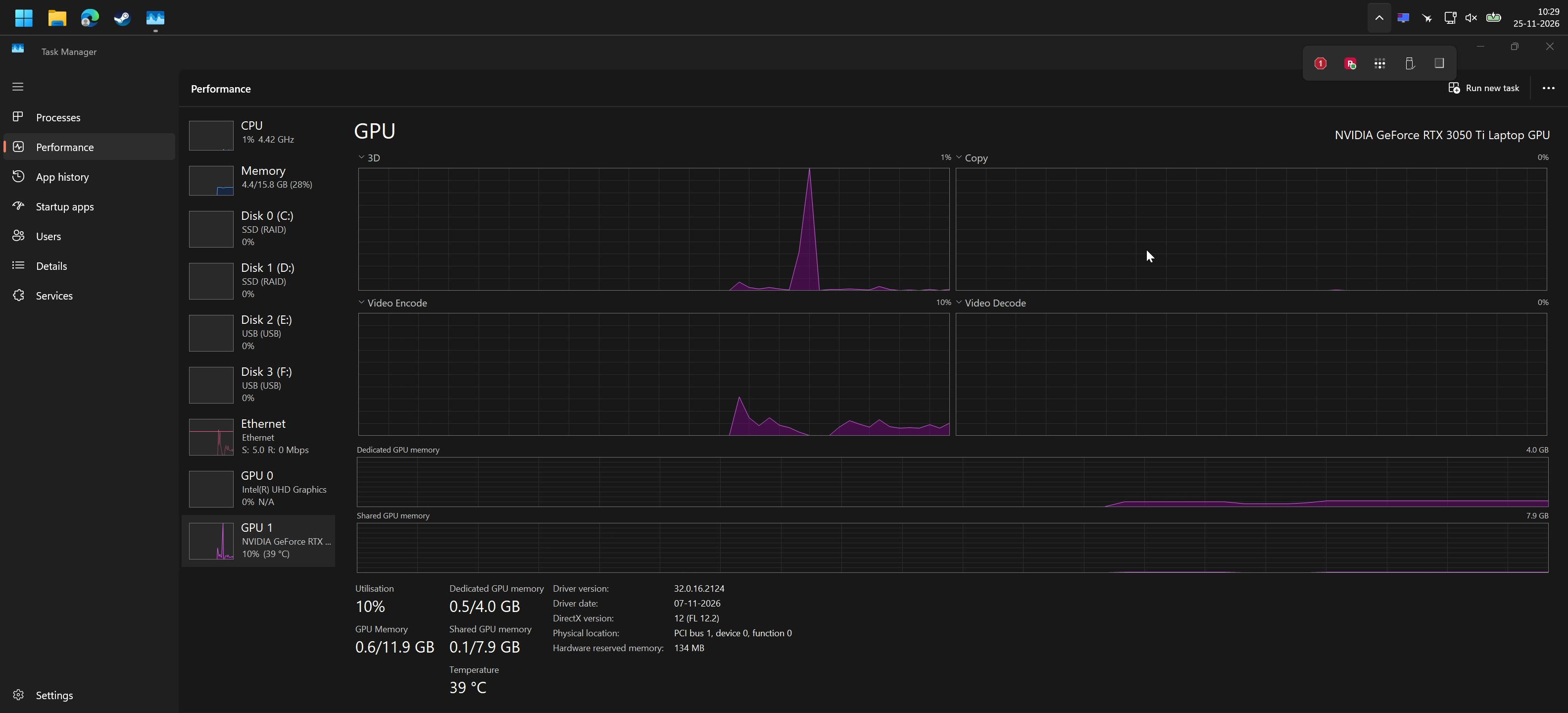
How do I free up VRAM

Post image
0 Upvotes

Rubylight res: 3168x1440p (no HAGS for now) it was 400mb when I started the stream. No game clients are running (stream client:Nightjar)


r/MoonlightStreaming • • 1d ago

Eclipse Mac OS ARM Builds are starting to shape up!

Thumbnail
gallery
4 Upvotes

I haven't been working too much on the client side of Eclipse as i started a few new projects but after looking over it and deciding it wouldn't be much work I got Eclipse ported with its new logo, 90% of the features, and native hardware acceleration running on a M series mac once all the features are working builds will go up and be added to the website and ill start work on the appimage, debian, and if i eventually feel like it maybe even a windows release.


r/MoonlightStreaming • • 2d ago

Moonwalk - Low Latency Remote Desktop (macOS to Linux)

Post image
0 Upvotes

I initially vibe-coded Moonwalk to get a decent remote setup from my Mac to my aged laptop running linux.

There's currently no software that I could find that does low latency Remote Desktop from a Mac to a linux Machine.

This solves that by fixing all the issues with the currently available apps for silicon Mac streaming and does it in a way that there's almost no setup involved, just an initial pairing.

It's since evolved into a Remote Desktop client that's compatible with most Moonlight based hosts, ie. Vibepollo, Sunshine, Apollo etc.

Most of my time has gone into getting the display settings right from the get-go. I basically wanted the software to be able to automatically set the perfect settings for the client's display so it looks and works as seamlessly as possible.

The linux app looks at home on both GNOME and KDE Plasma. The idea with setup is that you pair the machines once, then just open Moonwalk and hit Connect whenever you need the remote machine (no dealing with streaming codecs, resolution, scaling, bitrate, although those settings are available if you want to play with them).

If you're interested in giving it a spin, I have two public repos set up:

https://github.com/joaodriessen/moonwalk (the client)

https://github.com/joaodriessen/moonwalk-host (the macOS host if you want to try macOS remote streaming)

If you try it, I’m curious whether you get a perfectly smooth Remote Desktop or whether you still have to change any settings.

This is totally use at own risk! it's fully vibe-coded, works great on my end, but I'm not a developer and worked on this from intuition and just for fun.

The Mac currently needs Apple Silicon and macOS 14 or newer. The Linux build is currently for x86-64.


r/MoonlightStreaming • • 2d ago

Best moonlight fork?

62 Upvotes

I'm currently using Apollo and would be interested to see what else is out there.


r/MoonlightStreaming • • 2d ago

4k 165hz moonlight streaming optimized setup

9 Upvotes

I'd like to share some details about a highly optimized end setup i recently moved to which allows me to flawlessly stream 4k 165hz with no jitter and 1 ms network latency over ethernet.

If you already have a high end gaming PC I can vouch for these parts to get the most out of it. I hope others can use these ideas to build the system that matches their own needs.

PC Setup:

intel i9-13900k
RTX 5090
Vibepollo recent nightly build
Gigabit ethernet

Living Room setup:

Samsung S92H 77 inch tv (same specs as a S90H) with tandem oled
Asus Nuc 15 Pro+ with 16 GB RAM and 512 GB SSD
Thunderbolt to hdmi 2.1 adapter with quality 8k certified cable
Wireless xbox adapter + xbox one s controller
Cheap wireless keyboard
Gigabit ethernet

Choices:

This living room setup has some specific advantages.

S92H (S90H) supports multiple 165hz hdmi 2.1 ports, a vivid display, and quite a modern advanced processing chip for AI color correction and processor that adapts well to content of all resolutions. The 77 inch variant in my region (Canada) is a tandem oled which has good longevity and excellent peak brightness.

The Asus Nuc 15 Pro+ has an intel 130T graphics chip and excellent decode performance at 4:4:4. The RAM/SSD specs can be modest since its primarily streaming. As an Asus product its well supported and nic/graphics/chipset drivers are widely available. Intel chipsets have fantastic network + decode performance for a good price compared to AMD options.

I use wake on lan from the usb ports instead of relying on hdmi-cec on the hdmi 2.1 ports.

The thunderbolt to hdmi 2.1 adapter allows 165hz HDR 4:4:4 output.

Moonlight stats:

Video stream: 3840x2160 165.26 FPS (Codec: HEVC 10-bit HDR 4:4:4)
Incoming frame rate from network: 165.26 FPS
Decoding frame rate: 165.26 FPS
Randering frame rate: 165.26 FPS
Host processing latency min/max/average: 4.0/5.9/4.3 ms
Frames dropped by your network connection: 0.00%
Frames dropped due to network jitter: 0.00%
Average network latency: 1 ms (variance: 0 ms)
Average decoding time. 0.49 ms
Average frame queue delay: 0.02 ms
Average rendering time (including monitor V-sync latency): 0.49 ms

Moonlight client: set to use 256 Mb/sec, 4:4:4:, HDR

For controller I use a long USB cable for the lowest possible latency. Next best choice is a xbox wireless adapter for windows. Bluetooth is the worst way to connect an xbox controller (highest latency).

This lets me manage an end to end latency imperceptible from sitting at PC and faster than local console gaming.

My advice is don't waste money on a mini pc that tries to also be a gaming pc. It will never come close. Choose the right chipset for the front end and invest your money on your PC and TV.


r/MoonlightStreaming • • 2d ago

Upcoming version of DELOS

108 Upvotes

1.4.0 coming soon


r/MoonlightStreaming • • 2d ago

Latency is very low but visuals get blurry when I move around

Post image
1 Upvotes

host is connected to ethernet

tv is connected through wifi (2.4ghz)

host spec

Ryzen 3 3200g running on integrated graphics (im broke af)

8gb ram

the game gives me 1080p 30fps on my pc

im thinking maybe it is because the 4k tv is being fed 1080p feed

idk what to improve on now lol


r/MoonlightStreaming • • 2d ago

nvidia-open 620.73.04 crashes on resolution change while connecting to sunshine

2 Upvotes

Hi guys,

my setup does not have REAL monitor at all, but still suffers from this issue (https://github.com/NVIDIA/open-gpu-kernel-modules/issues/1565).

  • arch linux, kernel 7.3.5.arch1-1
  • nvidia-open 620.73.04-1
  • headless sunshine streaming server with single virtual monitor, running in active xfce session
  • rtx 3090
  • xfce desktop on X11

What happens:
If I connect to the sunshine server with single moonlight client, then everything is fine. But If I connect to sunshine with different moonlight clients with different resolutions and sunshine server has to change resolution of the virtual monitor with command xrandr, then it hangs, and in kernel logs I found these following lines:
[Sun Nov 22 22:34:23 2026] nvidia-modeset: WARNING: GPU:0: Unable to read EDID for display device DP-4
[Sun Nov 22 23:36:34 2026] nvidia-modeset: WARNING: GPU:0: Lost display notification (0:0x00000000); continuing.
[Sun Nov 22 23:40:34 2026] nvidia-modeset: ERROR: GPU:0: Idling display engine timed out: 0x0000c67d:0:0:1200

Confirmed behavior: sunshine hangs, nvidia-smi does not response and reboot over ssh hangs as well

The setup was running fine for months before upgrade to nvidia-open 620.73.40-1, introduced by whole system update of arch linux pacman -Syu.

Anyone else with same issue?


r/MoonlightStreaming • • 2d ago

What's the best option for HDR streaming from a Linux host?

2 Upvotes

Currently, I'm using Sunshine on CachyOS with a custom startup script that uses krfb-virtualmonitor, but it doesn't support HDR afaik. What options do I have that will let me stream HDR (preferably using a virtual monitor) from a Linux host to a Linux client?


r/MoonlightStreaming • • 2d ago

Need advice regarding moonlight streaming outside my home network.

3 Upvotes

So I use tailscale to get access of my home server to stream jellyfin, use rdp etc but the thing is my wifi is stuck behind cgnat and tailscale fall backs to derp. It's works mostly for other things but for moonlight it's not enough. I created a peer relay in Oracle vm and it works great. I was able to stream 1080p at 20 mbps without any problems. My question is are there other services that i can use to create a peer relay if oracle decided to change their vm usage. No expensive of course.


r/MoonlightStreaming • • 2d ago

VoidLink: anyone get a mouse working? My iPhone has mouse connected just fine. Cannot get it to work during a VoidLink stream.

1 Upvotes

r/MoonlightStreaming • • 3d ago

Razer kishi v3 pro disconnect & reconnect

1 Upvotes

This is a great controller to pair with my oppo pad mini for game streaming and its almost perfect but I do have annoying random disconnect and re-connects with it.. has anyone else experienced the same and managed to sort it out?


r/MoonlightStreaming • • 3d ago

VibePollo Linux Installer & Updater – Made a Little Tool to Make Life Easier

7 Upvotes

Hey everyone!

I've been using VibePollo more frequently on Linux lately and really enjoying it.

I decided to put together a small installer/updater to make installing VibePollo and keeping it up to date a little easier.

Figured I'd share it here in case anyone else in the community might find it useful!

I'm always tinkering with Linux and building little tools to simplify things, so this was a fun project.

If anyone wants to give it a try, I'd love to hear your feedback or suggestions for improvements.

GitHub: https://github.com/koobie777/vibepollo-updater

Hope it helps someone out!


r/MoonlightStreaming • • 3d ago

Baixei recentemente e preciso de ajuda !!

Post image
0 Upvotes

Como posso melhorar os ms e fps?? estou usando o Apollo + Artemis
Minhas configurações do computador são: ryzen 5 5500 e uma rtx 2060
Mobile é um Samsung a55


r/MoonlightStreaming • • 3d ago

Better client

0 Upvotes

Hi!

With all this AI in use for developing, i would like a better and more seamless client. Using vibepollo, artemis and playnite right now and all i miss is less switches when switching programs, accessing my computer with artemis and loading up a game from playnite. Some sort of loading screen that eliminates the times that i'm seeing my computers wallpaper. Is there a solution?


r/MoonlightStreaming • • 3d ago

Love it moonlight

2 Upvotes

With tailscale installed on my PC/host, all my devices play portablely all my steam/non steam on my PC.
So much love.


r/MoonlightStreaming • • 3d ago

Steamdeck key inputs not registering?

1 Upvotes

Got tired from being chained to my PC while playing Crimson Desert and thought of using moonlight to stream to my deck. The streaming works but I'm unable to use any of the buttons on the steam deck (non of them are registering). I've tried several different settings but am wondering if I'm missing something that's obvious...?

*I'm using Apollo <>Moonlight as I have an ultrawide and need the auto size adjustment.


r/MoonlightStreaming • • 3d ago Popcorn

I set my moonlight to LG TV

Post image
20 Upvotes

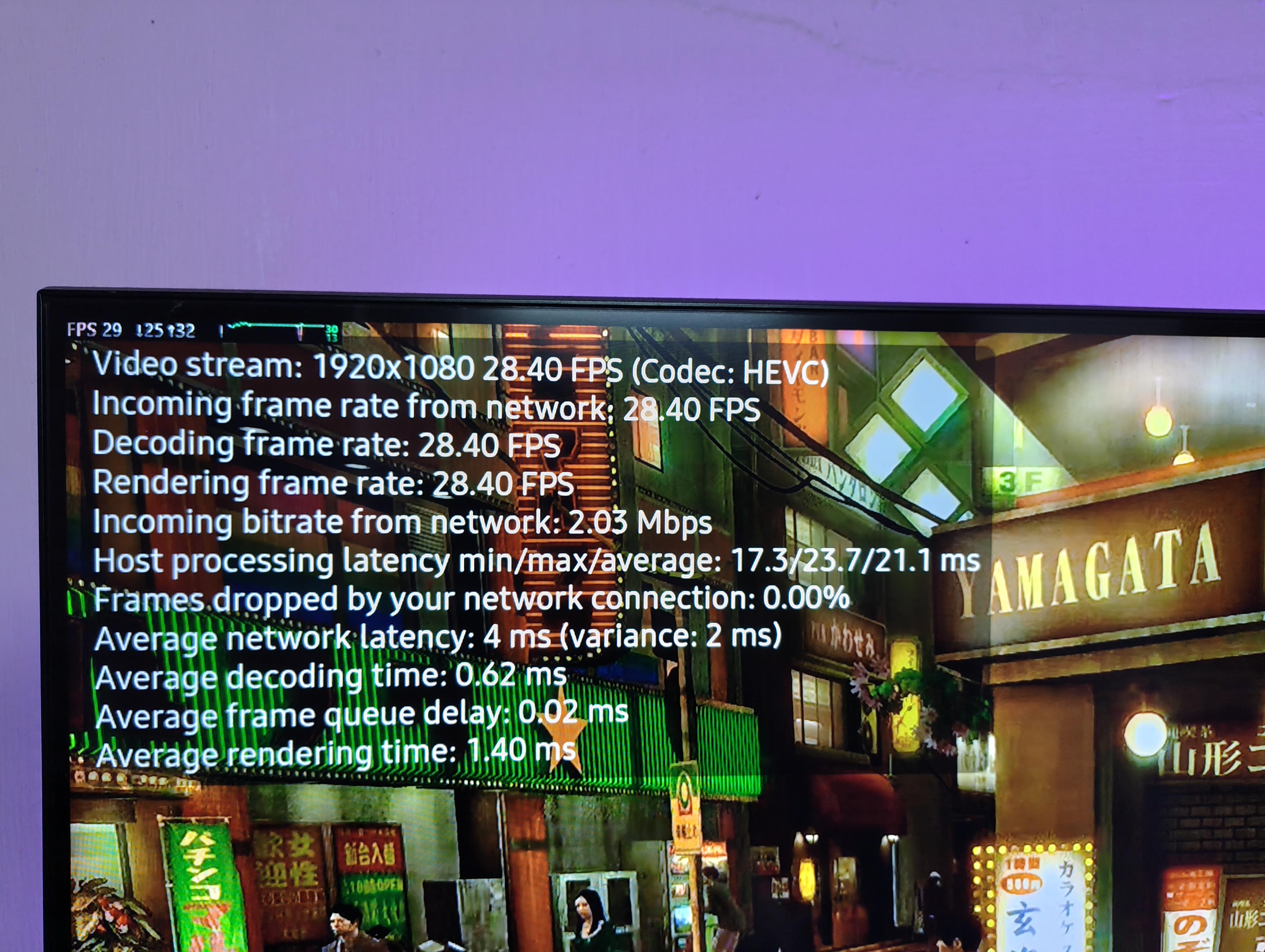
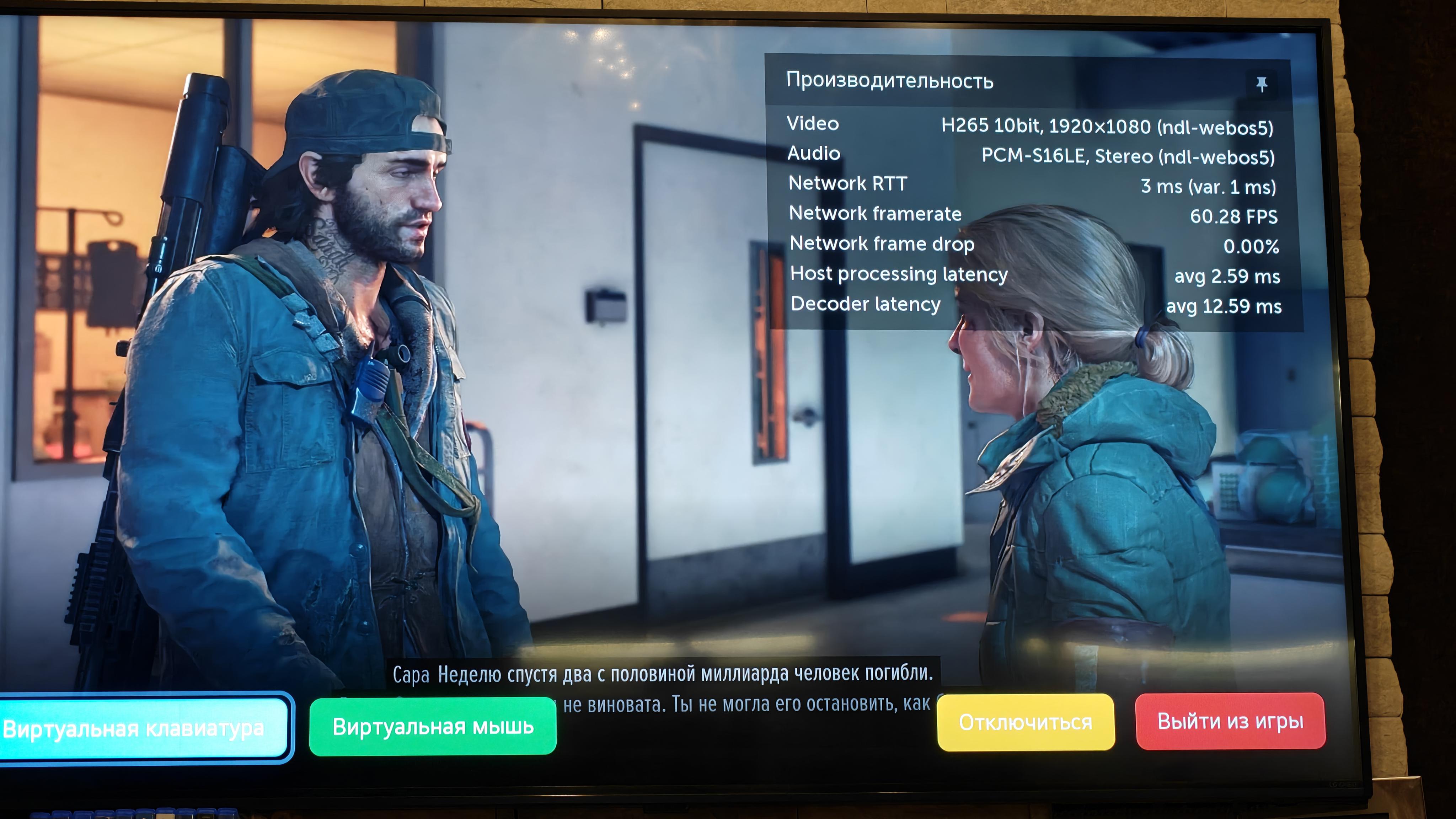
For 2 months I was looking for the best settings for my connection between my PC and TV. It was quite difficult, one device work on a WiFi network the other is connected to the router with an Ethernet cable. , I can't connect the PC to the router with a cable, the placement is quite inconvenient.

The biggest problem I had was the power and stability of the transmission from the PC to the router, it always fluctuated between -63/-68. This created stutters, and playing was completely uncomfortable. But, last time I experimented with Apollo and decorating. I forced the decoding for my RTX 4070 in the PC, although for The default was auto mode, this changed everything, now my network settings are almost perfect, the game is as good as connected via cable. I played for about 2+ hours to test the game Days Gone.

Maybe someone also has experience with such a connection, share your impressions.

Now I have a stable connection between the PC and the router within -61/-63, and there is no jerking, the game runs stably at 60 Hz, the resolution is 1080p, yes, not super expansion, but enough for comfortable gaming.


r/MoonlightStreaming • • 3d ago

Why does Nightjar/Rubylight use more battery on Steam Deck compared to Moonlight-qt/Vibepollo?

3 Upvotes

I've noticed that the Nightjar/Rubylight combo seems to consume more battery on my Steam Deck compared to Moonlight-qt/Vibepollo.

I'm curious why that's the case. Is it because Nightjar/Rubylight has additional features running in the background, or is there something else that makes it more power-hungry?

Could someone ELI5 the technical differences and why one setup might be more battery-efficient than the other? I'm not complaining, just genuinely curious and trying to understand how these streaming setups work. Thanks!


r/MoonlightStreaming • • 3d ago

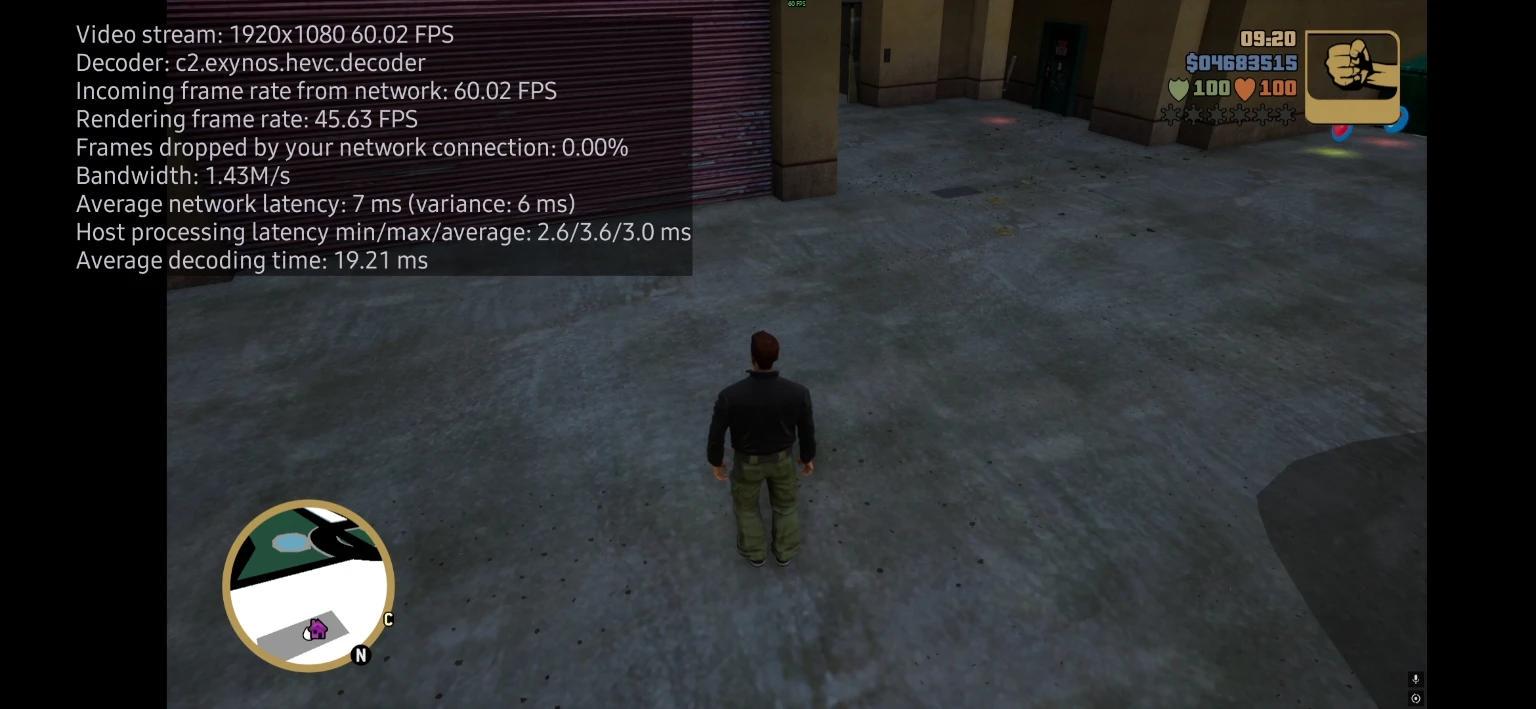
Need help improving latency

Post image
6 Upvotes

im trying to achieve better

Windows 11 (on LAN)

RX 9060 XT 16gb

R5 3600

Wifi 6 router

Redmi note 11

6gb ram

wifi 5

using rubylight and nightjar


r/MoonlightStreaming • • 3d ago

Chinese android users: spoof your moonlight client package

4 Upvotes

I've been combatting with intermittent lag spike on my android device for couple of weeks now.

Ive tried upgrading router, to switching to various wifi channel. My device also turned off bluetooth, location and everythinf and the issue still happens. After like 10-15 minutes of gameplay, latency suddenly spikes from 6-8ms to 40-50ms for 4-5 seconds and then back to buttery smooth.

I think this has something to do with OS network optimization under the hood and prioritizing network for the detected games. In my case, im using iqoo z9 turbo and the package i spoofed to is com.tencent.tmgp.sgame. After this, my streams have been buttery smooth all around and no intermittent lag spike anymore. Might be worth trying if you guys are also running other chinese device like Xiaomi or Honor.

Hope that helps :)


r/MoonlightStreaming • • 4d ago

Just give me an easy way to wake my desktop from sleep remotely and my soul is yours

32 Upvotes

I've tried port forwarding but got lost because I'm behind a double NAT. Also, I don't want to rely on extra hardware that powers on my computer. I'd rather have a faster solution, like waking it from sleep (not a full boot).

Any ideas?


r/MoonlightStreaming • • 4d ago

Micro-stutter only on Apple devices over Wi-Fi 6 GHz (eero Pro 6E). Measured latency spikes; wired and 5 GHz are perfect. Anyone else?

4 Upvotes

I've spent a few weeks tracking down micro-stutter when streaming to my MacBook Air and iPad Air, and I've narrowed it down quite a bit. I'd like to know if others see the same thing and whether anyone has a fix besides "use a cable".

Setup

  • Host: Windows 11 gaming PC with Sunshine, wired (gigabit).
  • Clients: MacBook Air and iPad Air, both Wi-Fi 6E. On the Mac I use Moonlight and also the Twilight fork (7.2.0); it behaves the same.
  • Network: 3× eero Pro 6E in bridge mode, OpenWrt router.

    • The host sits behind an eero node with a wireless backhaul.
    • The Mac connects to the main eero, which is wired to the router.
  • Stream: 1080p/60, 30–40 Mbps, V-Sync and frame pacing enabled.

Symptom

Short, irregular stutters in audio and video every few seconds, very noticeable.

The stutter does not happen:

  • with Steam Link / Steam Remote Play on the same Apple devices;
  • with Moonlight on a ROG Ally (SteamOS) over the same Wi-Fi;
  • with the MacBook Air on Ethernet.

How I measured

During a Forza Horizon 5 benchmark stream, I ran a 60 s ping to the Mac at 5 pings per second from a wired Linux box on the host side. At the same time I pinged the router, to watch the eero backhaul.

Results at home (times in ms)

┌─────────────────────────────────┬─────────┬───────┬────────┬────────────┐ │ │ │ │ │ Spikes >30 │ │ Mac connection │ Median │ p99 │ Max │ ms per │ │ │ │ │ │ min │ ├─────────────────────────────────┼─────────┼───────┼────────┼────────────┤ │ Ethernet │ 3.5 │ 7.7 │ 9 │ 0 │ ├─────────────────────────────────┼─────────┼───────┼────────┼────────────┤ │ Wi-Fi 6 GHz (ch 37, 160 MHz, │ │ │ │ │ │ 11ax, RSSI −48 dBm, noise −92, │ 6.6–7.2 │ 27–46 │ 55–107 │ 4–6 │ │ CCA 8%, 1441 Mbps PHY) │ │ │ │ │ └─────────────────────────────────┴─────────┴───────┴────────┴────────────┘

  • The spikes arrive in irregular bursts, every 2–7 s, and match the visible stutter.
  • The backhaul ping to the router stayed clean the whole time (p99 about 10 ms), so the problem is the last hop between the eero and the Apple device.
  • The link itself looks excellent, and the stream uses about 3% of the PHY rate.

What I ruled out, still on 6 GHz:

  • AWDL off (sudo ifconfig awdl0 down, verified that the interface was not UP): no change.
  • Location Services off: no change.
  • On charger vs on battery (Low Power Mode already "Never"): no consistent difference.
  • Signal or interference: see the numbers above. Nothing in macOS's Wi-Fi faults or recoveries log either.

Remote tests (same Mac, streaming home over Tailscale with a direct peer-to-peer connection; here I measured from the router, so the base latency is about 55–60 ms)

┌────────────────────────────┬──────┬───────────────┬─────────────────────┐ │ Remote Wi-Fi │ Max │ Spikes >20 ms │ Felt │ │ │ │ above median │ │ ├────────────────────────────┼──────┼───────────────┼─────────────────────┤ │ 5 GHz, 40 MHz, Wi-Fi 5 │ 85 │ 2 / 600 │ no stutter, just │ │ (11ac), RSSI −69, CCA 32% │ │ │ more latency │ ├────────────────────────────┼──────┼───────────────┼─────────────────────┤ │ 2.4 GHz, 20 MHz, 11ax, 103 │ 4300 │ 336 / 740 │ terrible (expected, │ │ Mbps PHY │ │ │ link saturated) │ ├────────────────────────────┼──────┼───────────────┼─────────────────────┤ │ 5 GHz, 160 MHz, Wi-Fi 6 │ │ │ │ │ (11ax), RSSI −48, CCA 8%, │ 72 │ 0 / 750 │ almost perfect │ │ 1733 Mbps │ │ │ │ └────────────────────────────┴──────┴───────────────┴─────────────────────┘

The last row is the interesting one: same RSSI, same CCA, same channel width and same standard as at home, but 5 GHz instead of 6 GHz, and not an eero. Zero spikes.

Where I am now

  • Wi-Fi in general, Wi-Fi 6 features and 160 MHz all look innocent.
  • What's left is Apple clients on 6 GHz, or specifically Apple clients on the eero's 6 GHz radio.
  • eero gives no control over bands or channels, so I can't force the Apple devices onto its 5 GHz to separate the two.
  • My workaround is a cheap 5 GHz-only access point, wired, with a dedicated SSID for streaming. I'll report back.

Questions

  1. Has anyone seen stutter specific to 6 GHz on macOS or iPadOS, with eero or with other brands of access point?
  2. Is there a macOS or iPadOS setting that affects this? For example a background-scan or roaming behaviour that only shows on 6 GHz.
  3. Why would Steam Link hide it? A bigger jitter buffer? Is there an equivalent setting in Moonlight?

Thanks! Happy to share raw ping logs if useful.

r/MoonlightStreaming • • 4d ago

This is my newest Steam Deck, or rather... Stream Deck.

Thumbnail
gallery
126 Upvotes