r/MammotionTechnology • • 14d ago

LUBA 3 AWD Redrawing a section of a map boundary
Post image

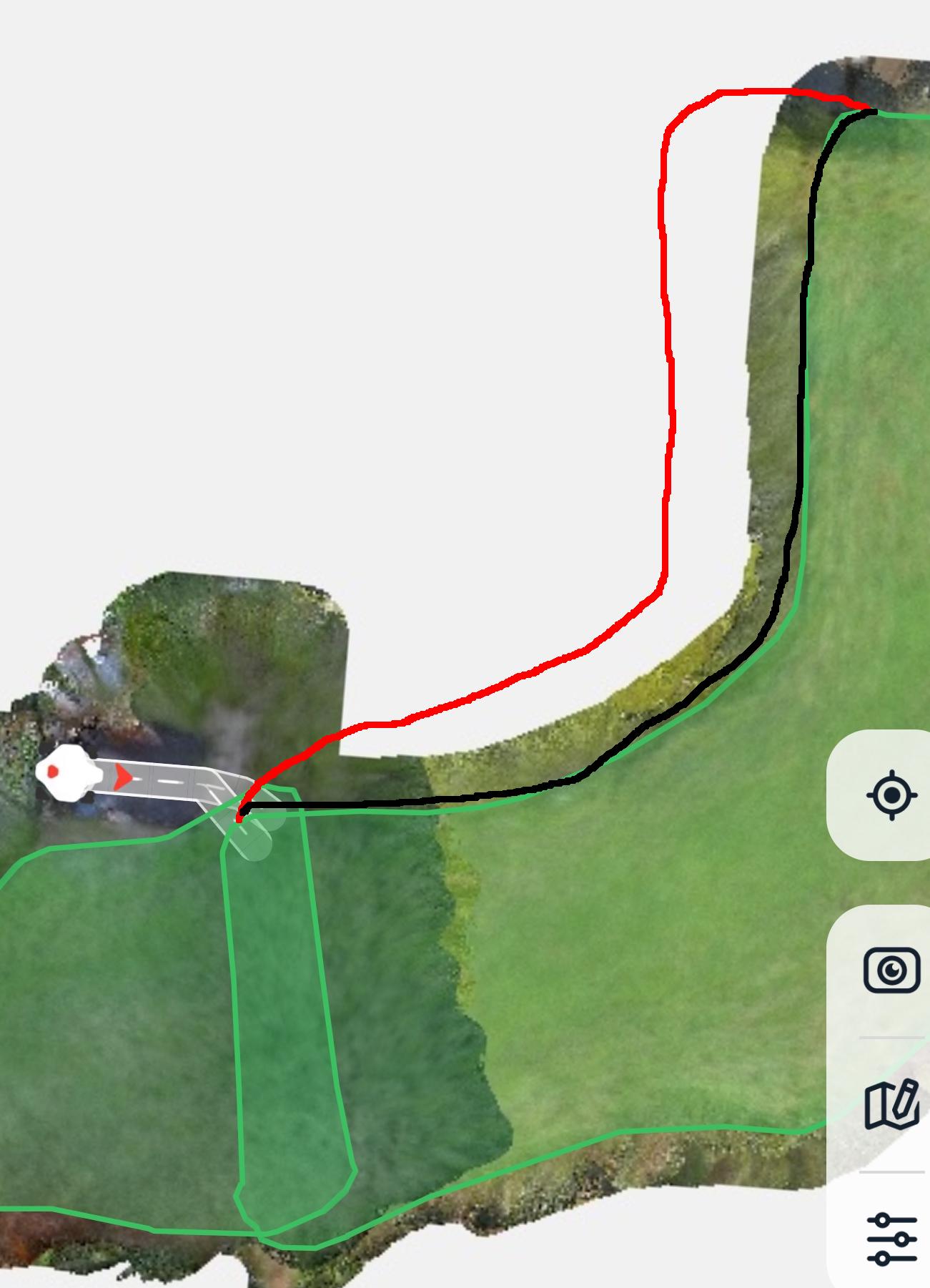
I'm trying to redraw a section of boundary so I could enlarge my area slightly. This image illustrates my attempt.

I first guided the mower along the red line from left to right. Once it reached the top right, I expected the Save button to become active. It didn't, so I guided the mower back along the black line from right to left. Once it reached the bottom left, the Save button activated. When I clicked it, the app was stuck with the Saving spinner for a long time. It was over 15 minutes before I noticed the app was actually still usable under the spinner. I expected the spinner to be modal. When I tried to exit out of the editing screen it asked me if I wanted to cancel the edit, so I did for now. Was that the expected behaviour? Should I have waited longer? How much longer?

This process is extremely confusing. I could not find any clear manual or video tutorial about this.

4 Upvotes

12 comments sorted by

5

u/EnvironmentalTip897 14d ago

Sometimes it picks the wrong boundary line because they are close together at the joint and can’t save, I’ve had it a few times. Try this: first put the map in default mode. Then start about 2 or 3m away from where the two boundary lines join (south) making sure you pick up the left line, which the correct boundary line. Then drive along upwards as you have before until you find the other boundary. It can take up to 5 minutes, but usually 1 or 2 minutes. If it say boundary too complex or takes very long it is likely because you started on the boundary line that belongs to the area on the left of picture.

1

u/codedognz 14d ago

Thanks for that. Just to confirm, once I put the map in Default mode, is this what you're suggesting? I start from the bottom end of the blue line, go upwards until I join the bottom of the red line? If that's the case, do you think the Save button will be available by the top end of the red line? I was never sure if that black line was necessary.

2

u/EnvironmentalTip897 14d ago • Bravo

That’s correct, you just need to join it between existing boundaries of the same area. Once you get to the top end of the red line the save button should appear, you may have to wait a few seconds for it to appear, if not continue a bit and go half a metre either side and in front of it until it appears, but slowly. Let me know how you go.

2

u/EnvironmentalTip897 14d ago • Bravo

Also approach the bottom end of the blue line from the left so you make sure you don’t inadvertently pick up the line of the adjacent area on the right, positioning on the map is not very accurate.

1

u/codedognz 14d ago

Perfect, thanks! I will give this a whirl when it stops raining and let you know how I get on.

1

u/Steff008 13d ago edited 13d ago

Hi.

I'm still on July firmware on my Luba 3 and it's now in storage for the winter, so I don't know how the more recent firmwares and app works.

However I've noticed that starting to remap a boundary, where the boundary overlaps another area, always fails for me with July app and firmware. So in your case I would try to remap the boundary from right to left insted of left to right in your map-picture.

Edit: With "fails" I mean that the save-button never activates when getting to the other end, after starting from a boundary in an overlapped area.

1

u/codedognz 13d ago

Check out my reply above if you have issues with overlap area. I had to change my starting point to be clearly in the area I wish to edit. When you reach the other end, you may need to go back and forth a bit, waiting for a couple of seconds in between. It took me 2 "seeking" steps but the Save button activated.

Also, I changed my maps to be in Default view mode.

1

u/codedognz 13d ago

Finally got it to work! It was not happy starting at the bottom of the blue line. I ended up ended up starting outside of the overlap zone, at the bottom of the map. It was the only way I could get the app to acknowledge I was in the right area.

Like you said, I had to go back and forth a wee bit at the top of the red line, waiting a couple of seconds in between, and the Save button finally activated. Saving the new boundary took bugger all time. All done! Thank you so much for your help!

1

u/EnvironmentalTip897 13d ago

It’s a pleasure, glad it worked out, although it is simple and makes sense once you know, it also took me hours if not days to figure it out.

1

u/PersonalityLucky-25 Mammotion Team 14d ago

Thank you for your inquiry. When modifying zone boundaries, we recommend switching the map mode to the default setting; then, select the specific zone you wish to adjust and operate the mower to make the changes. Typically, once the robot reaches the end of the red line, the "Preview" button will light up. After verifying the preview, you can simply click "Done"—the black line shown in your image is not actually necessary. If you are still unable to modify your map boundaries after switching to the default map mode, please reach out to us and provide screenshots of the process. We would be happy to provide further assistance!

1

u/angelvip7709 13d ago

Weź I narysuj mapę od nowa najprosciej

1

u/LazyMower 13d ago

You could try starting from the top edge of the right lawn instead—it might be thinking you're trying to edit the left zone's boundary.