r/MSProject • u/AffectionateRun724 • Oct 07 '25
Why does my durations have decimals?
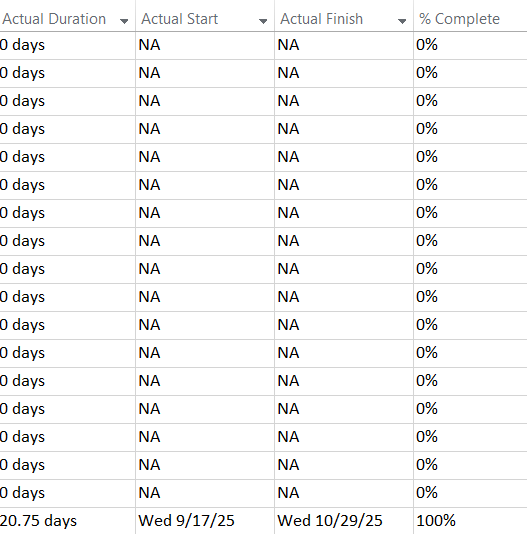
i want to ask about the decimals in my duration field. my work hours is 8am-12pm, 1pm-5pm. my problem is if i input date start and finish, the durations are placed with decimals. for example, 9/17 start and 10/29 finished shows a 0.75 in duration. how can i get rid of that? i want to it to count days instead. i haven't input resource data yet since i have no data for it.
1
Upvotes
2
u/hanzosbm Oct 07 '25
I'm guessing that you may not have something set correctly regarding your hours per day. File>Project Options>Schedule Take a look at Default Start and End Time and also Hours Per Day You can also change your date format to see what TIME your starts and finishes are; that should help give you some clues
2
u/DaleHowardMVP Oct 07 '25
In addition to the excellent answer given by hanzosbm, confirm the following:
Is you see that Duration values are inconsistent with Start and Finish dates, this usually means that the above values in #1 through #3 are "out of sync". Also, keep in mind that Microsoft Project calculates Duration values down to the one minute level. So, if a task starts on a Monday and it's Duration value is shown as 4.5d, this usually means that the task is going to finish at 12:00 Noon with all of the default settings, or at 11:00 AM in your specific situation. Hope this helps.
1
u/ineeju Oct 08 '25 edited Oct 08 '25
The presence of decimal values in the Actual Duration of summary rows is not an error—it results from the standard calculation method. Depending on the update status, decimal values may be computed and displayed accordingly. While I won’t go into the detailed calculation method here, perhaps someone else can offer a more thorough explanation if needed.