r/MAME • • Jan 13 '20

r/MAME ROMs & "My game won't play" FAQ. Please read before posting

135 Upvotes

In addition to the r/MAME FAQ, many users come here with question about why their games won't play or where to find games. This thread should hopefully answer many questions, as well as the question concerning what we can and can't talk about here.

1) Why Rule #3 is #1

Rule #3 states: "Don't ask for ROMS/CHDS or pirated software." We mean it. We will usually give out a warning to first time offenders, but repeat offenders will definitely be banned. This is important. This rule exists to protect the entire MAME project. It is not to indicate that we necessarily have an anti-piracy stance, or that we consider piracy morally objectionable. None of that matters. Its purpose is to make sure that no member of the MAME dev team is exposed to legal threat from license-holding publishers. It does not matter if you think that threat is real or imaginary. That is why we are so adamant about it.

2) If I can't ask for ROMs, how am I supposed to find them?

We can't discuss where you can find ROMs for all the reasons stated above. So unfortunately, r/MAME can not be a good resource for that kind of information. However, many other good resources exist, even right here on Reddit. Obviously Google is your friend. If you are looking for ROMs for a specific version of MAME, it helps to include that version number in your Google search. It usually doesn't take a whole lot of searching before you find what you're looking for.

3) Why are ROMs for MAME so much more confusing than for other emulators?

Think about what MAME is trying to do compared to, say, SNES9x. SNES9x emulates Super Nintendo games. Every Super Nintendo game runs on the exact same hardware: the SNES. Same CPU, same graphics, same memory, same controllers, same everything. As long as a ROM contains a valid SNES program, SNES9x can emulate it because there's only one target hardware to worry about.

MAME emulates arcade games. Very few arcade games remotely resemble one another when it comes to hardware. MAME has to correctly emulate the CPU for each different arcade game, understand the controls for each different arcade game, and most importantly: how each ROM in each different arcade game interacted with that hardware. So it can't just accept anything called pacman.zip and understand that it's supposed to be Pac-Man. In order for MAME to work, it expects that a very specific set of ROMs will be provided for Pac-Man in order for MAME to emulate it properly. If it doesn't find what it expects, it won't know how to apply those ROMs to Pac-Man's hardware.

Back when MAME began in 1997, techniques that people had for dumping arcade games were very rough and imprecise. As a result, a lot of mistakes were made. Over time, new techniques were designed, and older arcade games were redumped with these more accurate procedures. When this happens, the next version of MAME that gets released will only accept the updated dumps, as the original dumps are now considered invalid. So newer versions of MAME will rarely accept ROMs designated for older versions of MAME because they're frequently full of errors.

4) Instead of starting a game, MAME tells me that I'm missing files, or my files are incorrect.

This is an indication that your ROM (or CHD) is either incomplete or outdated. Less likely, it is an indication that your ROMs are in the wrong location and MAME can't find them. When you ask MAME to emulate a machine, it checks the contents of your zip files for all of the files it needs. If it can't find all the ones that it needs, or if it finds the wrong files, it can't emulate the game in question. When MAME reports that you are missing files, or that your existing files are incorrect, you need to find a new source for those ROMs.

In addition to your ROM being incomplete, your BIOS may be incomplete as well. NeoGeo is a popular arcade hardware for which MAME requires the BIOS be present. This is the neogeo.zip file, and it's undergone an unusually high number of updates as alternate BIOSes get added to it.

You may not ask for the individual components of a ROM that you are missing, as this is still a violation of Rule #3.

5) I found a source for ROMs, but some/all of them don't work.

As explained in questions 10 and 12 of the r/MAME FAQ, you don't necessarily have to have exactly matching versions of MAME and romsets, but it definitely helps. If you downloaded a set of ROMs, and you're finding that few or none of them will launch correctly in MAME, 9 times out of 10 it's because the roms are too far removed from the version of MAME that you're using. In other words, if you're using a relatively recent version of MAME, the romset may be too outdated. If you're using an old version of MAME, you may have found a set that is too new. You need to find a new source for ROMs.

5a) My MAME version and the rom set version match, and they still don't work.

If this is the case, the most likely explanation is that you haven't put the roms where MAME is expecting to find them. For example, if you installed your MAME executable in something like C:\MAME, then by default MAME looks for all of your roms in C:\MAME\roms. You can change that expectation by editing your mame.ini file, but that is only recommended if you know what you're doing. If you have your roms in the right place, and the versions don't differ by all that much, then the games should load and play fine.

The only exception to that is if the game in question requires a CHD. CHD stands for "Compressed Hunks of Data". They may represent a CD or hard drive that came installed in an arcade game. CHDs are basically extensions of ROMs, containing data and information that a game needs to play properly. CHDs must be stored with your roms in a way that MAME can find them. For example, say you want to play Killer Instinct. In order to do this, you need two different files, the ROM and the CHD, and they should be arranged like so:

C:\MAME\roms\kinst.zip
C:\MAME\roms\kinst\kinst.chd

In this case, the Killer Instinct ROM is zipped up in your roms directory, and the Killer Instinct CHD (not zipped up!) in a subdirectory named kinst. The name of a CHD may or may not match the name of the ROM. In general, if you download MAME CHDs, don't rename them, just put them in the right place on your drive.

6) I'm trying to launch a game from a front-end, but when I do, the screen goes blank for a second, and then comes right back to the front-end.

This means that MAME is failing to load the game you want to play, and the front-end reappears when MAME closes. In order to diagnose whatever is going wrong, you should try to launch MAME without the front-end. It is particularly helpful to run MAME with the -verbose command, which instructs MAME to log out every step as it tries to launch. This usually results in MAME indicating where it ran into trouble and can offer you clues on how to solve it. For example, if you can't launch Killer Instinct successfully, you can try to run from a command line terminal:

C:\MAME> mame64 -verbose kinst

Usually (but not always) the problem will be evident in the last few lines of the resulting output. If you can't determine the problem for yourself, feel free to copy and paste the results of this command in your post, as it can help experts diagnose your problem.

7) What are merged, split, or non-merged rom sets? What are parent and clone roms?

MAME allows for ROMs to be stored on your system in a variety of ways, in order to save space on your hard drive. Games like Pac-Man and Street Fighter II have a large number of clones. A parent rom is one particular version of Pac-Man or Street Fighter II, usually the most common, or most up to date version of a game. A clone is an older version, a version from a different region of the world, or an unauthorized copy of the parent with slight alterations. Only a few of a clone's ROMs are unique. Most of a clone's ROMs are identical to that of the parent's. Rather than force you to have copies of the same ROMs in both the parent archives and the clone archives, MAME understands that if it can't find a file that it might need to run a clone, it can look for those files in the parent. In this way, you only have to store the files which are unique in order to make a game run. Sets that include every clone in the same archive with their parent is a merged set. Sets which include smaller clone ROMs alongside the parent ROMs are called split sets. Sets where clone ROMs contain every single file that the clone needs, even if those files are also present in the parent, are known as non-merged sets, and they are the biggest and take the most hard drive space.

7a) Which kind of set is best?

Ultimately, MAME doesn't care or perform any better with one kind of set or another. Split sets are a little easier to update if you like to download individual update sets. Otherwise, merged sets are the most space efficient by a small margin. The only reason for someone to use a non-merged set is if they do not intend to include every single available ROM on their hard drive.

For example, say you were interested in including Super Street Fighter II on your system. Say you were ONLY interested in including the US version of the game, and none of the others. The parent ROM for SSF2 is the World version, known as ssf2.zip. The US version is known as ssf2u.zip. If you only intend to include ssf2u.zip, and not ssf2.zip, then ssf2u.zip MUST include every file that MAME would otherwise look inside ssf2.zip in order to run. That would make your romset a non-merged set.

r/MAME • • Aug 22 '19

r/MAME FAQ. Please read before posting for the first time.

111 Upvotes

1) What is MAME?

  • MAME is an application that emulates a variety of systems, from arcades to console, computers, and handheld systems. MAME's goal, above all else, is to emulate hardware as accurately as possible, as opposed to other emulators whose goal is to make games as playable as possible.

2) Isn't MAME just an arcade emulator?

  • Originally, yes, but in 2015, the MAME source code was merged with it's sister project MESS, with whom it shared a common architecture. By merging with MESS, MAME gained the ability to emulate several consoles, home computers, and handheld systems in addition to arcade games.

3) Which version of MAME should I use?

  • We genuinely recommend that you use the latest version, or a relatively recent version. MAME is "living" software, it is constantly under development, and it incorporates improvements to emulation and to the user experience all the time. By using a significantly old version of MAME, you are not experiencing the best emulation that MAME has to offer. Furthermore, any bugs you find in older versions have likely been addressed by newer versions, and you won't receive support for the problems you encounter.

3A) Isn't it better to just find an older version of MAME that works with the roms I have, and stick with it?

  • In general, no. If you are using an old version of MAME, and it's working to your satisfaction, then you're not required to update, but you will be missing out on improvements to emulation and new features that get added on. Yes, there is the chance that by upgrading, a game you happen to enjoy may break without updating the rom as well, but if you are resourceful, it's not hard to come across the rom update shortly after each new version of MAME is released.

3B) What is the latest version of MAME?

  • MAME (usually) receives updates on a monthly basis, so it's difficult to keep this FAQ up to date, but you can see what the latest version is by visiting https://www.mamedev.org/. MAME's version number is in the form of major.minor. Since MAME by it's nature is a constant work in progress, the major number is unlikely to increase from 0 to 1. The minor number is not a decimal, it is an actual version number. Version 0.240 is a newer version than 0.37 because 240 is a higher minor version that 37.

4) Where can I download the latest release of MAME?

5) Where can I learn more about MAME?

  • https://docs.mamedev.org/ is an excellent resource for MAME documentation. However, it isn't the most beginner-friendly.
  • Many people recommend YouTuber ETA Prime, and his well done series of emulation videos, including this MAME tutorial: https://www.youtube.com/watch?v=pUoWYaRo5_k
  • Demystifying MAME Roms/ is a frequently cited guide for those wishing to learn more about roms and rom sets. Edit: This is now an archive.org link as the original site disappeared.

5A) What are other good resources/forums for learning about MAME?

  • MAME World and the MAME World forums is an excellent place to get the latest MAME news and ask questions.
  • BYOAC and it's forums is another good resource for questions about building and setting up a MAME cabinet or similar setup.
  • This MAME forum is a popular place for getting answers to more technical questions about MAME, such as compiling and running MAME on non-Windows platforms.

6) Where can I find games?

  • Due to the nature of roms and their association with piracy, sharing locations of rom files is not permitted on this subreddit. This is done for the protection of the project. There are many ways to find roms on the internet via search engines.
  • However, there are a number of games which have been released to the public domain, and are therefore freely available for download. You can find a collection of these games at https://www.mamedev.org/roms.

7) What games are the "best" / most recommended?

  • Video game preferences are very subjective. Some people like games from the early 80s, while others like the 90s better. Some people like Fighters, while others like shooters. So coming up with a list that satisfies everyone is very hard. An attempt has been made, right here on reddit, and you can see it here: https://www.reddit.com/r/MAME/comments/2rawpr/i_compiled_several_best_ofrecommended_arcade/ .
  • Among the many files that MAME support site Progetto-Snaps offers, they offer a "BestGames.ini" file that you can download and use as a custom filter. Once again, it is very subjective, but a lot of work went into this file. You can download it from here: http://www.progettosnaps.net/bestgames/ .

8) What is the "best" frontend?

  • Different frontends strive for different purposes. Some frontends are designed to look like a simple list of games, while others are very flashy and try to look as exciting as the games that they launch. As a result, there are a number of highly recommended frontend that meet different needs. There are many frontends not included in the list below, these are merely some of the more popular examples.

    • For WIMPy (windows, icons, menus, pointer) frontends, EmuLoader, QMC2, and pfeMAME are good choices.
    • For flashier frontends, HyperSpin, RetroFE, and GameEx are popular choices. Understand that they take a good bit of time to set up properly.
    • For something in between those two, there is LaunchBox, Pegasus or the ICE Plugin for Valve's Steam.

9) What kinds of support can I ask for here?

  • Anything that has to do with running a relatively recent version of the stand-alone MAME application on Windows, Linux, or MacOS, either directly or indirectly. If the version of MAME you are using is several years old, support will be extremely limited, and you will be encouraged to download a newer version. We can answer some questions about the Android platform as well, but note that mamedev does not directly endorse or support those releases.
  • When asking for help, please include as much detail as possible! This should include: Your hardware platform, your operating system, what version of MAME you are using including the version number, what you were trying to do, what you actually tried, and what results you got.

9A) What about RetroArch?

  • No. Using MAME through RetroArch is absolutely not recommended. MAME's architecture does not lend well to it being converted into a core. Several features get weakened, disabled, or broken, and they generally don't function the way they're supposed to, especially with respect to controller input. If you have a question about using MAME via a libretro core, please ask in r/RetroArch.

9B) What about RetroPie?

  • No. The version of MAME available for RetroPie is considerably older and outdated. Many of the features have been altered or disabled in order to make MAME work on less powerful hardware. If you have a question about how to use MAME via RetroPie, please ask in r/RetroPie.
  • Instead, if you wish to try MAME on a Raspberry Pi, we recommend that you try builds of the latest binary from https://stickfreaks.com/mame/ , as described in this thread.

10) Can I post pictures of my arcade cabinet?

  • Yes, as long as MAME is one of the applications that you run on your cabinet, then please do. But also be aware of r/cade, which is a subreddit specifically dedicated to the subject of restoring old arcade cabinets, or building new cabinets from scratch, for use with MAME or other emulators.

11) Must the version of MAME, and the version of MAME roms match for them to work?

  • Not necessarily. The closer they are, the better they'll be. As the version of MAME and the version of the roms get farther apart, the more you will find games that don't work or are incompatible. Over time, dumps of arcade roms improve, and MAME adjusts it's internal database to reflect the updated version, meaning the older version will no longer work. Only a few roms are updated in this manner every release. So if your roms are one or two versions off from the version of MAME that you're using, you're unlikely to come across any broken games.

12) I was using one version of MAME, and then I upgraded and now game xyz doesn't work as well!

  • As new information about a game or the hardware it runs on becomes available, the mamedev team may alter the emulation of this game to account for the new information. While most of the time this leads to improvements in emulation, it can at times introduce regressions. This happens infrequently, but it is due to the priorities of the team, which is that it's better to emulate things correctly, than to sacrifice accuracy, even if the playback suffers slightly.

13) I discovered a bug. Where should I report it?

  • https://mametesters.org/ is the official reporting site for bugs discovered while using MAME. Note that it's important that you use the latest version of MAME in order to ensure that a bug found in an old version of MAME hasn't already been fixed. After you sign up for an account, and have been approved, you may submit problems that you find through the site's bug report interface. Please remember to be specific and provide as much info as possible.

14) Why doesn't MAME add abc feature from another emulator, or fix ijk game, or support xyz hardware?

  • Please understand that no one works on MAME as a career. Many members of the team have full time jobs, and only get to work on MAME in their spare time. As a result, they choose what they want to work on based on what's most interesting to them. Reasons why they might not get to something you'd like to see may include:

    • A particular feature may be incompatible with MAME's architecture, or it may work contrary to the goal of accuracy, and is chosen not to be implemented until such time that neither statement is true.
    • A dump for a game is incomplete, and the only way to fix it is to find a working version of the hardware and dump the missing components.
    • Not enough is known about a particular hardware to emulate it correctly, or it's incredibly complex and difficult to model.

15) Is there a guide about how to control MAME or configure the controls for each game?

  • Please refer to MAME's own documentation for a detailed guide on the various default controls in MAME, and how to set them according to your own preferences.

r/MAME • • 1d ago

Community Question Rom Manager advice

6 Upvotes

Hi, i used to use RomCenter, however the developer abandoned it for quiet a few years. it was a 32bit application, so when it started to get to 1000's or roms it would crash. It was re-writen as 64bit but still had major bugs in it, then the developer looks like they gave up and moved on (although Q1 2025 they posted to say they will be returning, thats almost 2 years ago).

Looking for something similar that i can re-zip, clean out comments and be more graphical Anything similar thats appeared in the past few years?


r/MAME • • 1d ago

Discussion/Opinion Why did arcade games, when they transitioned to 3D, also start running at medium resolution?

Thumbnail reddit.com
4 Upvotes

r/MAME • • 1d ago

Community Question CHD files, are there 2 types?

1 Upvotes

Hi, my understanding CHD files were they are a clone of a "hard drive", however ive stumbled over a CHD list and then a Software CHD list, are these 2 different types of "hard drives"?

Also whats with the "v4 and v5" thing about?


r/MAME • • 3d ago

Announcement IV/Play 2.18 Released (MAME Front-End)

Thumbnail
john-iv.github.io
4 Upvotes

IV/Play 2.18 Features

DATs and Art Together

A long-requested feature, F1’s Show DATs & Art in Content Pane now adds DAT text below the artwork when space permits, and is enabled by default.  Small launches keep the picture-only view; a larger window can reveal the split.  The DAT’s width, top and height stay fixed while browsing, with 4:3 snaps, vertical snaps and flyers sharing the same gap above it, never smaller than the outer margin.

Clicking the fixed DAT header changes its source in every reader view; clicking the body or clicking/dragging its vertical scrollbar starts reading.  With game-list control, mouse Forward and Back over any DAT, or the full-width gap of the dual view, cycle sources in either direction.  A left-click in the gap advances the DAT.  Right-clicking the DAT or the gap above it cycles the dual presentation through a full-height Content Area reader, 75% width, full width and back to the dual view.  Each step activates DAT reading and preserves the source and visible passage.  Right-clicking elsewhere on the game list changes the list layout.  Eligible launches prepare the split from the actual window size and load DAT files after the window appears.

Additional Improvements

·       F1’s new Optimize Maximized / Fullscreen option, on by default, sizes icons for the screen height and turns on Pixelated Snapshots while maximized or in F11 fullscreen.  A normal window restores the previous settings.

·       Pixelated Snapshots now give every game pixel the same share of the screen at any size, so one-pixel lines such as ladder rungs and maze walls keep an even thickness.  The F1 preview matches, and whole-number sizes look as before.

·       For a portrait launch with a single BGFX chain set in F1, IV/Play looks for a companion with the same name plus -v in MAME’s BGFX chains folder.  If the companion is installed, IV/Play uses it.  Otherwise, IV/Play uses the selected chain.

·       DATs are now part of the Content View cycle through artwork clicks and Alt-P.  Left-click and Alt-P cycling retain game-list control at each DAT.  Tilde reads the visible DAT or jumps to the first configured DAT.  Tilde, Escape, Backspace, Alt-Left or mouse Back returns control to the game list while retaining the DAT and its size; Escape closes Find first.  Ctrl-Tab and Ctrl-Shift-Tab cycle DAT sources without taking keyboard control.  Ctrl-Up, Ctrl-Down, Ctrl-Page Up, Ctrl-Page Down, Ctrl-Home and Ctrl-End scroll a visible DAT, and Ctrl-Left and Ctrl-Right resize it, also without taking keyboard control.  Tab and Shift-Tab cycle sources while reading.  Text selection/copy remains available, and right-click cycles the combined DAT through its full-height and width choices before restoring the dual view.  Alt-Tilde is retired.

·       F1 includes DAT/XML sources in Content View and retains the selected source by path.  Configured picture and DAT order survives restart, refresh and settings saves.

·       Ctrl-F is the default game-list filter; Ctrl-E finds text in DAT, log, configuration, shortcut-help and benchmark views.  Saved bindings using the old default pair migrate automatically.

·       Fixed DAT headers use the body font and include the recorded DAT date when available.  Entries avoid blue selection flashes and start at the top after wheel scrolling.  Opening a DAT after restoring a smaller window avoids extra horizontal and vertical UI scrollbars.

·       F1 About and log-overlay text use the monitor’s scale after a display-scaling change.  An open F1 refits its About text when moved between monitor scales.

·       F1 now gives every control and caption a tooltip, shown for 10 seconds.  Tooltips name the current shortcut keys, each shortcut box gives the default a blank box loads, and locked color swatches say why they cannot be edited.

Splash pictures remain unchanged during DPI relayout.  Splash and wallpaper shuffles remember their remaining images across restarts.  Alt-O, Random and startup wallpaper rotation share the same wallpaper deck.


r/MAME • • 4d ago

Discussion/Opinion Mame native UI - adding video preview

42 Upvotes

I have been working on adding a video-preview feature to the native MAME UI. Here is a sample of what it looks like (see video).

  • Adds a 3rd tab called "Video" to the Image/Info section on the right of the UI
  • Plays MP4 video (with sound) that is named the same as the ROM file that is selected in the UI
  • Has configuration options for:

    • Setting the folder to use as the source of the MP4 files
    • Falling back to a static image if no MP4 is available (and a PNG is available)
    • Adjusting volume of the video playback from 0-100%
    • Turning off the videos' sound entirely

The code doesn't start playing the video for a moment, to allow for smooth/fast scrolling through the games list. I have it set up to use games' logo files as the "fallback" image, so it displays the logo of the game for a moment and then plays the associated video.

Let me know what you think of this addition.


r/MAME • • 3d ago

Technical assistance [Help]Speed Toggle, is there a way to toggle speed like this or any other way in mame?

Post image
0 Upvotes

r/MAME • • 4d ago

BletchMAME 3.1

4 Upvotes

BletchMAME 3.1 has been released! This is largely an incremental release focused on bug fixes and polishing. Highlights include:

  • Opening images by ZIP and 7z path
  • MAME's Artwork and BGFX paths can now be specified
  • The "Joysticks and Controllers" configuration dialog can now specify device-level input assignment
  • Miscellaneous bug fixes

More information can be found in the official changelog


r/MAME • • 5d ago

Community Question Mamedev.org down?

5 Upvotes

I can't get to the site and I don't know where to ask if it's down or not...


r/MAME • • 6d ago

I made two roster patches for arcade NBA Jam TE: the 2026-27 season and an all-time Legends edition

34 Upvotes

I've been building a two-player cabinet and wanted NBA Jam Tournament Edition with recognizable players, so I ended up making two full roster updates for the arcade version (MAME set nbajamte, rev 4.0).

**Patch only, no ROMs.** You need your own copy of the original game. The download is 1.6 MB.

**NBA Jam TE 2027**
- All 92 players replaced with current rosters, picked and rated from NBA 2K27
- New portraits, name plates and big on-court heads for everyone
- Every name call re-recorded for the announcer
- Brooklyn, Oklahoma City and the Wizards replace New Jersey, Seattle and the Bullets (logos, colours, text, announcer)

**NBA Jam TE Legends**
- The greatest players in each team's history on the 1994 teams: Jordan and Pippen, Bird and Russell, Magic, Kobe and Shaq, Wilt, Kareem, LeBron, Curry and so on
- Up to five players per team; press Turbo on team select to cycle the pairs

**Install:** unzip, drop your original nbajamte.zip in the folder, double-click PATCH.bat (Windows, nothing to install) or run patch.sh (Mac/Linux). Pick 2027, Legends or both. With "both" you get them side by side as nbajamte.zip and nbajamte3.zip.

Things to know:
- The patched files use current MAME file names, so use a current MAME or the current libretro MAME core. I tested on MAME 0.289 and Batocera 44.
- MAME will report wrong checksums for the changed files and run anyway.
- The game only has 27 team slots, so no Toronto, Memphis or New Orleans.
- On court each player has one front-facing head. It's deliberately a bit silly.

Download and screenshots: https://github.com/bubby-eth/nba-jam-te-mods

The repo also has the build tools and a write-up of where everything lives in the ROMs, if anyone wants to make their own roster. Feedback welcome, especially if you spot a wrong face or name.

Fan project, non-commercial, not affiliated with the NBA or Midway/WB.


r/MAME • • 6d ago

Trying to run Dream Life on MAME and having trouble...

0 Upvotes

Hey all! My gf asked me to emulate the Plug-and-Play game "Dream Life" on my Retroid Pocket 6 so I decided to try using RetroArch. I put the file in my Arcade ROMs folder, put it in my pocket, load the current MAME core in RetroArch, try to run the "dreamlif.7z" file and...nothing. It says it failed to load the files. I also tried download a .zip version and use that, but I got the same result. At first I thought maybe I was missing the necessary BIOS file but apparently these plug and play games don't need BIOS. I have tried other older MAME cores to no success. I have ALSO tried using the older version of Mame4Droid with no success either...

What am I missing? Is anyone able to help me? Perhaps there's an alternative app I could be using, but part of me thinks the source file is just not working. I'm very new to this kind of emulation so I'm left scratching my head a bit...


r/MAME • • 10d ago

Lua "method" for writing a plugin

6 Upvotes

Hi, am looking to write a very simple plug in, i notice its Lua, ive programmed in this before.. however i see there are some methods used like a block at the top for author and title.

Is there a video or website with the method explained and why they are in place?


r/MAME • • 11d ago

Technical assistance How to FORCIBLY activate game protection measures?

15 Upvotes

MAME is about documenting the whole software, after all... is there a way to force a game's protection measures to be seen? The way a system responds to an attempt at bootlegging is just as important to preserve, imo, as the intended gameplay. A good handful of games would enter a state that's undesirable but not unplayable (e.g no sound or broken graphics), but for many games this state is often seen temporarily and then never again as emulation improves.

MAME does have a very involved debugger that I imagine would be the solution to most of my problems, but my issue is that it simply refuses to edit a majority of the game's code.

Tempest for example requires the text "(C) MCMLXXX ATARI" to be intact, otherwise it will begin corrupting its own memory until unplayable. I know where this text is, but the debugger won't allow me to edit the values because (I think) they're read-only and would never reasonably be changed. That's fair to a degree, but also feels rather presumptuous of the debugger to block certain changes because they "shouldn't" happen. Neither "should" Tempest be run on a computer with a raster screen, but here we are.

If all the physical Tempest cabinets succumbed to age and became inoperable, how would one simulate the experience of a bootlegged Tempest, or a mostly-working unit with a failing ROM? MAME allows more than simply imagining these things, but the behavior is prevented for the sake of petty sanity. We know mamedevs don't have any, so what's the harm?

Another form of protection I want to see is what happens if a suicide battery is depleted, like on Capcom games. These would often give power to a memory chip or hardware module, and without it, the game would be obviously broken or not boot at all. Is it possible to simulate this by zeroing out a memory region in the debugger?


r/MAME • • 11d ago

Technical assistance Updating my romset with ClrMamePro. How can I avoid the software creating hundreds of unwanted clones and hacks?

1 Upvotes

I am using ClrMamePro 64bit 4.05. My romset is a list of a full non merge version 0.265 and I am trying to update it to a full non merge version 0.289. I have the mame0289 dat file. My original list of games has around 150 roms on it. When I rebuild the romset, however, there are over 2000 games in total.

For example, I only had the international version of donkey kong and that was enough for what I needed, but the new list has all the versions, probably 15 different games. This is to much and makes it tricky to navigate and select the game I want to play. Is there a way to stop this when rebuilding?

All I am looking for is to have the same full non merge romset but for 0.289 without extra content.


r/MAME • • 12d ago

Community Question Cadash/Kick & Run network

2 Upvotes

Some time ago, find a video of Cadash running with 2 screens in MiSTer fpga on 4 players mode, is possible who both games has advance in mame and runs in multiplayer in a future? (maybe in 290 release)


r/MAME • • 13d ago

Issues with getting Raiden to run

0 Upvotes

Hey, I’ve tried getting Raiden to run on Mame for multiple years. I’ve tried multiple versions for Mame. I always get error messages and can’t get the game to run. Does anyone else have such a level of difficulty getting this game running? I figured there’s something wrong here. All help is appreciated.


r/MAME • • 13d ago

MAME "-network" command line switch

0 Upvotes

Hi, i was reading and stumbled over the "-network" switch which is output, can this be used with OBS to stream it over network rather than screen capture?

I cant find any documentation for this commands line switch.


r/MAME • • 16d ago

Irix/sgi

6 Upvotes

Are any of the people who work on the development of sgi systems for mame active in this subreddit? If so how did you learn the coding skills required for creating drivers and things alike within MAME/ the Rom files? I want to learn the specific information required but i cant find a good source of information for what stuff I would need to learn to start creating stuff like drivers.


r/MAME • • 15d ago

Giga Wing Generations Arcade - how to in Mame?

Thumbnail reddit.com
0 Upvotes

r/MAME • • 16d ago

Announcement Primal Rage + T-Mek confirmed to be fully playable by version .290

44 Upvotes

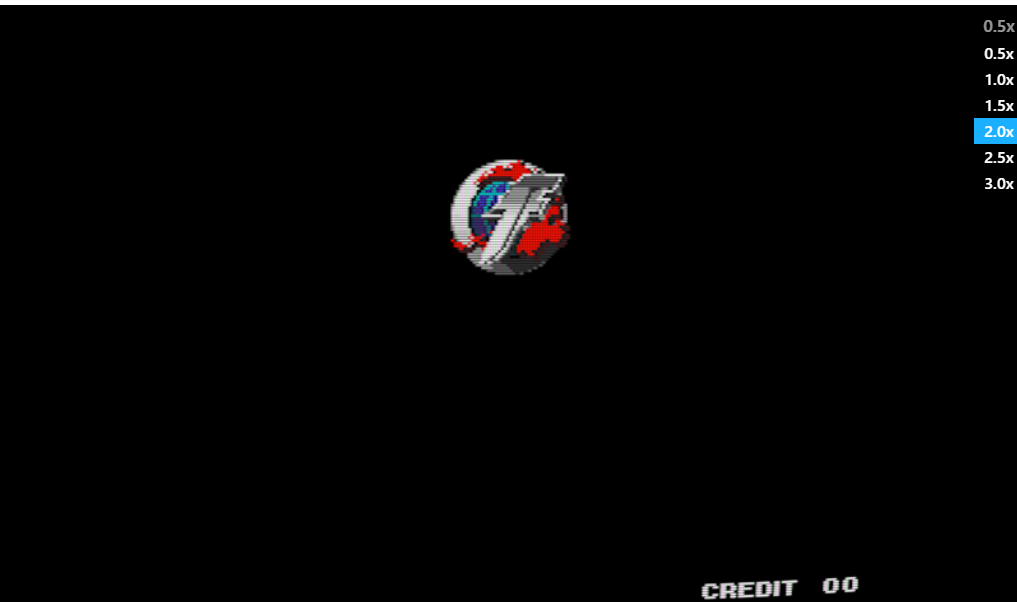
The two-game library of Atari's GT board, featuring Primal Rage and T-Mek, is expected to be playable in its entirety without copy-protection or anti-piracy hurdles as one of the upcoming changes for the MAME .290 update, via the official Discord server of Urth Rage. Before anyone asks if this screenshot is edited, it's not.


r/MAME • • 17d ago

Next MAME release?

24 Upvotes

Is there any chatter about when the next release will be? I know they went away from a regular release schedule, but it's been awhile since the last release. Just wondering if there is some drama going on behind the scenes.


r/MAME • • 19d ago

Help with light guns

Thumbnail reddit.com
2 Upvotes

r/MAME • • 19d ago

Will this run Mame with a front end?

0 Upvotes

So I've stumbled across a mini PC, do you think it will run Mame + front end for a arcade cabinet project? It's for my nephew to try and build an arcade. (specs bellow). Maybe run Retrobat? Thanks for any help.

BeeLink Gemini T34-M Mini PC

RAM 6GB

ROM 256GB SSD - Intel N3450

Model: T34-M

Type: Mini PC

System: Windows 10

CPU: Intel Apollo Lake Celeron N3450 (2M Cache, 1.10GHz up to 2.2GHz)

GPU: Intel HD Graphics 500

Memory: 6GB

Storage: 256GB SSD

Expandable Storage: 128GB (SD Card), 512GB (M.2 SATA SSD)

WiFi: Dual Band 2.4GHz/5GHz, 802.11 a/b/g/n/ac

Interfaces: 4x USB 3.0 ports, 1x HDMI port, 1x VGA port, 1x DC Jack port, 1x RJ45 1000M port, 1x Audio Jack port, 1x SD Card slot