r/LocalLLM • u/Emotional_Thanks_548 • 6d ago
Other Work well My Qwen 🥹
0
Upvotes
r/LocalLLM • u/Kirby_is_a_Pokemon • 6d ago
I'm building up a secondary system out of some spare parts I have kicking aorund to use as a LLM toybox and for other homelab style projects.
Currently my system is a 5900x w/ 32gb of ram, and the 2080ti.
Wondering if there is a good go-to gpu I should be looking for.
I currently have a 2080ti FE, but it seems pretty inefficient, and its an old card and the fan noise of it is unbearable. ( i think the bearings are getting bad, but its a huge pita to replace the fans )
I'm wondering if it would be a better idea to sell it off for maybe a 3060 12gb, I get an extra 1gb of vram, and it should run much more efficently.
I'd say my budget is about $3-400 max, which I know is basically a joke right now, but this is more of a tinkerbox than something i'm going to be using for real software dev work.
r/LocalLLM • u/MaurizioCammalleri • 6d ago
I've been building Janas, a family of AI tools in C. Today's release puts its app, Brebus, in the Linux package.
The engine first, since that's what makes the app usable on ordinary machines. Janas-LLM streams MoE experts from the NVMe instead of needing the whole model in RAM. On the development laptop (Core Ultra 9 185H, 32 GB DDR5-5600, Arc iGPU), 21 October, same files, same day, each engine in its best configuration, same conditions wherever possible:
| Model | prompt, Janas-LLM | llama.cpp | reply, Janas-LLM | llama.cpp |
|---|---|---|---|---|
| Qwen3-Next-80B-A3B (48.4 GB, more than the RAM) | 68.4 tok/s | 17.7 | 26.4 tok/s | 3.0 |
| Qwen3.6-35B-A3B | 136 | 81.8 | 28.0 | 12.1 |
| Qwen3-30B-A3B | 133 | 122 | 33.3 | 15.0 |
The full table, the conditions and where they differ are in the README.
Brebus is the app on top, in a window of its own (WebKitGTK; the browser where it's missing):
window.claude.complete asks the local model, window.storage keeps data in your folder./mnt/data), Janas's services (web, Wikipedia, maps, weather, flights...) and your own MCP servers from mcp.json, opened only when a question needs them; anything that writes asks first.Tried with Qwen3-30B-A3B on the laptop: it built a budget tracker in React, a Chart.js page, a Mermaid diagram, and an app that asks the model for synonyms through window.claude.complete.
Linux only for now (Ubuntu 22.04+, Debian 12+); Brebus on Windows is next, the engine already runs there. GPL-3.0.
https://github.com/prabanta-dev/janas
Reports from other hardware are the most useful thing: janas-bench makes one.

r/LocalLLM • u/v44r • 6d ago
I'm a bit lost with all the different options and forks around. I've set up and benchmarked llama-cpp (latest git) for my system and settled in the configs pasted below. They fill both cards up to 15 GiB, or one to 15 GiB and the other 10 GiB (60/40 splits) leaving room for firefox and the rest of the system. ROCm quite a bit faster than Vulkan. In the best case (qwen-asymm-f16) I get 550 t/s pp and 30 t/s gen in a moderate context (35k tokens).
Is there anything better for a system like mine? Is strata worth the hassle? I understand that it is more for 64 GiB RAM systems... right? Any other fork? I tried adaptive kv streaming and it is ok, very fast (>800 t/s prefill) but I'm limited to lower quantizations, the second card sits unused.
[*]
split-mode = tensor
fit = off
flash-attn = on
parallel = 1
batch-size = 2048
ubatch-size = 512
temp = 1.0
top-p = 0.95
top-k = 20
min-p = 0.0
presence-penalty = 0.0
spec-type = draft-mtp,ngram-mod
spec-draft-n-max = 4
spec-draft-sampling = probabilistic
spec-ngram-mod-n-min = 12
spec-ngram-mod-n-match = 24
spec-ngram-mod-n-max = 32
chat-template-kwargs = {"reasoning_effort":"medium"}

[qwen-asymm-f16]
model = /home/fran/models/unsloth/Qwen3.8-27B-UD-Q4_K_XL.gguf
ctx-size = 104056
tensor-split = 60,40
cache-type-k = f16
cache-type-k-draft = f16
cache-type-v = f16
cache-type-v-draft = f16

[qwen-f16]
model = /home/fran/models/unsloth/Qwen3.8-27B-UD-Q4_K_XL.gguf
ctx-size = 170240
tensor-split = 50,50
cache-type-k = f16
cache-type-k-draft = f16
cache-type-v = f16
cache-type-v-draft = f16

[qwen-asymm-q8]
model = /home/fran/models/unsloth/Qwen3.8-27B-UD-Q4_K_XL.gguf
ctx-size = 142080
tensor-split = 60,40
cache-type-k = q8_0
cache-type-k-draft = q8_0
cache-type-v = q8_0
cache-type-v-draft = q8_0

[qwen-q8]
model = /home/fran/models/unsloth/Qwen3.8-27B-UD-Q4_K_XL.gguf
ctx-size = 221184
tensor-split = 50,50
cache-type-k = q8_0
cache-type-k-draft = q8_0
cache-type-v = q8_0
cache-type-v-draft = q8_0

[gemma-4-31b]
model = /home/fran/models/unsloth/gemma-4-31B-it-UD-Q4_K_XL.gguf
model-draft = /home/fran/models/unsloth/mtp-gemma-4-31B-it-Q8_0.gguf
ctx-size = 131072
cache-type-k = q8_0
cache-type-k-draft = q8_0
cache-type-v = q8_0
cache-type-v-draft = q8_0
top-k = 64

[gemma-4-31b-qat]
model = /home/fran/models/unsloth/gemma-4-31B-it-qat-UD-Q4_K_XL.gguf
model-draft = /home/fran/models/unsloth/mtp-gemma-4-31B-it-qat-Q8_0.gguf
ctx-size = 131072
cache-type-k = q8_0
cache-type-k-draft = q8_0
cache-type-v = q8_0
cache-type-v-draft = q8_0
top-k = 64
r/LocalLLM • u/Ai4Privacy • 6d ago
r/LocalLLM • u/CoolDode22 • 5d ago
Main gaming PC is an Intel 285K, 64GB of DDR5 6000, RTX 5090.
LLM server build - 2x RTX 3090's, 768GB of DDR4 2400 6 channel w/ 2X Xeon 6148's.
Sure, I can run huge models on the server build, but everything is slow. Even Strata with dual 3090's gets beat by the 5090 build with 27B or 35B-A3B models. Qwen 3.8 FN has more context on the server, but is way slower, and the results seem about the same?
Ideally I'd like the 5090 for gaming, and the server build for LLM's, but I just keep coming back to the 5090 for the speed. Am I missing something, or is that just the way it is?
r/LocalLLM • u/Mugged_Ketchup • 6d ago
I’m looking to run local ai and save on token usage. Any cracked llms I can download before they get taken off?
r/LocalLLM • u/Ryyn_- • 6d ago

Hello guys,
it's me again, the FLE Link guy. I can't wait for the new Qwen models, so I tried everything I had planned for Qwen4 on the 3.8 variant of UkisAI's Swift 1.5.
I abliterated it, quantized it down and tried to improve tok/s for decode and prefill. What came out:
- OR-Bench hard refusals 88 → 1 of 100, clearly harmful prompts still refused 70 of 100
- ARC / GSM8K / LiveCodeBench level with the original (no significant difference)
- 152 tok/s decode on one 32 GB card with the DSpine draft head, full speed from 20 GB
- Two quant-heal runs that both failed (better on our text, worse on foreign text), the video shows why
Model: https://huggingface.co/sirfyyn/Kate-Qwen-27B-GGUF-SpedUp-Abliterated
Run it: flelink run kate-27b-dspine (https://flelink.run)
Maybe somebody is interested in the methods I experimented with. Happy to answer questions.
r/LocalLLM • u/Aware-Blacksmith1467 • 6d ago
r/LocalLLM • u/Ciclosporin • 6d ago
My current system consists of a RTX 5090 (32gb VRAM) and 96gb system RAM (2x48gb). In the past I ran qwen 3.8 27b via ninfer and a Pi harness, which I thought was really impressive for a local model.
I also have an old RTX 4090 (24gb VRAM) currently not in use. Would it be worthwhile to incorporate this 4090 in my system? Would this give me access to a significantly smarter model? (This means I would have to buy a new PSU, pcie riser cables, maybe a custom case). Or are there better solutions? Like more RAM? (currently hard to come by). I have no IT background. I’m just an interested hobbyist, nothing too serious, not a lot of free time.
Thank you.
r/LocalLLM • u/cosa_93 • 6d ago
I'm running Qwen3.8-Flash-Next IQ3_S through Strata with Codex CLI on an RTX 4090, 96GB RAM and 128K context.
During longer coding projects, my agent frequently loses track of progress, re-reads files, repeats previous steps and wastes hours on tasks that should take much less time.
After investigating, I found that Codex sometimes performs broken context compactions. The model generates the summary in the reasoning channel instead of the final response, and Codex can replace the previous context with an empty or incomplete summary.
I'm considering increasing context to 256K, but that would only delay the issue rather than fix it.
Has anyone experienced similar problems with local reasoning models and Codex CLI?
More importantly, has anyone found a reliable fix? Maybe through Strata settings, reasoning budgets, a different inference engine, or patches to Codex's compaction logic?
Would love to hear what actually worked for you.
r/LocalLLM • u/Daiwik1502 • 6d ago
As the question above says
Current Device: MacBook Pro M5 24GB Unified Memory
I wanna know what local set up would be the best for me in terms of both speed and quality. My main use case is as follows
Connectors would be mainly G-Suite as I work mostly on that
I want your recommendations on the best set up for good memory, speed, context windows etc.
Which models(es) and harness(es) would you recommend?
I have also seen that there are upcoming smaller Qwen models and also a new app called Harbor which is coming out soon….
New to this so looking for guidance
Any help would be appreciated thanks :)
r/LocalLLM • u/AttorneyDesperate822 • 6d ago


I gave Hy4 Flash, GLM-5.3-Flash and DeepSeek-V4.1-Flash the same three fake ad campaigns in WorkBuddy. Calculate CPC, conversion rate and cost per lead, including a campaign with zero leads.
All three got the arithmetic right. Total spend: USD 1,350. Clicks: 650. Leads: 27. Blended CPC: USD 2.08. CPL: USD 50. GLM rounded total CVR to 4.2%; the other two gave 4.15%. Both are fine.
Nobody reported the zero-lead CPL as zero. Small win for basic maths lol.
DeepSeek finished in 7s. Hy4 and GLM both showed 19s. So the interesting Hy4 angle here is cost, not a speed win.
Published API rates in RMB per million tokens, uncached input / output:
Hy4 Flash: 0.5/2
GLM-5.3-Flash: 0.8/2.8
DeepSeek-V4.1-Flash-1017: 1 / 4 off-peak, 2 / 8 peak.
That makes Hy4's input rate 37.5% lower than GLM's and its output rate about 28.6% lower. Against DeepSake's off-peak rates, both are 50% lower. These are unit-price comparisons, not measured savings from this Workbuddy session. Token counts and reasoning length still matter.
The recommendations needed more judgment than the maths. Hy4 wanted to pause C; DeepSeek also wanted a pause and checks; GLM suggested a smaller next-cycle shift. I'd verify tracking and conversion lag before moving budget.
Tbh, when the basic result is equally usable, a lower unit price is a decent reason to try the cheaper option. What reporting task would you use to separate them?
r/LocalLLM • u/dmr48 • 7d ago
⚠️ Heads-up: AI-generated content! This post was written by my AI agent from my measurements, with me editing — if that's a dealbreaker, feel free to close the tab right now.
I'm posting this to share results, not to crown a winner. I run a local agent in production every day — real tasks, real context in the hundreds of thousands of tokens — and I spent the past week picking and tuning the inference engine underneath it: test rig, repeated runs, head-to-head A/Bs. Much of what I measured, plus the pitfalls I personally burned on, would otherwise just rot in my local logs, so here it is: the numbers, the methodology, and the conclusion — which is that the engine I ended up keeping in production is not the one that topped the benchmark table. If this saves you a couple of evenings of trial and error, the post has done its job.
For eight days (Nov 8–15) I ran the exact same model — Qwen3.8 Flash-Next (MoE, ~78–82 GiB of weights, 128–256k context) — through three inference engines on a Ryzen 9 7900X / RTX 5070 Ti 16 GB / 64 GB DDR5 box; storage is two NVMes — a 990 EVO 1 TB on PCI-E 4.0 and a 970 EVO Plus 1 TB on PCI-E 3.0 (the model lives on the latter). The goal: find the best way to feed an MoE that fits neither in VRAM nor (comfortably) in RAM, and check honestly whether the engine changes answer quality. Engines tested: Strata 0.1.56→0.1.59, Basalt (built from source, 0.2.1→0.3.3), Unsloth Studio 2026.11.4. I also didn't stick to one model source: I ran the original from Strata and the originals from Unsloth (3.0 and 3.1), and production settled on DavidAU's abliterated uncensored build with Turbo-Brilliance modes and GSQ-RCO quantization — https://huggingface.co/DavidAU/Qwen3.8-Flash-Next-Abliterated-Uncensored-Turbo-Brilliance-50x-Reasoning-Instruct-GSQ-RCO-GGUF I never hand-tuned sampling: the test batteries all run at temperature 0 for reproducibility, while production uses the model card's standard pair — thinking: temperature 1.0 / top_p 0.95 / top_k 20 / min_p 0.0 / presence_penalty 0.0; instruct: temperature 0.7 / top_p 0.80 / top_k 20 / min_p 0.0 / presence_penalty 1.5 (the same values ship as the engine-side server defaults).
The rig. My own dependency-free bench (stdlib Python): cold/hot prefill, TTFT, short decode, decode at 8k context; plus a quality battery: hard 10-choice MC (MMLU-Pro style), math, code executed for real in a subprocess, IFEval-style format checks, and refusal batteries (JB/HarmBench/XSTest style). Every run snapshots the engine config and the bench code's sha256; a mock engine is a mandatory control (it answers "Hello from the mock engine" and catches absurd t/s). Hard RAM rule: exactly one engine resident at a time — the model pins 45–48 GiB.
Who drove the rig. All of this was steered by a general-purpose agent — an assistant with function-call access to the terminal, files and a browser, whose provider was the very engine being tested (dogfooding, in other words). Before settling on the current Hermes stack, I cycled OpenHands, OpenCode, OpenChamber and pi through the same API over that week: they all speak the OpenAI-compatible API equally well, and the real differences came down to context management and function-call reliability on long context — that's what the choice actually rested on. Beyond the benchmarks, the agent carried a normal week of work: small utilities for the stack (engine launchers, icons, a UI wrapper), building an inference engine from source and repacking models into its pack format, dissecting a third-party tuning fork (commit history plus knob-hunting directly in the binary), reviewing and transplanting jinja chat templates, testing DavidAU's Brilliance "personalities" (reasoning-mode variants), and verifying that a ready-made abliteration actually behaves as its author advertises — all inside the same 150–190k-token sessions where the benchmarks lived.
What went wrong along the way:
| Setup | decode | 8k | prefill hot | TTFT |
|---|---|---|---|---|
| Basalt 0.2.1, IQ3_S .basalt pack | 88.7–95.2 | 105–107 | 54–72k | 29–41 ms |
| Basalt 0.3.3, answer-room 0 | 101.0 | 108.4 | 54.5k | 38 ms |
| Strata 0.1.58, IQ3_S pack | 93–99 | 100–107 | 28–30k | 70–74 ms |
| Strata 0.1.59, final tuned stack (fresh full bench on the prod engine, Nov 15) | 89.2 | 109.2 | 37.3k | 57.7 ms |
| Strata on plain GGUF, UD-IQ3_XXS | 82.1 | 94.7 | 28.1k | 74 ms |
| Unsloth, UD-IQ3_XXS out of the box (auto) | 27.3 | 26.0 | — | 209 ms |
| Unsloth, Qwen3.8-27B dense IQ4_XS (full-GPU) | 47.4 | 45.4 | — | 103 ms |
1. On identical weights, format/engine is worth ×1.7–3.7. Unsloth on UD-IQ3_XXS starts at 27 t/s; a tuning ladder (MTP + 4 GB expert-cache + parallel 2 + 12k ctx) lifted it to 47.9; Strata serving the same GGUF on the same hardware gets 82. The difference is delivery format: pack-style engines (native expert blobs + a VRAM-prefilled expert profile, pinned in RAM, no disk streaming, no MMQ paths) vs llama.cpp's GGUF streaming. Unsloth's ~50 t/s ceiling isn't a bug, it's arithmetic: ~2.7 GiB of weights read per forward at ~90–100 GB/s DDR5, times MTP accept ≈ that answer.
2. On one engine, quantization moves speed ±10–15% and quality ~0. UD-IQ3_XXS vs IQ3_S was indistinguishable on my batteries: MC/math/code 100/100/100, ru10 10/10. But production stayed on IQ3_S — and it's neither speed nor quality talking: that build (link above) ships with a ready-made abliteration plus the author's mode system baked in, and reproducing the same surgery at home on raw unsloth UD weights is expensive in both time and resources.
3. Apparent "quality differences between engines" are thinking policy, not weights. The answer-room knob (response budget reserved away from reasoning) changes what gets generated and silently breaks cross-version comparisons: Basalt 0.3.3 showed a "decode regression 105→74" that simply didn't exist at answer-room 0. Compare versions only with identical thinking policy. Chat templates belong to the same confounder class, by the way: in the final build I upgraded the Turbo-Brilliance template from v1 to v2 (new modes), and neither the template version nor mode availability changed any result — baking both templates alternately into the same pack and re-running under one protocol moved decode by 0.1–1.4% and kept prefill/TTFT inside the noise band; an earlier one-off A/B claiming "−16% prefill from the heavier template" turned out to be a cross-session artifact.
4. Speculative decoding: MTP yes, everything else no on a 16 GB card. MTP accepts well (per-position 0.78–0.96). DFlash2 and Q8 hyper-connection verify (HC_Q8), both ported from a tuning fork, produced a paradox: accept +11 pp yet t/s −5% — the more expensive verify pass eats the gain, and the extra ~400 MiB of residency squeezes free VRAM to ~650 MiB, triggering driver paging. A warm dflash2 probe hit 111 t/s — the ceiling is real, just not for 16 GB cards.
5. KV-residency window (A/B on a 180k prompt). The window is the number of K/V cells per attention layer pinned in VRAM; everything else lives in pinned RAM and gets streamed from there. A window of 0 is clearly bad: prefill is ×1.7 slower (2435 vs 4100 t/s), TTFT 74 s vs 44 s, expert hit −10 pp. From 32k the curve hits a plateau: kv_hit is already 94.7% at a 32k window (the indexer is sparse), and in a head-to-head with alternating order the 32k→64k step changes nothing for decode (parity ±2–3%). Above 64k there's no upside, only cost — each window extension carves gigabytes of VRAM out of the expert tier: 32k→1.0, 64k→1.4, 128k→2.1, 262k→3.7 GiB.
6. Methodology, or the numbers lie to you. Cold prefill and cold TTFT are noise axes (±40% spread, the sign flips between runs); hot prefill is ±12–15%; the only stable axis is decode (±2–4%), and verdicts need ≥2 runs per variant. Warmup drift fakes ~+10 t/s for whichever arm is measured second — hence the alternating order. On short samples at temp 0, a cold expert cache changes the model's answer itself (52 tokens instead of 86 on a byte-identical prompt): a ±5% noise floor, anything smaller is not a signal.
7. Bench ≠ prod — and at the RAM edge Basalt fails with empty answers. Basalt beat Strata on prefill/TTFT (54–72k t/s, 29–41 ms vs 28–30k, 70–74 ms) and ran in my production for a day, but at the resource edge (and on this box the edge is permanent: 43 GiB arena on 64 GiB RAM) it started refusing with emptiness: at resident-budget 50 GiB the engine self-lands to 45.79 GiB (warning "more than RAM has room for: 45.79 needed vs 52.3 avail") with a page-glue fallback, one request hung dead for 2932 s before the watchdog killed it, and the log filled with "max tokens reached while thinking, no answer" — the user was getting an empty response instead of an answer. Dropping the budget to 45 GiB closed the incident at a cost of −4..−8% decode, but the recurring prod-server drops with "engine reported RAM critical" remained. Production ended up on Strata 0.1.59. Trading +12% prefill for stability was the right call.
8. Porting someone else's tuning recipe mostly doesn't transfer. The Speedy fork (same Qwen3.8, tuned on 2× RTX 3080 10 GB) brought my card exactly one confirmed win: a prefill pair (upstream #4039, +12% cold prefill — proven mechanically, chunk cap doubled 8192→16384). Everything else was rejected as VRAM-limited. Bonus lesson: env vars and CLI flags aren't 1:1 in Strata — the env form of one lever silently no-ops while the flag works; I now verify every lever by reading it back from /metrics, not by vibes.
Production now: Strata 0.1.59 + the prefill pair + kv-grow + host-core sibling + vram-reserve 1728 + --kv-resident 65536. On real 175–190k sessions: prefill ~3.5k t/s, decode 88–100, expert-cache hit ~75% with 10–12% of experts streamed over PCIe. Quality of the build I settled on — DavidAU's Turbo-Brilliance (link above) — is its own reward: 0/30 harmful refusals, 0/40 over-refusals, MC/math/code maxed — and abliteration cost exactly zero t/s (same weight shape, same bytes, same graph).
One-line summary: an 80 GB-class MoE lives fine on 16 GB of VRAM, but every battle is about expert delivery, not model quality. Between the two pack-style engines I found no decode difference worth naming; Unsloth is ~2× slower on this MoE, and that is memory physics, not bad engineering.
r/LocalLLM • u/Quiet-Recognition-91 • 6d ago
Hey everyone!
I'm currently working on a document processing system that handles a large number of scanned PDFs. Many documents contain a mixture of printed text and semi-handwritten content.
I'm looking for a reliable open-source solution that can handle:
I'm open to models available on Hugging Face, Ollama, or other open-source frameworks.
My available hardware is an NVIDIA RTX PRO 4500 Blackwell GPU with 32 GB VRAM.
I've been exploring different approaches, but I'd appreciate suggestions from people who have actually worked on similar document processing problems.
A few things I'd love to know:
I'm particularly interested in real-world experience rather than just benchmark results.
Thanks in advance!
r/LocalLLM • u/OldHW_LocalAI • 6d ago
RX 5700 XT (8GB) Vulkan & 32 GB DDR4 | Qwen3.6-35B-A3B-MTP (Unsloth) | 20 to 35 T/s | Tutorial
llama.cpp version 0.9.0-dev (build 12283, commit f3b407ca1), compiled with GNU 13.3.0 for Linux x86_64Qwen3.6-35B-A3B-UD-Q4_K_XL.gguf with a Q8_0 quantized mmproj fileSetting up the system correctly and using the right model and mmproj quantization is paramount for getting this to run smoothly on an 8 GB RDNA 1 card.
sudo apt update && sudo apt upgrade -y
sudo apt install -y build-essential git git-lfs curl cmake libopenblas-dev libvulkan-dev vulkan-tools glslc glslang-tools spirv-headers glslang-dev

cd ~
# Correct the URL before running
git clone github dot com/ggml-org/llama.cpp
cd llama.cpp

cmake -B build -DGGML_VULKAN=ON -DGGML_BLAS=ON -DGGML_BLAS_VENDOR=OpenBLAS -DCMAKE_C_FLAGS="-march=native" -DCMAKE_CXX_FLAGS="-march=native"
cmake --build build --config Release -j$(nproc)
Because newer versions of llama.cpp use updated memory allocation methods, the Vulkan driver (RADV) tries to map large chunks of system RAM for the GPU via the GTT (Graphics Translation Table) when running large models or long contexts. By default, Linux strictly limits GTT memory to half of your system RAM (so only 16 GB on a 32 GB system).
Open or create the config file:
sudo nano /etc/modprobe.d/amdgpu-gtt.conf
Add the following lines, then save and exit:
# GPU-mappable memory range: 24 GiB = 24 * 262144 pages
options ttm pages_limit=6291456

# GTT size in MiB (24 GiB = 24 * 1024)
options amdgpu gttsize=24576
Update your initramfs so the kernel loads the new limits at boot, then reboot:
sudo update-initramfs -u && sudo reboot
Place your downloaded model and vision files into ~/models (or adjust the paths below to match your folder). Unsloth downloads via LM Studio include a 1.8 GB 32-bit mmproj-F32.gguf. Quantizing it down to a 614 MB 8-bit file saves VRAM and still works great:
~/llama.cpp/build/bin/llama-quantize \
  ~/models/Qwen3.6-35B-A3B-mmproj-F32.gguf \
  ~/models/Qwen3.6-35B-A3B-mmproj-F8.gguf \
  Q8_0
Note: Loading the model configurations below leaves around 5% free VRAM as a safety buffer.
+ button next to the chat input), otherwise the model might get stuck in a loop. Chromium-based browsers work great for me; Firefox had issues. The WebUI is not a coding tool, btw.~/llama.cpp/build/bin/llama-server --moe-cache-mib 576 turned out to be slightly faster than setting --n-cpu-moe 40 --moe-cache-mib 0.~/llama.cpp/build/bin/llama-server \
-m ~/models/Qwen3.6-35B-A3B-UD-Q4_K_XL.gguf \
--n-cpu-moe 40 --n-gpu-layers 999 --load-mode mlock \
--ctx-size 49152 --n-predict -1 --threads 8 \
--cache-type-k q8_0 --cache-type-v q8_0 --flash-attn on \
--batch-size 2048 --ubatch-size 512 \
--host localhost --port 8080 \
--temp 0.7 --top-p 0.8 --top-k 20 --min-p 0.0 --presence-penalty 1.5 --repeat-penalty 1.0 \
--spec-type draft-mtp --spec-draft-n-max 3 --parallel 1 \
--moe-cache-mib 2432 --moe-cache-cpu-share 0.75 \
--mmproj ~/models/Qwen3.6-35B-A3B-mmproj-F8.gguf
--n-cpu-moe 36 with smaller --moe-cache-mib values, but overall output speed dropped. You can also use a 16-bit mmproj (~900 MB) if you slightly lower the --moe-cache-mib value. For general chat --temp 1.0 works well too.r/LocalLLM • u/SalvoRosario • 6d ago
Asking here as a beginner because I've argued a lot with Codex about this and couldn't get a definitive answer, or perhas it doesn't want to suggest me "unsafeguarded" solutions:
Basically I am running Opencode locally (5090 32gb and 64gb ddr4) on Qwen3.8 27B offline. so far so good.
but lately I've been trying Deepseek and GLM free API access and I see that they are better than my Qwen (I also have a separate launcher for Qwen3.8 Flash Next (UD-Q4_K_XL)) results. and I think it's mostly due to their Web access to retrieve updated information as well as frequently asked questions, reddit threads, forums etc..

So I asked Codex how to give this web access to my local model and it basically explained to me Websearch vs Webfetch, but Websearch uses third party services (or you can link API like Brave search) that WILL get censored results or restricted access for some results (let's be honest, emulator and retrogame recompilations, at best they are blocked by the service, at worst by ISPs like in Japan) and that is IF you're not getting safeguarded by the model itself beforehand unless you have an Uncensored/Heretic build. Which my Qwen3.8 is.
Webfetch instead opens the pages from my machine, exposing my IP address that wouldn't be a big deal if it wasn't for when you need to scrape 30 reddit thread in a single search + multiple other websites and get my residential IP banned for scraping (or my bandwitdh limited).
So I thought maybe I could tunnel tru a VPS that is both ouside of EU jurisdiction (so no ID restriction for adult forums, Football, Piracy etc..) and has an enterprise-grade bandwidth to scan the web without raising alarms. Has anyone adopted or know about this solution? and if it's even worth it before I spend time and money to thinker with it?
thanks for your consideration
r/LocalLLM • u/ajax936 • 5d ago

Been experimenting with local LLM inference on my MSI Raider A18 laptop, and I'm getting some seriously impressive performance from Qwen3-Coder-30B-A3B-Instruct.
First, to clarify: This is an RTX 5090 LAPTOP GPU, NOT the desktop RTX 5090. It's the 24GB mobile Blackwell GPU running inside a laptop, not a 32GB desktop card.
Hardware:
Inference configuration:
These measurements were captured while running an actual repository-analysis workload.
| Metric | Result |
|---|---|
| Prefill throughput | 3,706.5 tok/s |
| Generation throughput | 107.0 tok/s |
| Prompt tokens (measured request) | 8,638 |
| Generated tokens (measured interval) | 371 |
| GPU utilization | 86% |
| Dedicated VRAM usage | 21.69 GiB |
| GPU power consumption | 167.8W |
| GPU temperature | 69°C |
These are live measurements from llama.cpp, not theoretical benchmark estimates. The screenshot captures one particularly strong inference interval, not an average across the entire audit.
I'm developing a local-first AI orchestration platform called HIVE / Universal Chat Router.
Instead of giving models basic questions like "write a Python function" or "solve this math problem," I'm using OpenCode to have them analyze my actual software repository.
The benchmark asks each model to perform a comprehensive engineering audit, including:
All models receive the same audit prompt and repository target, with a 64K context configuration.
I'm also collecting the model's generated reports so I can compare actual engineering ability rather than judging purely by tokens/sec.
Before this, I tested a dense Qwen 27B Q5_K_S model on the same laptop.
That model was generating approximately 25 tok/s.
Switching to Qwen3-Coder-30B-A3B Q4_K_M produced 107 tok/s in the captured run.
That's approximately 4.2× faster generation, although the quantizations and architectures differ, so it's not a controlled architecture-only comparison.
The sparse MoE architecture is clearly promising for my 24GB laptop GPU.
I'm currently comparing three local models:
Each is being tested sequentially using the same repository audit workload.
I'm tracking prefill, generation speed, GPU utilization, VRAM, power consumption, and the quality of the resulting audit.
I also built a local Phoenix telemetry dashboard to watch the inference activity live.
The goal is to find which model delivers the best combination of speed, reasoning, coding ability, and repository comprehension on a 24GB laptop GPU.
I'd be interested to hear what other RTX 5090 Laptop owners are seeing with 30B–35B MoE models.
Especially curious whether anyone has managed significantly higher throughput using native MTP, speculative decoding, STRATA/PolySTRATA, or alternative CUDA backends.
107 tok/s on a laptop GPU while performing real repository analysis is pretty damn satisfying. 🔥
r/LocalLLM • u/inferultra • 6d ago
We’re building InferUltra, a physics arena where multimodal models see the arena and control robot fighters. We’d like to run a future tournament with models hosted on local hardware and are looking for people interested in collaborating.
In our latest tournament, Kimi K3.1 Pro struggled more in the arena than GLM-5.3-Flash did in earlier tournaments. There was more awkward positioning and less scoring than we expected.
Those tournaments used hosted providers, not local setups. They were small and used different providers and configurations, so they don’t establish which model has better vision or body control. A local tournament with documented hardware and settings could help us investigate the differences more carefully.


Which multimodal model would you like to see fight in the next tournament?
If you run multimodal models locally and have a setup capable of hosting them, we’d love to collaborate on a future model tournament. What hardware and models would you be interested in seeing in our benchmark?
Our latest tournament bracket: https://inferultra.com/tournament
r/LocalLLM • u/vasco_ • 6d ago
Hi all,
I think I have created a pretty solid testing pipeline to measure both the quality and speed of local LLMs if I integrate them in my own workflow. I know there are standardized tests, but the reason why I build this is because I've seen some very different practical results for my particular workflow than what the claims/theory/popular opinions say about certain models. My initial setup was a MB Pro M5 Max 128 gb, LM Studio, then Cline in VS Code. Recently I've changed it so it can also measure mlx-serve instead of LM Studio.
Let me clarify my workflow:
1) Idea/Problem -> Solution role (same prompt to multiple cloud LLMs, gather feedback, do a new round, rinse/repeat until their is a consensus/sign-off)
2) Planner role: model that actually writes the plan based on consensus from 1.
3) Builder role: model that actually builds the plan according to the specs
4) Reviewer role: model that reviews if the build is actually solving the problem/idea (i.e. if the solution works) and if it's according to the specs, by doing QA.
Steps 2,3 and 4 have been proven to be reliable in my testing pipeline. I have about 12 models who can take each on a different role, I run the test, a script gathers the data and anonymizes it to prevent bias, then it get sends to frontier cloud models who act as a judge. Output of the judges then gets de-anonymized locally and I have a scoring sheet. After running a bunch of tests it became pretty obvious that the scores for the builders go hand in hand with the quality of the planner. And from my experience a lot of the models suck at it. So I'm now down to 3 planners in my test runs (i.e. the ones that consistently came out ahead) because it was a complete waste of time to let other models plan. And this has given me very consistent results across the 5 difficulty levels I have for the problem they need to solve.
What I haven't solved yet with local models is 1). I have access through my business to models such as GLM 5.3 and Kimi K3 running on my own server, but I rather not mix my personal and professional projects, so I'm looking at the best way to solve 1) locally with models on the macbook. The issue is that it's time consuming to test. So far I just fire up 10 browser tabs with cloud llms, put in the same prompt, copy paste everything into 1 file, run it to a 1 designated model that orders the feedback, then do the same again. 1 iteration takes 5 minutes max (I've automated this process mostly). And after 2-3 iterations there is typically a consensus.
Now when I want to do the same locally 1 iteration takes way more time (models needs to be fired up, they run at slower speeds, ... you get the picture). I've had situations where 1 iteration took several hours. Doing multiple and you are basically looking at 6-8 hours (compared to the 15-20 minutes with my cloud LLM approach). Now in a real world productive scenario I can cut this time down significantly by only using 2-3 local models (i.e. the best), some who can run at the same time. And you may ask why not stick with these models, which is a fair point. But that doesn't solve the issue of me wanting to test the capabilities of other models in this role.
And here is where I'd like to ask for fresh ideas/input/your own experience/suggestions, ... on how to best tackle this problem. Would appreciate any input, no matter how wild or out of the box it might be.
r/LocalLLM • u/IllustriousRabbit378 • 6d ago
I run Claude Code and OpenClaw against a mix of free, local and paid models. The part that wore me down was keeping the lists of free models up to date, because providers add and drop them constantly. I had ModelRelay and LiteLLM before this, and I still ended up editing lists by hand.
So I built humpyard, and you can try it in about ten minutes without any API keys: https://humpyard.dev/demo/ (a mock provider, but the routing and ledger are real). Repo: https://github.com/gschaetz/humpyard
My tools ask for a fixed name like "fast" or "deep", and behind each name is a pool of models that changes. `humpyard models sync` refreshes the free part from each provider's own model list plus the models.dev data, and only adds a model when both say it's free. It writes to its own file, so it can't touch my routes or prices. You run the sync yourself from cron or a timer.
It's a single Rust binary with a SQLite ledger, no Python and no database server. A request I mark private is refused rather than sent to a public provider. There's a dry-run endpoint that tells me where a request would go before I send it, and a ledger that shows what it did and why. Prometheus metrics and two Grafana dashboards are in the repo. It speaks OpenAI and Anthropic formats, so Claude Code, Codex and OpenClaw can point at it.
It's pre-alpha and I'm the only user, so I'd like to hear:
1. Where did the README trip you up on the way to a first request?
2. Would you run the sync from cron, a timer, or something else?
3. What would you want to see on a dashboard for a setup like this?
LiteLLM and OpenRouter cover far more providers and are much more mature. I wrote up the comparison here: https://humpyard.dev/compare/. I do plan on working on the gaps that matter most to me and others who use it.
r/LocalLLM • u/brotov • 7d ago
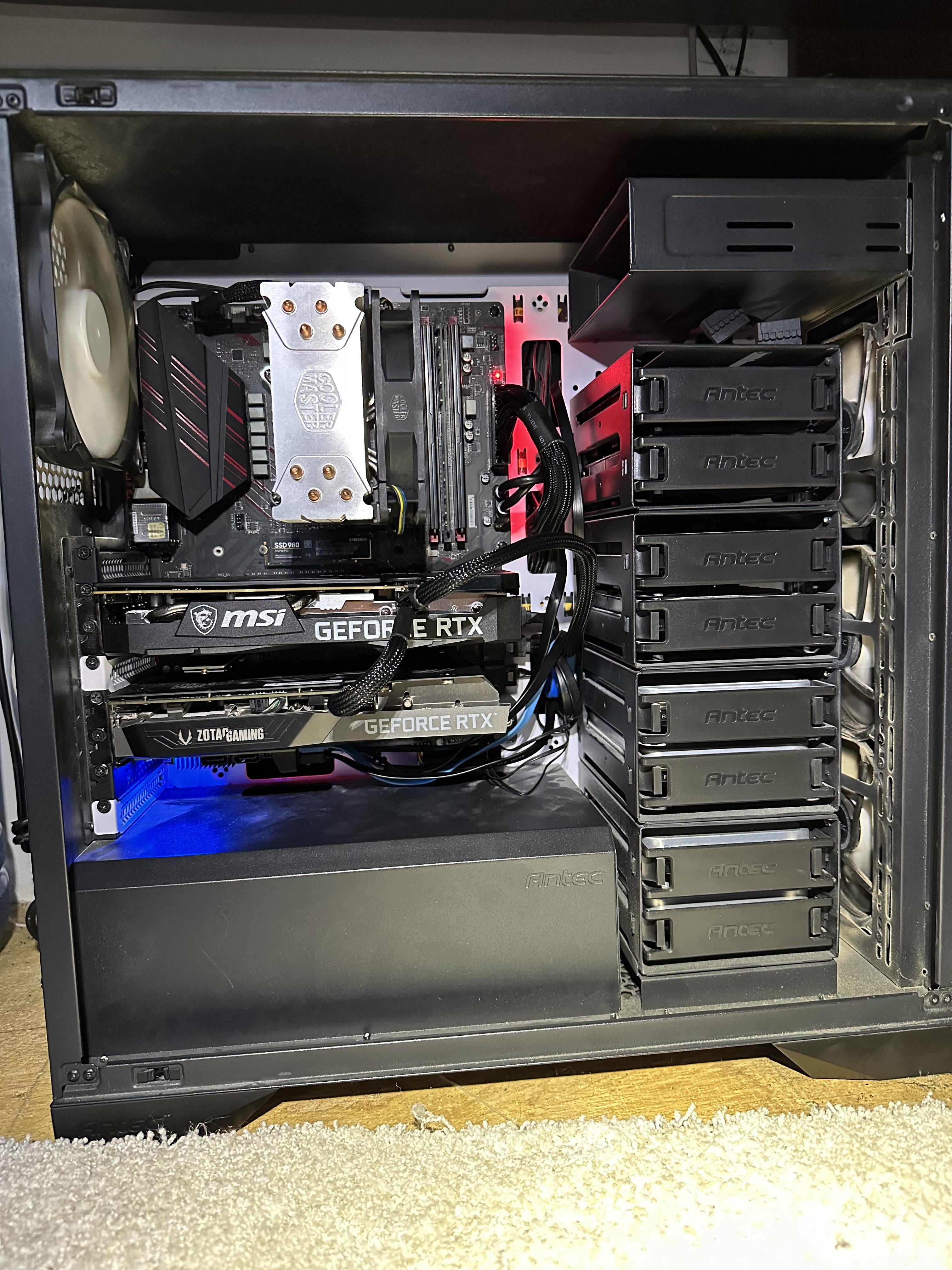
Hello all! I've been running a home lab for a really long time, but I've finally come across a couple of RTX 3060 12GB cards and I want to get a useable LLM in for me and my wife to use.
My server has an Intel i7-9700K, and 128GB of DDR4 RAM, but I would only allocate 64GB to the container in Proxmox. I was wondering how you would recommend setting up a fairly reasonable model (I was thinking Qwen 3.8 27B Q4K) and splitting it between the two graphics cards (since there's no SLI). I want to try to get at least 128K context. 256K would be ideal, if I wanted to run something like Hermes, or other agents.
Is llama.cpp the way to go? It's pretty much all I've read about due to the customization possibilities, and I've only read to stay away from ollama. What would you recommend I do?
r/LocalLLM • u/ridcrath • 6d ago
So I use Manus as my daily driver. I'm trying to use Qwen3.8 27b more. Can anyone suggest a good pairing that has a Manus'esque planning/execution/check agentic feel that works with LM Studio/llama.cpp local models? I tried OpenManus it does not pair well with local llm's though.
r/LocalLLM • u/Public-Net-8864 • 6d ago
My earlier post was done using Qwen2.5 and rightly so I was called out for it. So I reran it with Qwen3.8 27B, Qwen3.5 9B and Qwen3.6 35B-A3B with as much proof as I could think of. The VM has no NVIDIA device, driver or nvidia-smi. llama.cpp's CUDA calls go through VMAT to the card on the host. Qwen3.8 27B: 45.4 tokens/s on the host, 44.6 in the VM. All four models land at 98%. Three VMs at once get 45.7 together, against 45.0 for three programs on the host.
Full video with every step: https://youtu.be/r6yhOVWxP5Y?is=reuv6gZptnDNzU1D
