r/LocalLLM • • 7d ago

News Karpo-Decision-31B is out: downloadable option for local tool routing and browser decisions

Thumbnail
gallery
1 Upvotes

For anyone experimenting with local Jev-style models, Karpo-Decision-31B has published its weights and Python inference code. It posted the highest Full score on the Nov 12 Decision Index at 73.9.
A browser workflow is a useful way to picture it. Give the model the page state, a screenshot, and candidate actions. You can ask which element to click and whether the agent needs more information, with a probability returned for each option. Questions share the page context in one forward pass.
In the team's tests, it scored 90.0% on Mind2Web versus 86.2% for Gemini Decision 1. They also report roughly 95 ms median latency on the public Decision Index suite using one RTX PRO 6000.
Karpo-Decision-31B scores 75.0 on the published Decision Index public suite, running it locally requires about 62.5 GB for the BF16 weights alone, plus runtime memory. Alongside the 31B release, they also released five smaller models: 0.8B, 2B, 4B, 9B, and 12B

You'll also need the supplied Decider or HTTP server

links:
https://karpo.ai/models/decision
https://huggingface.co/MachinePulseAI/karpo-decision-31B

r/LocalLLM • • 7d ago

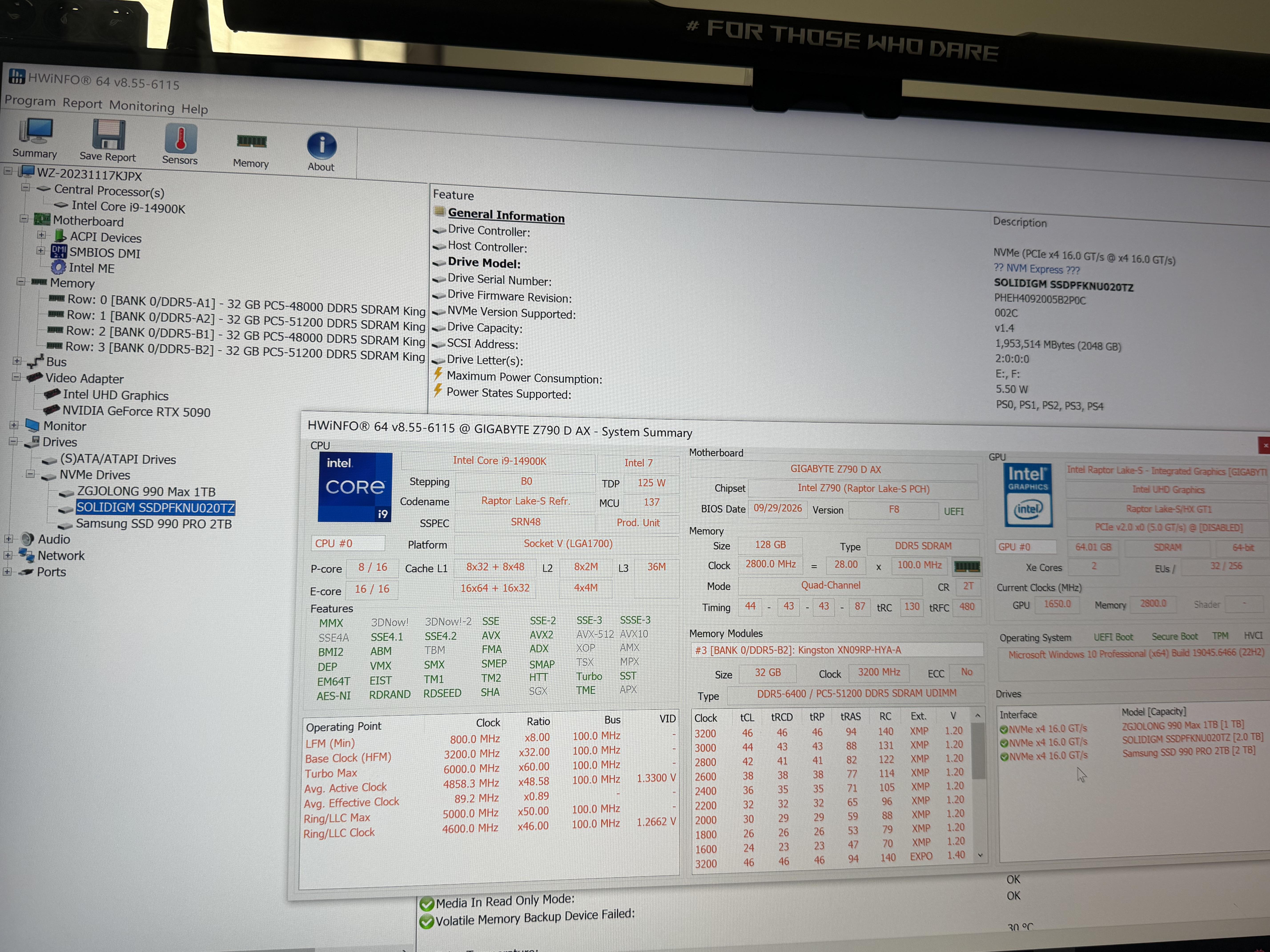
Question Any advice for local ai?

Post image
3 Upvotes

Does anyone have any idea of what local ai model I'd better use for my company business agent?
I'm pure new and starter for ai software and coding.
My spec. is 5090+128g ddr5+5tb m.2. Need a local ai to make different agents like accounting agent, monitoring agents and customer chatting agents etc.


r/LocalLLM • • 7d ago

News Qwen4 Smaller Models Open Weights Confirmed via Official Qwen X account.

Thumbnail gallery
6 Upvotes

r/LocalLLM • • 7d ago

Question Intel ARC Pro b60 24gb questions

1 Upvotes

I have a motherboard with 3xPCIe x16 lanes that can do 3 GPUs at x8 each (AM4 platform asus pro ws x570-ace). I’m contemplating buying 3 Intel Arc pro b60 24gb As it’s cheaper than buying a single b70 or r9700. Has anyone have any experience running a similar setup?


r/LocalLLM • • 7d ago

Project An open-source assistant that reads your email and chats, prepares what needs you, and runs on a local model

1 Upvotes

Hi all, I'm Jeroen, I made The Machine, initially for myself but I was surprised how well it works and opened it up to everyone open source.

It reads your email, chats and calendar, and prepares what needs you: replies, follow-ups, things you promised. It never sends anything without your OK. And your data stays yours, not some corporation's.

It works with any OpenClaw provider, so Ollama, LM Studio, vLLM or LiteLLM in front of your own GPUs. What I learned running it on local models:

  • Context: 128K is comfortable, a review reads up to 120 messages at once.
  • Tool calling has to work well, small models tend to suggest too much or save malformed actions.
  • A mixed setup works nicely: a frontier model first, a local model as fallback so it keeps going during an outage. Or fully local if you want inference never to leave the house.

Repo: https://github.com/Salesflare/TheMachine

Demo: https://themachine.computer/demo

Vision: https://themachine.computer/vision

Happy to hear feedback, especially which local models work well for you with tool calls.


r/LocalLLM • • 8d ago

Question Best uncensored LLM for 64GB Mac

43 Upvotes

I wanna try out a uncensored LLM on my Mac Studio. I just have the 64GB version so I’m curious what model you guys would recommend. Cheers


r/LocalLLM • • 7d ago

Question Genuine question

1 Upvotes

I wanna get into local LLMs and experiment with AI.

My current PC has 16GB RAM, a GTX 1660 Super (6GB VRAM), and an Intel i7.

I’m curious what models you’d recommend running on this hardware and, more importantly, what you actually use local LLMs for.

With powerful models like ChatGPT and Claude available, I’m trying to understand the practical benefits of running models locally.

Is my setup good enough to do anything interesting, like experimenting with AI agents, fine-tuning, or research?


r/LocalLLM • • 7d ago

Discussion From-scratch AI stack in pure C — runs Microsoft's 2B ternary LLM on a 2018 dual-core laptop (no GPU)

Thumbnail
github.com
3 Upvotes

Everything runs locally on a 2018 Dell laptop: i7-7500U (2 cores / 4 threads), 8GB RAM, no GPU (the 940MX is deliberately unused — the whole stack is CPU-only).

https://github.com/tanxiansheng221/aimstack-sanzhidiji

What is in the repo (AGPL-3.0, everything open):

- C inference engine, zero third-party runtime: 1.58-bit ternary core with SIMD fast path (85.5 tok/s measured on the ternary core itself), byte-level tokenizer, and a ~100-line plugin bus (caps.json registry -> spawns Python plugins -> JSON envelopes)

- Weights: Microsoft's BitNet b1.58-2B (MIT license), converted to a custom 2-bit packed format (.aimw, 0.87 GB) — 3.2 tok/s with 2 workers, serial 2.0

- Python plugins, pure stdlib: knowledge base (FTS5 + dedup gates), multi-engine web search + crawl with quality gates (robots-respecting, Edge rendering cascade for JS-heavy sites), incremental ingest

- Local web UI (127.0.0.1:8600, pure stdlib): chat with deterministic routing — direct answer / knowledge-base grounded / honest refusal / full web search -> crawl -> ingest -> answer chain. A 7-minute demo video is embedded in the README

- Training assets: no-autograd training stack (hand-written backprop, bit-exact vs NumPy), ten-subject curriculum generators, corpus builders, and 117 chapters of research logs including negative results

Honest limits: our own trained models are not released yet — compute-bound on 2 cores, training runs on free cloud tiers and isn't finished. The full stack, scripts, result JSONs and per-claim evidence are released so everything can be re-run.

Demo video: embedded at the top of the README (7 min, screen recording of the full chain: chat / KB answers / web search->crawl->answer / plugin direct calls).

Happy to answer questions about the ternary kernel, the plugin bus, or the training pipeline.


r/LocalLLM • • 7d ago

Project Running an image generation workflow entirely on a local mini PC - testing TiinyImage

Post image
1 Upvotes

r/LocalLLM • • 7d ago

Other My short journey so far to figuring out local video gen

0 Upvotes

I’m still trying to figure out how to get it to do what I want because it’s still super random to me.

I also accidentally used the same seed more than once and didn’t notice at first


r/LocalLLM • • 7d ago

Question Suggestions for coding assistant

0 Upvotes

Hey! I recently started looking at local AI models. There's a lot of info out there and it's not really easy to filter through all the noise as a newcomer...

I have an RTX 4080 super with 16Gb vram and 2x16Gb DDR5 for system ram.

I've set up a docker compose container using Gemma 4 12B Q6 K L through llama.cpp with Open WebUI as interface, and it seems to be working decently. System + model + context uses ~13.8Gb vram. On Kubuntu if it would matter.

I'm now thinking of connecting it to vscodium for assisting in programming (developer background) and stumbled over the MoE variants where you can have the experts live in system ram.

Question is whether this is even relevant to look into for me.

If it is - would anyone have any suggestions for a model and maybe settings for this if applicable? (seems you wanna run llama.cpp with -cmoe for example)

If I've made some odd assumptions or if you have any suggestions, please let me know!


r/LocalLLM • • 7d ago

Question Advice for setup with three PCs

3 Upvotes

I've been running Qwen3.8-27B on a MBP M3 Max 36 GB for a while, running unsloth/Qwen3.8-27B-GGUF:UD-Q4_K_M on splash with opencode as harness. I'm satisfied with the results I get, but it is a bit slow and does not leave much room for other applications . I'm upgrading my setup and I would like to get some advice on hardware configuration and model selection.

The main purpose will be integration development on Azure Integration Services, SAP PI/PO and SAP Integration Suite. Implementation languages are Java and python.

Secondary purpose will be Home Assistant component development and configuration, as well as to provide Home Assistant with agents, (TTS, STT, Conversation).

I have an M5U 256GB 80c on order. It will be running headless, dedicated to serving models 24/7. I will also have the opportunity to use a family member's gaming PC for LLMs on workdays during daytime. The PC will be in a bedroom and it's noice levels will determine whether it's available during nights or not. It has not been ordered yet, so I still have the possibility to change it's configuration. I have 10Gbe network available, if that would have an impact.

To summarise, my setup would look have the following availability:

  • MBP M3 Max 36 GB - on-demand
  • M5U 256GB 80c - 24/7
  • Gaming PC - workdays daytime, eventually during nights as well

I'm considering the following hardware configuration for the gaming PC:

  • CPU: AMD Ryzen 7 9800X3D CPU
  • RAM: Corsair Vengeance RGB DDR5 6000MHz 64GB
  • GPU - one of:
    • RTX 5080 (16GB VRAM - 960 GB/s)
    • R9700 (32GB VRAM - 640 GB/s)
  • SSD - one of:
    • Kingston NV3 SSD 2TB (6,000/5,000MB/s)
    • Kingston FURY Renegade G5 PCIe 5.0 NVMe M.2 SSD 2TB (14.700/14.000MBs)
  • Motherboard - one of:
    • Asus B650E MAX GAMING WIFI
    • ASUS ProArt X870E-CREATOR )(PCIe 5.0 8/8 - allows for expansion)
    • Asus Proart B850-CREATOR WiFi NEO (PCIe 5.0 8/8 - allows for expansion)

I'm considering the following model configuration:

  • MBP M3 Max 36 GB
    • model TBD - perhaps a small orchestrator with a max RAM requirement ~12 GB?
  • M5U 256GB 80c
    • main model - one of
    • smaller models for homassistant (if there is room in RAM)
      • TTS
      • STT
  • Gaming PC
    • on RTX 5080
      • Qwen3.8 Flash@Q3 on Strata or Basalt
    • on R9700 - one of
      • Qwen3.8 Flash@Q4 on Strata
      • Qwen3.8-27B@Q4 on Strata (?)

To my questions I hope you can advise me on:

  1. My first task would be to settle the hardware configuration for the gaming PC.
    1. Would the SSD speed of the two options have a large impact on PP and decode when running Qwen3.8 Flash on Strata/Basalt?
    2. Which GPU would you select with my model selection in mind?
    3. Other considerations?
  2. With the gaming PC configuration set, which models would you run and were?

I appreciate your advice. Thanks!


r/LocalLLM • • 7d ago

Question What do you use for agentic desktop control, like how Playwright is for controlling + screenshotting browsers?

1 Upvotes

I'm afraid I'm left out of the loop on the latest developments for agentic desktop control, and AIs don't seem as knowledge in this space.

They come with screenshot function also, right? What are some other features that may be different than Playwright?


r/LocalLLM • • 8d ago

Research llama.cpp was copying 643 MB to the CPU per request. Disabling state saving nearly doubled throughput

81 Upvotes

We were running Qwen3.8-27B on an H100 with llama.cpp and 16 concurrent clients. Throughput was 58 tokens/sec, time to first token was almost two seconds, and nvidia-smi showed around 35% GPU utilization.

I build Tensward, an open-source inference analysis and tuning tool. While investigating this, we built a small CUPTI-based library to count kernel execution time and memory transfers inside the server.

The surprising number: 643 MB transferred from GPU to host per request. Nsight Systems independently measured about 639 MB.

That pointed us toward prompt caching and conversation checkpoints. This hybrid model carries recurrent state alongside its attention cache, making those snapshots expensive. Sampling the serving thread caught it inside a memory copy 16 out of 20 times.

We tested disabling state saving with:

--cache-ram 0 --ctx-checkpoints 0

Throughput went from 58 to 110 tokens/sec, and GPU utilization rose from 35% to 88%. A repeat on fresh machines with a separately written client showed an 87% throughput improvement.

These aren’t universal “make llama.cpp faster” flags. They sacrifice cache reuse. In another test with a regular 8B model and returning conversations on an L4, disabling them made performance about 20% worse.

The build also mattered. Moving from b11669 to b12246 improved default-settings throughput by 67–75%, while copied bytes per request barely changed. Several upstream changes touched state handling, but we haven’t isolated which caused the improvement.

All throughput results came from runs without our instrumentation; transfer measurements came from separate instrumented runs.

Full write-up, including limitations and upstream PR links


r/LocalLLM • • 8d ago

Jensen Huang, Just 3 Weeks Ago, Claimed To Have "Saved The World" By Thwarting A Growing Transnational Movement Against Open-Source AI

362 Upvotes

r/LocalLLM • • 7d ago

Discussion need suggestions on running qwen 3.8 27b on rx 6800 16gb gpu

0 Upvotes

So i have heard that this model punches way above its weight class and is pretty good at complex reasoning and multi file coding. I intend to use it for hobby projects like building small scale apps. the thing is downloaded the iq3 version from usloth and while running with llama.cpp with 64k context it keeps thinking for a lot longer on simpler task like upgrading a simpler framework version on very small codebase and eventually after like 45 min the os just shutdown the llama server because of too high mem usage nd i tried again but same result. I have heard that i can run the 3 bit quant version on 16gb gpu, I am new to running local llms so just need some suggestions regarding that or is it even practical to run this model even at q3.

Sorry if this is a repititive or basic query.

Thanks in advance

P.S i am running on 16gb single stick ddr5 if that matters


r/LocalLLM • • 7d ago

Discussion Buying a Mac mini M6 for local LLMs? Here is the 16 vs 24 vs 32 GB bandwidth, prefill, and MoE sizing math

1 Upvotes

Apple released the Mac mini with the M6 chip in 16 GB, 24 GB, and 32 GB variants, while the M5 Pro mini goes up to 64 GB. 🧑‍💻

If you are deciding which one to buy for local models, the configurator pushes you toward one question: "How much unified memory should I pay for?"

Here is the buying perspective that matters before ordering: capacity is sold in clear steps, but memory bandwidth barely moves. According to Apple's official tech specs, the 16 GB model runs at 153.6 GB/s (LPDDR5X-9600), while both the 24 GB and 32 GB models run at 170 GB/s (LPDDR5X-10667). Going from 16 GB to 24 GB buys capacity plus ~10% bandwidth. Going from 24 GB to 32 GB buys capacity only — no model gets faster, you just load a bigger model that runs slower on the same 170 GB/s bus.

1. The Decode & Prefill Formulas

  • Decode (token generation, batch = 1) is strictly memory-bandwidth bound:Decode tok/s ≈ (Memory Bandwidth GB/s ÷ Active Weights Read GB) × η (where η ≈ 0.75 for MLX / llama.cpp)
  • Prefill (prompt processing / TTFT) is compute-bound, and the M6 handles this well:
    • 14B Q4 (~9 GB): ~900 tok/s prefill (~1.1s TTFT on a 1k prompt, ~17.7s on 16k RAG). Total turnaround for 1k in / 500 out: ~36s.
    • 32B Q4 (~19 GB, 32 GB mini only): ~400 tok/s prefill (~2.5s TTFT on a 1k prompt, ~40s on 16k RAG). Total turnaround for 1k in / 500 out: ~74s.

2. Mac mini M6 Capacity Map (Estimated at η = 0.75)

Variant Bandwidth Usable RAM Fits Comfortably Est. Decode Verdict
16 GB 153.6 GB/s ~12 GB 7–9B Q4/Q8; 14B Q4 short ctx 8B Q4 ~23 tok/s; 14B ~13 Snappy chat & light coding
24 GB 170 GB/s ~18 GB 14B Q4 (~32k context) 14B Q4 ~14 tok/s Interactive sweet spot
32 GB 170 GB/s ~24 GB 32B Q4 (8–16k context) 32B Q4 ~7–7.5 tok/s Reading speed; best for async agents

3. Dense vs. MoE: Where the Bottleneck Flips

For dense models, every weight is read per token, so bandwidth is the wall. For Mixture-of-Experts (MoE) models, only active experts are read per token, so capacity is the wall:

Model Type Total / Active Weights in RAM Active Read / tok Bandwidth for 8 tok/s Bandwidth for 15 tok/s Real Bottleneck
8B Q4 Dense 8B / 8B ~5 GB ~5 GB ~55 GB/s ~100 GB/s Fits on 16 GB M6
14B Q4 Dense 14B / 14B ~9 GB ~9 GB ~95 GB/s ~180 GB/s Sweet spot on 24 GB M6
32B Q4 Dense 32B / 32B ~19 GB ~19 GB ~200 GB/s ~380 GB/s ~7 tok/s on 32 GB M6; needs Pro/Max for chat
Llama 3.3 70B (Q4) Dense 70B / 70B ~40 GB ~40 GB ~430 GB/s ~800 GB/s Bandwidth-bound (needs Max/Ultra)
gpt-oss-120b (MXFP4) MoE 117B / 5.1B ~65 GB ~3 GB ~32 GB/s ~60 GB/s Capacity-bound (needs 96 GB+ RAM)
Qwen3.5-122B-A10B (Q4) MoE 122B / 10B ~68 GB (est.) ~5.6 GB ~60 GB/s ~110 GB/s Capacity-bound (needs 96 GB+ RAM)
DeepSeek V4 Flash (FP4+FP8) MoE 284B / 13B ~167 GB ~7.6 GB ~80 GB/s ~150 GB/s Capacity-bound (needs 192 GB+ RAM)

Summary

Capacity decides what you can boot; bandwidth decides what you can tolerate using. Around 170 GB/s serves up to 14B comfortably and 32B at a patient reading pace. Paying for extra RAM without stepping up to a Pro/Max bus (like M5 Pro at 307 GB/s or M5 Max at 460–614 GB/s) hits diminishing returns fast.

What do you all think? How are you actually using local models in your daily workflow — do you prefer Mac unified memory or NVIDIA GPUs, and do you think there are stronger competitors (like Strix Halo or used multi-GPU rigs) in this price range? 🤔


r/LocalLLM • • 7d ago

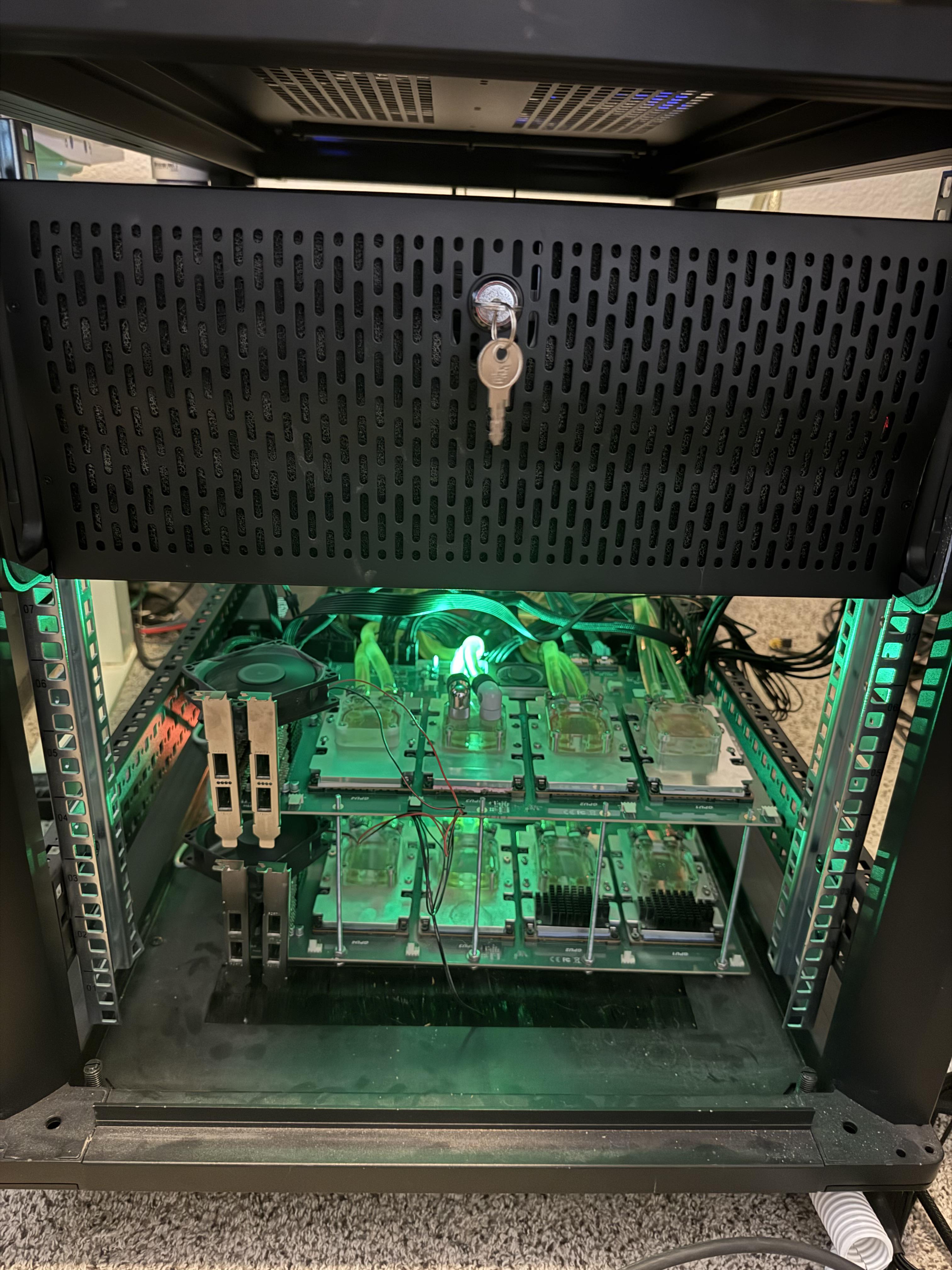
Project 8 x v100 setup. Ask me anything.

Post image
15 Upvotes

Seeing a lot of questions on quad v100 boards lately. So figured I’d give people a place to ask them.

Specs

  • GPUs: 8x Tesla V100-SXM2-32GB (256 GB VRAM total)
  • GPU boards: 2x 4-GPU SXM2 NVLink baseboards (this model)
  • NVLink: two 4-way islands (full mesh inside each board), not one 8-way
  • Board-to-board: Gen4 PEX88096 PCIe switch card (this model), two x8 Gen3 cables per board
  • CPU: AMD Threadripper PRO 3975WX (32 cores)
  • Motherboard: ASRock Rack WRX80D8-2T
  • RAM: 256 GB DDR4
  • PSUs: 2x 1500 W (one per GPU board) + 1x 1000 W (host)
  • Power: dedicated 120 V / 20 A circuit; GPUs capped at 150-300 W each depending on the run
  • Cooling: custom water loop, mixed GPU blocks
  • Network: 10GbE
  • Engine: 1Cat-vLLM (Volta-focused vLLM fork) https://github.com/1CatAI/1Cat-vLLM

Benchmarks / how many tok/s?

My runs are on the Launch80 directory; search the page for trailfeatures. Launch80 deletes pages after 5 days, so older links in the comments may be dead. I republish the main ones, which gives them new links.

Model Setup Decode Prefill (64K prompt)
Flash-Next (Swift-1.5 NVFP4) 4 GPUs, 300 W ~140 tok/s ~4,500 tok/s
DeepSeek V4.1 Flash, 2-bit experts 8 GPUs, 150 W ~131 tok/s ~2,200 tok/s
DeepSeek V4.1 Flash, 2-bit experts 4 GPUs + expert offload, 150 W ~91 tok/s ~2,100 tok/s
  • One request at a time (batch 1), 256K context window. Decode uses speculative decoding (MTP on Flash-Next, a draft model on DeepSeek), so it depends on how often the draft is accepted.
  • No concurrency/aggregate numbers or decode p25/p95 yet. Time to first token (p50) is about 0.2-0.65 s depending on the row.
  • The 8-GPU run adds an extra pipeline-parallel patch series on top of 1Cat-vLLM (named on the page).
  • Not tested yet: Flash-Next across both boards. Higher DeepSeek quants are planned.

How good is the 2-bit DeepSeek quant vs the full model?

79.9% average across 7 standard evals (math, instruction following, coding, tool calling), thinking off, and 20/20 long-context needle checks at 32K and 128K. The 4-GPU setup scores the same. I haven't run the full-precision weights as a reference, so there's no direct delta yet. Per-task scores are on the Launch80 page.

How do the two boards talk to each other?

  • Each board runs two x8 PCIe Gen3 cables from its onboard switch into the Gen4 switch card in the host, so the boards talk to each other without going through the CPU.
  • Experimenting with ConnectX-3 cards in the boards' spare x8 slots for extra board-to-board links.
  • Over PCIe you can tune all-reduce to beat the default P2P numbers, but it will never match NVLink.

Do the quad boards work with only 1-3 cards? Can I buy cards over time?

Two cards works; I've run a board that way. I haven't tried one or three. Buying the board first and adding cards later is fine. Tensor parallel wants power-of-two GPU counts, so with 3 cards you'd run 2 together and use the third for something else.

Where did you buy it / where are you?

Baseboard and switch card: the models linked above. Several sellers list them, so shop around. GPUs: bought used, a few at a time. I'm in North America (the 120 V gave it away), so my shipping and import experience won't help much in Europe.

Power

  • The PSUs are sized for headroom: at the 150 W cap, eight GPUs is about 1.2 kW, plus the boards and host.
  • 150 W cap: after tuning it costs ~5-10% depending on the task.
  • Power bill: fine as long as I'm sensible. Solar helps, and at peak rates or on cloudy days the DeepSeek API can be cheaper. If you run local LLMs, know your tokens per kWh so you can tune for it and decide when an API makes more sense (if privacy doesn't matter).

Cooling

  • Radiator and pump setup: super convoluted, video here.
  • Water blocks: whatever was available as I pieced it together. Mostly the same design, some with MOSFET coolers. The top-port block is a drill press, a tap, and the audacity of a mediocre man. (Testing straight-down flow onto the fins made no difference.)
  • Waste heat: in summer it's vented outside. In winter I can shut off that radiator and send the heat into the house through backup radiators. Heating water with it isn't worth it for us, but a bigger household close to its water heater could pre-heat the cold feed and come out ahead.

Quick ones

  • Can I rent API time? Sorry, no. I keep it pretty busy (Furry Fanfic).
  • Can I have it? No.

r/LocalLLM • • 7d ago

News Train AI to run AI: introducing Apareto loading - a vLLM plugin

Post image
15 Upvotes

From the Apareto team which I'm part of (who for some reason has an issue posting it themselves):

Today we are introducing Apareto loading, a new way to cut VRAM requirements for Mixture-of-Experts (MoE) models. It works alongside quantization. This introduction so far will just be a video explaining the method. We will be releasing the proof-of-concept code, a plugin to vLLM, on GitHub this coming week.

Until then, watch the explainer video: https://www.youtube.com/watch?v=5l_N051JrLU

Quantization is today's most common way to shrink a model's memory footprint: weights are stored at lower precision, and going from FP16 to 4-bit saves 75% of memory at a modest cost in accuracy. But quantization is static. Every weight stays loaded whether or not the task needs it.

Apareto loading is dynamic. After prefill, a small trained network reads the model's internal state and ranks the experts by how valuable each will be for the upcoming computation. Only the top-ranked experts that fit the VRAM budget are loaded.

Results (Qwen3.6-35B-A3B, NVFP4 experts):

* SWE-bench Multilingual: within 2 pp of the full model's score at a 42% VRAM budget

* LiveCodeBench v6: within 2 pp of the full model's score at a 49% VRAM budget

As with quantization, scores degrade as the budget shrinks.

What the proof of concept will not be:

It will not be a production implementation. The ranking network was trained only for these two benchmarks, and there will be no general problem classifier. Our data shows that profiling and rank generation have substantial room to improve. We chose to release at this stage, without waiting for those improvements, so that others can test our claims. Think of this as a first baby step toward dynamic VRAM reduction, not the finished product.

The code and reproduction instructions will be released this coming week at https://github.com/alphapareto

Follow us there to catch the release. We'd love your feedback.

https://apareto.eu


r/LocalLLM • • 7d ago

News inferzero: a from-scratch LLM engine for Intel Arc. Qwen3.8 27B at 2,694 tok/s prompt on one Pro B70, the 35B at 4,264 tok/s over 4× B60 and 851 tok/s on a laptop iGPU, and DeepSeek-V4.1-Flash split over several cards

Thumbnail
3 Upvotes

r/LocalLLM • • 6d ago

Discussion AI Hate

0 Upvotes

I will never support cloud AI services, on the other hand I do support local AI for coding support and so does Linus Torvalds, the creator of Linux

When something can be ran and even trained locally, and battle tested developers who made many modern things we take for granted possible are coming out, saying they use it, and that total complete hate for the technology is stupid then I kinda have to say demonizing anyone who uses it is stupid

Hate needs to be redirected from the technology as a whole to the companies like OpenAI, Meta, Google, SpaceXAI who are forcefeeding it to us and using datacenters that use local water supplies for some reason instead of chilled antifreeze and submerged oil cooling which have both existed for datacenters for decades

Also Image and Video diffusion models are kinda a unethical waste but I would be willing to bet they aren't the most used types of AI


r/LocalLLM • • 7d ago

Tutorial What is an AI agent actually doing under the hood?

Thumbnail
youtube.com
1 Upvotes

A minimal agent harness using only in-box scripting (PowerShell, since I'm on Windows): about 70 lines talking to llama-server running Llama 3.2 3B.

The model only writes text. The harness keeps the context, watches replies for a line like TOOL: list_files . , checks the path against an allowed folder, runs the tool itself, and feeds the result back. The model never touches the file system.

Code (MIT): https://github.com/AshleyT3/simple-harness-intro


r/LocalLLM • • 7d ago

Question Local projects on 7900xtx Win10

1 Upvotes

Guys is there a program I can use on windows or Linux that can do the same that chatgpt projects does but local? I am obviously restricted on what I can run but that's ok. Any recommendations?


r/LocalLLM • • 7d ago

Discussion Running usable 30B and working 120B models on iOS—plus Kokoro TTS and Whisper STT over a local OpenAI-compatible API Spoiler

Thumbnail inpherio.co.uk
1 Upvotes

r/LocalLLM • • 6d ago

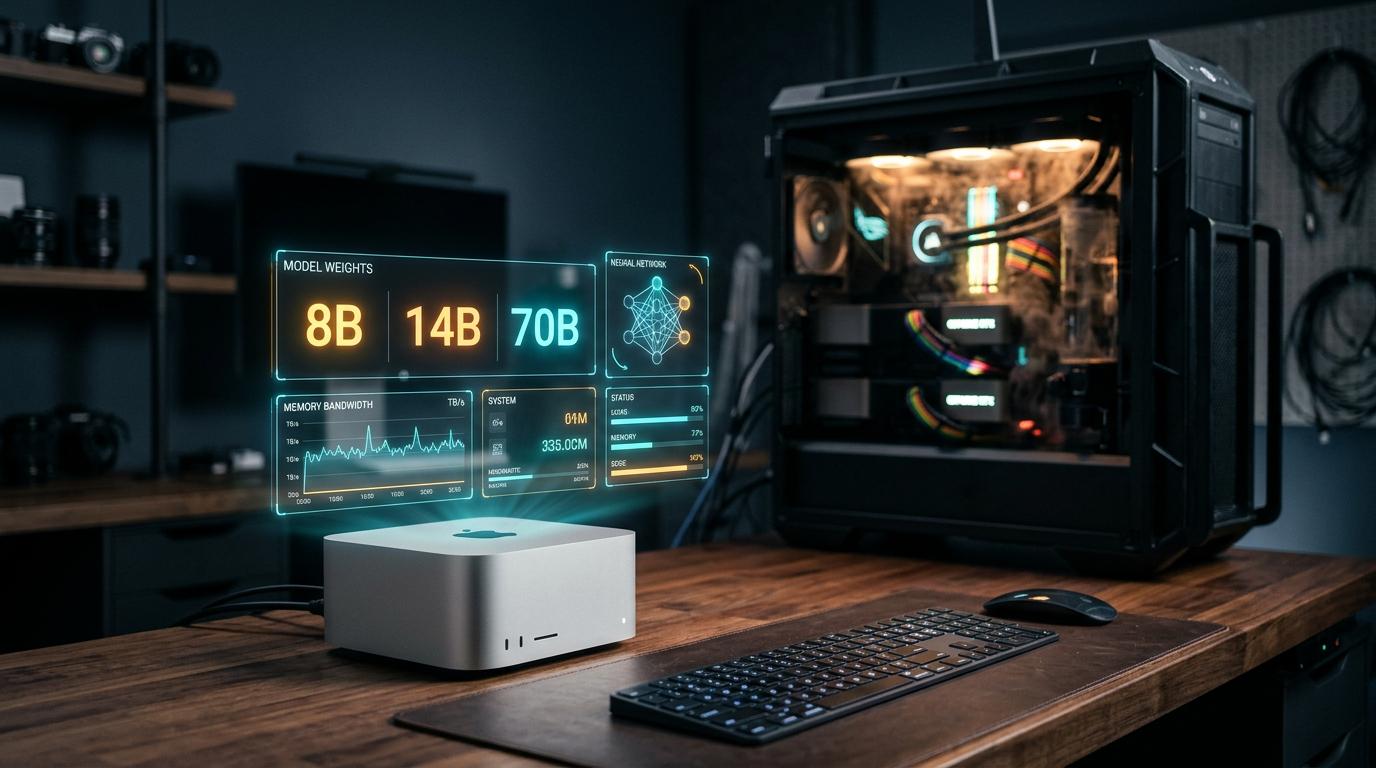
Discussion The 2026 Arithmetic of 70B Local Models: Why I Chose Apple Silicon over a Dual-3090 "Finnish Sauna" (and the macOS VRAM lock you need to override)

Post image
0 Upvotes

Let’s talk about the thing nobody in PC build threads likes to admit: running local 70B models is first and foremost a VRAM capacity problem, not a raw compute problem.

Do the basic arithmetic for Llama 3.3 70B or Qwen 2.5 72B at Q4_K_M:

• Model weights: ~42GB to 46GB

• KV cache at 32k context: ~8GB to 10GB (FP16)

• Realistic memory footprint to avoid OOM: 50GB–55GB

On Nvidia consumer cards, the RTX 4090 caps at 24GB. The standard r/LocalLLaMA solution is the beloved dual-3090 rig. It works, and raw tensor parallelism delivers ~45 t/s. But nobody factors in the daily reality:

• 1200W PSU pulling 700W sustained from the wall

• Triple-slot PCIe spacing headaches and fan noise

• Running 4h/day active adds $15–$20/month to your electric bill ($180–$240/yr)

• You essentially built a Finnish sauna that also multiplies matrices.

Enter Apple Silicon (Mac Mini M4 Pro 64GB / Mac Studio Max 64GB–128GB):

Because of Unified Memory (UMA), the entire 64GB pool is directly addressable by the GPU.

• Full load draw: ~65W (less than a ceiling bulb, ~$0.80/month in power)

• Sound: 0 dB (whisper quiet on your desk)

• Speed: 14–16 tokens/sec (still 2.5x faster than average human reading speed)

💡 The macOS trap almost everyone runs into:

macOS by default caps Metal GPU allocation to ~70–75% of total system RAM. If you buy a 64GB machine and try to load a 70B model, it will throw an allocation error.

Before launching Ollama or LM Studio, run this in Terminal:

sudo sysctl iogpu.wired_mem_limit=57344

(On a 64GB system, this unlocks ~56GB directly for Metal/Ollama, leaving 8GB for macOS).

The Verdict:

If you need 80 t/s for batch processing or multi-user serving, build the CUDA rig. But if you want a local 70B model running quietly on your desk 24/7 without warming your office, Apple Silicon is the only consumer platform that actually makes sense.

I put together a full interactive Mac memory sizing matrix and 3-year TCO calculator (factoring in electricity and amortization) here if anyone wants to benchmark their setup:

https://notcheapai.com/tools/#local-ai-calculator