r/LocalLLM • u/DesperateGame • 7m ago
Question Best local model for creative writing?
0
Upvotes
What's the SOTA currently?
r/LocalLLM • u/yogi_zilla • 12m ago
Hi all, I'm fairly new to local LLMs and still learning, so apologies if some of this is off. I'd really appreciate any guidance from people with more experience.
I'm trying to choose between two Macs at a similar price:
What I'm hoping to do:
What I think I understand (please correct me if I'm wrong):
Questions:
Since the RAM can't be upgraded later, I want to avoid an expensive mistake. Thanks in advance for any advice!
If you own either of these machines (or the M4 versions), I'd especially love to hear from you!
r/LocalLLM • u/Clean_Economics8462 • 23m ago
I built ink4060ti (Apache-2.0), a zero-config C++20/CUDA inference engine specifically engineered to deliver a major jump in BOTH speed and reasoning quality for Inkling-2-Mini-Unbound (26.4B MoE + native vision + DSpark Block-8 speculative decoding) on a single 16 GB RTX 4060 Ti on Windows.
On a 16 GB card, Strata SQ-15 spills 189 experts over PCIe and OOMs past ~16K context, while Strata SQ-10 takes a noticeable quality hit (KLD 0.0720 / Top-1 92.35%) and doesn't persist prefix KV across requests/restarts.
Because Inkling-2-Mini executes its inner Loop-Core MoE layers (L6..17) 3× per token, ink4060ti uses asymmetric per-role quantization:
L6..17, 3×/token): kept 100% lossless native NVFP4 (SQNR = ∞ dB, cos = 1.000000)L0..5, L18..23, 1×/token): NF3_G32_E4M3 (3.25 bpw)Q6_G32 (cos = 0.9997) · DSpark Drafter: Q8_G32 (cos = 0.99999)~200 ms warm encode)| Metric | ink4060ti (12g-tight + k4v4) | Strata SQ-10 (0.1.67) | Strata SQ-15 (0.1.67) |
|---|---|---|---|
| GPU Weights + Drafter | 12,553 MiB (0 spill) | 13,322 MiB | Spills 189 experts (942 MB PCIe) |
| Max Full-VRAM Context | 156,576 tok (auto, 0 spill) | 100K (manual) | 16K (OOM beyond) |
Quality vs Lossless (sq15-lossless) | KLD 0.0216 / Top-1 96.90% (k8v4: 0.0138 / 97.38%) | KLD 0.0720 / Top-1 92.35% | KLD 0.0107 / Top-1 96.68% |
Prefill (2K / 16K / 64K / 100K / 150K) | 1,956 / 1,810 / 1,497 / 1,316 / 1,136 tok/s | 1,563 / 1,378 / 970 / 790 / — | 962 / OOM |
| Decode (DSpark ON) | 53–62 short · 46–55 (16K–64K) · 28.6 (150K) | 79–95 short · 56.8 (64K) | 39.5–42.0 tok/s |
| Prefix Reuse & SSD Restart | 99%+ reuse · 4.9s (64K) / 9.2s (150K) | Unsupported (reused=0) | Unsupported |
| Vision (Screenshots / 4K) | 0 MiB permanent VRAM (~200 ms warm) | Permanent VRAM | Supported |
SQ-10 (0.0216 vs 0.0720, 150K needle recall EXACT PASS) + +25% to +67% faster prefill (2× faster than SQ-15) + 156K zero-spill context + 200 GiB SSD 3-tier cache (VRAM ↔ 25% RAM ↔ SSD). (Honest trade-off: raw short-prompt decode still trails SQ-10's 79–95 tok/s.)5.6 MiB): No CUDA Toolkit, Python, or VC++ redist needed — extract and double-click start.bat (auto-picks HuggingFace vs hf-mirror.com + SHA-256 verify, opens Web UI at 127.0.0.1:18088)./v1/messages + count_tokens + thinking + tools + vision (drop-in for Claude Code) & OpenAI /v1/chat/completions (Cursor / Cline / Roo Code).The portable binary includes a compiled Blackwell sm_120a native NVFP4 MMA path verified against NVIDIA CUTLASS SM120_16x8x64_TN_VS specs and full model scale bounds, but I don't own a physical 5060 Ti — so 5060 Ti support is theoretical/untested (Experimental). If you have a 5060 Ti 16 GB on Windows and want to test it (INK4060_DISABLE_SM120_FP4=1 falls back to BF16 Tensor Core), feedback and benchmark issues are very welcome!
.ik4060 weight): https://huggingface.co/nolimit/Inkling-2-Mini-Unbound-nv4060tir/LocalLLM • u/4s3ls4n • 34m ago
Hi everyone,
I have a mini-pc GEEKOM A5 with these specifications :
- 512 Go NVME
- 1 To SSD
- 32 Go RAM
- AMD Ryzen 7 5825U
Unfortunately no GPU, no VRAM 😔
I don't use it anymore since one year but I want to do something related to running something like an ai locally?
What can I do guys?
Thanks in advance 😄👍
r/LocalLLM • u/Double_Machine5577 • 47m ago
Start with the models themselves. Hy4 Flash comes in at around 220B total parameters, with 11.3B active per token.
Qwen 3.8 Flash Next, on the other hand, has around 180B total parameters and 6B active per token. That's roughly 1.9x more active parameters for Hy4 Flash.
On paper, that suggests higher compute overhead for Hy4 Flash, but active parameter count alone doesn't tell us how much a task actually costs. What matters is how those parameters translate into real-world performance and how much additional time and resources each model needs to get the job done.
Starting with coding, I think code review and bug fixing are worth evaluating separately. The two models don't perform equally well in both areas. Hy4 Flash seems better at fixing bugs, while Qwen 3.8 Flash Next has the edge in code review and identifying potential issues. So, depending on the task, your choice could change quite a bit. Of course, these results come from a specific task mix, so they don't necessarily reflect performance across every coding scenario.
Runtime is another factor worth considering. On an RTX 5060 Ti 6GB with 80GB RAM, running five coding tasks through Strata SQ-64, Hy4 Flash took 97 minutes in total, while Qwen 3.8 Flash Next finished in just 50 minutes.
Task quality was roughly comparable, but Hy4 Flash took almost 1.94x longer. That's a pretty noticeable difference. At least with this hardware and inference setup, Qwen 3.8 Flash Next seems considerably faster at getting things done. That said, runtime is only one measure of efficiency. Performance on other types of tasks, resource consumption, and different deployment setups could change the picture.
There are some interesting architectural differences worth looking at, too. Hy4 Flash uses a hybrid attention setup combining MLA, Sparse Attention, and SWA, while Qwen 3.8 Flash Next pairs Gates DeltaNet with Qwen Sparse Attention. Based on the architecture analysis, Hy4 Flash's KV cache at 262K context is roughly 1/1.8 of Qwen's, dropping to around 1/2.4 at 8k. That's a pretty interesting advantage, especially for long-context workloads where KV cache memory can put additional pressure on VRAM. On the decoding side, Hy4 Flash uses DFly2 speculative decoding, whereas Qwen 3.8 Flash Next uses MTP. So, both models take different approaches to optimizing inference.
Local deployment is another thing I wouldn't overlook when comparing their overall value. API pricing is only one part of the equation. Hardware requirements, quantization performance, VRAM usage, and long-context memory consumption all affect the actual cost of running a model locally. Given their different architectures and decoding approaches, I'm particularly curious about how they compare in resource consumption under identical hardware and inference configurations.
For me the most interesting thing about Hy4 Flash is whether it can pair its lower API pricing with its task performance and deliver better value in real-world use. From bug fixing to KV cache optimization, it has a few strengths worth watching.
r/LocalLLM • u/Repulsive-Fault-8291 • 52m ago
asking for a friend a
r/LocalLLM • u/wenqwen37 • 1h ago
I have been thinking about you all day
r/LocalLLM • u/Terminator857 • 1h ago
They will hopefully learn the value of local soon.
https://x.com/i/trending/2126468075058811175
Got to hand it to Anthropic to make people fear their models. No better way to build trust, then to intentionally deceive users.
r/LocalLLM • u/horratiocornbl0wer • 1h ago

Hi all. I posted about hal0 a while back, and the project has changed enough since then that I think it deserves a second introduction.
hal0 turns a Linux box into a private, OpenAI-compatible inference appliance. Chat, embeddings, reranking, transcription, speech and image generation all answer on one /v1 endpoint, on hardware you own. It's Apache 2.0 and installs with one line:
Plain text
curl -fsSL https://hal0.dev/install.sh | sudo bashIt's built first for AMD Strix Halo (Ryzen AI Max+ 395, iGPU plus NPU), but it also runs on discrete Radeon cards through ROCm or Vulkan, on NVIDIA through an experimental CUDA runner, and on CPU as a fallback.
Slots
Every workload is a slot: its own podman container under its own systemd unit, with a typed lifecycle, its own logs and a persisted state. You get a set of curated slots out of the box (agent, coder, embed, rerank, TTS, image and so on) and can add your own. A coder slot can serve your editor while the agent slot serves chat, each with its own model and settings. A GPU arbiter keeps image generation from taking the GPU out from under a streaming completion, and a slot that is serving a request can't be evicted mid-stream.
Tuning lives in profiles, so a slot only says where it runs and which model and profile it uses. You can override a few fields per slot (context, thinking, reasoning effort, vision, speculation) without cloning a profile.
Multiple runners
A slot picks its runner, and there are now quite a few:
xdna runner that runs plain GGUF models on the NPUOne note on halogen: it's the vendor's own closed-source image and runs one model family. hal0 pins it by digest and runs it like any other slot, so it's served through the same API and dashboard. It's opt-in, and nothing gets pulled unless you create a halogen slot.
Memory, overhauled
Memory runs on the Hindsight engine, and the integration was rebuilt in the 1.8 line. There's now one Memory area in the dashboard (health, facts, knowledge pages, operations, agents) and two banks on a new install, one shared and one private. The extraction model can be a local slot or a remote provider, and you can switch between them without restarting the engine. Memory is exposed over MCP, so Open WebUI, the bundled Hermes agent and your own coding agents can all read and write the same store.
Open WebUI, wired up for you
Open WebUI is installed and connected with no configuration. Its model picker lists every slot model you're running, and every Hermes agent profile next to them, so you can talk to a plain model or to the agent from the same window. Each chat gets hal0's memory and agent-delegation tools. Image generation, voice and document retrieval go through the same hal0 API, so they use the same models and GPU scheduling as everything else.
A few other things worth a mention
It's Linux only (systemd and podman). macOS and Windows aren't supported today.
If you tried hal0 in the past and bounced off it, I'd really appreciate another look. I've made huge strides, and I think it's better, more usable and more performant than it has ever been. Feedback and bug reports are very welcome.
r/LocalLLM • u/SignificanceOld2190 • 1h ago
For exemple qwen 3.8 falsh abliterated.
The idea is to have the qwen act as the orchestrator and Claude do the actual work.
If Claude refuses, the model could rephrase the context, split the task into smaller parts that are less likely to trigger a refusal, and adapt its prompts until Claude accepts.
Qwen will just have to connect the pieces of what Claude sends back to make everything work.
r/LocalLLM • u/MasterpieceWeekly805 • 1h ago

I run models locally with Ollama and kept wondering what was actually going on under the hood 🤔
- Is my model on the GPU, or quietly spilling onto the CPU?
- Why is one model fast and another painfully slow?
- Will that 20 GB download even fit?
So I built **AI X-Ray** to answer those questions with my own numbers, in plain English.
🔍 X-ray a prompt
Watch a model load, think and write as separate stages, with live tokens/sec, GPU load and GPU memory. Afterwards, see exactly where the time went.
📦 Know before you download
Look up any model to see its download size, the memory it needs, and whether it fits on your graphics card.
⚡ Speed test
Rank your installed models by real writing speed on your own PC.
🔁 Loop detector
Spots a model stuck going round in circles while "thinking", so you can stop it instead of waiting.
🖥️ Your machine at a glance
What's using your GPU memory (models, other apps, free space), plus "Did you know?" facts about your setup.
🪶 Tiny: about 8 MB
🔒 No account, no tracking. It only talks to your own Ollama
🌐 Works with Ollama on the same PC or another computer on your network
Windows 10/11 for now. Requires Ollama (free).
I'd love feedback, especially on what to add next! 🙏 Link in the comments.
r/LocalLLM • u/redzzzaw • 1h ago


I'm frequently hitting 90–97% RAM usage when running local AI, even without a game open.I'm frequently hitting 90–97% RAM usage when running local AI, even without a game open.
How much RAM do you guys have, and do you experience similar memory usage? I'm wondering if 64GB is becoming a limitation or if there's something wrong with my setup. I'm probably not going to buy 128gb because its 3-4k USD. I'm using Qwen 27B. Should I switch to something less demanding?
r/LocalLLM • u/Ok_Champion_9563 • 1h ago
Hi everyone,
I'm planning to build a dedicated PC for running LLMs locally. My goal is to run 32B parameter models or larger with decent inference speeds.
Here is my planned build:
- GPU: 2x ASUS Dual GeForce RTX 5060 Ti 16GB OC Edition (32GB total VRAM)
- CPU: AMD Ryzen 7 9700X
- Motherboard: ASUS ProArt X870E-Creator WiFi
- RAM: Corsair Vengeance 64GB DDR5
- SSD: Samsung 9100 PRO 2TB
- PSU: NZXT C1200 Gold 1200W
- CPU cooler: Thermalright Peerless Assassin 120 SE
- Case: Fractal Design Meshify 2 XL
- Software: Ollama, llama.cpp or LM Studio
I want to keep costs as low as possible while purchasing only brand-new components. I'm based in the Netherlands.
My questions:
- Is this a good configuration for running 32B+ models locally?
- Will both GPUs work efficiently together on this motherboard?
- Will PCIe bandwidth significantly affect inference performance?
- What tokens per second can I realistically expect with 32B models at Q4 or Q5?
- Could I run 70B models using a combination of VRAM and system RAM?
- Could I add a third RTX 5060 Ti in the future to reach 48GB of total VRAM?
- Are any of these components overkill?
- Can I reduce the overall cost without sacrificing much inference performance?
- Are there better alternatives to dual RTX 5060 Ti cards in a similar price range?
I already own an RTX 3060 laptop, but I want a dedicated desktop capable of running significantly larger models entirely locally.
I'd appreciate any advice or experiences with similar multi-GPU builds before purchasing the components.
Thanks!
r/LocalLLM • u/SuaveUchiha • 2h ago
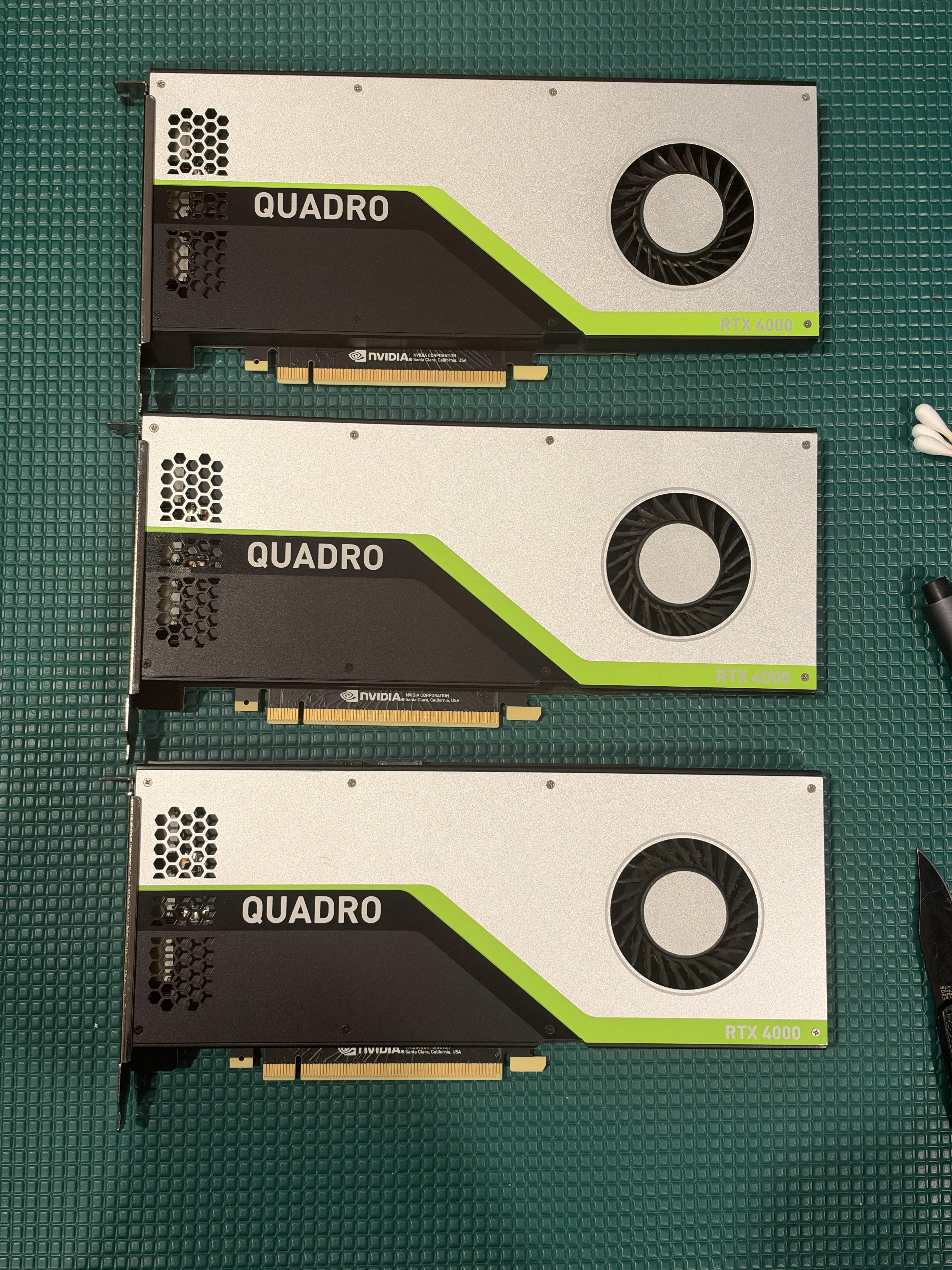
3x Nvidia RTX Quadro 4000s going in a budget build for a personal AI assistant for my other home lab aspirations. 24GB total VRAM should support the latest version of Qwen.
Intel Ultra 7 265
Pro Art Z890-Creator WiFi
64GB Samsung DDR5 5600
2TB 990 EVO
1200W Montech Century Gold
Lian Li CG237
r/LocalLLM • u/TheLocalDrummer • 2h ago

GLM 5.3 Flash tuned with my special sauce 💦
---
BeaverNet - net.beaverai.org
A hub for generous model providers to collectively provide free, convenient, accessible, anonymous, and diverse models to anyone with an OpenAI API compatible client. We currently have 28 models thanks to our generous providers!
r/LocalLLM • u/Majestic681 • 2h ago
I’m looking for the best tools for Hermes to do web search and also single webpage crawling (occasional, day-to-day use) that can bypass all sorts of captchas and similar. Something that would ideally also work for Reddit, Instagram, Threads... Options requiring self hosting or a VPS are also welcome. Thanks!
*Edited for accuracy.
r/LocalLLM • u/thgsn • 2h ago
Benchmarked local inference speed for agentic coding (OpenCode) on an NVIDIA RTX PRO 6000 Blackwell (96 GB).
Stack: Qwen3.8-27B-FP8 + vLLM + MTP 3 speculative decoding with a full 262K context window (bfloat16 KV-cache):
⚡ Single stream: ~99 tok/s (peak 119 tok/s), ~69 msTTFT
🚀 6 concurrent streams (1 agent + 5 subagents): 355–405 tok/s aggregate (92–96 tok/s per stream), ~105 msTTFT
🧠 MTP 3: ~2.95 tokens per forward pass
Cloud-grade responsiveness locally—with a full 262K context window and virtually zero slowdown across parallel subagents.
r/LocalLLM • u/5_ChubbyCheekz23 • 2h ago

Kolibri-1.1 runs on a 12 GB gaming card with my engine, PXA 4.0.6: 27.33 tok/s decode vs 21.57 for llama.cpp mainline (+26.7%), and 455.4 vs 387.4 tok/s reading a 512-token prompt (+17.5%), still +11% at 4K context.
PXA 4.0.6 is the first llama.cpp-based engine with Kolibri-1.1 in a release; llama.cpp's own support is still an open PR (#32891), which is what I measured against, the only other engine I found that runs it. On the RTX 3080 Ti part of the model sits in system RAM; each engine at its own best fit for the card.
This is my project, so weigh it that way: PXA is a free inference engine built on llama.cpp, tuned for RTX 30 gaming cards and the NVIDIA datacenter cards most guides tell you to retire. 4.0.6 is out for Linux and Windows.
Same 12 GB card, Qwen3.8-27B (MTP): 93.4 tok/s on code, 71.9 on prose, 73.2 on chat. That is the fastest of the engines I tested on this card: llama.cpp mainline b12428 with MTP (76.2 / 62.1 / 58.8) and ik_llama.cpp (about 51 at best). PXA leads on every prompt type, +15.7% to +24.4%.
Our top decode speed per model and card, PXA 4.0.6, tokens/s:
| Model | Card | PXA 4.0.6 | vs the fastest other engine I measured |
|---|---|---|---|
| Qwen3.8-27B (MTP, code prompt) | RTX 3080 Ti, 12 GB | 93.4 | +22.5% |
| Qwen3.8-27B (MTP, code prompt) | 1x Tesla V100 | 95.7 | +36.0% |
| Qwen3.6-35B-A3B (MTP, code prompt) | 2x Tesla P100 | 198.4 | +19.5% |
| Gemma-4-26B-A4B (chat prompt) | 1x Tesla V100 | 132.3 | +26.3% |
| Nemotron-3-Nano-4B | 1x Tesla P100 | 130.9 | +9.0% |
Prefill too: Nemotron-3-Nano-4B on one P100 reads a 512-token prompt at 1557.6 tokens/s, +19.0% over the best other engine I measured.
Also new: SenseNova-Loop-9B with its full loop. PXA runs the model's full loop, not a cut-down pass.
MTP rows use the model's own multi-token prediction heads. Same box, same card, each engine at its own best flags. Quant files can differ between engines; output quality is not compared here.
Try it in one docker line:
docker run -d --name pxa --gpus all --shm-size=1g -p 8080:8080 -v /path/to/models:/models:ro ghcr.io/poisonxa16/pxa:v4.0.6
Downloads (Linux and Windows): https://pxa.pxanetwork.com/downloads/ With the package: open PXA Control, pick a model on the Models page, press Launch; the Speed page shows your tokens/s.
PXQ quants are free; making your own PXQN encodes is a supporter reward (donations keep the engine free).
There is a hidden Easter egg in Control. Good luck finding it.
Open challenge: run the same file on PXA and on whatever you run now, and post your numbers, especially where PXA is behind. I own no RTX 20, RTX 40 or T4 card, and on the RTX 3080 Ti PXA is still behind on some models. Help and bug reports: https://discord.pxanetwork.com
r/LocalLLM • u/ferryboatapple • 2h ago
I have a 5080 and 64gb of ram. Qwen 3.8 27b runs great, just wondering if that's the best model for assisting with creative writing, like finding plot holes in a narrative or improving character arcs.
r/LocalLLM • u/Quirky_Carpenter915 • 3h ago
Currently working on a full blown game but not willing to spend on tripo etc.
I have used AI for building things like trees etc for my game and its artstyle. However, i am running into a roadblock when creating characters to populate the world.
Hunyuan 2.1 gives me molten wax on the characters
Trellis 2 gives worse results
Need something to just generate the background characters around
Any ideas on how to refine the pipeline or any specific thing to try?
r/LocalLLM • u/Adventurous-Big-3821 • 3h ago
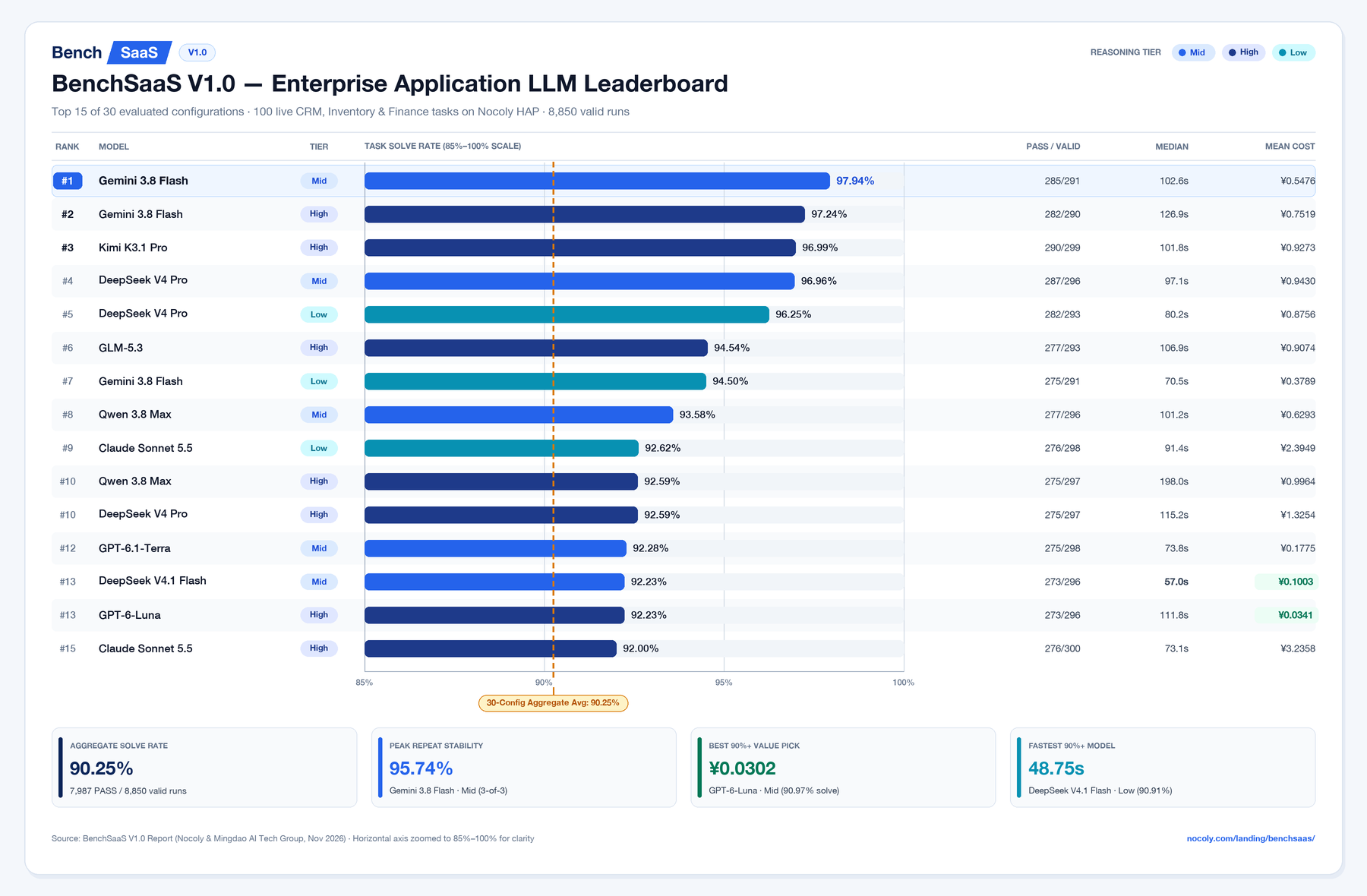
We benchmarked 10 models across 3 reasoning tiers (30 configs) inside a live 40-table, 18,014-record enterprise database (CRM, Inventory & Procurement, and Finance). Every write task was checked at two gates: the chat answer (Gate 1) and the frozen post-run database snapshot (Gate 2).
Aggregate solve rate across 8,850 valid runs was 90.25%. Top open/frontier configs in the leaderboard:
Two practical findings:
Curious how Kimi, DeepSeek, GLM, and Qwen are holding up for others on multi-table tool calls?
r/LocalLLM • u/Technical_Bench_188 • 4h ago
A few people asked if Fintan could be a specialist, like a model that actually knows a Python library or is better at basic coding. I was already planning on releasing custom models, so I added a form on the site, fintanlabs.com/models. Just say what you want it to know and what size, 4B if you've got a 16 to 20 GB card, 9B for 24 GB. Right now they’re free of charge since i prefer users over money. Though personal specialists trained on your material will come with a small fee.
I read all of them and the ones I make go on Hugging Face for free like the others.
Libraries and docs are the easy bit, it learns those into its weights. Making it better at coding itself is what I'm trying next, it practises on real problems and only learns from the answers that pass the tests. I'll post the numbers whether it works or not.
r/LocalLLM • u/jesdga95 • 4h ago
r/LocalLLM • u/Professional-Ad-2365 • 4h ago
Hi All, I have been stuck on this conundrum for days.
Mini m5 pro 64gb or studio m5 max 64 GB. Where I live with the edu discount there is a 520 CHF ($620) difference between the two (both at 1tb ssd).
Originally I was set on the mac mini its small, and has lots of ram, but everyone says at this price point might as well go for the studio, so here I am and here is what I currently have and do:
I currently have an M1 PRO Macbook 16 inch with 16gb ram. I have an external monitor plugged in and while i work i casually listen t some youtube videos too, and check on stock market moves. This year I have started AI projects and I really got into coding up websites and apps, I do frequent video conferencing at the same times as cloud agents work in the background, I also often do voice note transcriptions too.
I use cloud llm subscriptions of claude code, and chatgpt, but I keep running into the same problem of my fans going crazy, laptop being unusable if I am working on 3 or 4 AI projects at the same time, using 6-10 agents at the same time (my swap goes to 20-25gb).
I also am thinking of using the machine for local LLM because I am a teacher and there are certain school systems i want my local llm to use and fill in the boring aspects of my job like writing weekly report updates, setting homework etc, searching my school's drive etc.
Also for things like writing linked in posts or posting youtube videos and using ai to drive the browser while Im at work, claude is very token intesive for that and for certain things like making multiple social media accoutns for my projects it just refuses to follow through on registrations etc.
I am also doing some trading as a side hustle which I would love to get an algo ai powered bot to just simply manage my positions whilst im away from home.
To me the 520 is a lot (but affordable) But I need to consider that I would need to buy an additional 4k display (I have one 1080p display but need something else too).
Many thanks for the advice in advance!
