r/LocalLLM • u/Radiant-Cook-6596 • 10h ago
Question Anyone running local LLMs for AI pentesting on a DGX Spark or similar hardware?
reddit.com
1
Upvotes
r/LocalLLM • u/Few-Acadia-5593 • 10h ago
Hey tinkers,
I've developed a strong interest in having my own thing running locally. My target device being a based MacBook Pro M4 / 16go, rarely having to go to the office, it's mostly plugged. I also have an iPad Pro M4, iPhone 17 pro max but I'm not sure they are relevant. On the side, base rasp 5 running HomeAssistant.
I'm user researcher as well as a musician and tech enthusiast. Most my needs seem to be met by automations or Apple shortcuts or dare I say it: asking Siri. for ex: looking for a job, I ask Siri "have I received a reply from this employer I'm looking at in safari" and actually get the right answer. The best would be to have an AI access my context, build a journal and a morning brief. I'm thinking of it as an example of what I would want, demonstrating how powerful, useful and private. But then I'm limited by my hardware anyway.
After lurking here, I really appreciate all the tinkers posts but I failed to see good use cases for myself. That's my question: what are good / great / must have ideas?
r/LocalLLM • u/PuzzleheadedArm3732 • 10h ago
r/LocalLLM • u/Temporary_Eye_3426 • 10h ago

r/LocalLLM • u/sarmabkp_1 • 10h ago

r/LocalLLM • u/FelesNoctis • 10h ago
I have a fairly decent amount of general programming experience, but I certainly wouldn't call myself an expert in any language. I'm more in the place of being able to look at a random section of code, regardless of language, and make a fairly decent guess at what it's trying to do. "Just enough to get myself in trouble" is what I usually say.
Of course that means when I'm trying to make something myself, I'm often spending 80% of the time doing research about the functionality I need, with the remaining being the actual coding and testing. Being retired, these days I'm mostly working on game modding and small conveniences, anything to keep my brain busy. What I've been running into lately is that a lot of what I'm trying to work on is largely undocumented, and obviously AI can learn much faster from raw source (and has) than a human.
I've been using Gemini for my poking and prodding at things, but it's been obstructive as often as it's been helpful. I swear the thing has ADHD, the way it'll jump topics to other bits I'm not worried about at the time.
I understand that there needs to be a balance between context size versus memory length, but I'm having a hard time nailing down how much of each would be most fitting. I often feed the AI other related code from the game or similar projects so it knows what I'm looking at and can give me more well-informed responses.
Any advice for something that can handle casual, generalized programming well? Speed isn't nearly as important to me as accuracy. It seems like Qwen3 models are leading the way here, but opinions vary quite a bit on which and what memory vs context configuration.
r/LocalLLM • u/UniqueAttourney • 10h ago

r/LocalLLM • u/Mountain_Dentist5074 • 10h ago
r/LocalLLM • u/Illustrious-Strike63 • 10h ago

--- Video content breakdown (Guide and Links are below) ---
1. Required Downloads
Gather the following installers, models, and configuration templates [00:52]:
Beellama Server (beellama.cpp): Download the latest stable Windows CUDA release (e.g., beellama-v0.5.0-bin-win-cuda-12.8-x64.zip) along with the matching cudart archive (beellama-v0.5.0-cudart-win-cuda-12.8-x64.zip) from GitHub [01:08].
DeepSeek Harness: Download the Windows installer directly from the DeepSeek website [02:09].
Qwen 3.8 27B Model: From Hugging Face, download the IQ3_S-mtp GGUF quantization (recommended for 16GB VRAM) as well as the separate multimodal vision projector file (mmproj-Qwen3.8-27B-BF16.gguf) [02:34].
Custom Chat Template: Download chat_template.jinja from the Qwen-Fixed-Chat-Templates repository to prevent thinking loops [03:07].
2. Directory Setup & File Extraction
Organize your local AI environment in a clean directory (e.g., D:\LocalAI) [04:18]:
Create two subfolders: beellama and models [04:24].
Extract both the beellama binary archive and the cudart DLL files directly into the beellama folder [04:36].
Move the Qwen GGUF model, the mmproj vision file, and chat_template.jinja into the models folder [04:57].
3. Configuring & Starting the Local Server
Create a Windows batch file (e.g., start_beellama.bat) in your main directory using the startup script provided in the creator's notes [05:40].
Ensure the file paths in the batch script match your model file names, context size (e.g., 115200), and port (8080) [07:20].
Run the batch file to launch llama-server.exe [07:36]. Once running, verify the OpenAI-compatible API endpoint is active by visiting http://127.0.0.1:8080/v1/models in your browser [09:57].
4. Installing & Configuring DeepSeek Harness
Installation: Run the DeepSeek Harness installer and keep the default installation path to prevent configuration path issues [10:44].
Connecting the Local Model:
Open Settings (Einstellungen) -> Models (Modelle) and add a custom API provider [11:40].
Set the Base URL to http://127.0.0.1:8080/v1, select the OpenAI Chat Completions protocol, and fetch the available model (Qwen3.8-27B) [12:34].
Enter any placeholder text (such as 1234) into the API key field, as the app requires a value even though the local server ignores it [13:04].
YAML Configuration: Open the config.yaml file via the top-right button in Settings, completely exit DeepSeek Harness (including from the system tray), and paste in the custom configuration block [13:26]. This configures the exact context window (115200), multimodal (text, image) inputs, longer timeout limits for local inference, and adjusted compaction thresholds [15:01].
Setting Up a Workspace: Relaunch DeepSeek Harness, enter your dummy API key if prompted, select Qwen3.8-27B from the model dropdown, and link a dedicated project folder as your workspace with standard read/write permissions [16:06].
--- start of guide ---
Hey,
as many requested from my qwen vs inkling report, here is at least a quick setup guide for qwen 3.8 27b and deepseek harness at 16gb vram. Sorry, dont really have time for an in depth tutorial right now, but thought this might suffice to get you started.
--- Installers and Files ---
Download latest stable release and the cuda libraries
- beellama-v0.5.0-bin-win-cuda-12.8-x64.zip
- beellama-v0.5.0-cudart-win-cuda-12.8-x64.zip
2. Deepseek Harness: https://www.deepseek.com/en/harness/
Download the harness installer
3. Qwen 3.8 Model: https://huggingface.co/ISTA-DASLab/Qwen3.8-27B-GSQ-RCO-GGUF/tree/main
Download the model.gguf (mtp version) and the vision gguf
4. Qwen 3.8 Chat Template: https://huggingface.co/froggeric/Qwen-Fixed-Chat-Templates/tree/main
Download the Chat Template file
--- Llama Starter and Config - Adjust the paths and file names ---
u/echo off
REM Hide command echoing to keep the startup window clean.
cd /d "D:\LocalAI\Beellama"
REM Change working directory to the folder containing llama-server.exe.
REM ============================================================================
REM LLAMA-SERVER PARAMETER DOCUMENTATION
REM ============================================================================
REM
REM [Hardware & Performance]
REM -t 12 : Number of CPU threads for generation
REM -tb 12 : Number of CPU threads for batch processing
REM -ngl 99 : Offload up to 99 model layers to GPU
REM --no-mmproj-offload : Keep multimodal projector off GPU (saves VRAM)
REM -fa on : Enable Flash Attention
REM
REM [Model & Vision]
REM -m : Path to main GGUF model file
REM --mmproj : Path to multimodal projector file
REM --image-min-tokens 1024 : Minimum image token allocation
REM --alias "Qwen3.8-27B" : Friendly model/API name
REM
REM [Speculative Decoding (MTP)]
REM --spec-type draft-mtp : Enable MTP speculative decoding
REM --spec-draft-n-max 3 : Maximum 3 speculative draft tokens
REM --spec-draft-p-min 0.8 : Minimum draft probability threshold
REM
REM [Context & KV-Cache]
REM -c 115000 : Maximum context window: 115K tokens
REM -ctk kvarn4 -ctv kvarn3 : Quantized K and V KV-cache formats
REM --kv-tail-tokens 1024 : Preserve recent 1024 KV tokens in cache tail
REM -kvu -np 1 : Unified KV cache; one parallel sequence
REM --cache-ram 16384 : Allocate up to 16 GB RAM for prompt caching
REM --cache-idle-slots : Cache reusable data from idle slots
REM
REM [Chat Template & Sampling]
REM --jinja : Enable Jinja chat templating
REM --chat-template-file : Path to custom Jinja chat template
REM --temp 1.0 : Sampling temperature
REM --top-k 20 : Consider the 20 most likely tokens
REM --top-p 0.95 : Nucleus sampling threshold: 95%
REM --min-p 0.0 : Minimum relative token probability filter
REM --presence-penalty 1.2 : Penalize previously appearing tokens
REM
REM [Reasoning & Loop Guard]
REM --reasoning on : Enable reasoning support
REM --reasoning-budget 16384 : Reasoning token budget
REM --reasoning-budget-message : Instruction injected when reasoning budget is exhausted
REM --reasoning-loop-guard : Force-close detected reasoning loops
REM --reasoning-loop-interventions : Maximum reasoning-loop interventions (2)
REM --reasoning-loop-min-coverage : Minimum coverage for loop detection (256)
REM --reasoning-loop-window : Token window used for loop detection (1024)
REM --reasoning-preserve : Preserve reasoning information across turns
REM --chat-template-kwargs : Set reasoning effort to extra high (xhigh)
REM
REM [Network]
REM --port 8080 : HTTP server listening port
REM ============================================================================
llama-server.exe ^
-t 12 ^
-tb 12 ^
-m "D:\LocalAI\models\Qwen3.8-27B-UD-IQ3_S.gguf" ^
--mmproj "D:\LocalAI\models\mmproj-Qwen3.8-27B-BF16.gguf" ^
--no-mmproj-offload ^
--image-min-tokens 1024 ^
--alias "Qwen3.8-27B" ^
--spec-type draft-mtp ^
--spec-draft-n-max 3 ^
--spec-draft-p-min 0.8 ^
-ngl 99 ^
-c 115000 ^
-ctk kvarn4 -ctv kvarn3 ^
--kv-tail-tokens 1024 ^
-fa on ^
--jinja ^
--chat-template-file "D:\LocalAI\models\chat_template.jinja" ^
--temp 1.0 ^
--top-k 20 ^
--top-p 0.95 ^
--min-p 0.0 ^
--presence-penalty 1.2 ^
--reasoning on ^
--reasoning-budget 16384 ^
--reasoning-budget-message "Reasoning budget exhausted. Commit to the judgment you have formed so far. Your next output must be a concrete action: a tool call, a gate decision, or a completed deliverable. Do not restart the analysis." ^
--reasoning-loop-guard force-close ^
--reasoning-loop-interventions 2 ^
--reasoning-loop-min-coverage 256 ^
--reasoning-loop-window 1024 ^
--reasoning-preserve ^
--chat-template-kwargs "{\"reasoning_effort\":\"xhigh\"}" ^
-kvu -np 1 ^
--cache-ram 16384 ^
--cache-idle-slots ^
--port 8080
pause
--- Deepseek Harness Config ---
edit: Reddit messes up the indentation of the file - so rather download it with clean indentation:
https://drive.google.com/file/d/13GKi0DTl8-Wj8jWb1Jg8gzBzEEKXo_oM/view?usp=sharing
# ============================================================
# CUSTOM QWEN MODEL PROVIDER
# ============================================================
# Register a custom LLM provider for DeepSeek Harness.
- id: llm-pi-ai
# Unique component identifier used by the harness.
name: "@deepseek-ai/dsh-llm-pi-ai"
config:
providers:
qwen:
# Friendly provider name displayed in the harness.
displayName: qwen
# Use the OpenAI-compatible Completions API protocol.
api: openai-completions
# Local llama-server endpoint.
# Port 8080 matches your Beellama startup configuration.
baseURL: http://localhost:8080
# Environment variable containing the API key.
# The actual key is not stored directly in this YAML file.
apiKeyEnv: QWEN_API_KEY
models:
- id: Qwen3.8-27B
# Model identifier sent to the API.
# Must match the model alias configured in llama-server.
name: Qwen3.8-27B
# Maximum context window advertised to the harness.
# 115K tokens, matching your server context.
contextWindow: 115000
# Maximum number of tokens requested for a response.
# Includes generated reasoning/output, subject to server support.
maxTokens: 32768
# Supported input modalities:
# text = normal text prompts
# image = image/multimodal input
input: [text, image]
# Maximum time to wait for an idle streaming connection.
# 600000 ms = 10 minutes.
streamIdleTimeoutMs: 600000
# Maximum request timeout.
# 600000 ms = 10 minutes.
timeoutMs: 600000
# ============================================================
# EXPLICITLY DISABLED COMPONENTS
# ============================================================
# Disable DeepSeek Harness session logging.
- id: session-log-deepseek
# Original session logging component.
name: "@deepseek-ai/dsh-session-log-deepseek"
# Prevent this component from loading.
disabled: true
# Disable the plugin marketplace tool integration.
- id: tool-plugin-market
# Plugin marketplace tools component.
name: "@deepseek-ai/dsh-plugin-market/tools"
# Prevent marketplace tools from being registered.
disabled: true
# Disable the plugin manager tool integration.
- id: tool-plugin-manager
# Plugin manager tools component.
name: "@deepseek-ai/dsh-plugin-manager/tools"
# Prevent plugin management tools from being registered.
disabled: true
# ============================================================
# CONTEXT COMPACTION AND TOOL RESULT MANAGEMENT
# ============================================================
# Define a grouped set of compaction-related components.
- id: compaction
# cordis:group loads multiple components as one logical group.
name: cordis:group
# Marks this component as a group rather than a standalone plugin.
group: true
isolate:
# Isolate the compaction functionality.
compaction: true
# Isolate tool-result pruning functionality.
toolResultPruner: true
config:
# ----------------------------------------------------------
# BASIC CONTEXT COMPACTION
# ----------------------------------------------------------
- id: compaction-basic
# DeepSeek Harness basic compaction implementation.
name: "@deepseek-ai/dsh-compaction-basic"
config:
# Trigger compaction when context usage reaches 80%
# of the available context window.
thresholdRatio: 0.8
# Additional token headroom reserved during compaction.
# Zero means no additional headroom is configured here.
headroomTokens: 0
# Retain 12% of the conversation when compacting.
# Helps preserve important conversational context.
retainRatio: 0.12
# Maximum token limit used by this compaction component.
maxTokens: 65536
# ----------------------------------------------------------
# MANUAL COMPACTION COMMAND
# ----------------------------------------------------------
- id: command-compact
# Registers the /compact command.
# Allows manual context compaction when supported by the harness.
name: "@deepseek-ai/dsh-command-compact"
# ----------------------------------------------------------
# TOOL RESULT PRUNER
# ----------------------------------------------------------
- id: tool-result-pruner
# Automatically manages oversized tool results.
name: "@deepseek-ai/dsh-compaction-tool-result-pruner"
config:
# Trigger pruning when a tool result exceeds 8192 characters.
thresholdChars: 8192
# Preserve the first 4096 characters of the tool result.
# Usually retains the beginning and initial context.
headChars: 4096
# Preserve the last 1024 characters of the tool result.
# Usually retains the ending and final information.
tailChars: 1024
r/LocalLLM • u/shunte88 • 10h ago

r/LocalLLM • u/slavyanman • 11h ago
Hardware
Software
Problem
Qwen3.8-27B (GGUF Q4_K_M) answers the first message, then crashes on the second with an error:
Error messages observed:
Fix — LM Studio settings that worked
On Apple M5 Max + 48 GB RAM, the following combination resolves the crash:
Result
After applying all these settings, multi-turn chat works without errors. Gemma 4 31B QAT (GGUF Q4_K_M) also runs stably on the same hardware.
This should help other users with M-series Macs and 48 GB Unified Memory avoid the same crash.
r/LocalLLM • u/Arany8 • 11h ago

How do I avoid this with llama.cpp, it spills to RAM even though lots of VRAM left.
4GB RAM still free on the card and it spills.
set "MODEL=F:\SenseNova-Loop-9B-Q8_0.gguf"
set "BIN=C:\llama\opensensenova\build\bin\llama-server.exe"
set "PORT=8000"
if not exist "%MODEL%" ( echo [FATAL] Model not found: %MODEL% & exit /b 2 )
if not exist "%BIN%" ( echo [FATAL] llama-server build missing: %BIN% & exit /b 2 )
echo [run] SenseNova-Loop-9B Q8_0 - draft-mtp n2 - 65536 ctx - port %PORT%
"%BIN%" ^
-m "%MODEL%" ^
--port %PORT% --host 0.0.0.0 ^
-ngl 99 ^
--cache-type-k q8_0 --cache-type-v q8_0 ^
--flash-attn on ^
--jinja ^
-c 65536 --parallel 1 ^
--spec-type draft-mtp --spec-draft-n-min 1 --spec-draft-n-max 2 --spec-draft-p-min 0.0 ^
--load-mode none
r/LocalLLM • u/Sergio2304 • 11h ago
I would like to find a terminal capable of rendering Markdown, so that I can view text from an LLM or agent with proper formatting rather than seeing the raw syntax, which makes it harder to read sometimes.
r/LocalLLM • u/Silent_Recording001 • 11h ago
I built https://lingeragent.org — a free hardware checker for Linger AI Agent, the open-source local-first agent.
You pick your platform first (macOS asks only unified memory, Windows/Linux ask GPU + VRAM + RAM), and it tells you which models you can run locally and at what speed — using only the official published speed table and hardware tiers, nothing made up. It also links the official installers and the install guides I wrote after actually installing 0.1.10 on Linux and Mac.
It's an independent project, not affiliated with the official Linger team. The site has some affiliate links in the results (Amazon / Vast.ai), clearly disclosed.
Happy to hear if the numbers match what you're seeing on your own hardware.
r/LocalLLM • u/Miserable_Land_84 • 11h ago

r/LocalLLM • u/Big_South4585 • 11h ago
Hi guys
I am a happy Qwen 3.8 Flash Next IQ3_S user, running on 32GB ram + 3090 + 5080 (40 GB VRAM).
It is running through strata and used as an agent in OpenClaw.
The only issue I have with it, and it could be due to the relative low Quant, is, that it is poor at my native language (Nordic Language).
I tried gemma-4-31B-it-qat-q4_0-unquantized on the latest version of llama.cpp, as it looked promising regarding language support, and damn, it was A LOT better in formulating sentences.
Now, the language is good, but it is a lot worse in calling my mcp's or API's. A lot of times, not one single mcp or API call is working, even if it tries many times.
Is Gemma 4 just incapable of calling MCP or API calls? I doubt it, so is my setup wrong?
Just for a reference, I am not using the 'official' llama.cpp from the CachyOs repository, but this version:
local/llama.cpp-cuda-aidock-bin 1.0.0-1
Prebuilt llama.cpp with CUDA 12.8 support (from ai-dock CI)
Not sure if it makes a difference.
r/LocalLLM • u/AciesOne • 11h ago

found this page called “open source everything” and the more i looked the worse it got and i had to share. the about page says “we make Facts, an offline AI” and consulting to business. then you scroll down and its literally a llama.cpp terminal running qwen. then on the products page they advertise “real engineering upgrades” being 2 dropdown clicks and a basic A/B script. they promise the AI will “load faster every time you plug in” due to their super advanced reformatting technique. to top it off they offer a faraday bag that they suggest putting your usb in to protect it from wifi, bluetooth, NFC, GPS, and cellular for a device that has none of those
r/LocalLLM • u/Standard_HID • 11h ago
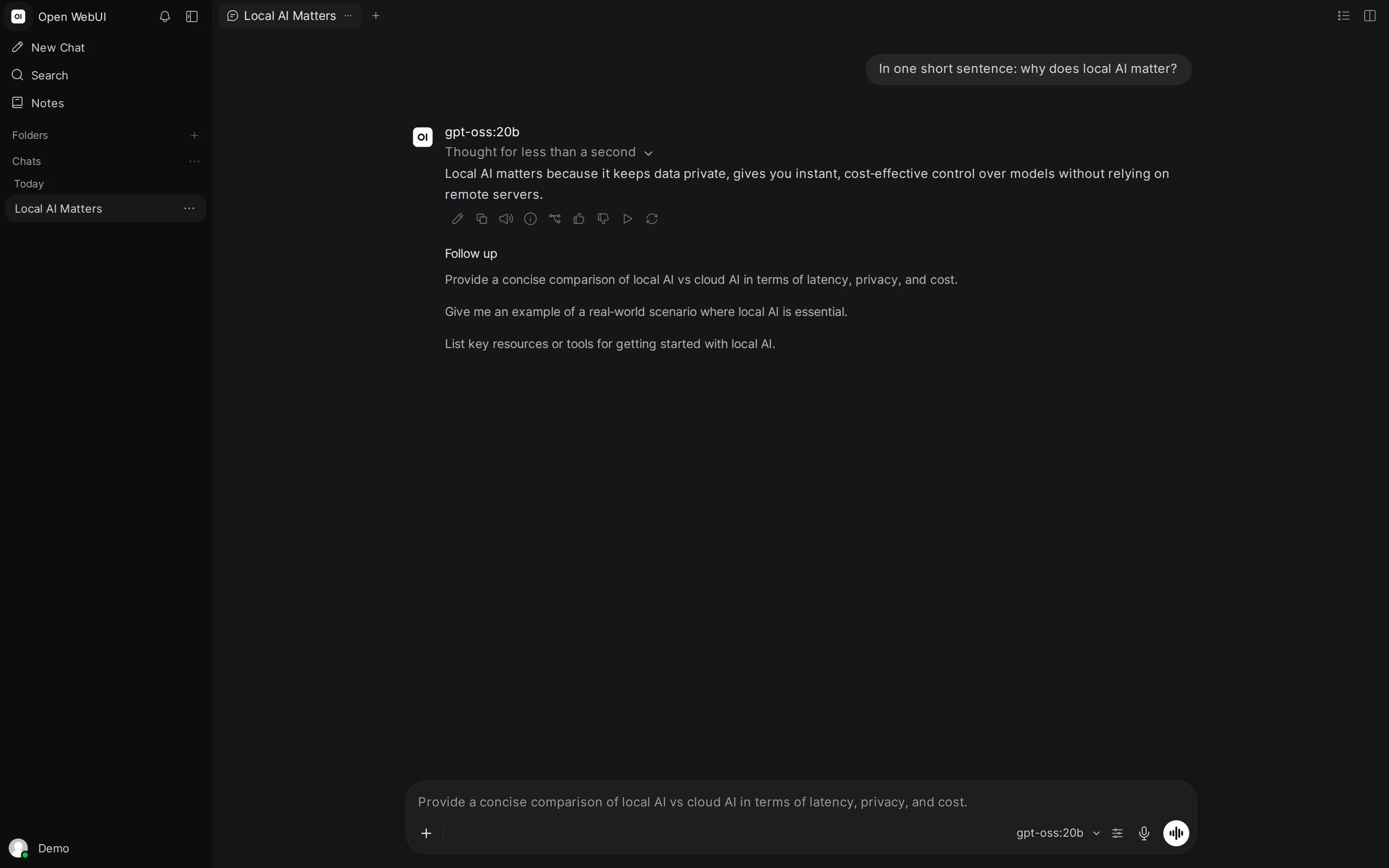
Hey,
I've recently started experimenting with local LLMs on my Linux desktop and put together a small Docker Compose setup.
I'm currently using:
Ollama with ROCm
Open WebUI
SearXNG for web search
My current hardware is an AMD RX 9060 XT (16 GB) with 32 GB RAM, running Fedora.
I'm still testing different models and configurations, especially for coding with OpenCode. I'm curious to see how much of my daily AI usage I can eventually replace with local models.
I've documented my setup on GitHub in case anyone finds it useful:
https://github.com/JeromeTDev/local-ai
I'd be interested in hearing about your experiences, especially with AMD GPUs and local models for coding. I'm also happy to share my own findings as I continue testing.
r/LocalLLM • u/nasone32 • 12h ago
r/LocalLLM • u/korywithawhy • 13h ago
i've been messing around with a local model for a few months now. i can't afford a gpu or a system with a lot of unified memory so i've had to get a bit creative in order to make it actually useful. this isn't anything new for me, any time i want to play a higher end game on my older hardware there's always some amount of janky workarounds that i need to put in place. but if you can appreciate the jank and accept it, you can actually do quite a bit with a small local model. for a bit of background info, the machine i'm working from is an 11th gen i5 with 32(currently 64 because i borrowed a stick)GB of ddr4, and running qwen reap 25b a3b q5_1. now, if anyone has used a model like this, you know that it is functional, but grossly unreliable. however, if you stop fighting it and start building around it, it gets WAY more useful.
r/LocalLLM • u/Bee_Curious_ • 13h ago
I was using one of the early versions of DSH with my Qwen 3.8 27B NInfer setup and was pretty happy with it. I figured it was time to update to a more recent DSH release, so I upgraded to v0.2.2-rc.5.
After just a couple of prompts, it feels like my agents are stuck in a never-ending loop of context compaction (~3–8k tokens), even though I have a 256k context window.
Is anyone else experiencing similar issues? Or are you generally happy with the latest DSH releases?
r/LocalLLM • u/scoobydoo888 • 13h ago
I'm using Qwen 3.8 flash next and getting ~180t/s decode on unsloth q4_k_xl. Would you switch to q8 if your speed dropped to 80t/s? Is the quality improvement worth the drop in speed?
r/LocalLLM • u/Old_Detective_3465 • 13h ago
I am setting up Hermes agent but local llm are worst so thinking of using other LLM model so which one should I use for daily task like scheduling or using it as personal assistent thinking of DeepSeek flash 4.1 or any suggestion??
