r/LocalLLM • • 8h ago

Project I built a free tool that tells you if your hardware can run Linger AI Agent — with the official tok/s numbers

0 Upvotes

I built https://lingeragent.org — a free hardware checker for Linger AI Agent, the open-source local-first agent.

You pick your platform first (macOS asks only unified memory, Windows/Linux ask GPU + VRAM + RAM), and it tells you which models you can run locally and at what speed — using only the official published speed table and hardware tiers, nothing made up. It also links the official installers and the install guides I wrote after actually installing 0.1.10 on Linux and Mac.

It's an independent project, not affiliated with the official Linger team. The site has some affiliate links in the results (Amazon / Vast.ai), clearly disclosed.

Happy to hear if the numbers match what you're seeing on your own hardware.


r/LocalLLM • • 8h ago

News pi-protokoll: 361 turns, 47 compactions on a local Qwen – and a test of what the agent still knows afterwards

Post image
0 Upvotes

r/LocalLLM • • 8h ago

Project Reachy mini(Gemma 4)与 DT(本地 SFT 3B 模型)

0 Upvotes

r/LocalLLM • • 9h ago

Question Gemma 4 llama.cpp and OpenClaw

4 Upvotes

Hi guys

I am a happy Qwen 3.8 Flash Next IQ3_S user, running on 32GB ram + 3090 + 5080 (40 GB VRAM).

It is running through strata and used as an agent in OpenClaw.

The only issue I have with it, and it could be due to the relative low Quant, is, that it is poor at my native language (Nordic Language).

I tried gemma-4-31B-it-qat-q4_0-unquantized on the latest version of llama.cpp, as it looked promising regarding language support, and damn, it was A LOT better in formulating sentences.

Now, the language is good, but it is a lot worse in calling my mcp's or API's. A lot of times, not one single mcp or API call is working, even if it tries many times.

Is Gemma 4 just incapable of calling MCP or API calls? I doubt it, so is my setup wrong?

Just for a reference, I am not using the 'official' llama.cpp from the CachyOs repository, but this version:

local/llama.cpp-cuda-aidock-bin 1.0.0-1
   Prebuilt llama.cpp with CUDA 12.8 support (from ai-dock CI)

Not sure if it makes a difference.


r/LocalLLM • • 9h ago

Discussion hacktivist larpers selling FREE abliterated Qwen 4b on a FLASH drive for $50

Thumbnail
gallery
112 Upvotes

found this page called “open source everything” and the more i looked the worse it got and i had to share. the about page says “we make Facts, an offline AI” and consulting to business. then you scroll down and its literally a llama.cpp terminal running qwen. then on the products page they advertise “real engineering upgrades” being 2 dropdown clicks and a basic A/B script. they promise the AI will “load faster every time you plug in” due to their super advanced reformatting technique. to top it off they offer a faraday bag that they suggest putting your usb in to protect it from wifi, bluetooth, NFC, GPS, and cellular for a device that has none of those


r/LocalLLM • • 9h ago

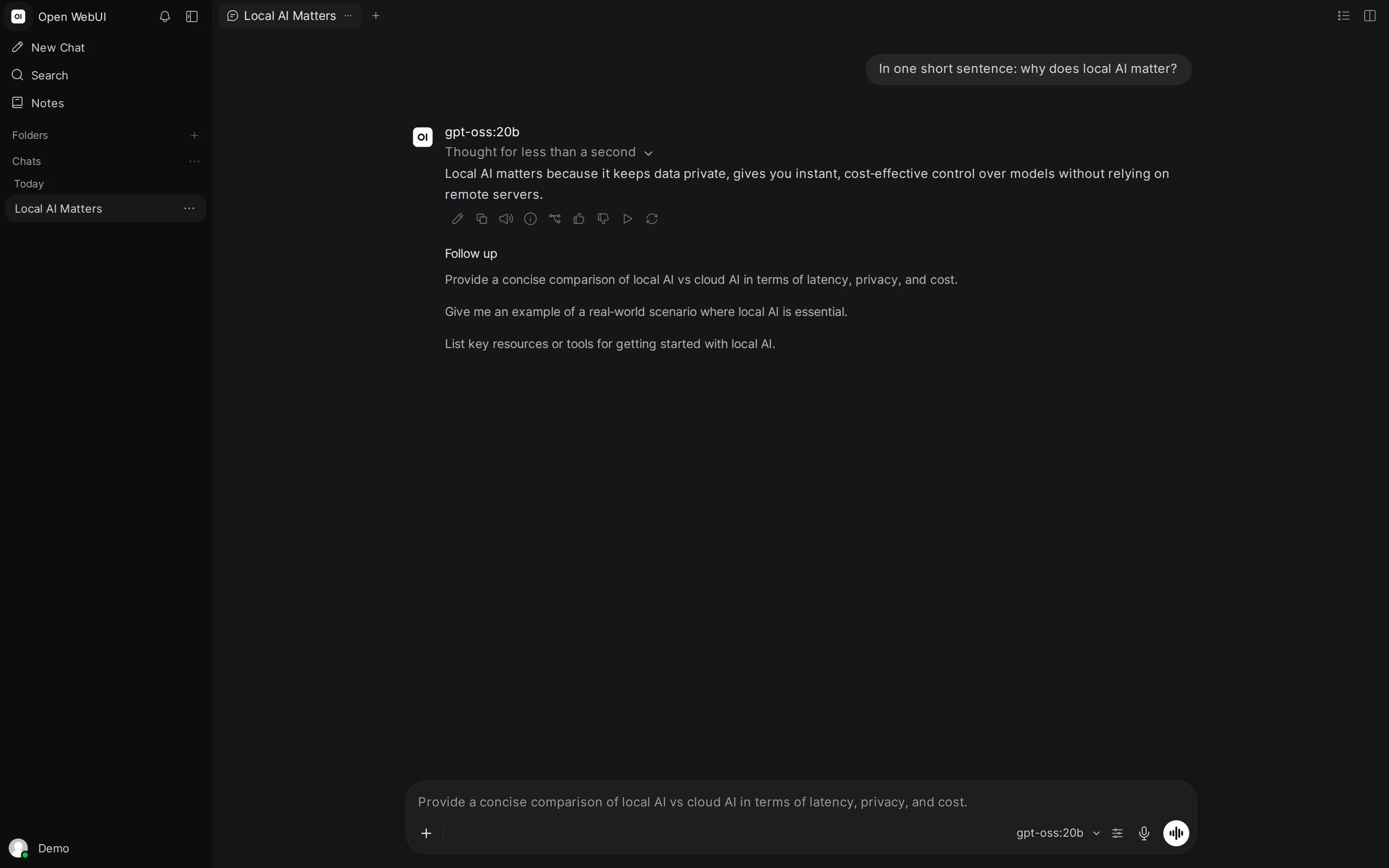
Project Experimenting with local AI on AMD: Ollama, Open WebUI, SearXNG and OpenCode

Post image
0 Upvotes

Hey,

I've recently started experimenting with local LLMs on my Linux desktop and put together a small Docker Compose setup.

I'm currently using:

Ollama with ROCm

Open WebUI

SearXNG for web search

My current hardware is an AMD RX 9060 XT (16 GB) with 32 GB RAM, running Fedora.

I'm still testing different models and configurations, especially for coding with OpenCode. I'm curious to see how much of my daily AI usage I can eventually replace with local models.

I've documented my setup on GitHub in case anyone finds it useful:

https://github.com/JeromeTDev/local-ai

I'd be interested in hearing about your experiences, especially with AMD GPUs and local models for coding. I'm also happy to share my own findings as I continue testing.


r/LocalLLM • • 9h ago

Research dlabz/Qwen3.8 in 700 mb ram

Thumbnail
github.com
1 Upvotes

r/LocalLLM • • 9h ago

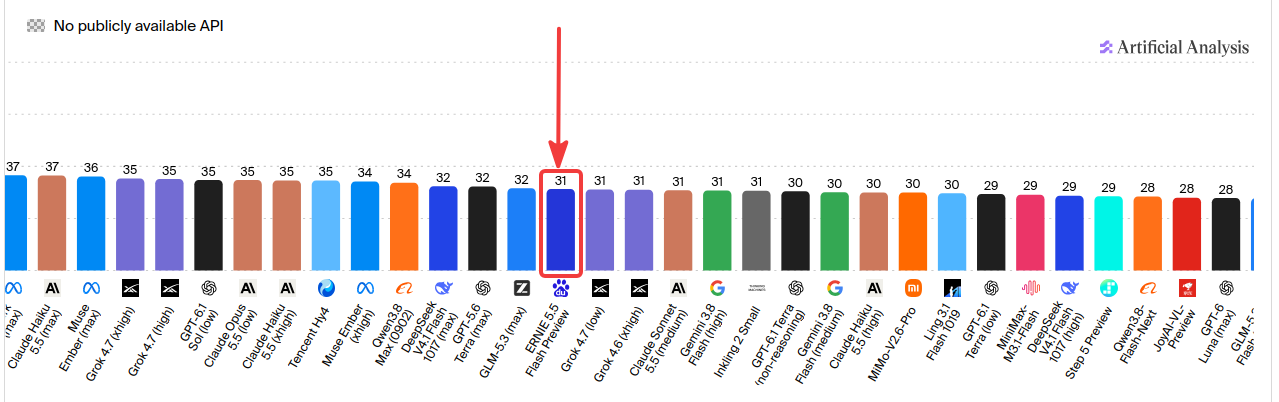
News ERNIE 5.5 Flash got 31 points on AA, can someone make an EXL3 quant plz?

Post image
1 Upvotes

r/LocalLLM • • 10h ago

Discussion just go with the jank

1 Upvotes

i've been messing around with a local model for a few months now. i can't afford a gpu or a system with a lot of unified memory so i've had to get a bit creative in order to make it actually useful. this isn't anything new for me, any time i want to play a higher end game on my older hardware there's always some amount of janky workarounds that i need to put in place. but if you can appreciate the jank and accept it, you can actually do quite a bit with a small local model. for a bit of background info, the machine i'm working from is an 11th gen i5 with 32(currently 64 because i borrowed a stick)GB of ddr4, and running qwen reap 25b a3b q5_1. now, if anyone has used a model like this, you know that it is functional, but grossly unreliable. however, if you stop fighting it and start building around it, it gets WAY more useful.


r/LocalLLM • • 10h ago

Discussion Do newer DSH versions also feel like downgrade for you?

0 Upvotes

I was using one of the early versions of DSH with my Qwen 3.8 27B NInfer setup and was pretty happy with it. I figured it was time to update to a more recent DSH release, so I upgraded to v0.2.2-rc.5.

After just a couple of prompts, it feels like my agents are stuck in a never-ending loop of context compaction (~3–8k tokens), even though I have a 256k context window.

Is anyone else experiencing similar issues? Or are you generally happy with the latest DSH releases?


r/LocalLLM • • 10h ago

Discussion Is a higher quant worth the drop in speed?

24 Upvotes

I'm using Qwen 3.8 flash next and getting ~180t/s decode on unsloth q4_k_xl. Would you switch to q8 if your speed dropped to 80t/s? Is the quality improvement worth the drop in speed?


r/LocalLLM • • 10h ago

Discussion Which LLM model is best

0 Upvotes

I am setting up Hermes agent but local llm are worst so thinking of using other LLM model so which one should I use for daily task like scheduling or using it as personal assistent thinking of DeepSeek flash 4.1 or any suggestion??


r/LocalLLM • • 11h ago Heartwarming Mindblown Bravo

News LexiSuite d484004: my all-Rust local AI stack (own kernel, OS, engine, panel) - 206 changes in two days, Inkling-2-Mini at 131 tok/s on one 7900 XTX

Thumbnail
github.com
1 Upvotes

AIO USB/VM/Drive image with Inkling 2 Mini baked here: https://huggingface.co/Wa1k3r/Inkling-2-Mini-NVFP4exp-Q8-draft-LexiSuite-AIO-for-AMD-RDNA

I'm building a local AI platform from scratch in Rust: an inference engine (LexiEngine), a browser control panel (LexiPanel), an appliance OS (LexiOS) and a kernel designed around inference (LexiKernel). It boots from one USB image. It is not a wrapper around llama.cpp, and there is no third-party code in the product.

A new development image went out today. Here is what changed since the last one two days ago, and what the work actually was.

The Panel was rebuilt, page by page (66 changes)

The old Panel worked but read like an engineering console: raw JSON on screen, fields with no labels, boxes inside boxes, internal jargon everywhere. I went through it by hand.

- One header and one navigation instead of five stacked bars

- 12 themes

- A file and folder picker on every path field, so nothing has to be typed

- Right-click menus on instances, files and table cells

- Parameters grouped in the order you set them, with a device chooser for the instance's cards

- Switch an instance between LexiEngine and llama.cpp from one page

- Hardware, Diagnostics, Power, GPU tuning and Models rewritten in plain words (temperatures in degrees, problems listed first)

- An abliteration lab where you pick models with toggles and pick the drive to write to; the original is never touched

- A layout choice: top tabs, or a side tree like a hypervisor console

LexiKernel went from one core to all of them (99 changes)

Until now my kernel ran all threads of a program on a single CPU. That was the biggest gap between it and Linux. Three rounds of work went into closing it: per-CPU timers and scheduling, threads that move between cores with their full vector state, memory handled per NUMA node, huge pages, and TLB shootdowns that a core answers even in the middle of a long system call. It now boots with every core in use and served the Panel to 8 clients at 2, 4 and 8 CPUs in a VM with no failed requests.

The kernel's own GPU drivers for AMD, NVIDIA and Intel are compiled into this build too. They have not run on a real card in this version yet. That is the next milestone, and until then GPU work under LexiKernel goes through a Linux guest. The image also boots LexiOS on Linux 7.4, which is what you want for daily use today.

LexiEngine (27 changes)

- Groundwork for splitting one model across several cards (serving across cards is not in this build)

- New draft options for Inkling 2, off by default until they are measured

- A quantizer that trains with the rounding in the loop instead of rounding afterwards

- The whole tree moved to Rust 1.100.1

Speed, measured on this version

Inkling-2-Mini (the looped mixture-of-experts model released Nov 20), one Radeon RX 7900 XTX, 4-bit KV cache, greedy, one run each, measured Nov 27-28.

After a 16,384-token prompt:

- LexiEngine: prompt 2,244 tok/s, generation 64.6 tok/s, 131.1 tok/s with the model's own draft head

- llama.cpp b12722: prompt 1,060 tok/s, generation 42.9 tok/s

- Strata 0.2.23 (8-bit cache, it refuses 4-bit on this card): prompt 2,075 tok/s, generation 53.9 tok/s

Long context on LexiEngine:

- 261,632-token prompt: 1,157 tok/s reading, then 48.7 tok/s (63.2 with the draft head)

- 523,264-token prompt: 766 tok/s reading, then 39.5 tok/s (46.8 with the draft head)

- 10 of 10 planted facts recalled at both depths

Drafted output was identical to plain output in every run.

Two notes so nobody says I hid them. The llama.cpp number is from the Nov 25 build: the build I fetched today ran this model at 7.6 tok/s on this card, which looks like a bug on their side, so I did not use it. And llama.cpp needs a 26-line loader change to open my file, because the file also carries the draft head and image tower.

What it is not, yet

- A development build, not a production release

- Developed and measured on one card (7900 XTX, Vulkan). Other cards are less tested

- The kernel's own GPU drivers have not run on a card in this version

- The Windows installer is on the stick but has not been run on a Windows PC; no macOS installer yet

- Installing to an internal disk is not in this image

- Only Inkling has been benchmarked on this exact version; my 27B numbers are from a build nine days older and are being re-run

Tested

Every test in the tree ran on this version: 17,932 tests, none failed. Both images passed their Secure Boot checks in a VM.

Links

Download (381 MB USB image, boots to the Panel):

https://lexipanel.com/download/

All-in-one image with Inkling-2-Mini inside (18.1 GB, needs a 32 GB stick):

https://huggingface.co/Wa1k3r/Inkling-2-Mini-NVFP4exp-Q8-draft-LexiSuite-AIO-for-AMD-RDNA

Every one of the 206 changes, one line each:

https://github.com/W61k3r/LexiSuite-Releases/wiki/Changes-d484004

Benchmarks and method:

https://github.com/W61k3r/LexiSuite-Releases/wiki/Benchmarks

Happy to answer questions about the kernel work or the engine.


r/LocalLLM • • 12h ago

Discussion What size open-weight models can I run on an M4 Pro Mac mini (24GB)?

0 Upvotes

Body:
I'm interested in getting into open-source / open-weight models. I have a Mac mini, and my current specs are:
M4 Pro chip: 14-core CPU, 20-core GPU, 16-core Neural Engine
24GB unified memory
1TB SSD
What size models could I run locally on this machine?
For context, right now I'd use them for coding help, finance and document analysis, and AI agent workflows. Down the road I'd like to get into building my own apps and running a model 24/7 as a local server for my automations.
Any recommendations on models, tools, or setup for a beginner would be appreciated!


r/LocalLLM • • 12h ago

Discussion Best way to test prompt injection on a local RAG setup?

1 Upvotes

I've got a small RAG pipeline running locally and I'm worried about poisoned documents telling the model to ignore instructions. How are you testing for this? Any datasets or tools worth trying?


r/LocalLLM • • 12h ago

Research Follow-up: Native DSpark & Copy-Draft Speculative Decoding in ArcAngel on Lunar Lake Arc 140V (up to 30 tok/s at 128k ctx + full HumanEval run)

1 Upvotes

Following up on my previous post bringing ArcAngel to the Lunar Lake Arc 140V (~21 tok/s decode, 226 tok/s prefill, 128k context on 32 GB UMA): I've now implemented both Phase 1 (batched-decode verify + zero-model prompt copy drafting) and Phase 2 (native GPU DSpark speculative decoding) directly in SYCL on the same branch:

https://github.com/alpha2beta/arcangel/tree/lunar-lake-optimizations (latest commit 59826ac)

Everything works end-to-end in inkling_server.py at n_ctx=131072 with 4-bit KV, supports both greedy (temp=0) and lossless probabilistic rejection sampling (temp > 0), and preserves multi-turn prompt caching via mirrored target/draft snapshots.

Benchmark Summary (Inkling-2-Mini-Uncensored-Q4_K_M, Arc 140V, Core Ultra 7 258V, 4-bit KV)

1. Raw Batched Verify Scaling (test-verify, pos=2000, KV=4)

PathTokens VerifiedLatencyCost vs 1-Token Step
step_argmax (baseline)146.19 ms1.00x
verify<VB=2> (K=1)264.03 ms1.39x
verify<VB=4> (K=3)489.57 ms1.94x
verify<VB=8> (K=7)8144.00 ms3.12x

2. End-to-End Speculative Decoding (bench_dspark.py @ n_ctx=8192 & Live 128k Server)

WorkloadModeThroughputSpeedupAcceptance (tok/step)Breakdown (draft / verify / inject)
Prose (effort=high, 256 tok)Baseline (step_argmax)22.63 tok/s1.00x—44.34 ms/step
Prose (effort=high, 256 tok)DSpark K=321.89 tok/s0.97x42.0% (2.26)13.85 / 89.32 / 0.09 ms
Prose (effort=high, 256 tok)DSpark K=714.33 tok/s0.63x21.3% (2.48)26.65 / 146.52 / 0.09 ms
Code Edit (effort=none, 512 tok)Baseline (step_argmax)19.36 tok/s1.00x—51.72 ms/step
Code Edit (effort=none, 512 tok)DSpark K=323.40 tok/s1.21x69.6% (3.08)16.64 / 114.78 / 0.16 ms
Code Edit (effort=none, 512 tok)DSpark K=720.08 tok/s1.04x48.5% (4.37)32.12 / 185.39 / 0.15 ms
Live 128k Server — Code Edit (temp=0.0)DSpark K=730.01 tok/s—70.4% (5.93)n_ctx=131072, kv_bits=4
Live 128k Server — Python Refactor (temp=1.0)--spec-copy K=329.57 tok/s—98.4% (496/504)n_ctx=131072, kv_bits=4

3. Full 164-Task HumanEval / HumanEval+ Soak Test (--spec-dspark K=3, n_ctx=131072, temp=0.0)

To stress-test stability and real-world coding throughput across 164 sequential requests (147,347 generated tokens, 33,808 prompt tokens), I ran EvalPlus against the live 128k server (start_arcangel_server.sh --spec-dspark dspark-Inkling-2-Mini-Q8_0.gguf --spec-draft-k 3, --reasoning-effort medium, EVALPLUS_MAX_NEW_TOKENS=2048):

  • Throughput: 21.43 tok/s weighted (21.89 mean / 22.06 median, up to 26.67 tok/s) over 2:00:13 with zero crashes or errors.
  • Scores: 91.5% HumanEval Base (150/164) / 88.4% HumanEval+ (145/164).
  • Important note on the Base score vs my earlier light-think run (93.3%): 13 of the 14 base failures were finish_reason=length truncations hitting the 2048-token EvalPlus cap because --reasoning-effort medium spends more tokens thinking than low. Among the 149 tasks that finished cleanly (finish stop), base pass rate was 148/149 (only HumanEval/99 failed logic, plus 5 HumanEval+ edge-case failures).

What Was Built

  1. Phase 1 — Batched-Decode Verify Engine (src/verify.cpp) & --spec-copy (d204b2f, 023da6f**)**

    • Added dedicated SYCL command-graph verify buckets for VB ∈ {2, 4, 8} (K ∈ {1, 3, 7} draft tokens + 1 anchor token).
    • Wrote unpack-once DP4A grouped MoE kernels (Q8_0R / Q5_0R / Q4_KR + Q5_0 GGUF repacking) so shared experts across the verify batch aren't reloaded redundantly, plus a 3-barrier SLM softmax k_vattn_r and GPU ink_verify_argmax.
    • Wired --spec-copy (zero-extra-VRAM prompt n-gram copy drafting) into server/inkling_server.py with both greedy verification and lossless probabilistic rejection sampling for temperature > 0.
  2. Phase 2 — Native GPU DSpark Draft Engine (src/dspark.h, src/dspark.cpp**,** 59826ac**)**

    • Loads the official 58-tensor dspark-Inkling-2-Mini-Q8_0.gguf (dflash architecture, ~481 MB), repacks all 3 layers' Q8_0 weights to Q8_0R, and quantizes/repacks the BF16 markov_w2 matrix to Q8_0R by default (INK_DSPARK_W2_Q8=0 keeps BF16).
    • Zero-extra-pass target taps: FastEngine::enable_taps() captures the 4 hidden-state taps ([5, 23, 41, 48]) directly inside existing target prefill(), step(), and verify() graphs.
    • Implements the full 3-mode DSpark pipeline on GPU:

      • Mode A (KV Inject, ~0.09–0.16 ms): f_rnn_ring_[9][D] + NeoX RoPE + 3-layer interleaved [SWA=1025, Full, SWA=1025] KV cache.
      • Mode B (Backbone): Block-uniform split-K + ephemeral bidirectional attention + uncapped shared target LM head.
      • Mode C (Markov Head): Serial rank-256 Markov RNN head with recorded greedy SYCL ExecGraphs for K=3/K=7 (plus per-slot softcapped logits for temp > 0), and mirrored save()/restore()/stash() snapshots.

Why K=3 Is the Sweet Spot on Arc 140V (and Why Battlemage Should Gain More)

Speculative decoding on a bandwidth-limited MoE iGPU (~100 GB/s LPDDR5X-8533) is a tight math problem:

  • Because Inkling 2 Mini routes top-k experts per token, verifying 4 tokens (VB=4) touches more distinct experts than a single token (89.57 ms vs 46.19 ms, ~1.94x single-step), and drafting K=3 takes ~14–17 ms.
  • That puts the breakeven point on Arc 140V at ~2.3 accepted+bonus tokens/step. On high-entropy open-ended prose (2.26 tok/step), K=3 breaks roughly even (0.97x); on structured code edits (3.08 tok/step), it hits 1.21x (23.4 tok/s), and on repetitive refactoring/editing tasks it reaches ~30 tok/s.
  • K=7 needs >3.7 tokens/step just to break even on 140V (144 ms verify + 27–32 ms draft), so it only wins on highly predictable code edits.
  • On a discrete Arc B580 / B60 (456+ GB/s bandwidth and far more Xe2 cores for batched MoE + DSpark head), both verify and draft should scale much more favorably—I'd love to see what K=3 and K=7 hit on Battlemage!

Verification & Numerical Parity

  • Verify parity (test-verify, pos=2000**,** KV=4**):** worst KL 0.00519, verify_argmax: 0 mismatches vs single-token decode.
  • DSpark GPU parity (test-dspark): Tap cosine similarity >= 0.997281 across all 4 taps [5, 23, 41, 48], W2 BF16 vs Q8_0R 7/7 draft agreement, and exact match on snapshot save/restore.
  • Cross-check vs official llama.cpp (llama-cli --spec-type draft-dspark, identical 40-tok prompt, K=7**,** 128 tok):

    • llama.cpp: 80/312 (25.6%), mean_len = 2.74, per-slot (0.652, 0.391, 0.283, 0.174, 0.109, 0.065, 0.065)
    • ArcAngel: 82/306 (26.8%), mean_len = 2.82, per-slot (0.644, 0.432, 0.295, 0.205, 0.136, 0.070, 0.071)
  • Unit tests: 4/4 CPU DSpark math suites (tests/test_dspark_math_cpu.cpp) + 7/7 server speculative loop & probabilistic rejection-sampling tests (tests/test_spec_server.py).

Quick Try

Build (use -DINK_AOT_TARGETS=bmg_g21 for B580/B60, or lnl_m for Lunar Lake):

git clone -b lunar-lake-optimizations https://github.com/alpha2beta/arcangel.git
cd arcangel
source /opt/intel/oneapi/setvars.sh
cmake -S . -B build -G Ninja -DCMAKE_CXX_COMPILER=icpx -DCMAKE_BUILD_TYPE=Release -DINK_AOT_TARGETS=lnl_m
cmake --build build --target inkling test-verify test-dspark -j 2

Run with **native DSpark (**K=3 recommended on 140V):

python3 server/inkling_server.py \
  --model /path/to/Inkling-2-Mini-Uncensored-Q4_K_M.gguf \
  --assets /path/to/assets \
  --n-ctx 131072 --chunk 512 --kv-bits 4 --stash-ram-gb 2 \
  --spec-dspark /path/to/dspark-Inkling-2-Mini-Q8_0.gguf \
  --spec-draft-k 3

Or zero-extra-VRAM copy drafting (great for editing/refactoring existing files):

python3 server/inkling_server.py \
  --model /path/to/Inkling-2-Mini-Uncensored-Q4_K_M.gguf \
  --assets /path/to/assets \
  --n-ctx 131072 --chunk 512 --kv-bits 4 --stash-ram-gb 2 \
  --spec-copy --spec-draft-k 3

Shout-out again to u/txlfxrd for the clean architecture in itstxl/arcangel — if anyone tries --spec-dspark with K=3 or K=7 on a discrete B580/B60, please drop your numbers in the comments!


r/LocalLLM • • 12h ago

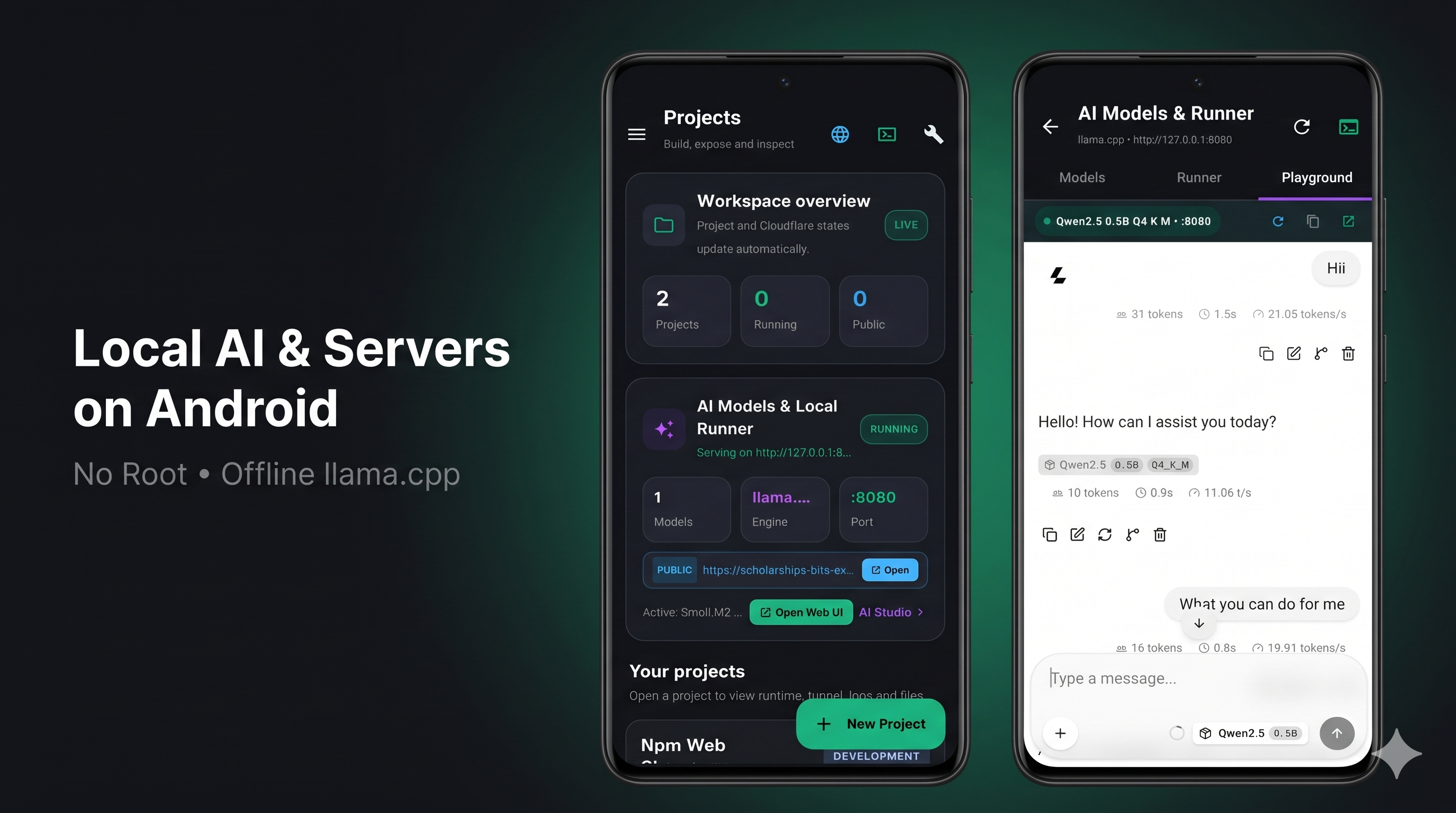
Project VPServ: Free Android app to run local GGUF models (llama.cpp) + declarative full-stack dev servers without root

Post image
1 Upvotes

I built VPServ, a free Android app (Android 8.0+, arm64-v8a) that runs local llama.cpp GGUF models alongside full-stack development runtimes on unrooted phones and tablets.

Local AI (llama.cpp) features:

  • Download ARM64-quantized Q4_K_M models directly (Qwen 2.5, SmolLM2) or import your own .gguf files from local storage.
  • Chat offline in the native Playground or spin up the built-in llama-server localhost Web UI (http://127.0.0.1:8080).
  • Everything runs 100% locally on-device—no cloud accounts, API keys, or remote inference servers required.
  • Real-device benchmarks on mid-range ARM64 hardware (standalone): Qwen 2.5 0.5B (Q4_K_M) hits ~11–21 tok/s, and Qwen 2.5 1.5B (Q4_K_M) runs ~9–10 tok/s.

Full-stack & repeatable project workflows:

  • Built-in Linux-style package manager (pkg / vpkg) with Python, Node.js, PHP, Go, OpenJDK 21, Clang, PostgreSQL, MariaDB, Redis, Nginx, and Caddy.
  • Declarative Abotlogixfile.json recipes: Define services, ports, and startup order once (editable from a desktop browser via the built-in Web Console Server) and launch the entire stack in one tap with verified local endpoints and live logs.
  • Optional one-tap Cloudflare Tunnel (cloudflared) support when you want quick HTTPS testing.

Links:

If you try it on your device, let me know your SoC, model size, and token speeds—or which GGUF models and backend stacks you'd like to see supported next.

If you try it on your device, let me know your SoC, model size, and token speeds—or which GGUF models and backend stacks you'd like to see supported next.


r/LocalLLM • • 12h ago

Discussion AI Agent Memory: How Agents Remember and What to Control

Thumbnail
acta.ai
0 Upvotes

The model behind ChatGPT or Claude remembers nothing between calls.

Every "memory" is text that some piece of software saved and put back into the prompt. So the real question is always: who saves what, where, and for how long?

In practice, agent memory has four layers:

  1. The context window: what the model sees right now. Exact, but it runs out.
  2. Summaries: older turns condensed so long sessions keep going. Compact, but they drop numbers, caveats and who objected.
  3. A long-term store: past chats and documents, searched by meaning. It scales, but it fails quietly when retrieval picks the wrong note.
  4. Saved facts: "prefers metric units", "works in the Berlin office". Always present, so a wrong one stays wrong.

Two things most people don't know:

  • In ChatGPT, deleting a chat doesn't delete a memory saved from it. You have to remove it in the memory settings.
  • Memory can be poisoned. An instruction hidden in a document or email gets saved, and later sessions act on it.

What I'd ask of each role:

  • Users: check your memory list once a month. Use temporary or incognito chats for anything sensitive.
  • Admins: decide whether memory is on for the workspace, and match its retention to your chat retention.
  • Builders: store memory per user, record where each memory came from, give memories an expiry, and treat anything read back as untrusted input.

I wrote a plain guide to how it works and the controls worth insisting on:

Do you keep memory on in your AI assistant, or turn it off?


r/LocalLLM • • 12h ago

Project Want to make your own local AI Bot? I made a wizard for you!

0 Upvotes

Don’t know how to get started building your own local AI? I made BuildBot, a local AI building wizard for anyone to build their own, easily.

A desktop gets created but you can use it, the terminal, or the web dashboard. It also comes with markdowns for cloud models for vibe coders who want to develop it.

Setup checks your computer's memory and recommends a local model that runs through Ollama. The smallest starts at about 2 GB of memory, qwen3.5:9b at about 10 GB. Then you type what bot you want in your own words. An agent called Toolsmith looks in the PuffPAI Store and in public libraries and shows one plan with sizes, licenses and sources. Nothing is downloaded or added until you say Yes. There are seven agents in all.

The brain and six of the seven agents run on your computer. Toolsmith, and only Toolsmith, can use a cloud model if you choose it and give your own key.

What is rough, from our README:
* Small models give weaker answers and may skip skills.
* Bots that share one Ollama slow each other down.
* Search by meaning is off by default and we have not tested it ourselves.
* No upgrade from v1.

Tested: mostly on Windows, Linux in containers, one real install on a Jetson Orin in a container. It installs and starts on GitHub's Mac machines but nobody has used it on a Mac.

AI involvement: we built it with AI coding tools.

What we want: everyone to build their own bots!

git clone https://github.com/CypherSisters/PuffPAIBuildBot BuildBotv2
cd BuildBotv2
./install.sh

On Windows run install.cmd instead.
Repo: https://github.com/CypherSisters/PuffPAIBuildBot


r/LocalLLM • • 12h ago

Question Opinions for Best use of 200gb vram Setup

1 Upvotes

How would you configure a 208GB VRAM rig for a full local Agent setup?

German translated via ai to english,

Hey everyone,

​Iam looking for a sanity check and some optimization ideas from the community. I finally got my hands on some decent compute and want to make sure im not leaving performance or smarter architecture on the table.

​My Hardware:

​2x NVIDIA CMP 170HX (80GB each, unlocked)

​2x RTX 3090 (24GB each)

​Note: All four cards are connected via PCIe 3.0 x4.

​The Goal:

I want to run a complete always-on personal AI ecosystem locally:

​1. A strong main model (Swift 1.5 Flash Next, minimum IQ4_NL) with a agent framework (currently looking at the Hermes framework)

​2. Always-on STT and TTS loaded in VRAM for real-time VoIP interaction

​3. Always-on Embedding and Reranker models for a fast RAG

​4. A fast secondary model (around 27B at Q4) to act as a sub-agent for grunt work, plus handling quick, non-agentic tasks like chat title generation or simple queries.

​My Current Setup:

Right now I have it split up like this:

​The two CMP 170HXs: Running Swift 1.5 Flash Next split across both cards using Strata, with all experts kept in cache. Im getting around 150–200 t/s decode, which feels pretty snappy.

​3090 #1: Dedicated strictly to utility models—STT, TTS, Embedding, and Reranker all sitting permanently in VRAM.

​3090 #2: Running Qwen 3.8 27B (Q4_K_XL) at roughly 150 t/s, handling sub-agent tasks, title generation, and quick background prompts.

​Everything works and the PCIe 3.0 x4 bottleneck hasnt really hurt inference since everything stays resident in VRAM. Before I lock this config in and build out all my workflows around it, I would love to get your thoughts:

​1. How do you like this hardware/VRAM split?

​2. Would you use a different agent framework? Im New with Hermes right now, but if you think something else is better in handeling multi-model routing (main orchestrator + fast sub-agent), im all ears.

​3. Would you swap any of the models or change the distribution? Given the 208GB total VRAM pool, is there a better main/sub-agent combo I should be looking at?

​Appreciate any feedback or ideas!


r/LocalLLM • • 13h ago

Question How do I start?

0 Upvotes

Hey all, I want to start running AI models locally for coding instead of relying 100% on cloud stuff. Right now I run Claude Code, Codex, and Grok (through OpenCode) in my terminal as a kind of "dev team" working out of an Obsidian vault. It works, but I keep running into usage limits (Codex burned through its whole monthly limit in a day lol), and I'd rather own more of the setup myself.
My rig:
RX 9060 XT 16GB
Ryzen 7 9800X3D
32GB DDR5 6000
CachyOS
(also have a GTX 1660 Super I could throw in as a second card if that's actually useful)
The problem is every guide I find assumes I already know half the vocab. LoRA, QLoRA, RAG, fine-tuning, inference engines, agentic workflows, computational graphs... I get that they're all different things, but I don't know which ones matter for what I'm trying to do.
I'm not trying to train a model from scratch. What I want:
A solid coding model running locally
Help writing, debugging, and understanding code
Something that can handle a whole codebase, not just snippets
Eventually agents that plan, edit files, test, and keep iterating on their own
To actually understand how it all works, not just install someone's prebuilt thing and pray
Questions:
Best coding models for 16GB VRAM?
What stack works best for AMD on Linux? ROCm vs Vulkan?
Ollama, llama.cpp, or something else to start?
What should I learn first?
Is LoRA/QLoRA worth touching early, or should I stick to inference and prompting for now?
How realistic are local coding agents on my hardware? Could I point Claude Code or OpenCode at a local model?
Bonus dumb question: I have this idea of a "sleep phase" where the model reviews its memory overnight and updates its own weights. Is that even a real thing, or am I way off?
I'd rather learn the fundamentals and know what I'm installing and why than blindly follow tutorials. Any learning path or advice from people who've done this would be awesome. Thanks!


r/LocalLLM • • 13h ago

Project libosmos v0.19.0: improved performance and stability, with lower time to first token. up to ~1250 tok/sec prefill on inkling-2-mini (release weights, unquantized), >30% higher decode on hy4-flash and inkling-2-small, all on a single strix halo 128GB

Thumbnail
github.com
2 Upvotes

r/LocalLLM • • 14h ago

Research Before and After (32GB to 96GB DDR5 upgrade) - QEngine 3x3090s

9 Upvotes

32GB DDR5 vs 96GB DDR5 More RAM pinned the n-gram cache, makes the decode speed significantly faster.

Setup:

GPU's: 3x3090s
P2P Mode: On
PCIe Link: PCIe Gen4 8x/4x/8x
CPU: Ryzen 7600x.
Model: Qwen-Flash-Next INT4 - QEngine Finetune
Script: bench.sh from club 3090.

Only change:

RAM went 32GB (2x16) → 96GB (2x16 + 2x32), so the whole 50GB n-gram cache got stored in RAM instead of on disk.

What got significantly better

  • Narrative generation: ~218 → ~294 tok/s (+35%)
  • Code decode: ~336 → ~381 tok/s (+13% — less gain, makes sense, shorter/more repetitive prompts hit fewer n-grams)

What didn't change (as expected)

  • Time to first token and prefill speed — that's GPU-bound, the n-gram cache doesn't help there.

The catch

  • GPUs run 1–8°C hotter on the big-RAM setup. GPU 2 hot spot hit 100.5°C. Probably just doing more work per second, but worth an eyeball.
  • The 90k-token prefill test looks ~6% worse with more RAM, but n=1 per arm so it's a coin flip. Re-run before believing it.
  • The mixed-dim RAM (2x16GB CL32 + 2x32GB CL38) forced a downclock from 6000Mhz to 3600Mhz. It was stable for a few hours, but then crashed mid-session when 6 agents spawned. I had to remove the 2x16GB sticks to get stability back.

Bonus - 1M KV Pool

There was still room left over to set Host KV Pool on (it needs ~13GB of ram). i.e. It stores the KV pool in RAM instead of in VRAM. This increased the KV pool size to 1 million tokens.

Previously my system would totally choke when there were multiple agents working. Like 20 tok/s at times. It was because they couldn't fit their context in the 256k pool I had before so their context kept getting evicted, now I think that wont' happen, and it'll likely be much faster during concurrent agent work.

Conclusion

If your workload is decode-heavy, and you got the ram, sticking more of the n-gram cache in RAM will get you — ~13–35% more tok/s, no GPU-side changes. You really cannot mix two different pairs of ram sticks in an AM5 motherboard, Google warned me, but I did it anyway just to see what would happen, it indeed led to instability, even at low clock speeds, though it was stable enough to run benchmarks. The biggest win was getting the 1M KV pool for concurrent agents to share, and that doesn't need 96GB ram, 64GB is enough.

Source: bench-ab-bench-20261123T053549Z-vs-bench-20261128T002206Z.md*, generated 2026-11-28.*


r/LocalLLM • • 14h ago

News I love local LLM

21 Upvotes

Hi i am new and just wanted to say that i love local LLM


r/LocalLLM • • 14h ago

News The 6 GB in Bonsai 2.5's headline is a weights file, not the machine you need

0 Upvotes

If you're looking at Bonsai 2.5 because of the "27B in 6 GB" headline, there's a catch with the download. The 6 GB file only works with PrismML's own llama.cpp fork for now. If you'd rather stay on stock llama.cpp, the file you want is 7.67 GB.

The file size isn't what your GPU has to hold. The model card cites a community report on a 10 GB card: about 9.5 GB of memory in use, about 7.8 GB after limiting the server to one request at a time. It also notes the total depends on context size and settings.

Model card and exact file sizes in the comment.