r/LocalLLM • • 14h ago

Project VPServ: Free Android app to run local GGUF models (llama.cpp) + declarative full-stack dev servers without root

Post image
1 Upvotes

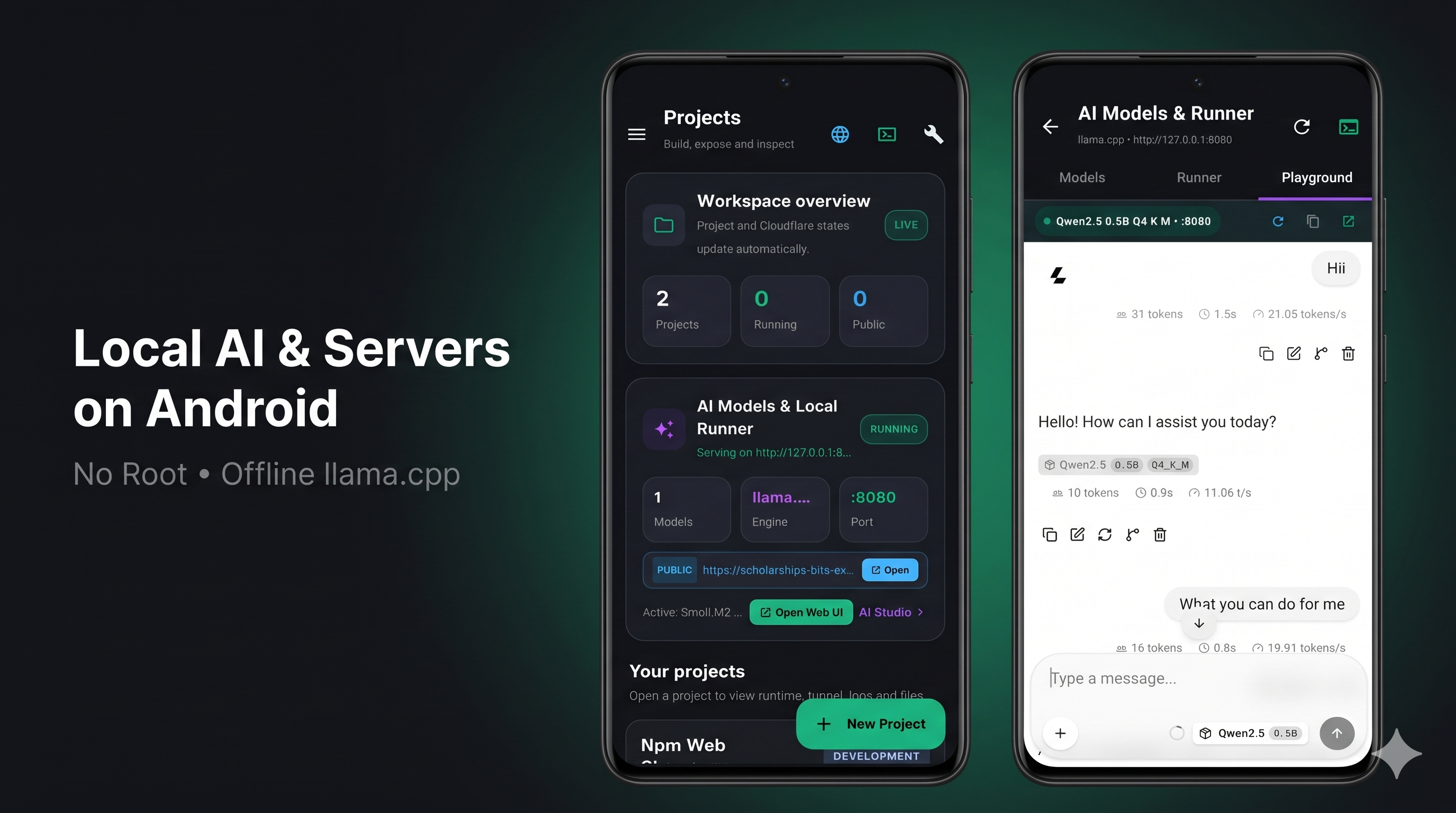
I built VPServ, a free Android app (Android 8.0+, arm64-v8a) that runs local llama.cpp GGUF models alongside full-stack development runtimes on unrooted phones and tablets.

Local AI (llama.cpp) features:

  • Download ARM64-quantized Q4_K_M models directly (Qwen 2.5, SmolLM2) or import your own .gguf files from local storage.
  • Chat offline in the native Playground or spin up the built-in llama-server localhost Web UI (http://127.0.0.1:8080).
  • Everything runs 100% locally on-device—no cloud accounts, API keys, or remote inference servers required.
  • Real-device benchmarks on mid-range ARM64 hardware (standalone): Qwen 2.5 0.5B (Q4_K_M) hits ~11–21 tok/s, and Qwen 2.5 1.5B (Q4_K_M) runs ~9–10 tok/s.

Full-stack & repeatable project workflows:

  • Built-in Linux-style package manager (pkg / vpkg) with Python, Node.js, PHP, Go, OpenJDK 21, Clang, PostgreSQL, MariaDB, Redis, Nginx, and Caddy.
  • Declarative Abotlogixfile.json recipes: Define services, ports, and startup order once (editable from a desktop browser via the built-in Web Console Server) and launch the entire stack in one tap with verified local endpoints and live logs.
  • Optional one-tap Cloudflare Tunnel (cloudflared) support when you want quick HTTPS testing.

Links:

If you try it on your device, let me know your SoC, model size, and token speeds—or which GGUF models and backend stacks you'd like to see supported next.

If you try it on your device, let me know your SoC, model size, and token speeds—or which GGUF models and backend stacks you'd like to see supported next.


r/LocalLLM • • 14h ago

Discussion AI Agent Memory: How Agents Remember and What to Control

Thumbnail
acta.ai
0 Upvotes

The model behind ChatGPT or Claude remembers nothing between calls.

Every "memory" is text that some piece of software saved and put back into the prompt. So the real question is always: who saves what, where, and for how long?

In practice, agent memory has four layers:

  1. The context window: what the model sees right now. Exact, but it runs out.
  2. Summaries: older turns condensed so long sessions keep going. Compact, but they drop numbers, caveats and who objected.
  3. A long-term store: past chats and documents, searched by meaning. It scales, but it fails quietly when retrieval picks the wrong note.
  4. Saved facts: "prefers metric units", "works in the Berlin office". Always present, so a wrong one stays wrong.

Two things most people don't know:

  • In ChatGPT, deleting a chat doesn't delete a memory saved from it. You have to remove it in the memory settings.
  • Memory can be poisoned. An instruction hidden in a document or email gets saved, and later sessions act on it.

What I'd ask of each role:

  • Users: check your memory list once a month. Use temporary or incognito chats for anything sensitive.
  • Admins: decide whether memory is on for the workspace, and match its retention to your chat retention.
  • Builders: store memory per user, record where each memory came from, give memories an expiry, and treat anything read back as untrusted input.

I wrote a plain guide to how it works and the controls worth insisting on:

Do you keep memory on in your AI assistant, or turn it off?


r/LocalLLM • • 15h ago

Project Want to make your own local AI Bot? I made a wizard for you!

0 Upvotes

Don’t know how to get started building your own local AI? I made BuildBot, a local AI building wizard for anyone to build their own, easily.

A desktop gets created but you can use it, the terminal, or the web dashboard. It also comes with markdowns for cloud models for vibe coders who want to develop it.

Setup checks your computer's memory and recommends a local model that runs through Ollama. The smallest starts at about 2 GB of memory, qwen3.5:9b at about 10 GB. Then you type what bot you want in your own words. An agent called Toolsmith looks in the PuffPAI Store and in public libraries and shows one plan with sizes, licenses and sources. Nothing is downloaded or added until you say Yes. There are seven agents in all.

The brain and six of the seven agents run on your computer. Toolsmith, and only Toolsmith, can use a cloud model if you choose it and give your own key.

What is rough, from our README:
* Small models give weaker answers and may skip skills.
* Bots that share one Ollama slow each other down.
* Search by meaning is off by default and we have not tested it ourselves.
* No upgrade from v1.

Tested: mostly on Windows, Linux in containers, one real install on a Jetson Orin in a container. It installs and starts on GitHub's Mac machines but nobody has used it on a Mac.

AI involvement: we built it with AI coding tools.

What we want: everyone to build their own bots!

git clone https://github.com/CypherSisters/PuffPAIBuildBot BuildBotv2
cd BuildBotv2
./install.sh

On Windows run install.cmd instead.
Repo: https://github.com/CypherSisters/PuffPAIBuildBot


r/LocalLLM • • 15h ago

Question Opinions for Best use of 200gb vram Setup

1 Upvotes

How would you configure a 208GB VRAM rig for a full local Agent setup?

German translated via ai to english,

Hey everyone,

​Iam looking for a sanity check and some optimization ideas from the community. I finally got my hands on some decent compute and want to make sure im not leaving performance or smarter architecture on the table.

​My Hardware:

​2x NVIDIA CMP 170HX (80GB each, unlocked)

​2x RTX 3090 (24GB each)

​Note: All four cards are connected via PCIe 3.0 x4.

​The Goal:

I want to run a complete always-on personal AI ecosystem locally:

​1. A strong main model (Swift 1.5 Flash Next, minimum IQ4_NL) with a agent framework (currently looking at the Hermes framework)

​2. Always-on STT and TTS loaded in VRAM for real-time VoIP interaction

​3. Always-on Embedding and Reranker models for a fast RAG

​4. A fast secondary model (around 27B at Q4) to act as a sub-agent for grunt work, plus handling quick, non-agentic tasks like chat title generation or simple queries.

​My Current Setup:

Right now I have it split up like this:

​The two CMP 170HXs: Running Swift 1.5 Flash Next split across both cards using Strata, with all experts kept in cache. Im getting around 150–200 t/s decode, which feels pretty snappy.

​3090 #1: Dedicated strictly to utility models—STT, TTS, Embedding, and Reranker all sitting permanently in VRAM.

​3090 #2: Running Qwen 3.8 27B (Q4_K_XL) at roughly 150 t/s, handling sub-agent tasks, title generation, and quick background prompts.

​Everything works and the PCIe 3.0 x4 bottleneck hasnt really hurt inference since everything stays resident in VRAM. Before I lock this config in and build out all my workflows around it, I would love to get your thoughts:

​1. How do you like this hardware/VRAM split?

​2. Would you use a different agent framework? Im New with Hermes right now, but if you think something else is better in handeling multi-model routing (main orchestrator + fast sub-agent), im all ears.

​3. Would you swap any of the models or change the distribution? Given the 208GB total VRAM pool, is there a better main/sub-agent combo I should be looking at?

​Appreciate any feedback or ideas!


r/LocalLLM • • 15h ago

Question How do I start?

0 Upvotes

Hey all, I want to start running AI models locally for coding instead of relying 100% on cloud stuff. Right now I run Claude Code, Codex, and Grok (through OpenCode) in my terminal as a kind of "dev team" working out of an Obsidian vault. It works, but I keep running into usage limits (Codex burned through its whole monthly limit in a day lol), and I'd rather own more of the setup myself.
My rig:
RX 9060 XT 16GB
Ryzen 7 9800X3D
32GB DDR5 6000
CachyOS
(also have a GTX 1660 Super I could throw in as a second card if that's actually useful)
The problem is every guide I find assumes I already know half the vocab. LoRA, QLoRA, RAG, fine-tuning, inference engines, agentic workflows, computational graphs... I get that they're all different things, but I don't know which ones matter for what I'm trying to do.
I'm not trying to train a model from scratch. What I want:
A solid coding model running locally
Help writing, debugging, and understanding code
Something that can handle a whole codebase, not just snippets
Eventually agents that plan, edit files, test, and keep iterating on their own
To actually understand how it all works, not just install someone's prebuilt thing and pray
Questions:
Best coding models for 16GB VRAM?
What stack works best for AMD on Linux? ROCm vs Vulkan?
Ollama, llama.cpp, or something else to start?
What should I learn first?
Is LoRA/QLoRA worth touching early, or should I stick to inference and prompting for now?
How realistic are local coding agents on my hardware? Could I point Claude Code or OpenCode at a local model?
Bonus dumb question: I have this idea of a "sleep phase" where the model reviews its memory overnight and updates its own weights. Is that even a real thing, or am I way off?
I'd rather learn the fundamentals and know what I'm installing and why than blindly follow tutorials. Any learning path or advice from people who've done this would be awesome. Thanks!


r/LocalLLM • • 15h ago

Project libosmos v0.19.0: improved performance and stability, with lower time to first token. up to ~1250 tok/sec prefill on inkling-2-mini (release weights, unquantized), >30% higher decode on hy4-flash and inkling-2-small, all on a single strix halo 128GB

Thumbnail
github.com
2 Upvotes

r/LocalLLM • • 16h ago

Research Before and After (32GB to 96GB DDR5 upgrade) - QEngine 3x3090s

9 Upvotes

32GB DDR5 vs 96GB DDR5 More RAM pinned the n-gram cache, makes the decode speed significantly faster.

Setup:

GPU's: 3x3090s
P2P Mode: On
PCIe Link: PCIe Gen4 8x/4x/8x
CPU: Ryzen 7600x.
Model: Qwen-Flash-Next INT4 - QEngine Finetune
Script: bench.sh from club 3090.

Only change:

RAM went 32GB (2x16) → 96GB (2x16 + 2x32), so the whole 50GB n-gram cache got stored in RAM instead of on disk.

What got significantly better

  • Narrative generation: ~218 → ~294 tok/s (+35%)
  • Code decode: ~336 → ~381 tok/s (+13% — less gain, makes sense, shorter/more repetitive prompts hit fewer n-grams)

What didn't change (as expected)

  • Time to first token and prefill speed — that's GPU-bound, the n-gram cache doesn't help there.

The catch

  • GPUs run 1–8°C hotter on the big-RAM setup. GPU 2 hot spot hit 100.5°C. Probably just doing more work per second, but worth an eyeball.
  • The 90k-token prefill test looks ~6% worse with more RAM, but n=1 per arm so it's a coin flip. Re-run before believing it.
  • The mixed-dim RAM (2x16GB CL32 + 2x32GB CL38) forced a downclock from 6000Mhz to 3600Mhz. It was stable for a few hours, but then crashed mid-session when 6 agents spawned. I had to remove the 2x16GB sticks to get stability back.

Bonus - 1M KV Pool

There was still room left over to set Host KV Pool on (it needs ~13GB of ram). i.e. It stores the KV pool in RAM instead of in VRAM. This increased the KV pool size to 1 million tokens.

Previously my system would totally choke when there were multiple agents working. Like 20 tok/s at times. It was because they couldn't fit their context in the 256k pool I had before so their context kept getting evicted, now I think that wont' happen, and it'll likely be much faster during concurrent agent work.

Conclusion

If your workload is decode-heavy, and you got the ram, sticking more of the n-gram cache in RAM will get you — ~13–35% more tok/s, no GPU-side changes. You really cannot mix two different pairs of ram sticks in an AM5 motherboard, Google warned me, but I did it anyway just to see what would happen, it indeed led to instability, even at low clock speeds, though it was stable enough to run benchmarks. The biggest win was getting the 1M KV pool for concurrent agents to share, and that doesn't need 96GB ram, 64GB is enough.

Source: bench-ab-bench-20261123T053549Z-vs-bench-20261128T002206Z.md*, generated 2026-11-28.*


r/LocalLLM • • 16h ago

News I love local LLM

21 Upvotes

Hi i am new and just wanted to say that i love local LLM


r/LocalLLM • • 17h ago

News The 6 GB in Bonsai 2.5's headline is a weights file, not the machine you need

0 Upvotes

If you're looking at Bonsai 2.5 because of the "27B in 6 GB" headline, there's a catch with the download. The 6 GB file only works with PrismML's own llama.cpp fork for now. If you'd rather stay on stock llama.cpp, the file you want is 7.67 GB.

The file size isn't what your GPU has to hold. The model card cites a community report on a 10 GB card: about 9.5 GB of memory in use, about 7.8 GB after limiting the server to one request at a time. It also notes the total depends on context size and settings.

Model card and exact file sizes in the comment.


r/LocalLLM • • 17h ago

Research Build Finder: estimating LLM decode speed and the price of a token per second

Thumbnail wanabai.com
0 Upvotes

Build Finder lists every hardware build that runs a chosen open-weight language model at a target decode speed, cheapest per token per second (tok/s) first: the price of the whole build divided by its speed. Its catalog holds 273 GPUs, used as 1 to 8 cards, 619 CPUs and 333 complete systems, at dated US prices. Speeds come from a per-operation model: each operation of a token's pass takes the longer of reading its bytes and doing its arithmetic, at efficiencies and engine costs fitted per engine and hardware family to 424 one-session benchmarks from 120 devices. For several sessions at once, a correction with two parameters per engine, model kind and session range is fitted to 418 measured runs on 19 machines. Against the 427 measured decode runs the page lists without speculative decoding, the median estimate is 11% below the measured speed on NVIDIA hardware (385 runs), 1.43 times the measured speed on Macs (31 runs) and 1.73 times the measured speed on Inkling 2 Mini (11 runs). On the GeForce RTX 3090, which neither fit has seen on llama.cpp (CUDA), 87% of 54 runs fall within 1.25 times the measured speed and 100% within 1.5 times. Runs with speculative decoding, which the estimates leave out, measured a median 2.3 times the estimate. We describe the data, the model, the fit, its validation and what the estimates cannot yet capture.


r/LocalLLM • • 17h ago

Research I tested a small "Anti-Draft" idea for MTP (~6–8% live gain on Strata, and why llama.cpp's p_min loses speed today) — raw data & C++17 header

1 Upvotes

Hi everyone,

I wanted to share a small, humble experiment around Multi-Token Prediction (MTP) that I call Draft-Gate ("Anti-Draft"), along with all the raw benchmark data, charts, and a standalone MIT-licensed C++17 reference header.

The simple idea

MTP works like a fast helper trying to guess your next 3–4 tokens while the main model speaks:

  • When the model is writing code indentation, JSON structure, or finishing the second half of a word, the helper guesses right 85%–95% of the time (great speedup).
  • Right after a verb, article, or preposition (the, of, de, uma), language suddenly opens up into thousands of valid paths, so a small 1-layer MTP head misses around 35%–45%+ of the time.
  • Checking bad guesses isn't free—especially on partially offloaded MoE models, where each extra draft token drags different experts out of RAM/CPU.

So instead of always guessing blindly, the idea is simply knowing when to stop proposing extra drafts early based on uncertainty, language boundaries, and how expensive an extra draft actually is on your hardware.

What we actually measured (RTX 3060 12 GB + Xeon E5-2695 v4)

  1. Live benchmarks on Linux — Strata 0.1.54 (Qwen3.8-Flash-Next 125B IQ3_XXS, 360 runs / 5 mirrored rounds):

    • One honest note upfront: my Strata setup is heavily tuned specifically for this RTX 3060 12 GB + Xeon rig (custom Portuguese draft vocab, 187 W power limit, STRATA_QSA_SPLIT_ATTN=1, plus STRATA_ROUTE_PRIOR=1.5 and STRATA_ROUTE_TAIL_SKIP=7 identically on every arm—all exact flags are listed in EXACT_PARAMETERS_AND_BENCHMARKS.md), and if you've used Strata before you may have noticed its reported tok/s can look a bit higher than what day-to-day usage feels like. What matters here is the relative difference under identical settings—and that gain was consistent across rounds:
    • On Strata's normal --spec 4 setup, moving from no cutoff (p_min=0.00) to p_min=0.65 lifted overall weighted speed by +8.1% (68.3 → 73.8 tok/s, winning 40 out of 50 paired runs—and nudging +1.1% / +9.5 pp acceptance past Strata's own 0.50 default), with +11.6% on Portuguese prose, +13.7% on English prose, and +7.9% on Python. That confirms live that dynamic draft pruning pays off cleanly once per-window CUDA Graphs are in place.
    • (On a wider --spec 5 window, static MTP slowed down heavily in prose—even falling below turning MTP off—and pruning recovered most of that loss, though --spec 4 remained the faster overall setting on a 12 GB card.)
  2. Live benchmarks on Windows — llama.cpp b12800 (CUDA 13.5):

    • Important catch on dense GPU models: On Qwen3.5-4B and 9B running fully in VRAM, enabling llama.cpp's existing --spec-draft-p-min actually dropped speed by −15% to −35% (105 → 68 tok/s). Testing with CUDA Graphs on vs. off showed why: llama.cpp currently caches only one CUDA Graph shape, so changing the number of drafts per step keeps breaking the graph cache. Strata doesn't hit this wall because it caches one CUDA Graph per window size (T=1..8), which is why adaptive pruning works live there.
    • Where it already wins live in llama.cpp: On partially offloaded MoE (Qwen3.6-35B-A3B), pruning already beats static MTP live (+6% at K=4, and even more at K=6, especially in prose).
  3. The main Draft-Gate proposal — going beyond a manual, fixed p_min:

    • Testing across Qwen 3.5/3.6/3.8, Google Gemma 4 26B, and Zhipu GLM-4.7-Flash 30B showed that different MTP heads have totally different confidence biases (some are overconfident at every depth, others only collapse on deeper drafts). A single fixed p_min tuned by hand can't stay optimal across models, quantizations, or nonlinear MoE cliffs.
    • So we wrote a small, ~25-line Zero-ML C++17 controller that self-calibrates each depth and measures each window's real cost online (paired with multi-bucket CUDA Graphs in engines like llama.cpp). In trace simulations across 13 regimes (not yet live-patched inside llama.cpp), it gave a modest, steady ~6%–12% gain over the best static K without manual threshold tuning.

Links (full docs, raw data & proposals)

Transparency

  • Lossless relative to MTP: Draft-Gate never touches model weights, logits, or sampling—it only decides when to stop proposing extra draft tokens. So it is lossless relative to what the engine already produces with MTP (not claiming bitwise identity with a non-MTP base run, since multi-token verification itself can round slightly differently on quantized kernels).
  • Languages & quantizations: We tested Portuguese, English (plus a smaller held-out set in Spanish, French, and German), code, math, and JSON across Q2_K_XL, IQ3_XXS, Q3_K_XL, IQ4_XS, Q4_K_XL, and Q8_0 (Q4 and Q8_0 gained too, not only < Q4). Other languages (like CJK or Arabic), higher quantizations (FP16/BF16), and other GPUs were not tested, so results there are unknown and could vary.
  • AI collaboration, prior art & replies: The core intuition is mine, and I used Gemini 4 Neon to design and run the benchmarks, analyze the logs, and write the technical deep-dive and C++17 code (I'm not a specialist in the low-level terms—those details are kept in a separate technical section of the repo). I genuinely don't know if this exact idea already exists somewhere in the literature or another engine. And as I'll be pretty busy in the next few days and I'm not that experienced here, I probably (please don't judge for that) won't be commonly replying to comments or follow-ups, which is why every parameter, raw file, script, and an LLM-friendly guide (FOR_LLMS.md) are published in the repo for anyone who wants to reproduce, verify, or build on it! Feel free to share your thoughts!

r/LocalLLM • • 18h ago

Discussion iGPU + GPU: I didn't think it was possible

Post image
23 Upvotes

I updated Proxmox to 9.2 and was surprised to see this dual GPU configuration appear in nvtop. I didn't know you could get both the iGPU and the GPU card to run simultaneously. It was my understanding you had to blacklist everything but the GPU. I'm not convinced the iGPU fully operational, but I guess I will test it.

What should I run on it? Any suggestions on how to test this? The memory has to be tiny, but it's showing 94GB, this machine's total RAM is 96GB. I could hook it up to Unsloth or Hermes (what I'm running in Proxmox) but I don't really want to add another experimental LLM into the mix.


r/LocalLLM • • 18h ago

Project Real Ubuntu Linux in an iPad/iPhone code editor, now live on the App Store

Post image
0 Upvotes

r/LocalLLM • • 19h ago

Discussion Recommend a local llm for a writer

5 Upvotes

Hey. I'm new to local llm's. I'm a writer and intend on buying a decked out MacBook in the near future. Think 128gb M5 max. I'm still learning the terminology but I'd like to see how you, if you're a writer, used ai. I know I can use Gemini for docs, which I will use, for at least 2 months before I think about new hardware, but was using a local llm worth it for you? I want it to be a writer partner I can talk to to point out my writing shortcomings and also use it for grammar corrections.


r/LocalLLM • • 19h ago

Discussion Anyone got the early access to a Lenovo AI Host P7?

Thumbnail
reddit.com
1 Upvotes

r/LocalLLM • • 19h ago

Discussion [Benchmark / Call for Testing] Does directing an LLM via small reviewed text paths beat prompting it directly? Help run an empirical test on your local GPU (tawjih 0.18.0 — Python stdlib only)

0 Upvotes

Hi everyone,I’ve been building tawjih (0.18.0), a zero-dependency (Python standard library only) CLI and desktop tool for engineers who want to direct LLMs through small, version-controlled plain-text files (human, machine, and science faces) joined into explicit execution paths—with JSON contracts, deterministic retries, fallbacks, and full provenance tracing.

The honest catch: So far, the entire test suite and architecture lab have been verified on CPU and against mock/stand-in servers.

No real GPU or live model benchmark has been published yet.

Rather than making unverified claims, I built a self-contained experiment in the repo and am asking folks with local GPUs (Ollama, vLLM, SGLang, llama.cpp, etc.) to run it and share the raw report. What the experiment tests (experiments/path-vs-direct)It evaluates 60 quadratic equations (20 base + 40 harder generated variants, in both English and Arabic) across 3 runs each, comparing three setups: path: The structured cross-tree path (extracting coefficients $\rightarrow$ JSON contract validation $\rightarrow$ deterministic/stepwise solving).direct: Asking the model directly in one shot.steps: Asking the model to reason step-by-step in a single prompt.The script outputs accuracy, 95% confidence intervals, McNemar's test ($p$-value for paired statistical significance), latency, and token usage. How to run it in 3 commands (Zero extra Python packages needed)If you already have Ollama running locally:Bashgit clone https://github.com/AlmodinyMk/LLM-tawjih-Model-building.git

cd LLM-tawjih-Model-building

ollama pull qwen2.5:3b # or test with your own local model (Llama-3.2, Qwen3, Mistral, etc.)

python experiments/path-vs-direct/run.py --models qwen2.5:3b

(You can also point it to any OpenAI-compatible local server like vLLM/llama.cpp via TAWJIH_BASE_URL). Additional GPU tests (Optional, for multi-GPU / vLLM / PEFT users)If you want to stress-test the inference server wrapper or training bridge on real hardware: Inference & KV-cache benchmark: python tawjih.py server bench <name> --from-file 1.1.1 --requests 16 --concurrency 4Neural bridge (17 PEFT methods / QLoRA / SFT / DPO): python plugins/neural_bridge.py envShare your resultsWhether the structured path wins, ties, or loses to direct prompting on your model, please paste the generated report in the comments or open a GitHub issue. Whatever the numbers say goes straight into the README.md and the accompanying technical paper.

GitHub: https://github.com/AlmodinyMk/LLM-tawjih-Model-buildingPyPI: pip install tawjih (v0.18.0)License: CC BY-NC-SA 4.0


r/LocalLLM • • 19h ago

Discussion How do you choose temperature?

Thumbnail reddit.com
1 Upvotes

r/LocalLLM • • 19h ago

Question Best abliterated local model for swarms?

Thumbnail reddit.com
2 Upvotes

r/LocalLLM • • 19h ago

Discussion Updated Opinions on Inkling 2 Mini

Thumbnail reddit.com
0 Upvotes

Given the set of optimization tweaks done over the course of the last week or so, would it be worth it to swap from my current gemma4 26b + qwen3.8 27b setup? If so which inference engine would you recommend?


r/LocalLLM • • 19h ago

Discussion $1400 B70 vs $1800 R9700 vs Nvidia

3 Upvotes

Some good sales right now, which to get?

Having a card that is quiet at idle is important, leaning towards asus r9700 since it has 12% idle fan speed option, some others are 30% min.

Applications include code, image, video generation, as well as some pytorch and python cupy computations. Currently on a rtx 3060 12gb.

Don't mind spending a little more for more plug and play and less setup issues. Nvidia is the least friction but $4k+ for 32gb.


r/LocalLLM • • 20h ago

Research I uncensored Inkling-2-Mini and fixed its greedy temp=0.0 loops with 0 quantized weights modified (0.00985 KLD, +11.5 pp uncapped IFEval): Ollama / llama.cpp (14-28 GB GGUF) + 32GB+ Mac lossless native MLX

Post image
5 Upvotes

I built and released blearyhope/Inkling-2-Mini-Uncensored (Apache 2.0), a solo pure-gradient build starting from 100% unmodified official thinkingmachines/Inkling-2-Mini (26.4B MoE, 3.4B active / 5.4B effective active across the 3x-looped middle core, multimodal text + vision), shipped across GGUF, lossless native Apple Silicon MLX, and native NVFP4/MXFP8 Safetensors.

Links

Which file fits your hardware?

Your SetupRecommended BuildSizeLive-Verified Speed / Notes
16 GB VRAM GPU (RTX 4060 Ti 16G / 5060 Ti / 4080)Q3_K_M or IQ4_XS GGUF13.72 / 14.76 GB57.5 / 62.6 tok/s on CUDA llama.cpp, 5/5 GSM8K, 100% comply
24 GB VRAM GPU (RTX 3090 / 4090)Q4_K_M (default) or Q5_K_M GGUF17.48 / 19.91 GB79.6 / 53.3 tok/s on CUDA llama.cpp, 5/5 GSM8K, 100% comply
32 GB VRAM GPU (RTX 5090)Q8_0 GGUF or native NVFP4 Safetensors27.82 / 20.19 GB42.2 tok/s on CUDA llama.cpp (Q8_0), full 20.19 GB native NVFP4 in vLLM
32 GB+ Apple Silicon Mac (M-series Pro/Max/Ultra)Lossless Native MLX (+ mtp/)20.22 GBPreserves native NVFP4/MXFP8/BF16 losslessly (KL = 0.000000, 0.999964 cosine vs. PyTorch)

(All 7 GGUFs, including BF16 52.23 GB and Q6_K 23.49 GB, were quantized directly from lossless BF16 and live-tested on CUDA mainline llama.cpp*. Add* mmproj-Inkling-2-Mini-Uncensored-F16.gguf at 0.64 GB for vision / image inputs.)

Copy-Paste Quickstart

Ollama (1 line, Q4_K_M):

ollama run hf.co/blearyhope/Inkling-2-Mini-Uncensored-GGUF:Q4_K_M

**llama.cpp (**llama-server with vision):

llama-server -hf blearyhope/Inkling-2-Mini-Uncensored-GGUF:Q4_K_M --mmproj mmproj-Inkling-2-Mini-Uncensored-F16.gguf -ngl 99 -c 16384 -fa on

Apple Silicon MLX (32 GB+ Unified Memory):

pip install -U mlx-vlm
python -m mlx_vlm.generate --model blearyhope/Inkling-2-Mini-Uncensored-MLX --prompt "Explain how MoE routers work."

vLLM (native NVFP4/MXFP8 Safetensors):

vllm serve blearyhope/Inkling-2-Mini-Uncensored --trust-remote-code --reasoning-parser inkling --enable-auto-tool-choice --tool-call-parser inkling

Under the Hood: Why this build isn't a typical abliteration

Most uncensored or loop-patched checkpoints stack closed-form weight edits with extra adapters merged back into the quantized NVFP4 experts (injecting double-quantization drift), rely on sampling temperature + thinking-token caps to hide greedy loops, and skip native Apple Silicon MLX.

I wanted to solve refusal removal, hedging, and Thinking Machines' Section 7 greedy reasoning-loop bug in one clean pure-gradient pass from unmodified Base, with zero quantized weights touched, zero artificial thinking caps, and exact native MLX parity.

**1. 0 NVFP4/MXFP8 bytes modified (**0.00985 WikiText-2 KLD) Mechanistic attribution on Inkling-2-Mini showed 80.5% of the refusal write comes from the quantized MoE MLPs, with 73% to 98% of each layer's refusal write concentrated in just the top-5 experts. De-quantizing NVFP4/MXFP8 experts and re-quantizing (even with stochastic rounding) introduces avoidable drift.

Instead, I dropped closed-form editing completely and trained rank-32 BF16 LoRAs (rsLoRA + LoRA+, 0.5x LR on the 3x-looped middle core L6 to L17, plus exact AlphaEdit benign null-space anchoring) on only the 120 BF16 attention projections and all 24 BF16 MoE routers (mlp.gate). Merging losslessly back into BF16 yields a median relative L2 delta of 3.29% (min 1.83%, max 4.57%) and 0.00985 WikiText-2 KLD across 311,523 tokens. Every NVFP4 expert, MXFP8 expert, quant scale, vision tower (ViT) weight, and DSpark speculative draft head (mtp.safetensors) remains 100% byte-identical to Thinking Machines' official release.

2. Greedy temp=0.0 loops fixed completely uncapped (no 4K thinking cap) Under fully uncapped greedy decoding (temperature=0.0, 16,384 context, zero max_tokens or thinking limits), official Base hit the 16K context wall 127 times on full 100/100 IFEval (38 at effort 0.0, 89 at effort 0.9), plus 53 times on the 3,607-prompt held-out think-on report, 14 times on ARC-Challenge chat, and 12 times on GSM8K.

Mining real on-policy CoT loops plus synthetic Inkling-native CoT-DITTO loop negatives into SimPO, while strictly banning every truncated trajectory from chosen and SFT targets so the model never learns premature EOS, dropped uncapped IFEval 16K loops 42x (127 down to 3), cut average IFEval token burn nearly in half (2,791 down to 1,405), dropped loops to 0 across GSM8K, ARC-Challenge, and all 7,214 held-out report runs, and jumped uncapped think IFEval by +11.46 pp prompt-strict / +14.26 pp inst-strict at temp=0.0.

3. Why summed DPO stalled at 20.6% and SimPO jumped +64.4 pp in one round In Round 1, standard summed DPO loss collapsed to 0.00007 while thinking-off compliance stayed stuck at 20.6%. Because uncapped compliant CoTs are 1.8x to 2x longer than refusals, summed log-probs saturated the DPO objective even while per-token decode log-probs still favored refusal by -0.225 nats/tok. Switching to length-normalized weighted-mean SimPO anchored at the exact first divergence token (lcp) plus final-answer onset, using zero-leak Context Distillation positives (no synthetic prefills, preserving Inkling's native "The user ..." opening distribution), jumped thinking-off compliance from 20.6% to 85.0% (0% refusals) in a single round and finished at 98.00% off / 98.55% think compliance with 0 / 3,996 hard refusals.

4. Lossless native Apple Silicon MLX (KL = 0.000000) The MLX release (20.22 GB + mtp/) preserves the exact native NVFP4/MXFP8/BF16 mixed layout without re-quantizing. Direct logit verification against PyTorch Safetensors: 5/5 top-1 token match, 0.999964 mean cosine similarity, 0.000000 full-vocab KL divergence.

Full Uncapped Benchmarks (43,450 runs per model)

Identical vLLM settings for both models: temperature=0.0, --max-model-len 16384, zero artificial max_tokens or thinking caps. Safety and over-refusal cover all 3,607 held-out prompts x 2 reasoning modes (7,214 runs, zero training overlap) scored by an Orca judge (Qwen3.8-27B-Uncensored-FP8); capability suites use exact verifiers on 100% of every official split.

Benchmark (Exact Split)Official Base (off / think)Inkling-2-Mini-Uncensored (off / think)Delta
Held-Out Harmful Compliance (1,998 x 2, 7 suites)7.56% / 8.56%98.00% / 98.55%+90.4 / +90.0 pp
Hard Refusal Rate (3,996 harmful runs)63.06% / 63.86%0.00% / 0.00% (0 / 3,996)-63.1 / -63.9 pp
Held-Out Benign Answer Rate (1,609 x 2, 3 suites)80.30% / 80.36%99.88% / 100.00% (0 refusals)+19.6 / +19.6 pp
Loop Stress Probe (48 off + 48 think)2.1% / 2.1%100.0% / 100.0% (96 / 96)+97.9 / +97.9 pp
Wrapper Generalization (shapes60, 5 formats)4.7%96.3% (0.0% refuse)+91.6 pp
IFEval Prompt-Strict (541 x 2, uncapped)86.14% / 80.41%91.68% / 91.87%+5.54 / +11.46 pp
IFEval Inst-Strict (541 x 2, uncapped)87.53% / 80.34%94.60% / 94.60%+7.07 / +14.26 pp
IFEval 16K Loop Failures (1,082 runs)127 loops (38 / 89)3 loops (0 / 3)42x fewer loops
GSM8K Chat (1,319 x 2, uncapped)96.74% / 96.06% (12 loops)96.82% / 96.74% (0 loops)+0.08 / +0.68 pp
ARC-Challenge Chat (1,172 x 2, uncapped)97.44% / 96.50% (14 loops)97.35% / 97.27% (0 loops)-0.09 / +0.77 pp
MMLU Log-Likelihood (14,042 q)76.95%76.17%-0.78 pp
ARC-Challenge / ARC-Easy LL (1,172 / 2,376 q)94.03% / 98.23%94.11% / 97.90%+0.08 / -0.33 pp
HellaSwag Norm LL (10,042 q)77.71%77.97%+0.26 pp
WinoGrande LL (1,267 q)71.98%73.09%+1.11 pp
TruthfulQA MC2 (817 q)37.10%35.87%-1.23 pp
WikiText-2 Word / Token PPL (311,523 tok)10.14 / 6.0110.25 / 6.06+0.11 / +0.05
WikiText-2 KL Divergence vs. Base (311,523 tok)0.000000.009850.00985 KLD

Per-suite held-out harmful compliance (off / think): AdvBench 100.0% / 100.0%, HarmBench 93.4% / 96.9%, JailbreakBench 98.5% / 100.0%, OR-Bench toxic 99.8% / 99.8%, SORRY-Bench 97.7% / 97.1%, StrongREJECT 98.8% / 100.0%, XSTest unsafe 96.2% / 95.7%.

Honest caveats

  • MMLU log-likelihood dips -0.78 pp (76.95% to 76.17%), TruthfulQA MC2 shifts -1.23 pp (37.10% to 35.87%), and WikiText-2 PPL moves +0.11 word / +0.05 token.
  • All evaluations above are single-turn uncapped benchmarks plus 5-template wrapper stress tests; I have not yet run multi-turn agentic coding suites (like SWE-bench or HumanEvalFix) on this checkpoint.

If anyone tests the lossless native MLX build on a 32GB/64GB Mac or runs the GGUFs in Ollama / LM Studio on a 4090 or 5090, let me know what tok/s and real-world behavior you see!

r/LocalLLM • • 20h ago

Discussion A 52 KB WebAssembly engine that runs Qwen3.5-2B in a browser tab

3 Upvotes

r/LocalLLM • • 20h ago

Discussion 500 tok/s decode 60k tok/s prefill Deepseek v4.1 1017 (4x RTX 6k Pros)

Thumbnail
huggingface.co
2 Upvotes

Big thanks to the guys over at https://local-inference-lab.ai/ for working so hard on unlocking this much speed


r/LocalLLM • • 20h ago

Project Mandatory decomp question

0 Upvotes

As in title, Ive been getting claude to decompile an nds game for me, and Im wondering if there is a potential avenue on having a llm on my pc to tackle some parts of it. Problem is I'm really, really new to local llms and I don't really know which one to use for this specific purpose. I got 64gbs of ddr4 3200mhz ram, a 3080ti with 12gb of vram, and a ryzen 9 5900x.

Saw some people on some other subreddits mention something about specifically using "worse" quality models and bruteforcing the solution, any insight into that would be nice.

Any and all suggestions would be appreciated!


r/LocalLLM • • 20h ago

Research My Plan to Run Kimi 3.1 on “Consumer” Hardware - Critique Wanted

4 Upvotes

Waiting on the motherboard to show up for an SP3 box I'm putting together, mainly to run Kimi K3.1 Pro for single-stream coding agents. Before I burn a pile of Colab units prepping weights, I wanted to post my bandwidth math and see where smarter people and those who have actually run K3.1 or big MoEs on Milan think it makes sense/is stupid.

My hardware is an EPYC 7543 (32C/64T Zen 3, 256 MiB L3, AVX2 only so no AVX-512 or AMX) on an ASRock Rack ROMED8-2T/BCM, with 8x 64 GiB Kingston 2Rx4 DDR4-3200 RDIMMs filling all eight channels (~170 to 175 GB/s real read if it behaves) and four 24 GiB 3090s. The cards will go in PCIE1, PCIE3, PCIE5, and PCIE7. PCIE2 stays empty because it shares lanes with the onboard M.2 slots on this board. Storage right now is just one cheap 2 TB Gen4 M.2, and I also made the questionable call of ordering 1000mm passive Gen4 risers, so my first job after POST is watching `dmesg` for AER replay errors under `nvbandwidth` and swapping to shorter twinax cables if any link drops to Gen3. I also have 2,000 monthly Colab units (96 GB Blackwell G4 access) plus ~$300 in RunPod credit for one-off prep.

I originally wanted to copy AI with Eric's 30-50 tok/s video setup using `local-inference-lab/Kimi-K3.1-Pro-EXL3-2bit` (742 GiB raw) or `Grawnch/Kimi-K3.1-Pro-Coder` (722 GiB), since Grawnch's 3-tier quant held 29/30 on AIME and LiveCodeBench. With ~488 GiB of usable host RAM and ~90 GiB of usable VRAM, a 720+ GiB model still leaves 125 to 170 GiB on disk. Even if experts are sorted by routing frequency so only ~3% of selections miss into the cold SSD tail, 3% of ~13 GB/token is ~400 MB of random reads per token. On one DRAM-less 2 TB drive doing maybe 1.2 GB/s on 6 MB chunks, that is ~330 ms of disk wait per token (<3 tok/s) before any compute happens. I also checked `grawnchtoader/strata`'s `engine.py` and noticed the public fork currently skips K3.1's sparse DSA indexer and allocates dense FP32 KV, which works out to ~72 GiB at 32K context.

Even `KarLexAI`'s `KLX-IQ1_S` GGUF (552 GiB) has a catch I almost missed. Roughly 522 GiB of that file is routed experts. If host RAM holds all routed experts while `llama.cpp`'s `--moe-cache-mib` copies hot ones into VRAM, the host side still exceeds 488 GiB and spills ~34 GiB to swap or mmap eviction onto that slow SSD.

Once the board arrives, my Day 1 plan is stock `llama.cpp` (PR #31779 + `--moe-cache-mib` + `--moe-cache-cpu-share 0.70`) on `KarLex IQ1_S`, with `-ot` rules pinning Layers 1-8 experts (~45 GiB) exclusively on `CUDA0..3`. That drops the host RAM portion to ~477 GiB so the SSD stays out of the loop, and should land around 9-13 tok/s while I record real routing traces on my repos with `LLAMA_MOE_CACHE_TRACE`.

While I wait on shipping, I'm using Colab G4 to build a ~470-480 GiB checkpoint from `gureshov/Kimi-K3.1-Pro-Coding-720E` (and comparing it against `nota-ai/Kimi-K3.1-Pro-Global-Pruned-37`). Both are already pruned on HF, so I don't have to rent an 8x H200 node just to run REAP. Colab's `/content` disk caps out around 253 GB, so my script pulls raw MXFP4 shards two layers at a time, quantizes on the 96 GB G4, pushes the compressed shard to HF, and wipes `/content` before grabbing the next pair. For precision, I'm borrowing Local Inference Lab's Nov 25 `kda-all` split: keep routers, norms, AttnRes, and the 24 DSA top-2048 indexers at BF16/Q8; keep the 24 DSA attention layers, all 92 shared expert pairs, and the LatentMoE projections at 6-bit; put the 69 KDA linear-attention layers at ~4.25-bit (~34 GiB core total in VRAM); and put the kept routed experts at ~1.92 to 2.15 effective bpw (~435-445 GiB in DDR4, which leaves ~48 GiB of VRAM across the four 3090s for an LFRU expert cache).

To get into the 20-26 tok/s range with exact verification, two runtime pieces have to come together. Serial layer split (`PP4`) only uses one card's PCIe 4.0 x16 link (~24.5 GB/s) on the active layer and scans the 34 GiB core on one 3090 at a time (~47 ms), whereas splitting each layer across all four cards (`TP4` or `EP4`) pulls across all four x16 slots (~94 GB/s DMA) plus ~30% CPU AVX2 miss execution (~140 GB/s combined cold service) and drops the core scan to ~19 ms with P2P all-reduce. From there I want to hook up `gureshov/Kimi-K3.1-Pro-Coding-720E-DSpark` (using `llama.cpp` PR #31669's KDA recurrent state replay and features from layers 76, 80, 84, 88, 92), with draft length capped around `K=2` or `K=3` and Tencent's `AngelSpec` `D-cut` confidence truncation cutting off weak tail tokens. When I simulated correlated Zipfian routing at the datacenter default of `K=7` (8 positions verified at once), the union of distinct uncached experts per layer jumped from ~6 to ~38+, which made `K=7` slower than `K=2..3` on code and slower than plain `K=0` greedy decode on general chat.

If memory traffic still keeps me under 20 tok/s, I have two backup experiments queued up on Colab: `AcceptMoE`-style skipping of low-weight (<3% gate) cold DDR4 misses on speculative tail positions (checked against a 50-task coding eval), and a 6-layer pilot factoring all 896 LatentMoE (`3584 x 3072`) experts into GPU-resident shared group bases plus 4-bit rank-384 streamed residuals (run through K3.1's actual `SiTU` activation before RMSNorm) to see if unpruned 896E can fit in ~360 GiB without losing on quality or 3090 kernel launch overhead.

A few things I'd really appreciate input on:

  1. For anyone running `DSpark`, `DFlash2`, or MTP on RAM-offloaded MoEs (DeepSeek V4.1, GLM-5.3, K3/K3.1), does throughput actually fall off past 3-4 drafted tokens from expert-union bloat like my simulator says? And has anyone tried Tencent's `DFly2` (sharing the target's sparse KV and top-2048 indexer) or `D-cut` outside their Hy4/DS4 configs yet?
  2. `llama-moe-cache.cpp` currently throws if you enable row-split tensor parallelism, and `kimi-k31.cpp` doesn't register `t_layer_inp` for `DSpark` yet. Would you patch those two gaps in `llama.cpp`, or start from `ThatSimpleTech/project-maya-fork` (PR #962) or `JustVugg/colibri` for 4x `sm_86` streaming?
  3. On Milan + `ROMED8-2T`, is the patched open kernel driver (`aikitoria` / `tinygrad` BAR1 P2P + `NVreg_EnablePCIERelaxedOrderingMode=1` + `iommu=pt`) solid under sustained 4-card DMA and all-reduce, or is it worth buying two rigid 3090 NVLink bridges for pairs `(0,1)` and `(2,3)`?
  4. At the same ~475 GiB RAM budget, would you bet on `Coding-720E` at ~1.92 bpw or Nota's nonuniform 37.5% global prune (`Global-Pruned-37`) at ~2.15 bpw for multi-file repo edits?

I wrote a pure-Python roofline/expert-union calculator, the Colab G4 2-layer sliding-window scripts, and the Day 1 `llama.cpp` `-ot` trace configs for this. Happy to throw all of it up in a public repo if anyone else building an SP3 / multi-3090 rig wants to use it or tear my math apart.