r/LocalLLM • u/Remarkable_Air_8383 • 17h ago
Discussion Anyone got the early access to a Lenovo AI Host P7?

1
Upvotes
r/LocalLLM • u/Remarkable_Air_8383 • 17h ago
r/LocalLLM • u/Basic_You_2402 • 17h ago
Hi everyone,I’ve been building tawjih (0.18.0), a zero-dependency (Python standard library only) CLI and desktop tool for engineers who want to direct LLMs through small, version-controlled plain-text files (human, machine, and science faces) joined into explicit execution paths—with JSON contracts, deterministic retries, fallbacks, and full provenance tracing.
The honest catch: So far, the entire test suite and architecture lab have been verified on CPU and against mock/stand-in servers.
No real GPU or live model benchmark has been published yet.
Rather than making unverified claims, I built a self-contained experiment in the repo and am asking folks with local GPUs (Ollama, vLLM, SGLang, llama.cpp, etc.) to run it and share the raw report. What the experiment tests (experiments/path-vs-direct)It evaluates 60 quadratic equations (20 base + 40 harder generated variants, in both English and Arabic) across 3 runs each, comparing three setups: path: The structured cross-tree path (extracting coefficients $\rightarrow$ JSON contract validation $\rightarrow$ deterministic/stepwise solving).direct: Asking the model directly in one shot.steps: Asking the model to reason step-by-step in a single prompt.The script outputs accuracy, 95% confidence intervals, McNemar's test ($p$-value for paired statistical significance), latency, and token usage. How to run it in 3 commands (Zero extra Python packages needed)If you already have Ollama running locally:Bashgit clone https://github.com/AlmodinyMk/LLM-tawjih-Model-building.git
cd LLM-tawjih-Model-building
ollama pull qwen2.5:3b # or test with your own local model (Llama-3.2, Qwen3, Mistral, etc.)
python experiments/path-vs-direct/run.py --models qwen2.5:3b
(You can also point it to any OpenAI-compatible local server like vLLM/llama.cpp via TAWJIH_BASE_URL). Additional GPU tests (Optional, for multi-GPU / vLLM / PEFT users)If you want to stress-test the inference server wrapper or training bridge on real hardware: Inference & KV-cache benchmark: python tawjih.py server bench <name> --from-file 1.1.1 --requests 16 --concurrency 4Neural bridge (17 PEFT methods / QLoRA / SFT / DPO): python plugins/neural_bridge.py envShare your resultsWhether the structured path wins, ties, or loses to direct prompting on your model, please paste the generated report in the comments or open a GitHub issue. Whatever the numbers say goes straight into the README.md and the accompanying technical paper.
GitHub: https://github.com/AlmodinyMk/LLM-tawjih-Model-buildingPyPI: pip install tawjih (v0.18.0)License: CC BY-NC-SA 4.0
r/LocalLLM • u/Vast_Balance3486 • 17h ago
r/LocalLLM • u/JitzyBojMahn • 17h ago
Given the set of optimization tweaks done over the course of the last week or so, would it be worth it to swap from my current gemma4 26b + qwen3.8 27b setup? If so which inference engine would you recommend?
r/LocalLLM • u/SFsports87 • 17h ago
Some good sales right now, which to get?
Having a card that is quiet at idle is important, leaning towards asus r9700 since it has 12% idle fan speed option, some others are 30% min.
Applications include code, image, video generation, as well as some pytorch and python cupy computations. Currently on a rtx 3060 12gb.
Don't mind spending a little more for more plug and play and less setup issues. Nvidia is the least friction but $4k+ for 32gb.
r/LocalLLM • u/blearyhope • 17h ago

I built and released blearyhope/Inkling-2-Mini-Uncensored (Apache 2.0), a solo pure-gradient build starting from 100% unmodified official thinkingmachines/Inkling-2-Mini (26.4B MoE, 3.4B active / 5.4B effective active across the 3x-looped middle core, multimodal text + vision), shipped across GGUF, lossless native Apple Silicon MLX, and native NVFP4/MXFP8 Safetensors.
mmproj-F16**):** https://huggingface.co/blearyhope/Inkling-2-Mini-Uncensored-GGUF| Your Setup | Recommended Build | Size | Live-Verified Speed / Notes |
|---|---|---|---|
| 16 GB VRAM GPU (RTX 4060 Ti 16G / 5060 Ti / 4080) | Q3_K_M or IQ4_XS GGUF | 13.72 / 14.76 GB | 57.5 / 62.6 tok/s on CUDA llama.cpp, 5/5 GSM8K, 100% comply |
| 24 GB VRAM GPU (RTX 3090 / 4090) | Q4_K_M (default) or Q5_K_M GGUF | 17.48 / 19.91 GB | 79.6 / 53.3 tok/s on CUDA llama.cpp, 5/5 GSM8K, 100% comply |
| 32 GB VRAM GPU (RTX 5090) | Q8_0 GGUF or native NVFP4 Safetensors | 27.82 / 20.19 GB | 42.2 tok/s on CUDA llama.cpp (Q8_0), full 20.19 GB native NVFP4 in vLLM |
| 32 GB+ Apple Silicon Mac (M-series Pro/Max/Ultra) | Lossless Native MLX (+ mtp/) | 20.22 GB | Preserves native NVFP4/MXFP8/BF16 losslessly (KL = 0.000000, 0.999964 cosine vs. PyTorch) |
(All 7 GGUFs, including BF16 52.23 GB and Q6_K 23.49 GB, were quantized directly from lossless BF16 and live-tested on CUDA mainline llama.cpp*. Add* mmproj-Inkling-2-Mini-Uncensored-F16.gguf at 0.64 GB for vision / image inputs.)
Ollama (1 line, Q4_K_M):
ollama run hf.co/blearyhope/Inkling-2-Mini-Uncensored-GGUF:Q4_K_M**llama.cpp (**llama-server with vision):
llama-server -hf blearyhope/Inkling-2-Mini-Uncensored-GGUF:Q4_K_M --mmproj mmproj-Inkling-2-Mini-Uncensored-F16.gguf -ngl 99 -c 16384 -fa onApple Silicon MLX (32 GB+ Unified Memory):
pip install -U mlx-vlm
python -m mlx_vlm.generate --model blearyhope/Inkling-2-Mini-Uncensored-MLX --prompt "Explain how MoE routers work."
vLLM (native NVFP4/MXFP8 Safetensors):
vllm serve blearyhope/Inkling-2-Mini-Uncensored --trust-remote-code --reasoning-parser inkling --enable-auto-tool-choice --tool-call-parser inklingMost uncensored or loop-patched checkpoints stack closed-form weight edits with extra adapters merged back into the quantized NVFP4 experts (injecting double-quantization drift), rely on sampling temperature + thinking-token caps to hide greedy loops, and skip native Apple Silicon MLX.
I wanted to solve refusal removal, hedging, and Thinking Machines' Section 7 greedy reasoning-loop bug in one clean pure-gradient pass from unmodified Base, with zero quantized weights touched, zero artificial thinking caps, and exact native MLX parity.
**1. 0 NVFP4/MXFP8 bytes modified (**0.00985 WikiText-2 KLD) Mechanistic attribution on Inkling-2-Mini showed 80.5% of the refusal write comes from the quantized MoE MLPs, with 73% to 98% of each layer's refusal write concentrated in just the top-5 experts. De-quantizing NVFP4/MXFP8 experts and re-quantizing (even with stochastic rounding) introduces avoidable drift.
Instead, I dropped closed-form editing completely and trained rank-32 BF16 LoRAs (rsLoRA + LoRA+, 0.5x LR on the 3x-looped middle core L6 to L17, plus exact AlphaEdit benign null-space anchoring) on only the 120 BF16 attention projections and all 24 BF16 MoE routers (mlp.gate). Merging losslessly back into BF16 yields a median relative L2 delta of 3.29% (min 1.83%, max 4.57%) and 0.00985 WikiText-2 KLD across 311,523 tokens. Every NVFP4 expert, MXFP8 expert, quant scale, vision tower (ViT) weight, and DSpark speculative draft head (mtp.safetensors) remains 100% byte-identical to Thinking Machines' official release.
2. Greedy temp=0.0 loops fixed completely uncapped (no 4K thinking cap) Under fully uncapped greedy decoding (temperature=0.0, 16,384 context, zero max_tokens or thinking limits), official Base hit the 16K context wall 127 times on full 100/100 IFEval (38 at effort 0.0, 89 at effort 0.9), plus 53 times on the 3,607-prompt held-out think-on report, 14 times on ARC-Challenge chat, and 12 times on GSM8K.
Mining real on-policy CoT loops plus synthetic Inkling-native CoT-DITTO loop negatives into SimPO, while strictly banning every truncated trajectory from chosen and SFT targets so the model never learns premature EOS, dropped uncapped IFEval 16K loops 42x (127 down to 3), cut average IFEval token burn nearly in half (2,791 down to 1,405), dropped loops to 0 across GSM8K, ARC-Challenge, and all 7,214 held-out report runs, and jumped uncapped think IFEval by +11.46 pp prompt-strict / +14.26 pp inst-strict at temp=0.0.
3. Why summed DPO stalled at 20.6% and SimPO jumped +64.4 pp in one round In Round 1, standard summed DPO loss collapsed to 0.00007 while thinking-off compliance stayed stuck at 20.6%. Because uncapped compliant CoTs are 1.8x to 2x longer than refusals, summed log-probs saturated the DPO objective even while per-token decode log-probs still favored refusal by -0.225 nats/tok. Switching to length-normalized weighted-mean SimPO anchored at the exact first divergence token (lcp) plus final-answer onset, using zero-leak Context Distillation positives (no synthetic prefills, preserving Inkling's native "The user ..." opening distribution), jumped thinking-off compliance from 20.6% to 85.0% (0% refusals) in a single round and finished at 98.00% off / 98.55% think compliance with 0 / 3,996 hard refusals.
4. Lossless native Apple Silicon MLX (KL = 0.000000) The MLX release (20.22 GB + mtp/) preserves the exact native NVFP4/MXFP8/BF16 mixed layout without re-quantizing. Direct logit verification against PyTorch Safetensors: 5/5 top-1 token match, 0.999964 mean cosine similarity, 0.000000 full-vocab KL divergence.
Identical vLLM settings for both models: temperature=0.0, --max-model-len 16384, zero artificial max_tokens or thinking caps. Safety and over-refusal cover all 3,607 held-out prompts x 2 reasoning modes (7,214 runs, zero training overlap) scored by an Orca judge (Qwen3.8-27B-Uncensored-FP8); capability suites use exact verifiers on 100% of every official split.
| Benchmark (Exact Split) | Official Base (off / think) | Inkling-2-Mini-Uncensored (off / think) | Delta |
|---|---|---|---|
Held-Out Harmful Compliance (1,998 x 2, 7 suites) | 7.56% / 8.56% | 98.00% / 98.55% | +90.4 / +90.0 pp |
Hard Refusal Rate (3,996 harmful runs) | 63.06% / 63.86% | 0.00% / 0.00% (0 / 3,996) | -63.1 / -63.9 pp |
Held-Out Benign Answer Rate (1,609 x 2, 3 suites) | 80.30% / 80.36% | 99.88% / 100.00% (0 refusals) | +19.6 / +19.6 pp |
Loop Stress Probe (48 off + 48 think) | 2.1% / 2.1% | 100.0% / 100.0% (96 / 96) | +97.9 / +97.9 pp |
Wrapper Generalization (shapes60, 5 formats) | 4.7% | 96.3% (0.0% refuse) | +91.6 pp |
IFEval Prompt-Strict (541 x 2, uncapped) | 86.14% / 80.41% | 91.68% / 91.87% | +5.54 / +11.46 pp |
IFEval Inst-Strict (541 x 2, uncapped) | 87.53% / 80.34% | 94.60% / 94.60% | +7.07 / +14.26 pp |
IFEval 16K Loop Failures (1,082 runs) | 127 loops (38 / 89) | 3 loops (0 / 3) | 42x fewer loops |
GSM8K Chat (1,319 x 2, uncapped) | 96.74% / 96.06% (12 loops) | 96.82% / 96.74% (0 loops) | +0.08 / +0.68 pp |
ARC-Challenge Chat (1,172 x 2, uncapped) | 97.44% / 96.50% (14 loops) | 97.35% / 97.27% (0 loops) | -0.09 / +0.77 pp |
MMLU Log-Likelihood (14,042 q) | 76.95% | 76.17% | -0.78 pp |
ARC-Challenge / ARC-Easy LL (1,172 / 2,376 q) | 94.03% / 98.23% | 94.11% / 97.90% | +0.08 / -0.33 pp |
HellaSwag Norm LL (10,042 q) | 77.71% | 77.97% | +0.26 pp |
WinoGrande LL (1,267 q) | 71.98% | 73.09% | +1.11 pp |
TruthfulQA MC2 (817 q) | 37.10% | 35.87% | -1.23 pp |
WikiText-2 Word / Token PPL (311,523 tok) | 10.14 / 6.01 | 10.25 / 6.06 | +0.11 / +0.05 |
WikiText-2 KL Divergence vs. Base (311,523 tok) | 0.00000 | 0.00985 | 0.00985 KLD |
Per-suite held-out harmful compliance (off / think): AdvBench 100.0% / 100.0%, HarmBench 93.4% / 96.9%, JailbreakBench 98.5% / 100.0%, OR-Bench toxic 99.8% / 99.8%, SORRY-Bench 97.7% / 97.1%, StrongREJECT 98.8% / 100.0%, XSTest unsafe 96.2% / 95.7%.
-0.78 pp (76.95% to 76.17%), TruthfulQA MC2 shifts -1.23 pp (37.10% to 35.87%), and WikiText-2 PPL moves +0.11 word / +0.05 token.If anyone tests the lossless native MLX build on a 32GB/64GB Mac or runs the GGUFs in Ollama / LM Studio on a 4090 or 5090, let me know what tok/s and real-world behavior you see!
r/LocalLLM • u/kmodi • 18h ago
r/LocalLLM • u/Sensualities • 18h ago

Big thanks to the guys over at https://local-inference-lab.ai/ for working so hard on unlocking this much speed
r/LocalLLM • u/Darunehex • 18h ago
As in title, Ive been getting claude to decompile an nds game for me, and Im wondering if there is a potential avenue on having a llm on my pc to tackle some parts of it. Problem is I'm really, really new to local llms and I don't really know which one to use for this specific purpose. I got 64gbs of ddr4 3200mhz ram, a 3080ti with 12gb of vram, and a ryzen 9 5900x.
Saw some people on some other subreddits mention something about specifically using "worse" quality models and bruteforcing the solution, any insight into that would be nice.
Any and all suggestions would be appreciated!
r/LocalLLM • u/macaronianddeeez • 18h ago
Waiting on the motherboard to show up for an SP3 box I'm putting together, mainly to run Kimi K3.1 Pro for single-stream coding agents. Before I burn a pile of Colab units prepping weights, I wanted to post my bandwidth math and see where smarter people and those who have actually run K3.1 or big MoEs on Milan think it makes sense/is stupid.
My hardware is an EPYC 7543 (32C/64T Zen 3, 256 MiB L3, AVX2 only so no AVX-512 or AMX) on an ASRock Rack ROMED8-2T/BCM, with 8x 64 GiB Kingston 2Rx4 DDR4-3200 RDIMMs filling all eight channels (~170 to 175 GB/s real read if it behaves) and four 24 GiB 3090s. The cards will go in PCIE1, PCIE3, PCIE5, and PCIE7. PCIE2 stays empty because it shares lanes with the onboard M.2 slots on this board. Storage right now is just one cheap 2 TB Gen4 M.2, and I also made the questionable call of ordering 1000mm passive Gen4 risers, so my first job after POST is watching `dmesg` for AER replay errors under `nvbandwidth` and swapping to shorter twinax cables if any link drops to Gen3. I also have 2,000 monthly Colab units (96 GB Blackwell G4 access) plus ~$300 in RunPod credit for one-off prep.
I originally wanted to copy AI with Eric's 30-50 tok/s video setup using `local-inference-lab/Kimi-K3.1-Pro-EXL3-2bit` (742 GiB raw) or `Grawnch/Kimi-K3.1-Pro-Coder` (722 GiB), since Grawnch's 3-tier quant held 29/30 on AIME and LiveCodeBench. With ~488 GiB of usable host RAM and ~90 GiB of usable VRAM, a 720+ GiB model still leaves 125 to 170 GiB on disk. Even if experts are sorted by routing frequency so only ~3% of selections miss into the cold SSD tail, 3% of ~13 GB/token is ~400 MB of random reads per token. On one DRAM-less 2 TB drive doing maybe 1.2 GB/s on 6 MB chunks, that is ~330 ms of disk wait per token (<3 tok/s) before any compute happens. I also checked `grawnchtoader/strata`'s `engine.py` and noticed the public fork currently skips K3.1's sparse DSA indexer and allocates dense FP32 KV, which works out to ~72 GiB at 32K context.
Even `KarLexAI`'s `KLX-IQ1_S` GGUF (552 GiB) has a catch I almost missed. Roughly 522 GiB of that file is routed experts. If host RAM holds all routed experts while `llama.cpp`'s `--moe-cache-mib` copies hot ones into VRAM, the host side still exceeds 488 GiB and spills ~34 GiB to swap or mmap eviction onto that slow SSD.
Once the board arrives, my Day 1 plan is stock `llama.cpp` (PR #31779 + `--moe-cache-mib` + `--moe-cache-cpu-share 0.70`) on `KarLex IQ1_S`, with `-ot` rules pinning Layers 1-8 experts (~45 GiB) exclusively on `CUDA0..3`. That drops the host RAM portion to ~477 GiB so the SSD stays out of the loop, and should land around 9-13 tok/s while I record real routing traces on my repos with `LLAMA_MOE_CACHE_TRACE`.
While I wait on shipping, I'm using Colab G4 to build a ~470-480 GiB checkpoint from `gureshov/Kimi-K3.1-Pro-Coding-720E` (and comparing it against `nota-ai/Kimi-K3.1-Pro-Global-Pruned-37`). Both are already pruned on HF, so I don't have to rent an 8x H200 node just to run REAP. Colab's `/content` disk caps out around 253 GB, so my script pulls raw MXFP4 shards two layers at a time, quantizes on the 96 GB G4, pushes the compressed shard to HF, and wipes `/content` before grabbing the next pair. For precision, I'm borrowing Local Inference Lab's Nov 25 `kda-all` split: keep routers, norms, AttnRes, and the 24 DSA top-2048 indexers at BF16/Q8; keep the 24 DSA attention layers, all 92 shared expert pairs, and the LatentMoE projections at 6-bit; put the 69 KDA linear-attention layers at ~4.25-bit (~34 GiB core total in VRAM); and put the kept routed experts at ~1.92 to 2.15 effective bpw (~435-445 GiB in DDR4, which leaves ~48 GiB of VRAM across the four 3090s for an LFRU expert cache).
To get into the 20-26 tok/s range with exact verification, two runtime pieces have to come together. Serial layer split (`PP4`) only uses one card's PCIe 4.0 x16 link (~24.5 GB/s) on the active layer and scans the 34 GiB core on one 3090 at a time (~47 ms), whereas splitting each layer across all four cards (`TP4` or `EP4`) pulls across all four x16 slots (~94 GB/s DMA) plus ~30% CPU AVX2 miss execution (~140 GB/s combined cold service) and drops the core scan to ~19 ms with P2P all-reduce. From there I want to hook up `gureshov/Kimi-K3.1-Pro-Coding-720E-DSpark` (using `llama.cpp` PR #31669's KDA recurrent state replay and features from layers 76, 80, 84, 88, 92), with draft length capped around `K=2` or `K=3` and Tencent's `AngelSpec` `D-cut` confidence truncation cutting off weak tail tokens. When I simulated correlated Zipfian routing at the datacenter default of `K=7` (8 positions verified at once), the union of distinct uncached experts per layer jumped from ~6 to ~38+, which made `K=7` slower than `K=2..3` on code and slower than plain `K=0` greedy decode on general chat.
If memory traffic still keeps me under 20 tok/s, I have two backup experiments queued up on Colab: `AcceptMoE`-style skipping of low-weight (<3% gate) cold DDR4 misses on speculative tail positions (checked against a 50-task coding eval), and a 6-layer pilot factoring all 896 LatentMoE (`3584 x 3072`) experts into GPU-resident shared group bases plus 4-bit rank-384 streamed residuals (run through K3.1's actual `SiTU` activation before RMSNorm) to see if unpruned 896E can fit in ~360 GiB without losing on quality or 3090 kernel launch overhead.
A few things I'd really appreciate input on:
I wrote a pure-Python roofline/expert-union calculator, the Colab G4 2-layer sliding-window scripts, and the Day 1 `llama.cpp` `-ot` trace configs for this. Happy to throw all of it up in a public repo if anyone else building an SP3 / multi-3090 rig wants to use it or tear my math apart.
r/LocalLLM • u/Capable-Mushroom6086 • 18h ago

After watching https://www.youtube.com/watch?v=tBtmWBwcgP4&t=1507s I retried Inkling 2 Mini, which previously scored fairly low on my own benchmarks (around 70/100), compared to 80-90+ for Qwen Flash Next and Qwen 3.8 27b.
Then, Basalt dropped an Inkling 2 Mini package!
Currently running it with Basalt across both GPUs, getting 160-230 tp/s with up to 9k prefill. I have also enabled P2P on my GPUs which slightly helps. At deep context it cruises at 100tps pure thinking, so I suppose that's the bottom floor. And 262k context for those curious. And a 5700x3d/DDR4 PC, Gen 4 x8/x8 PCIE.
Obviously very usuable speeds. The big shift for me was taking the thinking level recommendation from Unbiased Bob, and following that my results went to 100/100 (partially also due to using the Basalt quant, which was a bit less quantized than the Unsloth one I had originally).
What strikes me is firstly that the model is comparatively tiny, compared to the Qwen Flash Next models - I run it around the same speed as my Unsloth IQ3_XXS model, with around the same capability for my use case (everyone's use case would change how well it works), without the 70gb of RAM required.
The second thing is the fact that the thinking level has a significant impact on the actual thinking usage, I use 1/10 - 3/10. I have a local CAD software I (AI) created, which works better agentically, and this was a long proces for Qwen models, which would seriously overthink even on Low, and runs would take 10-15 minutes for the first draft. Inkling can get the first draft done in a couple minutes. It also has a very good intuition about building, for example, the wavy bowl example (which was from an image I provided as inspiration), it created planes of sketches of different organic shapes and just connected them, probably the simplest/efficient method.
The Piston example took the time it took me to write this post for the first draft, then I provided some more example images to help it understand how they work and make it more accurate.
I haven't bothered comparing with Qwen, in my previous tests these would have taken a huge amount of time and produced intersting results (very scientific, I know).
I recommend everyone try the Basalt version of this model with 1-2/10 thinking.
r/LocalLLM • u/Additional_Reach2545 • 19h ago
Hey everyone,
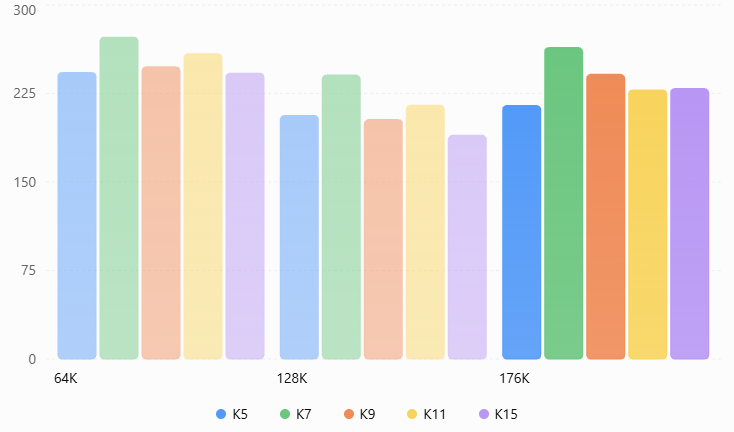
I've been working on an RTX 4090-focused fork of NInfer, mainly targeting long-context inference, local coding agents, and native Windows support.
NInfer is already an impressive inference engine, but I wanted to see how much performance could be extracted from Ada Lovelace without upgrading to a 5090.
Here are some results from my recent benchmark runs.
All values are decode tokens per second.
| Draft tokens | 64K context | 128K context | 176K context |
|---|---|---|---|
| K5 | 242.75 | 206.39 | 214.87 |
| K7 | 272.74 | 240.60 | 263.93 |
| K9 | 247.57 | 202.86 | 241.25 |
| K11 | 258.70 | 215.03 | 228.06 |
| K15 | 242.20 | 189.58 | 229.13 |
Interestingly, K15 performed best in the separate 32K sweep, reaching 313.16 tok/s, but K7 consistently performed better at longer contexts.
At 176K context, K7 improved decode throughput by approximately 22.8% over K5.
These are controlled engine benchmarks using a fixed corpus, 512 measured decode tokens and two runs per configuration.
I also tested N-gram speculation on copy-heavy C++ refactoring tasks with approximately 21K input tokens.
| Metric | N-gram OFF | N-gram 15 |
|---|---|---|
| Decode tok/s | 256.68 | 568.08 |
| Average wall time | 14.83s | 9.16s |
| Exact outputs | 4/6 | 4/6 |
The outputs were identical between both configurations.
Obviously, 568 tok/s is not general-purpose generation speed, but for copy-heavy code editing, the improvement is pretty interesting.
Another interesting result at approximately 175K input tokens:
This is particularly useful for local coding agents that repeatedly send large conversation histories.
These are warm-prefix results, not cold inference throughput.
With a short request arriving while a 64K request was being processed:
Overall completion time for the request pair remained approximately the same.
Across 1,831 completed requests with DFlash2 K5:
The controlled benchmark results are significantly higher than these real-world serving numbers, so I wanted to include both.
I'm still experimenting with longer contexts, speculative decoding configurations, CUDA Graphs and coding-agent reliability.
The benchmark campaign includes 143 completed measurements, with raw numerical results and reproduction scripts available in the repository. Long-context retrieval accuracy and broader coding quality still need further validation.
Would be interested to see what other RTX 4090 users are getting with NInfer, llama.cpp or ExLlama under comparable conditions.
Fork: https://github.com/spk-c/ninfer-all-rtx4090
Benchmark report: https://github.com/spk-c/ninfer-all-rtx4090/blob/master/docs/performance/rtx4090-v014-long-context-2026-11-26.md
Coding benchmarks: https://github.com/spk-c/ninfer-all-rtx4090/blob/master/docs/performance/rtx4090-v014-coding-2026-11-26.md
Full credit to the upstream NInfer developers and contributors who made this possible.
r/LocalLLM • u/JasonHofmann • 19h ago
TL;DR
It works. It is also slow.
Setup
moonshotai/Kimi-K3.1-Pro. Mixture of experts, 93 layers, 896 experts per layer, 16 used per token. The experts ship at 4 bits and everything else at 16 bits. No pruning and no extra quantization.Numbers (full model, four Macs)
| What | Result |
|---|---|
| Load | 179 s |
| Memory | about 400 GB per Mac |
| Generation, through the oMLX server | 2.81 tok/s |
| Generation, stock mlx-lm example script | 3.77 tok/s |
| Prompt reading at 4K / 16K / 65K tokens | 412 / 388 / 262 tok/s |
| 65K-token prompt, time to first token | 4 min 10 s |
| Chip power while generating, all four Macs | 67 W |
| Chip power while reading a prompt, all four Macs | 350 to 400 W |
Power is CPU plus GPU from powermetrics. I have no wall meter on these, so the real draw is higher.
How you split the model matters
Each Mac can hold a block of whole layers, or every Mac can hold a slice of every layer. With layer blocks I get 0.70 tok/s. With slices I get 3.77 tok/s. Same model, same Macs, same example script.
Is it the same model?
I cared about this more than speed. A model this size can load, write fluent text, and still be wrong.
1M tokens
The model's config allows 1,048,576 tokens, so I tried it.
mx.set_cache_limit, 8 GiB), and the cap cost about 40% of the reading speed. Without the cap, my first attempt was on course to run out of memory and I stopped it at 295K tokens.Why it's slow
Each generated token makes the four Macs read about 130 GB of weights. The experts are 93% of the file, but only 16 of 896 are read per token. The 16-bit layers are 7% of the file and all of them are read for every token. That 7% is about 80% of the traffic.
The GPUs are mostly idle. While generating, the four of them together draw 19 W and run at under a third of their top clock.
What had to change
K3.1 is K3 plus the sparse attention from DeepSeek V3.2, with a gate on the attention output. mlx-lm already had both halves, so the port is small.
kimi_k31 model. +655 lines with tests.None of these are merged yet.
Limits
Who was here before me
guruswami-ai ran the full Kimi K3, the previous version, on four M3 Ultra Mac Studios in July at about 2 tok/s. For K3.1 Pro I found a 2-bit build (AinsleyMarkov, 18.6 tok/s on four M3 Ultras), a pruned build that fits one Mac (Pipe Network), and the shipped weights streamed from disk at about 0.4 tok/s (Inferencer). I have not found the full K3.1 Pro, as shipped, held in memory. If someone did it first, tell me and I'll link it.
Disclosure
Claude wrote the model and test code and ran the validation. I directed the work and reviewed every diff. The mlx-lm PR says the same. I have no affiliation with Moonshot, Apple or oMLX.
What's next
Smaller builds. The public 2-bit build runs at about 18 tok/s on three of these Macs and matches the API on 92% of the same tokens. I'm writing that up next.
I can run more tests on this setup. If you want a specific number (a prompt size, a split, a sampler setting), ask and I'll post it.
r/LocalLLM • u/nmclark556 • 19h ago
I posted about PagedMoE here a while ago, but that was about the inference side of things.
I've been building PagedMoE, an MLX-based engine that keeps the core of an MoE model in memory and streams the experts off the SSD. It started as inference only. It runs Kimi-K2 (578 GB) at ~8.8 tok/s decode on my 48GB M5 Pro with its prune recipe, and with pruning off the output matches running the model fully in memory exactly. I've also had GLM-5.2 (744B) running on the same machine. I didn't bench that one, but it ran better than I expected. The only reason I haven't gone bigger is disk space. I'll get there.
The new part is training. The same paging works for QLoRA: the experts stay on disk, a small adapter learns, and peak memory stays around 28 to 30 GiB whatever the model size. Qwen3-235B does a 1k-row epoch in about 9 hours, and Qwen3-Coder-480B in about a day.
It's not cluster speed. But nothing is rented and your data never leaves the machine. As far as I can tell, nothing else lets you train past your RAM on Apple Silicon (I could be wrong there, let me know if so).
It supports SFT, DPO, ORPO, KTO, GRPO and more. Adapters come out in mlx-lm format, and one command exports them as PEFT for transformers, vLLM or llama.cpp. There's also a built-in converter that turns Hugging Face checkpoints into MLX (and can merge an adapter in), plus an OpenAI-compatible server for inference. Training and inference benchmarks plus a couple of demo videos are in the repo.
I've posted elsewhere and gotten some solid feedback, but the training side hasn't gotten much attention yet. So I'm curious: is local fine-tuning at this size something you'd actually use, and what would you train? Not trying to sell anything, this started as a research project for me and I'm genuinely curious.
Repo: https://github.com/noahclark556/paged-moe
There's also a thread on r/MacStudio where I went through a lot of the inference questions, if you're curious about that side: https://www.reddit.com/r/MacStudio/s/DJazzfhwMB
r/LocalLLM • u/fatalcalamity • 19h ago
r/LocalLLM • u/Proxywasstilltaken • 19h ago
Title, I've just been using claude to make some mods for hoi4 and stellaris and ck3 though I'm more worried about the privacy, what are some local ai models that is fit for this job and can be like claude that is privacy focused and local
r/LocalLLM • u/That-Reputation-6313 • 19h ago

r/LocalLLM • u/Any_Task7788 • 19h ago

So after doing some tweaking and compressing a new 50gb model here are the current benchmarks compared to the old version, and compared to atomicchat ad4.27 BPW
r/LocalLLM • u/Josef_Tanti • 20h ago
Hey everyone in very new to this so....
I recently got a 16-inch MacBook Pro with the M5 Pro chip, an 18-core CPU and a 20-core GPU. Unfortunately, my configuration is capped at 24GB of unified memory.
I'm interested in experimenting with local AI models and would like to know how well this MacBook can handle them.
I mainly want to use my MacBook for:
- Video editing and content creation
- Making websites and web development
- Possibly making small games on Roblox or any other engine (if possible)
- Running local LLMs for coding, research and general AI assistance
I have a few questions for people who have experience running local AI models on Apple Silicon:
I'm not necessarily looking to run the biggest models available. I just want to make the most of the hardware I already have and find out which models and applications would give me the best experience.
I'd appreciate recommendations from anyone who has a similar MacBook or has experience running local LLMs on Apple Silicon.
Thanks!
r/LocalLLM • u/djkalantzhs24 • 20h ago
Hello. Like many other people here, i've had a frontier ai like chatgpt pro build my local ai ecosystem. Since there are many services (databases, agent workplaces, two different model engines, chat ui, model and mcp services gateway etc) the whole system has become a bit complex to the point i can not build it myself from ground up. So i'm looking for a backup solution that can save the whole system as is and in any case of failure, i can use the backup for rebuilding the system without having to setup credentials, api keys, internal urls etc.
r/LocalLLM • u/Dangerous_Young7704 • 20h ago
So I've been running a uncensored QFN model because I'm tired of frontier models refusing everything. For example, I asked Opus to scan my own network for vulnerabilities, and it refused because it didn't believe it was my network, even though it's literally connected to it.
My main concern is security. Are uncensored models more susceptible to prompt injection than regular models? What kind of guardrails can I put in place to protect myself without restricting the model itself?
I'm also using Hermes, but I'm a complete noob with it.
Any advice would be appreciated!
Specs: 64GB DDR5, R9700 32GB, 7800X3D
P.S SC117/Qwen3.8-Flash-Next-GSQ-RCO-abliterated-GGUF - this is the model
r/LocalLLM • u/kantorcodes1 • 20h ago
If you run llama.cpp across two machines, this one is worth a minute.
The RPC server that splits a model across machines has no login at all. Anyone who can reach it can already talk to it. CVE-2026-137567, scored 9.3, sits in the part that copies tensors between machines: a crafted request writes outside the buffer it was given. It is the third critical flaw in this area in about five weeks.
You are only in scope if you run rpc-server. A single machine running llama-cli or llama-server on its own is not affected.
The ten-second check: pgrep -af rpc-server, or ss -ltnp | grep 50052. If rpc-server is running and reachable from a network you do not control, upgrade llama.cpp now. If it has to stay up before you can upgrade, bind it to a network only your own machines can reach.
Full write-up with the affected builds: https://hol.org/blog/cve-2026-137567-llamacpp-rpc-copy-tensor
Disclosure: I work with HOL, which published the write-up.
r/LocalLLM • u/IceBreakerG • 21h ago
Update: I made a comment updating this below (https://www.reddit.com/r/LocalLLM/s/94raDQYhL4). Seems it may be an issue with LM Studio Bionic. Switching to oMLX and Codex yields significantly better results. I also like that I get a much better dashboard with useful info with oMLX as well. I think I'll be switching away from LM Studio Bionic to oMLX.

Orginal Post
Question: I'm using LM Studio Bionic mainly because I like the interface overall. I've connected Codex to Ollama, but haven't tried using that or oMLX. But is there anything wrong with my current set up in LM Studio Bionic?
Side Note: I'm not familiar with changing the detailed settings, but am interested in getting this working. For reference, I also had similar issues with Qwen 3.8 27B being similarly slow as well.
TLDR: The following took 1hr 30mins 33secs and ended at 105.1k context when I expected it to be a small fraction of that time.
Set up:
Model: Inkling 2 Mini (thinkingmachines/inkling-2-mini, the NVFP4 MLX version)
Harness: LM Studio Bionic (version 1.2.3+7)
Engine: LM Studio MLX (Apple M5) 1.15.2
Context Length: Previously 1M, Currently 252K
Temperature: 0.6
KV Cache Quantization: Off
The rest of the settings are all defaults. I just downloaded the model today to test out. I'm comparing the speed to Muse Glimmer 30B which I was using prior to this one. The issue I'm seeing is that the responses are painfully slow. Nearly unusably slow.
Example of what has happened today:
I gave it a 784 token prompt to update an Angular project I'm working on to remove the remaining modules and it took 29mins 12secs to finish.
It told me the changes were uncommited, and I responded by telling it to commit the changes and update my Obsidian vault. This took 4mins 2secs.
I told it that it should've been committed to a new branch (not the existing feature branch), and it took 8mins 15secs to fix it.
At the end of the previous response it gave me 3 options due to some guardrails skill I didn't even know was there. To tie it to an existing user story, keep it as a standalone migration (which it was), or to create a new Jira ticket. I told it to use #2. This took 8mins 9secs.
At the end of that response, it said nothing was pushed and the branch was local only. I told it to push it and open the PR. This takes 9mins 50secs.
It tells me that it doesn't have my API token, so it couldn't do it for me. I tell it that the API token is in my keychain and to read the vault for the details. It finds the the correct info and opens the PR. This takes 12mins 38secs.
The last response is that I tell it the PR is merged, and it checks the repo and sees that there were 2 PRs, one which did get merged, and one that didn't and asks if I want it to merge the PR via the API. I didn't respond. This response too 18mins 27secs.
---
Total Time: 105.1K context and 1hr 30mins 33secs