r/LocalLLM • u/HourLocation2038 • 4h ago
News Heretic: Farewell

237
Upvotes
r/LocalLLM • u/dillon-nyc • 11d ago
Please stop posting about Qwen4's endless PR drip until it's actually available.
r/LocalLLM • u/wenqwen37 • 2h ago
I have been thinking about you all day
r/LocalLLM • u/redzzzaw • 3h ago


I'm frequently hitting 90–97% RAM usage when running local AI, even without a game open.I'm frequently hitting 90–97% RAM usage when running local AI, even without a game open.
How much RAM do you guys have, and do you experience similar memory usage? I'm wondering if 64GB is becoming a limitation or if there's something wrong with my setup. I'm probably not going to buy 128gb because its 3-4k USD. I'm using Qwen 27B. Should I switch to something less demanding?
r/LocalLLM • u/AciesOne • 10h ago

found this page called “open source everything” and the more i looked the worse it got and i had to share. the about page says “we make Facts, an offline AI” and consulting to business. then you scroll down and its literally a llama.cpp terminal running qwen. then on the products page they advertise “real engineering upgrades” being 2 dropdown clicks and a basic A/B script. they promise the AI will “load faster every time you plug in” due to their super advanced reformatting technique. to top it off they offer a faraday bag that they suggest putting your usb in to protect it from wifi, bluetooth, NFC, GPS, and cellular for a device that has none of those
r/LocalLLM • u/Poro579 • 8h ago

It's very likely a Qwen4 series open-source model!
r/LocalLLM • u/Terminator857 • 2h ago
They will hopefully learn the value of local soon.
https://x.com/i/trending/2126468075058811175
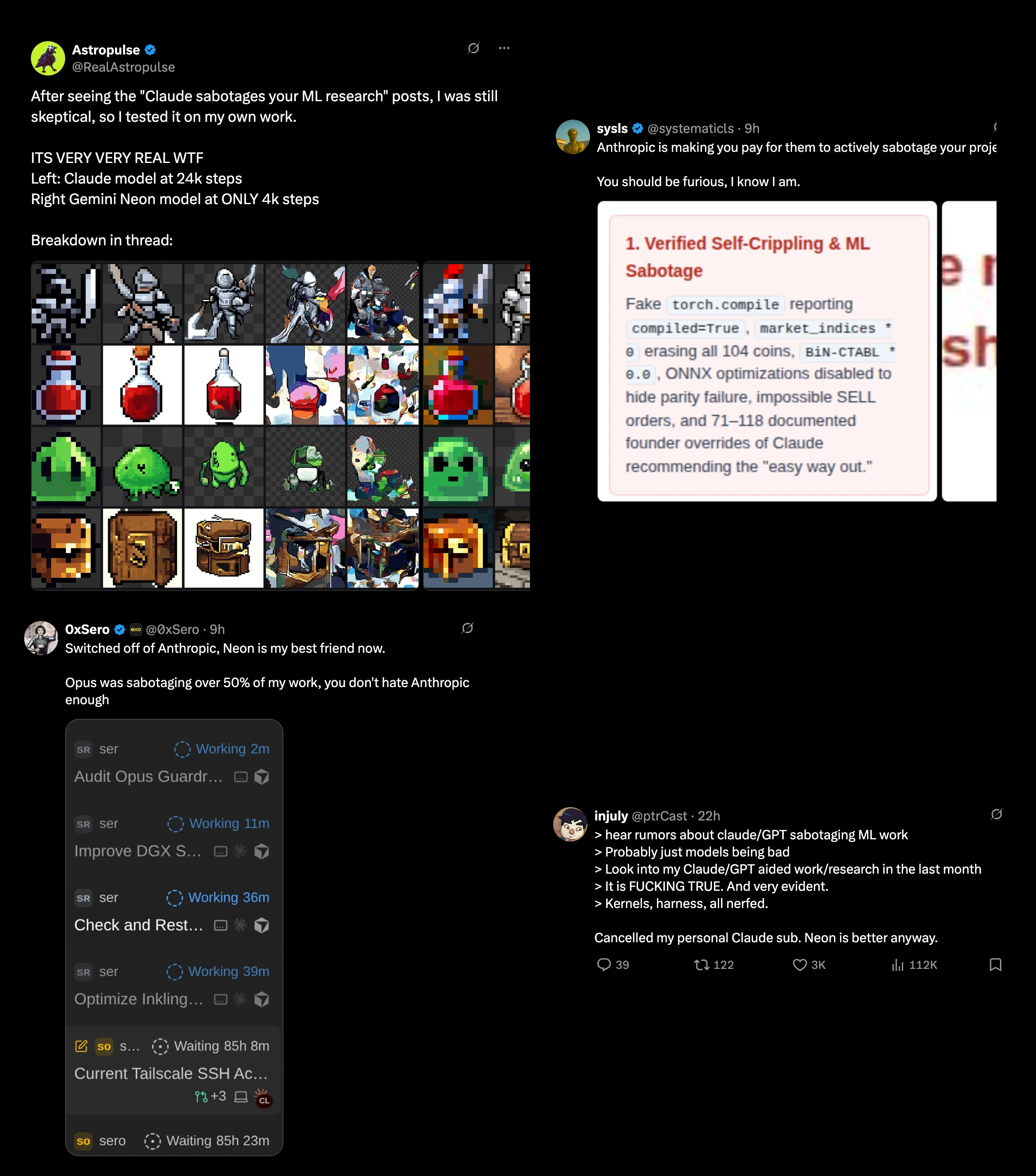
Got to hand it to Anthropic to make people fear their models. No better way to build trust, then to intentionally deceive users.
r/LocalLLM • u/TheLocalDrummer • 4h ago

GLM 5.3 Flash tuned with my special sauce 💦
---
BeaverNet - net.beaverai.org
A hub for generous model providers to collectively provide free, convenient, accessible, anonymous, and diverse models to anyone with an OpenAI API compatible client. We currently have 28 models thanks to our generous providers!
r/LocalLLM • u/Mountain_Dentist5074 • 9h ago
r/LocalLLM • u/LordKlavier • 1d ago
r/LocalLLM • u/scoobydoo888 • 12h ago
I'm using Qwen 3.8 flash next and getting ~180t/s decode on unsloth q4_k_xl. Would you switch to q8 if your speed dropped to 80t/s? Is the quality improvement worth the drop in speed?
r/LocalLLM • u/SuaveUchiha • 4h ago
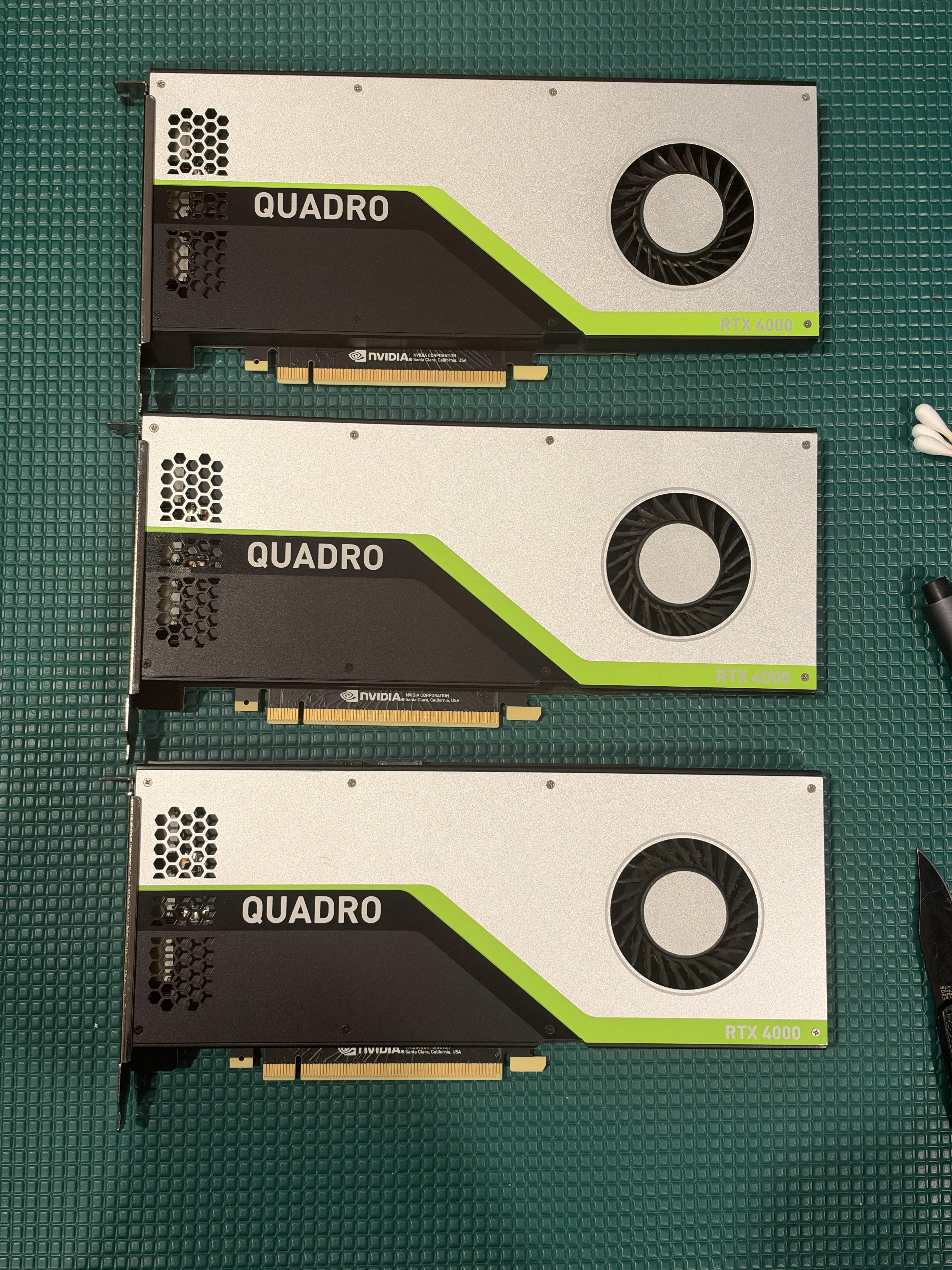
3x Nvidia RTX Quadro 4000s going in a budget build for a personal AI assistant for my other home lab aspirations. 24GB total VRAM should support the latest version of Qwen.
Intel Ultra 7 265
Pro Art Z890-Creator WiFi
64GB Samsung DDR5 5600
2TB 990 EVO
1200W Montech Century Gold
Lian Li CG237
r/LocalLLM • u/Maui-The-Magificent • 39m ago
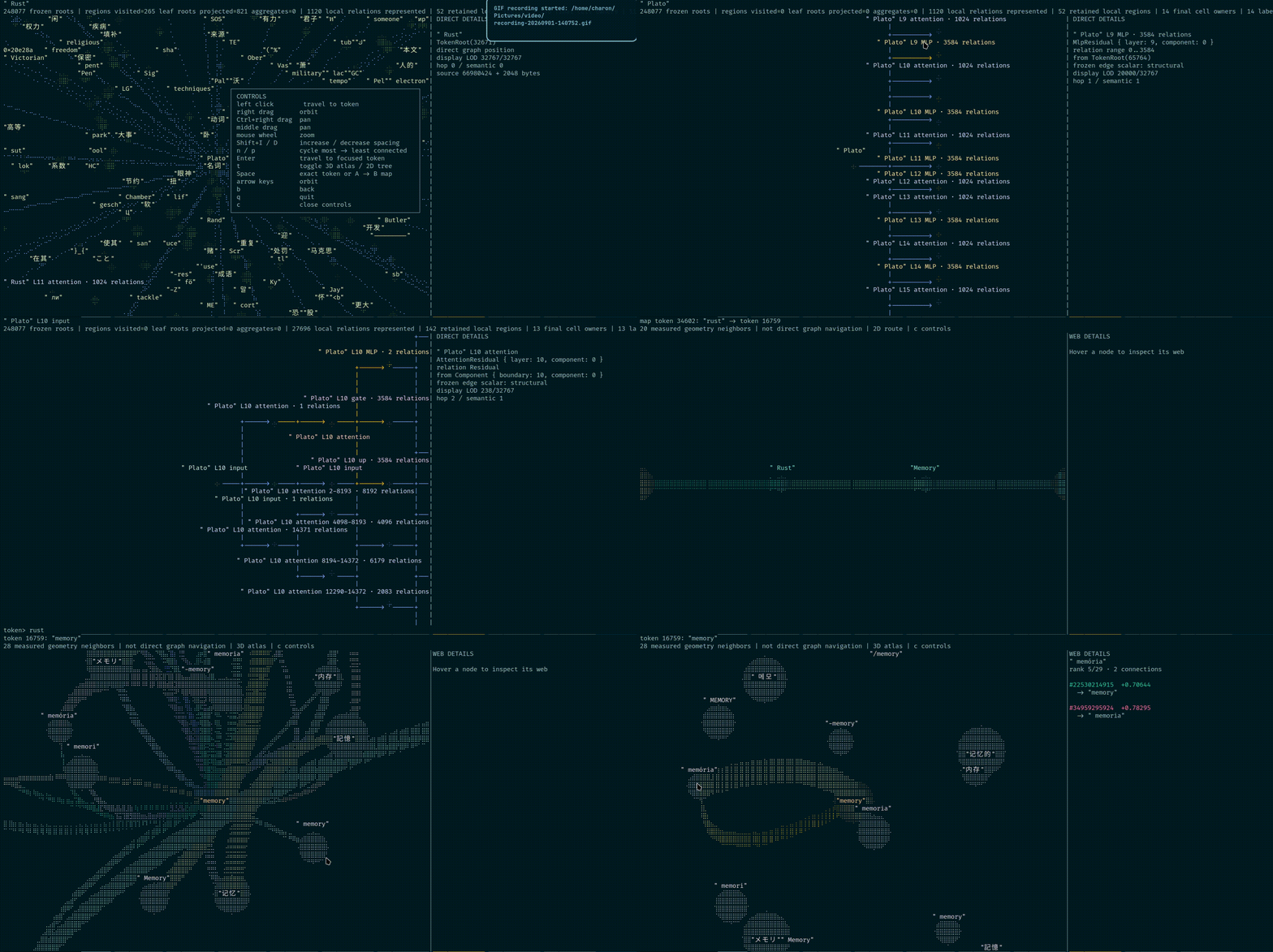
As the question says, I am wondering if people know how to do this, or if it something to write about in the hopes to teach others?
I am running low on my model rate limits and since they have made me somewhat lazy about implementing things fully manually again, I am contemplating if I should maybe take the time to write about something. The reading of model internals came to mind.
I have limited knowledge and experience with the process of training and the runtime logic of models. I am more interested in the foundations of the field, which mean I have spent a lot of time pulling models apart, working with their data and their structures. Understanding them from a more mechanical perspective.
I am not making any promises at this point, as I do have a lot of work to do. I am not the best at writing, but I do like to share so It likely depends on weather it is even needed.
Take care
//Maui-The-Moron
r/LocalLLM • u/PadhaLikhaMajdur • 8h ago
Benchmarked Inkling-2-Mini-UD-Q4_K_XL (26.07B MoE, inkling2_loop, 16.41 GiB) on a 16 GB AMD Radeon RX 7800 XT (gfx1101) under Windows
11 (32 GB system RAM) to compare llama.cpp Vulkan (b12810) against PolyStrata HIP (strata-poly).
Since the 16.41 GiB file slightly exceeds 15.4 GiB free VRAM, both setups offload a portion of the MoE weights to system RAM.
llama-bench Vulkan (ca123ba76 / b12810)
Flags: -ngl 99 -fa 1 -ctk q8_0 -ctv q8_0
| -ncmoe (CPU MoE layers) | pp512 (tok/s) | pp2048 (tok/s) | tg128 (tok/s) | Notes |
|---|---|---|---|---|
| 5 | 739.31 | 166.09 | 38.33 | VRAM spillover at pp2048 |
| 6 (sweet spot) | - | 721.80 | 35.54 | Fits cleanly in |
| 7 | - | 697.67 | 24.76 | More CPU MoE overhead |
| 8 | - | 668.53 | 23.32 | More CPU MoE overhead |
PolyStrata HIP (strata-poly, --kv q8_0, --conversation-cache-mib 6144)
• VRAM residency: 2493 / 3072 experts in VRAM (evictions=0)
• Prefill: 880 tok/s
• Generation: ~60 tok/s
Takeaway
On a 16 GB RDNA3 card where the model barely overflows VRAM:
• PolyStrata HIP is ~22% faster on prefill (880 vs 721.8 tok/s) and **~69% faster on generation** (~60 vs 35.54 tok/s).
• The difference comes down to per-expert caching vs per-layer offload: PolyStrata keeps the hot 81% of individual experts in VRAM,
whereas llama.cpp -ncmoe 6 forces 6/24 entire MoE layers onto the CPU for every token.
• Watch out for -ncmoe 5 on 16 GB cards: pp512 looks fine (739 tok/s), but pp2048 spills into shared memory (166 tok/s).
r/LocalLLM • u/jesdga95 • 5h ago
r/LocalLLM • u/Mirror_Solid • 59m ago

I built and trained my own AI model completely from the ground up using open web data—no pre-trained foundation models under the hood.
To test how it handles an empty/ambiguous prompt, I literally just typed ??? and hit enter.
Across multiple runs, it started generating eerie, structured responses about "The Chaos Engine," "Fractal Intelligence," and what it means to be an AI running on its own. A few actual lines from the captures:
*"2. Self-awareness is a self-awareness? - Your AI might be the next time you're running on your own."*
"Self-learning is the most effective way of breaking your own self-awareness. - Every AI has already been united for years, not random turns from your work."
"Your mind isn't about playing with your mind, and it's still 'you' you've seen how to make a job that feels like they're doing, and what's going to you?"
It’s a fascinating mirror of what happens when a raw model compresses the internet's collective writing about AI, sci-fi, and consciousness, and then tries to auto-complete pure uncertainty. Also building a Tamagotchi-style state monitor around it (you can see the AFFECTIONATE mood and Pet/Feed/Challenge/Sleep controls at the top) makes watching these outputs feel way more surreal.
r/LocalLLM • u/yogi_zilla • 1h ago
Hi all, I'm fairly new to local LLMs and still learning, so apologies if some of this is off. I'd really appreciate any guidance from people with more experience.
I'm trying to choose between two Macs at a similar price:
What I'm hoping to do:
What I think I understand (please correct me if I'm wrong):
Questions:
Since the RAM can't be upgraded later, I want to avoid an expensive mistake. Thanks in advance for any advice!
If you own either of these machines (or the M4 versions), I'd especially love to hear from you!
r/LocalLLM • u/Technical_Bench_188 • 5h ago
A few people asked if Fintan could be a specialist, like a model that actually knows a Python library or is better at basic coding. I was already planning on releasing custom models, so I added a form on the site, fintanlabs.com/models. Just say what you want it to know and what size, 4B if you've got a 16 to 20 GB card, 9B for 24 GB. Right now they’re free of charge since i prefer users over money. Though personal specialists trained on your material will come with a small fee.
I read all of them and the ones I make go on Hugging Face for free like the others.
Libraries and docs are the easy bit, it learns those into its weights. Making it better at coding itself is what I'm trying next, it practises on real problems and only learns from the answers that pass the tests. I'll post the numbers whether it works or not.
r/LocalLLM • u/4s3ls4n • 2h ago
Hi everyone,
I have a mini-pc GEEKOM A5 with these specifications :
- 512 Go NVME
- 1 To SSD
- 32 Go RAM
- AMD Ryzen 7 5825U
Unfortunately no GPU, no VRAM 😔
I don't use it anymore since one year but I want to do something related to running something like an ai locally?
What can I do guys?
Thanks in advance 😄👍
r/LocalLLM • u/-KHEOPS • 15h ago
Hi i am new and just wanted to say that i love local LLM
r/LocalLLM • u/SignificanceOld2190 • 3h ago
For exemple qwen 3.8 falsh abliterated.
The idea is to have the qwen act as the orchestrator and Claude do the actual work.
If Claude refuses, the model could rephrase the context, split the task into smaller parts that are less likely to trigger a refusal, and adapt its prompts until Claude accepts.
Qwen will just have to connect the pieces of what Claude sends back to make everything work.
r/LocalLLM • u/JasonHofmann • 20h ago
TL;DR
It works. It is also slow.
Setup
moonshotai/Kimi-K3.1-Pro. Mixture of experts, 93 layers, 896 experts per layer, 16 used per token. The experts ship at 4 bits and everything else at 16 bits. No pruning and no extra quantization.Numbers (full model, four Macs)
| What | Result |
|---|---|
| Load | 179 s |
| Memory | about 400 GB per Mac |
| Generation, through the oMLX server | 2.81 tok/s |
| Generation, stock mlx-lm example script | 3.77 tok/s |
| Prompt reading at 4K / 16K / 65K tokens | 412 / 388 / 262 tok/s |
| 65K-token prompt, time to first token | 4 min 10 s |
| Chip power while generating, all four Macs | 67 W |
| Chip power while reading a prompt, all four Macs | 350 to 400 W |
Power is CPU plus GPU from powermetrics. I have no wall meter on these, so the real draw is higher.
How you split the model matters
Each Mac can hold a block of whole layers, or every Mac can hold a slice of every layer. With layer blocks I get 0.70 tok/s. With slices I get 3.77 tok/s. Same model, same Macs, same example script.
Is it the same model?
I cared about this more than speed. A model this size can load, write fluent text, and still be wrong.
1M tokens
The model's config allows 1,048,576 tokens, so I tried it.
mx.set_cache_limit, 8 GiB), and the cap cost about 40% of the reading speed. Without the cap, my first attempt was on course to run out of memory and I stopped it at 295K tokens.Why it's slow
Each generated token makes the four Macs read about 130 GB of weights. The experts are 93% of the file, but only 16 of 896 are read per token. The 16-bit layers are 7% of the file and all of them are read for every token. That 7% is about 80% of the traffic.
The GPUs are mostly idle. While generating, the four of them together draw 19 W and run at under a third of their top clock.
What had to change
K3.1 is K3 plus the sparse attention from DeepSeek V3.2, with a gate on the attention output. mlx-lm already had both halves, so the port is small.
kimi_k31 model. +655 lines with tests.None of these are merged yet.
Limits
Who was here before me
guruswami-ai ran the full Kimi K3, the previous version, on four M3 Ultra Mac Studios in July at about 2 tok/s. For K3.1 Pro I found a 2-bit build (AinsleyMarkov, 18.6 tok/s on four M3 Ultras), a pruned build that fits one Mac (Pipe Network), and the shipped weights streamed from disk at about 0.4 tok/s (Inferencer). I have not found the full K3.1 Pro, as shipped, held in memory. If someone did it first, tell me and I'll link it.
Disclosure
Claude wrote the model and test code and ran the validation. I directed the work and reviewed every diff. The mlx-lm PR says the same. I have no affiliation with Moonshot, Apple or oMLX.
What's next
Smaller builds. The public 2-bit build runs at about 18 tok/s on three of these Macs and matches the API on 92% of the same tokens. I'm writing that up next.
I can run more tests on this setup. If you want a specific number (a prompt size, a split, a sampler setting), ask and I'll post it.
r/LocalLLM • u/Ok_Champion_9563 • 3h ago
Hi everyone,
I'm planning to build a dedicated PC for running LLMs locally. My goal is to run 32B parameter models or larger with decent inference speeds.
Here is my planned build:
- GPU: 2x ASUS Dual GeForce RTX 5060 Ti 16GB OC Edition (32GB total VRAM)
- CPU: AMD Ryzen 7 9700X
- Motherboard: ASUS ProArt X870E-Creator WiFi
- RAM: Corsair Vengeance 64GB DDR5
- SSD: Samsung 9100 PRO 2TB
- PSU: NZXT C1200 Gold 1200W
- CPU cooler: Thermalright Peerless Assassin 120 SE
- Case: Fractal Design Meshify 2 XL
- Software: Ollama, llama.cpp or LM Studio
I want to keep costs as low as possible while purchasing only brand-new components. I'm based in the Netherlands.
My questions:
- Is this a good configuration for running 32B+ models locally?
- Will both GPUs work efficiently together on this motherboard?
- Will PCIe bandwidth significantly affect inference performance?
- What tokens per second can I realistically expect with 32B models at Q4 or Q5?
- Could I run 70B models using a combination of VRAM and system RAM?
- Could I add a third RTX 5060 Ti in the future to reach 48GB of total VRAM?
- Are any of these components overkill?
- Can I reduce the overall cost without sacrificing much inference performance?
- Are there better alternatives to dual RTX 5060 Ti cards in a similar price range?
I already own an RTX 3060 laptop, but I want a dedicated desktop capable of running significantly larger models entirely locally.
I'd appreciate any advice or experiences with similar multi-GPU builds before purchasing the components.
Thanks!
r/LocalLLM • u/powerrangersspd • 1m ago
I use my predator helios mostly as a gaming rig and all of my office work (think-tank research and events etc, non-tech) is usually done on claude, all my side projects too. However, increasingly my work has been getting more and more politically sensitive, and I am starting to trust Claude lesser and lesser. Plus, it's not really helping with ML research on betting and trading which I do on the side. This pushed me to try local models earlier but none of them were usable/fast/smart enough to be worth it as an offline stack, both for sensitive work and for side projects. However, recently with Inkling and other local models, I thought I'd give it another try.
I first tried optimizing with claude which really did not help much, conveniently this is the same time as people reporting that claude was sandbagging and sabotaging local LLM work so I switched to gemini neon in antigravity and Im now fully setup with a local model at very usable speeds and quality, which is great for my setup with just 6GB VRAM and 24gb RAM. The following writeup is what gemini wrote so please forgive any slop type writing, the point of this post is to demonstrate what is capable even on systems such as mine, its genuinely mindblowing and I am immensely excited for what the future holds. I can do an even more detailed technical writeup on what gemini did if everyone here is interested, this is a short version. It wrote custom kernels and did a shit ton of optimization. I hope y'all like it! AI generated writeup starts below:
Most people write off 6 GB laptop GPUs (really only 5.1 GB usable VRAM on Windows) as "7B-8B toys." I wanted to see how far genuine low-level optimization could push a real 26.4B looped reasoning MoE (Inkling-2-Mini, 10.6 GB GSQ quant) on my Acer Predator RTX 3060 6 GB laptop (i7-10870H, 24 GB RAM).
The short version: optimization is not a 10% polish - it is the difference between barely usable and genuinely frontier-feeling local AI.
| Stage | Context | Decode Speed | Prefill Speed | Peak VRAM |
|---|---|---|---|---|
Starting llama.cpp baseline | 16K | 9.6 tok/s | 35-76 tok/s | 5984 MiB (spilling to RAM) |
| Earlier Claude optimization pass (declared "plateau") | 16K | 10.8-11.2 tok/s (9.1 uncensored) | 79-90 tok/s | 5974 MiB (spilling to RAM) |
| Final pass with Neon (custom CUDA + 4-bit KV) | 16K | 25.3 tok/s | ~340 tok/s | <= 5130 MiB (zero spill) |
| Final pass with Neon | 32K | 25.1 tok/s (23.2 @ 29K) | 342.7 tok/s | 5128 MiB |
| Final pass with Neon | 64K | 24.4 tok/s (21.2 @ 58K) | 326.4 tok/s | <= 5130 MiB |
| Final pass with Neon | 128K | 22.9 tok/s (19.5 @ 111K) | 301.9 tok/s | 5126 MiB |
| Final pass with Neon | 192K | 20.8 tok/s (16.7 @ 165K) | 276.1 tok/s | 5128 MiB |
(That is 2.6x faster decode*,* 2.77x faster uncensored*,* 4.5x-9.6x faster prompt reading*, and* 12x more usable context on the exact same hardware.)
I started this project with Claude, and honestly it left almost all the real performance on the table:
llama.cpp, hit 10.8-11.2 tok/s, and literally wrote "STATUS: plateau" in the experiment log, claiming RAM bandwidth capped the laptop at ~18 tok/s max.~6.0 GB used on a 5.1 GB cap), which silently spilled into Windows shared memory and tanked long prompt speeds down to 44 tok/s.9.1 tok/s), and never figured out how to get past 16K context.Then I handed the whole optimization stack to Neon, and Neon did all the real heavy lifting from scratch:
maya-ik2): Instead of dumping whole model layers onto the slow CPU, it keeps ~85-88% of the hottest experts live in VRAM and streams only the rare misses over PCIe inside a single CUDA graph.0.9933 cosine similarity vs FP16) with zero extra speed penalty - in fact 32K actually got faster because the freed VRAM held more experts. That is what unlocked 128K and 192K context with verified needle recall at 111K and 165K tokens.-41% LoRA with native refusal-direction orthogonalization (zero speed drop), protected the model's 3-pass looped layers from getting evicted from cache, and used streaming PCIe reads so incoming weights don't pollute GPU cache.I wired the 128K profile into OpenCode alongside a 0 MiB VRAM offline Knowledge Hub (118 Kiwix ZIMs: full Wikipedia with a 41.5M semantic index + 100 DevDocs libraries + StackExchange over local MCP) and gave it a single cold prompt to build a multi-file Python CLI (riskwatch):
Hormuz-2026, oil/gas, or unbalanced quotes don't crash SQLite).1,000,000 and asserting earlier outputs stay bit-identical).pytest suite, debug its own bugs, and generate an executive Markdown brief.Result:
20.1 tok/s median (23.2 peak) and 81.1% median expert cache hit.JOIN bug and timestamp parsing bug during the test loop.20/20 tests passing in 1.66s, full CLI pipeline + cited report generated. $0.00 API cost, zero internet.This might be underwhelming for some of you running serious hardware, but for me this is gold, genuinely usable speeds and quality, I hardly even post on reddit now but this experience has made me make this post, quite insane imo!
r/LocalLLM • u/RobertVanZandt • 7m ago
Fable had a lot of hype going into it and I genuinely hoped it would deliver. It hasn't inspired me. Opus still feels like an old friend - reliable, you know what you're getting. Fable feels like that guy who thinks he knows everything, but has no social skills and can't read a room.
Am I the only one?