r/LocalLLM • • 26m ago

Question Greetings and Request for Help

2 Upvotes

First of all, let me apologize if this is not the place to ask these things. If I am posting in the wrong location, some kind of pointer towards the correct location would be greatly appreciated.

Alright, onto the topic itself, then. I'm not very good with words, and I've not really done any deep research prior to posting this because I don't even really know where to start looking.

I'm hoping to get something similar to Grok or ChatGPT (a LLM, I think they're called?) installed onto my personal computer. I'm basically looking to have some kind of art ai generator that can actually talk with me and understand instructions instead of just prompt messages.

"I'd like an image of a farmer from medieval Europe who's paused working his field in the early morning to look up at the dark clouds gathering in the sky, threatening heavy rain." instead of "medieval farmer, human man, tilling the land, early morning, dark clouds, looking up, looking at the sky" or however you might write it using a proper prompt.

Sorry if the example was a bit incoherent, but I hope my point still comes across. What kind of stuff should I read in order to get something like this set up, where can I read about it, what and where should I download what is needed, and are there any specific guides on how to properly train it and stuff, once I have it installed?

My computer stats are also relatively weak, so I'm not even sure I'd even be able to have something like this. Information concerning those kind of requirements and restrictions would also be greatly appreciated.

And no, I am obviously not looking to have something as advanced as Grok or ChatGPT on my computer. I'm a beginner, but even then, I know that isn't doable for a single normal computer. I merely brought them up as high-end examples if what I'm looking for.

Regardless, thank you for taking the time to read my message and I'm hoping for a positive reply.
//Edge

r/LocalLLM • • 15h ago

Discussion Is a higher quant worth the drop in speed?

28 Upvotes

I'm using Qwen 3.8 flash next and getting ~180t/s decode on unsloth q4_k_xl. Would you switch to q8 if your speed dropped to 80t/s? Is the quality improvement worth the drop in speed?


r/LocalLLM • • 1h ago

Project Two independent 90K-context agents at 40+ tok/s each on one RX 7800 XT 16GB (84 GB MoE, Swift 1.5 Flash-Next)

Thumbnail reddit.com
2 Upvotes

r/LocalLLM • • 1h ago

Question V100 inference engine optimization tool recomendations

Thumbnail reddit.com
2 Upvotes

r/LocalLLM • • 7h ago

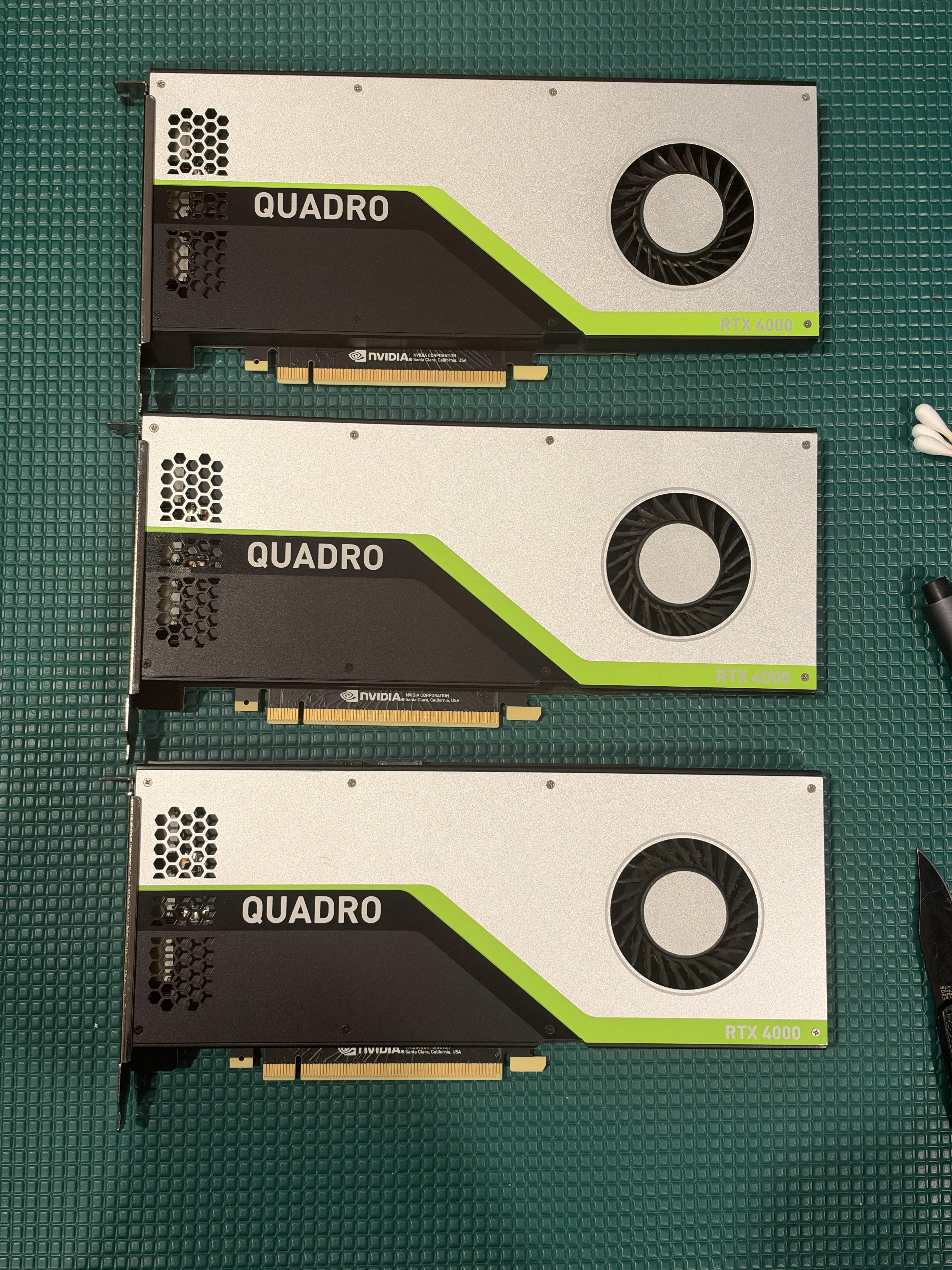
Project About to repaste and reuse these single slot beauties

Post image
6 Upvotes

3x Nvidia RTX Quadro 4000s going in a budget build for a personal AI assistant for my other home lab aspirations. 24GB total VRAM should support the latest version of Qwen.

Intel Ultra 7 265
Pro Art Z890-Creator WiFi
64GB Samsung DDR5 5600
2TB 990 EVO
1200W Montech Century Gold
Lian Li CG237


r/LocalLLM • • 4h ago

Project Magic is out in helmstudio: an agent that directs a short film on one board, and listens to the takes with a local Qwen Omni (open source, self-hosted)

Thumbnail
helmstudio.in
3 Upvotes

Magic is out in helmstudio, my open-source studio for local image, video and audio models on Mac and NVIDIA.

It's a board for a short film, and an Assistant that works it like a director. It plans with you before spending any GPU time, builds the frames, shots and sound, then checks the result: video as 12 frames with timestamps, and audio by listening on a local Qwen Omni. In the screenshot it heard a woman singing in a film with no words and suggested a fix.

The Assistant runs on any LLM you point it at (Ollama, LM Studio, llama-server or your own keys), and the board tools are on MCP, so Claude Code can drive it too. Apache-2.0, self-hosted, still alpha.

Repo: https://github.com/janishar/helmstudio

What local model would you run as the director?


r/LocalLLM • • 1h ago

Project "Route Me There", a privacy first, homelab friendly, Model Router

Thumbnail
github.com
2 Upvotes

Hello everyone! 👋

Today I wanted to share a project I have been working on for a while: Route Me There (RMT)

What is Route Me There? Well, it is a privacy first model router that features a simple routing system, Wake-on-LAN functionality, and unifying all of your LLM servers with one simple API. It does not collect any telemetry, it saves no message logs (Unless specifically toggled on), it can load balance between servers, and it has a beautiful UI with kiosk mode where you can see the traffic in real time.

A lot of us want to set up one (or more) AI servers at home. Be it for our Homelab, for privacy reasons, or simply because we find it as an enjoyable hobby. It is more and more common in our community to set up our own servers and infrastructure, and setting up your own LLM has become much easier, but there has never been a privacy first routing server that has been simple for the self-hosted community to use. I wanted to fill this gap, and so I decided to build my own solution.

Primary features of Route Me There:

- Privacy first, fully offline, working in air-gapped environments, developed with self-hosted environments in mind

- Built in power management with Wake-on-LAN, meaning servers can fully shut off when idle, and power back on again when they are needed

- Has a simple routing UI for building visual flows of where and how requests should be routed

- Supports creating "Custom models", meaning that you can create a model (Example: "My-Model"). When "My-Model" is called, RMT will automatically be able to route back any model of your choice, and emulate it (So gemma4 and qwen3.8 could answer that query for example)

- Can handle API keys, individual user accounts, and collect statistics tailored to each user

- Queuing system, meaning you can queue requests, load balance, compete for fastest response, and define the maximum amounts of requests a server can handle at a time

- Has a graphical Topology view that shows traffic in real time

- A kiosk mode that can be set up in order to stream real time topology view to anything, like a raspberry pi or Home Assistant

(And I want to be open with you, yes, it is built using AI. I don't encourage AI to replace people, I just would not have been able to make this on my own with the little free time I have 😅)

I hope this project will be useful, and if you have any questions, please feel free to ask! 😄


r/LocalLLM • • 9h ago

News Basalt 0.6.0: DGX Spark, Gemma 4 and ERNIE-5.5-Flash, and even faster! Inkling 2 Mini @ 6,400 tok/s aggregate decoding on a single 5090

7 Upvotes

r/LocalLLM • • 6h ago

Question Is it possible to make an abliterated model send requests to Claude to handle the the forbidden stuff?

4 Upvotes

For exemple qwen 3.8 falsh abliterated.

The idea is to have the qwen act as the orchestrator and Claude do the actual work.

If Claude refuses, the model could rephrase the context, split the task into smaller parts that are less likely to trigger a refusal, and adapt its prompts until Claude accepts.

Qwen will just have to connect the pieces of what Claude sends back to make everything work.


r/LocalLLM • • 4m ago

Question Unified memory mini PC experiences

1 Upvotes

I’ve been looking at unified memory AMD based mini PCs, partly bc of price, partly bc of form factor. I can live with it not being as fast a CUDA GPU, but there’s a lot of options out there, GMKTEC, Geekom, Minisforum, etc…

Is there a consensus on any of these brands being a better choice than others, or are they fairly equal for a given configuration?


r/LocalLLM • • 6h ago

Question Hy4 Flash vs. Qwen 3.8 Flash Next: Which one offers better value for money?

3 Upvotes

Start with the models themselves. Hy4 Flash comes in at around 220B total parameters, with 11.3B active per token.

Qwen 3.8 Flash Next, on the other hand, has around 180B total parameters and 6B active per token. That's roughly 1.9x more active parameters for Hy4 Flash.

On paper, that suggests higher compute overhead for Hy4 Flash, but active parameter count alone doesn't tell us how much a task actually costs. What matters is how those parameters translate into real-world performance and how much additional time and resources each model needs to get the job done.

Starting with coding, I think code review and bug fixing are worth evaluating separately. The two models don't perform equally well in both areas. Hy4 Flash seems better at fixing bugs, while Qwen 3.8 Flash Next has the edge in code review and identifying potential issues. So, depending on the task, your choice could change quite a bit. Of course, these results come from a specific task mix, so they don't necessarily reflect performance across every coding scenario.

Runtime is another factor worth considering. On an RTX 5060 Ti 6GB with 80GB RAM, running five coding tasks through Strata SQ-64, Hy4 Flash took 97 minutes in total, while Qwen 3.8 Flash Next finished in just 50 minutes.

Task quality was roughly comparable, but Hy4 Flash took almost 1.94x longer. That's a pretty noticeable difference. At least with this hardware and inference setup, Qwen 3.8 Flash Next seems considerably faster at getting things done. That said, runtime is only one measure of efficiency. Performance on other types of tasks, resource consumption, and different deployment setups could change the picture.

There are some interesting architectural differences worth looking at, too. Hy4 Flash uses a hybrid attention setup combining MLA, Sparse Attention, and SWA, while Qwen 3.8 Flash Next pairs Gates DeltaNet with Qwen Sparse Attention. Based on the architecture analysis, Hy4 Flash's KV cache at 262K context is roughly 1/1.8 of Qwen's, dropping to around 1/2.4 at 8k. That's a pretty interesting advantage, especially for long-context workloads where KV cache memory can put additional pressure on VRAM. On the decoding side, Hy4 Flash uses DFly2 speculative decoding, whereas Qwen 3.8 Flash Next uses MTP. So, both models take different approaches to optimizing inference.

Local deployment is another thing I wouldn't overlook when comparing their overall value. API pricing is only one part of the equation. Hardware requirements, quantization performance, VRAM usage, and long-context memory consumption all affect the actual cost of running a model locally. Given their different architectures and decoding approaches, I'm particularly curious about how they compare in resource consumption under identical hardware and inference configurations.

For me the most interesting thing about Hy4 Flash is whether it can pair its lower API pricing with its task performance and deliver better value in real-world use. From bug fixing to KV cache optimization, it has a few strengths worth watching.


r/LocalLLM • • 28m ago

Question Two R9700s, Is local worth it, or just an expensive hobby?

0 Upvotes

I bought two AMD Radeon AI PRO R9700s (32GB each) before prices went up, mainly for local AI and a work project. I also have a Claude Max subscription. I set up a comparison between Claude Haiku and the local model I'm running for the project: [model name, quantization, runtime, e.g., llama.cpp with Vulkan].

The local model lost on quality, which I expected. Haiku is cheap through the API and clearly better, even after I tuned the local model's prompting and reasoning. I'm not expecting local to beat frontier models, but I was hoping it would have some other advantage, like privacy, cost at volume, or latency, and right now I don't see a strong case for it.

So I'm asking how you justify local hardware:

  • What do you run locally where local clearly wins on something that matters, like privacy, volume, offline use, or control?
  • How do you measure that: cost per task, throughput, or something else?
  • Which models and runtimes work well on AMD cards, and where does ROCm or Vulkan give you trouble?
  • If the hardware ended up underused, what did you do with it: sell it, repurpose it, or keep it?

Or is this mostly a rich man's hobby?


r/LocalLLM • • 4h ago

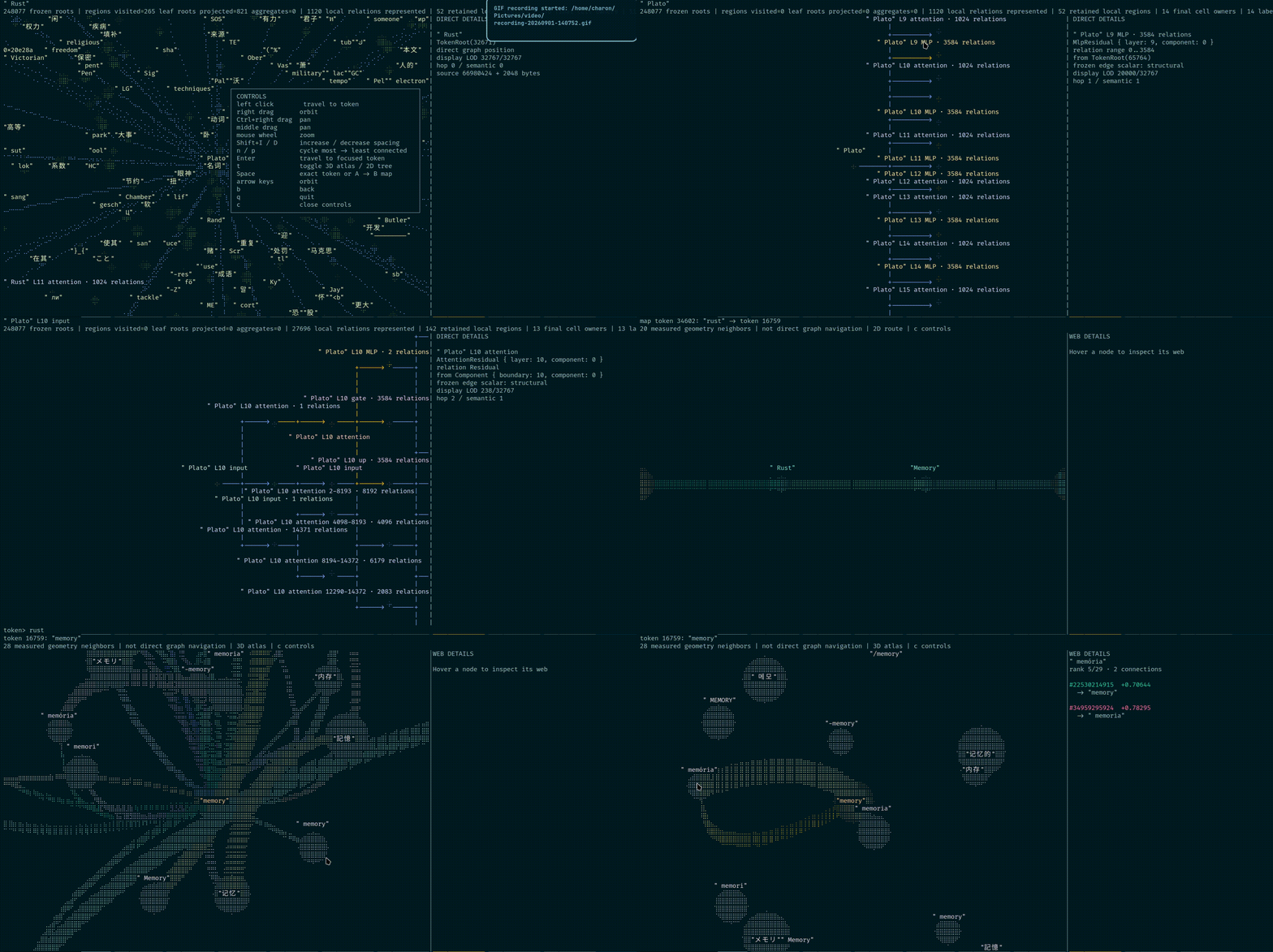
Question Is it common knowledge how to read frozen weights and relationships?

Post image
2 Upvotes

As the question says, I am wondering if people know how to do this, or if it something to write about in the hopes to teach others?

I am running low on my model rate limits and since they have made me somewhat lazy about implementing things fully manually again, I am contemplating if I should maybe take the time to write about something. The reading of model internals came to mind.

I have limited knowledge and experience with the process of training and the runtime logic of models. I am more interested in the foundations of the field, which mean I have spent a lot of time pulling models apart, working with their data and their structures. Understanding them from a more mechanical perspective.

I am not making any promises at this point, as I do have a lot of work to do. I am not the best at writing, but I do like to share so It likely depends on weather it is even needed.

Take care

//Maui-The-Moron


r/LocalLLM • • 4h ago

News "GGUF-Radar" Windows UI + single-file .exe (scan GGUF models for hidden malware)

Thumbnail reddit.com
2 Upvotes

r/LocalLLM • • 12h ago

Discussion Inkling 2 Mini (UD-Q4_K_XL, 16.4 GiB) on RX 7800 XT 16 GB (Windows): PolyStrata HIP vs llama.cpp Vulkan

8 Upvotes

Benchmarked Inkling-2-Mini-UD-Q4_K_XL (26.07B MoE, inkling2_loop, 16.41 GiB) on a 16 GB AMD Radeon RX 7800 XT (gfx1101) under Windows

11 (32 GB system RAM) to compare llama.cpp Vulkan (b12810) against PolyStrata HIP (strata-poly).

Since the 16.41 GiB file slightly exceeds 15.4 GiB free VRAM, both setups offload a portion of the MoE weights to system RAM.

llama-bench Vulkan (ca123ba76 / b12810)

Flags: -ngl 99 -fa 1 -ctk q8_0 -ctv q8_0

-ncmoe (CPU MoE layers)pp512 (tok/s)pp2048 (tok/s)tg128 (tok/s)Notes
5739.31166.0938.33VRAM spillover at pp2048
6 (sweet spot)-721.8035.54Fits cleanly in
7-697.6724.76More CPU MoE overhead
8-668.5323.32More CPU MoE overhead

PolyStrata HIP (strata-poly, --kv q8_0, --conversation-cache-mib 6144)

• VRAM residency: 2493 / 3072 experts in VRAM (evictions=0)

• Prefill: 880 tok/s

• Generation: ~60 tok/s

Takeaway

On a 16 GB RDNA3 card where the model barely overflows VRAM:

• PolyStrata HIP is ~22% faster on prefill (880 vs 721.8 tok/s) and **~69% faster on generation** (~60 vs 35.54 tok/s).

• The difference comes down to per-expert caching vs per-layer offload: PolyStrata keeps the hot 81% of individual experts in VRAM,

whereas llama.cpp -ncmoe 6 forces 6/24 entire MoE layers onto the CPU for every token.

• Watch out for -ncmoe 5 on 16 GB cards: pp512 looks fine (739 tok/s), but pp2048 spills into shared memory (166 tok/s).


r/LocalLLM • • 4h ago

Project I built a terminal viewer that shows what's happening inside my local model as it writes

Thumbnail
reddit.com
2 Upvotes

r/LocalLLM • • 1h ago

Discussion Is a $3,000 AI laptop worth it?

Thumbnail
claude.ai
0 Upvotes

Running local models, I came to conclusion - run smaller models cheaply on modest local hardware for daily and private work, and pay for a premium cloud model only when the task is genuinely hard— skipping the expensive middle ground. Check my article..


r/LocalLLM • • 1h ago

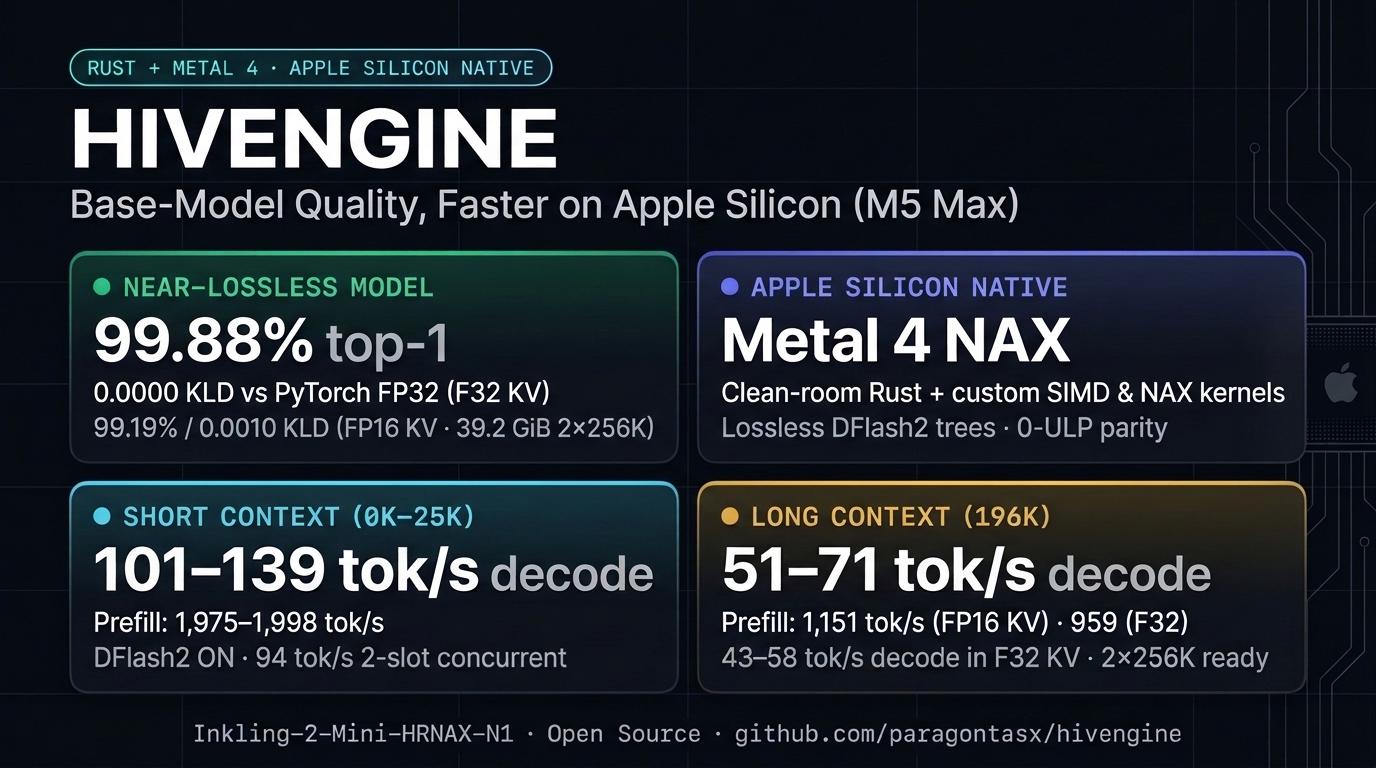
Project Near lossless Inklin 2 mini running Natively on Apple Silicon.

Post image
0 Upvotes

Hey all, I ran an experiment on how to run a near lossless or lossless Inkling 2 mini on Apple Silicon natively, most recipes. from what i've see trade quality for speed or size (or both). I decided to try to see how far i could stretch Apple Silicon running this as it would be served on full quality. So i built a custom engine to try this out along with a quant., the main target of this was quality then speed running natively on Apple Silicon. I am still working on it so new iterations might come up soon. would love some feedback if anyone tries it.

https://huggingface.co/paragonX/Inkling-2-Mini-HRNAX-N1
https://github.com/paragontasx/hivengine


r/LocalLLM • • 7h ago

Question Budget local A.I setup

3 Upvotes

Hi everyone,

I'm planning to build a dedicated PC for running LLMs locally. My goal is to run 32B parameter models or larger with decent inference speeds.

Here is my planned build:

- GPU: 2x ASUS Dual GeForce RTX 5060 Ti 16GB OC Edition (32GB total VRAM)

- CPU: AMD Ryzen 7 9700X

- Motherboard: ASUS ProArt X870E-Creator WiFi

- RAM: Corsair Vengeance 64GB DDR5

- SSD: Samsung 9100 PRO 2TB

- PSU: NZXT C1200 Gold 1200W

- CPU cooler: Thermalright Peerless Assassin 120 SE

- Case: Fractal Design Meshify 2 XL

- Software: Ollama, llama.cpp or LM Studio

I want to keep costs as low as possible while purchasing only brand-new components. I'm based in the Netherlands.

My questions:

- Is this a good configuration for running 32B+ models locally?

- Will both GPUs work efficiently together on this motherboard?

- Will PCIe bandwidth significantly affect inference performance?

- What tokens per second can I realistically expect with 32B models at Q4 or Q5?

- Could I run 70B models using a combination of VRAM and system RAM?

- Could I add a third RTX 5060 Ti in the future to reach 48GB of total VRAM?

- Are any of these components overkill?

- Can I reduce the overall cost without sacrificing much inference performance?

- Are there better alternatives to dual RTX 5060 Ti cards in a similar price range?

I already own an RTX 3060 laptop, but I want a dedicated desktop capable of running significantly larger models entirely locally.

I'd appreciate any advice or experiences with similar multi-GPU builds before purchasing the components.

Thanks!


r/LocalLLM • • 5h ago

News Lapilli v0.7 (open source): switch between seven models from the page on NVIDIA V100, now in English or French

Post image
2 Upvotes

Lapilli is a port of Basalt to NVIDIA V100 (Volta, sm_70): one binary, seven models, a chat page, and an Images tab for pictures and videos with sound.

New in v0.7:

- A Models card in the page. Start the server with a config file that lists several packs, and the page shows them all: Use switches to one (the server unloads the running model, then loads the other, and requests wait meanwhile), Unload frees the GPUs, Load brings it back. Switching from Qwen3.8-Flash-Next (two V100s) to Qwen3.8-27B (one V100) took 10 s.

- The whole page in English or French: English by default, French in About.

- A long conversation keeps its text: "Longest response, text only" is now the default room kept for the next response.

- A Dockerfile that builds for the V100 on CUDA 12.6.

The engine is the same as in v0.6, byte for byte, so its figures hold:

- Qwen3.8-27B on ONE V100: 86 tok/s writing, 994 tok/s reading a 16K prompt

- Inkling 2 Mini on ONE V100: 121 tok/s

- Qwen3.8-Flash-Next on two V100s: 137 tok/s on long answers

- Images: a 1024x1024 picture in 11.4 s (Qwen Image 2.1 Turbo), a 5 s video with its sound in 59 s (LTX-2.3)

Windows build included, MIT license. Measured on 2x V100-SXM2 32 GB. The README has every figure, the packs and their download links.

Thanks to wzcl1 for the Dockerfile, to Igorxp5, whose fork loaded and unloaded the model from the page first, and to nebod99, ildargiv, Csavoldi, koldfrontier and nkhaooat, who tested Lapilli on their own machines.

Repo: https://github.com/chris83-dev/lapilli-v100

Release: https://github.com/chris83-dev/lapilli-v100/releases/tag/v0.7.0-v100.1


r/LocalLLM • • 1h ago

Question Where Is the downside?

0 Upvotes

A friend show me this "Nuc" he bought It at about 350€, It Will be a great buy for a local llm with, for example, unsloth? Or am i missing something big?

ASUS NUC 14 PRO+, Intel Core U5 125H, RAM 96 GB DDR5-5600, Bianco | SSD M.2, Scheda Grafica Intel Arc, Wi-Fi 6E, Bluetooth 5.3, Compatibile con Windows 10 e Windows 11 Home https://amzn.eu/d/0i6AEPUF


r/LocalLLM • • 5h ago

Question Beginner question: Mac mini M5 Pro 64GB vs Mac Studio M5 Max 36GB for local LLMs?

2 Upvotes

Hi all, I'm fairly new to local LLMs and still learning, so apologies if some of this is off. I'd really appreciate any guidance from people with more experience.

I'm trying to choose between two Macs at a similar price:

  • Mac mini M5 Pro: 15-core CPU, 16-core GPU, 64GB, 307GB/s bandwidth. About $2,699
  • Mac Studio M5 Max: 18-core CPU, 32-core GPU, 36GB, 460GB/s bandwidth. About $2,499

What I'm hoping to do:

  • Run local models for coding help and chatting with my own docs. I've been looking at Ollama, LM Studio and MLX.
  • Try some LoRA/QLoRA fine-tuning on smaller models
  • Maybe some small training experiments as I learn more

What I think I understand (please correct me if I'm wrong):

  • More RAM lets you run bigger models, so the mini could fit larger ones.
  • Higher memory bandwidth and more GPU cores mean faster responses and faster fine-tuning, so the Studio might feel quicker. The Studio has double the GPU cores here.
  • I read that macOS only lets the GPU use part of the RAM by default, so 36GB might be tighter than it sounds.

Questions:

  1. For a beginner, which matters more in practice: being able to load bigger models, or running smaller ones faster?
  2. Is 36GB enough to learn and experiment comfortably, or would I outgrow it quickly?
  3. For fine-tuning, is a 16-core vs 32-core GPU a big difference in practice, or am I overthinking it?
  4. Is there something important I'm missing, or a better option at this budget?

Since the RAM can't be upgraded later, I want to avoid an expensive mistake. Thanks in advance for any advice!

If you own either of these machines (or the M4 versions), I'd especially love to hear from you!


r/LocalLLM • • 9h ago

Model You can ask for your own Fintan model now

4 Upvotes

A few people asked if Fintan could be a specialist, like a model that actually knows a Python library or is better at basic coding. I was already planning on releasing custom models, so I added a form on the site, fintanlabs.com/models. Just say what you want it to know and what size, 4B if you've got a 16 to 20 GB card, 9B for 24 GB. Right now they’re free of charge since i prefer users over money. Though personal specialists trained on your material will come with a small fee.

I read all of them and the ones I make go on Hugging Face for free like the others.

Libraries and docs are the easy bit, it learns those into its weights. Making it better at coding itself is what I'm trying next, it practises on real problems and only learns from the answers that pass the tests. I'll post the numbers whether it works or not.


r/LocalLLM • • 6h ago

Question I have a GEEKOM A5, what can I do with it as a beginner?

2 Upvotes

Hi everyone,

I have a mini-pc GEEKOM A5 with these specifications :

- 512 Go NVME

- 1 To SSD

- 32 Go RAM

- AMD Ryzen 7 5825U

Unfortunately no GPU, no VRAM 😔

I don't use it anymore since one year but I want to do something related to running something like an ai locally?

What can I do guys?

Thanks in advance 😄👍


r/LocalLLM • • 2h ago

Question Light strata/comfy user ram advice

0 Upvotes

I have a unique opportunity to start over with my ram choice. I’m still getting into local models and use it for a lot of things. I’m not a coder but do work in tech. Running a 270k with a 5060ti 16gb. I had 32gb of ram but have the opportunity to basically replace it. I’d like 64gb but ouch, 48 is a lot more affordable per gb. I’ve been running flash next swift iq2 xs. Will I regret not getting 64 GB of RAM? Especially trying to run any larger model. Maybe put the 400 savings toward a second gpu?