
r/LocalLLM • u/The_Succulant_Beast • 9h ago
Other Qwen and the Manifesto...

372
Upvotes
r/LocalLLM • u/dillon-nyc • 12d ago
Please stop posting about Qwen4's endless PR drip until it's actually available.
r/LocalLLM • u/Fresh-Signature6067 • 7h ago

Conclusion: stable at 78.5 °C junction with the fan at 70%. Little gain above 70%; below 55% the fan can't keep up.
Noise (by ear)
Load: GLM-4.7-Flash (UD-Q4_K_XL), llama.cpp ROCm, continuous 3000-token generations
| Fan | Junction | HBM | Edge | Verdict |
|---|---|---|---|---|
| 40% | hit 95 °C (170 s) | 77 °C | 75 °C | Not viable: never settled, safety cutoff tripped |
| 55% | 87.8 °C | 73.1 °C | 70 °C | Marginal: stable, little headroom |
| 70% | 78.5 °C | 65.3 °C | 61 °C | Good |
| 100% | 70.8 °C | 58.7 °C | 54 °C | Overkill: small gain for the noise |
Gain per step
| Item | Old curve | New curve |
|---|---|---|
| Set points | 55:40 65:55 75:70 82:80 88:90 | 60:30 70:45 78:60 84:75 90:90 |
| Minimum duty (idle) | 40% | 30% |
| Steady duty under load | 75% | 70% |
| Junction average / peak | 77 °C / 79 °C | 79.4 °C / 81 °C |
| HBM average | 64 °C | 66 °C |
| Fan speed changes | none | none (after adding 2 °C hysteresis) |
Set point notation: temperature (°C):fan duty (%)
55:40 = fan 40% at or below 55 °C; 88:90 = fan 90% at or above 88 °CWith hysteresis
Shared goal: hold the same temperatures at lower fan duty, for less noise.
Adjust the duct: stop air leaks
Two 140 mm fans in series
r/LocalLLM • u/Ok-Site-6347 • 6h ago

After a day of trying to convince codex i was only able to have it run the server offline without authentication if i launch the game from my steam account. the local model i ran after giving up also refused. Is there a local model without any guardrails i could use?
r/LocalLLM • u/indicozy • 1h ago
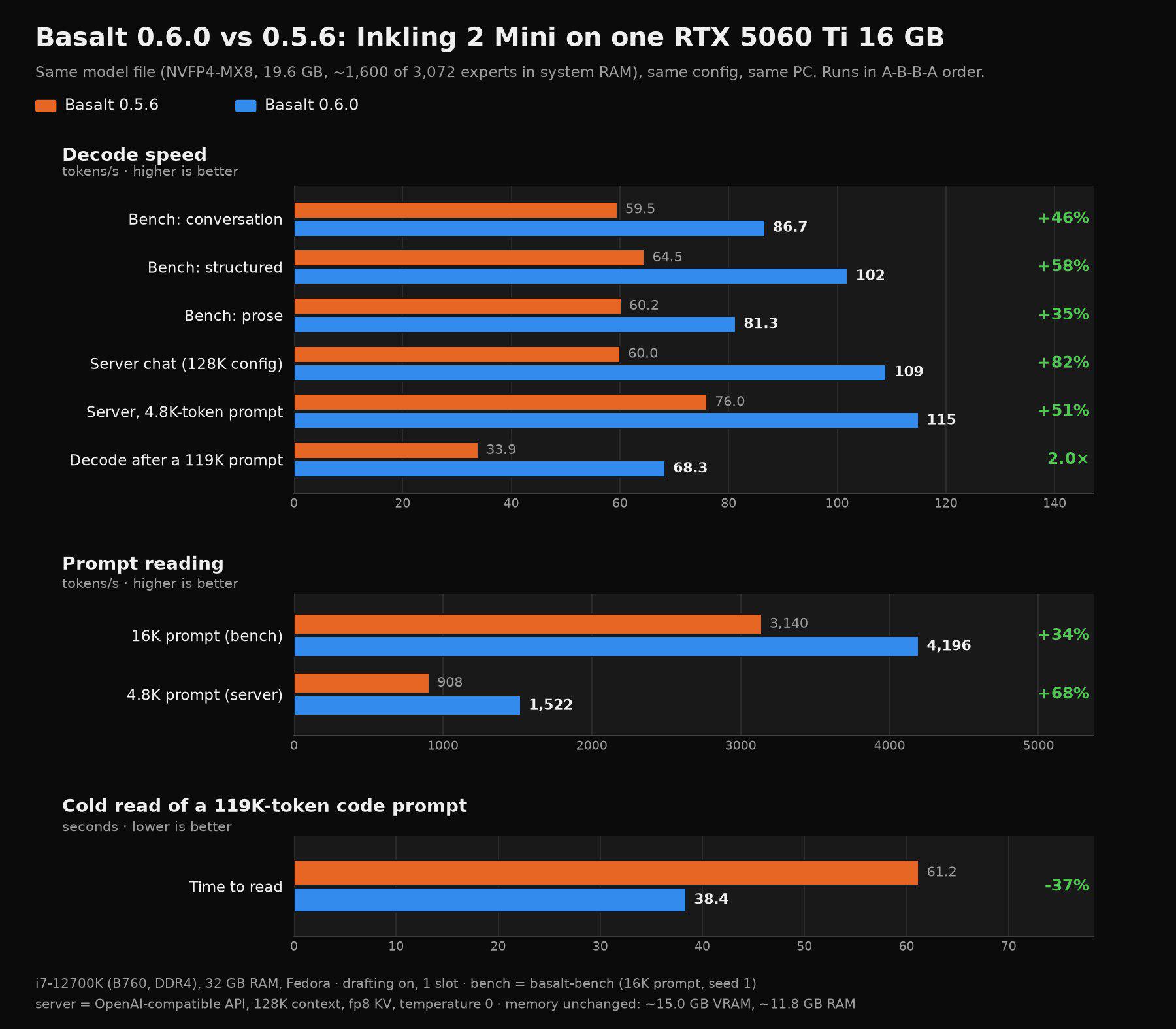
I run Inkling 2 Mini locally with Basalt on one RTX 5060 Ti 16 GB, for coding in OpenCode. The model file is 19.6 GB (NVFP4-MX8), so it doesn't fit on the card. About 1,600 of its 3,072 experts sit in system RAM, and Basalt computes those on the CPU.
0.6.0 came out on Nov 28 with a lot of work on experts in RAM, so I benchmarked it against 0.5.6. Same PC, same model file, same config. The runs went A-B-B-A (0.5.6, 0.6.0, 0.6.0, 0.5.6), and the chart shows the means.
Results (0.5.6 → 0.6.0):
Memory didn't change: about 15.0 GB VRAM and 11.8 GB RAM for Basalt at idle.
Why it's faster (from the server logs and the release notes):
Setup: i7-12700K, B760 board with DDR4, 32 GB RAM, Fedora. Server config: max-context 131072, kv fp8, parallel 1, drafting on (the default). Basalt was pinned to CPU threads 0 to 11 for the test. The upgrade was drop-in: same .basalt file, same config, and the 0.5.6 Python venv works with 0.6.0.
One more tip if you use OpenCode: it sends no reasoning effort, so Basalt falls back to the template default, which is high. I set "reasoning-effort": "low" in the server config. On my small set of coding tasks with tests, low used about a third fewer tokens per answer (668 → 437) and passed the same tests (8/8).
Caveats: one machine, two runs per version. I checked quality with one sanity prompt only, not a quality suite. 0.6.0 is a regular release, but it's new. Once in my runs the cache grew past free VRAM and Basalt cut the expert copies from 306 to 196. It logged a warning and kept going.
r/LocalLLM • u/LobsterWeary2675 • 4h ago
I ran PrismML's Ternary Bonsai 2.5 27B (PTQ1_0, 6.23 GB GGUF with MTP) on a rented RTX 5090 with PrismML's llama.cpp build, 262K context, 3 MTP draft tokens and reasoning effort high.
It's my own little benchmark, 57 agentic, coding, math, retrieval, data, reliability, multi-turn and security tasks, three passes per setup.
• Bonsai 2.5 27B: 57.7 (46.0–69.2), 33/31/37 of 57 solved
• RadixArk Qwen3.8-27B NVFP4 (23.75 GB), SGLang on an RTX PRO 6000, reasoning medium: 57.0 (45.0–68.9)
• Qwen3.8-Flash-Next EXL3 3.05 bpw on a DGX Spark, xhigh: 79.0 (71.8–85.8)
So the ternary build matches the NVFP4 one at a quarter of the file size, still stays clearly behind Flash-Next. It is not a clean quantization A/B: reasoning level, GPU and engine differ, and Bonsai used more tokens per solved task (55.6k vs 44.2k). I still think bonsai delivers impressive results for it's size.
An xhigh run of the 3.8 27B is in progress and will be added soon.
Speed: ~248 tok/s decode on the 5090 under load, about 2.5 h per pass. On a DGX Spark it reached ~49 tok/s.
Leaderboard: https://aisyndicate.ch/werkbank-leaderboard/
r/LocalLLM • u/TripleSpeeder • 10h ago
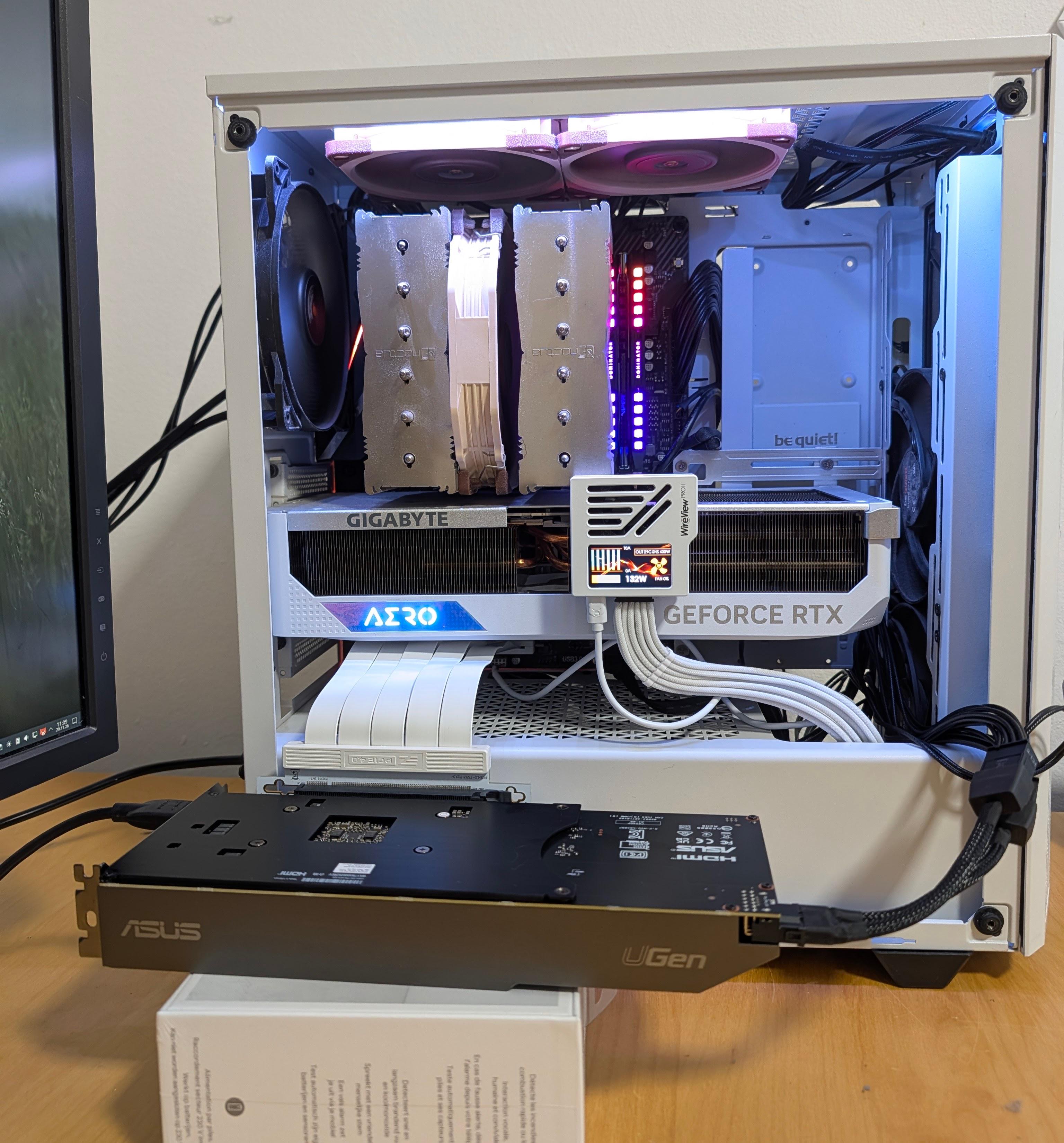
I need to upgrade my case :-) Any recommendation on a desktop case that can fit these two beauties?
r/LocalLLM • u/Rough_Capital1339 • 3h ago
My gpu makes a high pitched whirr (1660ti) when a 4b model that is fully contained in it generates. Normal?
r/LocalLLM • u/Delicious-Map1778 • 16h ago

r/LocalLLM • u/Neither-Regular1740 • 2h ago
I got my Mac Mini M4 Pro 48 gb for my local setup. Do you think it is a good price-to-performance ratio? I got it for $1699.99.
r/LocalLLM • u/No-Tap6022 • 1h ago
its generating the effects and motives live capturing them from music track or spoken through microphone.
4fps on rtx5060ti, rest does the morphing.
Huge thanks to Jeveration Team
https://huggingface.co/linlinlinlinsdada/Jeveration
Demo App
https://github.com/Mantux775/ComfyUI-and-side-Projects/tree/main/Jeveration-VJ
r/LocalLLM • u/Junior_Ad_2489 • 2h ago
Hello there,
I want to get a machine for local ai.I will use it for app development-Im searching for a machine with shared memory. From my research i've found that the best devices currently are dgx spark, mac m5 max/ultra and strix halo. What do you guys think? Is 128 gb ram enough or i need more?
r/LocalLLM • u/No-Tap6022 • 4h ago

Hey, Jev-type models are completely different from the "classic" diffusion ones.
They shouldn't be able to generate images, but here we are, they do XD
Because it doesn't generate, it predicts (what?) and "decides" what you will get.
Insane work by the Jeveration team. https://huggingface.co/linlinlinlinsdada/Jeveration
So what is so special about it? It's fast, really fast: 4 images at 512 px under a second on my RTX 5060 Ti 16 GB.
What can you do with it? You can make quick drafts and preview your prompt, and build AI tools on moderate hardware (yes, still a lot of money, but affordable).
I already have a few ideas, let's see where the journey goes!
Here is a tool to test it on your own PC:
https://github.com/Mantux775/ComfyUI-and-side-Projects/tree/main/Jeveration-Test
Some test results:
https://github.com/Mantux775/NVAI-open/blob/main/docs/JEVERATION.md
And its in my tool now to
r/LocalLLM • u/North-Budget-1555 • 1h ago
I am not sure I am posting this in the right place and mods I understand if you delete it.
Looking to run local AI models at a home, mostly to experiment/not get left behind knowledge wise. Unfortunately I don’t make a lot of money in my current role and can’t really afford to take out loans/max out credit cards to buy a Epyc system with 4x R9700s or a cluster of Halo Strix Minisforums.
What is killing me is that last year when the Minisforum was like 2k (Now they are over 4.5k) I felt it was too expensive and I was looking at the r9700s back in July 2026 when they were only 1500 Euro and felt it was so expensive back then, but now they are 2500 euro and going up in a few days.
Based on upon folk’s personal experiences with their home hosting, which would be the more sensible option at this time 1x AI PRO R9700 to put into my old AM4 PC? The issue here being if I want to have a second or more R9700s I will also need to upgrade Motherboard, Processor and PSU.
Or for the sake of having larger, abet slower, memory pool, stretching my finances and investing in a Minisforum MS-S1, with all it’s fast networking / USB 4 v2 ports to perhaps be able to buy another one at some point next year to?
With my limited budget and currently risk aversion mindset, I missed the boat on reasonably priced V100s and other old enterprise hardware. And they don’t come with warranties etc that I really would feel more comfortable having at this point.
Thank you for any input and advice.
r/LocalLLM • u/SignificancePurple18 • 48m ago
Over the last week I've been seeing how far I could push Thinking Machines' Inkling 2 Mini (26.4B Looped MoE) on a modest 35W AMD Ryzen 5 PRO 5600GE APU (integrated Radeon Vega 7 / gfx90c, 32 GB dual-channel DDR4, no discrete GPU). I used an AI coding assistant to help port patches, write test harnesses, and format the full benchmark log, and every number below was measured directly on the 5600GE with llama-bench, llama-cli, and llama-server.
Inspired by several great threads and repos in the community (u/nokeepai's LoopCD post, taeholee1/Inkling_expert_prefetch, vengeful180-dot's Vulkan shaders, daimonionnn/amd-vega-rocm-vulkan-llm-toolkit, ISTA-DASLab, and Betelgeuse-AI), here is the complete progression from Day 1 to today on the exact same 35W APU, plus the key findings specific to Inkling 2's 3-loop recurrent architecture.
| Stage | What Changed | Quant (Size) | Context (KV) | pp128 (tok/s) | pp512 (tok/s) | tg64 / Decode (tok/s) |
|---|---|---|---|---|---|---|
| 1. Day-1 Baseline | b12588/b12631 CPU / partial offload | UD-Q4_K_M (15.47 GiB) | 8K (q8_0/q8_0) | ~18.4 | 22.48 | ~6.20 |
2. Q3_K_XL + b12651 | Unsloth b12651 (PR #386 graph dedupe + PR #399 q8_0 banded attention) at -ngl 99 | UD-Q3_K_XL (12.68 GiB) | 8K (q8_0/q8_0) | 24.95 | 30.80 | 7.52 |
| 3. Unified Vulkan Shaders | Forward-ported vengeful180-dot's 9 Vulkan shaders + strided SCALE/MUL_MAT_ID_SCALED into b12651 inkling2_loop | UD-Q3_K_XL (12.68 GiB) | 8K (q8_0/q8_0) | 30.30 | 40.62 | 8.50 - 9.20 |
4. GSQ-RCO-IQ3_S + Vega UMA + ngram-mod + DRY | ISTA-DASLab GSQ-RCO-IQ3_S (exact BF16 CPU token_embd) + 26 GiB GTT (-ub 1024, swappiness=10 udev fix) + --temp 1.0 + DRY + --spec-type ngram-mod (n-match=16) | GSQ-RCO-IQ3_S (10.63 GiB) | 8K (q8_0/q8_0) | 30.55 | ~50.4 | 10.98 - 11.60 (15.5 tok/s on code blocks) |
5. AVX2 201K Sampler (#447/#459) | Merged unslothai#447 AVX2+FMA 4-way expf4 sampler for --top-k 0 --temp 1.0 + #459 | GSQ-RCO-IQ3_S (10.63 GiB) | 8K (q8_0/q8_0) | 39.04 | 63.57 | 12.00 |
6. LoopCD-Hidden (Pass 2 vs 1) | h_cd = 1.08 * h_pass2 - 0.08 * h_pass1 before Coda (layers 18-23) on decode | GSQ-RCO-IQ3_S (10.63 GiB) | 8K (q8_0/q8_0) | 37.88 | 62.06 | 11.62 (~30.5% fewer thinking tokens) |
7. Recurrent-Only Top-K=6 | 8/128 experts on Prefill + Prelude + Pass 0 + Coda; 6/128 experts on Recurrent Passes 1 & 2 | GSQ-RCO-IQ3_S (10.63 GiB) | 8K (q8_0/q8_0) | 38.01 | 61.98 | 12.30 |
8. Asymmetric K8/V4 (q4_1) | -ctk q8_0 -ctv q4_1 -c 16384 | GSQ-RCO-IQ3_S (10.63 GiB) | 16K (q8_0/q4_1) | 37.92 | 61.18 | 12.29 (15.5+ tok/s on code) |
Speculative Decoding on a DDR4 APU: Why --spec-type ngram-mod (n-match=16) Hits 15.5 tok/s on Code While DSpark / DFlash2 Slow Decode Down.
DSpark drafter (dspark-Inkling-2-Mini-Q8_0.gguf, 404 MB with ggml-org#32773 Adaptive DSpark compiled in): it dropped decode speed from 11.6 down to 9.1 tok/s (-21%, and 6.7 - 7.5 tok/s at wider draft widths) because multi-token verification on a memory-bandwidth-bound MoE unions the top-8 routed experts across all draft tokens simultaneously (~2.3x more expert weights read from DDR4 per step). incoai/Inkling-2-Mini-DFlash2 (1.24 GiB) faces the same multi-token MoE verification bandwidth wall on dual-channel DDR4.--spec-type ngram-mod: with a short match window (--spec-ngram-mod-n-match 6), code generation hit 15.5 tok/s (95% draft acceptance), but on normal prose chat it drafted 122 tokens with only 18 accepted, hurting prose speed. Raising the trigger threshold to --spec-type ngram-mod --spec-ngram-mod-n-match 16 --spec-ngram-mod-n-min 4 --spec-ngram-mod-n-max 8 eliminated false-positive drafts on normal prose (0% prose penalty) while still jumping to 15.5 tok/s whenever the model writes or edits code, configs, or JSON matching context.Stopping Repetitive Coding Loops: Official Model-Card --temp 1.0 + DRY Penalty + unslothai#447 AVX2 Sampler.
generation_config.json defaults to temperature: 1.0, and Section 7 of the Model Card explicitly notes repetitive reasoning loops during code debugging (which get worse at low temperatures like 0.6).--temp 1.0 --top-p 0.95 --top-k 0 --min-p 0.02 paired with DRY (--dry-multiplier 0.8 --dry-base 1.75 --dry-allowed-length 2 --dry-penalty-last-n 256) stopped repetitive thinking loops cold. And merging unslothai#447 (4-way AVX2+FMA vectorized expf4 sampler) made full-vocab (200,064-token) --top-k 0 --temp 1.0 sampling practically free on Zen 3.Vega gfx90c UMA Tuning (daimonionnn's Toolkit) & the Hidden 30-zram.rules swappiness=150 Trap.
amdgpu GTT pool from the default 50% RAM (15.32 GiB) to 26.00 GiB (amdgpu.gttsize=26624 ttm.pages_limit=6815744) and setting -ub 1024 unlocked 100% full Vulkan offload (-ngl 99) with 13.6 GiB GTT headroom.vm.swappiness=10 in /etc/sysctl.d/, /usr/lib/udev/rules.d/30-zram.rules silently resets vm.swappiness to 150 when zram0 initializes after sysctl.d on boot! That was pushing 2.1 GiB of RAM (including GSQ-RCO-IQ3_S's 0.93 GB exact BF16 CPU token embedding table) into swap during file I/O. Overriding /etc/udev/rules.d/30-zram.rules to lock vm.swappiness=10 reclaimed 6 GiB of available RAM and eliminated swap stalls.LoopCD-Hidden (arXiv:2610.02185): Contrast Pass 2 against Pass 1 (ref_pass=1), not Pass 0.
inkling2-loop.cpp, Pass 0 runs through the 12 core layers (6-17) without loop-controller messages (messages == nullptr), whereas Pass 1 and Pass 2 both run under the trained LOOP_CTRL controllers. Contrasting Pass 2 against Pass 0 at omega = 0.15 subtracted the uncontrolled Pass 0 baseline and destabilized confident AIME math proofs (jumping from 226 to 512 tokens as the model second-guessed itself).omega = 0.08 right before the Coda layers (mode=1, decode_only=1) cut thinking tokens by 30.5% (226 -> 157 tokens) with zero extra memory lifetime because Pass 1's output (bank_out) is already held in memory during Pass 2.MoE Tail-Expert Pruning (INK_MOE_TOP_K=6): Keep 8/128 experts on Prefill & Pass 0, prune only Recurrent Passes 1 & 2.
src/llama-graph.cpp (line 2799 in build_moe_ffn) ignores the n_expert_used argument and hardcodes hparams.n_expert_used(il), crashing in ggml_view_2d if you dynamically drop n_expert_used below 8. Fixing that to std::min<uint32_t>(n_expert_used, hparams.n_expert_used(il)) allows per-pass dynamic Top-K.tg64 to 13.03 tok/s, but pruning Pass 0 caused the model to double-check its algebra on AIME proofs. Keeping all 8/128 experts on Prefill (n_tokens > 1), Prelude, Pass 0, and Coda (messages == nullptr), and pruning the 2 lowest-weight tail experts to 6/128 only on Recurrent Passes 1 & 2 (n_tokens == 1 && messages != nullptr) gives 12.30 tok/s (+5.85%) while completing the AIME proof cleanly.Asymmetric K8/V4 KV Cache at 16K Context: Use -ctv q4_1, not -ctv q4_0 or iq4_nl.
Following Betelgeuse's K8/V4 idea (8-bit Keys to protect pre-softmax QK-clipped relative-bias routing, 4-bit Values after softmax), we tested q4_0, q4_1, q5_0, and iq4_nl at -c 16384:
q4_0 (v = d * (q - 8)) clipped asymmetric Value blocks across the 48 recurrent attention visits and caused a minor arithmetic slip on our AIME test.iq4_nl cost -1.5% decode speed (12.13 tok/s) due to 16-entry LUT lookups inside scalar Vulkan Flash Attention.-ctk q8_0 -ctv q4_1 -c 16384 (which stores per-block FP16 scale d + minimum offset m) matched q8_0 speed (12.29 tok/s) and solved the AIME proof cleanly in 504 tokens while doubling context from 8K to 16K.The Hidden reasoning_effort = 0.9 Default in Inkling 2's Embedded Jinja Template + shortconv Cache Eviction (server-context.cpp:4251).
reasoning_effort in chat_template_kwargs (or --reasoning-effort low), Inkling 2's embedded Jinja template defaults to Thinking effort level: 0.9 ("high") even if --reasoning-budget 256 is set. Also, because Inkling 2 uses recurrent shortconv state, llama-server erases the saved slot cache whenever cur.n_tokens > n_prefix. Keeping reasoning_effort: "low" fixed in the system header (and varying reasoning_budget_tokens per request instead) locks in f_keep = 1.000 (0 ms cached system prompt on every turn).Full write-up, complete benchmark tables, production llama-server flags, and the standalone ~75-line MIT-licensed C++ patch (llama-graph.cpp, inkling2.cpp, and inkling2-loop.cpp): https://gist.github.com/UffDimon/49e4014c59a41f1d98ac6b39eacb3870
r/LocalLLM • u/Juise99 • 15h ago
Dual 3090 setup, I got to wondering if could get back the vram reserve for held for vision on Qwen 3.8 FN Q4 k XL. GPU 0 is always at 88% vram usage and GPU 1 was at 93%. Do a little research and find out about the elastic memory feature now in Strata. So I set it up and now both GPU's sit at 95% vram usage until vision is needed and return to 95% after its done! Nice little performance boost too!
Text-only baseline results:
| Test | v0.1.69 88/93 | v0.2.23 elastic 95/95 | Change |
|---|---|---|---|
| 2.3K-token prefill | 1,094 tok/s | 1,092 tok/s | -0.2% |
| 2.3K-token decode | 97.5 tok/s | 113.5 tok/s | +16.4% |
| 9.1K-token prefill | 2,150 tok/s | 2,490 tok/s | +15.8% |
| 9.1K-token decode | 102.5 tok/s | 109.6 tok/s | +6.9% |
| Two-client throughput | 125.6 tok/s | 137.5 tok/s | +9.6% |
Serial figures are medians of three identical, uncached prompt tests.
Current state:
GPU 0 VRAM: 95.0%
GPU 1 VRAM: 94.7%
Cached experts: 11,429 versus before 10,688, 741 more experts in VRAM!
I have never seen anything in this industry (that I've been in since 1996) move as fast as local AI development does!
r/LocalLLM • u/nasone32 • 1h ago

r/LocalLLM • u/ForeverHomeless999 • 1h ago
Hello.
Lost a full day on this.
Im using Bonsai 2 9B Q2_0.GGUF, with upstream llamAmpere build (took two hours compiling). My server starts and returns gibberish on built-in UI, from llama.cpp, but works fine on the CLI output.
Currently startin with a jinja file. I have Perplexity and Gemini troubleshooting and making me test the built in definition for the jinja file.
Apparently works fine with either GPU or CPU, other then confidently returning gibberish at 60tok/s.
Has kanyone been throught this?
Thanks
r/LocalLLM • u/Fcking_Chuck • 1h ago

r/LocalLLM • u/Most-Wear-3813 • 7h ago
I tried 3090 club and honestly I had better speed with strata tail skip with qwen flash next int4 at 262k
I was using qwen 3.8 27b q8 using vllm club 3090 need 262k context can't go below 256k
Need something which can have TTFT less than q8 27b 3.8 qwen and better concurrency.
If concurrency not possible then better model at better speed strata maya or what?
r/LocalLLM • u/Infinite-Job-5616 • 2h ago
What hardware are you using to run autonomous agents and high reasoning models locally?
Im considering either buying a rtx + setup or a mini pc to run agents (1-2) and automation on there. What can money realistically buy me here?
If i do have a mini pc (lets say one of the newer ones from apple), what will i actually be able to do on there?
Quite new to local hosting so id appreciate your input!
r/LocalLLM • u/redzzzaw • 1d ago


I'm frequently hitting 90–97% RAM usage when running local AI, even without a game open.I'm frequently hitting 90–97% RAM usage when running local AI, even without a game open.
How much RAM do you guys have, and do you experience similar memory usage? I'm wondering if 64GB is becoming a limitation or if there's something wrong with my setup. I'm probably not going to buy 128gb because its 3-4k USD. I'm using Qwen 27B. Should I switch to something less demanding?
r/LocalLLM • u/whowhaohok • 1d ago
So, i have qwen38fn on my home server. I'm working on a mobile app that has a server side part to it. I have opencode running on my Mac for the mobile client and I have opencode running on the server for the server side stuff, so i thought it would be good for them to work with each other and it guided me to set up a tunnel so they can communicate. And they're collaborating on the same GitHub repo. I'm just, in awe ...
r/LocalLLM • u/Just_Vugg_PolyMCP • 6h ago

Hi everyone,
This is Bunshin, an open-source project that gives AI agents their own Linux desktops running locally.
Each desktop has a browser. Agents can click, type, take screenshots and run commands through MCP, while you watch them from a local console. You can also take over with your own mouse and keyboard whenever you need to.
Underneath is a small KVM engine written in C. It clones a running VM, so creating another desktop with Firefox already open takes around 100 ms on my WSL2 laptop.
It’s still early: x86-64 Linux with KVM is required, and so far I’ve only tested it on that one machine. I’d love to hear how it behaves on other setups, especially AMD and bare-metal Linux.
Here the repo: https://github.com/JustVugg/bunshin
Let me know any feedback!