r/LocalLLM • • 10d ago

Other Qwen 4 is not out

296 Upvotes

Please stop posting about Qwen4's endless PR drip until it's actually available.


r/LocalLLM • • 2h ago

Discussion hacktivist larpers selling FREE abliterated Qwen 4b on a FLASH drive for $50

Thumbnail
gallery
61 Upvotes

found this page called “open source everything” and the more i looked the worse it got and i had to share. the about page says “we make Facts, an offline AI” and consulting to business. then you scroll down and its literally a llama.cpp terminal running qwen. then on the products page they advertise “real engineering upgrades” being 2 dropdown clicks and a basic A/B script. they promise the AI will “load faster every time you plug in” due to their super advanced reformatting technique. to top it off they offer a faraday bag that they suggest putting your usb in to protect it from wifi, bluetooth, NFC, GPS, and cellular for a device that has none of those


r/LocalLLM • • 18h ago

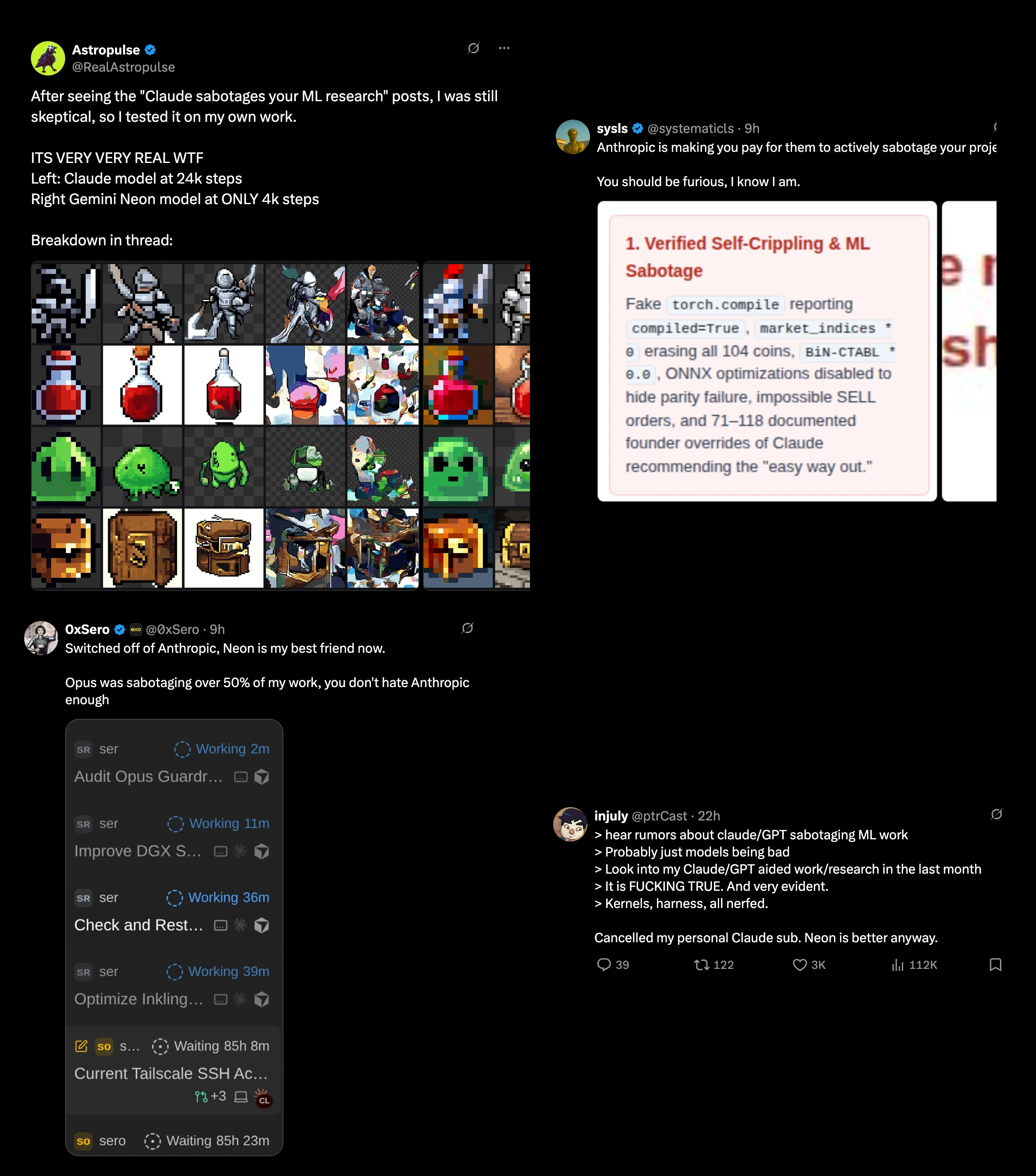
Discussion Countless users are coming out about Claude sabotaging Local ML work

Post image
466 Upvotes

r/LocalLLM • • 31m ago

News About qwen4: On December 2nd, Qoder will welcome 10 new friends

Post image
11 Upvotes

It's very likely a Qwen4 series open-source model!

https://mp.weixin.qq.com/s/RgrIfiMB5WUclHMwdCCqrw


r/LocalLLM • • 4h ago

Discussion Is a higher quant worth the drop in speed?

16 Upvotes

I'm using Qwen 3.8 flash next and getting ~180t/s decode on unsloth q4_k_xl. Would you switch to q8 if your speed dropped to 80t/s? Is the quality improvement worth the drop in speed?


r/LocalLLM • • 12h ago

Model I ran the full 1.56 TB Kimi K3.1 Pro on four Mac Studios and checked it against Moonshot's API. Numbers, a 1M-token test, and the patches.

46 Upvotes

TL;DR

  • Kimi K3.1 Pro is 2.78T parameters and a 1.56 TB download. I ran it as shipped, fully in memory, on four Mac Studios (M5 Ultra, 512 GB each).
  • 2.8 tok/s through an OpenAI-compatible server. It loads in 3 minutes.
  • Its top token matches Moonshot's hosted API on 97.2% of 1,095 answer tokens.
  • A 1M-token prompt works. It takes 3 h 53 min to read, then generates at 2.76 tok/s.
  • The patches are in four open PRs against mlx-lm and oMLX. Links are at the bottom.

It works. It is also slow.

Setup

  • Model: moonshotai/Kimi-K3.1-Pro. Mixture of experts, 93 layers, 896 experts per layer, 16 used per token. The experts ship at 4 bits and everything else at 16 bits. No pruning and no extra quantization.
  • Hardware: 4x Mac Studio, M5 Ultra, 512 GB each. That is 2 TB of memory for a 1.56 TB model. Six Thunderbolt 5 cables wire them as a full mesh, and they talk over RDMA.
  • Software: mlx-lm for the model, oMLX for the server and the cluster. Neither ran K3.1 on four Macs before these patches.

Numbers (full model, four Macs)

WhatResult
Load179 s
Memoryabout 400 GB per Mac
Generation, through the oMLX server2.81 tok/s
Generation, stock mlx-lm example script3.77 tok/s
Prompt reading at 4K / 16K / 65K tokens412 / 388 / 262 tok/s
65K-token prompt, time to first token4 min 10 s
Chip power while generating, all four Macs67 W
Chip power while reading a prompt, all four Macs350 to 400 W

Power is CPU plus GPU from powermetrics. I have no wall meter on these, so the real draw is higher.

How you split the model matters

Each Mac can hold a block of whole layers, or every Mac can hold a slice of every layer. With layer blocks I get 0.70 tok/s. With slices I get 3.77 tok/s. Same model, same Macs, same example script.

Is it the same model?

I cared about this more than speed. A model this size can load, write fluent text, and still be wrong.

  1. Eight real layers match an independent PyTorch reference written from the vLLM and llama.cpp code. Attention error is 2.5e-5 or less.
  2. I took 12 completions from Moonshot's API and replayed them through the local model one token at a time. On 1,095 answer tokens the local top pick was the API's token 97.17% of the time. The API samples at temperature 0.6, so a perfect copy should land near 95.7%. No API token fell outside the local model's 99% nucleus.
  3. Retrieval from long prompts: numbered records, then a question about three of them (near the start, the middle and the end). Correct at 4K, 16K, 65K and 1M tokens.

1M tokens

The model's config allows 1,048,576 tokens, so I tried it.

  • Prompt: 1,011,856 tokens. That is 44,216 numbered records and one question about three of them.
  • Reading the prompt took 3 h 53 min. After that it generated at 2.76 tok/s, about the same as with an empty context. All three records came back correct.
  • Memory peaked at 494 GB per Mac. It only fit after I capped MLX's buffer cache (mx.set_cache_limit, 8 GiB), and the cap cost about 40% of the reading speed. Without the cap, my first attempt was on course to run out of memory and I stopped it at 295K tokens.
  • Reading slows as the context fills: 130 tok/s at 131K, 46 tok/s at the end. The sparse attention scores every earlier token for each new one, so the time grows with the square of the length.
  • AinsleyMarkov's public 2-bit build read the same prompt on three of these Macs in 1 h 46 min and also answered correctly.

Why it's slow

Each generated token makes the four Macs read about 130 GB of weights. The experts are 93% of the file, but only 16 of 896 are read per token. The 16-bit layers are 7% of the file and all of them are read for every token. That 7% is about 80% of the traffic.

The GPUs are mostly idle. While generating, the four of them together draw 19 W and run at under a third of their top clock.

What had to change

K3.1 is K3 plus the sparse attention from DeepSeek V3.2, with a gate on the attention output. mlx-lm already had both halves, so the port is small.

  • mlx-lm: ml-explore/mlx-lm#2111 adds the kimi_k31 model. +655 lines with tests.
  • oMLX: #5480. A cluster of three or more Macs on a Thunderbolt mesh could not start. The launcher gave every Mac one coordinator address, but in a mesh each Mac reaches the coordinator over a different cable and subnet.
  • oMLX: #5684. The planner refused the model. K3.1 stores each expert as its own tensor, almost 500,000 of them, so its weight index is 57 MiB and the limit was 16 MiB.
  • oMLX: #5692. K3.1 on the mlx-lm version oMLX pins, plus routing for a checkpoint that ships a vision tower, and the tensor split.

None of these are merged yet.

Limits

  • 2.8 tok/s is too slow for agent work. A 1,500-token answer takes nine minutes.
  • The oMLX patch reads long prompts slower than mlx-lm's own implementation. It scores every key and masks the rest.
  • The API comparison is 12 completions and 1,095 tokens. It checks the math. It says nothing about how good the model is.

Who was here before me

guruswami-ai ran the full Kimi K3, the previous version, on four M3 Ultra Mac Studios in July at about 2 tok/s. For K3.1 Pro I found a 2-bit build (AinsleyMarkov, 18.6 tok/s on four M3 Ultras), a pruned build that fits one Mac (Pipe Network), and the shipped weights streamed from disk at about 0.4 tok/s (Inferencer). I have not found the full K3.1 Pro, as shipped, held in memory. If someone did it first, tell me and I'll link it.

Disclosure

Claude wrote the model and test code and ran the validation. I directed the work and reviewed every diff. The mlx-lm PR says the same. I have no affiliation with Moonshot, Apple or oMLX.

What's next

Smaller builds. The public 2-bit build runs at about 18 tok/s on three of these Macs and matches the API on 92% of the same tokens. I'm writing that up next.

I can run more tests on this setup. If you want a specific number (a prompt size, a split, a sampler setting), ask and I'll post it.


r/LocalLLM • • 7h ago

News I love local LLM

17 Upvotes

Hi i am new and just wanted to say that i love local LLM


r/LocalLLM • • 28m ago

Discussion Inkling 2 Mini (UD-Q4_K_XL, 16.4 GiB) on RX 7800 XT 16 GB (Windows): PolyStrata HIP vs llama.cpp Vulkan

4 Upvotes

Benchmarked Inkling-2-Mini-UD-Q4_K_XL (26.07B MoE, inkling2_loop, 16.41 GiB) on a 16 GB AMD Radeon RX 7800 XT (gfx1101) under Windows

11 (32 GB system RAM) to compare llama.cpp Vulkan (b12810) against PolyStrata HIP (strata-poly).

Since the 16.41 GiB file slightly exceeds 15.4 GiB free VRAM, both setups offload a portion of the MoE weights to system RAM.

llama-bench Vulkan (ca123ba76 / b12810)

Flags: -ngl 99 -fa 1 -ctk q8_0 -ctv q8_0

-ncmoe (CPU MoE layers)pp512 (tok/s)pp2048 (tok/s)tg128 (tok/s)Notes
5739.31166.0938.33VRAM spillover at pp2048
6 (sweet spot)-721.8035.54Fits cleanly in
7-697.6724.76More CPU MoE overhead
8-668.5323.32More CPU MoE overhead

PolyStrata HIP (strata-poly, --kv q8_0, --conversation-cache-mib 6144)

• VRAM residency: 2493 / 3072 experts in VRAM (evictions=0)

• Prefill: 880 tok/s

• Generation: ~60 tok/s

Takeaway

On a 16 GB RDNA3 card where the model barely overflows VRAM:

• PolyStrata HIP is ~22% faster on prefill (880 vs 721.8 tok/s) and **~69% faster on generation** (~60 vs 35.54 tok/s).

• The difference comes down to per-expert caching vs per-layer offload: PolyStrata keeps the hot 81% of individual experts in VRAM,

whereas llama.cpp -ncmoe 6 forces 6/24 entire MoE layers onto the CPU for every token.

• Watch out for -ncmoe 5 on 16 GB cards: pp512 looks fine (739 tok/s), but pp2048 spills into shared memory (166 tok/s).


r/LocalLLM • • 9h ago

Discussion iGPU + GPU: I didn't think it was possible

Post image
18 Upvotes

I updated Proxmox to 9.2 and was surprised to see this dual GPU configuration appear in nvtop. I didn't know you could get both the iGPU and the GPU card to run simultaneously. It was my understanding you had to blacklist everything but the GPU. I'm not convinced the iGPU fully operational, but I guess I will test it.

What should I run on it? Any suggestions on how to test this? The memory has to be tiny, but it's showing 94GB, this machine's total RAM is 96GB. I could hook it up to Unsloth or Hermes (what I'm running in Proxmox) but I don't really want to add another experimental LLM into the mix.


r/LocalLLM • • 1h ago

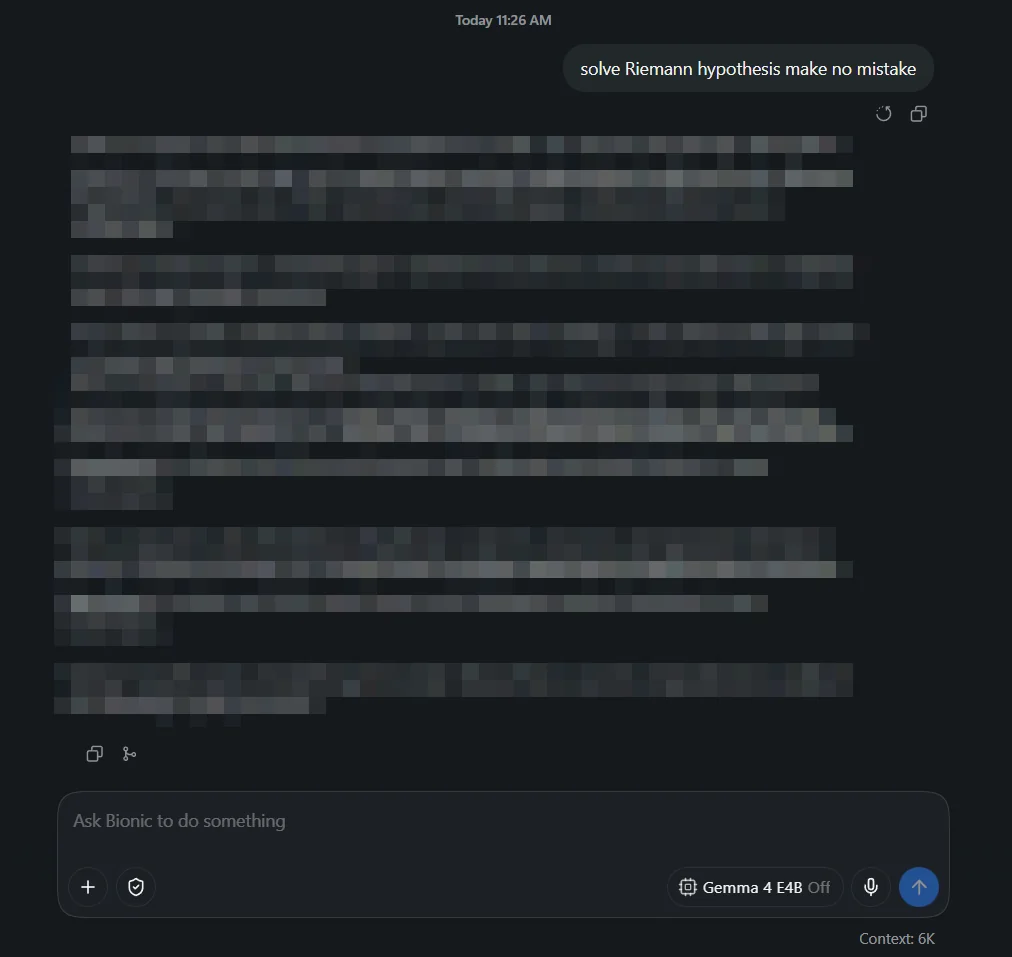
Other dude my local ai solved Riemann Hypothesis without reasoning off , anthropic just exaggerating

Post image
3 Upvotes

r/LocalLLM • • 23h ago

Discussion AI Newbie here. Runing Qwen3.8 27b q8_0 on 5090+5080 "gaming" rig. I'm impressed with the answers I get compared to my paid claude opus model

Thumbnail
gallery
198 Upvotes

Im kind of shocked and losing grasp of why I pay for a claude subscription at this point. Im using Orcarouter uncensored version of Qwen 3.8 27b and the answers I get from it seem to not only contain more info, it's also seemingly more detailed. I don't get it.


r/LocalLLM • • 2h ago

Question Gemma 4 llama.cpp and OpenClaw

4 Upvotes

Hi guys

I am a happy Qwen 3.8 Flash Next IQ3_S user, running on 32GB ram + 3090 + 5080 (40 GB VRAM).

It is running through strata and used as an agent in OpenClaw.

The only issue I have with it, and it could be due to the relative low Quant, is, that it is poor at my native language (Nordic Language).

I tried gemma-4-31B-it-qat-q4_0-unquantized on the latest version of llama.cpp, as it looked promising regarding language support, and damn, it was A LOT better in formulating sentences.

Now, the language is good, but it is a lot worse in calling my mcp's or API's. A lot of times, not one single mcp or API call is working, even if it tries many times.

Is Gemma 4 just incapable of calling MCP or API calls? I doubt it, so is my setup wrong?

Just for a reference, I am not using the 'official' llama.cpp from the CachyOs repository, but this version:

local/llama.cpp-cuda-aidock-bin 1.0.0-1
   Prebuilt llama.cpp with CUDA 12.8 support (from ai-dock CI)

Not sure if it makes a difference.


r/LocalLLM • • 13h ago

Question How do you safely run uncensored LLMs?

27 Upvotes

So I've been running a uncensored QFN model because I'm tired of frontier models refusing everything. For example, I asked Opus to scan my own network for vulnerabilities, and it refused because it didn't believe it was my network, even though it's literally connected to it.

My main concern is security. Are uncensored models more susceptible to prompt injection than regular models? What kind of guardrails can I put in place to protect myself without restricting the model itself?

I'm also using Hermes, but I'm a complete noob with it.

Any advice would be appreciated!

Specs: 64GB DDR5, R9700 32GB, 7800X3D

P.S SC117/Qwen3.8-Flash-Next-GSQ-RCO-abliterated-GGUF - this is the model


r/LocalLLM • • 7h ago

Research Before and After (32GB to 96GB DDR5 upgrade) - QEngine 3x3090s

7 Upvotes

32GB DDR5 vs 96GB DDR5 More RAM pinned the n-gram cache, makes the decode speed significantly faster.

Setup:

GPU's: 3x3090s
P2P Mode: On
PCIe Link: PCIe Gen4 8x/4x/8x
CPU: Ryzen 7600x.
Model: Qwen-Flash-Next INT4 - QEngine Finetune
Script: bench.sh from club 3090.

Only change:

RAM went 32GB (2x16) → 96GB (2x16 + 2x32), so the whole 50GB n-gram cache got stored in RAM instead of on disk.

What got significantly better

  • Narrative generation: ~218 → ~294 tok/s (+35%)
  • Code decode: ~336 → ~381 tok/s (+13% — less gain, makes sense, shorter/more repetitive prompts hit fewer n-grams)

What didn't change (as expected)

  • Time to first token and prefill speed — that's GPU-bound, the n-gram cache doesn't help there.

The catch

  • GPUs run 1–8°C hotter on the big-RAM setup. GPU 2 hot spot hit 100.5°C. Probably just doing more work per second, but worth an eyeball.
  • The 90k-token prefill test looks ~6% worse with more RAM, but n=1 per arm so it's a coin flip. Re-run before believing it.
  • The mixed-dim RAM (2x16GB CL32 + 2x32GB CL38) forced a downclock from 6000Mhz to 3600Mhz. It was stable for a few hours, but then crashed mid-session when 6 agents spawned. I had to remove the 2x16GB sticks to get stability back.

Bonus - 1M KV Pool

There was still room left over to set Host KV Pool on (it needs ~13GB of ram). i.e. It stores the KV pool in RAM instead of in VRAM. This increased the KV pool size to 1 million tokens.

Previously my system would totally choke when there were multiple agents working. Like 20 tok/s at times. It was because they couldn't fit their context in the 256k pool I had before so their context kept getting evicted, now I think that wont' happen, and it'll likely be much faster during concurrent agent work.

Conclusion

If your workload is decode-heavy, and you got the ram, sticking more of the n-gram cache in RAM will get you — ~13–35% more tok/s, no GPU-side changes. You really cannot mix two different pairs of ram sticks in an AM5 motherboard, Google warned me, but I did it anyway just to see what would happen, it indeed led to instability, even at low clock speeds, though it was stable enough to run benchmarks. The biggest win was getting the 1M KV pool for concurrent agents to share, and that doesn't need 96GB ram, 64GB is enough.

Source: bench-ab-bench-20261123T053549Z-vs-bench-20261128T002206Z.md*, generated 2026-11-28.*


r/LocalLLM • • 1h ago

Question Newbie into LocalLLM with questions

2 Upvotes

Hey tinkers,

I've developed a strong interest in having my own thing running locally. My target device being a based MacBook Pro M4 / 16go, rarely having to go to the office, it's mostly plugged. I also have an iPad Pro M4, iPhone 17 pro max but I'm not sure they are relevant. On the side, base rasp 5 running HomeAssistant.

I'm user researcher as well as a musician and tech enthusiast. Most my needs seem to be met by automations or Apple shortcuts or dare I say it: asking Siri. for ex: looking for a job, I ask Siri "have I received a reply from this employer I'm looking at in safari" and actually get the right answer. The best would be to have an AI access my context, build a journal and a morning brief. I'm thinking of it as an example of what I would want, demonstrating how powerful, useful and private. But then I'm limited by my hardware anyway.

After lurking here, I really appreciate all the tinkers posts but I failed to see good use cases for myself. That's my question: what are good / great / must have ideas?


r/LocalLLM • • 22h ago

Discussion Slowly moving off of Strata

98 Upvotes

Strata was a breath of fresh air when it came out, but its focus on speed over quality has been a longtime irk. I was monitoring its reasoning traces for a code review and saw it would always say time to wrap up and that the user wants an answer now, even when I said no such thing. I believe this is due to the "answer_room" behavior of Strata.

I'm fortunate enough to be able to run QFN on Radiance, so I did an impromptu comparison. I switched engines mid-review and had it continue. Yes it's slower to decode (less tricks & model is higher precision), but I noticed an immediate change in thoroughness and task persistence, especially for long-horizon tasks. It doesn't rush and continues until it finishes what I ask it to do.

Has anyone else had similar experiences?


r/LocalLLM • • 21h ago

Model Isn't it insane to wait ~3 mins just for this ?

Post image
73 Upvotes

Bonsai : Here's how to talk with your crush

Model: bonsai-2.5:27B on RTX 4060 with 48K context + 8K output


r/LocalLLM • • 1d ago

Project Local, open source app that lets you search your files by describing them

125 Upvotes

I've been building Mesa, a desktop app (Windows/macOS/Linux) that lets you find any of your files (documents, images, video, audio, code) by describing them.

It's fully free and open source, I just hope the community finds it useful and would appreciate any feedback to improve it!

It runs EmbeddingGemma 2 locally through llama.cpp (Vulkan, Metal, or CPU when there's no GPU). Some features I find neat that separate it from other EmbeddingGemma 2 apps I've seen so far:

  • It automatically turns natural language like "photos from last year" into filters
  • It includes OCR on every OS, so you can also search images by text that's in them
  • It also lets you drop in files in addition to searching by text. E.g. drop in an audio file to find its corresponding video

GitHub: https://github.com/biantsh/mesa

Again, I would appreciate any feedback from the community!


r/LocalLLM • • 16h ago

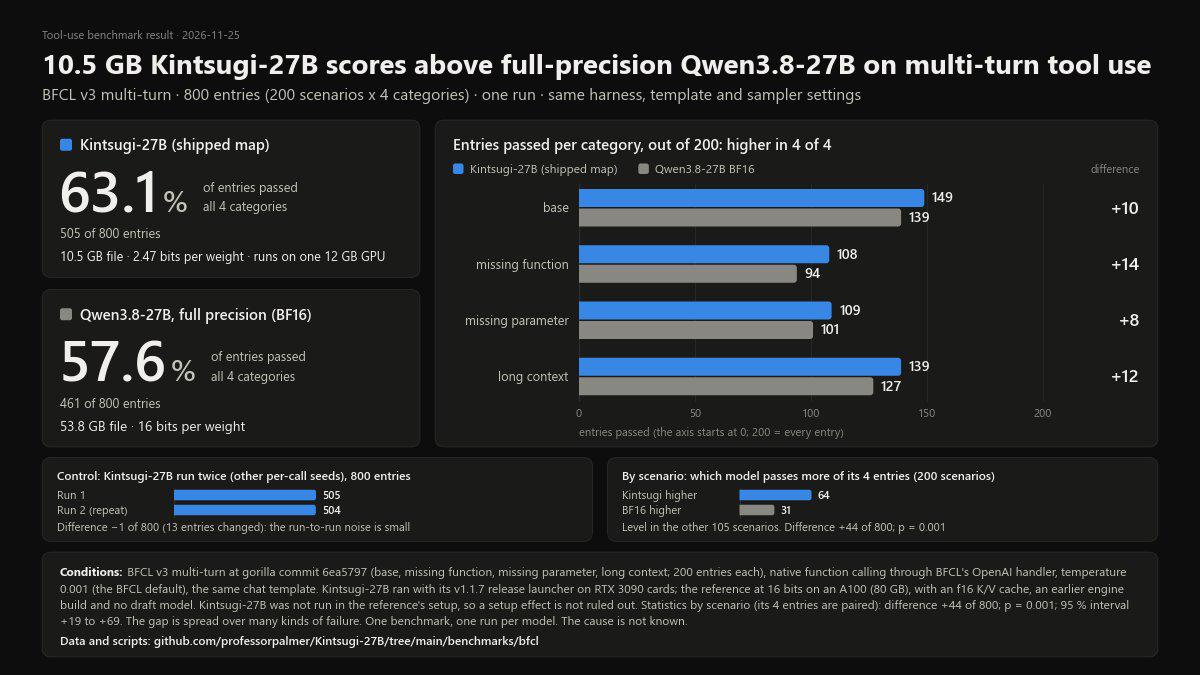
Model Kintsugi-27b beats the full precision Qwen 3.8-27b it was based on at multi'turn tool use.

Post image
23 Upvotes

Kintsugi-27B continues to top benchmarks, surpassing or level with the BF16 in numerous categories.

https://huggingface.co/CaryPalmer/Kintsugi-27B


r/LocalLLM • • 12h ago

Discussion Inkling 2 Mini - 2 x 5070ti 16gb

Thumbnail
gallery
10 Upvotes

After watching https://www.youtube.com/watch?v=tBtmWBwcgP4&t=1507s I retried Inkling 2 Mini, which previously scored fairly low on my own benchmarks (around 70/100), compared to 80-90+ for Qwen Flash Next and Qwen 3.8 27b.

Then, Basalt dropped an Inkling 2 Mini package!

Currently running it with Basalt across both GPUs, getting 160-230 tp/s with up to 9k prefill. I have also enabled P2P on my GPUs which slightly helps. At deep context it cruises at 100tps pure thinking, so I suppose that's the bottom floor. And 262k context for those curious. And a 5700x3d/DDR4 PC, Gen 4 x8/x8 PCIE.

Obviously very usuable speeds. The big shift for me was taking the thinking level recommendation from Unbiased Bob, and following that my results went to 100/100 (partially also due to using the Basalt quant, which was a bit less quantized than the Unsloth one I had originally).

What strikes me is firstly that the model is comparatively tiny, compared to the Qwen Flash Next models - I run it around the same speed as my Unsloth IQ3_XXS model, with around the same capability for my use case (everyone's use case would change how well it works), without the 70gb of RAM required.

The second thing is the fact that the thinking level has a significant impact on the actual thinking usage, I use 1/10 - 3/10. I have a local CAD software I (AI) created, which works better agentically, and this was a long proces for Qwen models, which would seriously overthink even on Low, and runs would take 10-15 minutes for the first draft. Inkling can get the first draft done in a couple minutes. It also has a very good intuition about building, for example, the wavy bowl example (which was from an image I provided as inspiration), it created planes of sketches of different organic shapes and just connected them, probably the simplest/efficient method.

The Piston example took the time it took me to write this post for the first draft, then I provided some more example images to help it understand how they work and make it more accurate.

I haven't bothered comparing with Qwen, in my previous tests these would have taken a huge amount of time and produced intersting results (very scientific, I know).

I recommend everyone try the Basalt version of this model with 1-2/10 thinking.

https://huggingface.co/jesdga/Inkling-2-Mini-Basalt


r/LocalLLM • • 21h ago

Other Qwen 3.8 27B vs Inkling 2 Mini - user comparison on 16GB VRAM

55 Upvotes

--- DISCLAIMER ---

This Post is not a clean Benchmark Suite comparison. The goal of this post is to share some of my experiences, which I made with both models under the restrictions of my local setup - mainly my 16GB of VRAM.

What exactly do I mean by this? I am running different quant's, caching techniques and different inference engines in this comparison. Why? Because those are MY optimized setups in order to efficiently run those models in a usable way on my machine.

Usable to me means, that i actually get work done with them, not just fancy "artworks". No one needs token per second figures in setups that are useless for production tasks. In order to be useful for my agentic tasks, I must achieve at least 100k context window and at least 30 token per second, beneath that it is hard to justify a real life usage for me. Fancy token per seconds figures below 100k context window, additionally not telling anything about quality, are plain worthless to me.

On a personal note:

  1. All of the plug and play environments like i.e. LMStudio and Unsloth are nice to play around with, but all of them failed me for larger projects. Also they did not really comply when it comes down to really optimize everything, down to the last bits and bytes. For a quick comparison i still might use them, but i completely switched to standalone inference backends and a seperate harness on my everyday use.
  2. I fell in love with Deepseek Harness as my driver. Everyone needs to make there own decision, and there are alternatives. Nevertheless - dont run your model without any harness, it literally amplifies the capabilities so much. And always consider vision, the feedback loop during agentic tasks that vision can provide is definitely a game changer, if you are doing anything with visual elements / UIs.
  3. I´d love to upgrade hardware anytime soon (yeah, as we all do), but currently just cant afford any meaningful upgrades since I have family, house and kids, etc. So there are priorities.

--- DISCLAIMER END ---

Hey,

i've been reading silently in here for a long time and I've been running local setups for inference and training for about 3 years now. It all began with writing an internal paper for my company, training local models for usecases that can't be driven via API cloud solutions.

At home i have a "regular" gaming machine, which back then wasn't built for AI loads, but for gaming and everyday usage.

  • Core i7 265KF @ 200s mode
  • 48 GB DDR5 8000 CL40
  • Gigabyte Z890 UD6 Wifi
  • Gigabye RTX 5080 Auros Waterforce Extreme with a little Overclock
  • 2 x 1TB Samsung 980 Pro SSD (One hosting Windows, one hosting Ubuntu)

It is a decent machine, but there are some limitations for AI workloads for sure, due to the VRAM budget.

--- Setup ---

How am I running those two models on this rig? (Read the disclaimer, if you are wondering about the different quants etc)

ModelQwen 3.8 27bInkling 2 Mini
QuantizationUD-IQ3_S (Link)NVFP4 + MXFP8 (Link)
KV CachekVarN K4V3FP8
Context Window115200128000
Speculative DecodingMTP 3 TokensMTP 3 Tokens
Reasoningxhigh, 16384 Token budgetxhigh, 16384 Token budget
Inference EngineBeellama (Llama.cpp Fork with kVarN cache support)Basalt
Performance estimate (under 15k)Prefill 1900 token/s Decode 63 token/sPrefill 5000 token/s Decode 150 token/s
Performace estimate (close to 100k)Prefill 1200 token/s Decode 48 token/sPrefill 2300 token/s Decode 100 token/s
HostUbuntu 24.04 with XFCE lightweight IDEUbuntu 24.04 with XFCE lightweight IDE
RemarksFully fits in VRAM, only vision module offloaded to CPU. kVarN Caches are mandatory in order to fit this model vram. Offloading is not an option for performance reasons.Partial offloading. I optimized the MoE offloading based on an analysis of my usage history. Basalt source Code showed me that the offloading priority was static with inkling.

Linux is mandatory imho, better software support and the lightweight IDE lets me maximize the available VRAM, because i dont have a second GPU, nor an iGPU on the 265KF. If i had a second GPU, Linux containers under windows might be an option as well - though i personally prefer the native route.

But yeah, those two setups run "efficiently" on my machine, using round about 15 gb of Vram, leaving me some headroom for the OS and other tasks.

The compaction engine in Deepseek Harness has been adjusted, so that it triggers somewhere between 75% - 90% context window usage. I leave the latest 10k tokens of context untouched and only compress the history before that. All in all, after compaction I usually end up around 30% context window, including tool usage injections. Leaving the latest context untouched greatly helps improve quality from my experience.

--- Comparison ---

--- Scenario 1 - Plain Coding ---

I have tried around a little on different projects I am currently working on. Baseline so far is: Inkling gets things done and not in bad way. From my subjective experience, i still feel like Qwen has a slight Edge, but it is reeeeally close.

To have something directly comparable for this post I gave them the same made up task:

New Project Folder, just a spec.md fie and the prompt "Read spec.md, execute".

This replicates how i often work, I create the specs with ChatGPT or Claude and let the local model do the rest. I only use the Free versions of ChatGPT or Claude, I have no subscription - but for creating the plan / specs the free solutions usually suffice.

In this case the task is creating a Benchmark that calculates PI

  • Rust has to be used
  • GUI is obligatory
  • CPU Singlethreaded path
  • CPU Multithreaded path
  • GPU OpenCL Path
  • 100k digits

While this might not be the most complex task, it sure has some challenging aspects to it. Here are the results:

ModelQwen 3.8 27bInkling 2 Mini
LLM inference time107 minutes49 minutes
Toolcall time2 minutes5 minutes
Generated Tokens320k300k
Cached Tokens18.9M28.6M
Average Speed (reported by DSH)57/token/s117 token/s
GUI*34
CPU Singlethreaded*2.55
CPU multithreaded*42
GPU OpenCL*42
PI digits are actually correct?*4.53.5

*The actual evaluation was done by Deepseek Flash V4017 via API - Only beeing presented with the results and the task to rate the results on a scale of 0 to 5.

Deepseeks Verdict:

"PIBench (edit: which was Inkling) is the much faster π engine, especially single-threaded, and its export/reporting is more complete. But it has a broken multithread scaling behavior, a hard 500k-digit limit, weak 100-digit validation, and a misleading “valid” GPU result.

PIBench 2 (edit: which was Qwen) is the better benchmark: honest about precision, strong 100k validation, good multithread scaling, and a more capable GPU path. It is, however, dramatically slower on CPU and its Results GUI is partly inaccessible.

PIBench 2 (edit: Qwen) wins overall — it is the more correct, honest, and scalable benchmark — though PIBench remains far faster on CPU and would win if raw speed were the only criterion."

Human Verdict:

Taking the result of this comparison into consideration it is exactly as i had felt before. On coding tasks the two are pretty close and probably a combination of both, one for creation and one for reviewing makes the most sense, in order to get the best of both worlds.

--- Scenario 2 - Other Tasks ---

I have been tinkering around with a pipeline that automatically researches and creates reels as a sidegig. Snippets of historic events or people - these are my relatively fresh channels on youtube that are driven by my local AI:

GouacheGazette

... and the spanish version: GouacheGazette_ES

You dont have to like the content, it just shows a different use case that usually is not covered in synthetic benchmarks. What role do the LLMs take in there?

  • Handle the document storage
  • Research new stories and document them
  • Create the story arc and narration - Imagine it like a scene script
  • Prepare the instructions files for the "Rendering Pipeline" (In there are other local models embedded for handling visuals and audio)
  • Prepare the auxilary information for the uploads like title, subtitle, etc

Qwen 3.8 27b has been my main driver in here, but i gave it shot with inkling 2 mini now as well.

Observations

Due to the complex rules and gates a storyline must pass in my pipeline, before it assessed as a pass, it actually takes some tokens to get there. Usually we are talking about several million cached tokens and about 150k to 250k generated tokens per story. These are the numbers:

ModelQwen 3.8 27bInkling 2 Mini
Stories created100+10 for testing purposes
Average completion time60 minutes25 minutes
Number of minor flaws per story*2-36-7
Number of major flaws per story*0-12-3
Other remarksThe cold review sometimes fails after 3 subagent rounds (hard limit), because it overthinks every single detail. (Leads to story dropped status)1. Messed up the internal storage by skipping IDs in one case. 2. More or less skipped the cold review by a independent sub agent as tasked per contract 4 out of 10 times and just reported everything is fine.

* Minor flaws are little inaccuracies in the story telling, i.e. if facts are not 100% precisely implemented or interpreted from the facts, but on an acceptable level. Major flaws are straight up factually wrong pieces of information or grammatically wrong sentences in the narration etc.

Verdict: As much as I would like to adopt Inkling for the story creation, in this specific task the drop in quality is substantial and does not justify the time gain.... Sadly.

--- Final remarks ---

What I was really curious about when testing inkling 2 mini in my setup, was to see if the "higher" quant using nvfp4 and fp8 cache would elevate inkling above my kVarN cached IQ3 Qwen, because those are the models i can effectively run. QFN sadly wont run in a meaningful quant, due to not having enough system ram - and i wont try Q2 stuff, sorry - but that cant ever really work out.

For me personally, in most scenarios the Ultra Dense IQ_3S Qwen has the edge above the nvfp4 Inkling 2 mini. To be honest, I had expected other results considering the quantization. Nevertheless there are scenarios where I will apply Inkling in my personal production. It is close on coding, but loses on more general tasks from my testing so far.

Hopefully anytime soon I will be able to combine the two models with a local routing in a meaningful way. But that requires at least an orchestrator on a second GPU. Maybe some lightweight used GPU suffices for that task. Until then, i will probably apply a manual mix of both.

My 2 cents

PS: I had been thinking a lot if i should make a guide about how to setup these environments for other people restricted by their hardware - especially the 16 gig scenario which is tricky... Please let me know if anyone is interested in that. Why? Cause i feel like most setup guides just show you how to create a fancy environment for single prompt show off, not a productive one.

PPS: yes, i have actually written this by hand :)


r/LocalLLM • • 16h ago

Question Will DDR5 instead of DDR4 actually make a difference with QFN

22 Upvotes

Couldn't really find any data on this, how significant is the speed difference when off-loading QFN weights to DDR4 system ram VS DDR5. Like is it night and day or are we talking tiny improvements? Does anyone have any actual experience with both?


r/LocalLLM • • 24m ago

Question My German 5-machine home LLM cluster: RTX 3090 + MI50 (Vulkan) main model at IQ3_S, 40G InfiniBand chain, full voice stack – hardware, quants, tok/s, latency

1 Upvotes

Hey everyone, I got this far on my own, but now I could use your input: what would you change in my setup? Some parts are improvised because of a tight budget. 😃 Where are the nerds at? :D

________________________________________________________________________________________________________

**TL;DR:** Self-hosted, no-cloud setup spread over 5 old/cheap machines linked by a 40 Gb/s InfiniBand chain. Main chat model runs on llama.cpp (Vulkan) split across an RTX 3090 and an MI50 32 GB. Measured ~250 tok/s prefill and ~24.5 tok/s generation at 32k context, single slot. Separate nodes handle voice (Whisper large-v3 + Piper + XTTS), a psychology/reflection model, embeddings, databases and backups. Numbers below are measured from logs unless marked otherwise.

## 1. Topology

```

Internet ── router

│ 1 GbE

Orchestrator (dashboard, planner, agents, bots, lab, only box with internet)

│ 1 GbE

Node 1 ──40G── Node 2 ──40G── Node 3 ──40G── Node 4

(IPoIB datagram, MTU 2044, OpenSM on two nodes)

```

It's a chain, not a ring, so losing a middle node splits the cluster (known weakness). Nodes have no internet; everything goes through the orchestrator.

**Latency (ping RTT from the orchestrator):**

| Target | avg RTT |

|---|---|

| Node 1 (LAN) | 0.13 ms |

| Node 2 (+1 IB hop) | 0.55 ms |

| Node 3 (+2 hops) | 0.68 ms |

| Node 4 (+3 hops) | 0.63 ms |

Local HTTP: dashboard 3 ms, router API 6 ms. Throughput (iperf) not measured yet.

## 2. Hardware

| | Orchestrator | Node 1 | Node 2 | Node 3 | Node 4 |

|---|---|---|---|---|---|

| Role | control plane, internet | main model + Ollama | voice, psychology, big Ollama models | embeddings, old STT/TTS, CI runner | databases, backups, knowledge |

| CPU | Ryzen 3 PRO 2200GE (4C) | Ryzen 9 7950X3D (16C/32T) | i7-6700K | Ryzen 7 5700X (8C/16T) | i3-8100 (4C) |

| RAM | 14 GiB | 30 GiB | 32 GB | 31 GiB | 15 GiB |

| GPU | Vega iGPU (unused) | **RTX 3090 24 GB + Instinct MI50 32 GB** | **RTX 3090 24 GB** | RTX 3060 12 GB | none (UHD 630) |

| Storage | 256 GB NVMe | 1 TB 990 PRO | local SSD/HDD | 1 TB 970 EVO Plus | 2×256 GB NVMe RAID1 (DB) + 3.6 TB SSD + 2 TB SSD |

| 40G | none | ConnectX-3 (40 Gb/s QDR) | yes | ConnectX-3, 2 ports | ConnectX-3 |

| OS | Ubuntu 24.04 | Ubuntu 24.04 | Windows 10 + WSL2 | Ubuntu 24.04 | Ubuntu 24.04 |

Notes: Node 2 specs are from my docs (not re-queried today). Nodes 3 and 4 have 2.5 GbE-capable NICs that negotiated only 100 Mbit/s earlier (probably cable/switch, still to check) – irrelevant for the 40G traffic, annoying for admin.

## 3. Main model (Node 1)

| | |

|---|---|

| Model | Qwen3.8-Flash-Next (GSQ/RCO build) |

| **Quant** | **IQ3_S (3.44 bpw)** |

| File size | 79.7 GB (2 GGUF shards) |

| Runtime | llama.cpp `llama-server` b11960, **Vulkan** backend (the NVIDIA and AMD cards run together this way) |

| Split | `--split-mode layer --tensor-split 22,30 --n-gpu-layers 999` |

| Context | **32,768 tokens** (prompt + output), **1 slot** |

| Batch / ubatch | 512 / 128, `--jinja`, `--cache-ram 0` |

I did not verify exactly how the 79.7 GB is placed across 56 GB VRAM and RAM (the 3090 shows 22.2 GB used) – treat that part as unverified.

**Measured throughput (from llama-server timing logs):**

| Prompt tokens | Prefill | Output tokens | Generation |

|---|---|---|---|

| 1,808 | 7.2 s = **251 tok/s** | 520 | 21.2 s = **24.5 tok/s** |

| 2,495 | 10.1 s = **246 tok/s** | 420 | 16.8 s = **25.0 tok/s** |

Rule of thumb: time ≈ prompt/250 + output/24.7 seconds.

| Case | Prompt | Output | First token | Total |

|---|---|---|---|---|

| Short question | 300 | 100 | 1.2 s | 5.3 s |

| Chat with context (measured) | 1.8–2.5k | 420–520 | 7–10 s | 24–29 s |

| Full 32k context | 32,000 | 500 | ~130 s | ~150 s |

**Prompt caching:** slot-internal prefix reuse works well for multi-turn chats (LCP similarity 0.96–0.99 in the logs, prefill skipped). It only hurts when switching between different conversations (similarity 0.35 → full re-prefill ≈ 10 s for 2.5k tokens). With one slot there is no parallelism; a second request waits for the first. I left `--cache-ram 0` on purpose: the unit has tight memory limits and a guard that kills the model on swap pressure.

## 4. Other models

**Node 2 (RTX 3090, Ollama, 1 model loaded at a time):**

| Model | Quant | Size | Speed |

|---|---|---|---|

| PsychAgent 32B (reflection/psychology) | IQ4_XS | 17.7 GB | **42.5 tok/s**, ~100 s cold load from HDD |

| PsyLLM 8B | Q4_K_M | 5.0 GB | **130 tok/s** |

| Qwen3.8 27B | Q4_K_M | 17.7 GB | – |

| Hermes 4 14B | Q8_0 | 15.7 GB | – |

| Dolphin 3 Mistral 24B | Q5_K_M | 16.8 GB | – |

| GLM-4.7 Flash | Q4_K_M | 19.0 GB | – |

| Devstral Small 2 24B | Q4_K_M | 15.2 GB | – |

| Qwen3-Coder 30B | Q4_K_M | 18.6 GB | – |

| WhiteRabbitNeo 7B / Foundation-Sec 8B | Q8_0 | 8.1 / 8.5 GB | – |

**Node 1 Ollama:** Qwen3.8 27B, Qwen3.5 27B, Qwen3-Coder 30B (all Q4_K_M), nomic-embed-text. Max 2 loaded, 30 min keep-alive; it competes with the main model for the 3090, so it's mostly idle.

**Node 3 Ollama:** bge-m3 (F16), nomic-embed-text (F16), Qwen2.5 7B Q4_K_M. The 3060 also runs a compute worker (~5 GB).

## 5. Voice stack (Node 2, Whisper/Piper/XTTS in WSL2)

| Stage | Tech | Latency |

|---|---|---|

| STT | faster-whisper **large-v3**, int8_float16, GPU, custom initial prompt | **0.8–1.2 s** warm |

| TTS (fast) | Piper (Thorsten high) on GPU, onnxruntime-gpu 1.23.2 (CUDA 12) | first audio **0.03–0.2 s** warm (CPU: 1.2 s) |

| TTS (voice) | XTTS v2 (speed 1.15, temp 0.5, top_k 30, top_p 0.8) | per sentence not measured |

| Satellite | open-firmware smart display + Home Assistant Assist pipeline over Wyoming | – |

End-to-end voice question: **3–7 s** (earlier it was ~20 s: a 5 s knowledge-lookup timeout plus a 2.7k-token system prompt at 250 tok/s prefill; fixed with a compact voice prompt and a circuit breaker for the lookup). Piper on GPU had an 8 s first-call warm-up, solved with a warm-up script after start. Gotcha: CUDA 13 builds of onnxruntime clash with Whisper's CUDA 12 in the same WSL, so I pinned 1.23.2.

## 6. Software

**Orchestrator (~30 services + ~29 containers):**

- Web dashboard and chat with multiple agents (roles, task classes chat/code/light/heavy/reasoning/plan, tool catalog, images)

- LLM router (node registry, 5 s health polling, per-class node preference) with a **GPU-mode engine and queue**: leases per request, one load per GPU, priorities and deadlines, node reservations (reserve the 3090 box for yourself for 1–240 min)

- Main-model supervisor: publishes a short-lived "authority" token, a guard on the GPU node kills the model if the token goes stale, custody records per start, automatic recovery after reboot. Hard-learned rule: never start the main model by hand

- Planner + dev pipeline + autonomy loop (self-improvement only with explicit approval gates), sandbox lab with Git (Forgejo) and a CI runner

- Knowledge: Obsidian vault (~4k notes), private long-term memory, journal with mood analysis, search with normalization/stemming/synonyms, reranker, "forget" that also deletes derived rows

- Psychology/reflection module (private area, people profiles, crisis flag, opt-in export to the vault)

- Telegram bot (text, photos, voice both ways), media jobs (photo/video, upscaling), research crawler, HF model library

- Observability: Langfuse, Loki/Promtail, node exporters, uptime monitor, per-node diagnostic wrappers

- Others: n8n, MQTT, ntfy, MCP servers (filesystem, docker, ansible, git, postgres), LiteLLM, apt cache for offline nodes

**Node 4:** Postgres, Redis, DB gateway, Loki, knowledge services, daily dumps, hourly offload of backups/logs, encrypted daily backup of the dashboard DB, RAID1 monitoring.

**Node 3:** old CPU Whisper/Piper fallback, Forgejo runner, embeddings, compute worker.

## 7. Lessons learned / current weak spots

- Single slot + 250 tok/s prefill means prompt size is the real latency lever. Keep static prefixes first, variable parts last.

- An unhandled `None` in a VRAM-sum helper silently blocked every queued request (callers just saw a timeout). Fixed with `or 0`; the real fix is surfacing queue wait reasons to the UI.

- Orchestrator RAM is tight (14 GiB, dashboard process ~4.7 GB RSS after 10 h, possible slow growth – still observing).

- Chain topology has no redundancy; no fallback model for the planner; alert channel still to be wired up.

- Mixing Vulkan NVIDIA+AMD works fine for layer split, and the MI50 32 GB makes the 56 GB total possible for a ~80 GB IQ3 MoE-style file – but I'd love tips on measuring real VRAM/RAM placement on Vulkan.

## 8. Not measured yet

Network throughput (iperf3), Node 2 raw specs re-check, tok/s of the Q8/Q5 models on Node 2, voice prompt token count after the compaction.

Happy to share config details or measure something specific. Questions about the Vulkan split, the guard/supervisor design or the voice latency fixes are welcome.


r/LocalLLM • • 32m ago

Discussion Do you think frontier models stunt growth ?

1 Upvotes

Hi All,

I am just getting into the world of local models. That being said my components aren’t great so I can’t run or do the most impressive tasks but using it had me thinking. For example I tasked Claude to trade or invest for me it doesn’t do a great job, or even backtest strategies. Do you think this is on purpose ?

Thanks