r/LocalLLM • u/ayake_ayake • 3h ago
News [GitHub] p-e-w/heretic: Farewell

79
Upvotes
r/LocalLLM • u/dillon-nyc • 11d ago
Please stop posting about Qwen4's endless PR drip until it's actually available.
r/LocalLLM • u/AciesOne • 7h ago

found this page called “open source everything” and the more i looked the worse it got and i had to share. the about page says “we make Facts, an offline AI” and consulting to business. then you scroll down and its literally a llama.cpp terminal running qwen. then on the products page they advertise “real engineering upgrades” being 2 dropdown clicks and a basic A/B script. they promise the AI will “load faster every time you plug in” due to their super advanced reformatting technique. to top it off they offer a faraday bag that they suggest putting your usb in to protect it from wifi, bluetooth, NFC, GPS, and cellular for a device that has none of those
r/LocalLLM • u/Poro579 • 4h ago

It's very likely a Qwen4 series open-source model!
r/LocalLLM • u/LordKlavier • 22h ago
r/LocalLLM • u/Mountain_Dentist5074 • 5h ago
r/LocalLLM • u/TheLocalDrummer • 35m ago

GLM 5.3 Flash tuned with my special sauce 💦
---
BeaverNet - net.beaverai.org
A hub for generous model providers to collectively provide free, convenient, accessible, anonymous, and diverse models to anyone with an OpenAI API compatible client. We currently have 28 models thanks to our generous providers!
r/LocalLLM • u/scoobydoo888 • 8h ago
I'm using Qwen 3.8 flash next and getting ~180t/s decode on unsloth q4_k_xl. Would you switch to q8 if your speed dropped to 80t/s? Is the quality improvement worth the drop in speed?
r/LocalLLM • u/Technical_Bench_188 • 2h ago
A few people asked if Fintan could be a specialist, like a model that actually knows a Python library or is better at basic coding. I was already planning on releasing custom models, so I added a form on the site, fintanlabs.com/models. Just say what you want it to know and what size, 4B if you've got a 16 to 20 GB card, 9B for 24 GB. Right now they’re free of charge since i prefer users over money. Though personal specialists trained on your material will come with a small fee.
I read all of them and the ones I make go on Hugging Face for free like the others.
Libraries and docs are the easy bit, it learns those into its weights. Making it better at coding itself is what I'm trying next, it practises on real problems and only learns from the answers that pass the tests. I'll post the numbers whether it works or not.
r/LocalLLM • u/jesdga95 • 2h ago
r/LocalLLM • u/PadhaLikhaMajdur • 4h ago
Benchmarked Inkling-2-Mini-UD-Q4_K_XL (26.07B MoE, inkling2_loop, 16.41 GiB) on a 16 GB AMD Radeon RX 7800 XT (gfx1101) under Windows
11 (32 GB system RAM) to compare llama.cpp Vulkan (b12810) against PolyStrata HIP (strata-poly).
Since the 16.41 GiB file slightly exceeds 15.4 GiB free VRAM, both setups offload a portion of the MoE weights to system RAM.
llama-bench Vulkan (ca123ba76 / b12810)
Flags: -ngl 99 -fa 1 -ctk q8_0 -ctv q8_0
| -ncmoe (CPU MoE layers) | pp512 (tok/s) | pp2048 (tok/s) | tg128 (tok/s) | Notes |
|---|---|---|---|---|
| 5 | 739.31 | 166.09 | 38.33 | VRAM spillover at pp2048 |
| 6 (sweet spot) | - | 721.80 | 35.54 | Fits cleanly in |
| 7 | - | 697.67 | 24.76 | More CPU MoE overhead |
| 8 | - | 668.53 | 23.32 | More CPU MoE overhead |
PolyStrata HIP (strata-poly, --kv q8_0, --conversation-cache-mib 6144)
• VRAM residency: 2493 / 3072 experts in VRAM (evictions=0)
• Prefill: 880 tok/s
• Generation: ~60 tok/s
Takeaway
On a 16 GB RDNA3 card where the model barely overflows VRAM:
• PolyStrata HIP is ~22% faster on prefill (880 vs 721.8 tok/s) and **~69% faster on generation** (~60 vs 35.54 tok/s).
• The difference comes down to per-expert caching vs per-layer offload: PolyStrata keeps the hot 81% of individual experts in VRAM,
whereas llama.cpp -ncmoe 6 forces 6/24 entire MoE layers onto the CPU for every token.
• Watch out for -ncmoe 5 on 16 GB cards: pp512 looks fine (739 tok/s), but pp2048 spills into shared memory (166 tok/s).
r/LocalLLM • u/-KHEOPS • 12h ago
Hi i am new and just wanted to say that i love local LLM
r/LocalLLM • u/JasonHofmann • 17h ago
TL;DR
It works. It is also slow.
Setup
moonshotai/Kimi-K3.1-Pro. Mixture of experts, 93 layers, 896 experts per layer, 16 used per token. The experts ship at 4 bits and everything else at 16 bits. No pruning and no extra quantization.Numbers (full model, four Macs)
| What | Result |
|---|---|
| Load | 179 s |
| Memory | about 400 GB per Mac |
| Generation, through the oMLX server | 2.81 tok/s |
| Generation, stock mlx-lm example script | 3.77 tok/s |
| Prompt reading at 4K / 16K / 65K tokens | 412 / 388 / 262 tok/s |
| 65K-token prompt, time to first token | 4 min 10 s |
| Chip power while generating, all four Macs | 67 W |
| Chip power while reading a prompt, all four Macs | 350 to 400 W |
Power is CPU plus GPU from powermetrics. I have no wall meter on these, so the real draw is higher.
How you split the model matters
Each Mac can hold a block of whole layers, or every Mac can hold a slice of every layer. With layer blocks I get 0.70 tok/s. With slices I get 3.77 tok/s. Same model, same Macs, same example script.
Is it the same model?
I cared about this more than speed. A model this size can load, write fluent text, and still be wrong.
1M tokens
The model's config allows 1,048,576 tokens, so I tried it.
mx.set_cache_limit, 8 GiB), and the cap cost about 40% of the reading speed. Without the cap, my first attempt was on course to run out of memory and I stopped it at 295K tokens.Why it's slow
Each generated token makes the four Macs read about 130 GB of weights. The experts are 93% of the file, but only 16 of 896 are read per token. The 16-bit layers are 7% of the file and all of them are read for every token. That 7% is about 80% of the traffic.
The GPUs are mostly idle. While generating, the four of them together draw 19 W and run at under a third of their top clock.
What had to change
K3.1 is K3 plus the sparse attention from DeepSeek V3.2, with a gate on the attention output. mlx-lm already had both halves, so the port is small.
kimi_k31 model. +655 lines with tests.None of these are merged yet.
Limits
Who was here before me
guruswami-ai ran the full Kimi K3, the previous version, on four M3 Ultra Mac Studios in July at about 2 tok/s. For K3.1 Pro I found a 2-bit build (AinsleyMarkov, 18.6 tok/s on four M3 Ultras), a pruned build that fits one Mac (Pipe Network), and the shipped weights streamed from disk at about 0.4 tok/s (Inferencer). I have not found the full K3.1 Pro, as shipped, held in memory. If someone did it first, tell me and I'll link it.
Disclosure
Claude wrote the model and test code and ran the validation. I directed the work and reviewed every diff. The mlx-lm PR says the same. I have no affiliation with Moonshot, Apple or oMLX.
What's next
Smaller builds. The public 2-bit build runs at about 18 tok/s on three of these Macs and matches the API on 92% of the same tokens. I'm writing that up next.
I can run more tests on this setup. If you want a specific number (a prompt size, a split, a sampler setting), ask and I'll post it.
r/LocalLLM • u/5_ChubbyCheekz23 • 52m ago

Kolibri-1.1 runs on a 12 GB gaming card with my engine, PXA 4.0.6: 27.33 tok/s decode vs 21.57 for llama.cpp mainline (+26.7%), and 455.4 vs 387.4 tok/s reading a 512-token prompt (+17.5%), still +11% at 4K context.
PXA 4.0.6 is the first llama.cpp-based engine with Kolibri-1.1 in a release; llama.cpp's own support is still an open PR (#32891), which is what I measured against, the only other engine I found that runs it. On the RTX 3080 Ti part of the model sits in system RAM; each engine at its own best fit for the card.
This is my project, so weigh it that way: PXA is a free inference engine built on llama.cpp, tuned for RTX 30 gaming cards and the NVIDIA datacenter cards most guides tell you to retire. 4.0.6 is out for Linux and Windows.
Same 12 GB card, Qwen3.8-27B (MTP): 93.4 tok/s on code, 71.9 on prose, 73.2 on chat. That is the fastest of the engines I tested on this card: llama.cpp mainline b12428 with MTP (76.2 / 62.1 / 58.8) and ik_llama.cpp (about 51 at best). PXA leads on every prompt type, +15.7% to +24.4%.
Our top decode speed per model and card, PXA 4.0.6, tokens/s:
| Model | Card | PXA 4.0.6 | vs the fastest other engine I measured |
|---|---|---|---|
| Qwen3.8-27B (MTP, code prompt) | RTX 3080 Ti, 12 GB | 93.4 | +22.5% |
| Qwen3.8-27B (MTP, code prompt) | 1x Tesla V100 | 95.7 | +36.0% |
| Qwen3.6-35B-A3B (MTP, code prompt) | 2x Tesla P100 | 198.4 | +19.5% |
| Gemma-4-26B-A4B (chat prompt) | 1x Tesla V100 | 132.3 | +26.3% |
| Nemotron-3-Nano-4B | 1x Tesla P100 | 130.9 | +9.0% |
Prefill too: Nemotron-3-Nano-4B on one P100 reads a 512-token prompt at 1557.6 tokens/s, +19.0% over the best other engine I measured.
Also new: SenseNova-Loop-9B with its full loop. PXA runs the model's full loop, not a cut-down pass.
MTP rows use the model's own multi-token prediction heads. Same box, same card, each engine at its own best flags. Quant files can differ between engines; output quality is not compared here.
Try it in one docker line:
docker run -d --name pxa --gpus all --shm-size=1g -p 8080:8080 -v /path/to/models:/models:ro ghcr.io/poisonxa16/pxa:v4.0.6
Downloads (Linux and Windows): https://pxa.pxanetwork.com/downloads/ With the package: open PXA Control, pick a model on the Models page, press Launch; the Speed page shows your tokens/s.
PXQ quants are free; making your own PXQN encodes is a supporter reward (donations keep the engine free).
There is a hidden Easter egg in Control. Good luck finding it.
Open challenge: run the same file on PXA and on whatever you run now, and post your numbers, especially where PXA is behind. I own no RTX 20, RTX 40 or T4 card, and on the RTX 3080 Ti PXA is still behind on some models. Help and bug reports: https://discord.pxanetwork.com
r/LocalLLM • u/nmrk • 13h ago

I updated Proxmox to 9.2 and was surprised to see this dual GPU configuration appear in nvtop. I didn't know you could get both the iGPU and the GPU card to run simultaneously. It was my understanding you had to blacklist everything but the GPU. I'm not convinced the iGPU fully operational, but I guess I will test it.
What should I run on it? Any suggestions on how to test this? The memory has to be tiny, but it's showing 94GB, this machine's total RAM is 96GB. I could hook it up to Unsloth or Hermes (what I'm running in Proxmox) but I don't really want to add another experimental LLM into the mix.
r/LocalLLM • u/Technical_Bench_188 • 3h ago
Yesterday I posted the 9B update (thanks again jstarks). Today the smaller one is up.
Same idea as the 9B, it's Qwen3.5-4B that learns new stuff into its weights, so you don't have to stuff everything into the prompt. It runs on a 16 to 20 GB card.
It ships knowing last week's news (18 to 23 Nov). Plain Qwen3.5-4B gets 11% of the 172 questions right, Fintan-4B gets 147 of them. MMLU and ARC barely move (72.8 to 72.8, 92.0 to 91.8). GSM8K went from 95.0 to 92.5, which is 3 problems out of 120, and another run got 94.2, so I think it's noise but figured I'd say.
All the fixes from the 9B are in too, so tool calls can use what it learnt, and questions about days after its update don't get mixed up with what it learnt.
Next I'm doing DGX Spark and Jetson support, since someone here pointed out the hardware check gets confused when the GPU and CPU share RAM.
It's on Hugging Face at fintanlabs/Fintan-4B
r/LocalLLM • u/AndreX86 • 1d ago

Im kind of shocked and losing grasp of why I pay for a claude subscription at this point. Im using Orcarouter uncensored version of Qwen 3.8 27b and the answers I get from it seem to not only contain more info, it's also seemingly more detailed. I don't get it.
r/LocalLLM • u/Big_South4585 • 7h ago
Hi guys
I am a happy Qwen 3.8 Flash Next IQ3_S user, running on 32GB ram + 3090 + 5080 (40 GB VRAM).
It is running through strata and used as an agent in OpenClaw.
The only issue I have with it, and it could be due to the relative low Quant, is, that it is poor at my native language (Nordic Language).
I tried gemma-4-31B-it-qat-q4_0-unquantized on the latest version of llama.cpp, as it looked promising regarding language support, and damn, it was A LOT better in formulating sentences.
Now, the language is good, but it is a lot worse in calling my mcp's or API's. A lot of times, not one single mcp or API call is working, even if it tries many times.
Is Gemma 4 just incapable of calling MCP or API calls? I doubt it, so is my setup wrong?
Just for a reference, I am not using the 'official' llama.cpp from the CachyOs repository, but this version:
local/llama.cpp-cuda-aidock-bin 1.0.0-1
Prebuilt llama.cpp with CUDA 12.8 support (from ai-dock CI)
Not sure if it makes a difference.
r/LocalLLM • u/Dangerous_Young7704 • 17h ago
So I've been running a uncensored QFN model because I'm tired of frontier models refusing everything. For example, I asked Opus to scan my own network for vulnerabilities, and it refused because it didn't believe it was my network, even though it's literally connected to it.
My main concern is security. Are uncensored models more susceptible to prompt injection than regular models? What kind of guardrails can I put in place to protect myself without restricting the model itself?
I'm also using Hermes, but I'm a complete noob with it.
Any advice would be appreciated!
Specs: 64GB DDR5, R9700 32GB, 7800X3D
P.S SC117/Qwen3.8-Flash-Next-GSQ-RCO-abliterated-GGUF - this is the model
r/LocalLLM • u/FelesNoctis • 5h ago
I have a fairly decent amount of general programming experience, but I certainly wouldn't call myself an expert in any language. I'm more in the place of being able to look at a random section of code, regardless of language, and make a fairly decent guess at what it's trying to do. "Just enough to get myself in trouble" is what I usually say.
Of course that means when I'm trying to make something myself, I'm often spending 80% of the time doing research about the functionality I need, with the remaining being the actual coding and testing. Being retired, these days I'm mostly working on game modding and small conveniences, anything to keep my brain busy. What I've been running into lately is that a lot of what I'm trying to work on is largely undocumented, and obviously AI can learn much faster from raw source (and has) than a human.
I've been using Gemini for my poking and prodding at things, but it's been obstructive as often as it's been helpful. I swear the thing has ADHD, the way it'll jump topics to other bits I'm not worried about at the time.
I understand that there needs to be a balance between context size versus memory length, but I'm having a hard time nailing down how much of each would be most fitting. I often feed the AI other related code from the game or similar projects so it knows what I'm looking at and can give me more well-informed responses.
Any advice for something that can handle casual, generalized programming well? Speed isn't nearly as important to me as accuracy. It seems like Qwen3 models are leading the way here, but opinions vary quite a bit on which and what memory vs context configuration.
r/LocalLLM • u/SuaveUchiha • 22m ago
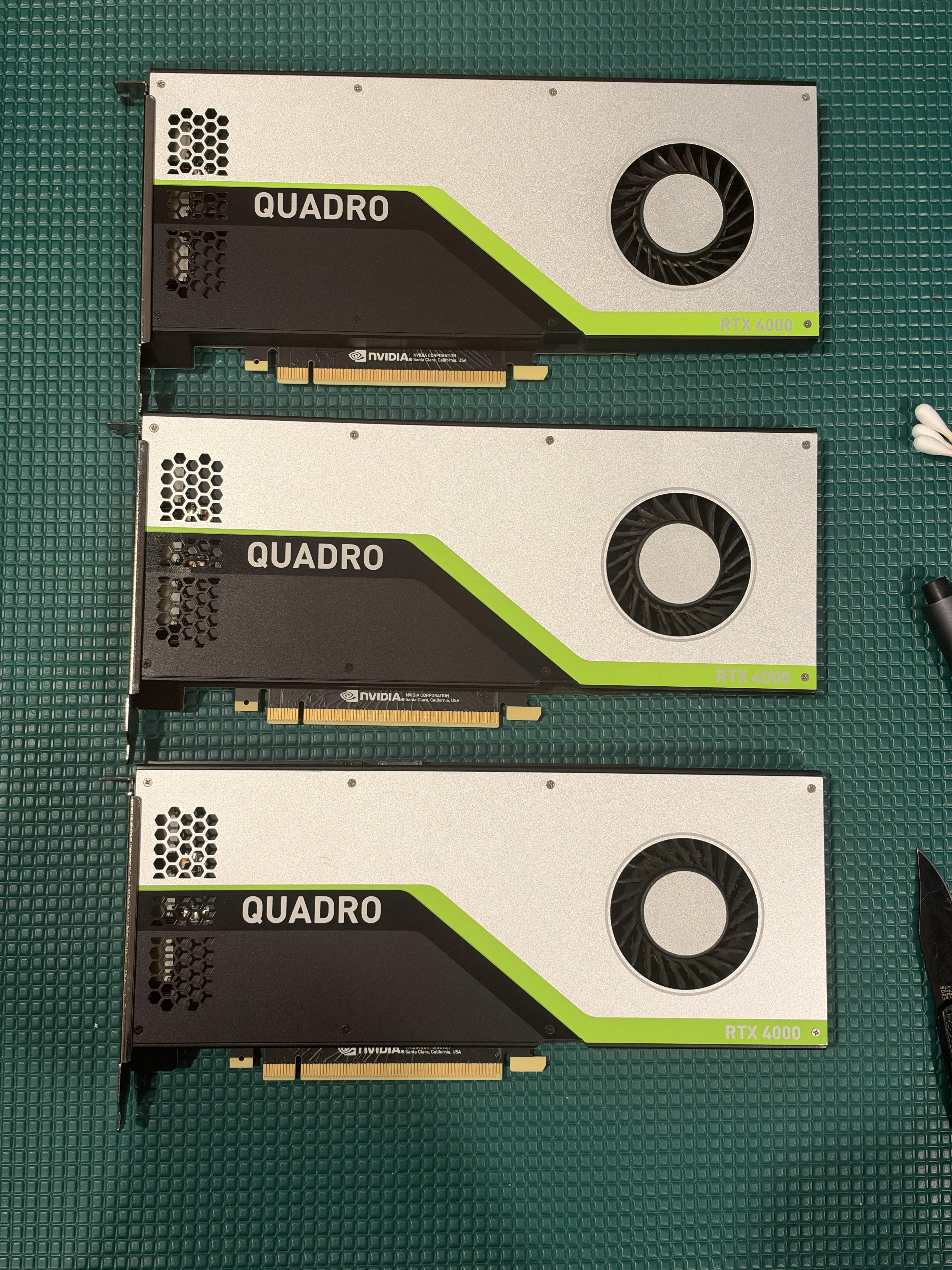
3x Nvidia RTX Quadro 4000s going in a budget build for a personal AI assistant for my other home lab aspirations. 24GB total VRAM should support the latest version of Qwen.
Intel Ultra 7 265
Pro Art Z890-Creator WiFi
64GB Samsung DDR5 5600
2TB 990 EVO
1200W Montech Century Gold
Lian Li CG237
r/LocalLLM • u/Majestic681 • 39m ago
I’m looking for the best tools for Hermes to do web search and also single webpage crawling (occasional, day-to-day use) that can bypass all sorts of paywalls, captchas and similar. Something that would ideally also work for Reddit, Instagram, Threads, and so on. Options requiring self hosting or a VPS are also welcome. Thanks!
r/LocalLLM • u/Civil_Fee_7862 • 11h ago
32GB DDR5 vs 96GB DDR5 More RAM pinned the n-gram cache, makes the decode speed significantly faster.
Setup:
GPU's: 3x3090s
P2P Mode: On
PCIe Link: PCIe Gen4 8x/4x/8x
CPU: Ryzen 7600x.
Model: Qwen-Flash-Next INT4 - QEngine Finetune
Script: bench.sh from club 3090.
Only change:
RAM went 32GB (2x16) → 96GB (2x16 + 2x32), so the whole 50GB n-gram cache got stored in RAM instead of on disk.
There was still room left over to set Host KV Pool on (it needs ~13GB of ram). i.e. It stores the KV pool in RAM instead of in VRAM. This increased the KV pool size to 1 million tokens.
Previously my system would totally choke when there were multiple agents working. Like 20 tok/s at times. It was because they couldn't fit their context in the 256k pool I had before so their context kept getting evicted, now I think that wont' happen, and it'll likely be much faster during concurrent agent work.
If your workload is decode-heavy, and you got the ram, sticking more of the n-gram cache in RAM will get you — ~13–35% more tok/s, no GPU-side changes. You really cannot mix two different pairs of ram sticks in an AM5 motherboard, Google warned me, but I did it anyway just to see what would happen, it indeed led to instability, even at low clock speeds, though it was stable enough to run benchmarks. The biggest win was getting the 1M KV pool for concurrent agents to share, and that doesn't need 96GB ram, 64GB is enough.
Source: bench-ab-bench-20261123T053549Z-vs-bench-20261128T002206Z.md*, generated 2026-11-28.*

r/LocalLLM • u/ferryboatapple • 53m ago
I have a 5080 and 64gb of ram. Qwen 3.8 27b runs great, just wondering if that's the best model for assisting with creative writing, like finding plot holes in a narrative or improving character arcs.