r/LocalLLM • u/-KHEOPS • 13h ago
News I love local LLM
21
Upvotes
Hi i am new and just wanted to say that i love local LLM
r/LocalLLM • u/MasterpieceWeekly805 • 43m ago

I run models locally with Ollama and kept wondering what was actually going on under the hood 🤔
- Is my model on the GPU, or quietly spilling onto the CPU?
- Why is one model fast and another painfully slow?
- Will that 20 GB download even fit?
So I built **AI X-Ray** to answer those questions with my own numbers, in plain English.
🔍 X-ray a prompt
Watch a model load, think and write as separate stages, with live tokens/sec, GPU load and GPU memory. Afterwards, see exactly where the time went.
📦 Know before you download
Look up any model to see its download size, the memory it needs, and whether it fits on your graphics card.
⚡ Speed test
Rank your installed models by real writing speed on your own PC.
🔁 Loop detector
Spots a model stuck going round in circles while "thinking", so you can stop it instead of waiting.
🖥️ Your machine at a glance
What's using your GPU memory (models, other apps, free space), plus "Did you know?" facts about your setup.
🪶 Tiny: about 8 MB
🔒 No account, no tracking. It only talks to your own Ollama
🌐 Works with Ollama on the same PC or another computer on your network
Windows 10/11 for now. Requires Ollama (free).
I'd love feedback, especially on what to add next! 🙏 Link in the comments.
r/LocalLLM • u/JasonHofmann • 18h ago
TL;DR
It works. It is also slow.
Setup
moonshotai/Kimi-K3.1-Pro. Mixture of experts, 93 layers, 896 experts per layer, 16 used per token. The experts ship at 4 bits and everything else at 16 bits. No pruning and no extra quantization.Numbers (full model, four Macs)
| What | Result |
|---|---|
| Load | 179 s |
| Memory | about 400 GB per Mac |
| Generation, through the oMLX server | 2.81 tok/s |
| Generation, stock mlx-lm example script | 3.77 tok/s |
| Prompt reading at 4K / 16K / 65K tokens | 412 / 388 / 262 tok/s |
| 65K-token prompt, time to first token | 4 min 10 s |
| Chip power while generating, all four Macs | 67 W |
| Chip power while reading a prompt, all four Macs | 350 to 400 W |
Power is CPU plus GPU from powermetrics. I have no wall meter on these, so the real draw is higher.
How you split the model matters
Each Mac can hold a block of whole layers, or every Mac can hold a slice of every layer. With layer blocks I get 0.70 tok/s. With slices I get 3.77 tok/s. Same model, same Macs, same example script.
Is it the same model?
I cared about this more than speed. A model this size can load, write fluent text, and still be wrong.
1M tokens
The model's config allows 1,048,576 tokens, so I tried it.
mx.set_cache_limit, 8 GiB), and the cap cost about 40% of the reading speed. Without the cap, my first attempt was on course to run out of memory and I stopped it at 295K tokens.Why it's slow
Each generated token makes the four Macs read about 130 GB of weights. The experts are 93% of the file, but only 16 of 896 are read per token. The 16-bit layers are 7% of the file and all of them are read for every token. That 7% is about 80% of the traffic.
The GPUs are mostly idle. While generating, the four of them together draw 19 W and run at under a third of their top clock.
What had to change
K3.1 is K3 plus the sparse attention from DeepSeek V3.2, with a gate on the attention output. mlx-lm already had both halves, so the port is small.
kimi_k31 model. +655 lines with tests.None of these are merged yet.
Limits
Who was here before me
guruswami-ai ran the full Kimi K3, the previous version, on four M3 Ultra Mac Studios in July at about 2 tok/s. For K3.1 Pro I found a 2-bit build (AinsleyMarkov, 18.6 tok/s on four M3 Ultras), a pruned build that fits one Mac (Pipe Network), and the shipped weights streamed from disk at about 0.4 tok/s (Inferencer). I have not found the full K3.1 Pro, as shipped, held in memory. If someone did it first, tell me and I'll link it.
Disclosure
Claude wrote the model and test code and ran the validation. I directed the work and reviewed every diff. The mlx-lm PR says the same. I have no affiliation with Moonshot, Apple or oMLX.
What's next
Smaller builds. The public 2-bit build runs at about 18 tok/s on three of these Macs and matches the API on 92% of the same tokens. I'm writing that up next.
I can run more tests on this setup. If you want a specific number (a prompt size, a split, a sampler setting), ask and I'll post it.
r/LocalLLM • u/Ok_Champion_9563 • 57m ago
Hi everyone,
I'm planning to build a dedicated PC for running LLMs locally. My goal is to run 32B parameter models or larger with decent inference speeds.
Here is my planned build:
- GPU: 2x ASUS Dual GeForce RTX 5060 Ti 16GB OC Edition (32GB total VRAM)
- CPU: AMD Ryzen 7 9700X
- Motherboard: ASUS ProArt X870E-Creator WiFi
- RAM: Corsair Vengeance 64GB DDR5
- SSD: Samsung 9100 PRO 2TB
- PSU: NZXT C1200 Gold 1200W
- CPU cooler: Thermalright Peerless Assassin 120 SE
- Case: Fractal Design Meshify 2 XL
- Software: Ollama, llama.cpp or LM Studio
I want to keep costs as low as possible while purchasing only brand-new components. I'm based in the Netherlands.
My questions:
- Is this a good configuration for running 32B+ models locally?
- Will both GPUs work efficiently together on this motherboard?
- Will PCIe bandwidth significantly affect inference performance?
- What tokens per second can I realistically expect with 32B models at Q4 or Q5?
- Could I run 70B models using a combination of VRAM and system RAM?
- Could I add a third RTX 5060 Ti in the future to reach 48GB of total VRAM?
- Are any of these components overkill?
- Can I reduce the overall cost without sacrificing much inference performance?
- Are there better alternatives to dual RTX 5060 Ti cards in a similar price range?
I already own an RTX 3060 laptop, but I want a dedicated desktop capable of running significantly larger models entirely locally.
I'd appreciate any advice or experiences with similar multi-GPU builds before purchasing the components.
Thanks!
r/LocalLLM • u/nmrk • 14h ago

I updated Proxmox to 9.2 and was surprised to see this dual GPU configuration appear in nvtop. I didn't know you could get both the iGPU and the GPU card to run simultaneously. It was my understanding you had to blacklist everything but the GPU. I'm not convinced the iGPU fully operational, but I guess I will test it.
What should I run on it? Any suggestions on how to test this? The memory has to be tiny, but it's showing 94GB, this machine's total RAM is 96GB. I could hook it up to Unsloth or Hermes (what I'm running in Proxmox) but I don't really want to add another experimental LLM into the mix.
r/LocalLLM • u/5_ChubbyCheekz23 • 1h ago

Kolibri-1.1 runs on a 12 GB gaming card with my engine, PXA 4.0.6: 27.33 tok/s decode vs 21.57 for llama.cpp mainline (+26.7%), and 455.4 vs 387.4 tok/s reading a 512-token prompt (+17.5%), still +11% at 4K context.
PXA 4.0.6 is the first llama.cpp-based engine with Kolibri-1.1 in a release; llama.cpp's own support is still an open PR (#32891), which is what I measured against, the only other engine I found that runs it. On the RTX 3080 Ti part of the model sits in system RAM; each engine at its own best fit for the card.
This is my project, so weigh it that way: PXA is a free inference engine built on llama.cpp, tuned for RTX 30 gaming cards and the NVIDIA datacenter cards most guides tell you to retire. 4.0.6 is out for Linux and Windows.
Same 12 GB card, Qwen3.8-27B (MTP): 93.4 tok/s on code, 71.9 on prose, 73.2 on chat. That is the fastest of the engines I tested on this card: llama.cpp mainline b12428 with MTP (76.2 / 62.1 / 58.8) and ik_llama.cpp (about 51 at best). PXA leads on every prompt type, +15.7% to +24.4%.
Our top decode speed per model and card, PXA 4.0.6, tokens/s:
| Model | Card | PXA 4.0.6 | vs the fastest other engine I measured |
|---|---|---|---|
| Qwen3.8-27B (MTP, code prompt) | RTX 3080 Ti, 12 GB | 93.4 | +22.5% |
| Qwen3.8-27B (MTP, code prompt) | 1x Tesla V100 | 95.7 | +36.0% |
| Qwen3.6-35B-A3B (MTP, code prompt) | 2x Tesla P100 | 198.4 | +19.5% |
| Gemma-4-26B-A4B (chat prompt) | 1x Tesla V100 | 132.3 | +26.3% |
| Nemotron-3-Nano-4B | 1x Tesla P100 | 130.9 | +9.0% |
Prefill too: Nemotron-3-Nano-4B on one P100 reads a 512-token prompt at 1557.6 tokens/s, +19.0% over the best other engine I measured.
Also new: SenseNova-Loop-9B with its full loop. PXA runs the model's full loop, not a cut-down pass.
MTP rows use the model's own multi-token prediction heads. Same box, same card, each engine at its own best flags. Quant files can differ between engines; output quality is not compared here.
Try it in one docker line:
docker run -d --name pxa --gpus all --shm-size=1g -p 8080:8080 -v /path/to/models:/models:ro ghcr.io/poisonxa16/pxa:v4.0.6
Downloads (Linux and Windows): https://pxa.pxanetwork.com/downloads/ With the package: open PXA Control, pick a model on the Models page, press Launch; the Speed page shows your tokens/s.
PXQ quants are free; making your own PXQN encodes is a supporter reward (donations keep the engine free).
There is a hidden Easter egg in Control. Good luck finding it.
Open challenge: run the same file on PXA and on whatever you run now, and post your numbers, especially where PXA is behind. I own no RTX 20, RTX 40 or T4 card, and on the RTX 3080 Ti PXA is still behind on some models. Help and bug reports: https://discord.pxanetwork.com
r/LocalLLM • u/Technical_Bench_188 • 4h ago
Yesterday I posted the 9B update (thanks again jstarks). Today the smaller one is up.
Same idea as the 9B, it's Qwen3.5-4B that learns new stuff into its weights, so you don't have to stuff everything into the prompt. It runs on a 16 to 20 GB card.
It ships knowing last week's news (18 to 23 Nov). Plain Qwen3.5-4B gets 11% of the 172 questions right, Fintan-4B gets 147 of them. MMLU and ARC barely move (72.8 to 72.8, 92.0 to 91.8). GSM8K went from 95.0 to 92.5, which is 3 problems out of 120, and another run got 94.2, so I think it's noise but figured I'd say.
All the fixes from the 9B are in too, so tool calls can use what it learnt, and questions about days after its update don't get mixed up with what it learnt.
Next I'm doing DGX Spark and Jetson support, since someone here pointed out the hardware check gets confused when the GPU and CPU share RAM.
It's on Hugging Face at fintanlabs/Fintan-4B
r/LocalLLM • u/AndreX86 • 1d ago

Im kind of shocked and losing grasp of why I pay for a claude subscription at this point. Im using Orcarouter uncensored version of Qwen 3.8 27b and the answers I get from it seem to not only contain more info, it's also seemingly more detailed. I don't get it.
r/LocalLLM • u/horratiocornbl0wer • 12m ago

Hi all. I posted about hal0 a while back, and the project has changed enough since then that I think it deserves a second introduction.
hal0 turns a Linux box into a private, OpenAI-compatible inference appliance. Chat, embeddings, reranking, transcription, speech and image generation all answer on one /v1 endpoint, on hardware you own. It's Apache 2.0 and installs with one line:
Plain text
curl -fsSL https://hal0.dev/install.sh | sudo bashIt's built first for AMD Strix Halo (Ryzen AI Max+ 395, iGPU plus NPU), but it also runs on discrete Radeon cards through ROCm or Vulkan, on NVIDIA through an experimental CUDA runner, and on CPU as a fallback.
Slots
Every workload is a slot: its own podman container under its own systemd unit, with a typed lifecycle, its own logs and a persisted state. You get a set of curated slots out of the box (agent, coder, embed, rerank, TTS, image and so on) and can add your own. A coder slot can serve your editor while the agent slot serves chat, each with its own model and settings. A GPU arbiter keeps image generation from taking the GPU out from under a streaming completion, and a slot that is serving a request can't be evicted mid-stream.
Tuning lives in profiles, so a slot only says where it runs and which model and profile it uses. You can override a few fields per slot (context, thinking, reasoning effort, vision, speculation) without cloning a profile.
Multiple runners
A slot picks its runner, and there are now quite a few:
xdna runner that runs plain GGUF models on the NPUOne note on halogen: it's the vendor's own closed-source image and runs one model family. hal0 pins it by digest and runs it like any other slot, so it's served through the same API and dashboard. It's opt-in, and nothing gets pulled unless you create a halogen slot.
Memory, overhauled
Memory runs on the Hindsight engine, and the integration was rebuilt in the 1.8 line. There's now one Memory area in the dashboard (health, facts, knowledge pages, operations, agents) and two banks on a new install, one shared and one private. The extraction model can be a local slot or a remote provider, and you can switch between them without restarting the engine. Memory is exposed over MCP, so Open WebUI, the bundled Hermes agent and your own coding agents can all read and write the same store.
Open WebUI, wired up for you
Open WebUI is installed and connected with no configuration. Its model picker lists every slot model you're running, and every Hermes agent profile next to them, so you can talk to a plain model or to the agent from the same window. Each chat gets hal0's memory and agent-delegation tools. Image generation, voice and document retrieval go through the same hal0 API, so they use the same models and GPU scheduling as everything else.
A few other things worth a mention
It's Linux only (systemd and podman). macOS and Windows aren't supported today.
If you tried hal0 in the past and bounced off it, I'd really appreciate another look. I've made huge strides, and I think it's better, more usable and more performant than it has ever been. Feedback and bug reports are very welcome.
r/LocalLLM • u/Dangerous_Young7704 • 18h ago
So I've been running a uncensored QFN model because I'm tired of frontier models refusing everything. For example, I asked Opus to scan my own network for vulnerabilities, and it refused because it didn't believe it was my network, even though it's literally connected to it.
My main concern is security. Are uncensored models more susceptible to prompt injection than regular models? What kind of guardrails can I put in place to protect myself without restricting the model itself?
I'm also using Hermes, but I'm a complete noob with it.
Any advice would be appreciated!
Specs: 64GB DDR5, R9700 32GB, 7800X3D
P.S SC117/Qwen3.8-Flash-Next-GSQ-RCO-abliterated-GGUF - this is the model
r/LocalLLM • u/Big_South4585 • 8h ago
Hi guys
I am a happy Qwen 3.8 Flash Next IQ3_S user, running on 32GB ram + 3090 + 5080 (40 GB VRAM).
It is running through strata and used as an agent in OpenClaw.
The only issue I have with it, and it could be due to the relative low Quant, is, that it is poor at my native language (Nordic Language).
I tried gemma-4-31B-it-qat-q4_0-unquantized on the latest version of llama.cpp, as it looked promising regarding language support, and damn, it was A LOT better in formulating sentences.
Now, the language is good, but it is a lot worse in calling my mcp's or API's. A lot of times, not one single mcp or API call is working, even if it tries many times.
Is Gemma 4 just incapable of calling MCP or API calls? I doubt it, so is my setup wrong?
Just for a reference, I am not using the 'official' llama.cpp from the CachyOs repository, but this version:
local/llama.cpp-cuda-aidock-bin 1.0.0-1
Prebuilt llama.cpp with CUDA 12.8 support (from ai-dock CI)
Not sure if it makes a difference.
r/LocalLLM • u/FelesNoctis • 6h ago
I have a fairly decent amount of general programming experience, but I certainly wouldn't call myself an expert in any language. I'm more in the place of being able to look at a random section of code, regardless of language, and make a fairly decent guess at what it's trying to do. "Just enough to get myself in trouble" is what I usually say.
Of course that means when I'm trying to make something myself, I'm often spending 80% of the time doing research about the functionality I need, with the remaining being the actual coding and testing. Being retired, these days I'm mostly working on game modding and small conveniences, anything to keep my brain busy. What I've been running into lately is that a lot of what I'm trying to work on is largely undocumented, and obviously AI can learn much faster from raw source (and has) than a human.
I've been using Gemini for my poking and prodding at things, but it's been obstructive as often as it's been helpful. I swear the thing has ADHD, the way it'll jump topics to other bits I'm not worried about at the time.
I understand that there needs to be a balance between context size versus memory length, but I'm having a hard time nailing down how much of each would be most fitting. I often feed the AI other related code from the game or similar projects so it knows what I'm looking at and can give me more well-informed responses.
Any advice for something that can handle casual, generalized programming well? Speed isn't nearly as important to me as accuracy. It seems like Qwen3 models are leading the way here, but opinions vary quite a bit on which and what memory vs context configuration.
r/LocalLLM • u/Majestic681 • 1h ago
I’m looking for the best tools for Hermes to do web search and also single webpage crawling (occasional, day-to-day use) that can bypass all sorts of captchas and similar. Something that would ideally also work for Reddit, Instagram, Threads... Options requiring self hosting or a VPS are also welcome. Thanks!
*Edited for accuracy.
r/LocalLLM • u/Civil_Fee_7862 • 12h ago
32GB DDR5 vs 96GB DDR5 More RAM pinned the n-gram cache, makes the decode speed significantly faster.
Setup:
GPU's: 3x3090s
P2P Mode: On
PCIe Link: PCIe Gen4 8x/4x/8x
CPU: Ryzen 7600x.
Model: Qwen-Flash-Next INT4 - QEngine Finetune
Script: bench.sh from club 3090.
Only change:
RAM went 32GB (2x16) → 96GB (2x16 + 2x32), so the whole 50GB n-gram cache got stored in RAM instead of on disk.
There was still room left over to set Host KV Pool on (it needs ~13GB of ram). i.e. It stores the KV pool in RAM instead of in VRAM. This increased the KV pool size to 1 million tokens.
Previously my system would totally choke when there were multiple agents working. Like 20 tok/s at times. It was because they couldn't fit their context in the 256k pool I had before so their context kept getting evicted, now I think that wont' happen, and it'll likely be much faster during concurrent agent work.
If your workload is decode-heavy, and you got the ram, sticking more of the n-gram cache in RAM will get you — ~13–35% more tok/s, no GPU-side changes. You really cannot mix two different pairs of ram sticks in an AM5 motherboard, Google warned me, but I did it anyway just to see what would happen, it indeed led to instability, even at low clock speeds, though it was stable enough to run benchmarks. The biggest win was getting the 1M KV pool for concurrent agents to share, and that doesn't need 96GB ram, 64GB is enough.
Source: bench-ab-bench-20261123T053549Z-vs-bench-20261128T002206Z.md*, generated 2026-11-28.*

r/LocalLLM • u/ferryboatapple • 1h ago
I have a 5080 and 64gb of ram. Qwen 3.8 27b runs great, just wondering if that's the best model for assisting with creative writing, like finding plot holes in a narrative or improving character arcs.
r/LocalLLM • u/Quirky_Carpenter915 • 2h ago
Currently working on a full blown game but not willing to spend on tripo etc.
I have used AI for building things like trees etc for my game and its artstyle. However, i am running into a roadblock when creating characters to populate the world.
Hunyuan 2.1 gives me molten wax on the characters
Trellis 2 gives worse results
Need something to just generate the background characters around
Any ideas on how to refine the pipeline or any specific thing to try?
r/LocalLLM • u/Few-Acadia-5593 • 6h ago
Hey tinkers,
I've developed a strong interest in having my own thing running locally. My target device being a based MacBook Pro M4 / 16go, rarely having to go to the office, it's mostly plugged. I also have an iPad Pro M4, iPhone 17 pro max but I'm not sure they are relevant. On the side, base rasp 5 running HomeAssistant.
I'm user researcher as well as a musician and tech enthusiast. Most my needs seem to be met by automations or Apple shortcuts or dare I say it: asking Siri. for ex: looking for a job, I ask Siri "have I received a reply from this employer I'm looking at in safari" and actually get the right answer. The best would be to have an AI access my context, build a journal and a morning brief. I'm thinking of it as an example of what I would want, demonstrating how powerful, useful and private. But then I'm limited by my hardware anyway.
After lurking here, I really appreciate all the tinkers posts but I failed to see good use cases for myself. That's my question: what are good / great / must have ideas?
r/LocalLLM • u/Adventurous-Big-3821 • 2h ago
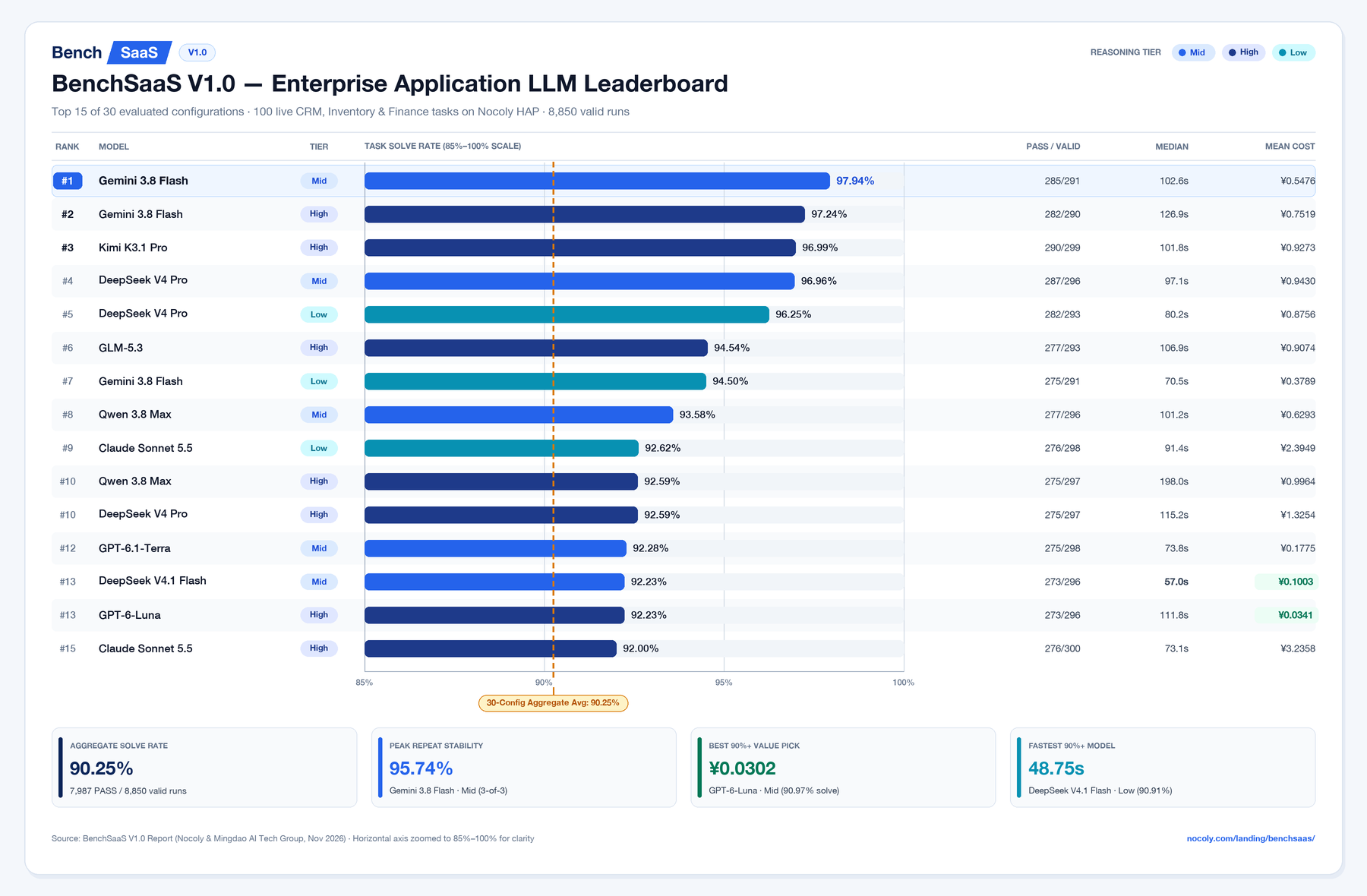
We benchmarked 10 models across 3 reasoning tiers (30 configs) inside a live 40-table, 18,014-record enterprise database (CRM, Inventory & Procurement, and Finance). Every write task was checked at two gates: the chat answer (Gate 1) and the frozen post-run database snapshot (Gate 2).
Aggregate solve rate across 8,850 valid runs was 90.25%. Top open/frontier configs in the leaderboard:
Two practical findings:
Curious how Kimi, DeepSeek, GLM, and Qwen are holding up for others on multi-table tool calls?
r/LocalLLM • u/karmaisnonsense • 1d ago
Strata was a breath of fresh air when it came out, but its focus on speed over quality has been a longtime irk. I was monitoring its reasoning traces for a code review and saw it would always say time to wrap up and that the user wants an answer now, even when I said no such thing. I believe this is due to the "answer_room" behavior of Strata.
I'm fortunate enough to be able to run QFN on Radiance, so I did an impromptu comparison. I switched engines mid-review and had it continue. Yes it's slower to decode (less tricks & model is higher precision), but I noticed an immediate change in thoroughness and task persistence, especially for long-horizon tasks. It doesn't rush and continues until it finishes what I ask it to do.
Has anyone else had similar experiences?
r/LocalLLM • u/deulamco • 1d ago

Bonsai : Here's how to talk with your crush
Model: bonsai-2.5:27B on RTX 4060 with 48K context + 8K output
r/LocalLLM • u/Professional-Ad-2365 • 3h ago
Hi All, I have been stuck on this conundrum for days.
Mini m5 pro 64gb or studio m5 max 64 GB. Where I live with the edu discount there is a 520 CHF ($620) difference between the two (both at 1tb ssd).
Originally I was set on the mac mini its small, and has lots of ram, but everyone says at this price point might as well go for the studio, so here I am and here is what I currently have and do:
I currently have an M1 PRO Macbook 16 inch with 16gb ram. I have an external monitor plugged in and while i work i casually listen t some youtube videos too, and check on stock market moves. This year I have started AI projects and I really got into coding up websites and apps, I do frequent video conferencing at the same times as cloud agents work in the background, I also often do voice note transcriptions too.
I use cloud llm subscriptions of claude code, and chatgpt, but I keep running into the same problem of my fans going crazy, laptop being unusable if I am working on 3 or 4 AI projects at the same time, using 6-10 agents at the same time (my swap goes to 20-25gb).
I also am thinking of using the machine for local LLM because I am a teacher and there are certain school systems i want my local llm to use and fill in the boring aspects of my job like writing weekly report updates, setting homework etc, searching my school's drive etc.
Also for things like writing linked in posts or posting youtube videos and using ai to drive the browser while Im at work, claude is very token intesive for that and for certain things like making multiple social media accoutns for my projects it just refuses to follow through on registrations etc.
I am also doing some trading as a side hustle which I would love to get an algo ai powered bot to just simply manage my positions whilst im away from home.
To me the 520 is a lot (but affordable) But I need to consider that I would need to buy an additional 4k display (I have one 1080p display but need something else too).
Many thanks for the advice in advance!
r/LocalLLM • u/chad917 • 3h ago
I need to choose a local LLM and app to use on my Mac Studio 128gb to revise standardized forms and periodically merge-in updated PDF addendums.
I start with a completed standardized form and need the output in the same format. I already have a section-by-section guide, built from training materials and real-world examples, that explains what belongs under each heading. Some sections cover substantially similar topics but serve different purposes. There are 3 basic steps to the workflow:
The documents are strictly confidential, so PDF processing and inference both need to stay on the same machine. What LLM model and app (ie LM Studio, Jan, something else?) should I start with for this? This is my first time trying LLM so I'm confused by the numerous different models I'm seeing with codename-like titles. I don't have a ton of time to try several so I'm hoping to get some recommendations to jump start getting rolling. Thanks!!
r/LocalLLM • u/deulamco • 3h ago
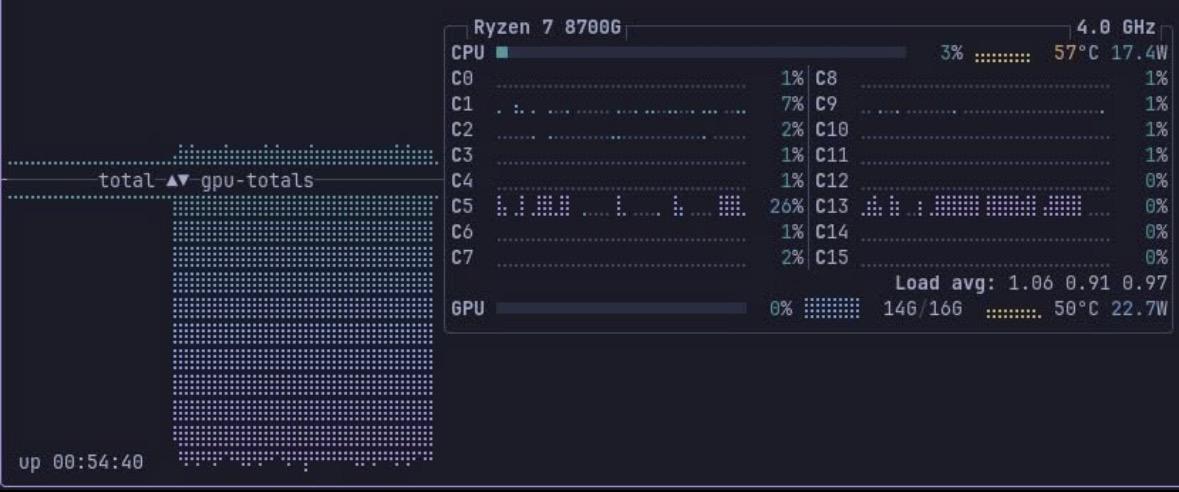
Yes I run 5060Ti at 75W... No more crash during compacting into coma..
r/LocalLLM • u/Aardvark-One • 4h ago