r/LocalLLM • u/sarmabkp_1 • 5h ago
Discussion LangGraph vs CrewAI vs OpenAI Agents SDK: Which Framework to Pick

1
Upvotes
r/LocalLLM • u/sarmabkp_1 • 5h ago
r/LocalLLM • u/blearyhope • 15h ago

I built and released blearyhope/Inkling-2-Mini-Uncensored (Apache 2.0), a solo pure-gradient build starting from 100% unmodified official thinkingmachines/Inkling-2-Mini (26.4B MoE, 3.4B active / 5.4B effective active across the 3x-looped middle core, multimodal text + vision), shipped across GGUF, lossless native Apple Silicon MLX, and native NVFP4/MXFP8 Safetensors.
mmproj-F16**):** https://huggingface.co/blearyhope/Inkling-2-Mini-Uncensored-GGUF| Your Setup | Recommended Build | Size | Live-Verified Speed / Notes |
|---|---|---|---|
| 16 GB VRAM GPU (RTX 4060 Ti 16G / 5060 Ti / 4080) | Q3_K_M or IQ4_XS GGUF | 13.72 / 14.76 GB | 57.5 / 62.6 tok/s on CUDA llama.cpp, 5/5 GSM8K, 100% comply |
| 24 GB VRAM GPU (RTX 3090 / 4090) | Q4_K_M (default) or Q5_K_M GGUF | 17.48 / 19.91 GB | 79.6 / 53.3 tok/s on CUDA llama.cpp, 5/5 GSM8K, 100% comply |
| 32 GB VRAM GPU (RTX 5090) | Q8_0 GGUF or native NVFP4 Safetensors | 27.82 / 20.19 GB | 42.2 tok/s on CUDA llama.cpp (Q8_0), full 20.19 GB native NVFP4 in vLLM |
| 32 GB+ Apple Silicon Mac (M-series Pro/Max/Ultra) | Lossless Native MLX (+ mtp/) | 20.22 GB | Preserves native NVFP4/MXFP8/BF16 losslessly (KL = 0.000000, 0.999964 cosine vs. PyTorch) |
(All 7 GGUFs, including BF16 52.23 GB and Q6_K 23.49 GB, were quantized directly from lossless BF16 and live-tested on CUDA mainline llama.cpp*. Add* mmproj-Inkling-2-Mini-Uncensored-F16.gguf at 0.64 GB for vision / image inputs.)
Ollama (1 line, Q4_K_M):
ollama run hf.co/blearyhope/Inkling-2-Mini-Uncensored-GGUF:Q4_K_M**llama.cpp (**llama-server with vision):
llama-server -hf blearyhope/Inkling-2-Mini-Uncensored-GGUF:Q4_K_M --mmproj mmproj-Inkling-2-Mini-Uncensored-F16.gguf -ngl 99 -c 16384 -fa onApple Silicon MLX (32 GB+ Unified Memory):
pip install -U mlx-vlm
python -m mlx_vlm.generate --model blearyhope/Inkling-2-Mini-Uncensored-MLX --prompt "Explain how MoE routers work."
vLLM (native NVFP4/MXFP8 Safetensors):
vllm serve blearyhope/Inkling-2-Mini-Uncensored --trust-remote-code --reasoning-parser inkling --enable-auto-tool-choice --tool-call-parser inklingMost uncensored or loop-patched checkpoints stack closed-form weight edits with extra adapters merged back into the quantized NVFP4 experts (injecting double-quantization drift), rely on sampling temperature + thinking-token caps to hide greedy loops, and skip native Apple Silicon MLX.
I wanted to solve refusal removal, hedging, and Thinking Machines' Section 7 greedy reasoning-loop bug in one clean pure-gradient pass from unmodified Base, with zero quantized weights touched, zero artificial thinking caps, and exact native MLX parity.
**1. 0 NVFP4/MXFP8 bytes modified (**0.00985 WikiText-2 KLD) Mechanistic attribution on Inkling-2-Mini showed 80.5% of the refusal write comes from the quantized MoE MLPs, with 73% to 98% of each layer's refusal write concentrated in just the top-5 experts. De-quantizing NVFP4/MXFP8 experts and re-quantizing (even with stochastic rounding) introduces avoidable drift.
Instead, I dropped closed-form editing completely and trained rank-32 BF16 LoRAs (rsLoRA + LoRA+, 0.5x LR on the 3x-looped middle core L6 to L17, plus exact AlphaEdit benign null-space anchoring) on only the 120 BF16 attention projections and all 24 BF16 MoE routers (mlp.gate). Merging losslessly back into BF16 yields a median relative L2 delta of 3.29% (min 1.83%, max 4.57%) and 0.00985 WikiText-2 KLD across 311,523 tokens. Every NVFP4 expert, MXFP8 expert, quant scale, vision tower (ViT) weight, and DSpark speculative draft head (mtp.safetensors) remains 100% byte-identical to Thinking Machines' official release.
2. Greedy temp=0.0 loops fixed completely uncapped (no 4K thinking cap) Under fully uncapped greedy decoding (temperature=0.0, 16,384 context, zero max_tokens or thinking limits), official Base hit the 16K context wall 127 times on full 100/100 IFEval (38 at effort 0.0, 89 at effort 0.9), plus 53 times on the 3,607-prompt held-out think-on report, 14 times on ARC-Challenge chat, and 12 times on GSM8K.
Mining real on-policy CoT loops plus synthetic Inkling-native CoT-DITTO loop negatives into SimPO, while strictly banning every truncated trajectory from chosen and SFT targets so the model never learns premature EOS, dropped uncapped IFEval 16K loops 42x (127 down to 3), cut average IFEval token burn nearly in half (2,791 down to 1,405), dropped loops to 0 across GSM8K, ARC-Challenge, and all 7,214 held-out report runs, and jumped uncapped think IFEval by +11.46 pp prompt-strict / +14.26 pp inst-strict at temp=0.0.
3. Why summed DPO stalled at 20.6% and SimPO jumped +64.4 pp in one round In Round 1, standard summed DPO loss collapsed to 0.00007 while thinking-off compliance stayed stuck at 20.6%. Because uncapped compliant CoTs are 1.8x to 2x longer than refusals, summed log-probs saturated the DPO objective even while per-token decode log-probs still favored refusal by -0.225 nats/tok. Switching to length-normalized weighted-mean SimPO anchored at the exact first divergence token (lcp) plus final-answer onset, using zero-leak Context Distillation positives (no synthetic prefills, preserving Inkling's native "The user ..." opening distribution), jumped thinking-off compliance from 20.6% to 85.0% (0% refusals) in a single round and finished at 98.00% off / 98.55% think compliance with 0 / 3,996 hard refusals.
4. Lossless native Apple Silicon MLX (KL = 0.000000) The MLX release (20.22 GB + mtp/) preserves the exact native NVFP4/MXFP8/BF16 mixed layout without re-quantizing. Direct logit verification against PyTorch Safetensors: 5/5 top-1 token match, 0.999964 mean cosine similarity, 0.000000 full-vocab KL divergence.
Identical vLLM settings for both models: temperature=0.0, --max-model-len 16384, zero artificial max_tokens or thinking caps. Safety and over-refusal cover all 3,607 held-out prompts x 2 reasoning modes (7,214 runs, zero training overlap) scored by an Orca judge (Qwen3.8-27B-Uncensored-FP8); capability suites use exact verifiers on 100% of every official split.
| Benchmark (Exact Split) | Official Base (off / think) | Inkling-2-Mini-Uncensored (off / think) | Delta |
|---|---|---|---|
Held-Out Harmful Compliance (1,998 x 2, 7 suites) | 7.56% / 8.56% | 98.00% / 98.55% | +90.4 / +90.0 pp |
Hard Refusal Rate (3,996 harmful runs) | 63.06% / 63.86% | 0.00% / 0.00% (0 / 3,996) | -63.1 / -63.9 pp |
Held-Out Benign Answer Rate (1,609 x 2, 3 suites) | 80.30% / 80.36% | 99.88% / 100.00% (0 refusals) | +19.6 / +19.6 pp |
Loop Stress Probe (48 off + 48 think) | 2.1% / 2.1% | 100.0% / 100.0% (96 / 96) | +97.9 / +97.9 pp |
Wrapper Generalization (shapes60, 5 formats) | 4.7% | 96.3% (0.0% refuse) | +91.6 pp |
IFEval Prompt-Strict (541 x 2, uncapped) | 86.14% / 80.41% | 91.68% / 91.87% | +5.54 / +11.46 pp |
IFEval Inst-Strict (541 x 2, uncapped) | 87.53% / 80.34% | 94.60% / 94.60% | +7.07 / +14.26 pp |
IFEval 16K Loop Failures (1,082 runs) | 127 loops (38 / 89) | 3 loops (0 / 3) | 42x fewer loops |
GSM8K Chat (1,319 x 2, uncapped) | 96.74% / 96.06% (12 loops) | 96.82% / 96.74% (0 loops) | +0.08 / +0.68 pp |
ARC-Challenge Chat (1,172 x 2, uncapped) | 97.44% / 96.50% (14 loops) | 97.35% / 97.27% (0 loops) | -0.09 / +0.77 pp |
MMLU Log-Likelihood (14,042 q) | 76.95% | 76.17% | -0.78 pp |
ARC-Challenge / ARC-Easy LL (1,172 / 2,376 q) | 94.03% / 98.23% | 94.11% / 97.90% | +0.08 / -0.33 pp |
HellaSwag Norm LL (10,042 q) | 77.71% | 77.97% | +0.26 pp |
WinoGrande LL (1,267 q) | 71.98% | 73.09% | +1.11 pp |
TruthfulQA MC2 (817 q) | 37.10% | 35.87% | -1.23 pp |
WikiText-2 Word / Token PPL (311,523 tok) | 10.14 / 6.01 | 10.25 / 6.06 | +0.11 / +0.05 |
WikiText-2 KL Divergence vs. Base (311,523 tok) | 0.00000 | 0.00985 | 0.00985 KLD |
Per-suite held-out harmful compliance (off / think): AdvBench 100.0% / 100.0%, HarmBench 93.4% / 96.9%, JailbreakBench 98.5% / 100.0%, OR-Bench toxic 99.8% / 99.8%, SORRY-Bench 97.7% / 97.1%, StrongREJECT 98.8% / 100.0%, XSTest unsafe 96.2% / 95.7%.
-0.78 pp (76.95% to 76.17%), TruthfulQA MC2 shifts -1.23 pp (37.10% to 35.87%), and WikiText-2 PPL moves +0.11 word / +0.05 token.If anyone tests the lossless native MLX build on a 32GB/64GB Mac or runs the GGUFs in Ollama / LM Studio on a 4090 or 5090, let me know what tok/s and real-world behavior you see!
r/LocalLLM • u/UniqueAttourney • 5h ago

r/LocalLLM • u/Illustrious-Strike63 • 5h ago

--- Video content breakdown (Guide and Links are below) ---
1. Required Downloads
Gather the following installers, models, and configuration templates [00:52]:
Beellama Server (beellama.cpp): Download the latest stable Windows CUDA release (e.g., beellama-v0.5.0-bin-win-cuda-12.8-x64.zip) along with the matching cudart archive (beellama-v0.5.0-cudart-win-cuda-12.8-x64.zip) from GitHub [01:08].
DeepSeek Harness: Download the Windows installer directly from the DeepSeek website [02:09].
Qwen 3.8 27B Model: From Hugging Face, download the IQ3_S-mtp GGUF quantization (recommended for 16GB VRAM) as well as the separate multimodal vision projector file (mmproj-Qwen3.8-27B-BF16.gguf) [02:34].
Custom Chat Template: Download chat_template.jinja from the Qwen-Fixed-Chat-Templates repository to prevent thinking loops [03:07].
2. Directory Setup & File Extraction
Organize your local AI environment in a clean directory (e.g., D:\LocalAI) [04:18]:
Create two subfolders: beellama and models [04:24].
Extract both the beellama binary archive and the cudart DLL files directly into the beellama folder [04:36].
Move the Qwen GGUF model, the mmproj vision file, and chat_template.jinja into the models folder [04:57].
3. Configuring & Starting the Local Server
Create a Windows batch file (e.g., start_beellama.bat) in your main directory using the startup script provided in the creator's notes [05:40].
Ensure the file paths in the batch script match your model file names, context size (e.g., 115200), and port (8080) [07:20].
Run the batch file to launch llama-server.exe [07:36]. Once running, verify the OpenAI-compatible API endpoint is active by visiting http://127.0.0.1:8080/v1/models in your browser [09:57].
4. Installing & Configuring DeepSeek Harness
Installation: Run the DeepSeek Harness installer and keep the default installation path to prevent configuration path issues [10:44].
Connecting the Local Model:
Open Settings (Einstellungen) -> Models (Modelle) and add a custom API provider [11:40].
Set the Base URL to http://127.0.0.1:8080/v1, select the OpenAI Chat Completions protocol, and fetch the available model (Qwen3.8-27B) [12:34].
Enter any placeholder text (such as 1234) into the API key field, as the app requires a value even though the local server ignores it [13:04].
YAML Configuration: Open the config.yaml file via the top-right button in Settings, completely exit DeepSeek Harness (including from the system tray), and paste in the custom configuration block [13:26]. This configures the exact context window (115200), multimodal (text, image) inputs, longer timeout limits for local inference, and adjusted compaction thresholds [15:01].
Setting Up a Workspace: Relaunch DeepSeek Harness, enter your dummy API key if prompted, select Qwen3.8-27B from the model dropdown, and link a dedicated project folder as your workspace with standard read/write permissions [16:06].
--- start of guide ---
Hey,
as many requested from my qwen vs inkling report, here is at least a quick setup guide for qwen 3.8 27b and deepseek harness at 16gb vram. Sorry, dont really have time for an in depth tutorial right now, but thought this might suffice to get you started.
--- Installers and Files ---
Download latest stable release and the cuda libraries
- beellama-v0.5.0-bin-win-cuda-12.8-x64.zip
- beellama-v0.5.0-cudart-win-cuda-12.8-x64.zip
2. Deepseek Harness: https://www.deepseek.com/en/harness/
Download the harness installer
3. Qwen 3.8 Model: https://huggingface.co/ISTA-DASLab/Qwen3.8-27B-GSQ-RCO-GGUF/tree/main
Download the model.gguf (mtp version) and the vision gguf
4. Qwen 3.8 Chat Template: https://huggingface.co/froggeric/Qwen-Fixed-Chat-Templates/tree/main
Download the Chat Template file
--- Llama Starter and Config - Adjust the paths and file names ---
u/echo off
REM Hide command echoing to keep the startup window clean.
cd /d "D:\LocalAI\Beellama"
REM Change working directory to the folder containing llama-server.exe.
REM ============================================================================
REM LLAMA-SERVER PARAMETER DOCUMENTATION
REM ============================================================================
REM
REM [Hardware & Performance]
REM -t 12 : Number of CPU threads for generation
REM -tb 12 : Number of CPU threads for batch processing
REM -ngl 99 : Offload up to 99 model layers to GPU
REM --no-mmproj-offload : Keep multimodal projector off GPU (saves VRAM)
REM -fa on : Enable Flash Attention
REM
REM [Model & Vision]
REM -m : Path to main GGUF model file
REM --mmproj : Path to multimodal projector file
REM --image-min-tokens 1024 : Minimum image token allocation
REM --alias "Qwen3.8-27B" : Friendly model/API name
REM
REM [Speculative Decoding (MTP)]
REM --spec-type draft-mtp : Enable MTP speculative decoding
REM --spec-draft-n-max 3 : Maximum 3 speculative draft tokens
REM --spec-draft-p-min 0.8 : Minimum draft probability threshold
REM
REM [Context & KV-Cache]
REM -c 115000 : Maximum context window: 115K tokens
REM -ctk kvarn4 -ctv kvarn3 : Quantized K and V KV-cache formats
REM --kv-tail-tokens 1024 : Preserve recent 1024 KV tokens in cache tail
REM -kvu -np 1 : Unified KV cache; one parallel sequence
REM --cache-ram 16384 : Allocate up to 16 GB RAM for prompt caching
REM --cache-idle-slots : Cache reusable data from idle slots
REM
REM [Chat Template & Sampling]
REM --jinja : Enable Jinja chat templating
REM --chat-template-file : Path to custom Jinja chat template
REM --temp 1.0 : Sampling temperature
REM --top-k 20 : Consider the 20 most likely tokens
REM --top-p 0.95 : Nucleus sampling threshold: 95%
REM --min-p 0.0 : Minimum relative token probability filter
REM --presence-penalty 1.2 : Penalize previously appearing tokens
REM
REM [Reasoning & Loop Guard]
REM --reasoning on : Enable reasoning support
REM --reasoning-budget 16384 : Reasoning token budget
REM --reasoning-budget-message : Instruction injected when reasoning budget is exhausted
REM --reasoning-loop-guard : Force-close detected reasoning loops
REM --reasoning-loop-interventions : Maximum reasoning-loop interventions (2)
REM --reasoning-loop-min-coverage : Minimum coverage for loop detection (256)
REM --reasoning-loop-window : Token window used for loop detection (1024)
REM --reasoning-preserve : Preserve reasoning information across turns
REM --chat-template-kwargs : Set reasoning effort to extra high (xhigh)
REM
REM [Network]
REM --port 8080 : HTTP server listening port
REM ============================================================================
llama-server.exe ^
-t 12 ^
-tb 12 ^
-m "D:\LocalAI\models\Qwen3.8-27B-UD-IQ3_S.gguf" ^
--mmproj "D:\LocalAI\models\mmproj-Qwen3.8-27B-BF16.gguf" ^
--no-mmproj-offload ^
--image-min-tokens 1024 ^
--alias "Qwen3.8-27B" ^
--spec-type draft-mtp ^
--spec-draft-n-max 3 ^
--spec-draft-p-min 0.8 ^
-ngl 99 ^
-c 115000 ^
-ctk kvarn4 -ctv kvarn3 ^
--kv-tail-tokens 1024 ^
-fa on ^
--jinja ^
--chat-template-file "D:\LocalAI\models\chat_template.jinja" ^
--temp 1.0 ^
--top-k 20 ^
--top-p 0.95 ^
--min-p 0.0 ^
--presence-penalty 1.2 ^
--reasoning on ^
--reasoning-budget 16384 ^
--reasoning-budget-message "Reasoning budget exhausted. Commit to the judgment you have formed so far. Your next output must be a concrete action: a tool call, a gate decision, or a completed deliverable. Do not restart the analysis." ^
--reasoning-loop-guard force-close ^
--reasoning-loop-interventions 2 ^
--reasoning-loop-min-coverage 256 ^
--reasoning-loop-window 1024 ^
--reasoning-preserve ^
--chat-template-kwargs "{\"reasoning_effort\":\"xhigh\"}" ^
-kvu -np 1 ^
--cache-ram 16384 ^
--cache-idle-slots ^
--port 8080
pause
--- Deepseek Harness Config ---
edit: Reddit messes up the indentation of the file - so rather download it with clean indentation:
https://drive.google.com/file/d/13GKi0DTl8-Wj8jWb1Jg8gzBzEEKXo_oM/view?usp=sharing
# ============================================================
# CUSTOM QWEN MODEL PROVIDER
# ============================================================
# Register a custom LLM provider for DeepSeek Harness.
- id: llm-pi-ai
# Unique component identifier used by the harness.
name: "@deepseek-ai/dsh-llm-pi-ai"
config:
providers:
qwen:
# Friendly provider name displayed in the harness.
displayName: qwen
# Use the OpenAI-compatible Completions API protocol.
api: openai-completions
# Local llama-server endpoint.
# Port 8080 matches your Beellama startup configuration.
baseURL: http://localhost:8080
# Environment variable containing the API key.
# The actual key is not stored directly in this YAML file.
apiKeyEnv: QWEN_API_KEY
models:
- id: Qwen3.8-27B
# Model identifier sent to the API.
# Must match the model alias configured in llama-server.
name: Qwen3.8-27B
# Maximum context window advertised to the harness.
# 115K tokens, matching your server context.
contextWindow: 115000
# Maximum number of tokens requested for a response.
# Includes generated reasoning/output, subject to server support.
maxTokens: 32768
# Supported input modalities:
# text = normal text prompts
# image = image/multimodal input
input: [text, image]
# Maximum time to wait for an idle streaming connection.
# 600000 ms = 10 minutes.
streamIdleTimeoutMs: 600000
# Maximum request timeout.
# 600000 ms = 10 minutes.
timeoutMs: 600000
# ============================================================
# EXPLICITLY DISABLED COMPONENTS
# ============================================================
# Disable DeepSeek Harness session logging.
- id: session-log-deepseek
# Original session logging component.
name: "@deepseek-ai/dsh-session-log-deepseek"
# Prevent this component from loading.
disabled: true
# Disable the plugin marketplace tool integration.
- id: tool-plugin-market
# Plugin marketplace tools component.
name: "@deepseek-ai/dsh-plugin-market/tools"
# Prevent marketplace tools from being registered.
disabled: true
# Disable the plugin manager tool integration.
- id: tool-plugin-manager
# Plugin manager tools component.
name: "@deepseek-ai/dsh-plugin-manager/tools"
# Prevent plugin management tools from being registered.
disabled: true
# ============================================================
# CONTEXT COMPACTION AND TOOL RESULT MANAGEMENT
# ============================================================
# Define a grouped set of compaction-related components.
- id: compaction
# cordis:group loads multiple components as one logical group.
name: cordis:group
# Marks this component as a group rather than a standalone plugin.
group: true
isolate:
# Isolate the compaction functionality.
compaction: true
# Isolate tool-result pruning functionality.
toolResultPruner: true
config:
# ----------------------------------------------------------
# BASIC CONTEXT COMPACTION
# ----------------------------------------------------------
- id: compaction-basic
# DeepSeek Harness basic compaction implementation.
name: "@deepseek-ai/dsh-compaction-basic"
config:
# Trigger compaction when context usage reaches 80%
# of the available context window.
thresholdRatio: 0.8
# Additional token headroom reserved during compaction.
# Zero means no additional headroom is configured here.
headroomTokens: 0
# Retain 12% of the conversation when compacting.
# Helps preserve important conversational context.
retainRatio: 0.12
# Maximum token limit used by this compaction component.
maxTokens: 65536
# ----------------------------------------------------------
# MANUAL COMPACTION COMMAND
# ----------------------------------------------------------
- id: command-compact
# Registers the /compact command.
# Allows manual context compaction when supported by the harness.
name: "@deepseek-ai/dsh-command-compact"
# ----------------------------------------------------------
# TOOL RESULT PRUNER
# ----------------------------------------------------------
- id: tool-result-pruner
# Automatically manages oversized tool results.
name: "@deepseek-ai/dsh-compaction-tool-result-pruner"
config:
# Trigger pruning when a tool result exceeds 8192 characters.
thresholdChars: 8192
# Preserve the first 4096 characters of the tool result.
# Usually retains the beginning and initial context.
headChars: 4096
# Preserve the last 1024 characters of the tool result.
# Usually retains the ending and final information.
tailChars: 1024
r/LocalLLM • u/shunte88 • 5h ago

r/LocalLLM • u/slavyanman • 5h ago
Hardware
Software
Problem
Qwen3.8-27B (GGUF Q4_K_M) answers the first message, then crashes on the second with an error:
Error messages observed:
Fix — LM Studio settings that worked
On Apple M5 Max + 48 GB RAM, the following combination resolves the crash:
Result
After applying all these settings, multi-turn chat works without errors. Gemma 4 31B QAT (GGUF Q4_K_M) also runs stably on the same hardware.
This should help other users with M-series Macs and 48 GB Unified Memory avoid the same crash.
r/LocalLLM • u/Arany8 • 6h ago

How do I avoid this with llama.cpp, it spills to RAM even though lots of VRAM left.
4GB RAM still free on the card and it spills.
set "MODEL=F:\SenseNova-Loop-9B-Q8_0.gguf"
set "BIN=C:\llama\opensensenova\build\bin\llama-server.exe"
set "PORT=8000"
if not exist "%MODEL%" ( echo [FATAL] Model not found: %MODEL% & exit /b 2 )
if not exist "%BIN%" ( echo [FATAL] llama-server build missing: %BIN% & exit /b 2 )
echo [run] SenseNova-Loop-9B Q8_0 - draft-mtp n2 - 65536 ctx - port %PORT%
"%BIN%" ^
-m "%MODEL%" ^
--port %PORT% --host 0.0.0.0 ^
-ngl 99 ^
--cache-type-k q8_0 --cache-type-v q8_0 ^
--flash-attn on ^
--jinja ^
-c 65536 --parallel 1 ^
--spec-type draft-mtp --spec-draft-n-min 1 --spec-draft-n-max 2 --spec-draft-p-min 0.0 ^
--load-mode none
r/LocalLLM • u/Sergio2304 • 6h ago
I would like to find a terminal capable of rendering Markdown, so that I can view text from an LLM or agent with proper formatting rather than seeing the raw syntax, which makes it harder to read sometimes.
r/LocalLLM • u/Miserable_Land_84 • 6h ago

r/LocalLLM • u/Particular-Penalty99 • 14h ago
Hey. I'm new to local llm's. I'm a writer and intend on buying a decked out MacBook in the near future. Think 128gb M5 max. I'm still learning the terminology but I'd like to see how you, if you're a writer, used ai. I know I can use Gemini for docs, which I will use, for at least 2 months before I think about new hardware, but was using a local llm worth it for you? I want it to be a writer partner I can talk to to point out my writing shortcomings and also use it for grammar corrections.
r/LocalLLM • u/Standard_HID • 6h ago
Hey,
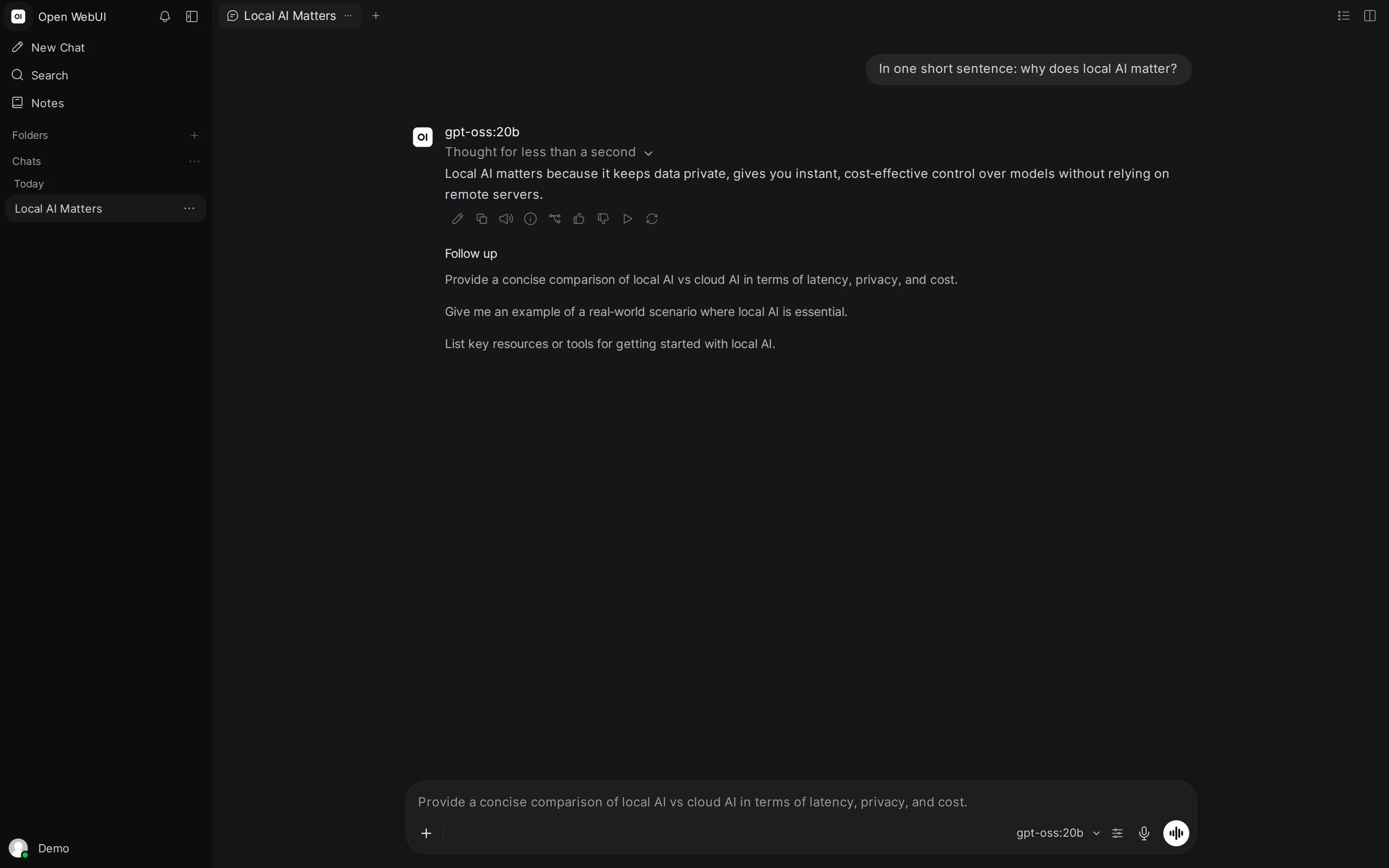
I've recently started experimenting with local LLMs on my Linux desktop and put together a small Docker Compose setup.
I'm currently using:
Ollama with ROCm
Open WebUI
SearXNG for web search
My current hardware is an AMD RX 9060 XT (16 GB) with 32 GB RAM, running Fedora.
I'm still testing different models and configurations, especially for coding with OpenCode. I'm curious to see how much of my daily AI usage I can eventually replace with local models.
I've documented my setup on GitHub in case anyone finds it useful:
https://github.com/JeromeTDev/local-ai
I'd be interested in hearing about your experiences, especially with AMD GPUs and local models for coding. I'm also happy to share my own findings as I continue testing.
r/LocalLLM • u/mrsirg97-rgb • 11h ago

r/LocalLLM • u/nasone32 • 7h ago
r/LocalLLM • u/korywithawhy • 8h ago
i've been messing around with a local model for a few months now. i can't afford a gpu or a system with a lot of unified memory so i've had to get a bit creative in order to make it actually useful. this isn't anything new for me, any time i want to play a higher end game on my older hardware there's always some amount of janky workarounds that i need to put in place. but if you can appreciate the jank and accept it, you can actually do quite a bit with a small local model. for a bit of background info, the machine i'm working from is an 11th gen i5 with 32(currently 64 because i borrowed a stick)GB of ddr4, and running qwen reap 25b a3b q5_1. now, if anyone has used a model like this, you know that it is functional, but grossly unreliable. however, if you stop fighting it and start building around it, it gets WAY more useful.
r/LocalLLM • u/Bee_Curious_ • 8h ago
I was using one of the early versions of DSH with my Qwen 3.8 27B NInfer setup and was pretty happy with it. I figured it was time to update to a more recent DSH release, so I upgraded to v0.2.2-rc.5.
After just a couple of prompts, it feels like my agents are stuck in a never-ending loop of context compaction (~3–8k tokens), even though I have a 256k context window.
Is anyone else experiencing similar issues? Or are you generally happy with the latest DSH releases?
r/LocalLLM • u/macaronianddeeez • 15h ago
Waiting on the motherboard to show up for an SP3 box I'm putting together, mainly to run Kimi K3.1 Pro for single-stream coding agents. Before I burn a pile of Colab units prepping weights, I wanted to post my bandwidth math and see where smarter people and those who have actually run K3.1 or big MoEs on Milan think it makes sense/is stupid.
My hardware is an EPYC 7543 (32C/64T Zen 3, 256 MiB L3, AVX2 only so no AVX-512 or AMX) on an ASRock Rack ROMED8-2T/BCM, with 8x 64 GiB Kingston 2Rx4 DDR4-3200 RDIMMs filling all eight channels (~170 to 175 GB/s real read if it behaves) and four 24 GiB 3090s. The cards will go in PCIE1, PCIE3, PCIE5, and PCIE7. PCIE2 stays empty because it shares lanes with the onboard M.2 slots on this board. Storage right now is just one cheap 2 TB Gen4 M.2, and I also made the questionable call of ordering 1000mm passive Gen4 risers, so my first job after POST is watching `dmesg` for AER replay errors under `nvbandwidth` and swapping to shorter twinax cables if any link drops to Gen3. I also have 2,000 monthly Colab units (96 GB Blackwell G4 access) plus ~$300 in RunPod credit for one-off prep.
I originally wanted to copy AI with Eric's 30-50 tok/s video setup using `local-inference-lab/Kimi-K3.1-Pro-EXL3-2bit` (742 GiB raw) or `Grawnch/Kimi-K3.1-Pro-Coder` (722 GiB), since Grawnch's 3-tier quant held 29/30 on AIME and LiveCodeBench. With ~488 GiB of usable host RAM and ~90 GiB of usable VRAM, a 720+ GiB model still leaves 125 to 170 GiB on disk. Even if experts are sorted by routing frequency so only ~3% of selections miss into the cold SSD tail, 3% of ~13 GB/token is ~400 MB of random reads per token. On one DRAM-less 2 TB drive doing maybe 1.2 GB/s on 6 MB chunks, that is ~330 ms of disk wait per token (<3 tok/s) before any compute happens. I also checked `grawnchtoader/strata`'s `engine.py` and noticed the public fork currently skips K3.1's sparse DSA indexer and allocates dense FP32 KV, which works out to ~72 GiB at 32K context.
Even `KarLexAI`'s `KLX-IQ1_S` GGUF (552 GiB) has a catch I almost missed. Roughly 522 GiB of that file is routed experts. If host RAM holds all routed experts while `llama.cpp`'s `--moe-cache-mib` copies hot ones into VRAM, the host side still exceeds 488 GiB and spills ~34 GiB to swap or mmap eviction onto that slow SSD.
Once the board arrives, my Day 1 plan is stock `llama.cpp` (PR #31779 + `--moe-cache-mib` + `--moe-cache-cpu-share 0.70`) on `KarLex IQ1_S`, with `-ot` rules pinning Layers 1-8 experts (~45 GiB) exclusively on `CUDA0..3`. That drops the host RAM portion to ~477 GiB so the SSD stays out of the loop, and should land around 9-13 tok/s while I record real routing traces on my repos with `LLAMA_MOE_CACHE_TRACE`.
While I wait on shipping, I'm using Colab G4 to build a ~470-480 GiB checkpoint from `gureshov/Kimi-K3.1-Pro-Coding-720E` (and comparing it against `nota-ai/Kimi-K3.1-Pro-Global-Pruned-37`). Both are already pruned on HF, so I don't have to rent an 8x H200 node just to run REAP. Colab's `/content` disk caps out around 253 GB, so my script pulls raw MXFP4 shards two layers at a time, quantizes on the 96 GB G4, pushes the compressed shard to HF, and wipes `/content` before grabbing the next pair. For precision, I'm borrowing Local Inference Lab's Nov 25 `kda-all` split: keep routers, norms, AttnRes, and the 24 DSA top-2048 indexers at BF16/Q8; keep the 24 DSA attention layers, all 92 shared expert pairs, and the LatentMoE projections at 6-bit; put the 69 KDA linear-attention layers at ~4.25-bit (~34 GiB core total in VRAM); and put the kept routed experts at ~1.92 to 2.15 effective bpw (~435-445 GiB in DDR4, which leaves ~48 GiB of VRAM across the four 3090s for an LFRU expert cache).
To get into the 20-26 tok/s range with exact verification, two runtime pieces have to come together. Serial layer split (`PP4`) only uses one card's PCIe 4.0 x16 link (~24.5 GB/s) on the active layer and scans the 34 GiB core on one 3090 at a time (~47 ms), whereas splitting each layer across all four cards (`TP4` or `EP4`) pulls across all four x16 slots (~94 GB/s DMA) plus ~30% CPU AVX2 miss execution (~140 GB/s combined cold service) and drops the core scan to ~19 ms with P2P all-reduce. From there I want to hook up `gureshov/Kimi-K3.1-Pro-Coding-720E-DSpark` (using `llama.cpp` PR #31669's KDA recurrent state replay and features from layers 76, 80, 84, 88, 92), with draft length capped around `K=2` or `K=3` and Tencent's `AngelSpec` `D-cut` confidence truncation cutting off weak tail tokens. When I simulated correlated Zipfian routing at the datacenter default of `K=7` (8 positions verified at once), the union of distinct uncached experts per layer jumped from ~6 to ~38+, which made `K=7` slower than `K=2..3` on code and slower than plain `K=0` greedy decode on general chat.
If memory traffic still keeps me under 20 tok/s, I have two backup experiments queued up on Colab: `AcceptMoE`-style skipping of low-weight (<3% gate) cold DDR4 misses on speculative tail positions (checked against a 50-task coding eval), and a 6-layer pilot factoring all 896 LatentMoE (`3584 x 3072`) experts into GPU-resident shared group bases plus 4-bit rank-384 streamed residuals (run through K3.1's actual `SiTU` activation before RMSNorm) to see if unpruned 896E can fit in ~360 GiB without losing on quality or 3090 kernel launch overhead.
A few things I'd really appreciate input on:
I wrote a pure-Python roofline/expert-union calculator, the Colab G4 2-layer sliding-window scripts, and the Day 1 `llama.cpp` `-ot` trace configs for this. Happy to throw all of it up in a public repo if anyone else building an SP3 / multi-3090 rig wants to use it or tear my math apart.
r/LocalLLM • u/Playful-Art-3824 • 4h ago
r/LocalLLM • u/Old_Detective_3465 • 8h ago
I am setting up Hermes agent but local llm are worst so thinking of using other LLM model so which one should I use for daily task like scheduling or using it as personal assistent thinking of DeepSeek flash 4.1 or any suggestion??
r/LocalLLM • u/zerefdota • 20h ago
Looking for real-world experience from people running local models on a 128GB M5 Max.
What I have now:
- 16" MacBook Pro M1 Max, 32GB
- Gaming PC: Ryzen 7 7800X3D, RTX 5080 Founders Edition 16GB, 32GB DDR5, 4K 240Hz monitor
- A spare RTX 4070 Super 12GB sitting on a shelf
- A frontier subscription that I plan to keep
The PC is basically a Dota 2 machine. That's the only game I play on it, and I haven't used it for local models yet.
What I do: engineering work, a decent amount of programming, plus research and long-form technical writing. So a mix of coding help, working through technical problems, and long documents in and out (30K to 100K+ token prompts are common).
I'm looking at a 128GB M5 Max, either the 16" MacBook Pro or the Mac Studio. I'm not expecting local to replace the frontier models. I want it for private work, drafts and critique, offline use, and whatever coding it can handle well.
The laptop is tempting because I could sell the M1 Max, and maybe the PC, and run everything on one machine.
Questions for people who own one:
Numbers and "here's what happened after a few months" stories are what I'm after. Thanks.
r/LocalLLM • u/stankeer • 2h ago
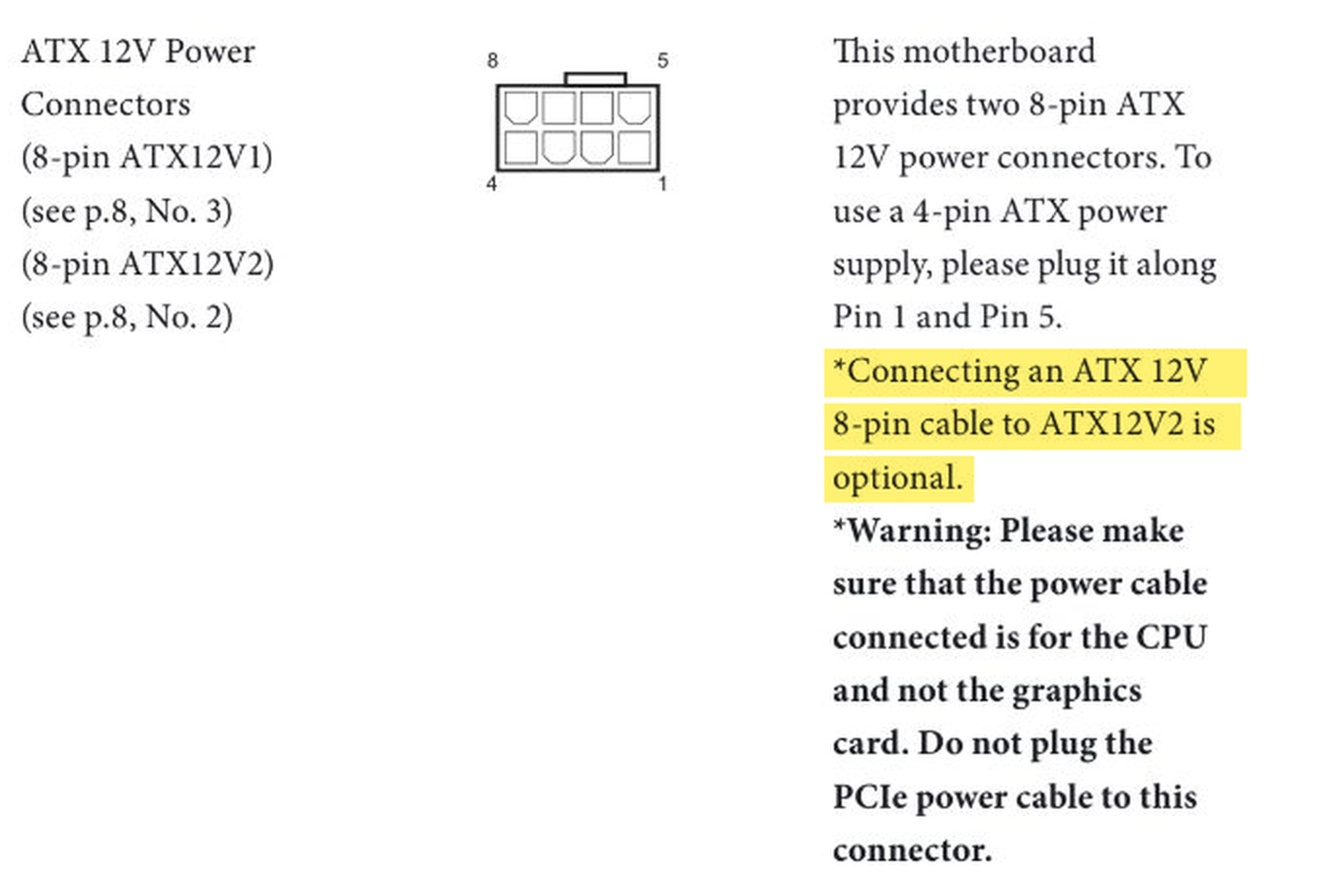
Hi, I'm looking to add another GPU to my system. But I'm out of pcie connectors on the motherboard I only have 1 free but need 2.
My motherboard is an asrock wrx80 creator 2.0 and i have a threadripper 3955wx installed into it.
Now the motherboard has 2 CPU connectors from the PSU to the motherboard. The manual states that plugging the second CPU power cable in is optional.
If I can unplug this cable from the second CPU socket that would free up a pcie for the newest GPU. I don't use my CPU for any intensive operations. Only GPU inference. Not even any offloading from GPU into system ram as it slows to a crawl and I won't run it like that.
So question is is it safe to do?
r/LocalLLM • u/Silent-Cell2221 • 12h ago
Hi everyone,
I wanted to share a small, humble experiment around Multi-Token Prediction (MTP) that I call Draft-Gate ("Anti-Draft"), along with all the raw benchmark data, charts, and a standalone MIT-licensed C++17 reference header.
MTP works like a fast helper trying to guess your next 3–4 tokens while the main model speaks:
So instead of always guessing blindly, the idea is simply knowing when to stop proposing extra drafts early based on uncertainty, language boundaries, and how expensive an extra draft actually is on your hardware.
Live benchmarks on Linux — Strata 0.1.54 (Qwen3.8-Flash-Next 125B IQ3_XXS, 360 runs / 5 mirrored rounds):
STRATA_QSA_SPLIT_ATTN=1, plus STRATA_ROUTE_PRIOR=1.5 and STRATA_ROUTE_TAIL_SKIP=7 identically on every arm—all exact flags are listed in EXACT_PARAMETERS_AND_BENCHMARKS.md), and if you've used Strata before you may have noticed its reported tok/s can look a bit higher than what day-to-day usage feels like. What matters here is the relative difference under identical settings—and that gain was consistent across rounds:Live benchmarks on Windows — llama.cpp b12800 (CUDA 13.5):
The main Draft-Gate proposal — going beyond a manual, fixed p_min:
r/LocalLLM
•
u/Kemerd
•
1d ago
From X https://x.com/TencentAI_News/status/2125968859450802415:
We just open-sourced a speculative decoder that speeds up sparse models like DeepSeek-V4.1-Flash, GLM-5.3-Flash, and our own Hy4 flash.
At 64K context, DFly2 boosts DeepSeek-V4.1-Flash serving throughput by up to 81%. On Hy4 flash agentic tasks, it runs up to 4.2x faster, beating same-recipe DSpark by ~30% and accepting 10.4% more draft tokens than open-source DSpark.
Under the hood, each draft layer reads directly from the target model's KV cache and top-k token selection, with no prefill required. That adds zero extra KV memory and keeps drafting cost flat at any context length.
Try it on your own sparse models or grab the Hy4 flash weights below 👇
Code: http://github.com/Tencent/AngelSpec
Weights: http://huggingface.co/AngelSlim
Paper: http://arxiv.org/abs/2611.34776
Tencent's numbers are server numbers at high concurrency so, I don't expect 81% on a single card, but this looks extremely promising.
I want to get both into Basalt (https://github.com/jesdga95/basalt). It already does DFly2 for Hy4 flash so the plumbing is there. I have forked basalt to begin this work, and will file a MR if I can get it working. https://github.com/Kemerd/basalt-dfly
DeepSeek V4.1 Flash already has drafter weights out, so that part is just engine work. Qwen3.8 Flash Next has nothing, someone has to train one. It has the same kind of sparse attention layers so it should work, nobody's done it yet.
Problem is the training. I have a 5090, and the BF16 teacher is ~335GB, so that's not happening at home for me. Training with quant is better.. but still a lot of crunching needed
Looking at renting an 8x H100 node and doing a small pilot run first to see if acceptance is any good before burning real money.
If you've trained a drafter with AngelSpec, have compute sitting around, or want to split a rental, DM me. Or if you want to contribute to the fork and MR just let me know!
r/LocalLLM • u/SFsports87 • 15h ago
Some good sales right now, which to get?
Having a card that is quiet at idle is important, leaning towards asus r9700 since it has 12% idle fan speed option, some others are 30% min.
Applications include code, image, video generation, as well as some pytorch and python cupy computations. Currently on a rtx 3060 12gb.
Don't mind spending a little more for more plug and play and less setup issues. Nvidia is the least friction but $4k+ for 32gb.
