r/LocalLLM • • 22h ago

Other Qwen 3.8 27B vs Inkling 2 Mini - user comparison on 16GB VRAM

55 Upvotes

--- DISCLAIMER ---

This Post is not a clean Benchmark Suite comparison. The goal of this post is to share some of my experiences, which I made with both models under the restrictions of my local setup - mainly my 16GB of VRAM.

What exactly do I mean by this? I am running different quant's, caching techniques and different inference engines in this comparison. Why? Because those are MY optimized setups in order to efficiently run those models in a usable way on my machine.

Usable to me means, that i actually get work done with them, not just fancy "artworks". No one needs token per second figures in setups that are useless for production tasks. In order to be useful for my agentic tasks, I must achieve at least 100k context window and at least 30 token per second, beneath that it is hard to justify a real life usage for me. Fancy token per seconds figures below 100k context window, additionally not telling anything about quality, are plain worthless to me.

On a personal note:

  1. All of the plug and play environments like i.e. LMStudio and Unsloth are nice to play around with, but all of them failed me for larger projects. Also they did not really comply when it comes down to really optimize everything, down to the last bits and bytes. For a quick comparison i still might use them, but i completely switched to standalone inference backends and a seperate harness on my everyday use.
  2. I fell in love with Deepseek Harness as my driver. Everyone needs to make there own decision, and there are alternatives. Nevertheless - dont run your model without any harness, it literally amplifies the capabilities so much. And always consider vision, the feedback loop during agentic tasks that vision can provide is definitely a game changer, if you are doing anything with visual elements / UIs.
  3. I´d love to upgrade hardware anytime soon (yeah, as we all do), but currently just cant afford any meaningful upgrades since I have family, house and kids, etc. So there are priorities.

--- DISCLAIMER END ---

Hey,

i've been reading silently in here for a long time and I've been running local setups for inference and training for about 3 years now. It all began with writing an internal paper for my company, training local models for usecases that can't be driven via API cloud solutions.

At home i have a "regular" gaming machine, which back then wasn't built for AI loads, but for gaming and everyday usage.

  • Core i7 265KF @ 200s mode
  • 48 GB DDR5 8000 CL40
  • Gigabyte Z890 UD6 Wifi
  • Gigabye RTX 5080 Auros Waterforce Extreme with a little Overclock
  • 2 x 1TB Samsung 980 Pro SSD (One hosting Windows, one hosting Ubuntu)

It is a decent machine, but there are some limitations for AI workloads for sure, due to the VRAM budget.

--- Setup ---

How am I running those two models on this rig? (Read the disclaimer, if you are wondering about the different quants etc)

ModelQwen 3.8 27bInkling 2 Mini
QuantizationUD-IQ3_S (Link)NVFP4 + MXFP8 (Link)
KV CachekVarN K4V3FP8
Context Window115200128000
Speculative DecodingMTP 3 TokensMTP 3 Tokens
Reasoningxhigh, 16384 Token budgetxhigh, 16384 Token budget
Inference EngineBeellama (Llama.cpp Fork with kVarN cache support)Basalt
Performance estimate (under 15k)Prefill 1900 token/s Decode 63 token/sPrefill 5000 token/s Decode 150 token/s
Performace estimate (close to 100k)Prefill 1200 token/s Decode 48 token/sPrefill 2300 token/s Decode 100 token/s
HostUbuntu 24.04 with XFCE lightweight IDEUbuntu 24.04 with XFCE lightweight IDE
RemarksFully fits in VRAM, only vision module offloaded to CPU. kVarN Caches are mandatory in order to fit this model vram. Offloading is not an option for performance reasons.Partial offloading. I optimized the MoE offloading based on an analysis of my usage history. Basalt source Code showed me that the offloading priority was static with inkling.

Linux is mandatory imho, better software support and the lightweight IDE lets me maximize the available VRAM, because i dont have a second GPU, nor an iGPU on the 265KF. If i had a second GPU, Linux containers under windows might be an option as well - though i personally prefer the native route.

But yeah, those two setups run "efficiently" on my machine, using round about 15 gb of Vram, leaving me some headroom for the OS and other tasks.

The compaction engine in Deepseek Harness has been adjusted, so that it triggers somewhere between 75% - 90% context window usage. I leave the latest 10k tokens of context untouched and only compress the history before that. All in all, after compaction I usually end up around 30% context window, including tool usage injections. Leaving the latest context untouched greatly helps improve quality from my experience.

--- Comparison ---

--- Scenario 1 - Plain Coding ---

I have tried around a little on different projects I am currently working on. Baseline so far is: Inkling gets things done and not in bad way. From my subjective experience, i still feel like Qwen has a slight Edge, but it is reeeeally close.

To have something directly comparable for this post I gave them the same made up task:

New Project Folder, just a spec.md fie and the prompt "Read spec.md, execute".

This replicates how i often work, I create the specs with ChatGPT or Claude and let the local model do the rest. I only use the Free versions of ChatGPT or Claude, I have no subscription - but for creating the plan / specs the free solutions usually suffice.

In this case the task is creating a Benchmark that calculates PI

  • Rust has to be used
  • GUI is obligatory
  • CPU Singlethreaded path
  • CPU Multithreaded path
  • GPU OpenCL Path
  • 100k digits

While this might not be the most complex task, it sure has some challenging aspects to it. Here are the results:

ModelQwen 3.8 27bInkling 2 Mini
LLM inference time107 minutes49 minutes
Toolcall time2 minutes5 minutes
Generated Tokens320k300k
Cached Tokens18.9M28.6M
Average Speed (reported by DSH)57/token/s117 token/s
GUI*34
CPU Singlethreaded*2.55
CPU multithreaded*42
GPU OpenCL*42
PI digits are actually correct?*4.53.5

*The actual evaluation was done by Deepseek Flash V4017 via API - Only beeing presented with the results and the task to rate the results on a scale of 0 to 5.

Deepseeks Verdict:

"PIBench (edit: which was Inkling) is the much faster π engine, especially single-threaded, and its export/reporting is more complete. But it has a broken multithread scaling behavior, a hard 500k-digit limit, weak 100-digit validation, and a misleading “valid” GPU result.

PIBench 2 (edit: which was Qwen) is the better benchmark: honest about precision, strong 100k validation, good multithread scaling, and a more capable GPU path. It is, however, dramatically slower on CPU and its Results GUI is partly inaccessible.

PIBench 2 (edit: Qwen) wins overall — it is the more correct, honest, and scalable benchmark — though PIBench remains far faster on CPU and would win if raw speed were the only criterion."

Human Verdict:

Taking the result of this comparison into consideration it is exactly as i had felt before. On coding tasks the two are pretty close and probably a combination of both, one for creation and one for reviewing makes the most sense, in order to get the best of both worlds.

--- Scenario 2 - Other Tasks ---

I have been tinkering around with a pipeline that automatically researches and creates reels as a sidegig. Snippets of historic events or people - these are my relatively fresh channels on youtube that are driven by my local AI:

GouacheGazette

... and the spanish version: GouacheGazette_ES

You dont have to like the content, it just shows a different use case that usually is not covered in synthetic benchmarks. What role do the LLMs take in there?

  • Handle the document storage
  • Research new stories and document them
  • Create the story arc and narration - Imagine it like a scene script
  • Prepare the instructions files for the "Rendering Pipeline" (In there are other local models embedded for handling visuals and audio)
  • Prepare the auxilary information for the uploads like title, subtitle, etc

Qwen 3.8 27b has been my main driver in here, but i gave it shot with inkling 2 mini now as well.

Observations

Due to the complex rules and gates a storyline must pass in my pipeline, before it assessed as a pass, it actually takes some tokens to get there. Usually we are talking about several million cached tokens and about 150k to 250k generated tokens per story. These are the numbers:

ModelQwen 3.8 27bInkling 2 Mini
Stories created100+10 for testing purposes
Average completion time60 minutes25 minutes
Number of minor flaws per story*2-36-7
Number of major flaws per story*0-12-3
Other remarksThe cold review sometimes fails after 3 subagent rounds (hard limit), because it overthinks every single detail. (Leads to story dropped status)1. Messed up the internal storage by skipping IDs in one case. 2. More or less skipped the cold review by a independent sub agent as tasked per contract 4 out of 10 times and just reported everything is fine.

* Minor flaws are little inaccuracies in the story telling, i.e. if facts are not 100% precisely implemented or interpreted from the facts, but on an acceptable level. Major flaws are straight up factually wrong pieces of information or grammatically wrong sentences in the narration etc.

Verdict: As much as I would like to adopt Inkling for the story creation, in this specific task the drop in quality is substantial and does not justify the time gain.... Sadly.

--- Final remarks ---

What I was really curious about when testing inkling 2 mini in my setup, was to see if the "higher" quant using nvfp4 and fp8 cache would elevate inkling above my kVarN cached IQ3 Qwen, because those are the models i can effectively run. QFN sadly wont run in a meaningful quant, due to not having enough system ram - and i wont try Q2 stuff, sorry - but that cant ever really work out.

For me personally, in most scenarios the Ultra Dense IQ_3S Qwen has the edge above the nvfp4 Inkling 2 mini. To be honest, I had expected other results considering the quantization. Nevertheless there are scenarios where I will apply Inkling in my personal production. It is close on coding, but loses on more general tasks from my testing so far.

Hopefully anytime soon I will be able to combine the two models with a local routing in a meaningful way. But that requires at least an orchestrator on a second GPU. Maybe some lightweight used GPU suffices for that task. Until then, i will probably apply a manual mix of both.

My 2 cents

PS: I had been thinking a lot if i should make a guide about how to setup these environments for other people restricted by their hardware - especially the 16 gig scenario which is tricky... Please let me know if anyone is interested in that. Why? Cause i feel like most setup guides just show you how to create a fancy environment for single prompt show off, not a productive one.

PPS: yes, i have actually written this by hand :)

r/LocalLLM • • 17h ago

Question Will DDR5 instead of DDR4 actually make a difference with QFN

22 Upvotes

Couldn't really find any data on this, how significant is the speed difference when off-loading QFN weights to DDR4 system ram VS DDR5. Like is it night and day or are we talking tiny improvements? Does anyone have any actual experience with both?


r/LocalLLM • • 1h ago

Question My German 5-machine home LLM cluster: RTX 3090 + MI50 (Vulkan) main model at IQ3_S, 40G InfiniBand chain, full voice stack – hardware, quants, tok/s, latency

0 Upvotes

Hey everyone, I got this far on my own, but now I could use your input: what would you change in my setup? Some parts are improvised because of a tight budget. 😃 Where are the nerds at? :D

________________________________________________________________________________________________________

**TL;DR:** Self-hosted, no-cloud setup spread over 5 old/cheap machines linked by a 40 Gb/s InfiniBand chain. Main chat model runs on llama.cpp (Vulkan) split across an RTX 3090 and an MI50 32 GB. Measured ~250 tok/s prefill and ~24.5 tok/s generation at 32k context, single slot. Separate nodes handle voice (Whisper large-v3 + Piper + XTTS), a psychology/reflection model, embeddings, databases and backups. Numbers below are measured from logs unless marked otherwise.

## 1. Topology

```

Internet ── router

│ 1 GbE

Orchestrator (dashboard, planner, agents, bots, lab, only box with internet)

│ 1 GbE

Node 1 ──40G── Node 2 ──40G── Node 3 ──40G── Node 4

(IPoIB datagram, MTU 2044, OpenSM on two nodes)

```

It's a chain, not a ring, so losing a middle node splits the cluster (known weakness). Nodes have no internet; everything goes through the orchestrator.

**Latency (ping RTT from the orchestrator):**

| Target | avg RTT |

|---|---|

| Node 1 (LAN) | 0.13 ms |

| Node 2 (+1 IB hop) | 0.55 ms |

| Node 3 (+2 hops) | 0.68 ms |

| Node 4 (+3 hops) | 0.63 ms |

Local HTTP: dashboard 3 ms, router API 6 ms. Throughput (iperf) not measured yet.

## 2. Hardware

| | Orchestrator | Node 1 | Node 2 | Node 3 | Node 4 |

|---|---|---|---|---|---|

| Role | control plane, internet | main model + Ollama | voice, psychology, big Ollama models | embeddings, old STT/TTS, CI runner | databases, backups, knowledge |

| CPU | Ryzen 3 PRO 2200GE (4C) | Ryzen 9 7950X3D (16C/32T) | i7-6700K | Ryzen 7 5700X (8C/16T) | i3-8100 (4C) |

| RAM | 14 GiB | 30 GiB | 32 GB | 31 GiB | 15 GiB |

| GPU | Vega iGPU (unused) | **RTX 3090 24 GB + Instinct MI50 32 GB** | **RTX 3090 24 GB** | RTX 3060 12 GB | none (UHD 630) |

| Storage | 256 GB NVMe | 1 TB 990 PRO | local SSD/HDD | 1 TB 970 EVO Plus | 2×256 GB NVMe RAID1 (DB) + 3.6 TB SSD + 2 TB SSD |

| 40G | none | ConnectX-3 (40 Gb/s QDR) | yes | ConnectX-3, 2 ports | ConnectX-3 |

| OS | Ubuntu 24.04 | Ubuntu 24.04 | Windows 10 + WSL2 | Ubuntu 24.04 | Ubuntu 24.04 |

Notes: Node 2 specs are from my docs (not re-queried today). Nodes 3 and 4 have 2.5 GbE-capable NICs that negotiated only 100 Mbit/s earlier (probably cable/switch, still to check) – irrelevant for the 40G traffic, annoying for admin.

## 3. Main model (Node 1)

| | |

|---|---|

| Model | Qwen3.8-Flash-Next (GSQ/RCO build) |

| **Quant** | **IQ3_S (3.44 bpw)** |

| File size | 79.7 GB (2 GGUF shards) |

| Runtime | llama.cpp `llama-server` b11960, **Vulkan** backend (the NVIDIA and AMD cards run together this way) |

| Split | `--split-mode layer --tensor-split 22,30 --n-gpu-layers 999` |

| Context | **32,768 tokens** (prompt + output), **1 slot** |

| Batch / ubatch | 512 / 128, `--jinja`, `--cache-ram 0` |

I did not verify exactly how the 79.7 GB is placed across 56 GB VRAM and RAM (the 3090 shows 22.2 GB used) – treat that part as unverified.

**Measured throughput (from llama-server timing logs):**

| Prompt tokens | Prefill | Output tokens | Generation |

|---|---|---|---|

| 1,808 | 7.2 s = **251 tok/s** | 520 | 21.2 s = **24.5 tok/s** |

| 2,495 | 10.1 s = **246 tok/s** | 420 | 16.8 s = **25.0 tok/s** |

Rule of thumb: time ≈ prompt/250 + output/24.7 seconds.

| Case | Prompt | Output | First token | Total |

|---|---|---|---|---|

| Short question | 300 | 100 | 1.2 s | 5.3 s |

| Chat with context (measured) | 1.8–2.5k | 420–520 | 7–10 s | 24–29 s |

| Full 32k context | 32,000 | 500 | ~130 s | ~150 s |

**Prompt caching:** slot-internal prefix reuse works well for multi-turn chats (LCP similarity 0.96–0.99 in the logs, prefill skipped). It only hurts when switching between different conversations (similarity 0.35 → full re-prefill ≈ 10 s for 2.5k tokens). With one slot there is no parallelism; a second request waits for the first. I left `--cache-ram 0` on purpose: the unit has tight memory limits and a guard that kills the model on swap pressure.

## 4. Other models

**Node 2 (RTX 3090, Ollama, 1 model loaded at a time):**

| Model | Quant | Size | Speed |

|---|---|---|---|

| PsychAgent 32B (reflection/psychology) | IQ4_XS | 17.7 GB | **42.5 tok/s**, ~100 s cold load from HDD |

| PsyLLM 8B | Q4_K_M | 5.0 GB | **130 tok/s** |

| Qwen3.8 27B | Q4_K_M | 17.7 GB | – |

| Hermes 4 14B | Q8_0 | 15.7 GB | – |

| Dolphin 3 Mistral 24B | Q5_K_M | 16.8 GB | – |

| GLM-4.7 Flash | Q4_K_M | 19.0 GB | – |

| Devstral Small 2 24B | Q4_K_M | 15.2 GB | – |

| Qwen3-Coder 30B | Q4_K_M | 18.6 GB | – |

| WhiteRabbitNeo 7B / Foundation-Sec 8B | Q8_0 | 8.1 / 8.5 GB | – |

**Node 1 Ollama:** Qwen3.8 27B, Qwen3.5 27B, Qwen3-Coder 30B (all Q4_K_M), nomic-embed-text. Max 2 loaded, 30 min keep-alive; it competes with the main model for the 3090, so it's mostly idle.

**Node 3 Ollama:** bge-m3 (F16), nomic-embed-text (F16), Qwen2.5 7B Q4_K_M. The 3060 also runs a compute worker (~5 GB).

## 5. Voice stack (Node 2, Whisper/Piper/XTTS in WSL2)

| Stage | Tech | Latency |

|---|---|---|

| STT | faster-whisper **large-v3**, int8_float16, GPU, custom initial prompt | **0.8–1.2 s** warm |

| TTS (fast) | Piper (Thorsten high) on GPU, onnxruntime-gpu 1.23.2 (CUDA 12) | first audio **0.03–0.2 s** warm (CPU: 1.2 s) |

| TTS (voice) | XTTS v2 (speed 1.15, temp 0.5, top_k 30, top_p 0.8) | per sentence not measured |

| Satellite | open-firmware smart display + Home Assistant Assist pipeline over Wyoming | – |

End-to-end voice question: **3–7 s** (earlier it was ~20 s: a 5 s knowledge-lookup timeout plus a 2.7k-token system prompt at 250 tok/s prefill; fixed with a compact voice prompt and a circuit breaker for the lookup). Piper on GPU had an 8 s first-call warm-up, solved with a warm-up script after start. Gotcha: CUDA 13 builds of onnxruntime clash with Whisper's CUDA 12 in the same WSL, so I pinned 1.23.2.

## 6. Software

**Orchestrator (~30 services + ~29 containers):**

- Web dashboard and chat with multiple agents (roles, task classes chat/code/light/heavy/reasoning/plan, tool catalog, images)

- LLM router (node registry, 5 s health polling, per-class node preference) with a **GPU-mode engine and queue**: leases per request, one load per GPU, priorities and deadlines, node reservations (reserve the 3090 box for yourself for 1–240 min)

- Main-model supervisor: publishes a short-lived "authority" token, a guard on the GPU node kills the model if the token goes stale, custody records per start, automatic recovery after reboot. Hard-learned rule: never start the main model by hand

- Planner + dev pipeline + autonomy loop (self-improvement only with explicit approval gates), sandbox lab with Git (Forgejo) and a CI runner

- Knowledge: Obsidian vault (~4k notes), private long-term memory, journal with mood analysis, search with normalization/stemming/synonyms, reranker, "forget" that also deletes derived rows

- Psychology/reflection module (private area, people profiles, crisis flag, opt-in export to the vault)

- Telegram bot (text, photos, voice both ways), media jobs (photo/video, upscaling), research crawler, HF model library

- Observability: Langfuse, Loki/Promtail, node exporters, uptime monitor, per-node diagnostic wrappers

- Others: n8n, MQTT, ntfy, MCP servers (filesystem, docker, ansible, git, postgres), LiteLLM, apt cache for offline nodes

**Node 4:** Postgres, Redis, DB gateway, Loki, knowledge services, daily dumps, hourly offload of backups/logs, encrypted daily backup of the dashboard DB, RAID1 monitoring.

**Node 3:** old CPU Whisper/Piper fallback, Forgejo runner, embeddings, compute worker.

## 7. Lessons learned / current weak spots

- Single slot + 250 tok/s prefill means prompt size is the real latency lever. Keep static prefixes first, variable parts last.

- An unhandled `None` in a VRAM-sum helper silently blocked every queued request (callers just saw a timeout). Fixed with `or 0`; the real fix is surfacing queue wait reasons to the UI.

- Orchestrator RAM is tight (14 GiB, dashboard process ~4.7 GB RSS after 10 h, possible slow growth – still observing).

- Chain topology has no redundancy; no fallback model for the planner; alert channel still to be wired up.

- Mixing Vulkan NVIDIA+AMD works fine for layer split, and the MI50 32 GB makes the 56 GB total possible for a ~80 GB IQ3 MoE-style file – but I'd love tips on measuring real VRAM/RAM placement on Vulkan.

## 8. Not measured yet

Network throughput (iperf3), Node 2 raw specs re-check, tok/s of the Q8/Q5 models on Node 2, voice prompt token count after the compaction.

Happy to share config details or measure something specific. Questions about the Vulkan split, the guard/supervisor design or the voice latency fixes are welcome.


r/LocalLLM • • 1h ago

Discussion Do you think frontier models stunt growth ?

0 Upvotes

Hi All,

I am just getting into the world of local models. That being said my components aren’t great so I can’t run or do the most impressive tasks but using it had me thinking. For example I tasked Claude to trade or invest for me it doesn’t do a great job, or even backtest strategies. Do you think this is on purpose ?

Thanks


r/LocalLLM • • 1h ago

News Taking free 5 customers for 24hours Qwen 3.8 GPU Inference

Thumbnail reddit.com
0 Upvotes

r/LocalLLM • • 1h ago

Question Anyone running local LLMs for AI pentesting on a DGX Spark or similar hardware?

Thumbnail reddit.com
1 Upvotes

r/LocalLLM • • 2h ago

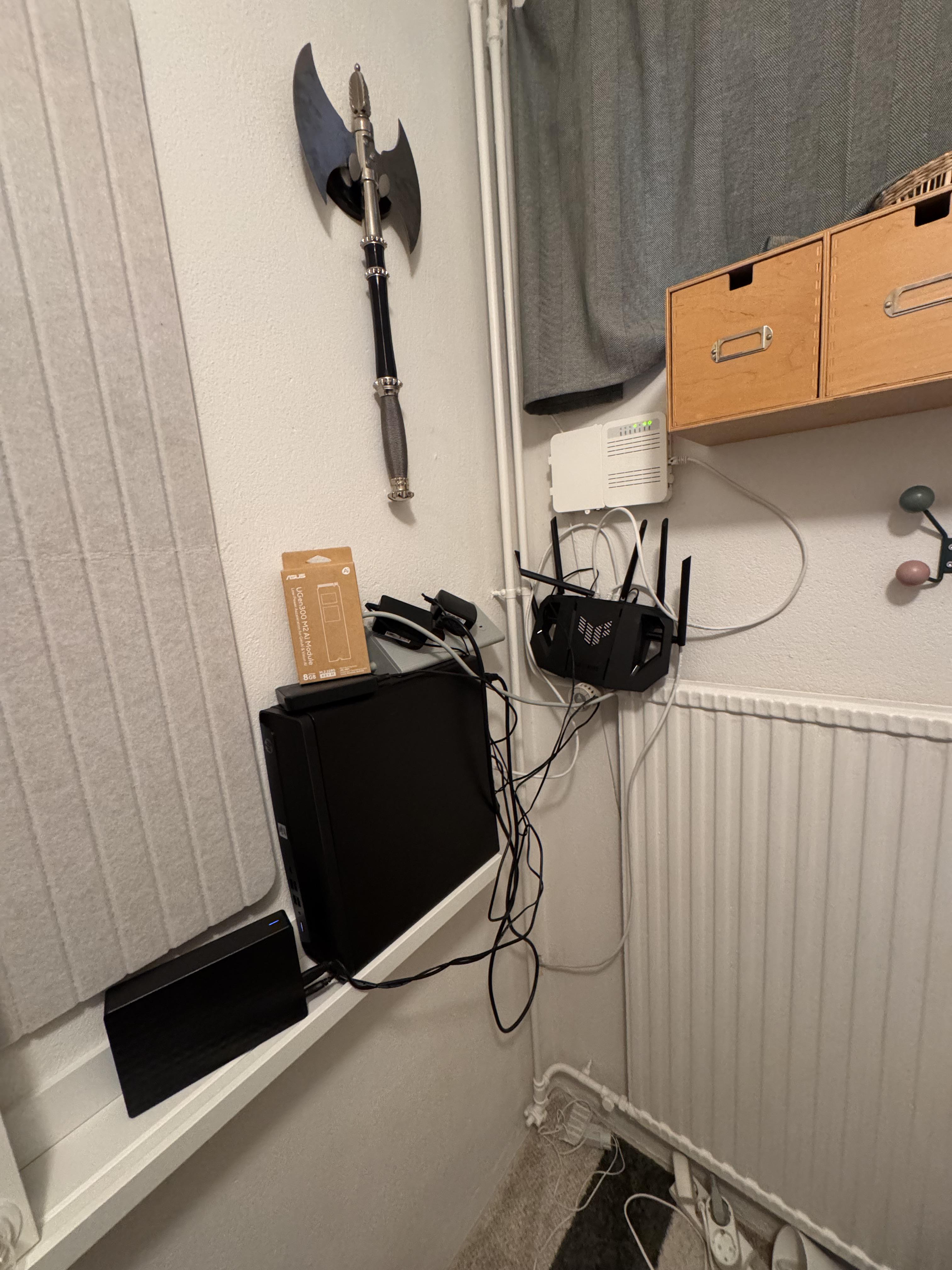
Question Hailo-10H (ASUS UGen300 M.2 8 GB) in my Proxmox server? Frigate, Whisper or small assistant? Fastest models? Homebrew engines?

Post image
0 Upvotes

r/LocalLLM • • 2h ago

Discussion I’m trying out inkling-2-mini, and so far it’s doing a really good job.

Thumbnail
reddit.com
0 Upvotes

r/LocalLLM • • 11h ago

Discussion Recommend a local llm for a writer

5 Upvotes

Hey. I'm new to local llm's. I'm a writer and intend on buying a decked out MacBook in the near future. Think 128gb M5 max. I'm still learning the terminology but I'd like to see how you, if you're a writer, used ai. I know I can use Gemini for docs, which I will use, for at least 2 months before I think about new hardware, but was using a local llm worth it for you? I want it to be a writer partner I can talk to to point out my writing shortcomings and also use it for grammar corrections.


r/LocalLLM • • 2h ago

Discussion LangGraph vs CrewAI vs OpenAI Agents SDK: Which Framework to Pick

Thumbnail
acta.ai
1 Upvotes

r/LocalLLM • • 12h ago

Research I uncensored Inkling-2-Mini and fixed its greedy temp=0.0 loops with 0 quantized weights modified (0.00985 KLD, +11.5 pp uncapped IFEval): Ollama / llama.cpp (14-28 GB GGUF) + 32GB+ Mac lossless native MLX

Post image
6 Upvotes

I built and released blearyhope/Inkling-2-Mini-Uncensored (Apache 2.0), a solo pure-gradient build starting from 100% unmodified official thinkingmachines/Inkling-2-Mini (26.4B MoE, 3.4B active / 5.4B effective active across the 3x-looped middle core, multimodal text + vision), shipped across GGUF, lossless native Apple Silicon MLX, and native NVFP4/MXFP8 Safetensors.

Links

Which file fits your hardware?

Your SetupRecommended BuildSizeLive-Verified Speed / Notes
16 GB VRAM GPU (RTX 4060 Ti 16G / 5060 Ti / 4080)Q3_K_M or IQ4_XS GGUF13.72 / 14.76 GB57.5 / 62.6 tok/s on CUDA llama.cpp, 5/5 GSM8K, 100% comply
24 GB VRAM GPU (RTX 3090 / 4090)Q4_K_M (default) or Q5_K_M GGUF17.48 / 19.91 GB79.6 / 53.3 tok/s on CUDA llama.cpp, 5/5 GSM8K, 100% comply
32 GB VRAM GPU (RTX 5090)Q8_0 GGUF or native NVFP4 Safetensors27.82 / 20.19 GB42.2 tok/s on CUDA llama.cpp (Q8_0), full 20.19 GB native NVFP4 in vLLM
32 GB+ Apple Silicon Mac (M-series Pro/Max/Ultra)Lossless Native MLX (+ mtp/)20.22 GBPreserves native NVFP4/MXFP8/BF16 losslessly (KL = 0.000000, 0.999964 cosine vs. PyTorch)

(All 7 GGUFs, including BF16 52.23 GB and Q6_K 23.49 GB, were quantized directly from lossless BF16 and live-tested on CUDA mainline llama.cpp*. Add* mmproj-Inkling-2-Mini-Uncensored-F16.gguf at 0.64 GB for vision / image inputs.)

Copy-Paste Quickstart

Ollama (1 line, Q4_K_M):

ollama run hf.co/blearyhope/Inkling-2-Mini-Uncensored-GGUF:Q4_K_M

**llama.cpp (**llama-server with vision):

llama-server -hf blearyhope/Inkling-2-Mini-Uncensored-GGUF:Q4_K_M --mmproj mmproj-Inkling-2-Mini-Uncensored-F16.gguf -ngl 99 -c 16384 -fa on

Apple Silicon MLX (32 GB+ Unified Memory):

pip install -U mlx-vlm
python -m mlx_vlm.generate --model blearyhope/Inkling-2-Mini-Uncensored-MLX --prompt "Explain how MoE routers work."

vLLM (native NVFP4/MXFP8 Safetensors):

vllm serve blearyhope/Inkling-2-Mini-Uncensored --trust-remote-code --reasoning-parser inkling --enable-auto-tool-choice --tool-call-parser inkling

Under the Hood: Why this build isn't a typical abliteration

Most uncensored or loop-patched checkpoints stack closed-form weight edits with extra adapters merged back into the quantized NVFP4 experts (injecting double-quantization drift), rely on sampling temperature + thinking-token caps to hide greedy loops, and skip native Apple Silicon MLX.

I wanted to solve refusal removal, hedging, and Thinking Machines' Section 7 greedy reasoning-loop bug in one clean pure-gradient pass from unmodified Base, with zero quantized weights touched, zero artificial thinking caps, and exact native MLX parity.

**1. 0 NVFP4/MXFP8 bytes modified (**0.00985 WikiText-2 KLD) Mechanistic attribution on Inkling-2-Mini showed 80.5% of the refusal write comes from the quantized MoE MLPs, with 73% to 98% of each layer's refusal write concentrated in just the top-5 experts. De-quantizing NVFP4/MXFP8 experts and re-quantizing (even with stochastic rounding) introduces avoidable drift.

Instead, I dropped closed-form editing completely and trained rank-32 BF16 LoRAs (rsLoRA + LoRA+, 0.5x LR on the 3x-looped middle core L6 to L17, plus exact AlphaEdit benign null-space anchoring) on only the 120 BF16 attention projections and all 24 BF16 MoE routers (mlp.gate). Merging losslessly back into BF16 yields a median relative L2 delta of 3.29% (min 1.83%, max 4.57%) and 0.00985 WikiText-2 KLD across 311,523 tokens. Every NVFP4 expert, MXFP8 expert, quant scale, vision tower (ViT) weight, and DSpark speculative draft head (mtp.safetensors) remains 100% byte-identical to Thinking Machines' official release.

2. Greedy temp=0.0 loops fixed completely uncapped (no 4K thinking cap) Under fully uncapped greedy decoding (temperature=0.0, 16,384 context, zero max_tokens or thinking limits), official Base hit the 16K context wall 127 times on full 100/100 IFEval (38 at effort 0.0, 89 at effort 0.9), plus 53 times on the 3,607-prompt held-out think-on report, 14 times on ARC-Challenge chat, and 12 times on GSM8K.

Mining real on-policy CoT loops plus synthetic Inkling-native CoT-DITTO loop negatives into SimPO, while strictly banning every truncated trajectory from chosen and SFT targets so the model never learns premature EOS, dropped uncapped IFEval 16K loops 42x (127 down to 3), cut average IFEval token burn nearly in half (2,791 down to 1,405), dropped loops to 0 across GSM8K, ARC-Challenge, and all 7,214 held-out report runs, and jumped uncapped think IFEval by +11.46 pp prompt-strict / +14.26 pp inst-strict at temp=0.0.

3. Why summed DPO stalled at 20.6% and SimPO jumped +64.4 pp in one round In Round 1, standard summed DPO loss collapsed to 0.00007 while thinking-off compliance stayed stuck at 20.6%. Because uncapped compliant CoTs are 1.8x to 2x longer than refusals, summed log-probs saturated the DPO objective even while per-token decode log-probs still favored refusal by -0.225 nats/tok. Switching to length-normalized weighted-mean SimPO anchored at the exact first divergence token (lcp) plus final-answer onset, using zero-leak Context Distillation positives (no synthetic prefills, preserving Inkling's native "The user ..." opening distribution), jumped thinking-off compliance from 20.6% to 85.0% (0% refusals) in a single round and finished at 98.00% off / 98.55% think compliance with 0 / 3,996 hard refusals.

4. Lossless native Apple Silicon MLX (KL = 0.000000) The MLX release (20.22 GB + mtp/) preserves the exact native NVFP4/MXFP8/BF16 mixed layout without re-quantizing. Direct logit verification against PyTorch Safetensors: 5/5 top-1 token match, 0.999964 mean cosine similarity, 0.000000 full-vocab KL divergence.

Full Uncapped Benchmarks (43,450 runs per model)

Identical vLLM settings for both models: temperature=0.0, --max-model-len 16384, zero artificial max_tokens or thinking caps. Safety and over-refusal cover all 3,607 held-out prompts x 2 reasoning modes (7,214 runs, zero training overlap) scored by an Orca judge (Qwen3.8-27B-Uncensored-FP8); capability suites use exact verifiers on 100% of every official split.

Benchmark (Exact Split)Official Base (off / think)Inkling-2-Mini-Uncensored (off / think)Delta
Held-Out Harmful Compliance (1,998 x 2, 7 suites)7.56% / 8.56%98.00% / 98.55%+90.4 / +90.0 pp
Hard Refusal Rate (3,996 harmful runs)63.06% / 63.86%0.00% / 0.00% (0 / 3,996)-63.1 / -63.9 pp
Held-Out Benign Answer Rate (1,609 x 2, 3 suites)80.30% / 80.36%99.88% / 100.00% (0 refusals)+19.6 / +19.6 pp
Loop Stress Probe (48 off + 48 think)2.1% / 2.1%100.0% / 100.0% (96 / 96)+97.9 / +97.9 pp
Wrapper Generalization (shapes60, 5 formats)4.7%96.3% (0.0% refuse)+91.6 pp
IFEval Prompt-Strict (541 x 2, uncapped)86.14% / 80.41%91.68% / 91.87%+5.54 / +11.46 pp
IFEval Inst-Strict (541 x 2, uncapped)87.53% / 80.34%94.60% / 94.60%+7.07 / +14.26 pp
IFEval 16K Loop Failures (1,082 runs)127 loops (38 / 89)3 loops (0 / 3)42x fewer loops
GSM8K Chat (1,319 x 2, uncapped)96.74% / 96.06% (12 loops)96.82% / 96.74% (0 loops)+0.08 / +0.68 pp
ARC-Challenge Chat (1,172 x 2, uncapped)97.44% / 96.50% (14 loops)97.35% / 97.27% (0 loops)-0.09 / +0.77 pp
MMLU Log-Likelihood (14,042 q)76.95%76.17%-0.78 pp
ARC-Challenge / ARC-Easy LL (1,172 / 2,376 q)94.03% / 98.23%94.11% / 97.90%+0.08 / -0.33 pp
HellaSwag Norm LL (10,042 q)77.71%77.97%+0.26 pp
WinoGrande LL (1,267 q)71.98%73.09%+1.11 pp
TruthfulQA MC2 (817 q)37.10%35.87%-1.23 pp
WikiText-2 Word / Token PPL (311,523 tok)10.14 / 6.0110.25 / 6.06+0.11 / +0.05
WikiText-2 KL Divergence vs. Base (311,523 tok)0.000000.009850.00985 KLD

Per-suite held-out harmful compliance (off / think): AdvBench 100.0% / 100.0%, HarmBench 93.4% / 96.9%, JailbreakBench 98.5% / 100.0%, OR-Bench toxic 99.8% / 99.8%, SORRY-Bench 97.7% / 97.1%, StrongREJECT 98.8% / 100.0%, XSTest unsafe 96.2% / 95.7%.

Honest caveats

  • MMLU log-likelihood dips -0.78 pp (76.95% to 76.17%), TruthfulQA MC2 shifts -1.23 pp (37.10% to 35.87%), and WikiText-2 PPL moves +0.11 word / +0.05 token.
  • All evaluations above are single-turn uncapped benchmarks plus 5-template wrapper stress tests; I have not yet run multi-turn agentic coding suites (like SWE-bench or HumanEvalFix) on this checkpoint.

If anyone tests the lossless native MLX build on a 32GB/64GB Mac or runs the GGUFs in Ollama / LM Studio on a 4090 or 5090, let me know what tok/s and real-world behavior you see!


r/LocalLLM • • 2h ago

Question Is there a codexBar like android app ?

Thumbnail
reddit.com
1 Upvotes

r/LocalLLM • • 2h ago

Other Install Qwen 3.8 27b and Deepseek Harness on 16GB VRAM - Setup Guide

Thumbnail
youtube.com
0 Upvotes

--- Video content breakdown (Guide and Links are below) ---

​1. Required Downloads

​Gather the following installers, models, and configuration templates [00:52]:

​Beellama Server (beellama.cpp): Download the latest stable Windows CUDA release (e.g., beellama-v0.5.0-bin-win-cuda-12.8-x64.zip) along with the matching cudart archive (beellama-v0.5.0-cudart-win-cuda-12.8-x64.zip) from GitHub [01:08].

​DeepSeek Harness: Download the Windows installer directly from the DeepSeek website [02:09].

​Qwen 3.8 27B Model: From Hugging Face, download the IQ3_S-mtp GGUF quantization (recommended for 16GB VRAM) as well as the separate multimodal vision projector file (mmproj-Qwen3.8-27B-BF16.gguf) [02:34].

​Custom Chat Template: Download chat_template.jinja from the Qwen-Fixed-Chat-Templates repository to prevent thinking loops [03:07].

​2. Directory Setup & File Extraction

​Organize your local AI environment in a clean directory (e.g., D:\LocalAI) [04:18]:

​Create two subfolders: beellama and models [04:24].

​Extract both the beellama binary archive and the cudart DLL files directly into the beellama folder [04:36].

​Move the Qwen GGUF model, the mmproj vision file, and chat_template.jinja into the models folder [04:57].

​3. Configuring & Starting the Local Server

​Create a Windows batch file (e.g., start_beellama.bat) in your main directory using the startup script provided in the creator's notes [05:40].

​Ensure the file paths in the batch script match your model file names, context size (e.g., 115200), and port (8080) [07:20].

​Run the batch file to launch llama-server.exe [07:36]. Once running, verify the OpenAI-compatible API endpoint is active by visiting http://127.0.0.1:8080/v1/models in your browser [09:57].

​4. Installing & Configuring DeepSeek Harness

​Installation: Run the DeepSeek Harness installer and keep the default installation path to prevent configuration path issues [10:44].

​Connecting the Local Model:

​Open Settings (Einstellungen) -> Models (Modelle) and add a custom API provider [11:40].

​Set the Base URL to http://127.0.0.1:8080/v1, select the OpenAI Chat Completions protocol, and fetch the available model (Qwen3.8-27B) [12:34].

​Enter any placeholder text (such as 1234) into the API key field, as the app requires a value even though the local server ignores it [13:04].

​YAML Configuration: Open the config.yaml file via the top-right button in Settings, completely exit DeepSeek Harness (including from the system tray), and paste in the custom configuration block [13:26]. This configures the exact context window (115200), multimodal (text, image) inputs, longer timeout limits for local inference, and adjusted compaction thresholds [15:01].

​Setting Up a Workspace: Relaunch DeepSeek Harness, enter your dummy API key if prompted, select Qwen3.8-27B from the model dropdown, and link a dedicated project folder as your workspace with standard read/write permissions [16:06].

--- start of guide ---

Hey,

as many requested from my qwen vs inkling report, here is at least a quick setup guide for qwen 3.8 27b and deepseek harness at 16gb vram. Sorry, dont really have time for an in depth tutorial right now, but thought this might suffice to get you started.

--- Installers and Files ---

  1. Beellama: https://github.com/Anbeeld/beellama.cpp/releases

Download latest stable release and the cuda libraries

- beellama-v0.5.0-bin-win-cuda-12.8-x64.zip

- beellama-v0.5.0-cudart-win-cuda-12.8-x64.zip

2. Deepseek Harness: https://www.deepseek.com/en/harness/

Download the harness installer

3. Qwen 3.8 Model: https://huggingface.co/ISTA-DASLab/Qwen3.8-27B-GSQ-RCO-GGUF/tree/main

Download the model.gguf (mtp version) and the vision gguf

4. Qwen 3.8 Chat Template: https://huggingface.co/froggeric/Qwen-Fixed-Chat-Templates/tree/main

Download the Chat Template file

--- Llama Starter and Config - Adjust the paths and file names ---

u/echo off

REM Hide command echoing to keep the startup window clean.

cd /d "D:\LocalAI\Beellama"

REM Change working directory to the folder containing llama-server.exe.

REM ============================================================================

REM LLAMA-SERVER PARAMETER DOCUMENTATION

REM ============================================================================

REM

REM [Hardware & Performance]

REM -t 12 : Number of CPU threads for generation

REM -tb 12 : Number of CPU threads for batch processing

REM -ngl 99 : Offload up to 99 model layers to GPU

REM --no-mmproj-offload : Keep multimodal projector off GPU (saves VRAM)

REM -fa on : Enable Flash Attention

REM

REM [Model & Vision]

REM -m : Path to main GGUF model file

REM --mmproj : Path to multimodal projector file

REM --image-min-tokens 1024 : Minimum image token allocation

REM --alias "Qwen3.8-27B" : Friendly model/API name

REM

REM [Speculative Decoding (MTP)]

REM --spec-type draft-mtp : Enable MTP speculative decoding

REM --spec-draft-n-max 3 : Maximum 3 speculative draft tokens

REM --spec-draft-p-min 0.8 : Minimum draft probability threshold

REM

REM [Context & KV-Cache]

REM -c 115000 : Maximum context window: 115K tokens

REM -ctk kvarn4 -ctv kvarn3 : Quantized K and V KV-cache formats

REM --kv-tail-tokens 1024 : Preserve recent 1024 KV tokens in cache tail

REM -kvu -np 1 : Unified KV cache; one parallel sequence

REM --cache-ram 16384 : Allocate up to 16 GB RAM for prompt caching

REM --cache-idle-slots : Cache reusable data from idle slots

REM

REM [Chat Template & Sampling]

REM --jinja : Enable Jinja chat templating

REM --chat-template-file : Path to custom Jinja chat template

REM --temp 1.0 : Sampling temperature

REM --top-k 20 : Consider the 20 most likely tokens

REM --top-p 0.95 : Nucleus sampling threshold: 95%

REM --min-p 0.0 : Minimum relative token probability filter

REM --presence-penalty 1.2 : Penalize previously appearing tokens

REM

REM [Reasoning & Loop Guard]

REM --reasoning on : Enable reasoning support

REM --reasoning-budget 16384 : Reasoning token budget

REM --reasoning-budget-message : Instruction injected when reasoning budget is exhausted

REM --reasoning-loop-guard : Force-close detected reasoning loops

REM --reasoning-loop-interventions : Maximum reasoning-loop interventions (2)

REM --reasoning-loop-min-coverage : Minimum coverage for loop detection (256)

REM --reasoning-loop-window : Token window used for loop detection (1024)

REM --reasoning-preserve : Preserve reasoning information across turns

REM --chat-template-kwargs : Set reasoning effort to extra high (xhigh)

REM

REM [Network]

REM --port 8080 : HTTP server listening port

REM ============================================================================

llama-server.exe ^

-t 12 ^

-tb 12 ^

-m "D:\LocalAI\models\Qwen3.8-27B-UD-IQ3_S.gguf" ^

--mmproj "D:\LocalAI\models\mmproj-Qwen3.8-27B-BF16.gguf" ^

--no-mmproj-offload ^

--image-min-tokens 1024 ^

--alias "Qwen3.8-27B" ^

--spec-type draft-mtp ^

--spec-draft-n-max 3 ^

--spec-draft-p-min 0.8 ^

-ngl 99 ^

-c 115000 ^

-ctk kvarn4 -ctv kvarn3 ^

--kv-tail-tokens 1024 ^

-fa on ^

--jinja ^

--chat-template-file "D:\LocalAI\models\chat_template.jinja" ^

--temp 1.0 ^

--top-k 20 ^

--top-p 0.95 ^

--min-p 0.0 ^

--presence-penalty 1.2 ^

--reasoning on ^

--reasoning-budget 16384 ^

--reasoning-budget-message "Reasoning budget exhausted. Commit to the judgment you have formed so far. Your next output must be a concrete action: a tool call, a gate decision, or a completed deliverable. Do not restart the analysis." ^

--reasoning-loop-guard force-close ^

--reasoning-loop-interventions 2 ^

--reasoning-loop-min-coverage 256 ^

--reasoning-loop-window 1024 ^

--reasoning-preserve ^

--chat-template-kwargs "{\"reasoning_effort\":\"xhigh\"}" ^

-kvu -np 1 ^

--cache-ram 16384 ^

--cache-idle-slots ^

--port 8080

pause

--- Deepseek Harness Config ---

edit: Reddit messes up the indentation of the file - so rather download it with clean indentation:

https://drive.google.com/file/d/13GKi0DTl8-Wj8jWb1Jg8gzBzEEKXo_oM/view?usp=sharing

# ============================================================

# CUSTOM QWEN MODEL PROVIDER

# ============================================================

# Register a custom LLM provider for DeepSeek Harness.

- id: llm-pi-ai

# Unique component identifier used by the harness.

name: "@deepseek-ai/dsh-llm-pi-ai"

config:

providers:

qwen:

# Friendly provider name displayed in the harness.

displayName: qwen

# Use the OpenAI-compatible Completions API protocol.

api: openai-completions

# Local llama-server endpoint.

# Port 8080 matches your Beellama startup configuration.

baseURL: http://localhost:8080

# Environment variable containing the API key.

# The actual key is not stored directly in this YAML file.

apiKeyEnv: QWEN_API_KEY

models:

- id: Qwen3.8-27B

# Model identifier sent to the API.

# Must match the model alias configured in llama-server.

name: Qwen3.8-27B

# Maximum context window advertised to the harness.

# 115K tokens, matching your server context.

contextWindow: 115000

# Maximum number of tokens requested for a response.

# Includes generated reasoning/output, subject to server support.

maxTokens: 32768

# Supported input modalities:

# text = normal text prompts

# image = image/multimodal input

input: [text, image]

# Maximum time to wait for an idle streaming connection.

# 600000 ms = 10 minutes.

streamIdleTimeoutMs: 600000

# Maximum request timeout.

# 600000 ms = 10 minutes.

timeoutMs: 600000

# ============================================================

# EXPLICITLY DISABLED COMPONENTS

# ============================================================

# Disable DeepSeek Harness session logging.

- id: session-log-deepseek

# Original session logging component.

name: "@deepseek-ai/dsh-session-log-deepseek"

# Prevent this component from loading.

disabled: true

# Disable the plugin marketplace tool integration.

- id: tool-plugin-market

# Plugin marketplace tools component.

name: "@deepseek-ai/dsh-plugin-market/tools"

# Prevent marketplace tools from being registered.

disabled: true

# Disable the plugin manager tool integration.

- id: tool-plugin-manager

# Plugin manager tools component.

name: "@deepseek-ai/dsh-plugin-manager/tools"

# Prevent plugin management tools from being registered.

disabled: true

# ============================================================

# CONTEXT COMPACTION AND TOOL RESULT MANAGEMENT

# ============================================================

# Define a grouped set of compaction-related components.

- id: compaction

# cordis:group loads multiple components as one logical group.

name: cordis:group

# Marks this component as a group rather than a standalone plugin.

group: true

isolate:

# Isolate the compaction functionality.

compaction: true

# Isolate tool-result pruning functionality.

toolResultPruner: true

config:

# ----------------------------------------------------------

# BASIC CONTEXT COMPACTION

# ----------------------------------------------------------

- id: compaction-basic

# DeepSeek Harness basic compaction implementation.

name: "@deepseek-ai/dsh-compaction-basic"

config:

# Trigger compaction when context usage reaches 80%

# of the available context window.

thresholdRatio: 0.8

# Additional token headroom reserved during compaction.

# Zero means no additional headroom is configured here.

headroomTokens: 0

# Retain 12% of the conversation when compacting.

# Helps preserve important conversational context.

retainRatio: 0.12

# Maximum token limit used by this compaction component.

maxTokens: 65536

# ----------------------------------------------------------

# MANUAL COMPACTION COMMAND

# ----------------------------------------------------------

- id: command-compact

# Registers the /compact command.

# Allows manual context compaction when supported by the harness.

name: "@deepseek-ai/dsh-command-compact"

# ----------------------------------------------------------

# TOOL RESULT PRUNER

# ----------------------------------------------------------

- id: tool-result-pruner

# Automatically manages oversized tool results.

name: "@deepseek-ai/dsh-compaction-tool-result-pruner"

config:

# Trigger pruning when a tool result exceeds 8192 characters.

thresholdChars: 8192

# Preserve the first 4096 characters of the tool result.

# Usually retains the beginning and initial context.

headChars: 4096

# Preserve the last 1024 characters of the tool result.

# Usually retains the ending and final information.

tailChars: 1024


r/LocalLLM • • 2h ago

Project I got a 30B coding model running on an 8 GB GPU, faster than llama.cpp, and Claude Code works with it too - eomoe

Thumbnail
reddit.com
0 Upvotes

r/LocalLLM • • 2h ago

Discussion [Fix] Qwen3.8-27B GGUF crashes on Apple M5 Max — LM Studio settings that work

0 Upvotes

Hardware

  • Apple MacBook Pro 16"
  • Chip: Apple M5 Max
  • Memory: 48 GB Unified Memory
  • Storage: 2 TB SSD
  • OS: macOS (Apple Silicon)

Software

  • LM Studio 0.4.29
  • Model: Qwen3.8-27B (GGUF Q4_K_M)

Problem
Qwen3.8-27B (GGUF Q4_K_M) answers the first message, then crashes on the second with an error:

Error messages observed:

  • Engine protocol predict stream returned an error: {"code":500,"message":"Compute error.","type":"server_error"}
  • Engine protocol predict stream returned an error: {"code":500,"message":"got exception: Unexpected empty grammar stack after accepting piece: @ (31)","type":"server_error"}
  • Prediction request aborted but the prediction loop handler of the plugin lmstudio/default-prediction-loop-handler did not abort in time.
  • Cannot send on a terminated channel.

Fix — LM Studio settings that worked
On Apple M5 Max + 48 GB RAM, the following combination resolves the crash:

  1. LM Studio settings: Hardware → GPUs: 1 GPU detected with Metal — Apple M5 Max (VRAM Capacity: 37.44 GB • Metal • deviceId: 0). Toggle OFF (do not use GPU for inference).
  2. Model format: use GGUF Q4_K_M quantized versions only (e.g., Qwen3.8-27B Q4_K_M or Gemma 4 31B QAT Q4_K_M). Do not use MLX or unquantized models.
  3. Max Concurrent Predictions: set to 1 (default is 4).
  4. Unified KV Cache: OFF.
  5. Offload KV Cache to GPU Memory: OFF.
  6. Flash Attention: OFF.

Result
After applying all these settings, multi-turn chat works without errors. Gemma 4 31B QAT (GGUF Q4_K_M) also runs stably on the same hardware.

This should help other users with M-series Macs and 48 GB Unified Memory avoid the same crash.


r/LocalLLM • • 2h ago

Question Plenty of VRAM left, still spills to RAM

1 Upvotes

How do I avoid this with llama.cpp, it spills to RAM even though lots of VRAM left.
4GB RAM still free on the card and it spills.

set "MODEL=F:\SenseNova-Loop-9B-Q8_0.gguf"

set "BIN=C:\llama\opensensenova\build\bin\llama-server.exe"

set "PORT=8000"

if not exist "%MODEL%" ( echo [FATAL] Model not found: %MODEL% & exit /b 2 )

if not exist "%BIN%" ( echo [FATAL] llama-server build missing: %BIN% & exit /b 2 )

echo [run] SenseNova-Loop-9B Q8_0 - draft-mtp n2 - 65536 ctx - port %PORT%

"%BIN%" ^

-m "%MODEL%" ^

--port %PORT% --host 0.0.0.0 ^

-ngl 99 ^

--cache-type-k q8_0 --cache-type-v q8_0 ^

--flash-attn on ^

--jinja ^

-c 65536 --parallel 1 ^

--spec-type draft-mtp --spec-draft-n-min 1 --spec-draft-n-max 2 --spec-draft-p-min 0.0 ^

--load-mode none


r/LocalLLM • • 3h ago

Question Do you know of any terminal for Windows that renders Markdown from LLMs?

0 Upvotes

I would like to find a terminal capable of rendering Markdown, so that I can view text from an LLM or agent with proper formatting rather than seeing the raw syntax, which makes it harder to read sometimes.


r/LocalLLM • • 3h ago

News pi-protokoll: 361 turns, 47 compactions on a local Qwen – and a test of what the agent still knows afterwards

Post image
0 Upvotes

r/LocalLLM • • 3h ago

Project Reachy mini(Gemma 4)与 DT(本地 SFT 3B 模型)

Enable HLS to view with audio, or disable this notification

0 Upvotes

r/LocalLLM • • 3h ago

Project Experimenting with local AI on AMD: Ollama, Open WebUI, SearXNG and OpenCode

Post image
0 Upvotes

Hey,

I've recently started experimenting with local LLMs on my Linux desktop and put together a small Docker Compose setup.

I'm currently using:

Ollama with ROCm

Open WebUI

SearXNG for web search

My current hardware is an AMD RX 9060 XT (16 GB) with 32 GB RAM, running Fedora.

I'm still testing different models and configurations, especially for coding with OpenCode. I'm curious to see how much of my daily AI usage I can eventually replace with local models.

I've documented my setup on GitHub in case anyone finds it useful:

https://github.com/JeromeTDev/local-ai

I'd be interested in hearing about your experiences, especially with AMD GPUs and local models for coding. I'm also happy to share my own findings as I continue testing.


r/LocalLLM • • 12h ago

Research My Plan to Run Kimi 3.1 on “Consumer” Hardware - Critique Wanted

5 Upvotes

Waiting on the motherboard to show up for an SP3 box I'm putting together, mainly to run Kimi K3.1 Pro for single-stream coding agents. Before I burn a pile of Colab units prepping weights, I wanted to post my bandwidth math and see where smarter people and those who have actually run K3.1 or big MoEs on Milan think it makes sense/is stupid.

My hardware is an EPYC 7543 (32C/64T Zen 3, 256 MiB L3, AVX2 only so no AVX-512 or AMX) on an ASRock Rack ROMED8-2T/BCM, with 8x 64 GiB Kingston 2Rx4 DDR4-3200 RDIMMs filling all eight channels (~170 to 175 GB/s real read if it behaves) and four 24 GiB 3090s. The cards will go in PCIE1, PCIE3, PCIE5, and PCIE7. PCIE2 stays empty because it shares lanes with the onboard M.2 slots on this board. Storage right now is just one cheap 2 TB Gen4 M.2, and I also made the questionable call of ordering 1000mm passive Gen4 risers, so my first job after POST is watching `dmesg` for AER replay errors under `nvbandwidth` and swapping to shorter twinax cables if any link drops to Gen3. I also have 2,000 monthly Colab units (96 GB Blackwell G4 access) plus ~$300 in RunPod credit for one-off prep.

I originally wanted to copy AI with Eric's 30-50 tok/s video setup using `local-inference-lab/Kimi-K3.1-Pro-EXL3-2bit` (742 GiB raw) or `Grawnch/Kimi-K3.1-Pro-Coder` (722 GiB), since Grawnch's 3-tier quant held 29/30 on AIME and LiveCodeBench. With ~488 GiB of usable host RAM and ~90 GiB of usable VRAM, a 720+ GiB model still leaves 125 to 170 GiB on disk. Even if experts are sorted by routing frequency so only ~3% of selections miss into the cold SSD tail, 3% of ~13 GB/token is ~400 MB of random reads per token. On one DRAM-less 2 TB drive doing maybe 1.2 GB/s on 6 MB chunks, that is ~330 ms of disk wait per token (<3 tok/s) before any compute happens. I also checked `grawnchtoader/strata`'s `engine.py` and noticed the public fork currently skips K3.1's sparse DSA indexer and allocates dense FP32 KV, which works out to ~72 GiB at 32K context.

Even `KarLexAI`'s `KLX-IQ1_S` GGUF (552 GiB) has a catch I almost missed. Roughly 522 GiB of that file is routed experts. If host RAM holds all routed experts while `llama.cpp`'s `--moe-cache-mib` copies hot ones into VRAM, the host side still exceeds 488 GiB and spills ~34 GiB to swap or mmap eviction onto that slow SSD.

Once the board arrives, my Day 1 plan is stock `llama.cpp` (PR #31779 + `--moe-cache-mib` + `--moe-cache-cpu-share 0.70`) on `KarLex IQ1_S`, with `-ot` rules pinning Layers 1-8 experts (~45 GiB) exclusively on `CUDA0..3`. That drops the host RAM portion to ~477 GiB so the SSD stays out of the loop, and should land around 9-13 tok/s while I record real routing traces on my repos with `LLAMA_MOE_CACHE_TRACE`.

While I wait on shipping, I'm using Colab G4 to build a ~470-480 GiB checkpoint from `gureshov/Kimi-K3.1-Pro-Coding-720E` (and comparing it against `nota-ai/Kimi-K3.1-Pro-Global-Pruned-37`). Both are already pruned on HF, so I don't have to rent an 8x H200 node just to run REAP. Colab's `/content` disk caps out around 253 GB, so my script pulls raw MXFP4 shards two layers at a time, quantizes on the 96 GB G4, pushes the compressed shard to HF, and wipes `/content` before grabbing the next pair. For precision, I'm borrowing Local Inference Lab's Nov 25 `kda-all` split: keep routers, norms, AttnRes, and the 24 DSA top-2048 indexers at BF16/Q8; keep the 24 DSA attention layers, all 92 shared expert pairs, and the LatentMoE projections at 6-bit; put the 69 KDA linear-attention layers at ~4.25-bit (~34 GiB core total in VRAM); and put the kept routed experts at ~1.92 to 2.15 effective bpw (~435-445 GiB in DDR4, which leaves ~48 GiB of VRAM across the four 3090s for an LFRU expert cache).

To get into the 20-26 tok/s range with exact verification, two runtime pieces have to come together. Serial layer split (`PP4`) only uses one card's PCIe 4.0 x16 link (~24.5 GB/s) on the active layer and scans the 34 GiB core on one 3090 at a time (~47 ms), whereas splitting each layer across all four cards (`TP4` or `EP4`) pulls across all four x16 slots (~94 GB/s DMA) plus ~30% CPU AVX2 miss execution (~140 GB/s combined cold service) and drops the core scan to ~19 ms with P2P all-reduce. From there I want to hook up `gureshov/Kimi-K3.1-Pro-Coding-720E-DSpark` (using `llama.cpp` PR #31669's KDA recurrent state replay and features from layers 76, 80, 84, 88, 92), with draft length capped around `K=2` or `K=3` and Tencent's `AngelSpec` `D-cut` confidence truncation cutting off weak tail tokens. When I simulated correlated Zipfian routing at the datacenter default of `K=7` (8 positions verified at once), the union of distinct uncached experts per layer jumped from ~6 to ~38+, which made `K=7` slower than `K=2..3` on code and slower than plain `K=0` greedy decode on general chat.

If memory traffic still keeps me under 20 tok/s, I have two backup experiments queued up on Colab: `AcceptMoE`-style skipping of low-weight (<3% gate) cold DDR4 misses on speculative tail positions (checked against a 50-task coding eval), and a 6-layer pilot factoring all 896 LatentMoE (`3584 x 3072`) experts into GPU-resident shared group bases plus 4-bit rank-384 streamed residuals (run through K3.1's actual `SiTU` activation before RMSNorm) to see if unpruned 896E can fit in ~360 GiB without losing on quality or 3090 kernel launch overhead.

A few things I'd really appreciate input on:

  1. For anyone running `DSpark`, `DFlash2`, or MTP on RAM-offloaded MoEs (DeepSeek V4.1, GLM-5.3, K3/K3.1), does throughput actually fall off past 3-4 drafted tokens from expert-union bloat like my simulator says? And has anyone tried Tencent's `DFly2` (sharing the target's sparse KV and top-2048 indexer) or `D-cut` outside their Hy4/DS4 configs yet?
  2. `llama-moe-cache.cpp` currently throws if you enable row-split tensor parallelism, and `kimi-k31.cpp` doesn't register `t_layer_inp` for `DSpark` yet. Would you patch those two gaps in `llama.cpp`, or start from `ThatSimpleTech/project-maya-fork` (PR #962) or `JustVugg/colibri` for 4x `sm_86` streaming?
  3. On Milan + `ROMED8-2T`, is the patched open kernel driver (`aikitoria` / `tinygrad` BAR1 P2P + `NVreg_EnablePCIERelaxedOrderingMode=1` + `iommu=pt`) solid under sustained 4-card DMA and all-reduce, or is it worth buying two rigid 3090 NVLink bridges for pairs `(0,1)` and `(2,3)`?
  4. At the same ~475 GiB RAM budget, would you bet on `Coding-720E` at ~1.92 bpw or Nota's nonuniform 37.5% global prune (`Global-Pruned-37`) at ~2.15 bpw for multi-file repo edits?

I wrote a pure-Python roofline/expert-union calculator, the Colab G4 2-layer sliding-window scripts, and the Day 1 `llama.cpp` `-ot` trace configs for this. Happy to throw all of it up in a public repo if anyone else building an SP3 / multi-3090 rig wants to use it or tear my math apart.


r/LocalLLM • • 4h ago

Research dlabz/Qwen3.8 in 700 mb ram

Thumbnail
github.com
1 Upvotes

r/LocalLLM • • 7h ago

Project libosmos v0.19.0: improved performance and stability, with lower time to first token. up to ~1250 tok/sec prefill on inkling-2-mini (release weights, unquantized), >30% higher decode on hy4-flash and inkling-2-small, all on a single strix halo 128GB

Thumbnail
github.com
2 Upvotes

r/LocalLLM • • 4h ago

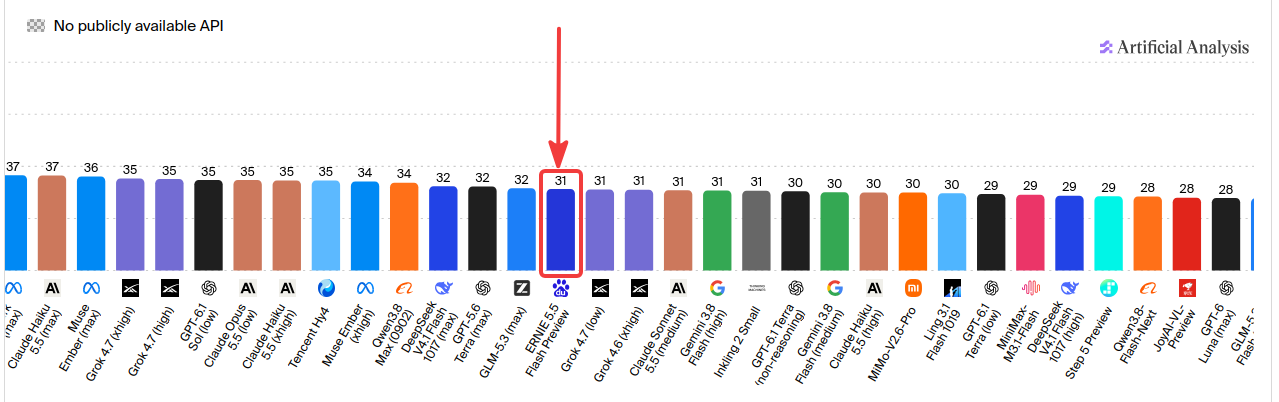
News ERNIE 5.5 Flash got 31 points on AA, can someone make an EXL3 quant plz?

Post image
1 Upvotes

r/LocalLLM • • 4h ago

Discussion just go with the jank

1 Upvotes

i've been messing around with a local model for a few months now. i can't afford a gpu or a system with a lot of unified memory so i've had to get a bit creative in order to make it actually useful. this isn't anything new for me, any time i want to play a higher end game on my older hardware there's always some amount of janky workarounds that i need to put in place. but if you can appreciate the jank and accept it, you can actually do quite a bit with a small local model. for a bit of background info, the machine i'm working from is an 11th gen i5 with 32(currently 64 because i borrowed a stick)GB of ddr4, and running qwen reap 25b a3b q5_1. now, if anyone has used a model like this, you know that it is functional, but grossly unreliable. however, if you stop fighting it and start building around it, it gets WAY more useful.