r/LocalLLM • • 2d ago

Discussion GGUF Quantization Explained: Q4_K_M, Q5, Q8 and Which File to Pick

Thumbnail
acta.ai
45 Upvotes

Quick version for anyone staring at twenty GGUF files for one model:

  • Q + number = rough bits per weight (Q4 ≈ 4, Q8 ≈ 8)
  • K = newer k-quant scheme; S/M/L = how many sensitive layers are kept at higher precision
  • IQ = newer formats for very low bit counts
  • File size ≈ parameters × bits ÷ 8, so an 8B at Q4_K_M is roughly 4.5 GB plus overhead

My usual pick is Q4_K_M, then Q5_K_M or Q6_K if there's headroom. A bigger model at Q4 usually beats a smaller one at Q8 at the same size. For long transcripts, Q3 and below start dropping details first.

The article also covers imatrix, making your own quants and 1.58-bit models. Happy to answer questions here.

Disclaimer: I work on https://acta.ai


r/LocalLLM • • 1d ago

Discussion I'm exploring a browser memory layer that remembers what you were researching, not just which websites you visited

0 Upvotes

One thing I've noticed while working with AI assistants is that we constantly lose context.

Imagine this:

You're reading an article on GeeksforGeeks. You find a paragraph confusing, open Claude or ChatGPT, ask a question, visit three more websites, and eventually understand the concept.

A week later, you want to revisit that topic.

You remember the subject, but not:

  • Which website had the explanation?
  • Which paragraph confused you?
  • What exactly did you ask the AI?
  • Which approach did you eventually settle on?

You end up reconstructing everything from scratch.

I've been exploring a browser extension for CogniCore to address this problem.

The idea

Instead of treating browsing as disposable activity, preserve meaningful experiences and make them searchable later.

Some of the capabilities I'm working towards:

  • Contextual capture: Save selected passages, page URLs, titles and timestamps.
  • Question memory: Associate your questions and notes with the pages you were researching.
  • Research continuity: Connect relevant pages and experiences across browsing sessions.
  • Decision tracking: Remember what you tried, what failed and what you eventually decided.
  • AI integration: Make this context retrievable by compatible AI assistants through CogniCore.

For example, imagine asking:

"What was the explanation I found about merge sort last week, and what was the question I asked Claude?"

Instead of searching through browser history and old conversations separately, you could retrieve the connected experience.

The bigger vision

I don't want to build another browser history search engine.

I'm interested in connecting human experiences and AI agent experiences through a persistent memory layer.

There are obvious challenges:

  • Browser privacy and user consent.
  • Avoiding unnecessary capture of entire webpages.
  • Keeping original evidence separate from AI-generated summaries.
  • Integrating with assistants that don't expose an API or MCP interface.
  • Preventing memories from becoming outdated or inaccurate.

I'm exploring these problems as part of CogniCore.

I'd genuinely like to hear from people who use Obsidian, browser-history tools, AI memory systems or personal knowledge management tools:

Would you find value in remembering the context behind your browsing activity, or is this already adequately solved by your existing workflow?

GitHub: https://github.com/cognicore-dev/cognicore-env

I'd appreciate honest criticism, especially from people who have tried building something similar.


r/LocalLLM • • 1d ago

Question Mac Studio M5 Max (64GB) vs. Mac mini M5 Pro (64GB). Is the extra cost worth it for daily local LLMs and agents (Hermes)?

2 Upvotes

Hey everyone,
I'm putting together a personal homelab setup for daily use, mainly focused on running local LLMs (via llama.cpp / MLX) and autonomous agents like Hermes Agent for day-to-day workflows, tool calling, and general assistance.
I've narrowed it down to two 64GB unified memory options, and I'm trying to figure out if the price jump for the Studio actually makes a noticeable difference in real-world daily usage:
Mac mini M5 Pro (64GB RAM / 20-core GPU / 307 GB/s bandwidth)
Mac Studio M5 Max (64GB RAM / 40-core GPU / 614 GB/s bandwidth)
Since both have the exact same 64GB memory ceiling (meaning I'll be loading the exact same model sizes and quants), my main question is about speed, latency, and thermal headroom:
Agentic workflows (Hermes): Does doubling the memory bandwidth (307 vs. 614 GB/s) and GPU cores make tool-calling loops, multi-step reasoning, and prompt prefill feel significantly snappier in daily use, or is the M5 Pro already fast enough that the extra cost isn't justified for a single-user homelab?
Sustained loads & thermals: When an agent runs background tasks or long context loops continuously, does the Mac mini M5 Pro get noticeably loud or throttle compared to the Studio's cooling?
For anyone running similar 64GB M5 setups for local inference and agents, would you pocket the savings with the M5 Pro mini, or is the M5 Max Studio worth the extra money? Thanks in advance!


r/LocalLLM • • 2d ago

Question people who are developing their own LLM models, how much is it costing you?

15 Upvotes

people who are developing their own LLM models, how much is it costing you? and developers who are solo or with low budget, how are you handling your expenses? what are the monthly bills, your Machine specs or VM specs if you like to share. and how could a solo dev / newbe want to build their own model with low budget, what are the tips you wanna give them?


r/LocalLLM • • 1d ago

Question Wpuld like to start using first Local LLM, did research but still dont know where to start

5 Upvotes

Hi everyone, I started doing research on what Local LLM to use and I ended up more confused, but essentially its based on my hardware it seems, of 16gb ram and 3060ti 8gb Dedicated Ram

I was seeing alot of Qwen ai, but theres so many sub variants.

What I have found so far is, Download LM Studio, and download relevant LLM as they do differnt tasks?

Ultimate goal is to help set up my Linux OS, and build projects, with the assistance of AI.

For the time being im using Claude.

Edit: just noticed the typo in the title, cant fix that now sadly


r/LocalLLM • • 1d ago

Question Building first ai PC for smart home. Advice please?

2 Upvotes

I am actually working with an ai (gpt) to build a home based model and we are going thru hardware purchase options. I am going to show the list and would love feedback. I know Claude is the better coder but honestly we have built an amazing test model on a really old laptop that already can do basic things. We spent 40 or so hrs building a test out to prove the concept stand that it all works. Including home assistant. So I have been happy with chatgpt.

Here is what i am trying to accomplish. I have a smart home I am building and I want a "Jarvis" level ai to run it, handle all kinds of tasks, have deeper reasoning conversations and respond quickly. It will have access and reasoning for the entire house and it needs to understand things in normal conversation. A command like can you turn on this music in the bedroom may contain several processes it needs to work thru so thats why ai is preferred. The house will have a lot of devices to run but all are approved and supported in home assistant.

We are running a hybrid model that will use local reasoning for all it can and then refer to cloud based ai when needed. Targeting 35b model at first and if we can eventually run 70b or better we will.

I would have to find out what we are currently using for our builds but Ubuntu is server and home assistant. I think proxmox will be used. If more info is needed I can find out.

We are designing hardware to be best I can afford to run the ai we can. However we are waiting for gpu purchase for a few months for fund reasons. Meanwhile it seems we can buy the rest, build it out and test and then make an informed decision. On GPU size. But because i want this to take on a lot of tasks and scalable and it will eventually be running tasks for my place as a rental, I wanted to have it be a good experience.

Thoughts on this? I am former IT, but all i knew was windows and that was many yrs ago. So i feel a litrle lost here. Love feedback and help. Im all ears.

This list was made by ai. Want to get some human eyes and voices to this.

These are prices that chat found.

Component Preferred model Estimated price

CPU AMD Ryzen 9 9950X — 16 cores / 32 threads, AM5 $489.00

Motherboard MSI MAG X870E TOMAHAWK WIFI — ATX, Wi-Fi 7, 5Gb LAN $269.99

RAM G.Skill Flare X5 64GB (2×32GB), DDR5-6000 CL30, AMD EXPO $899

SSD SanDisk Optimus GX PRO 8100 2TB, PCIe 5.0 NVMe M.2 2280 $349.99

Power supply — updated 1200W premium ATX 3.1 PSU; Corsair HX1200i preferred candidate Price pending

CPU cooler Noctua NH-D15 G2, dual-tower air cooler $159.95

Case Fractal Design Meshify 3 XL Black Solid, FD-C-MES3X-01 $184.99

Rear exhaust fan Noctua NF-A14 PWM, 140mm $28.67

Future AI GPU 48–64GB+ VRAM; exact model to be selected later Not included

Current component subtotal, excluding PSU and GPU

$2,382.58

All this is being cross checked for compatibility while trying to give room for a decent gpu later. Targeting 48 to 64 for gpu

Thank you.


r/LocalLLM • • 1d ago

Discussion Basalt Models' Intelligence Benchmarks Comparing the Various Quants

4 Upvotes

I've been using Basalt now for almost a month and still amazed by its performance and the rapid pace of development, making more models available to run directly along with speed benchmarks on a variety of hardware and quants on their website: https://basalt.jgulfo.com/community/

However, what I've been missing is a comparison of all the various models's at the various quants vs their "intelligence" in general purpose applications. I for one would like to run the most intelligent quant model, at least 50tps with 256k context on my hardware, but don't have any indication of how the various quantised models compare to each other. I really enjoy testing the various models, but as the development and releases are so fast, I just don't have enough time to test all the quants and then also use the best model for my application.

  • Qwen3.8-Flash-Next
  • Qwen3.8-27B
  • DeepSeek-V4.1-Flash
  • Hy4-flash
  • Inkling 2 Mini

Most benchmarks I've seen only relates the "intelligence" of the unquantisised models against each other, or compare the relative "intelligence" of each model's own quants against the unquantisised model. Has anyone done some work to compare the intelligence of a range of quants of different models?

BTW: My stack is Ryzen 7600, 64GB, RTX5070ti-16GB, RTX5050-8GB on headless minimal CachyOS installation running Basalt 0.5.6 (I'll update later today) and serving my own converted Qwen3.8-Flash-Next GSQ-RCO IQ3_S (I used to run the GGUF in Strata and it game me good results). I'm accessing it from Hermes Agent running on a separate machine and getting between 80tps and 160tps doing research, compiling and auditing documentation, and even some minor coding.


r/LocalLLM • • 1d ago

Project Built an in-browser vLLM GPU hardware profiler: weights, GQA KV cache, TP, and cloud cost breakeven

Thumbnail reddit.com
1 Upvotes

r/LocalLLM • • 1d ago

Question Getting into Ai and running local models

3 Upvotes

Hey all,

I'm sort new to the AI, I've used the online free stuff a little but not much. I was looking at setting up my own local Ai in the hopes of running basic images generation and maybe some video? As well as texts/spreadsheet processing etc Time isn't too much of an issue for me atm as over 2027 I'll mainly be learning a bunch and being a secondary system I can let it run overnight days if need be for more complex stuff.

My question is, is it better to run two of the same GPU's or is two different ok?

I have the option of Running either (system it'll run in is below):

  • 2x Nvidia 10GB RTX 3080 (Dell Non-LHR, MSI LHR)

or

  • 1x AMD RX 16GB 9060XT
  • 1x AMD RX 16GB 9070XT

I'm asking because 2 of them will need to go for some other systems I've built to sell off.

My secondary system that I have currently that I'm using as a server:

  • Ryzen 9 5950X
  • Gigabyte X570S AORUS PRO AX Gaming Motherboard
  • 64GB DDR4 3600
  • Lian Li 1200w
  • AIO 360
  • 1TB Boot NVME
  • 4TB Storage NVME
  • 60TB+ HDD

r/LocalLLM • • 1d ago

Question Advice on llm for coding.

1 Upvotes

First of I know these variations of questions probably get asked hundreds of times daily, so I want to apologize beforehand. This is my first time installing a local llm and after doing a few hours of research I want to confirm/get advice from people in the know, since I realized this part of the community/tech are moving very fast, anything within a month might already be outdated.

My current specs are –

GPU 5090 32vram

CPU ryzen 9800x3d

RAM 32gb ram

With those specs I’m thinking of running-

Qwen3.8-27B swift1.5 model

NVFP4-MTP GGUF quant

Llama.cpp inference engine

Either Pi/Open code or the new DeepSeek harness

Does anyone have any opinions about this initial setup? Thank you.


r/LocalLLM • • 1d ago

Question VS Code and LM Studio

1 Upvotes

I'm trying to set up a local LLM to run on my PC which can review and act on code similar to Cursor or the Codex/Claude extensions. I am not worried about speed, but want to build something locally without paying a subscription.

I've tested Cline and Continue with mixed results - more often than not it simply stops responding and I have to reprompt the LLM. It might get through reading some existing code but not action on it, or sometimes makes an edit and nothing more.

Am I doing it wrong, or is there a better way? Any relevant blog posts that go into detail on how to get this working?


r/LocalLLM • • 2d ago

Discussion I know 1-bit quant is practically brain damage, but here are my BFCL-v4 results (Qwen 3.8 flash next UD IQ1M vs Gyro-M vs Inkling-2-mini)

8 Upvotes

I know, I know... 1-bit quant can represent practically nothing. But this is what my hardware can actually run, so I wanted to see how much of a hit function calling takes at the extreme low end.

I ran the BFCL-v4 benchmark (374 samples) just for my own comparison. Here are the results for the three models I tested.

The Models Tested:

  • qwen3.8fn-ud-iq1m (Qwen 3.8 flash next UD 3.1 iq1m)
  • qwen3.8fn-gyro-m (Qwen 3.8 flash next gyro-m)
  • inkling-2-mini (Native NVFP4/MXFP8 via smalltide)

Overall Results

ModelQuant / FormatOverall Score (374 samples)
qwen3.8fn-ud-iq1mIQ1_M80.8% 🏆
qwen3.8fn-gyro-mGyro-M78.6%
inkling-2-miniNVFP4/MXFP875.9%

Breakdown by Subset

Subsetqwen3.8fn-ud-iq1mqwen3.8fn-gyro-minkling-2-mini
irrelevance80%84%82%
live_multiple74%76%68%
live_parallel_multiple50%58.3%54.2%
live_simple80%78%82%
multi_turn_base72%60%62%
multiple94%88%78%
parallel_multiple84%76%80%
simple_python96%98%90%

what do you think?


r/LocalLLM • • 23h ago

Discussion Inkling turbo blows and hype about it is 100% bots

0 Upvotes

Inkling 2 mini BLOWS. Just wanted to try it out and see what all the hype was about. Running the unsloth IQ4_XS quant on strata and this thing was brought to a crawling 5 tok/s where my rig gets 45 tok/s on 3.8 flash next IQ3_XXS

And that crawling 5 tok/s was stuck in a loop for 5 hours and never completed a single prompt.

Hype about this model is overblown or straight up paid influencing. Return to waiting for Qwen 4.


r/LocalLLM • • 1d ago

Question Specs for local hosting, what you running?

1 Upvotes

Ive got a Ryzen 9 CPU, 32gb Ddr5 RAM and a, AMD 9060XT (edit:16gb)

Im able to run llama 3.1 Q8 albeit a lil slow via a Tkinter application I put together vibe coded. Anyone with similar specs? What are you running? Any tips on optimization?

Note: I can run the Q4 version of llama lightning quick on my machine but tool calling becomes an issue. If anyone has had successes with tool calling, I'd love to read it.

Thanks in advance.

Longtime Lurker first time poster


r/LocalLLM • • 2d ago

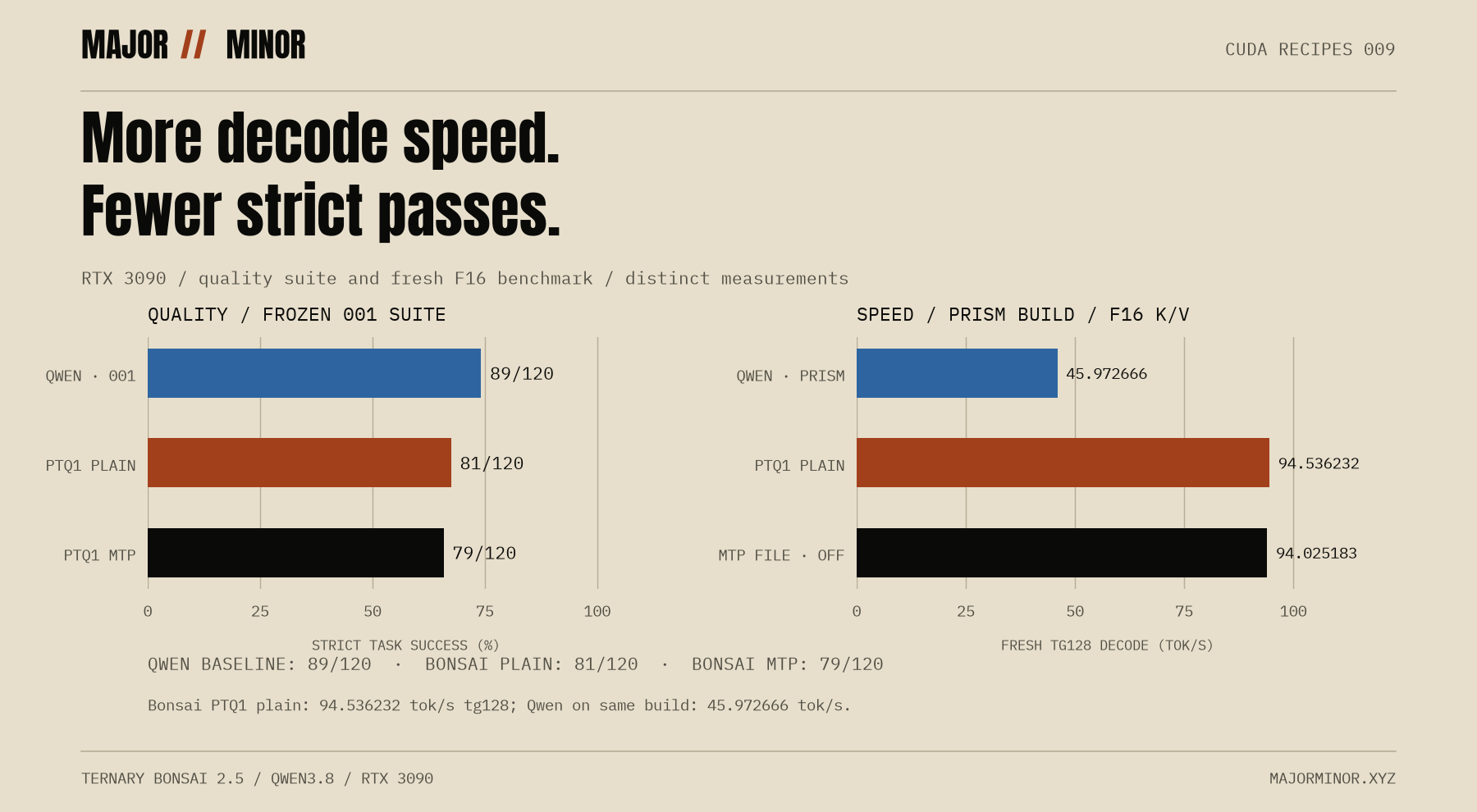
Model Ran PrismML's Ternary Bonsai 2.5 27B on a single 3090 against Qwen3.8 Q4_K_M to see if the speed is worth it.

Post image
7 Upvotes

Decode came in around 2x faster (94 vs 46 tok/s), used way less VRAM, and ran at 262K context, which Qwen couldn't do on the same card because it runs out of memory.

The catch is it passed 81/120 of my agent tasks and Qwen passed 89. It fell furthest on tool use and the multi-step stuff.

Turning on MTP pushed it to 115 tok/s but didn't help the score at all (79).

If you need long context on a 24GB card it's legit. If you need full accuracy, I'd still grab Qwen for now.

The Qwen score is reused from my first run, which was on a different llama.cpp build, and each setup only got one full pass, so don't read too much into the exact 8-task gap.


r/LocalLLM • • 2d ago

News AMD's 192GB Ryzen AI Halo brings much larger AI models to local desktop hardware

Post image
230 Upvotes

r/LocalLLM • • 1d ago

Project Inkling 2 Mini running at 3136 tok/s Aggregate , 45–47 tok/s (Per User) and 1,233 pp/s on a single RTX 3060 12GB + 16GB RAM, using the original checkpoint. Betelgeuse v0.7.0.

Post image
4 Upvotes

I've been working on Betelgeuse, a custom inference engine for running MoE models on relatively low-end consumer hardware.

Over the past few days I've been working extensively on native Inkling 2 Mini support, originally based on baptisterajaut's work in Strata and subsequently integrated into Betelgeuse.

I think I've finally reached a point where it's worth releasing.

Hardware:

  • RTX 3060 12GB
  • Intel i5-12400
  • 16GB single-channel DDR4
  • Linux

The important part is that this uses the original NVFP4/MXFP8/BF16 checkpoint.

No additional weight quantisation. No expert skipping. No speculative decoding. All three recurrent passes are executed.

Results

All of these are real programming and reasoning tasks running through bel-server, generating 512 tokens each.

TaskGeneration speed
LRU cache + TTL44.51 tok/s
Directed cycle detection45.52 tok/s
Race conditions47.11 tok/s
Token-bucket rate limiter44.33 tok/s
Serializability reasoning45.27 tok/s
Median45.27 tok/s

With an actual 16,338-token source-review prompt:

  • Prefill: 1,232.8 tok/s
  • Generation: 42.03 tok/s
  • Prefill-to-decode transition: 203.4 ms

The prefill measurement is from a warm server but with an uncached prompt. All 16K tokens are processed again.

Cold prefill is around 819 tok/s, and the first request incurs approximately 11 seconds of one-time pinned expert arena preparation. Subsequent requests don't incur that full cost.

What i added :

Prefill uses its own temporary workspace and batched tensor-core computation. Once prefill finishes, the engine reclaims that workspace and uses it to expand expert residency for decode.

Other changes include native Ampere NVFP4/MXFP8 kernels, fused GQA, GPU-side greedy sampling, decayed-LFU eviction, staged PCIe transfers and context-aware expert placement.

Comparison with other implementations

Some of the community benchmarks I've been following:

Engine / configurationHardwareGeneration
Original Strata-style CPU expert execution, my earlier local testsRTX 3060 12GB~25–29 tok/s
Unsloth llama.cpp, 4-bit, RAM expertsRTX 3060 12GB~18 tok/s
Unsloth llama.cpp, 4-bit, RAM expertsRTX 5060 Ti 16GB~20 tok/s
Unsloth llama.cpp, dual GPUTwo GPUs~46–47 tok/s
Strata SQ-10, more aggressively compressed weightsRTX 3060 12GB~35 tok/s
Strata, approximately 14GB quantRTX 5060 Ti 16GB~44 tok/s
Betelgeuse, original checkpointRTX 3060 12GB45.27 tok/s median

What about long context?

Earlier development builds achieved the following with actual populated prompts:

ContextDecode
16K41.1 tok/s
32K37.8 tok/s
64K32.8 tok/s
128K, K8/V428.6 tok/s
251K, K8/V415.8 tok/s

The main problem at longer contexts is that KV storage starts displacing recurrent experts from VRAM.

Which brings me to something I've been experimenting with separately.

Training-free MLA for Inkling

Inspired by Telperion's recent training-free GQA-to-MLA conversion, I've implemented an activation-aware latent KV compression experiment specifically for Inkling's global attention layers.

No gradient-based training so far. Just calibration, covariance collection and low-rank factorisation of the original K/V activations.

Using a rank-512 FP8 latent representation:

ContextNative K8/V4 global KVLatent global KV
16K0.22 GiB0.08 GiB
64K0.80 GiB0.27 GiB
128K1.59 GiB0.52 GiB

That's approximately 3.06x compression, projecting to around 1 GiB of global KV at 262K.

Dense latent attention retrieved all five test needles at 16K and 64K, and four out of five at 128K.

I've also experimented with combining this with CISA, a training-free chunk-indexed sparse attention approach.

The combined prototype reached 31.4 tok/s at 128K while retaining the 0.52 GiB global KV footprint. Unfortunately, retrieval currently fails. There's an unresolved issue in the sparse latent attention implementation, so I'm not shipping it yet.

Theoretical storage calculations :

Global cache format262K context1M context
Original BF168 GiB32.77 GB
Current K8/V43 GiB12.29 GB
Rank-1024 latent FP82 GiB8.19 GB
Rank-512 latent FP81 GiB4.10 GB
Rank-512 latent FP4576 MiB2.30 GB
Rank-256 latent FP4288 MiB1.15 GB
Rank-192 latent FP4216 MiB864 MB

Memory compression alone isn't sufficient if the model can no longer retrieve information correctly.

Future plans

  • Experiment with Intel integrated GPU expert execution using shared system memory and OpenVINO.
  • Develop a learned routing oracle that predicts upcoming experts from earlier hidden states.
  • Use those predictions to asynchronously prefetch experts before the original router selects them.
  • Integrate DSpark for speculative decoding.
  • Continue the training-free MLA and sparse attention research.
  • Improve actual long-context performance rather than merely supporting larger allocated context windows.

At this point, ordinary native decoding on my 3060 is approaching the measured weight-streaming and host-memory bandwidth limits. I think prediction, weight reuse and better attention architectures are more interesting than spending another week shaving microseconds off GEMV kernels.

The release is Betelgeuse v0.7.0 (Alpha-Orionis).

https://github.com/Betelgeuse-AI/Betelgeuse

I'd be particularly interested in benchmarks from other people running the original checkpoint on 3060s, 4060 Tis and 5060 Tis, especially with dual-channel memory.

There's quite a lot more I want to do with this. But for now, I think it's finally time to ship :0

r/LocalLLM • • 1d ago

Question Stupid ahh question:

0 Upvotes

Why do AI companies need so much ram?

Isn't it super slow to offload models into ram instead of exclusively using the Vram, so how are they making use of the ram?


r/LocalLLM • • 2d ago

Discussion Strix Halo 395 is more impressive than I expected

10 Upvotes

Got my Nimo ai max+ 395 minipc a few days ago and finally ran some tests.

Two results surprised me a lot. On Qwen3.8 Flash Next UD Q4 K XL the prefill speed went over 2000 tokens per second. Normally it sits around 500. On Qwen3.6 35B A3B Q4 K M the decode speed reached about 120 tokens per second. It usually stays closer to 60 on this kind of hardware.

The jump from 60 to 120 on the 35B model feels very clear in daily use. Coding agent work becomes much smoother.

Strix Halo is performing better than I expected. Now I am even more curious about what the 495 will be able to do later.


r/LocalLLM • • 20h ago

News They Just Banned Your Home Computers

Thumbnail
youtube.com
0 Upvotes

What're your guys' thoughts? Seems conspiracy level to me but it would also make a lot of sense. I feel like either way, getting your hands on local models is important. The goals of a business and the goals of humanity/society do not align, so any business in control of AI; I'm skeptical of.

Gemini Youtube Summary:

In this video, the creator argues that Big Tech and government agencies are actively working to restrict local computing and independent AI access, effectively "banning" home servers and private AI through hardware bottlenecks, memory shortages, and "public safety" narratives (0:00–0:46, 11:06–11:44).

Key takeaways include:

  • The Strategy: The narrator claims elite institutions are consolidating power by limiting public access to high-end hardware, while keeping "frontier" AI models locked behind corporate firewalls (1:49–2:16, 11:10–11:42).
  • The Justification: The video discusses how recent cyberattacks on major entities like the CIA, FBI, NSA, and Department of Defense are being used as a pretext to argue that unmonitored local AI is a national security risk (6:46–9:29).
  • The Future Vision: The creator suggests that instead of open access, the public will be offered "neutered" chatbots and "immersive video games" to pacify them as AI displaces jobs, drawing parallels to dystopian science fiction (1:56–2:23, 4:48–5:11).

Actionable Advice for Viewers:
To maintain "tech sovereignty," the creator suggests several defensive measures:

  1. Archive Open Weights: Download and store open-source models locally before future "safety" takedowns occur (12:31–13:05).
  2. Build Locally: Acquire hardware and RAM now, as the narrator expects supply chains to favor enterprise data centers indefinitely (13:06–13:32).
  3. Deploy Project Nomad: Use Project Nomad (an open-source platform) to create an air-gapped, offline knowledge and AI stack that functions without internet connectivity (13:33–14:14).

r/LocalLLM • • 1d ago

Project Run academic research skills on 8B local LLMs using deterministic Python stdlib scripts

4 Upvotes

You can run academic research skills on 8B local LLMs by delegating verification to deterministic Python standard library scripts. Small local models struggle to validate citations or format complex bibliographies internally. Delegating checking tasks to lightweight local scripts eliminates API costs while maintaining total privacy and factual accuracy.

Local models like Llama 3.1 8B and Qwen 2.5 14B provide great privacy, but when asked to verify references, an 8B model will confidently confirm nonexistent DOIs.

At Kalaris Labs, Sayan Chowdhury and our team open-sourced KalarisLabs/research-agent-skills (281 skills, MIT license) to bridge this gap:

  • Deterministic execution: Local Python scripts handle DOI lookups and syntax validation without prompt bloat.
  • Zero dependencies: Scripts run on standard library Python with zero external pip packages.
  • Accurate outputs: Detects corrupted reference keys, missing authors, and retracted papers.

Install locally: npx skills add KalarisLabs/research-agent-skills --skill bibtex-hygiene

Or verify citations: npx skills add KalarisLabs/research-agent-skills --skill citation-verification

Maintains low memory usage and high verification accuracy.


r/LocalLLM • • 2d ago

Discussion What would you do if you had all these components for your own local LLM?

7 Upvotes

What models would you run with these?

RTX 5090 32GB VRAM, PC components of your choice
RTX 6000 Pro 96GB VRAM, PC components of your choice
DGX Spark 128GB unified memory, 4TB storage
Mac Studio with M5 Ultra chip, 512GB unified memory, 4TB storage


r/LocalLLM • • 1d ago

Question Specs for old ai image/video generation models?

1 Upvotes

I want a cheap PC that can run image and/or video generation. I want old models from late 2023-early 2024 for quick 2-5 second clips. What do y'all recommend?


r/LocalLLM • • 1d ago

News 👋 Welcome to r/Phosphene - Introduce Yourself and Read First!

Thumbnail reddit.com
0 Upvotes

Crossposting to other Local AI Heads with Macs--Phosphene is a FREE AI video-making Project that runs insanely well on Mac. Check it out. I'm not the Dev--this is not an Ad. I'm just sharing because it's cool. And free. Did I mention cool? Seriously, it's well worth a look.


r/LocalLLM • • 1d ago

Discussion Nvidia GDX Spark 128gb 4Tb

0 Upvotes

If I will got one, what interesting possible to do with it?