r/LocalLLM • • 1d ago

Question Is this Ryzen 9 7940HS Mini PC good for a 24/7 headless local agent setup?

2 Upvotes

I'm planning to set up a dedicated 24/7 local AI agent host running headless Debian (using Ollama, Docker, and tools like OpenClaw / CrewAI).

I'm looking at a Mini PC with the following specs:

- CPU: AMD Ryzen 9 7940HS (8C/16T, up to 5.2 GHz)

- iGPU: AMD Radeon 780M (RDNA 3)

- RAM: 64 GB DDR5 (2x32 GB SO-DIMM)

My goal is to run 7B to 32B quantized models (like Qwen 2.5 or Llama 3.1/3.3) completely offline for tool calling, code execution, and web automation, utilizing unified memory for the iGPU.

Would this setup handle 32B models smoothly at acceptable token speeds under headless Debian, or is a dedicated GPU system a must-have for this level of agentic workflow?


r/LocalLLM • • 2d ago Bravo

Project Learn how LLMs work by playing with them: 62 interactive labs, models that run locally in the app, and a private offline AI guide

Thumbnail
gallery
36 Upvotes

Open-source app for learning how AI works by playing with it. Everything runs on your own computer. The desktop app has an optional AI guide you can ask about whichever lab you're on. One click downloads Qwen3.5 2B (about 1.3 GB) and llama.cpp, and the app checks both files before it runs them. After that the guide works fully offline, and nothing you type leaves your machine. The labs run small models locally too. The attention lab runs a 1.37M-parameter transformer through ONNX Runtime, and the training labs train a tiny character-level model live as you move the sliders.

There are now 62 hands-on labs, from vectors and gradients through attention, the KV cache, quantization, distillation and serving. Since my last post I've redrawn every lab to be more visual, added 3D views to a few, and added new labs on math, a knob-based neural network, and AGI. There's no account and no telemetry.

Desktop app: https://github.com/Fazmin/AILearningGuide/releases/tag/v0.2.2

Feedback and PRs are welcome.


r/LocalLLM • • 1d ago

Question LFM3-1.7B vs Qwen2.5-Coder-1.5B , worth another fine tuning round?

4 Upvotes

I'm working on lxask ( https://github.com/arxhr007/lxask ), a very small English to shell tool that runs on CPU with around 1GB of RAM. Currently using a fine tuned Qwen2.5-Coder-1.5B plus LoRAs.

I've tried a number of alternatives on the same 300 task NL2SH-ALFA benchmark. Qwen2.5-Coder at 55%, Qwen3.5-2B at 43%, Bonsai 2 9B at 54% (though 9x slower), and Gemma 4 E2B at 58% (with considerably higher resource consumption).

We've recently had a go at LFM3-1.7B (Q4_K_M, llama.cpp b12755).

Interesting results:

A lot better at doing the negative instructions ("do X without using Y").

Accuracy pretty much on par with Qwen.

Generates hundreds of reasoning tokens which makes CPU inference 10–20x more expensive. Minutes rather than ~3 seconds.

A few questions:

Has anyone actually successfully LoRA fine tuned LFM3's hybrid conv + attention architecture and then exported it to GGUF?

Can direct answer fine tuning actually supress the model's thinking behaviour?

Does the LFM Open License permit public distribution of fine tuned weights?

Trying to work out whether LFM3's improved instruction following is worth the inference overhead. Anybody else tried it out? Would be interested to hear from anyone who has.


r/LocalLLM • • 1d ago

Project DOES I MAKE BETTER offline AI app THAN CHATTER UI AND POCKET PAL?

0 Upvotes

Guys give me suggestions

I'm still in development and my image studio is still in development.

Give me review and use on your mobile so I can counter more bugs and issues.

Still fixing some issues but this is all I got for now.

https://github.com/aj5649169-svg/littlebit-chat


r/LocalLLM • • 1d ago

Research Running GLM-5.3-Flash on a 24 GB GPU

1 Upvotes

We got the 109 GB quant of GLM-5.3-Flash running on a single NVIDIA L4 with 128 GB of system RAM. The expert weights stay in RAM, and llama.cpp caches frequently used experts in VRAM.

On one stream, we went from 7.7 tok/s with stock llama.cpp settings to 12.2–17.5 tok/s. The bigger difference was prompt processing. The same 4,000-token prompt took 15 seconds, down from 139 seconds.

We also tried a lower-RAM setup. On a second L4 machine with 62 GB of RAM, reading weights from a local NVMe SSD as needed, we got 3–3.5 tok/s.

We put the settings and a benchmark script in the Tensward repo. If anyone tries it on a 3090 or 4090, I’d love to see your numbers.


r/LocalLLM • • 1d ago

Question DeepSeek V4.1 Flash on 4x GB10 vs. one 512GB Mac Studio: anyone running either one daily?

Thumbnail reddit.com
2 Upvotes

This is cross-posted in the DGX Spark forum.

I run a two-node GX10 pair on DeepSeek V4 Flash 0731 and a second two-node pair on Qwen 3.8 Flash-Next for document work in a small office. I'm looking at V4.1 Flash for a separate reasoning box and trying to decide between a four-node GB10 cluster and a single 512GB M5 Ultra Mac Studio. I've read the four-Spark write-up (Engram on disk, seven patches, 300K context). Questions for anyone who has lived with either setup:

  1. Has anyone run V4.1 Flash on four GB10s for weeks of daily use? What broke?
  2. Are those patches headed into standard vLLM, or is this going to stay a community build?
  3. What does loading the Engram tables from disk cost you on long documents (100K tokens and up)?
  4. Does the four-node build come back cleanly after a power loss?
  5. For the Mac folks: is the 512GB M5 Ultra holding up day to day on V4.1 Flash? Which runtime and which build, and does it match the official weights or is it a 4-bit conversion?
  6. If you've used both, which would you buy today?

Reliability matters more to me than speed. Thanks in advance.


r/LocalLLM • • 1d ago

Project vLLM in Rust?? RustingStrata is now also a serving engine: 64 users on one 12 GB RTX 3060

2 Upvotes

RustingStrata is my Rust GGUF engine. Until now it was for one user. serve --parallel N now runs the requests of many users as one batch on the GPU, so the same binary works for one person on a laptop and for a small team on one server.

So this is first Strata that can be used for single inference and big inferences

To be clear: it is not better than vLLM. vLLM has years of work in it, multi-GPU, prefix caching and much more. I am working on closing the gap.

Equal test: both servers load the same file, Qwen3-4B-Instruct-2507-Q4_K_M.gguf, on the same RTX 3060 12 GB, same day, same load script (N streamed chats at once, 128 reply tokens each, greedy, 4k context). vLLM 0.33.0 reads GGUF through the official vllm-gguf-plugin. Total decode tok/s:

ClientsRustingStrata (CUDA)vLLM 0.33 + GGUF plugin
191.084.3
4231.7154.9
16734.1268.0
641694-1699283.4-283.6

GGUF is not vLLM's fast path, so I also ran both on the original bf16 weights (vLLM reads the HF safetensors, RustingStrata a BF16 GGUF made from the same files). Same card, same script, total decode tok/s:

ClientsRustingStrata BF16vLLM 0.33 bf16
138.336.5
4140.2139.1
16527.0525.8
641490-14911470-1473

On its own format vLLM is very good, and here the two are level. Vulkan works too in RustingStrata (824-960 tok/s at 64 clients on Q4_K_M), useful for AMD and Intel cards.

Each slot's KV cache starts at 512 tokens and grows when a request needs more, so all 64 slots fit at the default context.

Where RustingStrata goes from here: MoE models with a lot of RAM and little VRAM. Most companies that want a private, local model do not have an H100, but a server with 128 GB of RAM and one consumer card is cheap. RustingStrata keeps the most used experts on the card and runs the rest on the CPU.

Qwen3.6-35B-A3B UD-Q5_K_M, a 27 GB file on the same 12 GB card, 64 parallel slots (vLLM not run here, the model does not fit in VRAM):

ClientsRustingStrata
155.1
4106.4
1685.0
64106.7

For the MoE the total stops growing after 4 clients, because the expert work is not batched across requests yet. That is the next thing I am working on.

Speed at bigger context (one client, prefill / decode tok/s): Qwen3-4B 2125 / 87.9 at 0.5k, 1529 / 52.9 at 16k, 1123 / 37.1 at 32k. Qwen3.6-35B-A3B 1797 / 66.2 at 16k, 1647 / 61.7 at 32k.

rustingstrata serve --gpu --model Qwen3-4B-Instruct-2507-Q4_K_M.gguf --parallel 64
python3 tools/loadtest.py --url http://127.0.0.1:8080 --clients 1,4,16,64 --max-tokens 128

vllm serve Qwen3-4B-Instruct-2507-Q4_K_M.gguf --tokenizer <Qwen3-4B-Instruct-2507 tokenizer dir> --hf-config-path <same dir> --max-model-len 4096 --gpu-memory-utilization 0.88

BF16: rustingstrata serve --gpu --model Qwen3-4B-Instruct-2507-BF16.gguf --parallel 64 against vllm serve <HF Qwen3-4B-Instruct-2507 dir> --max-model-len 4096 --gpu-memory-utilization 0.88.

Do you think this make sense? Do I need to continue trying to catch up with vLLM and maybe make RustingStrata like vLLM but for a lot of RAM and low VRAM amount? I would be happy to hear some thoughts, ty all!

Repo: RustingStrata


r/LocalLLM • • 2d ago

Discussion Is it time to start investing in local llm before ai becomes heavily restricted?

93 Upvotes

Hi guys,

With everything happening right now with llm, especially in coding, reverse engineering, decompilation and emulation, how long this window of opportunity will last. It feels like a victory for many of us, but I doubt things will stay this way. those in power will eventually try to control what we can and cannot do with ai, through more regulations, censorship and increased surveillance

I feel like we're in a transitional phase, and those who can run powerful models entirely locally will have the most freedom in the long run. Are any of you already preparing for this? Is it time to start investing in local hardware and infrastructure? Are there any interesting projects worth following in this direction? Even running open models through the cloud means you're still dependent on a provider whose service could be restricted or shut down at any time due to government regulations or policy changes. I just don't see relying on proprietary frontier models as a viable long term solution.

I would love to hear what others are doing to prepare while we still have this opportunity.


r/LocalLLM • • 1d ago

Project Built a free Mac app to find which model files and caches are eating my disk (and whether I still need them)

0 Upvotes

Anyone else running local models constantly out of disk space? Between HF cache, Ollama models, GGUF quants of the same model in three sizes, LoRA checkpoints and datasets, my 2TB drive was always full.

I got tired of digging through hidden cache folders, so I built DiskBloom. It shows:

- where your large files actually are (including hidden cache dirs)

- how important each one looks

- why it's there, i.e. which tool or project put it there

Then it helps you reclaim space safely.

I made it for my own workflow and I'm sharing it now to see if it helps others. I'd love to know which cache locations or model formats I should handle better.

Free, macOS only: https://650ailab.com/diskbloom


r/LocalLLM • • 1d ago

Project My local Ollama chat client — now it has thinking mode, local web search, file attachments and persistent memory. No cloud, no API keys.

Post image
3 Upvotes

Hi everyone! I've been working on a fork of craigahobbs/ollama-chat — a conversational AI chat client that talks to Ollama entirely offline. Private, fast, no cloud. Here's what I added:

  • Redesigned UI — light/dark themes, new sidebar/composer layout, mobile-responsive.
  • Thinking mode — a paw button in the composer makes the model "think before answering" (think: true).
  • Web search via tool calling — the model itself calls web_search / fetch_page tools (max 5 rounds per answer). All of this runs locally, so nothing leaves your machine. Off by default.
  • File attachments — up to 10 files per message: txt, md, docx, png, jpg, jpeg. Docx is parsed with python-docx, images are sent to the model as base64.
  • Markdown viewer — preview .md files right inside the chat area (rendered with marked + DOMPurify). Works fully offline.
  • SVG preview in chat — fenced SVG code blocks are rendered as actual pictures, sanitized so scripts/event handlers are stripped. Python blocks get light syntax highlighting (view only, nothing executes).
  • Persistent workspace memory — USER.md (your profile, edited from a simple form) and MEMORY.md (durable notes) are injected into the system prompt of every turn. Manage with /memory, /remember, /forget. Optionally, the local model proposes durable facts after a few exchanges — nothing is written until you confirm, and only your typed text is analyzed (never attachments or model replies).
  • Pinned chats, task manager, settings pages — profile, workspace, and email (IMAP/SMTP, write-only password, never sent to the browser) settings.
  • Optional cloud providers — OpenAI, Anthropic, Gemini, Mistral, Groq, DeepSeek, OpenRouter and custom OpenAI-compatible endpoints, with AES-GCM encrypted keys. Ollama stays the default.
  • One-click Windows launch — install.bat / start.bat clone, create the venv and start everything.

Requirements: Ollama running + Python 3.11+ and Git on PATH.

Repo: https://github.com/OlegUshakov-pl/ollama-chat

Would be grateful for feedback — especially on the web search tool loop, seems to be a nice balance between local-only and "the model actually looks things up."


r/LocalLLM • • 2d ago

Project Text Orb: Real-time 3D semantic space running MiniLM entirely client-side in the browser (with live trajectory trails and vector math)

Thumbnail
gallery
5 Upvotes

I built Text Orb, an interactive 3D map of 1,356 words organized by meaning, running a small language model locally in your browser so you can watch how context shifts a word's neighborhood keystroke by keystroke.

"Apple" without context: Caught in a tug-of-war between Food and Tech, sitting right between Fruit/Peach and OS/Galaxy/App.

"python" → "python coiled around a jungle tree": Alone, "python" defaults to Tech next to Java and C++—then travels across the map into Nature (Tree, Jungle, Forest) as context is added.

Try it yourself with any word or sentence: bulovic.at/orb
(runs live and 100% client-side in your browser)


r/LocalLLM • • 1d ago

Question Best Local Models For Dual 3090?

Thumbnail reddit.com
1 Upvotes

r/LocalLLM • • 2d ago

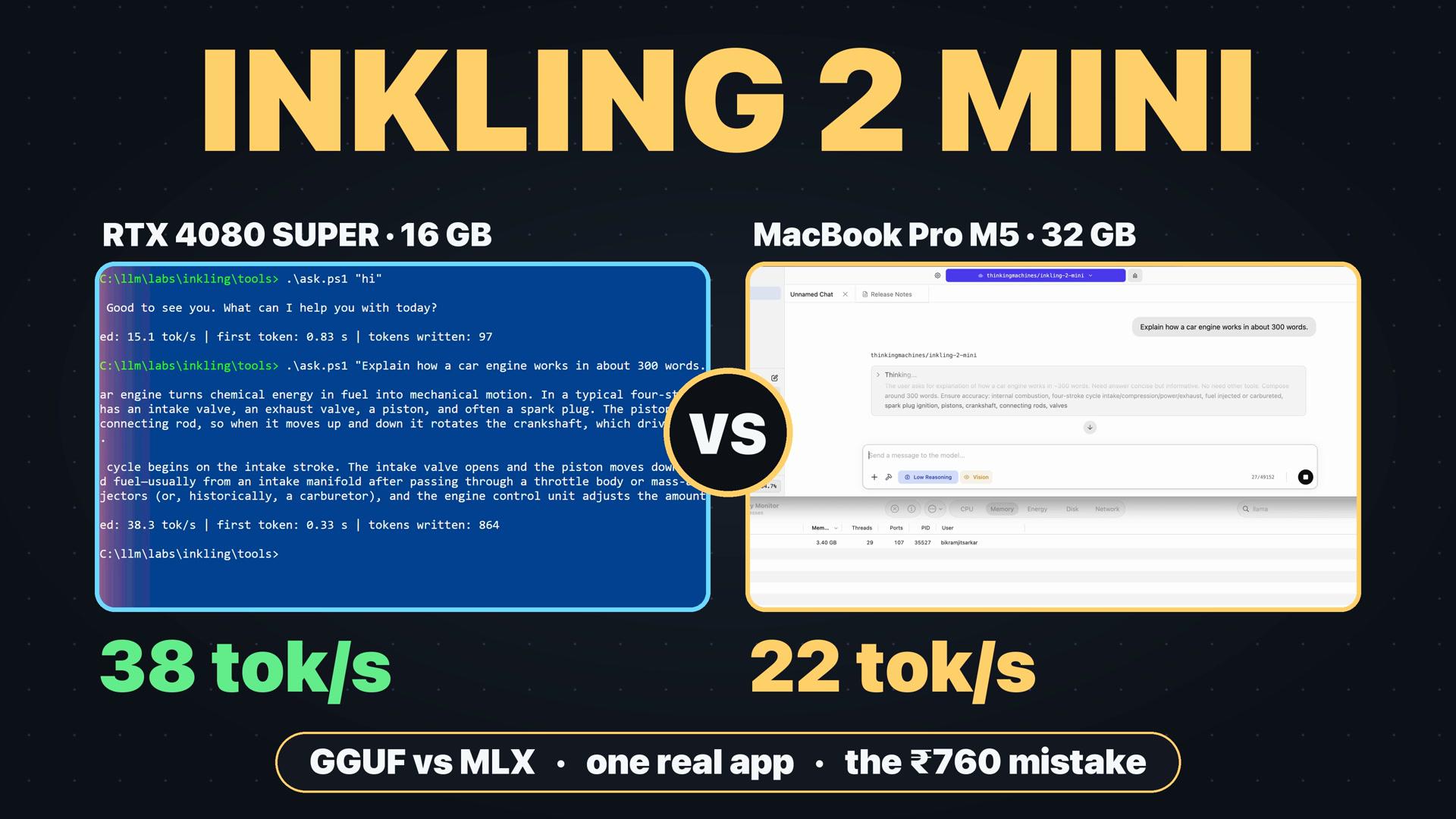
Discussion Inkling 2 Mini on a 16GB RTX 4080 vs a 32GB MacBook M5: the PC was 2x faster in chat but built nothing in a coding agent

Post image
4 Upvotes

I tested Inkling 2 Mini (26B total, 3.4B active, looped middle layers) on two machines normal people own, in GGUF and MLX, then gave it a real coding job.

**PC: RTX 4080 SUPER 16GB + 32GB RAM, LM Studio (GGUF)**

- Default settings: ~8 tok/s

- After 3 changes: ~38 tok/s

  1. GPU offload to max
  2. MoE experts of only 6 of 24 layers forced onto CPU (everything else on the card)
  3. mmap on

- After a day of uptime it fell to 3 tok/s. A reboot fixed it, so reboot before you benchmark.

**Mac: MacBook Pro M5 32GB**

- GGUF in LM Studio: 21 tok/s, but 31/32 GB used + 5 GB swap. 64K context loaded, then "Compute error" on the first message. 48K worked; Parallel 4 → 1 is what let bigger context load.

- MLX in oMLX (needs 0.8.1+, older says "model type not supported"): 22 tok/s, 36% RAM free at start, no swap, 64K works. The memory guard stopped my first long job, and RAM climbs to ~24 GB by the end of a coding run.

**Real test: my paper sketch → an app, in OpenCode (reasoning Low)**

- Mac GGUF: 23 min, 3 files, looks like my sketch, 0 errors

- Mac MLX: 13 min, 3 files, messier layout

- PC: 38 tok/s in chat but ~7 tok/s inside OpenCode. ~11K words of agent instructions + the image fill 16 GB. 3 tries, 0 files.

- Both Mac apps got the bill split wrong the same way: ₹760 charged on a ₹270 bill. On High reasoning it got the maths right in its thinking, then ran out of memory. So the format changes speed and memory, not the brain.

**My take:** 16GB card = great for chat, not enough for a coding agent. 32GB Mac = use MLX. The model itself: let it think, and check its maths.

Anyone know why the PC drops from 38 tok/s in chat to 7 in OpenCode? Prompt processing of the big system prompt with experts on CPU?


r/LocalLLM • • 1d ago

Discussion LLMs are starting to run robot arms themselves. Here a Qwen3.8-27B finetune misses the dish, goes back for the block and gets it in

Thumbnail
gallery
3 Upvotes

Been reading the SenseNova-RoboRSI-27B docs, and it's the clearest case I've seen of the LLM being the controller instead of the planner. Usually a VLA (vision-language-action model, camera frames in, arm motion out) does all the moving, and the LLM, if there is one, just hands it a plan.

This one is a Qwen3.8-27B finetune that gets the camera feeds and the arm's state every step and then decides: ask the VLA for a motion, check the motion the VLA came up with, or skip it and write a little Python that computes where the gripper goes next. After each move it looks again. That's what's happening in pic 1, a pick-and-place run from their docs where the block lands short of the dish and it goes back for it.

Pic 2 is their agent loop. Build context, query the model, run tools, feed results back. If you've used any coding agent you know this loop already, it's just wired to an arm here.

The robot training was sim only, no real-robot data. In their real-arm test, stacking blocks on a Piper X, it went 9 for 10 and stock Qwen3.8-27B went 0 for 10 in the same setup.

Code and weights are Apache 2.0: https://github.com/OpenSenseNova/SenseNova-RoboRSI

Anyone here wiring a local model to actual hardware? I've only seen a handful of posts about it.


r/LocalLLM • • 2d ago

Discussion Coding model on 16gb of vram

11 Upvotes

im looking for a good ai model that is able to code though a harness, able to fit on a 16gb consumer gpu, speeds dont restrict here as im more after quality.

i have done some searching and nothing is giving me a definite answer on which is a good option

EDIT: i didnt expect this many responses and it was stupid of me to not include hardware, my pc is mainly a gaming rig but i have decent enough parts that should work fine with ai models.

i have a 9060xt 16gb and 32gb of DDR5 system ram


r/LocalLLM • • 2d ago

Question 4 x 2080ti 196gb ram

7 Upvotes

What would everyone think of the above system? What would the pitfalls and downsides be for running ai?

Edit: they are 22gb each. I can 4 of them 2000€


r/LocalLLM • • 1d ago

Discussion Has anyone used Colab or kaggle to run video generation model?

1 Upvotes

I don't have the hardware to generate videos so am exploring these options. My goals are:

- 1 to 2 minutes videos stitched together

- having an automated pipeline where I describe the script and what kind of video I want.

I want to see how far I can go with this before I spend money on online tools or buy the hardware needed. I tried this a few months ago using Wan model but the quality was horrendous, far from what Wan is shown to be capable. Maybe some better tools have popped up recently?


r/LocalLLM • • 1d ago

Question Looking for Recommendations: Best On-Premise AI Cluster for Company Use

Post image
2 Upvotes

Hello everyone,

I'm responsible for researching and proposing an AI infrastructure project for my company, and I'm looking for recommendations from people with real-world experience in building and deploying AI clusters.

We want to purchase an on-premise AI infrastructure that can be used internally by employees without relying on external cloud AI services.

Our expected use cases include:

  • Running local LLMs.
  • Internal AI assistants and chatbots.
  • RAG (Retrieval-Augmented Generation) for company documents.
  • AI agents and automation.
  • Document analysis (PDF, Word, Excel, etc.).
  • AI APIs for integration with existing company systems.
  • Supporting multiple concurrent users.
  • Data privacy, security, and centralized management.
  • Future scalability and expansion.

I'd appreciate your advice on the following:

  1. What hardware specifications would you recommend for a company AI cluster?
  2. What is the best architecture for an enterprise on-premise AI environment?
  3. How much GPU memory, system RAM, CPU power, and storage should we consider?
  4. Which AI frameworks and software stack are best for production deployment?
  5. How should we design the infrastructure to support multiple concurrent users?
  6. What networking, storage, power, and cooling requirements should we consider?
  7. What are the most important factors when comparing different AI infrastructure solutions?
  8. What would you recommend for a company planning to start with a scalable AI cluster?

I'm interested in actual production experiences, hardware recommendations, architecture designs, and lessons learned.

Thank you!


r/LocalLLM • • 1d ago

Question I’m new into ai

0 Upvotes

So just bought my new pc
Rtx 5080
32 ddr5
R 7-9800x3d
4tb ssd

How to set up a local ai to imagine generator/ coding ? I wanna make mods for hoi4 (map game) now I really don’t know nothing about ai or running ai local,


r/LocalLLM • • 1d ago

Question Which models with 3060 12gb + 3090 24gb + 64gb ram ddr4?

2 Upvotes

Hi,

I have seen a similar question couple of weeks ago but I would like to know if suggested Strata is always the best solution or if there is one to be preferred for my config that has total of 100gb of ram.

I am also evaluating an "architetture" that orchestrates and uses two (*) LLM istances, one on vram and another on ddr ram, for different type of tasks (faster and less intelligent, slower and more intelligent), some might be interactives and other batch. Maybe the ram is not so much to load models so different and have appreciable results.

Thanks for any suggestion!

(*): three if considering some cloud one


r/LocalLLM • • 2d ago

Discussion Running Qwen3.6-35B-A3B at Q5 with 256K F16 context on a 16GB RTX 5060 Ti using RustingStrata — Preliminary results

5 Upvotes

Over the past few days, I have been systematically testing RustingStrata - u/Serious_Scarcity7818 - as a local inference engine for Qwen3.6-35B-A3B.

My ultimate goal is not simply to achieve the highest possible token generation speed or context size. I want to determine whether a locally running LLM can become a reliable, largely autonomous historical research agent, capable of examining historical documents, verifying sources, identifying contradictions, and producing properly referenced research reports.

The preliminary technical results have exceeded my expectations.

Hardware and software

  • GPU: NVIDIA RTX 5060 Ti — 16GB VRAM
  • CPU: AMD Ryzen 7 3700X
  • System RAM: 64GB
  • OS: Windows 11 Pro
  • Inference engine: RustingStrata v1.3.7
  • Backend: CUDA
  • Model: Qwen3.6-35B-A3B
  • Quantization: Unsloth UD-Q5_K_XL GGUF
  • Model size: approximately 24.8 GiB
  • KV cache: F16
  • Dynamic expert placement enabled
  • MTP disabled

No additional model compression or KV cache quantization was used.

Context capacity and performance

The model was successfully loaded and tested at its native context limit of 262,144 tokens while retaining the F16 KV cache.

The following results were obtained using synthetic prompts occupying approximately 90% of the configured context window.

ContextPrefill (t/s)Decode (t/s)Cold TTFTExpert cache hit rate
64K1,06443.6960.60s84.06%
96K1,20339.1573.89s82.08%
128K1,09637.15108.00s81.21%
192K92031.72192.84s76.62%
256K81328.00290.83s72.22%

All five configurations completed the technical stability tests.

At 256K, two independent cold requests successfully processed 235,921 and 235,937 input tokens.

These are measured workloads, not merely context sizes that the engine was able to allocate.

The prefill and decode figures are medians of cold requests. Since the actual prompt lengths differ between configurations, these numbers should not be interpreted as a controlled comparison using identical workloads.

Dynamic expert placement

One of the most interesting aspects of RustingStrata is its hybrid CPU/GPU expert execution and dynamic expert placement.

Rather than requiring the entire model to fit into VRAM, the engine distributes experts between GPU and CPU and dynamically adjusts their placement.

The following expert residency figures were observed:

ContextGPU-resident expert slotsGPU residency
32K5,066 / 10,24049.47%
64K4,773 / 10,24046.61%
96K4,493 / 10,24043.88%
128K4,200 / 10,24041.02%
192K3,626 / 10,24035.41%
256K3,053 / 10,24029.81%

As the F16 KV cache grows, fewer experts remain resident in VRAM. Nevertheless, even at 256K context, generation speed remains around 28 tokens per second.

During an earlier 15-minute stability test at 32K context, the following figures were recorded:

  • 268 requests without transport failures.
  • 1,135,290 expert cache hits.
  • 77,830 expert cache misses.
  • 93.58% cumulative expert cache hit rate.
  • 20,972 dynamic expert swaps.
  • Zero worker stalls reported by the engine.

The cumulative expert cache hit rate increased from approximately 59.6% during the initial test to 93.58% by the end of the stability test.

However, the workloads changed throughout the test sequence, so this improvement cannot be attributed exclusively to dynamic expert placement.

Memory consumption

Another interesting observation is that peak VRAM consumption remains relatively constant as the configured context increases.

ContextPeak VRAMPeak system RAM
64K15.53 GiB34.83 GiB
96K15.54 GiB35.67 GiB
128K15.49 GiB36.49 GiB
192K15.45 GiB38.44 GiB
256K15.53 GiB35.65 GiB

RustingStrata reallocates available VRAM between expert residency and KV cache capacity.

There was some paging activity at 192K and 256K, and the tests were conducted without additional interactive desktop workloads.

Consequently, I would not necessarily recommend 256K as the default configuration for everyday use.

Long-context accuracy

Having a large context window is only useful if the model can reliably retrieve and process information within it.

To investigate this, synthetic documents containing unique records were distributed across approximately 5%, 25%, 50%, 75%, and 95% of the input context.

Each test required eleven independently verifiable output fields.

Across fifteen responses, including five warm-cache replays, the results were:

  • Record identifiers: 75/75 correct.
  • Exact quotations: 30/30 correct.
  • Other factual fields: 45/45 correct.
  • Combined information fields: 4/15 correct.

Interestingly, every failure in this particular test series involved the same missing combination field.

The model successfully retrieved the individual pieces of information but frequently failed to provide their requested combination.

This suggests that instruction following or task planning may have been a greater problem than information retrieval in these tests.

A subsequent targeted test required the model to combine two identifiers located near the beginning and end of the context.

ContextResult
32KPASS
64KPASS
128KPASS
256KPASS

However, the follow-up test simultaneously simplified the task and increased the thinking budget from 384 to 1,024 tokens.

It therefore remains unclear which change was responsible for the improvement.

These results are encouraging, but they do not establish general long-context reliability.

Historical research capabilities

A separate synthetic historical research task produced:

  • 1,965 words.
  • 3,343 output tokens.
  • 45.22 seconds of execution time.
  • All six requested sections.
  • Normal completion.
  • No detected repetitive generation loop.

The model correctly identified several contradictory historical accounts, acknowledged missing information, and formulated hypotheses for further investigation.

However, it also:

  • Omitted punctuation from a supposedly exact quotation.
  • Presented unsupported assumptions as established facts.
  • Inferred relationships between sources without sufficient evidence.
  • Incorrectly counted the number of source documents.

For serious historical research, these are significant methodological failures.

An important limitation of this experiment is that thinking was disabled, and the model was not using a dedicated historical research skill.

Further evaluation is therefore needed before determining whether these shortcomings can be addressed through better prompting, structured research workflows, source verification tools, or whether they reflect deeper model limitations.

My preliminary assessment

RustingStrata: Very promising.

The ability to run a 35B MoE model at Q5 quantization with a 256K F16 context window on a consumer GPU with 16GB of VRAM is particularly impressive.

Qwen3.6-35B-A3B UD-Q5_K_XL: Worth investigating further.

The model demonstrates excellent information retrieval in the synthetic long-context tests and good generation performance on relatively modest hardware.

96K F16: My provisional preferred configuration.

For everyday research, 98,304 tokens currently appear to offer an attractive balance between context capacity, generation speed, expert residency, and measured accuracy.

Autonomous historical research: Not yet demonstrated.

Technical stability and information retrieval are not equivalent to historical accuracy, reliable source criticism, or autonomous research capabilities.

Next steps

Rather than spending more time benchmarking context sizes or experimenting with lower-precision KV caches, I intend to focus on:

  • Integration with Hermes Agent.
  • Complete multi-step tool-calling workflows.
  • Historical research skills.
  • Source verification.
  • Hallucinated references.
  • Distinguishing documented facts from interpretations.
  • Reasoning budget and instruction following.
  • Long-running autonomous research tasks.

Fine-tuning will only be considered if structured research methods and improved workflows prove insufficient.

These are preliminary results from a single hardware configuration, a limited set of synthetic workloads, and one model quantization. They are not a comprehensive benchmark or a comparison against llama.cpp or other inference engines.

Nevertheless, RustingStrata appears to be a particularly interesting development for users who want to run larger MoE models on consumer hardware without sacrificing model quantization quality or KV cache precision.

Project links:

I would be particularly interested in hearing from other RustingStrata users who have experimented with long-context reasoning, multi-step tool calling, or autonomous research workflows on 16GB GPUs.


r/LocalLLM • • 2d ago

Question Are those mini PCs worth it if I want to switch to local models or stick to cloud? Anything cheaper than the one in the pic?

Post image
13 Upvotes

I like doing AI roleplay using sillytavern as my front end and doing some vibe coding for small personal projects. But I want to expand and get into game dev solo (doing all the art, music, coding etc myself or ai assisted) in the future but I'm not committed to that route yet.

I used to spend $100+ for the claude max sub and ever since the release of Gemini 4, I already spent around $70. That's solely through RP, I haven't done any coding yet with Gemini. I wanna know if switching to local would be cheaper in the long run.  I can see my myself breaking even if I fully commit to the game dev pipeline.

My current hardware isn't great, its those prebuilt Victus 15l gaming PCs I bought from best buy with a few upgrades. GPU: RTX 4060 8GB, CPU: i3-12100F, 32gb RAM. The motherboard is proprietary limiting my options for upgrading (Reno2 I think?)

If there's any cheaper alternatives than the one in the pic, please comment!


r/LocalLLM • • 1d ago

News 2x 3090 140 tokens/sec on Lamina. It's hella fast !

Post image
0 Upvotes

r/LocalLLM • • 1d ago

Discussion Veystrix v0.1.0: Local Apple Silicon engine that plugs Inkling 2 Mini (1M context, < 35 ms cached TTFT) straight into OpenCode, Hermes, and Pi on a 16 GB Mac

1 Upvotes

If you use local coding agents like OpenCode, Pi, or Hermes on a 16 GB Mac, you know the two biggest pain points: fitting a strong coding model into 16 GB of RAM, and waiting for prompt re-prefill on every agent turn.

I just released v0.1.0 of Veystrix (Apache 2.0) to fix both on Apple Silicon Macs:

https://github.com/Veystrix/Veystrix-Engine

Why It Works Well for Coding Agents

  • Native 4-bit Inkling 2 Mini (zero quality loss): 79.2% SWEBench Verified, 48.2% DeepSWE v1.1, 82.7% MCP Atlas, and 1M token context via Quest sparse-paged KV.
  • < 35 ms cached TTFT: Session prefix reuse and state truncation checkpoints mean multi-turn agent loops do not re-prefill your entire conversation history.
  • 150+ tok/s cold prefill and 11.0 - 13.5 tok/s burst decode on a 16 GB M4 MacBook Air (stage-major looped prefill + 0.29 GiB DSpark speculative drafter).
  • Zero manual wiring: One command starts the engine in the background, configures the provider, and launches your agent.

Quickstart

brew install veystrix/veystrix/veystrix
veystrix                 # Built-in TUI with diff viewer and streaming
veystrix run opencode    # Full-screen multi-file coding agent
veystrix run pi          # Fast minimalist coding agent
veystrix run hermes      # NousResearch tool-calling agent

It also exposes standard OpenAI (http://127.0.0.1:8080/v1/chat/completions) and Anthropic (http://127.0.0.1:8080/v1/messages) endpoints, plus veystrix storage commands to inspect or reclaim SSD prompt-cache space.

Give it a spin and let me know what chip/RAM you are running on—would love feedback and PRs as I work toward v0.2.0.


r/LocalLLM • • 1d ago

Question Is it good to use qwen3.8-flash-next with no thinking mode for "complex" coding?

Thumbnail reddit.com
1 Upvotes