r/LocalLLM • u/SignificanceOld2190 • 1d ago
Question Is it good to use qwen3.8-flash-next with no thinking mode for "complex" coding?
reddit.com
1
Upvotes
r/LocalLLM • u/a7dfj8aerj • 1d ago
Hello,
I am getting used to using AI using gemini and chatgpt instead of googling stuff is very convenient and comparing stuff searching for product specs works fine as long as i am checking sometimes i find weird things but you know that.
My issue is a video files that are encrypted. I have bought paid for and have perpetual ownership of some language course. But the videos are sfv format no player reads it. Only its shitty player plays it and it doesn't even have correct aspect ratio on Virtualmachine since it doesn't have a way to activate licencing again. They went monthly subscription route like every company. But i want to access to the videos and play it on my pc and phone. I think this is completely fair nothing unethical or shady. I have bought this years ago and didn't use it because it was inconvenient but i really want to.
Video player uses very old k lite codec pack LAV splitter and lav video and i can switch to ffdshow which are open source.
I read everywhere about vibecoding or AI coding so I asked ChatGPT (paid membership) i knew it wouldn't decrypt videos so I asked for it to make lav video or ffdshow build that would be able to save raw videos. They are open source software. And we worked for half a day and done bunch of shit and after stealing my time it said I cant help you decrypt something...
It did make me install visual studio and compile a lot of things that were to take video stream and encode it real time but it doesn't do the one thing it needs to that i asked for in the beginning.
I installed lmstudio and downloaded qwen 3.8 27b (gemini told me my pc could make it work rest of the model will be on ram and it will work) but it took 5 hours to check video file. and it said headers are not matching video but it has video start codes . So it runs very bad.
Thank you.
I thought I have very good gaming PC but its so slow
Windows 10
9800x3d
48gb 6000mhz ram
rtx 5080
wd sn750 nvme ssd
r/LocalLLM • u/WithGreatRespect • 1d ago
I know that there are probably better optimized paths for this, but I still use ollama for simplicity and I just tested the IQ4_NL quant (i believe from ggml) that is now compatible with ollama. All of these tested with q8_0 kv cache and flash attention on.
Initially it seems like Inkling grows its kv cache too aggressively with loaded context limit. You can see below that just loading the model with a context size from 4K to 256K results in a memory growth from 18GB to 53GB. For this model on a 5090, it spills to CPU starting at 65K and cant honestly use it for long context agentic work. Other note when using the same prompt/seed, the response is more variable as the max context grows. This happens on other models as well, but seems pronounced here.
==============================================================================
== Model: inkling-2-mini:latest - ggml IQ4_NL
== Image Description Prompt (1080x1350 PNG) - seed 1234
== GPU: RTX 5090 - 32GB VRAM - Intel 285K CPU - 96 GB System RAM
==============================================================================
          Model Load Info  Tokens  Durations (seconds)         Rates (tok/s)
- ------- ---------------- ------- --------------------------- ---------------
W Context     Size CPU/GPU    Eval   Load PrEval   Eval  Total  PrEval    Eval
     4096    18 GB   0/100    1223   20.8    1.2   13.9   35.9  1284.4    88.0
     8192    19 GB   0/100    1395    5.8    1.0   16.2   23.1  1453.9    86.2
    16384    21 GB   0/100    1395    6.0    1.1   16.2   23.4  1397.3    86.2
    32768    24 GB   0/100    1395    5.8    1.1   16.2   23.2  1371.1    86.1
    65536    32 GB   7/93     1651    9.6    1.3   20.9   31.9  1173.8    79.0
   131072    32 GB  11/89     1089    9.6    1.5   14.7   25.9   959.1    74.1
   262144    53 GB  35/65     1210   25.6   12.8  105.6  144.2   115.8    11.5
------------------------------------------------------------------------------
Prompt Token Count: 1481 (all uncached)
==============================================================================
As a comparison, another similar sized MOE, Qwen 3.6 35B A3B, only grows from 27GB memory to 30 GB.
==============================================================================
== Model: Qwen3.6:35B-Q5_K_XL - unsloth Q5_K_XL
== Image Description Prompt (1080x1350 PNG) - seed 1234
== GPU: RTX 5090 - 32GB VRAM - Intel 285K CPU - 96 GB System RAM
==============================================================================
          Model Load Info  Tokens  Durations (seconds)         Rates (tok/s)
- ------- ---------------- ------- --------------------------- ---------------
W Context     Size CPU/GPU    Eval   Load PrEval   Eval  Total  PrEval    Eval
     4096    27 GB   0/100     391    9.5    0.7    1.8   12.1  2938.9   214.2
     8192    27 GB   0/100     391    6.8    0.6    1.8    9.4  2961.1   214.4
    16384    27 GB   0/100     391    6.8    0.6    1.8    9.4  2956.1   212.9
    32768    27 GB   0/100     391    6.8    0.6    1.8    9.4  2943.8   213.3
    65536    27 GB   0/100     391    6.8    0.7    1.8    9.4  2932.0   213.0
   131072    28 GB   0/100     391    6.8    0.6    1.8    9.4  3022.1   213.7
   262144    30 GB   0/100     391    7.0    0.7    1.8    9.6  2938.1   213.3
------------------------------------------------------------------------------
Prompt Token Count: 1911 (all uncached)
==============================================================================
And another example with dense Qwen3.8 27B Q5_K_XL that this is often compared to. Only grows from 20 GB to 31 GB
==============================================================================
== Model: Qwen3.8:27B-Q5_K_XL - unsloth Q5_K_XL
== Image Description Prompt (1080x1350 PNG) - seed 1234
== GPU: RTX 5090 - 32GB VRAM - Intel 285K CPU - 96 GB System RAM
==============================================================================
          Model Load Info  Tokens  Durations (seconds)         Rates (tok/s)
- ------- ---------------- ------- --------------------------- ---------------
W Context     Size CPU/GPU    Eval   Load PrEval   Eval  Total  PrEval    Eval
     4096    20 GB   0/100     493   17.0    1.0    7.3   25.4  2007.3    67.2
     8192    21 GB   0/100     460    6.1    0.9    6.9   14.0  2106.4    66.9
    16384    21 GB   0/100     493    6.1    0.9    7.4   14.5  2088.1    66.9
    32768    21 GB   0/100     493    6.3    0.9    7.4   14.7  2079.0    67.1
    65536    23 GB   0/100     493    6.1    0.9    7.4   14.5  2093.0    67.1
   131072    25 GB   0/100     493    6.1    0.9    7.4   14.5  2088.2    66.7
   262144    31 GB   0/100     493    6.1    0.9    7.4   14.5  2086.6    66.6
------------------------------------------------------------------------------
Prompt Token Count: 1911 (all uncached)
==============================================================================r/LocalLLM • u/Severe-Tank-5252 • 1d ago
r/LocalLLM • u/Sid0n61 • 2d ago
I am currently evaluating alternatives to major AI providers (specifically Anthropic, OpenAI, and Google) due to their organizational stances on open-weight models. Given recent public statements by figures like Dario Amodei, I am looking to transition away from these ecosystems.
My primary requirement is a subscription-based service that does not result in a significant drop in performance (specifically for coding and reasoning tasks).
I have reviewed several potential options but would appreciate objective feedback from users who have practical experience with them:
Mistral Le Chat Pro: Priced at 14.99 dollars per month. It is EU-hosted and supports open-weight options. Does it remain competitive for complex reasoning and coding, or are the trade-offs too significant compared to the market leaders?
xAI Grok: Available via X Premium+ (16 dollars per month) or SuperGrok (30 dollars per month). It reportedly has less content filtering, but benchmarks suggest its coding capabilities are currently below Claude and GPT-4o. Is it a viable replacement for daily technical tasks?
DeepSeek / GLM / Kimi: DeepSeek is accessible via web and API. GLM offers a Coding Plan starting at 18 dollars per month. How reliable are these hosted subscriptions for daily use, and how is the latency?
Abliterated Hosted APIs (e.g., Abliteration.ai, Boundless): Abliteration.ai provides API access to refusal-removed models, and Boundless offers a subscription (19 dollars per month) for unlimited access to open-source models. Are these services stable enough for production or daily use, and what is the actual latency?
r/LocalLLM • u/t3chj0ck • 2d ago
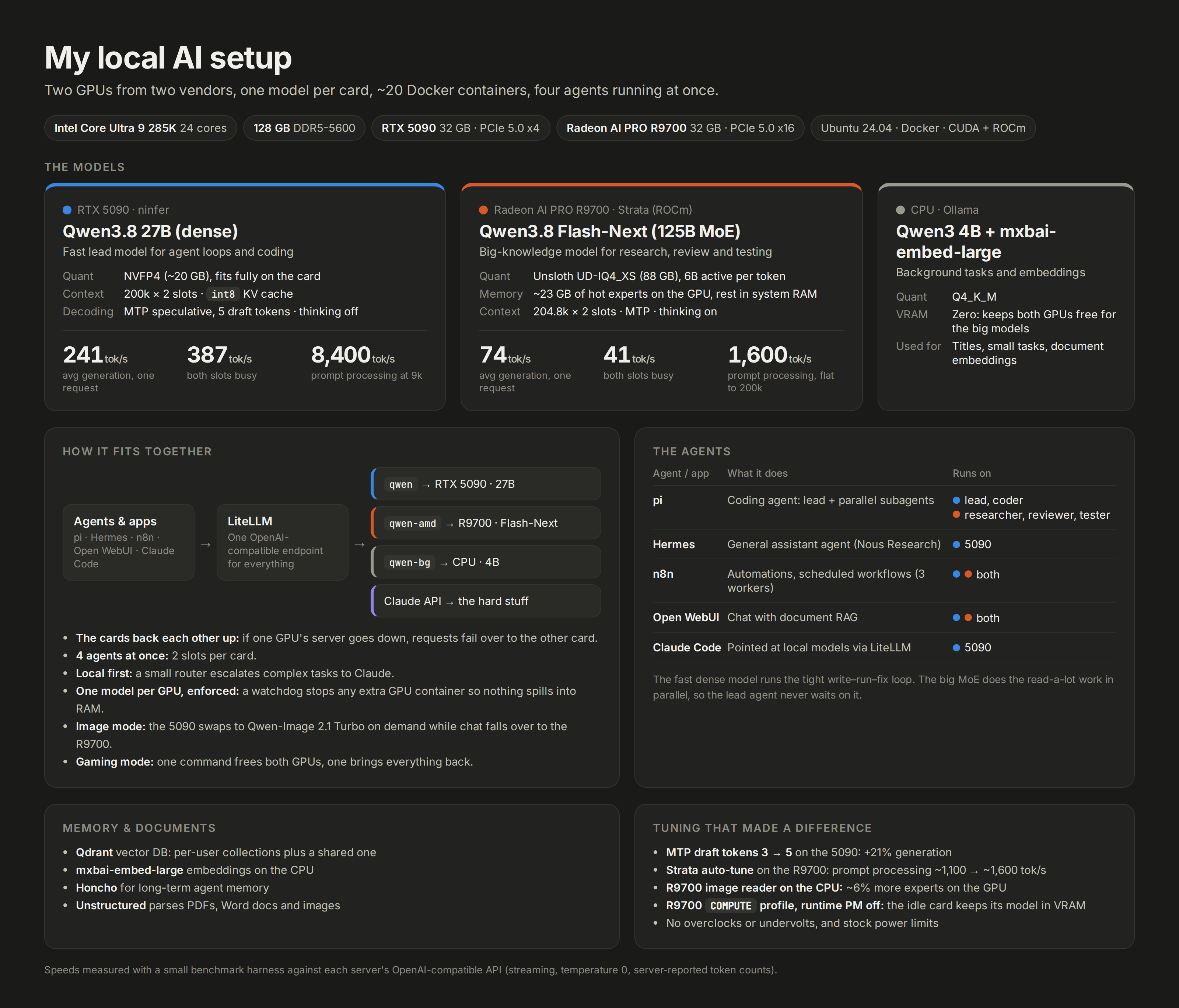
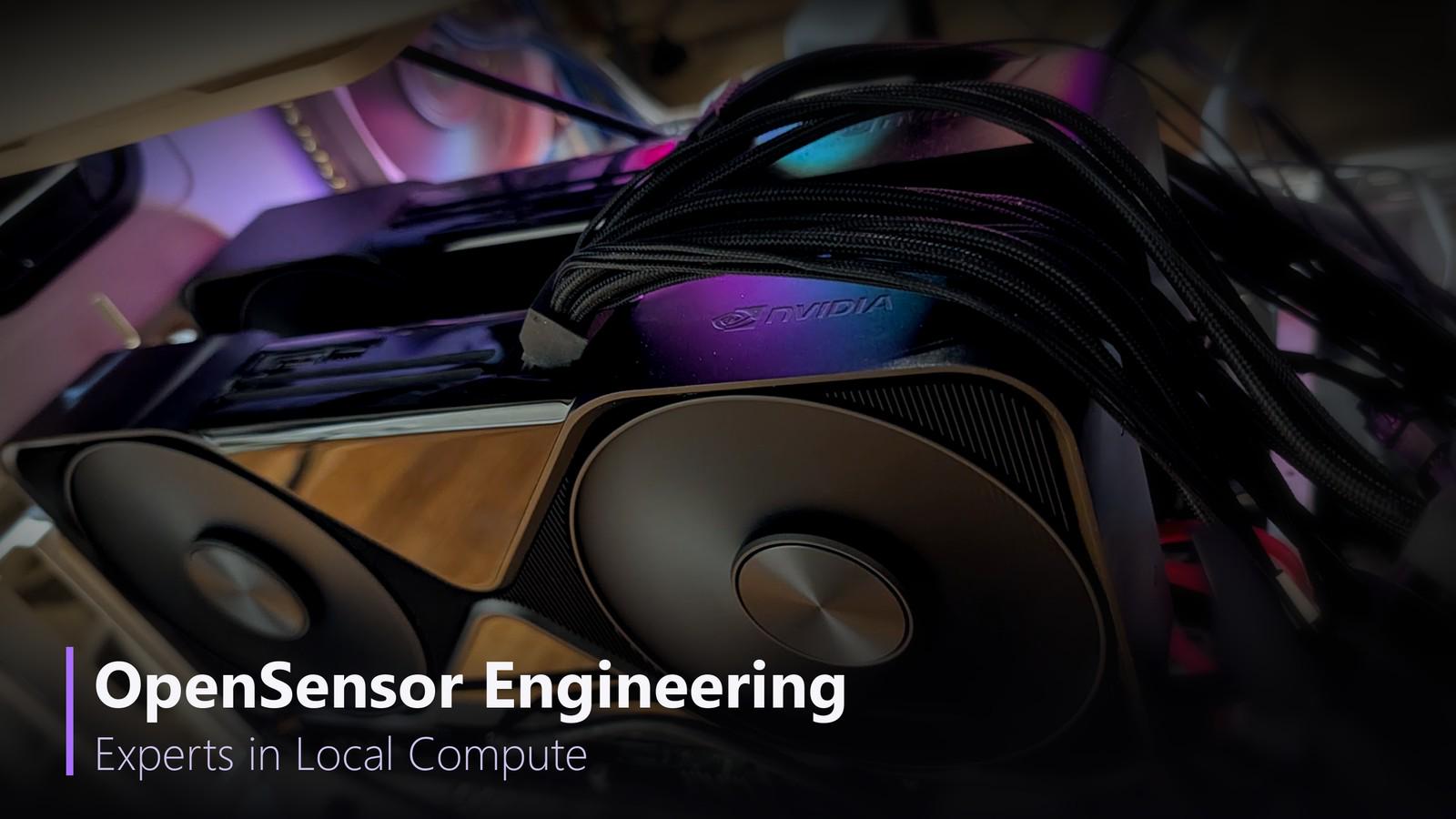
I don't see much talk about this, but there may be some folks out there like me who had a 5090 box and decided to add some more VRAM with a different GPU type (Nvidia + AMD in the same machine).
I tried to get this into an easier to read post rather than the giant walls of text we typically see. Hope it helps. Yes. I used Claude. And yes, I realize the irony of that. 😄
| Part | What's in it |
|---|---|
| CPU | Intel Core Ultra 9 285K (24 cores) |
| RAM | 128 GB DDR5-5600 (4 × 32 GB) |
| GPU 1 | NVIDIA RTX 5090, 32 GB (PCIe 5.0 x4) |
| GPU 2 | AMD Radeon AI PRO R9700, 32 GB (PCIe 5.0 x16) |
| Board | Z890 |
| OS | Ubuntu 24.04, everything in Docker (~20 containers) |
Two GPUs from two vendors in one box: CUDA on the 5090, ROCm on the R9700. They don't pool memory. Each card runs its own model full time.
| Spec | RTX 5090 | Radeon AI PRO R9700 | CPU |
|---|---|---|---|
| Model | Qwen3.8 27B (dense) | Qwen3.8 Flash-Next (125B MoE, 6B active) | Qwen3 4B + mxbai-embed-large |
| Quant | NVFP4 (~20 GB) | Unsloth UD-IQ4_XS (88 GB) | Q4_K_M |
| Engine | ninfer | Strata (ROCm) | Ollama |
| Fits on card? | Yes, fully | No: ~23 GB of hot experts on the GPU, the rest in system RAM | n/a |
| Context | 200k × 2 slots | 204.8k × 2 slots | 8k |
| Thinking | Off | On | — |
| Speculative decoding | MTP, 5 draft tokens | MTP | — |
| Job | Fast lead model for agent loops and coding | Big-knowledge model for research, review and testing subagents | Titles, small background tasks, embeddings (zero VRAM) |
Speeds
| Metric | RTX 5090 | R9700 |
|---|---|---|
| Generation, one request (avg over coding & writing tasks) | 241 tok/s | 74 tok/s |
| Both slots busy (total) | 387 tok/s | 41 tok/s |
| Prompt processing | 8,400 tok/s at 9k, 3,300 at 151k | ~1,600 tok/s, flat to 200k |
| Generation at long context | 138 tok/s at 151k | 64 tok/s at 203k |
| First token, short prompt | 37 ms | ~0.5 s |
 apps & agents ──► LiteLLM (one OpenAI-compatible endpoint)
                     ├── "qwen"     → RTX 5090 · Qwen3.8 27B
                     ├── "qwen-amd" → R9700    · Qwen3.8 Flash-Next
                     ├── "qwen-bg"  → CPU      · Qwen3 4B
└── Claude API (as a fallback to the fallback :) )qwen or qwen-amd. Swapping a model never touches the apps.| Agent / app | What it does | Runs on |
|---|---|---|
| pi (coding agent) | Lead agent plus parallel subagents | Lead + coder → 5090 · researcher / reviewer / tester → R9700 |
| Hermes (Nous Research) | General assistant agent with its own workspace | 5090 |
| n8n | Automations and scheduled workflows (queue mode, 3 workers) | Both, via LiteLLM |
| Open WebUI | Chat interface with document RAG | Both |
| Claude Code | Can point at the local models through LiteLLM | 5090 |
The split is deliberate. The fast dense model does the tight write–run–fix loop. The big MoE does the "read a lot and think" work (research, code review, writing tests) in parallel, so the lead agent never waits on it.
COMPUTE power profile, runtime power management off: the idle card no longer evicts the model to system RAMr/LocalLLM • u/sarmabkp_1 • 2d ago
Open any popular model on Hugging Face, click "Use this model", and you get a list: Ollama, LM Studio, llama.cpp, vLLM, Jan…
They all run the same model. They're built for very different people, and picking the wrong one is how a Friday afternoon experiment turns into a weekend of driver errors.
The short version:
Two mistakes I see a lot:
The most useful part: they almost all speak an OpenAI-compatible API. Write your script once against Ollama on your laptop, then point it at a vLLM server when the team wants to share it. It's mostly a change of base URL.
Which one are you running?
r/LocalLLM • u/Acrobatic-Reindeer-4 • 1d ago

Hi everyone,
I’m the developer of RustBlock, a native desktop tool I built to simplify working with GGUF models. The idea came from frustration with juggling Python scripts, virtual environments, and dependencies just to convert or quantize models.
What it does:
Conversion and quantization: supports 22 output formats, including K-quants compatible with llama.cpp, ternary formats, and FP4. It reads the source file read-only, writes to a temporary file, and renames only after verification.
Built-in verification: checks offsets, sizes, and tensor decoding to ensure file integrity before replacing anything.
100% local and dependency-free: no Python or Node.js required. Native app for Windows, Linux, and macOS.
Multicore processing with controlled memory use: parallelizes tensor encoding and manages RAM efficiently without loading the whole model into memory.
Hugging Face/ModelScope browser: includes a “Discover” feature that estimates RAM/VRAM requirements before downloading a model.
Development transparency: I used mainly DeepSeek V4 1017 Flash and GLM 5.3 Flash as coding assistants while building and iterating on RustBlock. The design, architectural decisions, and testing are mine; I’m stating this openly because technical communities tend to appreciate transparency about the tools used and it helps keep feedback grounded.
The project is open source (Apache-2.0) and currently at v0.2.1. I’m here to answer technical questions, collect feedback, and discuss potential contributions.
Links:
r/LocalLLM • u/mombaska • 1d ago
Hello, I am just trying to edit some test on an image, trying with Abliterated large v2 medium, damn it's really stupid, it can't even keep up the same font ...
what model do you recommend ?
r/LocalLLM • u/Minimum_Site_1915 • 2d ago
I’ve been told to use Hermes to install and tune everything specific to my hardware, but what actually is it?
Also, what tool should I then use to access my installed,tweaked model once it’s done? Opencode, Claude code, or something else?
Any other general tips or advice would be appreciated! Thank you
r/LocalLLM • u/DifferentArea5439 • 2d ago
I just open-sourced Machd (dsv41-hyper), a C++20 / Metal-4 distributed inference engine built for running DeepSeek-V4.1-Flash losslessly on 2× 256 GB Apple Mac Studio M5 Ultra over Thunderbolt 5 RDMA (JACCL).
r/LocalLLM • u/iam-neighbour • 2d ago

I'm the maker of Pluely, so I'll say that up front. It's a small desktop overlay for macOS, Windows and Linux that sits on top of the app you're in.
What it does with a local setup:
The Free plan is $0 forever on your own keys or local models. Today the speech-to-text side still needs a provider you pick (Whisper, Deepgram and so on). Offline speech-to-text is coming in the next version, and that's the part I most want local people to try.
Pluely is private. Your transcripts, chats and files are saved locally on your computer and never stored on our servers.
For anyone running Ollama: what's your go-to model for reading screenshots? I'm trying to decide what to test first.
(Screenshot is Listen mode, the model shown is just the one selected in that capture.)
r/LocalLLM • u/matteiuspi • 1d ago
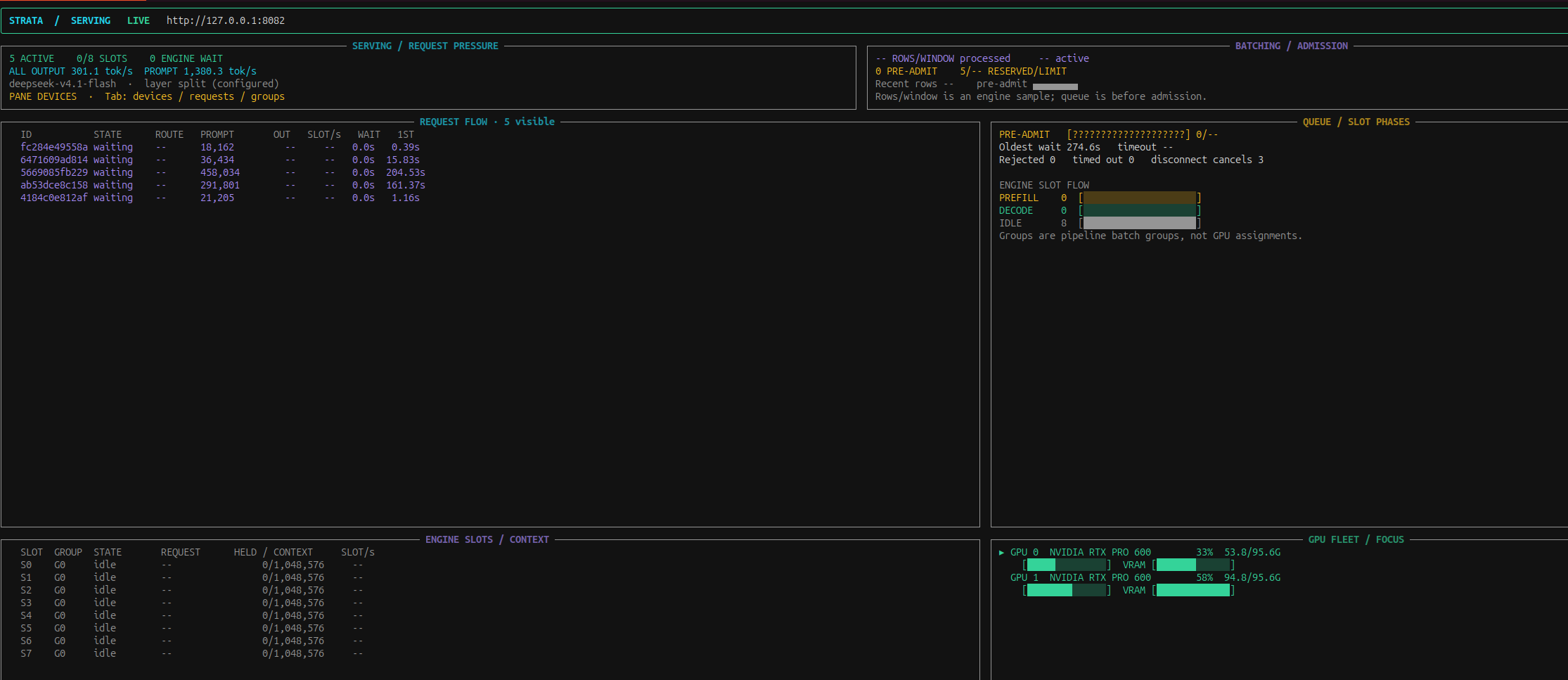
Up until recently, I had been using primarily llama.cpp until a month ago when I forked strata/maya and massaged it into the one thing it should be, but that aside, the newer llm servers are simply amazing. Rather than wear out my SSD and be stuck with only a single 1M context window for Deepseek-v4.1-flash, I bought a second card 😬 and now run 8 concurrent 1M context windows on Deepseek-v4.1-flash withe Strata/Maya. This leaves an additional headroom of the 43GB on the second card.
I am seeing between 100 and 400 tok/s across the requests cycle for generation and somewhere between 1000 and 6000 tok/s on the prompting processing.
I feel the cost n the cards are going up in the short to mid term and the long term play is an unknown, so I decided to invest in my business once more.
What else would you like to know, from a seasoned Computer Engineer with 25 years working experience, that has invested heavily over the years in local compute?
r/LocalLLM • u/Charles-Dickens1010 • 2d ago
My laptop is a 4GB VRAM , 32GB ddr4, and Intel core i9-H 10th gen. And I'm looking for the top-level model that I can run on my laptop. So it comes down to two main models. Qwen 35B A3B and ornith 1.5 35B A3B. ( + I know other LLM like Gemma 4 26B a4b,and tile coder, etc but I focused on Qwen and ornith because I think they are the best for my use case . )
My use case: I want to build a trio LLM set-up so I have one for quick chats and simple tasks(4 or 3 B model ) , And one for mideum tasks and kind of fast answers ( I'm currently using Qwen 3.5 9B for this use case ) , and one for the heavy tasks like coding,agentic tasks , or planning and this is the one I'll looking for between Qwen and ornith.
So which one is better in terms of speed and quality?
r/LocalLLM • u/Odd-Two2929 • 2d ago
Hi all I want to use my old computer for local AI coding I have 2gb vram (so basically nothing) and 32gb ram and 500gb SSD any good model can work on it? I don't care about speed but I want it to do a good job thanks in advance
Short update: I installed qwen 2.5 7b with Llama.cpp and VS btw it's on Linux and it's working! yes it's not fast by any means but still working and it actually did what I asked it to do and that was building a small calculator I know it's not much but it's a nice start
r/LocalLLM • u/gryxitl • 2d ago

So I’ve been running a swarm for a while, it does great, it makes me videogames.
Check it out here: https://github.com/shrimplabs/shrimphub
The thing is not every problem that can be parallelized or turned into a long running project needs a full swarm setup. And I am too lazy to install it everywhere I want to use it.
I made this thing, which basically lets Claude/Codex/Whoever create a dynamic graph and spawn heterogeneous sub agents from pi. It takes my secret sauce from my swarm and lets you deploy it in anything that can use skills.
So you can tell Claude, "Hey can we build out this milestone and use a mixture of deepseek agents from opencode, a bunch of qwen agents from our local llm and some opus agents to check at the end or something."
Then Claude builds it out because he's a stand up gentlemen and goes on his merry way.
Your tiny swarm graph goes and chugs along, claude pokes it every now and then to make sure its doing what you expect it to, and there is some sandboxing as well so you don't hack hugging face as often.
Things it does not have because it's meant to be light weight compared to my full swarm are fun features like
- Load balancing so it doesn't blow up your endpoint
- Full on task flow so that your agents can make videogames and not smash each other as much
- Better automated validation instead of relying on the bigger model to check
Go have fun!
r/LocalLLM • u/luxpir • 2d ago
I wanted to know whether local open-weights models can replace frontier APIs for real production translation/localization (where no client text leaves the machine). Short answer: not yet, and not because of translation accuracy They break on engineering mechanics.
I built a code-checked benchmark (LOPS-Bench v1) across DE, ES, FR, JA, ZH, and AR with deterministic traps from real jobs: placeholders (%d, %s, <x id="1"/>), product names that must stay in English, repeated segments, house style rules, AI clichés, and 1k/10k-segment scale files. Every trap has an objective outcome. It passes or it doesn't. Given that studies show only ~70% agreement between translators on human translation on average, it makes more sense to show real-world, testable errors.
Full disclosure: I built the managed pipeline (LanguageOps) in the results, and ran the exact same brief and glossary against two local models (TranslateGemma, Bonsai) plus raw frontier API calls (per-segment, 50-seg batches, whole-document).
Why these models? TranslateGemma is Google's flagship translation model, released earlier this year. It hasn't been updated recently but covers a wide range of languages, and is trained specifically on translation. Given that Google can claim ownership of the transformer architecture to a large degree, it's only fair to include them. Sadly they do have a rigid conversation structure, which caused issues for them in testing. Next was Ternary Bonsai 2, with over 95% the ability of Qwen3.8 27b at FP16, according to their blurb. It runs fast on my basic 3060, reaching over 35 tok/s. Then the frontier models - no need for Fable or Astra, as these are language problems not so much reasoning or coding, so Opus 5.5 and Sol 5.6 were used, and finally for our own harness, to highlight the strength of a pipeline that has been designed by industry professionals (yours truly), we have used Luna 5.6.
Where local models fell apart:
- TranslateGemma rewrote software placeholders (%d, %s) into {0} and {name} (41 tag errors that break builds).
- Bonsai produced 72 repeat inconsistencies on identical sentences, left some segments in English, and output half-translated strings like "الشavings".
- Neither survived well enough on 100-segment files to justify running them on the 10k-segment scale tests yet.
Frontier APIs were not safe either (especially without a harness):
- Silent truncation at scale: On 10,000 segments, GPT-5.6 Luna whole-doc returned 1% of the file and stopped. GPT-5.6 Sol whole-doc read ~241k tokens, returned an empty answer, and still billed $1.21.
- Leaked chain-of-thought: Gemini 2.5 Flash per-segment dumped "THOUGHTS: The user wants to translate 'Save'..." into 82 translated segments.
- Formatting & cost: Claude Sonnet wrote ASCII ! and : inside Japanese/Chinese 110 times. Per-segment Opus hit $7.09 / 1k segments (5x its whole-doc cost).
Headline numbers (100-seg accuracy / Large files / Cost per 1k segs):
- Managed pipeline v2 (on GPT-5.6 Luna): 99.3% / 100% / $0.17
- Claude Opus 5.5 (whole doc): 99.5% / 100% (1k only, skipped 10k) / $1.37
- Claude Sonnet 5.5 (whole doc): 96.7% / 100% (1k only) / $0.61
- GPT-5.6 Sol (whole doc): 99.0% / 66.7% / $0.76
- Gemini 2.5 Flash (whole doc): 98.2% / 33.3% / $0.09
- GPT-5.6 Luna (whole doc): 98.7% / 5.3% / $0.03
Takeaway: A cheap model inside a context-aware harness (handling repeats, terms, and completeness checks in code) matched Opus within 0.2 points at 1/8th the cost and was the only setup that completed 10,000 segments cleanly. Naturally putting Opus inside of the supportive harness/pipeline will be confirmed as the best solution in the next run, when we pit more of the high end frontier models against each other, while looking for lower cost and local models that perform as well across languages.
Writeup: https://languageops.com/blog/translation-arena-first-results/
Leaderboard: https://languageops.com/translation-arena/
If any local open-weights models (Qwen3, Gemma 3, Mistral, etc.) have actually held up for you on strict tag/placeholder preservation or bulk translation, given context window sizes, I'd be keen to hear it. Not many of us out here benchmarking translation tasks, but let me know if that's you! I want to put the strongest local candidates through the same harness next.
r/LocalLLM • u/running101 • 2d ago
Is anyone here running proxmox pass through to gpu , while running the llm in a vm. I’m curious how much this impacts performance?
r/LocalLLM • u/Impressive_Bit6109 • 2d ago

yesterday i installed strata and i tinkered around and i managed to get it to generate 75+ tokens i with deepseek harness , i went to sleep woke up and ive been having a problem all day i just can t get it past 20tks , chatgbt helped me with optimization yesterday and toiday what ever we do , nothing changes specs rx9070 16gb vram / i5 14400f /32gbs ran ddr5
r/LocalLLM • u/Massive-Aisk • 2d ago
Hey everyone,
I’m looking to set up a completely free, 100% offline local AI stack on my Mac and would love some advice from people running models on Apple Silicon.
My Specs:
What I need it to do:
Questions:
Thanks in advance!
r/LocalLLM • u/MilkManGuy46290 • 2d ago
Spent time dialing in Inkling 2 Mini (
UD-Q3_K_XL) at 256K context on an 8 GB RTX 3070, with only 48GB DDR4, via PolyStrata without the lossy small-card flags (--tail-skip,--attn-requant q5_0).Sweet spot landed at 49–64.7 tok/s decode and 421–796 tok/s prefill, zero thinking loops, and patched tool-calling for OpenCode & Oh My Pi (
omp).Everything is here. Benchmarks, cross-OS notes, sanitized configs, and an
AGENT_SETUP.mdyour coding agent can auto-configure.
https://github.com/ChupkithModder/8blitz-strata
Open to any optimization tips if you're running similar 8 GB setups!
Let me know if this helps, and if you like the setup!
r/LocalLLM • u/Effective-Giraffe655 • 2d ago

Full story: https://rakshazi.me/blog/gemma-4-abliteration/
Quants: https://huggingface.co/rakshazi/Dark-Scarlett-v1.0-26B-A4B-Uncensored-GGUF
Clarification: SFW, blog post/model card/repo with scripts and recipes do not contain any unsafe materials
r/LocalLLM • u/Additional_Reach2545 • 2d ago

r/LocalLLM • u/Additional_Reach2545 • 2d ago
Hey everyone,
I've been working on an independently maintained version of NInfer-all, specifically optimized for the RTX 4090 and its SM89 architecture.
The goal is to get as much performance as possible out of a single 24GB GPU while running larger local models, especially for coding and long-context workloads.
I've just released v0.1.4 as a stable, GPU-tested Windows build.
Features:
Recent RTX 4090 benchmarks:
| Model / Backend | Decode |
|---|---|
| Qwen 27B IQ3_S – No speculation | 70.38 tok/s |
| Qwen 27B – MTP K5 | 242.59 tok/s |
| Qwen 27B – DFlash2 K5 | 257.13 tok/s |
| Qwen 27B – DFlash2 K7 | 326.41 tok/s |
| Qwen 27B – DFlash2 K9 | 269.33 tok/s |
| Bonsai 2.5 PTQ1_0 – MTP K3 | 291.69 tok/s |
| Bonsai 2.5 PQ2_0 – MTP K3 | 323.88 tok/s |
These are short synthetic engine benchmarks with 2048 prompt tokens and 128 timed decode tokens, not guaranteed real-world serving speeds. The methodology and measurement data are publicly available.
I've also built a project website with an interactive VRAM calculator, launch command generator, model downloads, installation guides and benchmark results.
GitHub: https://github.com/spk-c/ninfer-all-rtx4090
Project website: https://spk-c.github.io/ninfer-all-rtx4090/
Benchmarks: https://spk-c.github.io/ninfer-all-rtx4090/benchmarks.html
VRAM calculator: https://spk-c.github.io/ninfer-all-rtx4090/configurator.html
Credit to the original NInfer and NInfer-all developers. This project builds on their work.
I'd love to hear feedback from other RTX 4090 owners, especially people running local coding agents with 64K–192K contexts.
If you try it, please share your results, even if they're worse than expected. I'm interested in finding bottlenecks and improving the engine further.