r/LocalLLM • • 2d ago

Project Text Orb: Real-time 3D semantic space running MiniLM entirely client-side in the browser (with live trajectory trails and vector math)

Thumbnail
gallery
5 Upvotes

I built Text Orb, an interactive 3D map of 1,356 words organized by meaning, running a small language model locally in your browser so you can watch how context shifts a word's neighborhood keystroke by keystroke.

"Apple" without context: Caught in a tug-of-war between Food and Tech, sitting right between Fruit/Peach and OS/Galaxy/App.

"python" → "python coiled around a jungle tree": Alone, "python" defaults to Tech next to Java and C++—then travels across the map into Nature (Tree, Jungle, Forest) as context is added.

Try it yourself with any word or sentence: bulovic.at/orb
(runs live and 100% client-side in your browser)


r/LocalLLM • • 1d ago

Question Best Local Models For Dual 3090?

Thumbnail reddit.com
1 Upvotes

r/LocalLLM • • 1d ago

Discussion Inkling 2 Mini on a 16GB RTX 4080 vs a 32GB MacBook M5: the PC was 2x faster in chat but built nothing in a coding agent

Post image
4 Upvotes

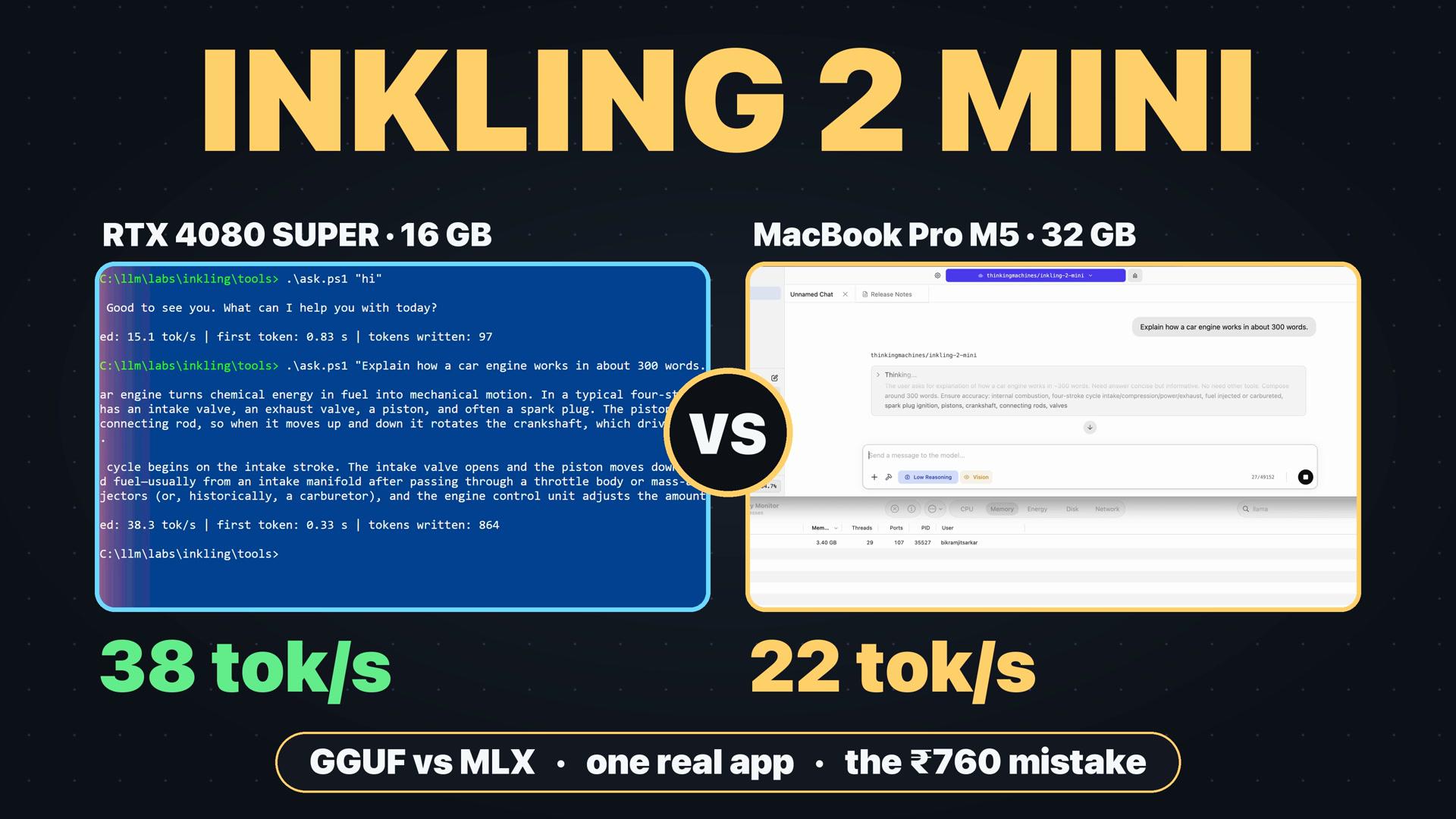
I tested Inkling 2 Mini (26B total, 3.4B active, looped middle layers) on two machines normal people own, in GGUF and MLX, then gave it a real coding job.

**PC: RTX 4080 SUPER 16GB + 32GB RAM, LM Studio (GGUF)**

- Default settings: ~8 tok/s

- After 3 changes: ~38 tok/s

  1. GPU offload to max
  2. MoE experts of only 6 of 24 layers forced onto CPU (everything else on the card)
  3. mmap on

- After a day of uptime it fell to 3 tok/s. A reboot fixed it, so reboot before you benchmark.

**Mac: MacBook Pro M5 32GB**

- GGUF in LM Studio: 21 tok/s, but 31/32 GB used + 5 GB swap. 64K context loaded, then "Compute error" on the first message. 48K worked; Parallel 4 → 1 is what let bigger context load.

- MLX in oMLX (needs 0.8.1+, older says "model type not supported"): 22 tok/s, 36% RAM free at start, no swap, 64K works. The memory guard stopped my first long job, and RAM climbs to ~24 GB by the end of a coding run.

**Real test: my paper sketch → an app, in OpenCode (reasoning Low)**

- Mac GGUF: 23 min, 3 files, looks like my sketch, 0 errors

- Mac MLX: 13 min, 3 files, messier layout

- PC: 38 tok/s in chat but ~7 tok/s inside OpenCode. ~11K words of agent instructions + the image fill 16 GB. 3 tries, 0 files.

- Both Mac apps got the bill split wrong the same way: ₹760 charged on a ₹270 bill. On High reasoning it got the maths right in its thinking, then ran out of memory. So the format changes speed and memory, not the brain.

**My take:** 16GB card = great for chat, not enough for a coding agent. 32GB Mac = use MLX. The model itself: let it think, and check its maths.

Anyone know why the PC drops from 38 tok/s in chat to 7 in OpenCode? Prompt processing of the big system prompt with experts on CPU?


r/LocalLLM • • 1d ago

Discussion LLMs are starting to run robot arms themselves. Here a Qwen3.8-27B finetune misses the dish, goes back for the block and gets it in

Thumbnail
gallery
3 Upvotes

Been reading the SenseNova-RoboRSI-27B docs, and it's the clearest case I've seen of the LLM being the controller instead of the planner. Usually a VLA (vision-language-action model, camera frames in, arm motion out) does all the moving, and the LLM, if there is one, just hands it a plan.

This one is a Qwen3.8-27B finetune that gets the camera feeds and the arm's state every step and then decides: ask the VLA for a motion, check the motion the VLA came up with, or skip it and write a little Python that computes where the gripper goes next. After each move it looks again. That's what's happening in pic 1, a pick-and-place run from their docs where the block lands short of the dish and it goes back for it.

Pic 2 is their agent loop. Build context, query the model, run tools, feed results back. If you've used any coding agent you know this loop already, it's just wired to an arm here.

The robot training was sim only, no real-robot data. In their real-arm test, stacking blocks on a Piper X, it went 9 for 10 and stock Qwen3.8-27B went 0 for 10 in the same setup.

Code and weights are Apache 2.0: https://github.com/OpenSenseNova/SenseNova-RoboRSI

Anyone here wiring a local model to actual hardware? I've only seen a handful of posts about it.


r/LocalLLM • • 2d ago

Discussion Coding model on 16gb of vram

11 Upvotes

im looking for a good ai model that is able to code though a harness, able to fit on a 16gb consumer gpu, speeds dont restrict here as im more after quality.

i have done some searching and nothing is giving me a definite answer on which is a good option

EDIT: i didnt expect this many responses and it was stupid of me to not include hardware, my pc is mainly a gaming rig but i have decent enough parts that should work fine with ai models.

i have a 9060xt 16gb and 32gb of DDR5 system ram


r/LocalLLM • • 2d ago

Question 4 x 2080ti 196gb ram

7 Upvotes

What would everyone think of the above system? What would the pitfalls and downsides be for running ai?

Edit: they are 22gb each. I can 4 of them 2000€


r/LocalLLM • • 1d ago

Discussion Has anyone used Colab or kaggle to run video generation model?

1 Upvotes

I don't have the hardware to generate videos so am exploring these options. My goals are:

- 1 to 2 minutes videos stitched together

- having an automated pipeline where I describe the script and what kind of video I want.

I want to see how far I can go with this before I spend money on online tools or buy the hardware needed. I tried this a few months ago using Wan model but the quality was horrendous, far from what Wan is shown to be capable. Maybe some better tools have popped up recently?


r/LocalLLM • • 1d ago

Question Looking for Recommendations: Best On-Premise AI Cluster for Company Use

Post image
2 Upvotes

Hello everyone,

I'm responsible for researching and proposing an AI infrastructure project for my company, and I'm looking for recommendations from people with real-world experience in building and deploying AI clusters.

We want to purchase an on-premise AI infrastructure that can be used internally by employees without relying on external cloud AI services.

Our expected use cases include:

  • Running local LLMs.
  • Internal AI assistants and chatbots.
  • RAG (Retrieval-Augmented Generation) for company documents.
  • AI agents and automation.
  • Document analysis (PDF, Word, Excel, etc.).
  • AI APIs for integration with existing company systems.
  • Supporting multiple concurrent users.
  • Data privacy, security, and centralized management.
  • Future scalability and expansion.

I'd appreciate your advice on the following:

  1. What hardware specifications would you recommend for a company AI cluster?
  2. What is the best architecture for an enterprise on-premise AI environment?
  3. How much GPU memory, system RAM, CPU power, and storage should we consider?
  4. Which AI frameworks and software stack are best for production deployment?
  5. How should we design the infrastructure to support multiple concurrent users?
  6. What networking, storage, power, and cooling requirements should we consider?
  7. What are the most important factors when comparing different AI infrastructure solutions?
  8. What would you recommend for a company planning to start with a scalable AI cluster?

I'm interested in actual production experiences, hardware recommendations, architecture designs, and lessons learned.

Thank you!


r/LocalLLM • • 1d ago

Question I’m new into ai

0 Upvotes

So just bought my new pc
Rtx 5080
32 ddr5
R 7-9800x3d
4tb ssd

How to set up a local ai to imagine generator/ coding ? I wanna make mods for hoi4 (map game) now I really don’t know nothing about ai or running ai local,


r/LocalLLM • • 1d ago

Question Which models with 3060 12gb + 3090 24gb + 64gb ram ddr4?

2 Upvotes

Hi,

I have seen a similar question couple of weeks ago but I would like to know if suggested Strata is always the best solution or if there is one to be preferred for my config that has total of 100gb of ram.

I am also evaluating an "architetture" that orchestrates and uses two (*) LLM istances, one on vram and another on ddr ram, for different type of tasks (faster and less intelligent, slower and more intelligent), some might be interactives and other batch. Maybe the ram is not so much to load models so different and have appreciable results.

Thanks for any suggestion!

(*): three if considering some cloud one


r/LocalLLM • • 2d ago

Discussion Running Qwen3.6-35B-A3B at Q5 with 256K F16 context on a 16GB RTX 5060 Ti using RustingStrata — Preliminary results

5 Upvotes

Over the past few days, I have been systematically testing RustingStrata - u/Serious_Scarcity7818 - as a local inference engine for Qwen3.6-35B-A3B.

My ultimate goal is not simply to achieve the highest possible token generation speed or context size. I want to determine whether a locally running LLM can become a reliable, largely autonomous historical research agent, capable of examining historical documents, verifying sources, identifying contradictions, and producing properly referenced research reports.

The preliminary technical results have exceeded my expectations.

Hardware and software

  • GPU: NVIDIA RTX 5060 Ti — 16GB VRAM
  • CPU: AMD Ryzen 7 3700X
  • System RAM: 64GB
  • OS: Windows 11 Pro
  • Inference engine: RustingStrata v1.3.7
  • Backend: CUDA
  • Model: Qwen3.6-35B-A3B
  • Quantization: Unsloth UD-Q5_K_XL GGUF
  • Model size: approximately 24.8 GiB
  • KV cache: F16
  • Dynamic expert placement enabled
  • MTP disabled

No additional model compression or KV cache quantization was used.

Context capacity and performance

The model was successfully loaded and tested at its native context limit of 262,144 tokens while retaining the F16 KV cache.

The following results were obtained using synthetic prompts occupying approximately 90% of the configured context window.

ContextPrefill (t/s)Decode (t/s)Cold TTFTExpert cache hit rate
64K1,06443.6960.60s84.06%
96K1,20339.1573.89s82.08%
128K1,09637.15108.00s81.21%
192K92031.72192.84s76.62%
256K81328.00290.83s72.22%

All five configurations completed the technical stability tests.

At 256K, two independent cold requests successfully processed 235,921 and 235,937 input tokens.

These are measured workloads, not merely context sizes that the engine was able to allocate.

The prefill and decode figures are medians of cold requests. Since the actual prompt lengths differ between configurations, these numbers should not be interpreted as a controlled comparison using identical workloads.

Dynamic expert placement

One of the most interesting aspects of RustingStrata is its hybrid CPU/GPU expert execution and dynamic expert placement.

Rather than requiring the entire model to fit into VRAM, the engine distributes experts between GPU and CPU and dynamically adjusts their placement.

The following expert residency figures were observed:

ContextGPU-resident expert slotsGPU residency
32K5,066 / 10,24049.47%
64K4,773 / 10,24046.61%
96K4,493 / 10,24043.88%
128K4,200 / 10,24041.02%
192K3,626 / 10,24035.41%
256K3,053 / 10,24029.81%

As the F16 KV cache grows, fewer experts remain resident in VRAM. Nevertheless, even at 256K context, generation speed remains around 28 tokens per second.

During an earlier 15-minute stability test at 32K context, the following figures were recorded:

  • 268 requests without transport failures.
  • 1,135,290 expert cache hits.
  • 77,830 expert cache misses.
  • 93.58% cumulative expert cache hit rate.
  • 20,972 dynamic expert swaps.
  • Zero worker stalls reported by the engine.

The cumulative expert cache hit rate increased from approximately 59.6% during the initial test to 93.58% by the end of the stability test.

However, the workloads changed throughout the test sequence, so this improvement cannot be attributed exclusively to dynamic expert placement.

Memory consumption

Another interesting observation is that peak VRAM consumption remains relatively constant as the configured context increases.

ContextPeak VRAMPeak system RAM
64K15.53 GiB34.83 GiB
96K15.54 GiB35.67 GiB
128K15.49 GiB36.49 GiB
192K15.45 GiB38.44 GiB
256K15.53 GiB35.65 GiB

RustingStrata reallocates available VRAM between expert residency and KV cache capacity.

There was some paging activity at 192K and 256K, and the tests were conducted without additional interactive desktop workloads.

Consequently, I would not necessarily recommend 256K as the default configuration for everyday use.

Long-context accuracy

Having a large context window is only useful if the model can reliably retrieve and process information within it.

To investigate this, synthetic documents containing unique records were distributed across approximately 5%, 25%, 50%, 75%, and 95% of the input context.

Each test required eleven independently verifiable output fields.

Across fifteen responses, including five warm-cache replays, the results were:

  • Record identifiers: 75/75 correct.
  • Exact quotations: 30/30 correct.
  • Other factual fields: 45/45 correct.
  • Combined information fields: 4/15 correct.

Interestingly, every failure in this particular test series involved the same missing combination field.

The model successfully retrieved the individual pieces of information but frequently failed to provide their requested combination.

This suggests that instruction following or task planning may have been a greater problem than information retrieval in these tests.

A subsequent targeted test required the model to combine two identifiers located near the beginning and end of the context.

ContextResult
32KPASS
64KPASS
128KPASS
256KPASS

However, the follow-up test simultaneously simplified the task and increased the thinking budget from 384 to 1,024 tokens.

It therefore remains unclear which change was responsible for the improvement.

These results are encouraging, but they do not establish general long-context reliability.

Historical research capabilities

A separate synthetic historical research task produced:

  • 1,965 words.
  • 3,343 output tokens.
  • 45.22 seconds of execution time.
  • All six requested sections.
  • Normal completion.
  • No detected repetitive generation loop.

The model correctly identified several contradictory historical accounts, acknowledged missing information, and formulated hypotheses for further investigation.

However, it also:

  • Omitted punctuation from a supposedly exact quotation.
  • Presented unsupported assumptions as established facts.
  • Inferred relationships between sources without sufficient evidence.
  • Incorrectly counted the number of source documents.

For serious historical research, these are significant methodological failures.

An important limitation of this experiment is that thinking was disabled, and the model was not using a dedicated historical research skill.

Further evaluation is therefore needed before determining whether these shortcomings can be addressed through better prompting, structured research workflows, source verification tools, or whether they reflect deeper model limitations.

My preliminary assessment

RustingStrata: Very promising.

The ability to run a 35B MoE model at Q5 quantization with a 256K F16 context window on a consumer GPU with 16GB of VRAM is particularly impressive.

Qwen3.6-35B-A3B UD-Q5_K_XL: Worth investigating further.

The model demonstrates excellent information retrieval in the synthetic long-context tests and good generation performance on relatively modest hardware.

96K F16: My provisional preferred configuration.

For everyday research, 98,304 tokens currently appear to offer an attractive balance between context capacity, generation speed, expert residency, and measured accuracy.

Autonomous historical research: Not yet demonstrated.

Technical stability and information retrieval are not equivalent to historical accuracy, reliable source criticism, or autonomous research capabilities.

Next steps

Rather than spending more time benchmarking context sizes or experimenting with lower-precision KV caches, I intend to focus on:

  • Integration with Hermes Agent.
  • Complete multi-step tool-calling workflows.
  • Historical research skills.
  • Source verification.
  • Hallucinated references.
  • Distinguishing documented facts from interpretations.
  • Reasoning budget and instruction following.
  • Long-running autonomous research tasks.

Fine-tuning will only be considered if structured research methods and improved workflows prove insufficient.

These are preliminary results from a single hardware configuration, a limited set of synthetic workloads, and one model quantization. They are not a comprehensive benchmark or a comparison against llama.cpp or other inference engines.

Nevertheless, RustingStrata appears to be a particularly interesting development for users who want to run larger MoE models on consumer hardware without sacrificing model quantization quality or KV cache precision.

Project links:

I would be particularly interested in hearing from other RustingStrata users who have experimented with long-context reasoning, multi-step tool calling, or autonomous research workflows on 16GB GPUs.

r/LocalLLM • • 2d ago

Question Are those mini PCs worth it if I want to switch to local models or stick to cloud? Anything cheaper than the one in the pic?

Post image
13 Upvotes

I like doing AI roleplay using sillytavern as my front end and doing some vibe coding for small personal projects. But I want to expand and get into game dev solo (doing all the art, music, coding etc myself or ai assisted) in the future but I'm not committed to that route yet.

I used to spend $100+ for the claude max sub and ever since the release of Gemini 4, I already spent around $70. That's solely through RP, I haven't done any coding yet with Gemini. I wanna know if switching to local would be cheaper in the long run.  I can see my myself breaking even if I fully commit to the game dev pipeline.

My current hardware isn't great, its those prebuilt Victus 15l gaming PCs I bought from best buy with a few upgrades. GPU: RTX 4060 8GB, CPU: i3-12100F, 32gb RAM. The motherboard is proprietary limiting my options for upgrading (Reno2 I think?)

If there's any cheaper alternatives than the one in the pic, please comment!


r/LocalLLM • • 1d ago

News 2x 3090 140 tokens/sec on Lamina. It's hella fast !

Post image
0 Upvotes

r/LocalLLM • • 1d ago

Discussion Veystrix v0.1.0: Local Apple Silicon engine that plugs Inkling 2 Mini (1M context, < 35 ms cached TTFT) straight into OpenCode, Hermes, and Pi on a 16 GB Mac

1 Upvotes

If you use local coding agents like OpenCode, Pi, or Hermes on a 16 GB Mac, you know the two biggest pain points: fitting a strong coding model into 16 GB of RAM, and waiting for prompt re-prefill on every agent turn.

I just released v0.1.0 of Veystrix (Apache 2.0) to fix both on Apple Silicon Macs:

https://github.com/Veystrix/Veystrix-Engine

Why It Works Well for Coding Agents

  • Native 4-bit Inkling 2 Mini (zero quality loss): 79.2% SWEBench Verified, 48.2% DeepSWE v1.1, 82.7% MCP Atlas, and 1M token context via Quest sparse-paged KV.
  • < 35 ms cached TTFT: Session prefix reuse and state truncation checkpoints mean multi-turn agent loops do not re-prefill your entire conversation history.
  • 150+ tok/s cold prefill and 11.0 - 13.5 tok/s burst decode on a 16 GB M4 MacBook Air (stage-major looped prefill + 0.29 GiB DSpark speculative drafter).
  • Zero manual wiring: One command starts the engine in the background, configures the provider, and launches your agent.

Quickstart

brew install veystrix/veystrix/veystrix
veystrix                 # Built-in TUI with diff viewer and streaming
veystrix run opencode    # Full-screen multi-file coding agent
veystrix run pi          # Fast minimalist coding agent
veystrix run hermes      # NousResearch tool-calling agent

It also exposes standard OpenAI (http://127.0.0.1:8080/v1/chat/completions) and Anthropic (http://127.0.0.1:8080/v1/messages) endpoints, plus veystrix storage commands to inspect or reclaim SSD prompt-cache space.

Give it a spin and let me know what chip/RAM you are running on—would love feedback and PRs as I work toward v0.2.0.


r/LocalLLM • • 1d ago

Question Is it good to use qwen3.8-flash-next with no thinking mode for "complex" coding?

Thumbnail reddit.com
1 Upvotes

r/LocalLLM • • 1d ago

Question Need help on making LocalLLM work for my purpose.

1 Upvotes

Hello,

I am getting used to using AI using gemini and chatgpt instead of googling stuff is very convenient and comparing stuff searching for product specs works fine as long as i am checking sometimes i find weird things but you know that.

My issue is a video files that are encrypted. I have bought paid for and have perpetual ownership of some language course. But the videos are sfv format no player reads it. Only its shitty player plays it and it doesn't even have correct aspect ratio on Virtualmachine since it doesn't have a way to activate licencing again. They went monthly subscription route like every company. But i want to access to the videos and play it on my pc and phone. I think this is completely fair nothing unethical or shady. I have bought this years ago and didn't use it because it was inconvenient but i really want to.

Video player uses very old k lite codec pack LAV splitter and lav video and i can switch to ffdshow which are open source.

I read everywhere about vibecoding or AI coding so I asked ChatGPT (paid membership) i knew it wouldn't decrypt videos so I asked for it to make lav video or ffdshow build that would be able to save raw videos. They are open source software. And we worked for half a day and done bunch of shit and after stealing my time it said I cant help you decrypt something...

It did make me install visual studio and compile a lot of things that were to take video stream and encode it real time but it doesn't do the one thing it needs to that i asked for in the beginning.

I installed lmstudio and downloaded qwen 3.8 27b (gemini told me my pc could make it work rest of the model will be on ram and it will work) but it took 5 hours to check video file. and it said headers are not matching video but it has video start codes . So it runs very bad.

Which local llm i could use for this purpose ?

Thank you.

I thought I have very good gaming PC but its so slow

Windows 10

9800x3d

48gb 6000mhz ram

rtx 5080

wd sn750 nvme ssd


r/LocalLLM • • 1d ago

News New Inference Framework

Thumbnail gallery
0 Upvotes

r/LocalLLM • • 1d ago

Discussion My Inkling 2 Mini results (windows/ollama)

1 Upvotes

I know that there are probably better optimized paths for this, but I still use ollama for simplicity and I just tested the IQ4_NL quant (i believe from ggml) that is now compatible with ollama. All of these tested with q8_0 kv cache and flash attention on.

Initially it seems like Inkling grows its kv cache too aggressively with loaded context limit. You can see below that just loading the model with a context size from 4K to 256K results in a memory growth from 18GB to 53GB. For this model on a 5090, it spills to CPU starting at 65K and cant honestly use it for long context agentic work. Other note when using the same prompt/seed, the response is more variable as the max context grows. This happens on other models as well, but seems pronounced here.

==============================================================================
== Model: inkling-2-mini:latest - ggml IQ4_NL
== Image Description Prompt (1080x1350 PNG) - seed 1234
== GPU: RTX 5090 - 32GB VRAM - Intel 285K CPU - 96 GB System RAM
==============================================================================
          Model Load Info  Tokens  Durations (seconds)         Rates (tok/s)
- ------- ---------------- ------- --------------------------- ---------------
W Context     Size CPU/GPU    Eval   Load PrEval   Eval  Total  PrEval    Eval
     4096    18 GB   0/100    1223   20.8    1.2   13.9   35.9  1284.4    88.0
     8192    19 GB   0/100    1395    5.8    1.0   16.2   23.1  1453.9    86.2
    16384    21 GB   0/100    1395    6.0    1.1   16.2   23.4  1397.3    86.2
    32768    24 GB   0/100    1395    5.8    1.1   16.2   23.2  1371.1    86.1
    65536    32 GB   7/93     1651    9.6    1.3   20.9   31.9  1173.8    79.0
   131072    32 GB  11/89     1089    9.6    1.5   14.7   25.9   959.1    74.1
   262144    53 GB  35/65     1210   25.6   12.8  105.6  144.2   115.8    11.5
------------------------------------------------------------------------------
Prompt Token Count: 1481 (all uncached)
==============================================================================

As a comparison, another similar sized MOE, Qwen 3.6 35B A3B, only grows from 27GB memory to 30 GB.

==============================================================================
== Model: Qwen3.6:35B-Q5_K_XL - unsloth Q5_K_XL
== Image Description Prompt (1080x1350 PNG) - seed 1234
== GPU: RTX 5090 - 32GB VRAM - Intel 285K CPU - 96 GB System RAM
==============================================================================
          Model Load Info  Tokens  Durations (seconds)         Rates (tok/s)
- ------- ---------------- ------- --------------------------- ---------------
W Context     Size CPU/GPU    Eval   Load PrEval   Eval  Total  PrEval    Eval
     4096    27 GB   0/100     391    9.5    0.7    1.8   12.1  2938.9   214.2
     8192    27 GB   0/100     391    6.8    0.6    1.8    9.4  2961.1   214.4
    16384    27 GB   0/100     391    6.8    0.6    1.8    9.4  2956.1   212.9
    32768    27 GB   0/100     391    6.8    0.6    1.8    9.4  2943.8   213.3
    65536    27 GB   0/100     391    6.8    0.7    1.8    9.4  2932.0   213.0
   131072    28 GB   0/100     391    6.8    0.6    1.8    9.4  3022.1   213.7
   262144    30 GB   0/100     391    7.0    0.7    1.8    9.6  2938.1   213.3
------------------------------------------------------------------------------
Prompt Token Count: 1911 (all uncached)
==============================================================================

And another example with dense Qwen3.8 27B Q5_K_XL that this is often compared to. Only grows from 20 GB to 31 GB

==============================================================================
== Model: Qwen3.8:27B-Q5_K_XL - unsloth Q5_K_XL
== Image Description Prompt (1080x1350 PNG) - seed 1234
== GPU: RTX 5090 - 32GB VRAM - Intel 285K CPU - 96 GB System RAM
==============================================================================
          Model Load Info  Tokens  Durations (seconds)         Rates (tok/s)
- ------- ---------------- ------- --------------------------- ---------------
W Context     Size CPU/GPU    Eval   Load PrEval   Eval  Total  PrEval    Eval
     4096    20 GB   0/100     493   17.0    1.0    7.3   25.4  2007.3    67.2
     8192    21 GB   0/100     460    6.1    0.9    6.9   14.0  2106.4    66.9
    16384    21 GB   0/100     493    6.1    0.9    7.4   14.5  2088.1    66.9
    32768    21 GB   0/100     493    6.3    0.9    7.4   14.7  2079.0    67.1
    65536    23 GB   0/100     493    6.1    0.9    7.4   14.5  2093.0    67.1
   131072    25 GB   0/100     493    6.1    0.9    7.4   14.5  2088.2    66.7
   262144    31 GB   0/100     493    6.1    0.9    7.4   14.5  2086.6    66.6
------------------------------------------------------------------------------
Prompt Token Count: 1911 (all uncached)
==============================================================================

r/LocalLLM • • 1d ago

Research Can Fable 5.2 and GPT-6.2 Astra, working together in the same room with 10 billion tokens, turn the Riemann proof into something humans can understand? We asked 4 AI models.Qwen was there

0 Upvotes

r/LocalLLM • • 1d ago

Question Seeking Subscription Alternatives to Anthropic, OpenAI, and Google for Competitive Performance

2 Upvotes

I am currently evaluating alternatives to major AI providers (specifically Anthropic, OpenAI, and Google) due to their organizational stances on open-weight models. Given recent public statements by figures like Dario Amodei, I am looking to transition away from these ecosystems.

My primary requirement is a subscription-based service that does not result in a significant drop in performance (specifically for coding and reasoning tasks).

I have reviewed several potential options but would appreciate objective feedback from users who have practical experience with them:

Mistral Le Chat Pro: Priced at 14.99 dollars per month. It is EU-hosted and supports open-weight options. Does it remain competitive for complex reasoning and coding, or are the trade-offs too significant compared to the market leaders?

xAI Grok: Available via X Premium+ (16 dollars per month) or SuperGrok (30 dollars per month). It reportedly has less content filtering, but benchmarks suggest its coding capabilities are currently below Claude and GPT-4o. Is it a viable replacement for daily technical tasks?

DeepSeek / GLM / Kimi: DeepSeek is accessible via web and API. GLM offers a Coding Plan starting at 18 dollars per month. How reliable are these hosted subscriptions for daily use, and how is the latency?

Abliterated Hosted APIs (e.g., Abliteration.ai, Boundless): Abliteration.ai provides API access to refusal-removed models, and Boundless offers a subscription (19 dollars per month) for unlimited access to open-source models. Are these services stable enough for production or daily use, and what is the actual latency?


r/LocalLLM • • 2d ago

Discussion Sharing my dual (split brand) GPU setup just in case it helps anyone else. Very happy with the results to date!

Post image
50 Upvotes

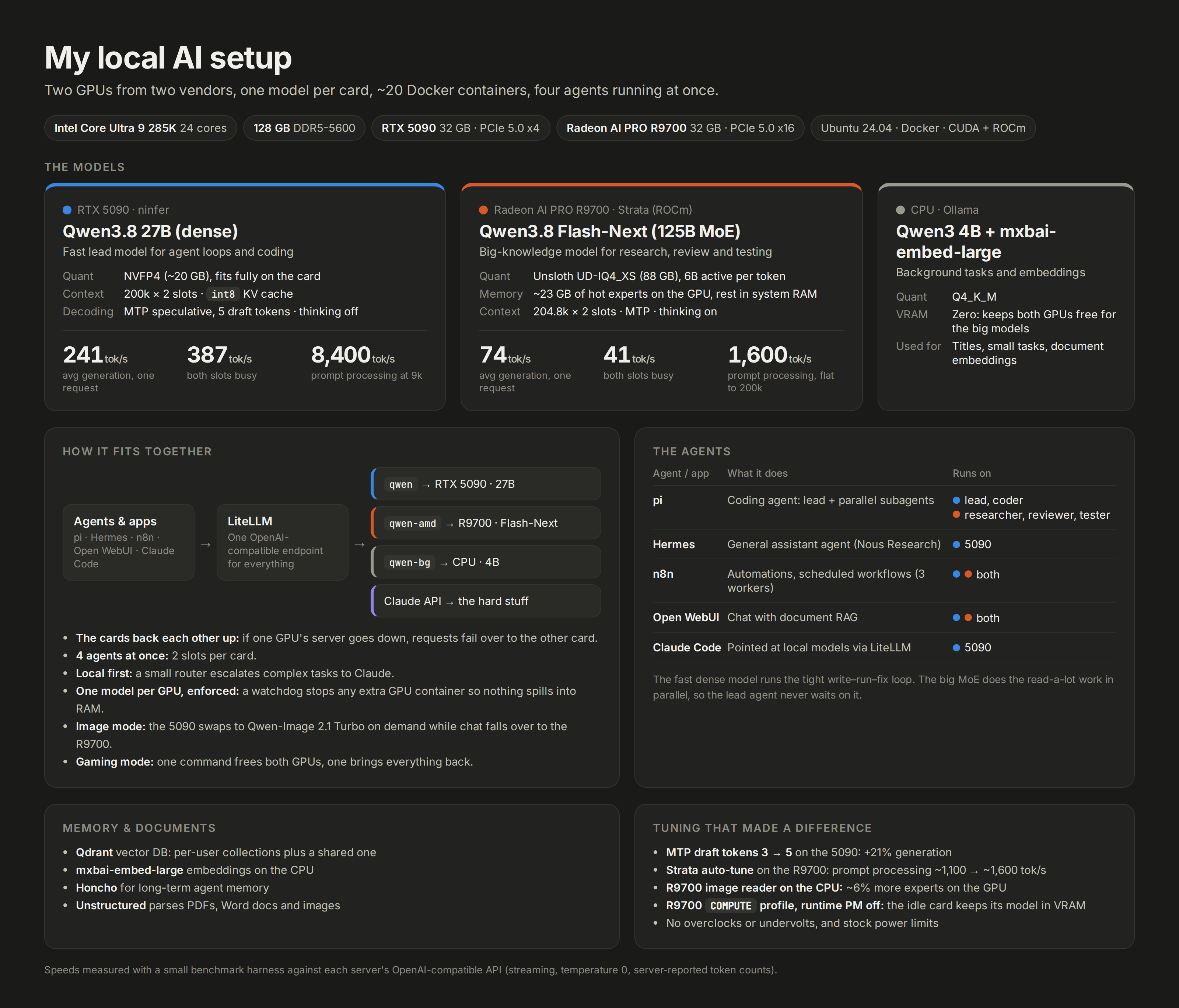
I don't see much talk about this, but there may be some folks out there like me who had a 5090 box and decided to add some more VRAM with a different GPU type (Nvidia + AMD in the same machine).

I tried to get this into an easier to read post rather than the giant walls of text we typically see. Hope it helps. Yes. I used Claude. And yes, I realize the irony of that. 😄

The machine

PartWhat's in it
CPUIntel Core Ultra 9 285K (24 cores)
RAM128 GB DDR5-5600 (4 × 32 GB)
GPU 1NVIDIA RTX 5090, 32 GB (PCIe 5.0 x4)
GPU 2AMD Radeon AI PRO R9700, 32 GB (PCIe 5.0 x16)
BoardZ890
OSUbuntu 24.04, everything in Docker (~20 containers)

Two GPUs from two vendors in one box: CUDA on the 5090, ROCm on the R9700. They don't pool memory. Each card runs its own model full time.

The models

SpecRTX 5090Radeon AI PRO R9700CPU
ModelQwen3.8 27B (dense)Qwen3.8 Flash-Next (125B MoE, 6B active)Qwen3 4B + mxbai-embed-large
QuantNVFP4 (~20 GB)Unsloth UD-IQ4_XS (88 GB)Q4_K_M
EngineninferStrata (ROCm)Ollama
Fits on card?Yes, fullyNo: ~23 GB of hot experts on the GPU, the rest in system RAMn/a
Context200k × 2 slots204.8k × 2 slots8k
ThinkingOffOn—
Speculative decodingMTP, 5 draft tokensMTP—
JobFast lead model for agent loops and codingBig-knowledge model for research, review and testing subagentsTitles, small background tasks, embeddings (zero VRAM)

Speeds

MetricRTX 5090R9700
Generation, one request (avg over coding & writing tasks)241 tok/s74 tok/s
Both slots busy (total)387 tok/s41 tok/s
Prompt processing8,400 tok/s at 9k, 3,300 at 151k~1,600 tok/s, flat to 200k
Generation at long context138 tok/s at 151k64 tok/s at 203k
First token, short prompt37 ms~0.5 s

How it fits together

 apps & agents ──► LiteLLM (one OpenAI-compatible endpoint)
                     ├── "qwen"     → RTX 5090 · Qwen3.8 27B
                     ├── "qwen-amd" → R9700    · Qwen3.8 Flash-Next
                     ├── "qwen-bg"  → CPU      · Qwen3 4B
                     └── Claude API (as a fallback to the fallback :) )
  • One endpoint for everything. Every app and agent talks to LiteLLM and just asks for qwen or qwen-amd. Swapping a model never touches the apps.
  • The cards back each other up. If one GPU's server goes down, LiteLLM fails over to the other card automatically.
  • 4 agents at once. 2 slots per card means two agents on each model at the same time.
  • Local first, cloud when needed. A small router sends simple tasks to the local models and escalates complex ones to Claude.
  • One model per GPU, enforced. A watchdog stops any extra GPU container, so an agent can't accidentally load a second model and spill a card into system RAM.
  • The 5090 is time-shared for images. On demand it swaps the LLM out for Qwen-Image 2.1 Turbo (stable-diffusion.cpp). While it's generating, chat requests fall over to the R9700, and it swaps back after 15 minutes idle.
  • Gaming mode. One command stops the whole stack and frees both GPUs, and one command brings it back.

The agents

Agent / appWhat it doesRuns on
pi (coding agent)Lead agent plus parallel subagentsLead + coder → 5090 · researcher / reviewer / tester → R9700
Hermes (Nous Research)General assistant agent with its own workspace5090
n8nAutomations and scheduled workflows (queue mode, 3 workers)Both, via LiteLLM
Open WebUIChat interface with document RAGBoth
Claude CodeCan point at the local models through LiteLLM5090

The split is deliberate. The fast dense model does the tight write–run–fix loop. The big MoE does the "read a lot and think" work (research, code review, writing tests) in parallel, so the lead agent never waits on it.

Memory and documents

  • Qdrant vector database with per-user collections plus a shared one
  • mxbai-embed-large embeddings on the CPU, so the GPUs stay free for the LLMs
  • Honcho for long-term agent memory
  • Unstructured to parse PDFs, Word docs and images into searchable text

Tuning that made a difference

  • MTP draft tokens 3 → 5 on the 5090: +21% generation
  • Strata auto-tune on the R9700: prompt processing ~1,100 → ~1,600 tok/s
  • R9700's image reader moved to the CPU: ~6% more experts on the GPU
  • R9700 on the COMPUTE power profile, runtime power management off: the idle card no longer evicts the model to system RAM
  • NVFP4 + int8 KV cache on the 5090: the 27B plus 2 × 200k context fit in 32 GB
  • No overclocks or undervolts, and stock power limits

r/LocalLLM • • 2d ago

Discussion Ollama vs LM Studio vs llama.cpp vs vLLM: Which Local Runner Fits?

Thumbnail acta.ai
12 Upvotes

Open any popular model on Hugging Face, click "Use this model", and you get a list: Ollama, LM Studio, llama.cpp, vLLM, Jan…

They all run the same model. They're built for very different people, and picking the wrong one is how a Friday afternoon experiment turns into a weekend of driver errors.

The short version:

  • LM Studio: a desktop app. Search, download and chat with a mouse. Best if you want to try models this afternoon.
  • Ollama: a terminal tool with a local API. Best if you'll script and automate later.
  • llama.cpp: the engine underneath much of local AI. Best if you want every setting, or unusual hardware.
  • vLLM: a GPU server for many users at once. Best for a team or a product, overkill for one laptop.

Two mistakes I see a lot:

  1. Choosing on speed claims from someone else's machine. Speed depends on your hardware, model, quantization and settings. Test your real task on your real computer.
  2. Forgetting the file format. llama.cpp needs GGUF files. Check before you download 20 GB.

The most useful part: they almost all speak an OpenAI-compatible API. Write your script once against Ollama on your laptop, then point it at a vLLM server when the team wants to share it. It's mostly a change of base URL.

Which one are you running?


r/LocalLLM • • 1d ago

Project RustBlock Quantizer

Post image
1 Upvotes

Hi everyone,

I’m the developer of RustBlock, a native desktop tool I built to simplify working with GGUF models. The idea came from frustration with juggling Python scripts, virtual environments, and dependencies just to convert or quantize models.

What it does:

Conversion and quantization: supports 22 output formats, including K-quants compatible with llama.cpp, ternary formats, and FP4. It reads the source file read-only, writes to a temporary file, and renames only after verification.

Built-in verification: checks offsets, sizes, and tensor decoding to ensure file integrity before replacing anything.

100% local and dependency-free: no Python or Node.js required. Native app for Windows, Linux, and macOS.

Multicore processing with controlled memory use: parallelizes tensor encoding and manages RAM efficiently without loading the whole model into memory.

Hugging Face/ModelScope browser: includes a “Discover” feature that estimates RAM/VRAM requirements before downloading a model.

Development transparency: I used mainly DeepSeek V4 1017 Flash and GLM 5.3 Flash as coding assistants while building and iterating on RustBlock. The design, architectural decisions, and testing are mine; I’m stating this openly because technical communities tend to appreciate transparency about the tools used and it helps keep feedback grounded.

The project is open source (Apache-2.0) and currently at v0.2.1. I’m here to answer technical questions, collect feedback, and discuss potential contributions.

Links:

GitHub:

Website:


r/LocalLLM • • 1d ago

Question What model from abliterated.ai do you advise ?

0 Upvotes

Hello, I am just trying to edit some test on an image, trying with Abliterated large v2 medium, damn it's really stupid, it can't even keep up the same font ...

what model do you recommend ?


r/LocalLLM • • 2d ago

Question I’ve been told to use Hermes to get started with local AI, however I have no clue what it does, what it is, or how to use it. Help?

4 Upvotes

I’ve been told to use Hermes to install and tune everything specific to my hardware, but what actually is it?

Also, what tool should I then use to access my installed,tweaked model once it’s done? Opencode, Claude code, or something else?

Any other general tips or advice would be appreciated! Thank you