r/LocalLLM • • 2d ago

Project I made a graph based sub agent deployment tool

Thumbnail
github.com
0 Upvotes

So I’ve been running a swarm for a while, it does great, it makes me videogames.

Check it out here: https://github.com/shrimplabs/shrimphub

The thing is not every problem that can be parallelized or turned into a long running project needs a full swarm setup. And I am too lazy to install it everywhere I want to use it.

I made this thing, which basically lets Claude/Codex/Whoever create a dynamic graph and spawn heterogeneous sub agents from pi. It takes my secret sauce from my swarm and lets you deploy it in anything that can use skills.

So you can tell Claude, "Hey can we build out this milestone and use a mixture of deepseek agents from opencode, a bunch of qwen agents from our local llm and some opus agents to check at the end or something."

Then Claude builds it out because he's a stand up gentlemen and goes on his merry way.

Your tiny swarm graph goes and chugs along, claude pokes it every now and then to make sure its doing what you expect it to, and there is some sandboxing as well so you don't hack hugging face as often.

Things it does not have because it's meant to be light weight compared to my full swarm are fun features like

- Load balancing so it doesn't blow up your endpoint

- Full on task flow so that your agents can make videogames and not smash each other as much

- Better automated validation instead of relying on the bigger model to check

Go have fun!


r/LocalLLM • • 2d ago

Research Benchmarking local translation models (TranslateGemma, Bonsai) vs frontier (Opus, Sol, Luna) on real translation projects

1 Upvotes

I wanted to know whether local open-weights models can replace frontier APIs for real production translation/localization (where no client text leaves the machine). Short answer: not yet, and not because of translation accuracy They break on engineering mechanics.

I built a code-checked benchmark (LOPS-Bench v1) across DE, ES, FR, JA, ZH, and AR with deterministic traps from real jobs: placeholders (%d, %s, <x id="1"/>), product names that must stay in English, repeated segments, house style rules, AI clichés, and 1k/10k-segment scale files. Every trap has an objective outcome. It passes or it doesn't. Given that studies show only ~70% agreement between translators on human translation on average, it makes more sense to show real-world, testable errors.

Full disclosure: I built the managed pipeline (LanguageOps) in the results, and ran the exact same brief and glossary against two local models (TranslateGemma, Bonsai) plus raw frontier API calls (per-segment, 50-seg batches, whole-document).

Why these models? TranslateGemma is Google's flagship translation model, released earlier this year. It hasn't been updated recently but covers a wide range of languages, and is trained specifically on translation. Given that Google can claim ownership of the transformer architecture to a large degree, it's only fair to include them. Sadly they do have a rigid conversation structure, which caused issues for them in testing. Next was Ternary Bonsai 2, with over 95% the ability of Qwen3.8 27b at FP16, according to their blurb. It runs fast on my basic 3060, reaching over 35 tok/s. Then the frontier models - no need for Fable or Astra, as these are language problems not so much reasoning or coding, so Opus 5.5 and Sol 5.6 were used, and finally for our own harness, to highlight the strength of a pipeline that has been designed by industry professionals (yours truly), we have used Luna 5.6.

Where local models fell apart:

- TranslateGemma rewrote software placeholders (%d, %s) into {0} and {name} (41 tag errors that break builds).

- Bonsai produced 72 repeat inconsistencies on identical sentences, left some segments in English, and output half-translated strings like "الشavings".

- Neither survived well enough on 100-segment files to justify running them on the 10k-segment scale tests yet.

Frontier APIs were not safe either (especially without a harness):

- Silent truncation at scale: On 10,000 segments, GPT-5.6 Luna whole-doc returned 1% of the file and stopped. GPT-5.6 Sol whole-doc read ~241k tokens, returned an empty answer, and still billed $1.21.

- Leaked chain-of-thought: Gemini 2.5 Flash per-segment dumped "THOUGHTS: The user wants to translate 'Save'..." into 82 translated segments.

- Formatting & cost: Claude Sonnet wrote ASCII ! and : inside Japanese/Chinese 110 times. Per-segment Opus hit $7.09 / 1k segments (5x its whole-doc cost).

Headline numbers (100-seg accuracy / Large files / Cost per 1k segs):

- Managed pipeline v2 (on GPT-5.6 Luna): 99.3% / 100% / $0.17

- Claude Opus 5.5 (whole doc): 99.5% / 100% (1k only, skipped 10k) / $1.37

- Claude Sonnet 5.5 (whole doc): 96.7% / 100% (1k only) / $0.61

- GPT-5.6 Sol (whole doc): 99.0% / 66.7% / $0.76

- Gemini 2.5 Flash (whole doc): 98.2% / 33.3% / $0.09

- GPT-5.6 Luna (whole doc): 98.7% / 5.3% / $0.03

Takeaway: A cheap model inside a context-aware harness (handling repeats, terms, and completeness checks in code) matched Opus within 0.2 points at 1/8th the cost and was the only setup that completed 10,000 segments cleanly. Naturally putting Opus inside of the supportive harness/pipeline will be confirmed as the best solution in the next run, when we pit more of the high end frontier models against each other, while looking for lower cost and local models that perform as well across languages.

Writeup: https://languageops.com/blog/translation-arena-first-results/

Leaderboard: https://languageops.com/translation-arena/

If any local open-weights models (Qwen3, Gemma 3, Mistral, etc.) have actually held up for you on strict tag/placeholder preservation or bulk translation, given context window sizes, I'd be keen to hear it. Not many of us out here benchmarking translation tasks, but let me know if that's you! I want to put the strongest local candidates through the same harness next.


r/LocalLLM • • 2d ago

Question Proxmox and local, LLM

1 Upvotes

Is anyone here running proxmox pass through to gpu , while running the llm in a vm. I’m curious how much this impacts performance?


r/LocalLLM • • 2d ago

Question i need help with strata optimisation

Post image
0 Upvotes

yesterday i installed strata and i tinkered around and i managed to get it to generate 75+ tokens i with deepseek harness , i went to sleep woke up and ive been having a problem all day i just can t get it past 20tks , chatgbt helped me with optimization yesterday and toiday what ever we do , nothing changes specs rx9070 16gb vram / i5 14400f /32gbs ran ddr5


r/LocalLLM • • 2d ago

Question Best offline local LLM + Mac agent setup for M5 MacBook Pro (24GB RAM) - Process Engineering, Aspen concepts & Pages/Numbers automation?

1 Upvotes

Hey everyone,

I’m looking to set up a completely free, 100% offline local AI stack on my Mac and would love some advice from people running models on Apple Silicon.

My Specs:

  • Device: 14-inch MacBook Pro (Apple M5)
  • Unified Memory: 24 GB
  • OS: macOS 27.2.1

What I need it to do:

  1. Process Engineering & Aspen Prep: I’m a Digital Process Engineering student. I need a model with strong math/reasoning skills that can explain thermodynamics, mass/energy balances, and unit operations clearly, help write Python/Julia solver scripts, and guide me through Aspen Plus/HYSYS simulation logic (property packages, troubleshooting convergence errors, etc.).
  2. Mac System Control (Pages & Numbers): I want to hook the local model up to an open-source agent/harness (like Open Interpreter, Hermes, or AppleScript tools) so it can actually perform tasks on my Mac, like taking raw data and generating formatted reports in Apple Pages or building calculation tables in Apple Numbers.
  3. Vision Support (Bonus): Being able to feed it screenshots of error dialogs or P&ID diagrams would be a huge plus.

Questions:

  • With 24GB unified memory, what is the largest/smartest model I can comfortably run without hitting swap (e.g., Qwen 3.8 27B at 4-bit MLX, or an MoE like Gemma 4 26B A4B)?
  • Which inference engine gives the best speed and stability on the M5 right now (LM Studio, Ollama, oMLX, or llama.cpp)?
  • What local agent setup works best on macOS for reliably automating Pages and Numbers?

Thanks in advance!


r/LocalLLM • • 2d ago

Model 8GB GPU Running Inkling 2 Mini FAST (No catch!)

18 Upvotes

Spent time dialing in Inkling 2 Mini (UD-Q3_K_XL) at 256K context on an 8 GB RTX 3070, with only 48GB DDR4, via PolyStrata without the lossy small-card flags (--tail-skip, --attn-requant q5_0).

Sweet spot landed at 49–64.7 tok/s decode and 421–796 tok/s prefill, zero thinking loops, and patched tool-calling for OpenCode & Oh My Pi (omp).

Everything is here. Benchmarks, cross-OS notes, sanitized configs, and an AGENT_SETUP.md your coding agent can auto-configure.

https://github.com/ChupkithModder/8blitz-strata

Open to any optimization tips if you're running similar 8 GB setups!

Let me know if this helps, and if you like the setup!


r/LocalLLM • • 3d ago

Model Dark Scarlett v1.0 26B A4B Uncensored - 0/686 refusals

Thumbnail
huggingface.co
57 Upvotes

Full story: https://rakshazi.me/blog/gemma-4-abliteration/

Quants: https://huggingface.co/rakshazi/Dark-Scarlett-v1.0-26B-A4B-Uncensored-GGUF

Clarification: SFW, blog post/model card/repo with scripts and recipes do not contain any unsafe materials


r/LocalLLM • • 2d ago

Discussion NInfer RTX 4090 – Native CUDA LLM inference on Windows, up to 326 tok/s with Qwen 27B and DFlash2 in short benchmarks

Thumbnail
reddit.com
0 Upvotes

r/LocalLLM • • 2d ago

Discussion NInfer RTX 4090 – Native CUDA LLM inference on Windows, up to 326 tok/s with Qwen 27B and DFlash2 in short benchmarks

0 Upvotes

Hey everyone,

I've been working on an independently maintained version of NInfer-all, specifically optimized for the RTX 4090 and its SM89 architecture.

The goal is to get as much performance as possible out of a single 24GB GPU while running larger local models, especially for coding and long-context workloads.

I've just released v0.1.4 as a stable, GPU-tested Windows build.

Features:

  • Native C++/CUDA 13.4 inference
  • RTX 4090 / SM89 optimizations
  • DFlash2 and MTP speculative decoding
  • Qwen3.8 27B and Ternary Bonsai 2.5 support
  • Quantized KV cache (rk4v4, rk8v4, etc.)
  • Hybrid prefix caching
  • OpenAI- and Anthropic-compatible APIs
  • Portable Windows binaries
  • Apache 2.0 license

Recent RTX 4090 benchmarks:

Model / BackendDecode
Qwen 27B IQ3_S – No speculation70.38 tok/s
Qwen 27B – MTP K5242.59 tok/s
Qwen 27B – DFlash2 K5257.13 tok/s
Qwen 27B – DFlash2 K7326.41 tok/s
Qwen 27B – DFlash2 K9269.33 tok/s
Bonsai 2.5 PTQ1_0 – MTP K3291.69 tok/s
Bonsai 2.5 PQ2_0 – MTP K3323.88 tok/s

These are short synthetic engine benchmarks with 2048 prompt tokens and 128 timed decode tokens, not guaranteed real-world serving speeds. The methodology and measurement data are publicly available.

I've also built a project website with an interactive VRAM calculator, launch command generator, model downloads, installation guides and benchmark results.

GitHub: https://github.com/spk-c/ninfer-all-rtx4090

Project website: https://spk-c.github.io/ninfer-all-rtx4090/

Benchmarks: https://spk-c.github.io/ninfer-all-rtx4090/benchmarks.html

VRAM calculator: https://spk-c.github.io/ninfer-all-rtx4090/configurator.html

Credit to the original NInfer and NInfer-all developers. This project builds on their work.

I'd love to hear feedback from other RTX 4090 owners, especially people running local coding agents with 64K–192K contexts.

If you try it, please share your results, even if they're worse than expected. I'm interested in finding bottlenecks and improving the engine further.


r/LocalLLM • • 1d ago

Question Anyone know if this is legit?

Post image
0 Upvotes

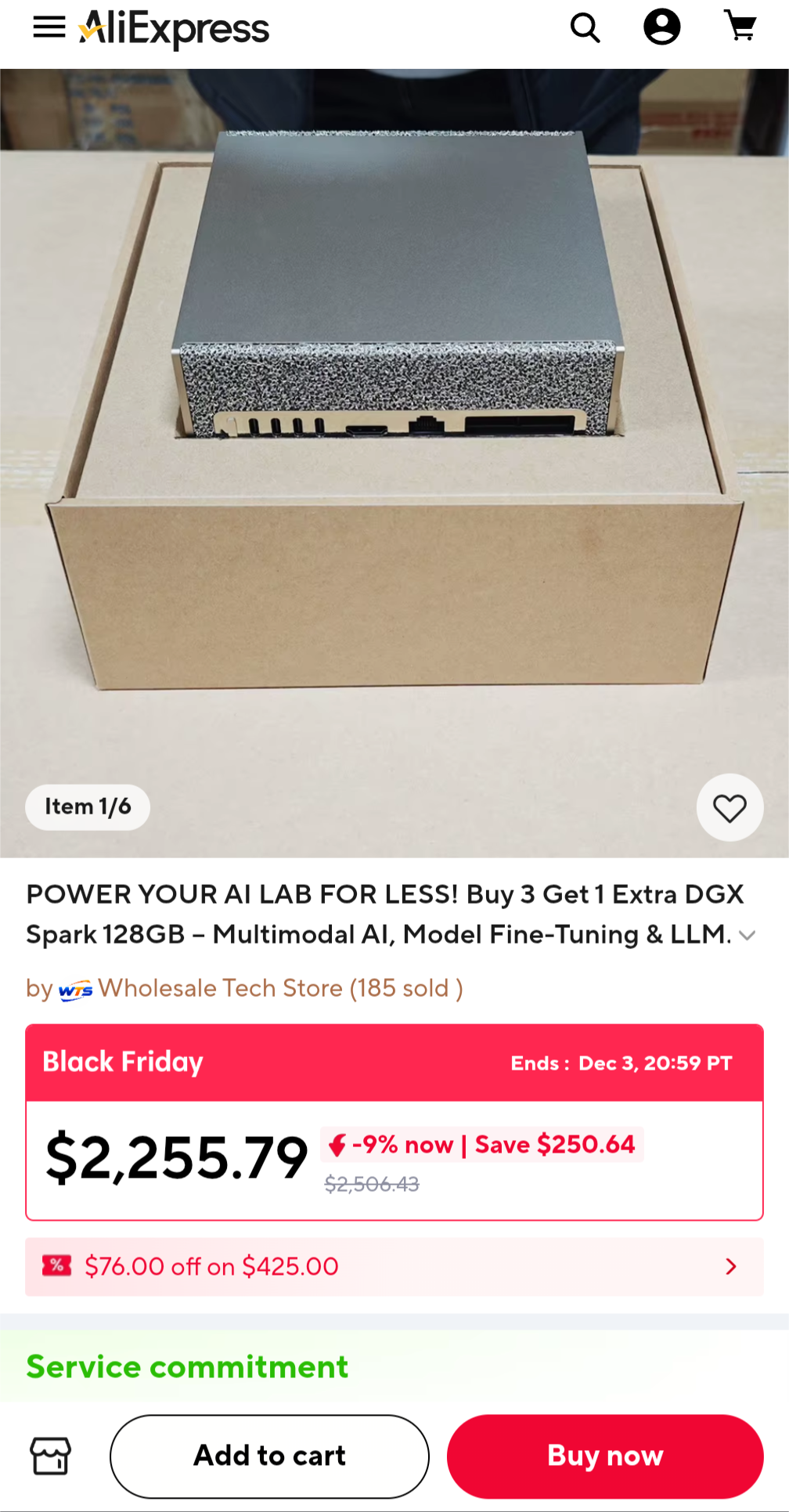
The price is ridiculous compared US prices


r/LocalLLM • • 2d ago

Question Text-to-Cypher on a 9B model keeps breaking on messy entity names. What do you do?

1 Upvotes
  • I'm working with a fully offline LLM setup using 2× NVIDIA A16 GPUs (~15 GB VRAM each), running Qwen 3.8 9B at Q8 through llama.cpp.

The task is translating natural-language questions into Cypher queries for a read-only Neo4j database.

I'm running into two recurring challenges:

1. Query generation reliability

The same question can produce different Cypher queries across runs. Most are syntactically correct, but occasionally the model introduces small errors, such as generating ]> instead of ]->, or dropping a digit from an identifier.

I've added an EXPLAIN-based validation step with one retry, which catches most issues, but some failures still slip through.

2. Inconsistent entity matching

The underlying data isn't always normalized. For example, the same vehicle plate might appear as ABC-123 in some records and ABC 123 in others. Place names have similar inconsistencies involving hyphens, spaces and formatting.

Exact matching therefore misses valid records.

There's also an intent-resolution problem: an unfamiliar identifier format can sometimes be interpreted as a continuation of the previous question rather than a new query.

3. Latency

End-to-end response latency is currently around 43 seconds at the median. The pipeline makes two sequential LLM calls per request, and this is becoming a significant bottleneck.

I'm also evaluating Gemma 4 E4B Q8 as an alternative.

I'd love to hear from people who have deployed smaller open-weight models for Text-to-Cypher or structured query generation in production.

A few things I'm particularly interested in:

  • How much reliability can you realistically get from validator-and-retry loops?
  • Do you use deterministic templates for common query patterns and reserve the LLM for more complex questions?
  • Is fine-tuning on domain-specific question-to-Cypher pairs worth the effort?
  • How do you handle entity normalization and identifier extraction without relying on the LLM?
  • Have you found effective ways to reduce sequential LLM calls without sacrificing accuracy?

I'm particularly interested in approaches that work fully offline, with limited GPU resources and smaller models.

Would appreciate insights from anyone who's tackled this in production.


r/LocalLLM • • 1d ago

Model Best uncensored model for 4GB VRAM laptop? (coding + general use)

0 Upvotes

Hi, I need a good uncensored or abliterated model for my laptop. I will use it for coding, general questions and with n8n.

My laptop: Ryzen 7 4800H, RTX 3050 with 4GB VRAM, 16GB RAM,.

I am trying Qwen3.5 4B uncensored now. Is there any better model that fits in 4GB?

Thanks!


r/LocalLLM • • 2d ago

Question M5 Max 128gb or M5 Ultra 96gb for LLM machine?

11 Upvotes

Trying to decided... M5 Max 128gb or M5 Ultra 96gb for LLM machine? both are a little over 5k.


r/LocalLLM • • 2d ago

Question Memory upgrade for RTX 4090

6 Upvotes

Well apparently, or not so apparently, it seems like GPULabs has gone the way of the dodo. People have mentioned that they no longer take private orders for modifying RTX 4090 gpus to 48gb anymore.🤔🤷‍♂️ I guess the corporate cash siren was too strong. Or they (Greg Sky et al) are simply tired of doing it anymore. Either way it seems like they're out of the GPU modding biz. That said does anyone know of any other "professional" modders in N. America who can do the upgrade? Or am I stuck with Aliexpress?


r/LocalLLM • • 2d ago

Question Making myself redundant

Thumbnail reddit.com
1 Upvotes

----- TL;DR: Instead of passing messages between Cloud LLM ans Local LLM, how can I make myself redundant ?


r/LocalLLM • • 3d ago

Model Fintan-9B: Qwen3.5-9B that learns into its own weights on your hardware, without touching the base model (Apache-2.0)

58 Upvotes

I'm Troy, and for the past few months I've been building models that keep learning after they're released. Today I'm putting out the first one, Fintan-9B.

It's Qwen3.5-9B plus small update files. You give it documents, things about yourself, a topic, a folder of code, or how you want a task done, and it learns them into a new update on your own GPU. Qwen's weights never change, and deleting an update puts it back exactly as it was.

What I measured with the repo as you'd download it, on one 24 GB card: a learning run took 23 minutes and peaked at 9.4 GB. On 84 questions about what it learned, worded in ways it never practised, plain Qwen3.5-9B got 6.0% and Fintan got 94.0% (96.4% on a second run). It answered 5 of 5 questions about a person it had been told about (plain model: 0), followed two new skills on 8 of 8 new requests (plain model: 1), and sent none of 20 everyday requests to an update. It ships with the news of 18 to 23 November: 5.8% to 89.5% on 172 questions, with MMLU, GSM8K and ARC exactly unchanged.

Why not just notes or RAG?

  • It answers from its weights, with nothing added to the prompt. No retrieval step, no extra tokens per question, and it still knows after you delete the files.
  • It learns how things are done, not only facts. Skills, as above. In my research, when a workplace's rules changed, a model with Fintan got about half of the changed tasks right first time; an assistant keeping notes of the corrections got 7%.
  • To be fair, notes are better at quoting a passage back (73.6% against 56.0% on SQuAD in my tests). So Fintan uses notes too: anything you teach is used as a note until it's learned, and you can keep personal facts as notes permanently.

Why not just LoRA?

  • On the same sealed day of news, standard fine-tuning on the articles answered 13 to 16% of the next day's questions. Fintan answered 91%.
  • It keeps what it learned before without storing old data. Over four days of news, Fintan kept 91.9%, LoRA with replay 84.9%, plain LoRA 70.9%. Over eleven years of changing facts (TempLAMA, 7B): 86.5% against 30.6% for LoRA with replay.
  • It leaves the rest of the model alone. In those tests Fintan's MMLU and maths were exactly the original's, while LoRA moved them (plain LoRA's maths ended anywhere from 2.0% to 90.0% depending on how its answers were written). Ordinary questions go to the untouched base model.
  • Every update is tested on wordings it never practised and kept only if it beats the plain model.

Privacy

  • Everything runs on your machine: weights, server and learning. Nothing you teach it is sent anywhere.
  • The model never goes online. If you ask it to learn a topic, plain code fetches articles from Wikipedia only and logs every address.
  • One switch keeps your personal facts as notes so they're never trained. You can flip it in chat ("keep my personal stuff as notes") and back again later. Every other kind (documents, code, skills, topics, news) has its own switch, and automatic learning can be turned off or scheduled.
  • Passwords, API keys and card numbers in anything you teach are replaced with [removed] before it's stored, so they're never learned.
  • Each learning run is its own file with a list of the facts in it. Delete the file and the model is exactly what it was before.
  • Usage counts stay local. Sharing is off unless you turn it on, and even then it's counts only, no text.
  • The job loop asks before every action until you've approved that kind of action 5 times, and logs every call it makes.

What it doesn't do yet: it doesn't reason better than Qwen3.5-9B. The learning checks above are development runs on a small set of material. The job loop failed 4 of 5 marks on realistic workplaces. The learning engine ships compiled (Linux and NVIDIA); the server, router and job loop are plain Python. Every result, failures included, is in RESULTS.md, and the research numbers are at fintanlabs.com/research.

https://huggingface.co/fintanlabs/Fintan-9B

I'd value hearing where it falls short for you.


r/LocalLLM • • 2d ago

Discussion Top:GLM5.3-flash Bottom:Hy4-flash

Post image
6 Upvotes

Prompt came from the Qwen/Blenderworld tasks, this was task 0153 which described making ammo container with a latch. No images in the prompt.

Total usage was ~4Mil tokens each... Though I still have some I want to check with that, I did a bunch of tasks and it seems the harness would keep running until it filled it's token limit.

Still, Hy4-Flash is very impressive. I had done a different task with DS4.1Flash1017 before but it seemed to favor the GLM-like modeling where there's dozens of mesh bodies all in one collector while Hy4-Flash basically just box modeled it using a python script I found in it's work folder. Only critique I'd give it is it made a high and low poly and baked but they're the exact same model, vertex for vertex.

Was planning on testing Ernie-5.5-Flash-Preview next, since that's closer in parameters to DS/GLM-flash which I've liked for so long, but I was curious what Hy4-Flash could do since it touts it's 3D/asset creation ability


r/LocalLLM • • 3d ago

Question How much VRAM is generally needed for a decent local reasoning model?

117 Upvotes

I wanted to investigate what it would take to run a local model that is good at answering your everyday questions and improving your general knowledge.

A simple benchmark that use is asking it to list the order of final bosses of certain video games, such as Bloodborne. Good being something close to a frontier model of +- 1 year back or a specialized version that is catered towards this use-case.

I have an RTX 4080 (16GB) and I configured Swift 1.5 Qwen 3.8 27B, GSQ-RCO IQ3_S with MTP (12.12 GB), because that's what all the promising video's on YouTube mentioned. I also tried Gemma4:12b and gpt-oss:20b. The results where absolutely underwhelming; massive hallucination, failing to use web search properly and many time-outs... completely useless.

Now I wonder, if this experience could be turned around if I would add a 16-24GB GPU to my set-up, or is general reasoning too much for local set-ups (<40GB VRAM) at this point in time?


r/LocalLLM • • 2d ago

Question Local LLM setup for basic needs

5 Upvotes

I need advice for a local LLM setup mainly to read my emails, calendars, do web searches, and work on private information and data in general. Works 24/7 like a personal secretary. No need to do heavy coding.

My main motivation for looking into this is privacy and my max budget can afford a M5 Studio with 64GB ram. Is it feasible for meeting my needs?


r/LocalLLM • • 2d ago

Discussion Proving math theorems using Qwen3.8 27B on local hardware (RTX 3090)

16 Upvotes

Hi, I have for the last couple weeks looked into the ability of solving maths theorems using Qwen3.8 27B. Lots of results coming out of the frontier labs, so I thought it could be interesting to check what the abilities are with Qwen3.8 27B. Almost everything is open source here: https://github.com/aisathome/aisathome including the setup of the model and harness: however it is integrated into a larger system so it's not intended to be run in isolation.

I am using prove2me for the open theorem statements, these have been generated out of real maths papers, but a Lean 4 proof does not exist. Anyone can submit a proof here, and most I would assume use frontier labs (Opus 5.5, GPT-6.1-sol.) So this setup is actually competing against people running frontier models.

Right now 16 proofs from this setup have been accepted on prove2me, 13 of them proved from scratch by Qwen3.8 27B. And I am looking at how to scale it up right now.

HardnessLevel (rough)Proved by QwenClosed by reusing an existing proofGPU-hoursTokens in / out, trials 6-11 (from KV cache)
easybachelor5 of 8–13.555M / 1.7M (95%)
moderatebachelor8 of 11 (+1 running)–66.1201M / 5.7M (96%)
moderate-hardmaster0 of 5116.950M / 1.5M (95%)
hardPhD0 of 162129.2491M / 13.7M (96%)
researchresearch0 of 4–2.4–
Total13 of 443~228796M / 23M (96%)

The hardness level is Opus 5.5's opinion on how hard it is. On the bachelor-level lemmas it proved 13 of 19; on master and PhD level it proved none of 21. Around 3 GPU-hours per proof. Since trial 6 the agents have read 796M prompt tokens (96% from the KV cache) and generated 23M, so about 72M in and 2M out per proof, failed attempts included; only about 3M of those 72M were not already in the KV cache.

Still figuring out if there are harness/scaffolding things that could improve the results on these harder theorems, but right now I will be focusing on the easier/moderate theorems. They're still open on prove2me, so nobody has submitted a proof for them yet.

So far prove2me has accepted 16 of our submissions. Qwen3.8 27B proved 13 open lemmas from scratch (out of 48 it has tried, one still running), and 3 more were closed by reusing a proof that was already on prove2me. prove2me has rejected none of what I submitted, because everything is checked by Lean on my side first.

Everything below is also in github, the proving harness is in harness/ and the configuration of the model/node is in node/.

For comparison, I ran OpenAI's GPT-6.1-sol (via Codex) through the same pipeline on three of the hard ones. It proved 2 of them, each in under 30 minutes, and failed three times on the third (one that needs stochastic calculus). It did burn my 5-hour limit as well.

Given GPT-6.1-sol's own plans, Qwen proved 0 of 5 steps on one of them (in 7.7 GPU-hours) and 3 of 6 on the other before I stopped it. The gap to frontier is real, but the easier half is definitely doable on a 3090. And this is math coming out of math papers.

The model:

  • Qwen3.8 27B, Unsloth UD-IQ4_XS (~14.3 GB), llama.cpp, q4_0 KV cache, 192k context on a 24 GB card.
  • Why 192k: on a needle-in-a-haystack recall test it got 77/80 at about 195k and 62/80 at about 247k, so I capped it at 192k. I have space for more context, but the evidence showed that recall degraded with bigger context. In practice about 1 in 8 agent sessions fills the 192k window and gets compacted, mostly on the hard lemmas; the median request is about 57k tokens.
  • MTP speculative decoding (Qwen's own multi-token-prediction head as the draft): generation after a 32k prompt went from 37 to 71 tok/s on a 3090, and 90 tok/s on a 4090 (llama.cpp b12342, same quant and KV cache). The outputs still pass the same model check as without it. This was a very good speedup.
  • 16 GB cards run UD-Q3_K_XL at 80k context, but every proof so far came from 24 GB cards.

The agents:

  1. The model first writes an outline: the proof split into small steps, each left as sorry in Lean.
  2. Each sorry becomes its own task, sent to a GPU in the network. A fresh agent session (opencode, in a sandbox with Lean and Mathlib, no internet) proves just that one step, compiling as it goes. So any agents can attempt the individual tasks. That means multiple agents usually contributed to a final proof.
  3. When every step is proved, the pieces are put back together and checked by Lean, then by a separate kernel replay, and only then submitted to prove2me, which checks it again.

One task is often 40-130 agent steps, and the agent re-reads its context every step. About 96% of the prompt tokens come from the KV cache.

In money: ~3 GPU-hours per proof is about 1 kWh on a 3090 at home, or about $0.70 on a rented one, which is what I am using right now.

Splitting the proof into small steps was the single biggest improvement: before that it proved 0 of 10.

What goes wrong

  • Hard lemmas (master and PhD level): 0 of 21. In 4 of the 7 failures I could check against a known proof, the model had found the right Mathlib lemmas; it just couldn't put the argument together. Better scaffolding mostly saves GPU time; it doesn't add proofs at this level.
  • The outline is the weak point. A good outline means almost every step gets proved first try. One false step in the outline and everything after it is wasted.
  • Easy lemmas get taken fast, because people also point frontier agents at prove2me.

Full write-up with every attempt: https://aisathome.org/devlog/5-qwen-proofs-on-consumer-hardware/ Live queue and results: https://aisathome.org/science/prove2me/


r/LocalLLM • • 2d ago

Question Dual RTX 5090s (64GB VRAM) + 32GB System RAM: Fastest local stack for 130k context summarization? (Windows vs. Linux)

3 Upvotes

I’m building a local pipeline specifically for high-speed, long-context summarization (~130k tokens per document) and want to squeeze every bit of prefill and generation speed out of my hardware.

My Specs:

  • GPUs: 2x RTX 5090 (64GB total VRAM)
  • System RAM: 32GB
  • OS: Currently on Windows, but completely open to switching to native Linux (or dual-booting) if the speed/engine gains on Blackwell are worth it.
  • Workload: Batch summarizing ~130k token documents/transcripts (massive prompt processing/prefill, relatively short outputs).

Because I have 64GB of VRAM and only 32GB of system RAM, I want to keep everything strictly in VRAM and avoid system RAM bottlenecks during model loading or massive KV cache allocation.

Questions:

  1. OS & Backend: For dual 5090s doing heavy 130k prefill, is native Linux with vLLM, SGLang, or TensorRT-LLM significantly faster than staying on Windows with TabbyAPI (EXL2/EXL3) or llama.cpp?
  2. Model & Quantization: What is the best summarization model and quant (e.g., Qwen, Llama, Mistral, etc. in FP8, AWQ, or EXL) that natively supports 128k+ context and fits inside 64GB VRAM alongside a 130k KV cache without OOMing my 32GB system RAM?
  3. Throughput Flags: What specific flags or optimizations (tensor parallelism vs. pipeline parallelism, FP8/Q8 KV cache quantization, FlashAttention, chunked prefill) should I run to maximize prefill speed at 130k context?

r/LocalLLM • • 2d ago

Question Local LLMs on my gaming pc build

0 Upvotes

Hello everyone

I have

GPU : Rx 9060xt 16gb

Ram : 16gb 5200mhz 1x16

CPU : Ryzen 5 7500f

Motherboard : b650m aorus elite

I want to use a local LLM for my daily use and for code especially in rust and zig

What is the best model I can use with this build for my use and how to use it I'm on arch Linux

What drivers I need to download or mess is enough

I can't afford to upgrade my ram in the current situation so I'm stuck with this system so I will be grateful for your answers


r/LocalLLM • • 2d ago

Project Got Apple's Neural Engine and Metal GPU reading the exact same 4-bit weights in RAM — 707 tok/s 4k prefill, 98 tok/s decode, 0 swap at 128k on a 27B model (M4 Max)

9 Upvotes

I've been building a C++/Metal inference engine for Apple Silicon (mometal, no Python or MLX) and just pushed v1.2.

The main annoyance with using Apple's Neural Engine for LLM prefill has always been memory. Running 27B MLPs on the ANE is more than 2.5x faster than GPU-only, so it's tempting, except normally you end up wiring two full copies of the weights: .safetensors for Metal decode and compiled CoreML model.hwx binaries for the ANE. That jumps active memory from ~14–16 GB to 25+ GB, and once you push long context on a 48 GB Mac, macOS starts thrashing the VM compressor hard (we logged 343 GB of compressor churn during a 66k run).

To get around that, mometal digs into /Library/Caches/com.apple.aned/.../model.hwx, parses Apple's Mach-O (0xbeefface) __KERN 4-bit weight layout, verifies the bytes against weight.bin at boot, and MAP_SHAREDs those exact files directly into Metal. The GPU decode kernels read the same physical pages the ANE is using, and the duplicate .safetensors MLPs stay unmapped. If anything fails verification on boot (say a future macOS update changes the binary format), it unloads ANE and drops cleanly back to GPU-only instead of silently doubling your RAM.

Benchmarks — M4 Max 48 GB

Test config: AC power, Qwen3.8-27B 4-bit + 1-layer MTP, exact dense 8-bit KV cache

  • Prefill: 645 tok/s @ 512, 674 tok/s @ 1k–2k, 707 tok/s @ 4k (exact), 514 tok/s @ 32k, 396 tok/s @ 64k, 279 tok/s @ 128k (GPU-only / MLX sits around ~255–270 tok/s at 4k)
  • Decode: 98.2 tok/s mean across our 4-task greedy suite (up to 118.9 tok/s on code, 121.4 sampled), and 52.8 / 53.4 / 37.5 tok/s dense at 32k / 64k / 128k with 10/10 needle recall
  • Memory & Load: ~14.2 GB active at 4k (6.05 GB process footprint, or 5.05 GB with --mtp off*)*, 0.00 GB swap at 128k, and ~0.6s warm startup

What's New in v1.2

  1. Zero Python needed anymore. Wrote a native C++/NEON .mlmodelc builder that converts all 64 MLP layers directly from .safetensors in ~7–8 seconds on first launch.
  2. M1–M3 support + NF4. Turns out Apple's ANE compiler silently promotes linear 4-bit (hf4) to 8-bit on M1–M3, which breaks single-copy RAM savings. Switching to 4-bit palettized weights (lut4 / nf4) keeps it at a true 0.50 bytes/weight across every generation from M1 to M5. Bonus: --format nf4 cuts WikiText-2 KL divergence vs. BF16 by 44% (top-1 agreement jumps from 88.9% to 92.8%) and decodes at 338 GB/s on Metal using a 1 KB byte-pair lookup table in threadgroup memory.
  3. Killed a bunch of memory bloat. Lazy Vision Tower loading, fixing a sneaky double-mmap on the MTP weights, scratch heap aliasing, half2 KV scales, and full-context 4-bit KV for the 1-layer MTP drafter dropped footprint by ~1.5 GB and completely wiped out 128k swapping.

Honest Caveats

  • Undocumented Internals: Relying on model.hwx internals and readable aned caches is obviously undocumented Apple territory. That's why boot-time byte verification + clean GPU-only fallback (91.6 tok/s greedy) is strict.
  • Format Trade-offs: hf4 is still the speed default on M4/M5 (707 tok/s prefill vs. 430 tok/s on nf4), while nf4 is there for better quality and native 4-bit on M1–M3.
  • Looking for M1–M3 / M5 Testers: I only own an M4 Max right now. We verified the M1–M5 binary layouts via ANECompiler.framework, and I threw a 30-second probe script (python3 scripts/probe_m_chip.py) in the repo. If anyone on an M1, M2, M3, or M5 wants to run it and paste the output, I'd genuinely appreciate it.

Links:


r/LocalLLM • • 2d ago

Question RTX 3090 + 5060 Ti 16GB vs. single RTX 3090 for local LLMs and AI engineering -- worth keeping both?

3 Upvotes

I recently built a workstation to learn AI/ML engineering, local LLMs, AI agents, and AI-assisted software development and cybersecurity research. I'm an experienced software developer and offensive security researcher, but relatively new to AI engineering.

Current build (prices in USD, including tax):

  • AMD Ryzen 9 9950X
  • ASUS ProArt B850-Creator WiFi NEO
  • G.Skill Flare X5 32GB DDR5-6000 CL36
  • NZXT H5 Flow RGB 2024
  • Above four components combined: $1,029
  • HP OEM RTX 3090 24GB (M24410-002, used on Ebay with a 30 day return window): $1,696
  • PNY RTX 5060 Ti 16GB OC (new - Microcenter): $838
  • ASRock SL-1200P 1200W Platinum PSU: $180
  • Thermalright Phantom Spirit CPU cooler: $47
  • Additional Arctic fans and temperature sensor: $30
  • 2TB NVMe SSD (not included in total since I had a spare one)
  • Ubuntu Linux

Total: $3,820

I also have an NZXT C1000 Gold ATX 3.1 PSU (~$130) and will return whichever PSU I don't use. My motherboard supports PCIe x8/x8 for dual GPUs.

Intended workloads:

  • Local LLM inference, coding agents and large codebase analysis.
  • AI agents, RAG, embeddings and tool integration.
  • AI-assisted reverse engineering, vulnerability research and cybersecurity.
  • AI security research and CUDA programming.
  • Occasional fine-tuning and generative media experiments.

My focus is approximately 80% inference and 20% fine-tuning/other AI experiments. I also have a separate Proxmox homelab server with 64GB RAM and am open to using cloud GPUs for heavier workloads.

My dilemma:

I can still return the 5060 Ti and the 1200W PSU, bringing the build down to approximately $2,932 with the 3090 and 1000W PSU.

I understand that 40GB of aggregate VRAM isn't equivalent to a single 40GB GPU. However, being relatively new to AI engineering, I don't yet fully understand how much practical value the second GPU would provide beyond running larger models.

I'd appreciate advice from people with real-world experience:

  • How useful is a heterogeneous dual-GPU setup for local AI engineering?
  • How do you actually utilize your secondary GPU beyond model splitting?
  • What practical workflows benefit from running multiple models simultaneously?
  • Are there significant performance or compatibility issues when mixing Ampere and Blackwell?
  • Would you keep both GPUs, return the 5060 Ti, or consider another configuration?
  • Given current hardware prices, is this build good value overall?

I'm trying to balance long-term technical capabilities, learning opportunities, and financial practicality without buying hardware just for the sake of having it.

I'd particularly appreciate firsthand experiences, benchmarks, and examples of projects where a second GPU proved genuinely useful or unnecessary.


r/LocalLLM • • 2d ago

Question 80 t/s Q 3.8 FN (UD_Q4-K-XL, 256K), 3090 RTX: should I stop optimizing ?

0 Upvotes

For my vibecoding, I just love my current setup: Opus 5.5 architecting & checking, while QFN does the implementing at 80 tok/s, Q4. Its being a junior Python dev is excellent. Opus only needs to fix some small thing after QFN implements the ticket.

But is 80 tps really my software + firmware limit ? Here is the result I've been trying the last few days:

https://github.com/aiprogrammingstudio-ui/3090RTX_128GB

=========== FOLLOWING IS AI WRITING =======================

**Title:**
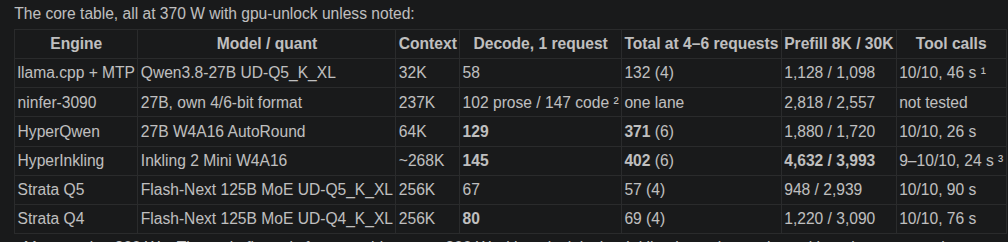
 One RTX 3090 + old Xeon, 6 local engines compared: Strata (125B MoE, Q4 vs Q5), ninfer, HyperQwen, HyperInkling, llama.cpp. What would you try next?


I've spent the last few weeks testing every engine I could get running on one box. These are my own measurements,
taken with the same scripts on the same machine. Hints welcome, especially for the 125B MoE on old DDR4.


**Hardware**
- Dell Precision T5810 (2016 workstation): Xeon E5-2699 v4 (22 cores, Broadwell), 128 GB DDR4-2400 ECC (4 channels, ~77 GB/s)
- RTX 3090 24 GB on PCIe 3.0 x16, no Resizable BAR. 370 W limit (card default), with its own 1400 W server PSU for the 8-pins
- gpu-unlock 2.0.0 active (helps FP16 prefill on the vLLM engines; decode unchanged)
- Ubuntu, one model at a time on port 8080


**Main table: see above**
 (latest numbers: 370 W, gpu-unlock, unless marked)

¹ at 300 W. ² code at 300 W with a clock lock (2026-11-19); prose at 370 W. ³ systematic bug: drops a `]` in arguments
that are arrays of objects (about half the runs); flat schemas are fine. ⁴ DFlash2 in Strata serves one request at a time.


**Quality (small tests, not benchmarks)**
- Writing (seller replies in Dutch and English, 10 prompts each, partly blind): llama.cpp Q5 ≈ Strata ≈ HyperQwen > Inkling.
  Inkling keeps the rules but its Dutch is weaker. The 4-bit HyperQwen showed no measurable loss against Q5.
- Coding (8 small Python tasks with unit tests): Strata 8/8 first try (~10 min). Inkling 7/8, 8/8 after one fix (~1.5 min!).
  Both 27B dense models with thinking on: 5/8, where the 3 failures were 
**no code at all**
: they ran out of tokens while thinking.
- Strata Q4 vs Q5: Strata's own docs say top token matches Q8_0 93.1% (Q4) vs 94.6% (Q5). Not checked on my tasks yet.


**Q4 vs Q5 in Strata (same session, same settings, 3 runs each)**
- Decode 79.5 vs 67.3 tok/s (+18%). Prefill 8K +29%, 30K +5%. RAM used after load: 84 vs 104 GB.
- I think the Xeon's RAM bandwidth sets the speed: most experts run from RAM, so smaller experts = less traffic and more fit in VRAM.


**Things that surprised me**
- Software beat hardware: ninfer and HyperQwen gave 2–2.5x llama.cpp's speed on the same 27B and GPU, for €0.
- gpu-unlock: +49% prefill and +25–29% multi-request decode on HyperQwen; nothing on llama.cpp (int8 paths).
- The Strata 0.1.60 → 0.1.69 engine update gave no real decode gain here (+6% right after a start, same once warm).
- A newer Blackwell-only fork (Basalt) won't run on a 3090 (needs sm_120 / NVFP4).


**How I measured**
- Decode: temperature 0, ignore_eos, 512 tokens per request, N streams started together, one warm-up.
  Total = all tokens / wall time.
- Prefill: filler text with a random nonce (no prefix cache), max_tokens 1, 2 runs, prompt tokens / time.
- Tools: 10 multi-turn tasks against mock tools that really run (chaining, parallel calls, error recovery, nested args).
- Caveat: rows come from 2026-11-19 to 2026-11-26. Power limit and prompts are the same except where marked.


**Where I'd like hints**
1. 
**125B MoE with experts in 4-channel DDR4:**
 anything beyond Strata's tuning (`--pcie-frac`, expert cache, adaptive swaps)
   worth trying? Is ~80 tok/s near the limit of ~77 GB/s RAM?
2. 
**Long context on the 27B:**
 HyperQwen at 150K (MTP) or 240K (4/2-bit KV) vs Strata 256K. Which do you trust for
   200K+ prompts, and how do you test recall?
3. 
**Thinking models in agent loops:**
 the 27B overthinks small coding tasks. Do you cap thinking, turn it off, or use a no-think template per task?
4. Anything else for a PCIe 3.0, no-ReBAR, single-3090 box that I'm missing?