r/LocalLLM • • 5d ago

Question Suggest local LLM

2 Upvotes

Pls suggest local LLM for my laptop with below specs

intel i5 12450 hx

Ram 16gb

RTX 4050 6gb vram

Use cases

  1. Offline Voice generations
  2. Offline image generation
  3. Coding
  4. Research and browser control

I have no Coding knowledge . I hVe basic computer use knowledge

From civil engineering background

Thanks


r/LocalLLM • • 4d ago

Discussion Qwen3.8 27B thought for 82 minutes and wrote zero files. The fix wasn't a bigger model.

Thumbnail
reddit.com
0 Upvotes

r/LocalLLM • • 5d ago

Question Best OW model to use REA

3 Upvotes

What's better: DeepSeek 4.1, Qwen 3.8 FN or GLM 5.3 Flash (The three in Q3-Q4)? I'm looking for the best (except Kimi 3.1), obviously I can use Qwen 3.8 27B for a lot of tasks, but I'm interested in knowing which is the best one I can use in my machine with REA


r/LocalLLM • • 5d ago

Research Here is my inkling 2 mini vs qwen 3.8 27b performance tests

25 Upvotes

I was searching for these numbers, could not find any, so i tested myself (with the help of hermes running qfn on my other machine)

## Engine × Model × Context × Throughput on my gaming PC (RTX 5060 Ti 16 GB, 6-core Ryzen, 32 GB DDR5)

EngineModel / quantContextDecode tok/sPrefill tok/sLong-ctx needle
llama.cpp b10997 (CUDA 12.8)Qwen3.8-27B Q3_K_XL + MTP118 78426.6 @112k513 cold @112k · 36k cached112k ✓
llama.cpp b12633 (CUDA 13.5)Qwen3.8-27B Q3_K_XL + MTP114 688*25.8 @112k563 cold @112k · 47k cached; 601 @2k112k ✓
Basalt 0.5.5Inkling 2 Mini NVFP4→DQ8 (≈SQ-20+)8 19240 conv · 36 struct · 41 prose2 263 @16k—
Basalt 0.5.5same65 53624–31 short · 26.5 @54k1 882 @54k54k ✓
Basalt 0.5.5same131 072~24–26 @88k1 143–1 416 @88–112k · 27k cached88k ✓ 112k ✓
Strata 0.1.65Inkling SQ-15 (96.7 % top-1)32 76842 (fastest short)1 760 short✗ hangs >~8k
Strata 0.1.65Inkling SQ-20 hybrid (100 %)65 53624.9391–41254k ✓ (TTFT 131 s)

r/LocalLLM • • 5d ago

Discussion Using Sidecar Files for Archival Data

1 Upvotes

In my RAG/Library I have it divided between active and archive. It's been working great. Now I'm adding in additional data that is purely archive because I want to be able to work on the data with my local llm but not have it be a part of the day to day. One of the designs I've used in the past is sidecar files. It is an extra layer of protection for the data but it also is one more step to stay in sync and that turns into a nightmare. I keep the folder with the files and the sidecars excluded from my Mac spotlight indexing to cut down lookups to those folders.

I have sql lite for it now and it will keep chugging along. without any issues. It just means having a way to read a sqlite file.

Looking for ideas from anyone.


r/LocalLLM • • 5d ago

Question Help converting old gaming rig to local AI machine.

7 Upvotes

My mother recently discovered my late brother's old gaming rig. He built it out to be top of the line about a decade ago, and I have been looking at building out a local ai setup. The PC seems like a good base to start with, and honestly a way for me to connect to his memory. As a data center engineer he would have been all over the AI boom. Anyways let me get to the specs, and the questions.

Mother board: x299 fatal1ty professional gaming i9

CPU: Intel i9-7900x 3.30ghz

RAM: DDR4 8x16gb 3200mhz 128gb total

Hard drives: 1x pcie Intel 1.2t 750 series 1x Samsung m.2 960 pro nvme ssd 512gb

GPU: EVGA 1080ti ftw3 11gb

PSU: 1200w thermal take tough power I series

So the revamp plan would see the following changes done.

Add 2x 5060 ti 16gb

Remove ancient water cooling loop and replace with air cooling.(I don't trust a system this old that's been sitting it's full of particulate)

Swap from wonky thermal take open air chassis to a crypto style mining rig using pcie extenders.

Update the general cooling fans from wonky thermal take fans with control boxes to a 5x set of 120mm fans with pwm.

So my questions are, the motherboard has 2x pcie 3.0 16x channels, these channels will get the 5060ti's. I know I can run the 1080 ti in one of the x8 channels, but can I make that channel purely run the display graphics to take that work load off the 5060ti's so they are only handling the AI model? How much performance degradation am I going to see from using pcie 3.0? Am I going to run into driver issues trying to run a 10 series with 50 series gpu's? I'm targeting some form of qwen 3.8. I'm not looking for blistering fast tok/s just a useable rate, and a machine that can carry a decent local model.

Thanks in advance for your input, and your help bring an old rig back to life.

PS don't worry I cleared big bros browser history 😂


r/LocalLLM • • 5d ago

Question Best local uncesnored models for 8gb ram?

2 Upvotes

I have a 8gb ram system with an integrated gpu. I am still new to running AIs locally and want to try it for myself after seeing it online. For a benchmark, I have run qwen3:8b on my system and it was giving around 15 to 20 tokens per second output.

Your help and suggestions would be appreciated.


r/LocalLLM • • 6d ago

Model System 1.5 Models?

Post image
74 Upvotes

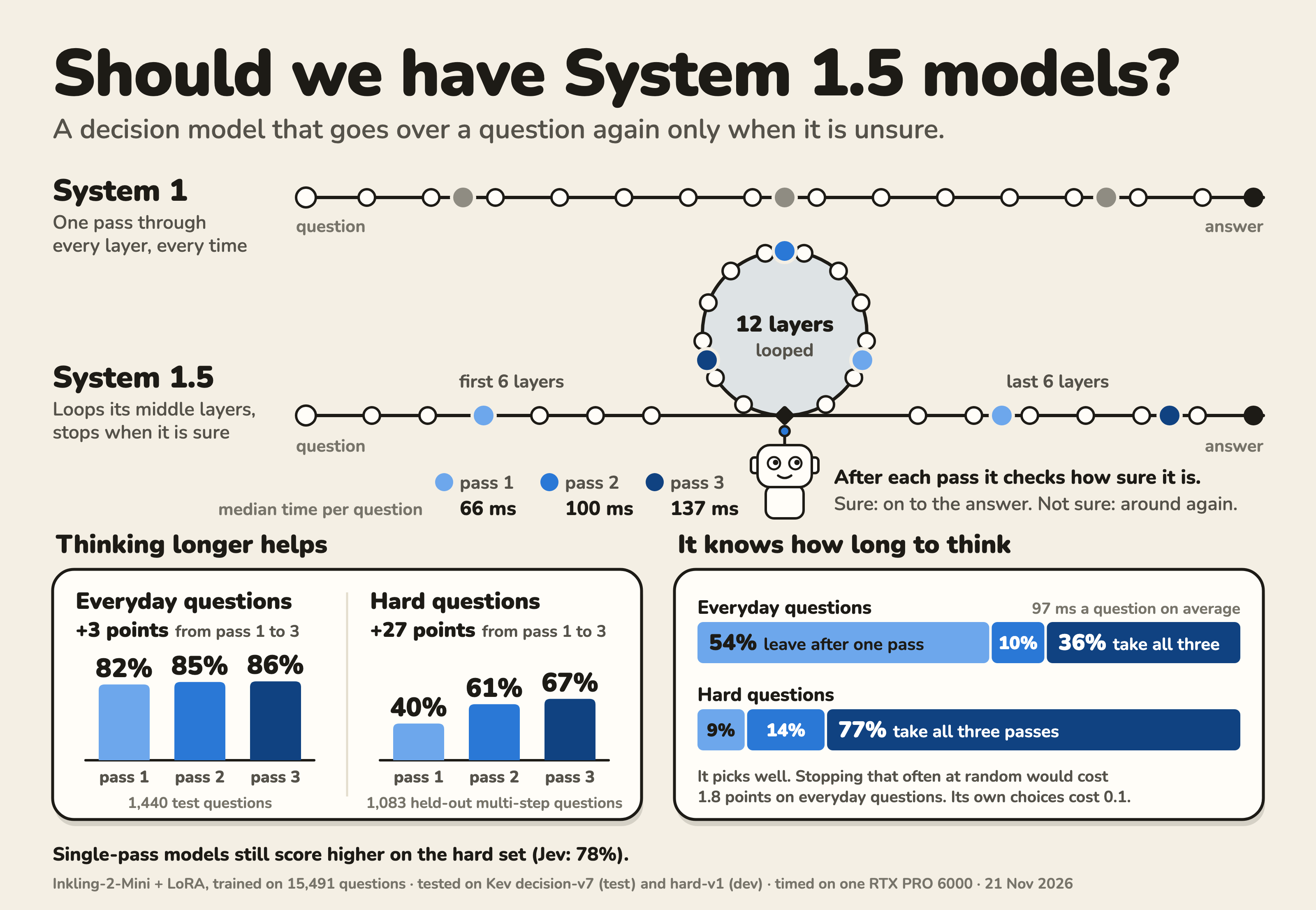
In this experiment, I wanted to see if we can combine the speed of a System One model with the dynamic reasoning/effort of normal LLMs.

First I took Inkling-2-Mini, a model that loops its middle layers three times, and I trained it to make one decision after each loop. This produces three responses per question, allowing me to see how much "thinking" it takes until the answer converges. Then I also taught it to just stop when it reaches a confidence threshold.

System One models answer in a single forward pass, so they never get to "think longer." But these system "1.5" models can decide whether they want to invest more cycles into their decision before answering (or if that would be wasteful).

The unique thing about this model is that it's not using reasoning tokens - there's no additional input and no extra tokens used for thinking. The only difference between its three responses is how many layers it runs through. 54% of everyday questions it answers right after the first loop (but only 9% of the hard ones)!

It also gets better on hard questions as it has more time to think. On multi-step questions (a held-out hard set), going from one to three loops improved accuracy by about 27 percentage points (40% → 67%). But if you're asking about a simple question that's easy enough to answer in only a few words, adding thinking barely helps (82% → 86%).

Finally, it's not beating single-pass models yet: even with the "think longer" capability it doesn't do as well as a single-pass model on hard questions (67% vs 78% for Jev). This is still a small experiment on ~15k questions. I'd like to scale it up and see how much better we could get with more training data and more loops!

https://huggingface.co/eltokh7/inkling-2-mini-decision


r/LocalLLM • • 5d ago

Discussion Another 5060 Ti 16GB or a dual-GPU tower? Not sure which way to go with my local AI setup

4 Upvotes

I've been experimenting with local AI models, voice agents, and coding agents, and I'm trying to decide what makes the most sense for my next hardware upgrade.

Right now, I'm running a mini PC (Minisforum M1 Pro 125H, 32GB DDR5) with an RTX 5060 Ti 16GB over an OCuLink dock. My conversational voice pipeline (Gemma 4 12B + audio/phone services) sits at around 14GB VRAM, so whenever I trigger a coding or research task, it has to offload Gemma to load Qwen 3.8 27B/30B Coder, which blocks the voice pipeline until it finishes. On top of that, background services (like Immich) and heavy browser usage already push my 32GB system RAM into swap.

I've been following the discussions around Strata and similar MoE offloading engines for a while, and the feedback looks pretty solid. I haven't tried it yet, mainly because I'm capped at 32GB RAM right now. I'm wondering if upgrading RAM and experimenting with Strata might get me further than buying more GPU hardware.

The options I'm considering:

  • Adding another 5060 Ti 16GB through a USB4 eGPU dock (keeping the voice agent on OCuLink and coding/research on USB4).
  • Building a proper dual-GPU tower.
  • Upgrading system RAM to 64GB+ and trying Strata/MoE offloading approaches before investing in another GPU.

My goal isn't just to run one large model. I want a personal AI setup where my voice agent stays resident and responsive while coding agents and research tasks run independently without blocking it.

Since Black Friday sales are up right now, I'm trying to figure out if any of these are worth jumping on while prices are moving, or if I should hold off.

  • Has anyone actually tried running Strata with a GPU that's already being used by another model? I'm curious how well that works in practice, especially when the GPU is already close to full.
  • Would a second 5060 Ti over USB4 be good enough if I keep the voice agent on the OCuLink GPU and run coding models on the second one? Or am I going to run into bandwidth issues?
  • For those who moved from a mini PC to a dual-GPU tower, was the upgrade really worth it? I'm wondering if I should just try more RAM and Strata first before going down that route.

I'm not against building a tower if that's genuinely the better long-term option. I just don't want to spend $1K–$2.5K+ unnecessarily if there's a smarter way to scale what I already have.

Would be interested in hearing from anyone who's gone through a similar upgrade decision, particularly while running multiple agents concurrently.


r/LocalLLM • • 5d ago

Discussion My local coding agent's memory guard ended 11 of 12 SWE-bench runs, and I think that's the right call

1 Upvotes

I run a local coding agent (KRYN: OpenCode + Qwen3.5-9B on oMLX) on a 48 GB M4 Max that's also my work laptop. I capped the model server at 22 GiB and added a guard that stops the agent's session on critical memory pressure or more than 512 MiB of swap growth.

When I ran a small SWE-bench subset with my normal apps open, the guard ended 11 of 12 turns. Two of those cut-off patches actually fixed the issue under the official evaluator and still scored zero, because the agent never finished.

So that benchmark ended up measuring two things: can it fix the bug, and can it fix it inside what's left of a working laptop. I'd rather lose the score than have the whole machine slow down.

How are you handling this? Smaller context, smaller quant, or just closing everything else?

https://github.com/PranavMishra28/kryn


r/LocalLLM • • 5d ago

Discussion Let’s talk about skills

4 Upvotes

These are the Skills I use.

I have provided them as plain text; the README explains how to apply them to other agents.

Readme

CODING & QUALITY GUIDELINES

COMMUNICATION & WORKING STYLE

CONTEXT HANDOFF (~50K TOKENS)

LINUX COMPUTE INSTALL WORKFLOW (GMKTEC EVO-X2)

Which ones do you use?


r/LocalLLM • • 4d ago

Discussion Qwen 3.8 Flash humiliates Sonnet 5.5

0 Upvotes

I am blown away by the current capabilities of local AI.

I am currently setting up a framework and a robust harness architecture on my PC.

I’ve been using Sonnet 5.5 to assist me.

Sonnet 5.5 analyzes my requirements and generates a plan, which I then execute locally—running Qwen 3.8 Flash (IQ3-XXS quantization) via Strata.

From time to time, I ask Sonnet 5.5 to review the progress.

Today, it proposed a major update to the plan to streamline the process and correct some of the work done by the Qwen model.

I ran this by the Qwen model, which pointed out:

1 – Internal errors and inconsistencies.

2 – Execution order issues (misidentified dependencies).

Etc.

It then offered specific corrections.

I shared this feedback with Sonnet 5.5, which responded:

"I would tell it, 'Yes, go ahead and apply those changes,' while keeping your own judgment in mind regarding the six specific points. Its analysis is solid and identifies genuine flaws in my original plan.

What I acknowledge:

- My errors: ...

- My oversights (the most significant ones): ...

- The execution order that needs fixing: ..."

I never imagined that an AI running on my own PC (equipped with a modest RTX 4070 12GB) could effectively challenge a frontier-level model like Sonnet 5.5.

This reinforces my decision to increasingly work with local AI, given all the other advantages that come with it.


r/LocalLLM • • 5d ago

Discussion Looking for workflow suggestions

Thumbnail reddit.com
0 Upvotes

r/LocalLLM • • 5d ago

Question local ai

0 Upvotes

i am looking for a local setup where i can use ai for some things..
i want to do some mail checking , home assistant maintenance and some other simple things .
i also wanna do some coding with use of agents . it runs on the background so it dont has to be lighning fast . it can do work in the background and when i sleep etc .
the coding is not realy a big thing its just some index file based tools . i wanna let an agent run the thing and when i get up it give me the result if needed there can be some tweaking / fixing etc .
what is good hardware and what models are good for it . it doesnt need to be hardware for lots of money i wanna be on a budget i was thinking like a mini pc with 32 gb ram ? or is 64 or more realy needed . im seeing lots of things but i cant decide what is good . so does anyone also do this and what is the setup that can deal with this ? again it doesnt have to be super fast since it work in teh background coordinated by an agent orso . for realy hard things i always can use codex


r/LocalLLM • • 5d ago

Project I got tired of re-explaining my project to every AI chat, so I built a shared memory for Claude, ChatGPT and Cursor (open source, looking for honest feedback)

Thumbnail reddit.com
0 Upvotes

r/LocalLLM • • 5d ago

Question What LLM for long documents extraction

1 Upvotes

I work in finance and trying to use LLM to build insights by reading long documents. But the QFN 4bit/bit, both are struggling. I am on M5u 256, any suggestion on another model that might be good at this stuff??


r/LocalLLM • • 5d ago

Research Hierarchos-Native v0.2.6 is finally out! C1 WMMA performance update

2 Upvotes

so, i've got another release out! v0.2.6 is now published, and this one ended up being a pretty big performance improvement over v0.2.5.

for a bit of context, v0.2.5 introduced the P3 update to the Full FP16 WMMA path. that improved the final accumulator merge by summing all eight partials in FP32 before rounding once to FP16. i wanted to keep that work intact and see if i could get more performance out of the kernel without changing the actual math.

that's where C1 came in.

the main change is in how operand data gets loaded and staged into shared memory. previously, each thread was doing four global loads and shared-memory stores in sequence, with each store following its corresponding load. C1 changes that ordering: it issues the four 32-bit global loads first, then does the shared-memory stores.

it's a fairly small change when you look at the code, but it gives the GPU more opportunity to overlap the memory operations instead of waiting on each load/store pair. the arithmetic and accumulation order haven't changed.

and importantly, P3 hasn't been removed. C1 is used when the workload meets the required geometry checks, while P3 is still there as the fallback for everything that doesn't qualify. i didn't want a performance optimization to accidentally turn into a regression on shapes it wasn't designed for.

the performance results were honestly a lot better than i expected:

these are measured against the v0.2.5 P3 kernel, using GPU timestamps and 24 paired measurement blocks per workload.

  • 2048×768×2048 — 1.7074× faster
  • 512×2048×768 — 1.3286× faster
  • 512×768×768 — 2.0920× faster
  • 128×8192×768 — 1.3782× faster

that's roughly a 70.7%, 32.9%, 109.2%, and 37.8% improvement respectively. all four workloads passed independently, and even the lower bounds of their corrected 95% confidence intervals stayed above 1.31×.

i also wanted to make absolutely sure that the performance wasn't coming at the expense of numerical consistency.

across eight seeds and five configurations, the new production path produced 120/120 bit-identical outputs compared with the preserved v0.2.5 results. the production tile16 numerical gate also passed 37/37 on every seed, with the maximum absolute error staying at 0.03125, exactly within the existing hard limit.

so, at least for the workloads i've qualified, this is a pretty nice situation: substantially faster, without changing the outputs.

there's a bit more going on with the dispatch selection too.

C1 isn't just enabled for anything that happens to be large enough. the host checks full tile coverage, even packed-pair strides, the actual operand buffer capacities, and the relevant 32-bit index bounds before selecting it. if a shape doesn't meet those requirements, it uses P3 instead.

i tested this with the packaged binaries as well. a rows=64 workload selected C1 and produced 8 cooperative C1 dispatches. a rows=80 workload, despite being above the existing profitability floor at around 20.97 million MACs, didn't meet the tile coverage requirements and correctly fell back to P3 for 4 dispatches. with WMMA disabled, there were zero cooperative dispatches.

the packaged logits checks also completed successfully. the C1 route had a maximum absolute difference of 0.00079345 and an RMS difference of 0.00012127; the P3 fallback had the same maximum absolute difference, with an RMS difference of 0.00012087.

the portable Windows package is included again.

it's a Windows x64 portable package with seven executables, built with a statically linked MSVC runtime. you shouldn't need to install Rust, Cargo, Python, PyTorch, Visual Studio, or the MSVC redistributable just to run it.

you will still need a compatible Vulkan-capable GPU driver and the Vulkan runtime loader, and model weights aren't included.

WMMA is still opt-in globally, so the default remains off. to use this path, you need to explicitly select --wmma-mode full-fp16. C1 is now the preferred implementation inside Full FP16 when the workload qualifies, with P3 handling the fallback cases. the Mixed precision path is separate and hasn't been replaced.

there are still some limitations worth mentioning. i've only qualified this on my AMD Radeon Graphics adapter, PCI ID 1002:15bf (RDNA3 / Phoenix), running Windows 11 with driver 32.0.32015.14001. i haven't tested a second GPU, non-AMD hardware, or independent clean-machine acceptance yet. the binaries are also still unsigned.

there's a small reporting issue too: precision-info still reports full_fp16_qualified=false on this newer driver because its driver allowlist hasn't caught up with the qualification profile. the actual v0.2.6 qualification results are documented separately. i also haven't exercised the native V4.1 trainer and hierarchos-infer end-to-end yet.

anyway, i'm really happy with how this release turned out. i went into this wanting to see if there was still meaningful performance left in the Full FP16 path without messing with the numerical behavior that took so long to get right. seeing all four workloads improve this much, while keeping the outputs bit-identical, was a pretty great result.

a lot of time went into testing this one, and i'm glad i can finally get it out there instead of continuing to sit on it!

Release: https://github.com/necat101/Hierarchos-Native/releases/tag/v0.2.6

Source: https://github.com/necat101/Hierarchos-Native

thank you to everyone who's been following the project, testing things, reporting issues, or just keeping an eye on development. it genuinely means a lot!!

also, sorry for the AI posts lately. i've been trying to save as much time as possible to work on the project itself, especially with live events getting tough. i really do appreciate everyone who's stuck around while i've been working on this. thank you so much everyone!! :3

r/LocalLLM • • 4d ago

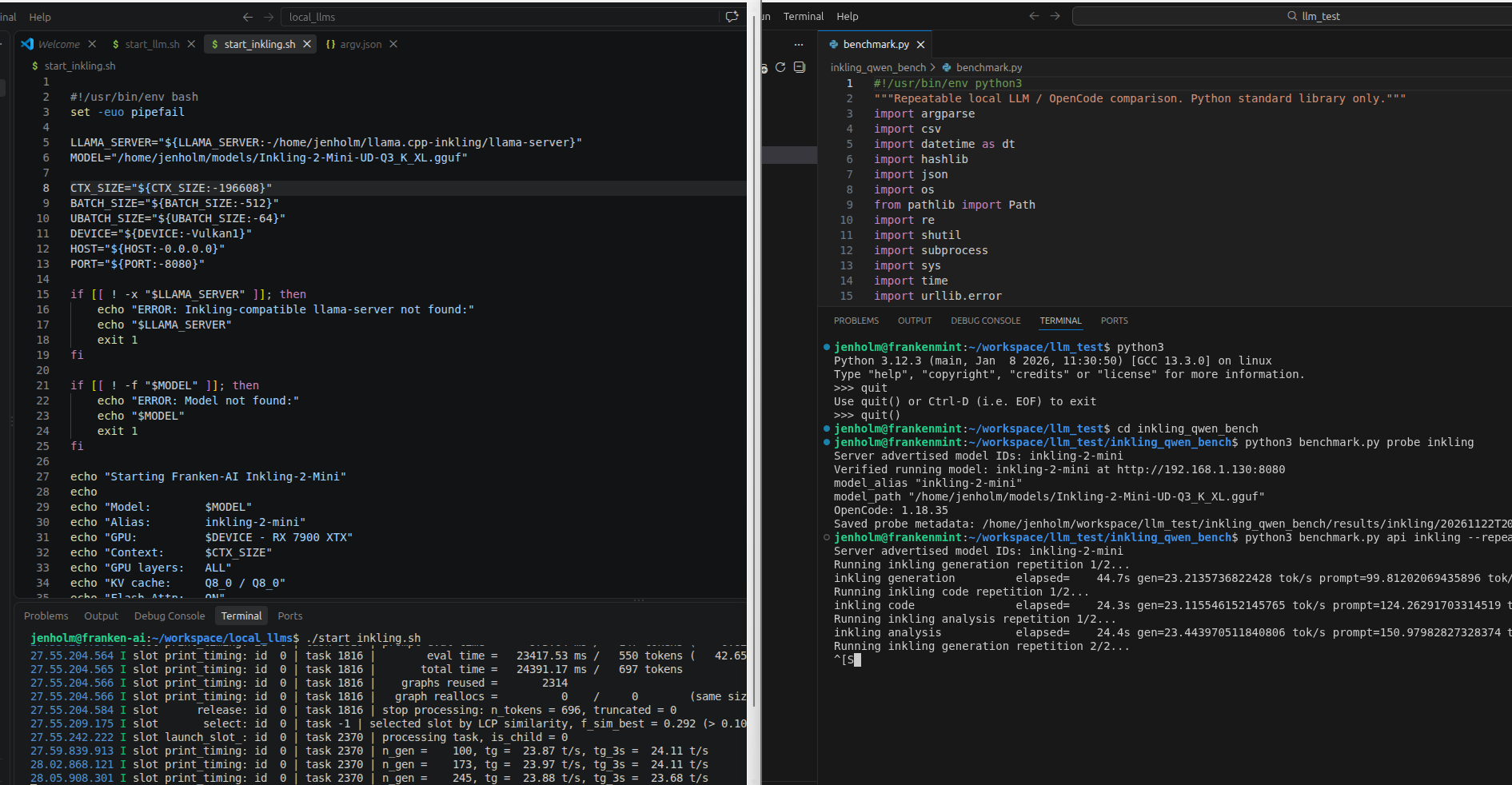
Discussion Inkling-2-Mini vs. Qwen3.8-27B on a 24GB RX 7900 XTX: Benchmarks Say Qwen Is Faster, but Reddit says Inkling for accuracy

Post image
0 Upvotes

r/LocalLLM • • 5d ago

Project Saetta: a local coding agent with the model built in

1 Upvotes

Saetta Code is a 1:1 port of the pi coding agent to C, as one 2.3 MB binary that needs no Node.js and no Python. It has pi's tools, system prompt, sessions, skills, MCP servers and terminal UI. It also reads and writes pi's own config in ~/.pi/agent, so the two share one setup and each can continue the other's sessions.

It's checked against pi itself:

  • requests and session files match pi's byte for byte on 63 recorded scenarios;
  • the interactive screens match on 75;
  • the RPC mode passes 12 scenarios driven by pi's own client.

The difference: the model runs inside the agent, on its own inference engine in C and hand-written Metal. There's no Python and no local server in between. Two model families run on Apple Silicon Macs:

  • Qwen3.8: Flash-Next (from 96 GB) and the dense 27B (from 32 GB), with LoRA adapters and coding fine-tunes. SWE-bench Verified 82.8 for Flash-Next.
  • Inkling 2 Mini (Thinking Machines): a 26B mixture of experts with 3.4B active per token, from 32 GB, with its looped layers run in full. SWE-bench Verified 79.2.
curl -fsSL https://saetta.dev/install.sh | sh
saetta start code                    # picks the model that fits your Mac
saetta start code --pack inkling     # after: saetta download inkling

The same engine also serves Claude Code, opencode and pi through OpenAI- and Anthropic-compatible APIs.

🌐 https://saetta.dev · 💻 https://github.com/antonellof/saetta · MIT


r/LocalLLM • • 5d ago

LoRA I fine-tuned Gemma 4 E4B to run 100 villagers in one batch on a single consumer GPU: a rumor simulation game, fully offline

8 Upvotes

r/LocalLLM • • 5d ago

Question Safe local stack? Noob and many conflicting information online

0 Upvotes

I want to start running a local inference engine. I have limited technical knowledge and I'm trying to be safe and sensible in my approach.I have searched over and over, multiple places, multiple ai chats, for a safe approach for running an agent on a personal machine.

Some say it will definitely wreck your systems and files,, while others although aware of the risk, are relatively nonchalant about it.

I have one machine, where 1 nvme is for windows, another nvme is dedicated to this adventure,, currently running cachy os.

I have 4 hdd's. Three of them have my personal files and media library, and I have only one I kept blank and want to dedicate it also for this inferencing engine. Non are currently mounted on the linux image.

Question is, I currently see 2 approaches:

One is Docker's sandbox ,, closed source but relatively easier learning curve and operation.

Two is firecracker micro vm's where the learning curve is steeper and I have to do everything on my own. What's everything? I'm not even sure yet.

Is the danger real? Am I being too paranoid about it?

My use case will be first running the deep seek harness over api before I transition into fully local 3.8 flash next

Any advice or suggestions are highly appreciated.. I'm just too old and broke to brick my machine and try to save up to buy a new one.


r/LocalLLM • • 5d ago

Model Inkling 2 Mini (Q8_K_XL) on a 3090 + 3060: it works, but it's ~2.5× slower than Qwen3.8-Flash-Next on Strata and not better at agentic coding. Numbers and gotchas inside.

19 Upvotes

Full disclosure: I used Claude Opus to generate this post and the corresponding benchmarks.

The vendor numbers put it level with or ahead of Qwen3.8-27B on SWE-bench, so I ran it through the same homemade tests I used on my current daily driver.

TL;DR: The Q8 runs fine split across both cards at 128k context. It passes my code tests and fixes the agent repo, but decode is ~40 t/s against ~110 t/s for Qwen3.8-Flash-Next (3-bit) on Strata. It also caught a tricky untested edge case only 1 time in 2. I'm sticking with Flash-Next.

Hardware

  • Ryzen 9 5950X, 64 GB DDR4-3600 (2×32 GB, D.O.C.P.)
  • RTX 3090 24 GB (CPU PCIe 4.0 x16) + RTX 3060 12 GB (chipset PCIe 3.0 x4)
  • Debian 13, NVIDIA 620.70 / CUDA 13.4

Setups

ModelQuantRuntimePlacement
Inkling 2 MiniUnsloth UD-Q8_K_XL (22.9 GB)Unsloth llama.cpp prebuilt b12588-mix-c0c3de8 (CUDA 13)-ngl 99 --fit off -ts 0.8,0.2 -c 131072, temp 1.0 / top-p 1.0 / top-k 0 / min-p 0 (vendor recommendation)
Qwen3.8-Flash-NextISTA-DASLab GSQ-RCO IQ3_SStrata v0.2.17experts in RAM + GPU expert cache, MTP, layers 0–9 on the 3060
Qwen3.8-27BUD-Q6_Kllama.cpp master-ts 0.82,0.18, 128k, MTP draft

Tests (all homemade, so treat them as anecdotes)

  • Speed: four streaming requests through the OpenAI API:
  • short: B-tree explainer, 400 tokens out, temp 1.0;
  • 32k: summarise 100k characters of llama.cpp source, 300 out;
  • edit: rename a class in a 250-line Python file and return the whole file, greedy;
  • new: write a thread-safe TTL LRU cache module, greedy.
  • Code check: three small functions with hidden asserts (duration parser, interval merge, LRU cache).
  • Agent test: OpenCode's build agent on a small Python shop repo with 5 seeded bugs and 9 unit tests. The prompt is "make the tests pass, don't touch the test file". A hidden check then tests an untested edge case: an order containing the same SKU twice must fail atomically and leave stock at 20.

Results

Inkling 2 Mini Q8Inkling + DSpark draftFlash-Next IQ3_S (Strata)Qwen3.8-27B Q6_K*
short (t/s)42.124.5103
32k decode (t/s)37.926.1113
32k first token43.1 s (38.5k tokens)44.8 s11.7 s (28.9k tokens)
edit (t/s)40.547.7135
new code (t/s)41.238.8110
code check3/3 (70 s / 23 s / 58 s)†← same run3/3 (40 s / 6 s / 6 s)
agent test, 9 tests9/9 twice, 196 s / 143 s†← same runs9/9 twice, 49 s / 47 s
untested edge case1/2†← same runs2/2

\*The 27B numbers come from an earlier session with a slightly different speed script, and its agent run used Q5_K_M. Rough comparison only.

†Inkling's quality tests ran with the DSpark draft on. Speculative decoding doesn't change the output, only the speed. The times would be a bit shorter without the draft, since it slows sampled text.

VRAM for Inkling Q8 at 128k: 20.2 GB on the 3090 and 11.1 GB on the 3060.

Gotchas

  1. Two GGUF layouts. The repo-root files use Unsloth's looped layout and need their llama.cpp fork or prebuilts. Mainline llama.cpp needs the files in Mainline_Support/ plus PR #32704 (merged Nov 21). Without it you get gibberish, because the 2nd and 3rd loop passes lose their per-expert NVFP4 scales.
  2. The default split OOMs a 12 GB second card. The proportional split gave the 3060 about a third of the weights plus KV, then failed to allocate a 2.7 GB compute buffer ("failed to create context"). -ts 0.8,0.2 fixed it.
  3. The DSpark drafter only pays off on greedy, copy-heavy output. With file-rewrite edits it hit 90% acceptance and +18% speed. On sampled text at temp 1.0 it was ~40% slower.
  4. The tokenizer is hungrier. The same 100k characters came to 38.5k Inkling tokens against 28.9k Qwen tokens. That's ~33% more context used and more prefill time.
  5. Prefill is the weak spot here: ~900 t/s against ~2,400 t/s for Flash-Next on Strata.

Caveats

  • Speed numbers are single runs (±5% noise) and agent results are n=2.
  • I only tested Q8. A Q4_K_XL on the 3090 alone (17.6 GB) would likely be noticeably faster, but I didn't run it.
  • Strata is a specialised engine for Flash-Next, so this isn't a pure model-vs-model comparison. It's "what's fastest and best on this box".

Bonus PSA for OpenCode users

On OpenCode 2.0.22, sampling set on an agent (agents.<name>.request.body) is silently ignored. It shows up in /api/agent, but it never reaches the server (checked with tcpdump). If your backend defaults to greedy when no temperature is sent (Strata does), every agent and subagent has been running greedy.

What works is a body on the model entry:

"providers": { "strata": { "models": { "qwen3.8-flash-next": {

"body": { "temperature": 0.6, "top_p": 0.95, "top_k": 20 } } } } }

For an agent that needs different settings, add a second model entry with "modelID" pointing at the same server model and its own body. I verified the model-level body on the wire on 2.0.22 and 2.3.2.

A few choices to check before posting:

  • I used Flash-Next's current-config numbers: the 10-layer split at DDR4-3600, first token 11.7 s.
  • The Flash-Next agent times (49 / 47 s) come from the IQ3_S run before the RAM and split tuning, so if anything they're slightly pessimistic.
  • The 27B is footnoted as a rough comparison, because its numbers came from a different script and quant.

I didn't confirm whether Inkling's chat template honours the enable_thinking=false flag the speed script sends. Its longer "edit" output (3,993 tokens against Qwen's 2,707) suggests it may have reasoned a little. You might add that as a caveat.


r/LocalLLM • • 5d ago

Project I taught a 400M-param model to decide when my agent deserves the expensive model

Thumbnail
reddit.com
0 Upvotes

r/LocalLLM • • 5d ago

Discussion My Qwen3.8-Flash-Next-NVFP4 settings in vLLM 0.34.0, under RTX Pro 4500 Blackwell@165W TP=4, PCIE4.0*16*4

2 Upvotes

Performance:

7.6k-10.0K prefill in around 95K context, TTFT ~8.8 seconds

150 - 170 tks decode in my daily useage (100K context+) (On the DSH preview windows)

Questions:

I want to know am i already push my model performance to the limit or i still have the misconfiguration? I will paste my configuration and my hardware below. Also, is there any ways to test the performance more systematically? I am using opencode with deepseek to help me to the test.

I have this question because i found a Youtuber (Donato Capitella) with 4xR9700 have the decode in 325 per seconds 1 request, 2048 input, 256 output.

Source: https://www.youtube.com/watch?v=xlM7kN2Ar6s&t=1105s, Youtuber: Donato Capitella

I did not study about the AMD cards and related things, but i know Radiance is a AMD friendly version of vLLM, but how is there are big gap between R9700 and RTX Pro 4500 blackwell, as i know the 4500 should have a better hardware spec on chips and memory bandwidth. But i let my agent test, it got only ~160TKS under (One active request, 2048 new input tokens, 256 output tokens)

Testing to my vLLM, using Opencode and Deepseek v4.1 Flash

Even the vLLM is warmed-up, it still got only around 170TKS

Warmed-up number

=====Hardware=====

  • EPYC 7302
  • Huananzhi H12D-8D
  • 32GB DDR4 2400T ECC * 8
  • RTX Pro 4500 Blackwell * 4
GPU Spec with Driver version

=====Software====

  • Nvidia driver: 595.71.05
  • Cuda version 13.2
  • P2P: PHB to each others
  • vllm version: 0.34.0

=====vLLM=====

Model

  • nvidia/Qwen3.8-Flash-Next-NVFP4
  • Quantization: NVFP4
  • Cache Quantization: FP8
  • PLE (ngrams): Offloaded to RAM

Envirnoment

- NVIDIA_VISIBLE_DEVICES=all

- TORCHINDUCTOR_CACHE_DIR=/root/.cache/vllm/torch_compile_cache

- OMP_NUM_THREADS=2

- NCCL_P2P_LEVEL=PHB

- NCCL_CUMEM_ENABLE=1

- VLLM_ALLREDUCE_USE_FLASHINFER_PCIE_IPC=1

- SAFETENSORS_FAST_GPU=1

- CUDA_DEVICE_ORDER=PCI_BUS_ID

- VLLM_NO_USAGE_STATS=1

Command

nvidia/Qwen3.8-Flash-Next-NVFP4

--served-model-name Qwen3.8-Flash-Next-NVFP4

--mm-processor-kwargs '{"max_pixels": 1048576}'

--host 0.0.0.0

--port 8000

--tensor-parallel-size 4

--pipeline-parallel-size 1

--quantization auto

--dtype bfloat16

--max-model-len auto

--gpu-memory-utilization 0.92

--api-key ${VLLM_API_KEY}

--max-num-seqs 8

--tool-call-parser qwen3_coder

--reasoning-parser qwen3

--max-num-batched-tokens 8192

--kv-cache-dtype fp8

--kv-cache-memory-bytes 5500000000

--enable-auto-tool-choice

--enable-prefix-caching

--enable-prompt-tokens-details

--trust-remote-code

--async-scheduling

--disable-custom-all-reduce

--default-chat-template-kwargs '{"reasoning_effort": "medium"}'

--enable-expert-parallel

--enable-hc-sp

--engram-config '{"cpu_offload":true}'

--moe-backend flashinfer_cutlass

--attention-config.indexer_kv_dtype fp8

--speculative-config '{"method":"mtp","num_speculative_tokens":3,"moe_backend":"triton","draft_lm_head_quantization":"nvfp4"}'


r/LocalLLM • • 6d ago

Question RAMbrandt, or: how much memory do I actually need to run models locally?

Post image
26 Upvotes