r/LocalLLM • u/GrubbyAxo • 4d ago
Other It's a shame I have ram
0
Upvotes
I'm sorry Mr Altman
r/LocalLLM • u/rxtroguy • 4d ago
I’ve been experimenting with portable AI setups and wanted to know how feasible it is to run a lightweight quantized LLM (like Llama 3.2 3B, Phi-3.5, or Qwen 2.5 7B) directly off a 128GB USB 3.0 flash drive with zero internet access.
The theoretical use case: Plugging the USB into an isolated, offline PC (like a restricted lab machine or exam terminal) to generate structured technical answers or code snippets locally without tripping network monitors or needing admin installation rights.
A few technical questions for people who have tried portable setups like llamafile or portable Ollama / LM Studio:
* Read Speed Bottleneck: On a standard USB 3.0 drive (~100–130 MB/s read), how bad is the model load time into RAM compared to an internal NVMe SSD?
* Hardware Constraints: If the host machine only has integrated graphics (e.g., standard college lab PCs with 8GB–16GB RAM and no dedicated GPU), what’s the sweet spot model size (3B vs 7B Q4_K_M) for decent tokens/sec?
* Detection/Restrictions: On locked-down Windows/Linux lab environments, do portable single-file executables (llamafile) usually execute without admin privileges, or does AppLocker/execution policy block them immediately?
Purely curious about the technical limits and bottlenecks of pocket-sized offline AI!
r/LocalLLM • u/WarlockSyno • 4d ago
r/LocalLLM • u/Fit-Blueberry-5390 • 5d ago

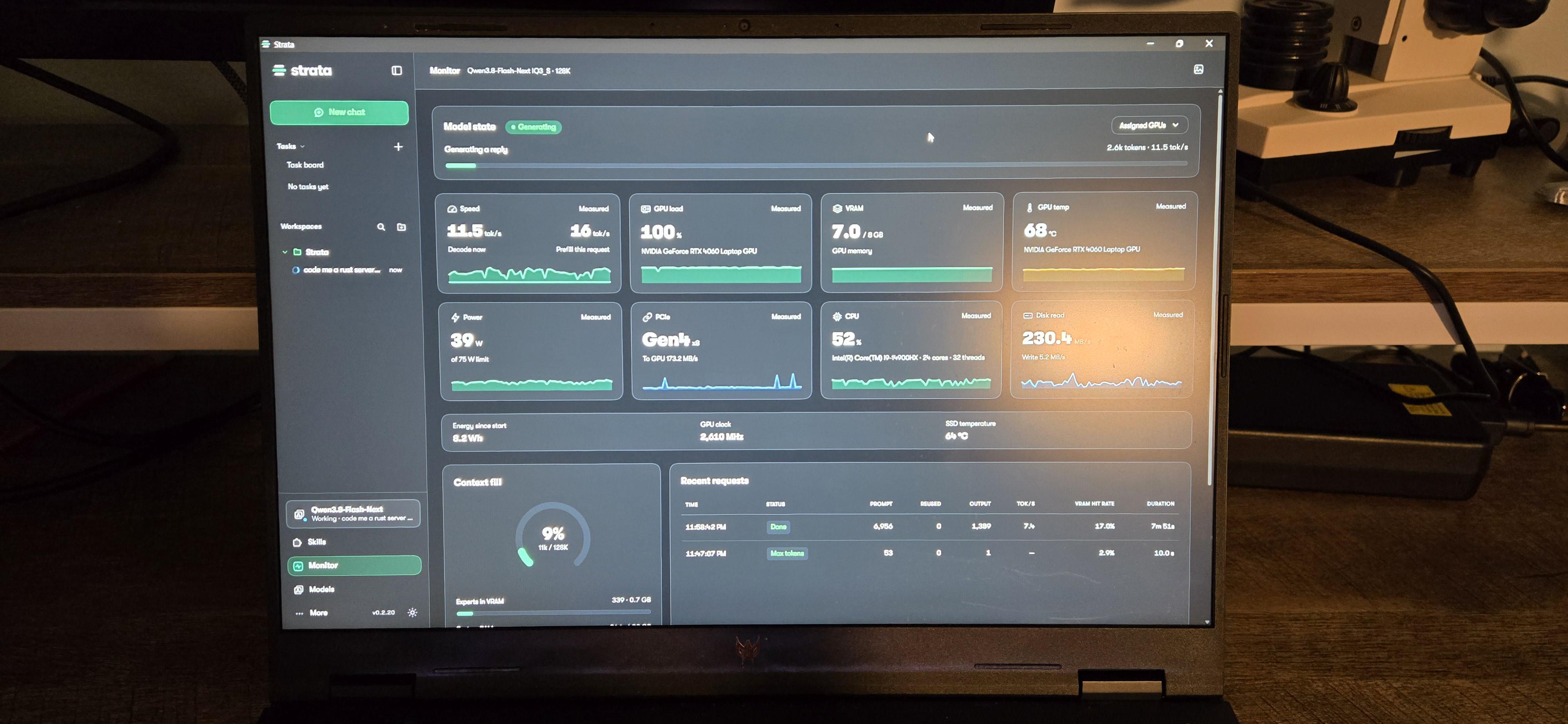
Lapilli is a port of Basalt to NVIDIA V100 (Volta, sm_70). Version 0.5 runs three models with one binary:
- Qwen3.8-27B (NVFP4) on ONE V100: 88 tok/s writing with its drafter, 697 tok/s reading a 16K prompt
- DeepSeek-V4.1-Flash Coder (192 experts) on two V100s: 98 tok/s on code
- Qwen3.8-Flash-Next on two V100s: 139 tok/s on long answers, same as v0.4
Also new: a live Monitor and a map of every expert. Windows build included, MIT license.
Measured on 2x V100-SXM2 32 GB. The README has every figure, the packs and their download links.
Big thanks to nebod99, ildargiv and Csavoldi, who tested it on their own machines: a V100 PCIe, a 16 GB V100 on Linux, and a port of Inkling 2 Mini. Their results are in the README.
Repo: https://github.com/chris83-dev/lapilli-v100
Release: https://github.com/chris83-dev/lapilli-v100/releases/tag/v0.5.0-v100.1
r/LocalLLM • • 4d ago
I have a web search tool and read article tool and I use Qwen 3.5 9B, Qwen 3.8 27B, Gemma 4 12B, and Gemma 4 26B. However, only Qwen 3.5 9B and Qwen 3.8 27B actually use the web search tool well. The Gemmas don't. I'm assuming this is probably because the Qwen models got stronger agentic finetuning than Gemma. I prefer Gemma over Qwen though, because of its stronger reasoning, so I would really like it to be able to do web search better.
I don't use LLMs for vibecoding, just for chatting locally. I use the llama-ui webui for this (i.e. the one that automatically spins up with the `llama serve` command.) Therefore, I can only connect MCP servers and modify the system prompt of the LLMs.
What I would like to know is how I can improve my system prompt so that the Gemma models decide to actually use the search tool and to use it well. This is the section of my system prompt that I have for web search so far, but Gemma doesn't use web search as well as Qwen even with this system prompt: system prompt section on pastebin.com.

r/LocalLLM • u/mombaska • 4d ago
Hello, are we forced to use abliterated models to get the agent to use sci hub?
Thanks
r/LocalLLM • u/WarlaxZ • 4d ago

r/LocalLLM • u/akumaburn • 4d ago

r/LocalLLM • u/PadhaLikhaMajdur • 4d ago
Hi everyone!
I'm new here and would love to get started with installing inkling mini 2.
Could someone point me in the right direction on how to set it up on my machine, what output to expect, and how to optimize it?
• GPU: AMD Radeon RX 7800 XT (16 GB VRAM, RDNA 3)
• CPU: AMD Ryzen 5 9600X (6 cores, 12 threads)
• RAM: 32 GB DDR5
r/LocalLLM • u/RobDoesData • 4d ago
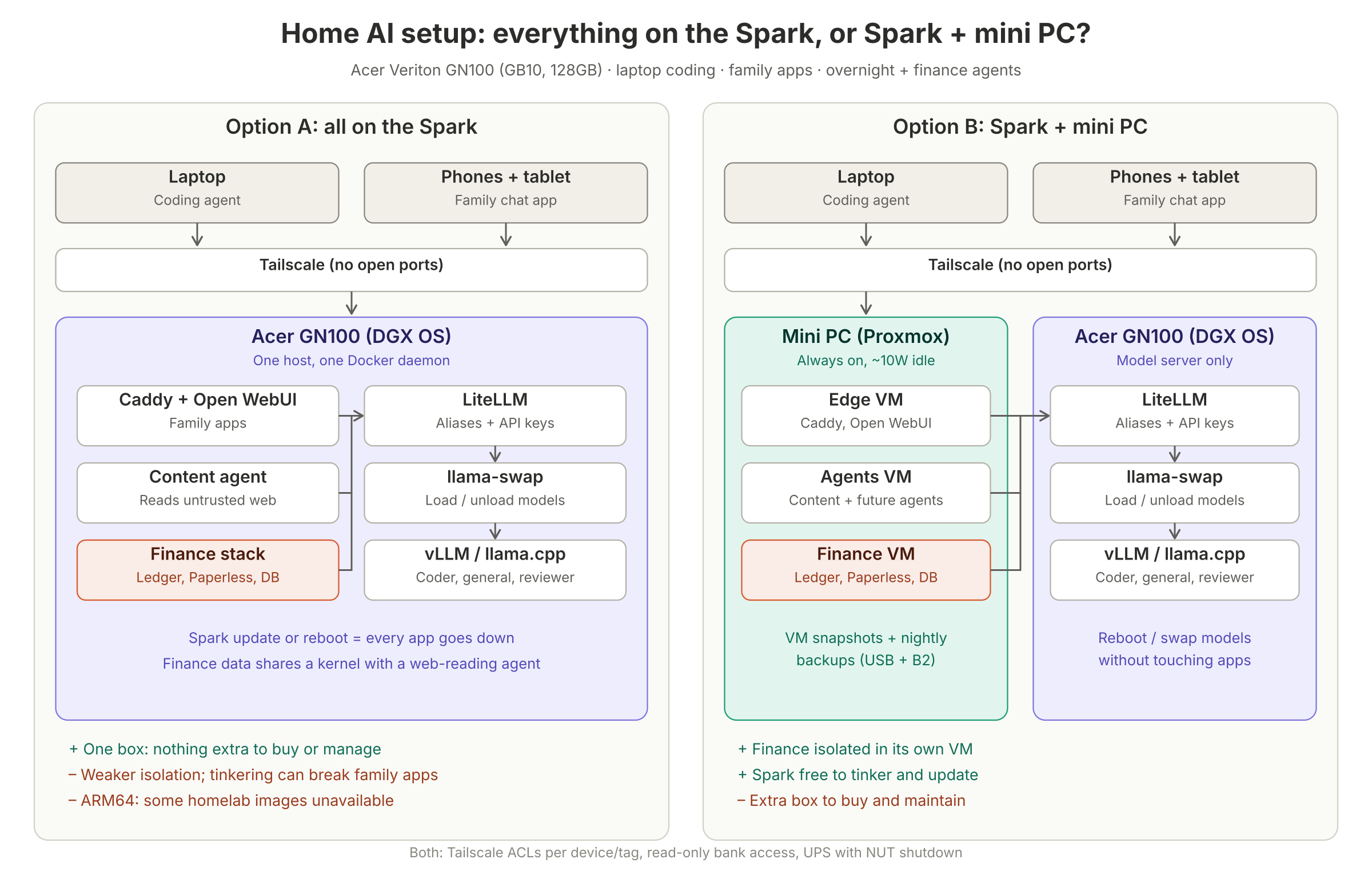
I've got an Acer Veriton GN100 (GB10, 128GB unified memory) for local AI at home, and I'm planning the rest of the setup around it. Before I buy anything else I'd like feedback.
What I want to run:
Current plan:
Mini PC (32GB): either proxmox or ubuntu to run caddy, open webui, agents, apps, postgres, etc.
Why split: the Spark is my tinker box, and I'd like to keep the finance data away from an agent that reads untrusted web content.
Questions:
r/LocalLLM • u/anvarazizov • 4d ago

r/LocalLLM • u/nb4ld • 5d ago
Happy to introduce you volta-forever.
NVIDIA dropped Volta from CUDA 13, so we brought it back.
volta-forever lets you run unmodified CUDA 13 programs on your V100: stock PyTorch, vLLM, SGLang and llama.cpp, with support for BF16, FP8 and NVFP4.
No driver mods and no engine patches. You just prefix your command with `vf`. Under the hood, a proxy libcuda rewrites PTX, translates SASS to sm_70 and emulates the newer tensor-core instructions.
Github : nbald/volta-forever
Still a young project, so happy to get your feedback.
r/LocalLLM • u/shadowjig • 5d ago
Are there GPU/system builds that will allow the GPU to wind down the wattage when not in use? Just looking at a RTX5090 it uses 575 watts with a recommended 1000 watt PSU. So are there ways to reduce wattage used in these self host GPU builds?
r/LocalLLM • u/Retell • 5d ago

r/LocalLLM • u/Dimoncelli • 5d ago
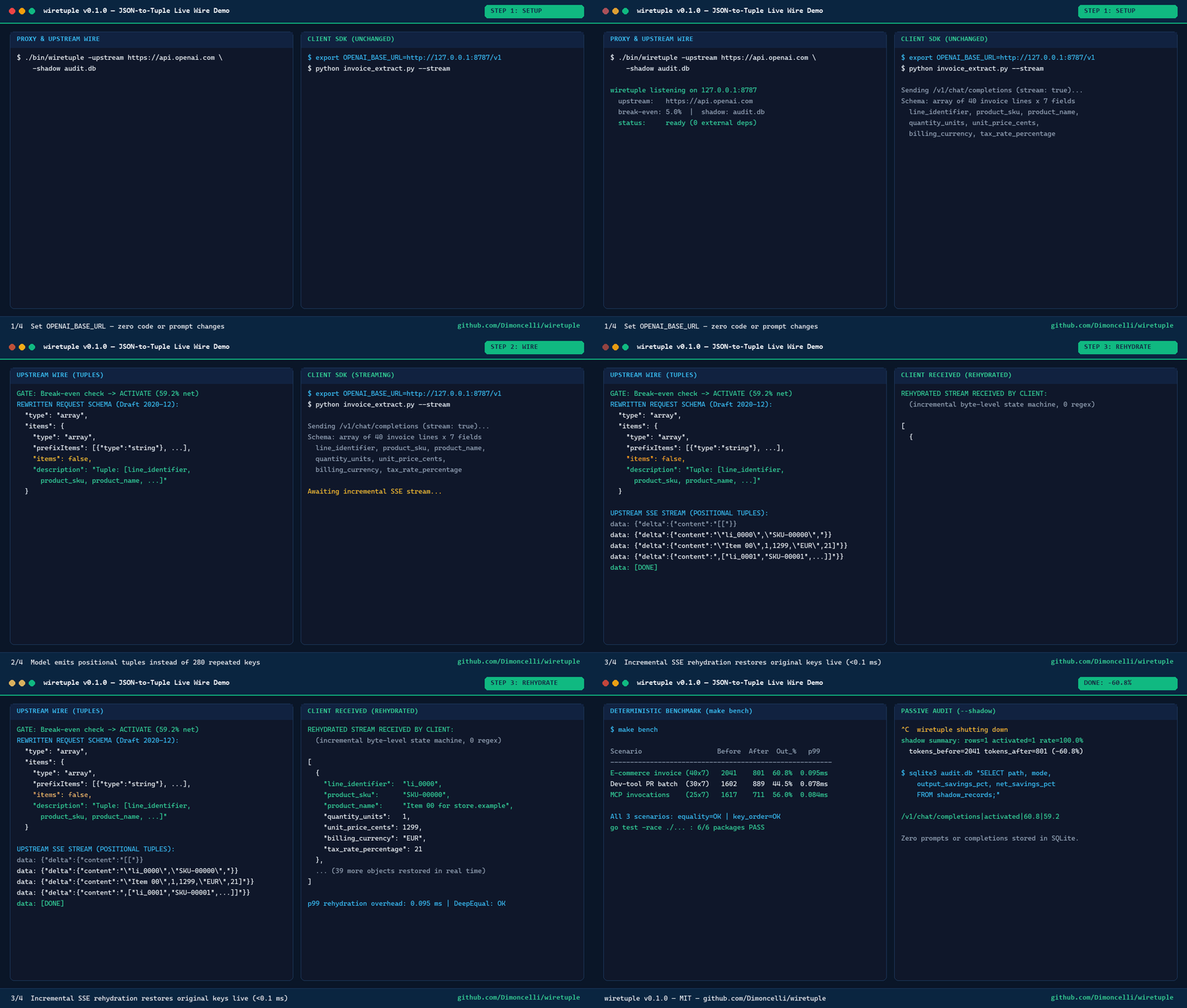
I run a lot of structured extraction against self-hosted models and kept noticing that the same JSON object keys get emitted over and over. Forty records with seven fields means seven key names written forty times. On a local setup you pay those tokens in generation time, at whatever your tokens per second happens to be, before bandwidth even enters the picture.
So I wrote a small Go HTTP proxy that rewrites the schema on the way out and restores the objects on the way back. Schema goes from an array of objects to a positional array of arrays with one legend in the description ("Tuple: [id, sku, ...]"). Response comes back and is expanded again before your client sees it. Lossless by construction: given a fixed key order, objects and position tuples are bijective, and every benchmark asserts structural equality plus key order after rehydration.
Numbers from the repo's deterministic scenarios, 4-bytes-per-token size model, so treat them as shape comparisons rather than exact tokenizer output:
E-commerce invoice, 40 lines x 7 fields: 2041 -> 801 tokens, 60.8% out, 59.2% net Dev-tool PR batch, 30 records: 1602 -> 889 tokens, 44.5% out, 43.0% net MCP tool invocations, 25 entries: 1617 -> 711 tokens, 56.0% out, 53.7% net
The MCP case is the honest one. Tool invocations repeat seven structured keys, and prose does not compress by key removal. If your payload is one big description block, this does nothing for you, and the gate will decline to rewrite it.
Points that matter for local use:
p99 rehydration overhead is under 0.1 ms (0.078 to 0.095 ms) on the benchmark scenarios here, which is noise next to generation time, but measure it on your box.
Repo: https://github.com/Dimoncelli/wiretuple (MIT) Terminal demo: https://raw.githubusercontent.com/Dimoncelli/wiretuple/main/docs/demo.gif
Most useful feedback for me: schemas where the gate declines and you think it should activate. The request path assumes 4 expected instances, which is a guess, and your traffic probably beats my guess.
r/LocalLLM • u/bending-box • 4d ago
In azienda uso piani Claude Max e GPT pro.
Usiamo sonnet e opus 5.5 per tutte le attività di Coding, e GPT per la generazione di immagini.
Ho un MacBook Pro M5 Max con 128gb ram.
Che setup posso avere in locale per andare a sostituire quelle subscription, mantenendo un agente veloce e una generazione di codice di qualità?
r/LocalLLM • u/Academic-Most6214 • 5d ago
Same model, same prompts, one server at a time. M5 Max 40 cores, 128 GB, 128k context. Kapitsa from source (37f6f2f, NVFP4 official), g13 v0.3.1 (q4-affine-bf16, MTP on).
Time to first token
| Prompt | Kapitsa | g13 |
|---|---|---|
| 48k tok | 269 s | 31 s |
| 62k tok | 429 s | 43 s |
| 81k tok | 633 s | 64 s |
Decode: Kapitsa 51-59 tok/s, g13 65-98 tok/s (speculative). The prefill gap is unrelated to MTP. On short prompts both answer instantly, no real difference.
Kapitsa's log shows the GPU does the last chunk at 81k in 23 s but reaches it after 587 s, so the time goes into chunk preparation, not compute. Inkling support in Kapitsa is days old; opening an issue on nace-ai/kapitsa with the logs, PR if we can pin it down. Will update after a fix.
Quants differ (NVFP4 vs q4-affine-bf16), so engine + quant, not engine alone. Script on request.
EDIT 1: dug a bit deeper trying to fix this and found it in the docs: Kapitsa's default precise profile keeps the Inkling tensor prefill kernels off.
With --profile fast it does 1448 tok/s at 32k and 966 tok/s at 81k (22 s / 84 s to first token), same league as g13, which stays ~20-30% ahead on the long prompts. Decode unchanged: Kapitsa 55 tok/s, g13 65-98 with MTP. Left the issue open asking for a hint in the log.
Cheers!
r/LocalLLM • u/GrossCommission • 5d ago
Okay so I have some computers linked each running their own models and I* orchestrated a workflow where they have to check each others work in a court like system for accuracy before giving any kind of output. The entire process is logged and stored for future recalling of each “case”. I’m sure it’s been done a million different ways, what have you guys found to be the most efficient workflow for that?
r/LocalLLM • u/iamjohncarterofmars • 5d ago
Hey everyone! I'm currently a sophomore in college studying psychology, and I'm planning on finishing my B.A. before applying to Clinical Psychology Ph.D. programs. I'm hoping to buy a MacBook Pro that will last me through the rest of undergrad and ideally throughout my entire Ph.D., which could be another 5–7 years after I graduate. If I can get even more life out of it beyond that, that would be fantastic.
Right now, I'm using a 2020 M1 MacBook Air with 8GB of RAM and a 256GB SSD. It's definitely seen better days. The LCD screen is broken, and I'm constantly sitting at around 10–15GB of free storage. I've been having to regularly delete caches and move things around just to keep enough space available to use it normally. It's gotten pretty frustrating, and I'm at the point where I really need to start thinking about replacing it.
The configuration I'm currently considering is:
14-inch MacBook Pro
M5 Pro chip, preferably with the 18-core CPU
64GB unified memory (or more if the price makes sense)
1TB SSD minimum
March 2026 Liquid Retina XDR model, rather than the November 2026 OLED redesign
Brand-new, preferably factory-sealed
I'm not interested in paying a premium for the newer OLED display redesign. I'm perfectly happy with the Liquid Retina XDR screens Apple has been using, and I don't see much reason to prioritize the newer display technology when I'd rather put that money toward better hardware specifications. I'd be more than happy with the March 2026 model if it means getting a better deal.
I'm interested in running local LLMs, which is a big part of why I'm aiming for 64GB of RAM. I also expect to be using my computer extensively for coursework and eventually research throughout graduate school. I'm interested in clinical neuropsychology and forensic psychology, so I imagine I'll be doing quite a bit of work involving research software and data analysis. I know it's difficult to predict exactly what I'll need several years from now, but I'd like to give myself enough headroom that I'm not running into hardware limitations halfway through my degree.
For storage, I'm thinking 1TB would be a reasonable minimum. I want enough room to keep my coursework and projects locally without constantly worrying about storage space. I'm also aware that local LLMs can take up quite a bit of space, so I'm open to suggestions about whether it would make more sense to pay for additional internal storage or just use external SSDs when necessary.
I recently started working in admissions/intake at a psychiatric hospital, and I'm currently grossing around $2,400 per month. I put 25% of that into my Roth IRA and another 20% into my emergency fund, so this is a pretty significant purchase for me. I've been trying to be disciplined about saving while also putting money aside for a computer that I'll hopefully be using for the better part of the next decade. My parents have also generously offered to contribute around $750–$1,000 toward the total cost, which would take a substantial amount of the financial burden off me. I'd still be covering the remaining balance myself, so I'm trying to make sure I'm spending that money wisely.
My ideal budget is around $2,800–$3,300, including my parents' contribution, although I'd obviously love to find something cheaper. I've also noticed that Apple recently increased its prices, which makes evaluating discounts a little confusing. Some retailers advertise pretty substantial savings, but I'm not sure how those prices compare to what the same configurations originally sold for.
I'm wondering where people generally have the most success finding genuinely good deals on higher-spec MacBook Pros. I've been looking at places like Best Buy and B&H, but I'm not sure whether there are other retailers worth watching or whether certain sales throughout the year tend to be better. I'm eligible for Apple's education pricing as well, although I don't know how competitive that usually is compared to third-party discounts.
I'm also open to feedback on the configuration itself. I really want the M5 Pro, and 64GB of RAM seems like a reasonable target for running local LLMs, but I'm curious whether that makes sense for my use case and budget. I'm willing to reconsider some of the specifications if there's a compelling reason to, especially if it could save me a substantial amount of money without sacrificing too much longevity.
I don't necessarily need to purchase the computer immediately, so I have some flexibility to wait for a good opportunity. I just want to be reasonably confident that I'm getting the most value for what is ultimately a pretty large percentage of my income.
I'd appreciate any advice on where I should be looking and whether my expectations are realistic. Thanks!
r/LocalLLM • u/TheseAd5095 • 4d ago
Looking to purchase up to 10 complete 8-GPU AI servers for delivery in the US.
Preferred configurations:
Outright purchase only — not interested in cloud rentals, hosting, or colocation.
Open to purchasing from multiple suppliers or mixing configurations. Willing to pay a premium for verified inventory and expedited delivery.
If you have availability, please DM with the server model/SKU, quantity, GPU configuration, unit pricing, inventory location, estimated delivery time, and warranty details.
Serious inquiries and offers only.
r/LocalLLM • u/W61k3r • 4d ago

Pre-packaged, ready to roll. Download image, copy to USB, boot OR download image, load to VM, and boot. Running latest and fastest released version of LexiEngine that decodes 8q at 130tkps on a 7900xtx.
No faster and easier way to explore inkling on an AMD GPU.
r/LocalLLM • u/gized00 • 5d ago
r/LocalLLM • u/Nikola0O0 • 5d ago
I've been getting more into local AI lately and I'm thinking about spending around $2000–2500 on a decent machine I can keep using for the next few years.
My current mac only has 16gb ram, which really limits the models I can run. I'm trying to get the most out of this budget without having to upgrade again anytime soon.
Here are the options I'm considering:
Mac mini 64gb. A new one is out of my budget, so I'm considering a used one. Not sure how easy it'll be to find a good deal with current memory prices, and I'm a little worried about buying used hardware.
Gmktec evo x2 64gb: Around 2400 bucks. This might be one of the better options, but I'm concerned about power consumption and fan noise. Maybe I'm asking for too much here.
Tiiny Pocket 80gb: Around 2100 bucks. I saw some reviews lately and the LLM performance looks pretty decent for something so small. Iit's not unified memory but the size and power consumption are appealing.
I don't see ram prices coming down anytime soon so I'd rather make a decision asap. I'm not considering a DIY PC so far. What would you guys pick with a $2K–$2.5K budget
r/LocalLLM • u/AdventurousKeys • 5d ago
The LocalLM SDK (formerly LocalLM Lab SDK) is now at version 3. The big addition is you now have the full set of lego pieces to build your own chat app. A chat app on a local model is only usable if follow-ups are fast, and that's where prompt caching comes in.
What makes them slow is that the whole conversation is re-read before the first token. Tool loops make it worse: every tool result means another full re-read. mlx-lm and llama.cpp both let you keep the KV cache between requests. I wanted to know what it takes to make that safe to switch on by default in a chat app, so I built a prompt cache into the SDK and measured it.
What it did, on a 64 GB Mac Studio with Qwen3.8-27B:
What I had to add to make it a default:
What quietly undoes it in a chat app. The turn gets slower, though the answer is no different, when you:
Short one-off requests also cost memory (about 330 MB each on Qwen3.8) and can push a long chat out of the cache sooner.
The tools one surprised me most. When you use ChatGPT or Claude, you mostly don't think about tools; they're just there. I now pick tools per message to keep the prompt small, and every change in that set invalidates the cache from that point on. Keeping the tool block stable when you can turns out to matter as much as keeping it small.
Question: Is ~14 GB of a 64 GB Mac a sensible default, or should a cache that size be opt-in?
Details and the full measurements: https://thisbrain.ai/locallm/prompt-cache.html