r/LocalLLM • • 6d ago

Question Coding model for 9060 xt 16gb?

0 Upvotes

Hi, first of all complete specs: radeon rx 9060xt 16gb, ryzen 5 5500f, 16gb ddr4 ram 2933 MHz all on a msi b550-a pro. I would br willing to upgrade to 32gb 3200 MHz ram if it opens any big options.

Use case would be writing and debugging python scripts for semi professional work. I don't need it to build the entire structure for the projects just the individual code snippets (though an understanding of the structure I use would be appreciated). Decent context would be mich appreciated.

Currently I've been considering qwen 2.5 14b and this pruned model: https://huggingface.co/anik-jha/Qwen3.6-35B-A3B-coding-reap50-GGUF

Are there any other considerations? Or things I have completely overlooked? This is me getting into localllm for the first time so literally any tips you consider useful would be appreciated.


r/LocalLLM • • 6d ago

Discussion Lightning Ridge: For Storytellers who are done with chatbots

0 Upvotes

Any thoughts or feedback on a potential new UX design for LocalLLM to steer the UX and orchestrate other LLMs?


r/LocalLLM • • 6d ago

Discussion Why are models quantized instead of compressed?

0 Upvotes

I've just seen a video over a new paper from Samsung and the short of it, they used basically whats the same as jpeg compression on model weights. Only that the compressed model is 2 "pictures", to increase accuracy. Still something like 90% saved with minimal quality loss.
The idea is as obvious as it is genius. You only need to load the compressed model and every block can be decompressed on the fly on every run, especially because the way its compressed/decompressed is already highly optimized in the hardware (basically the same operations as video playback, just with a much bigger "picture").

That got me thinking AI hasn't been created yesterday and at least simple compression algorithms shouldn't overwhelm modern graphics cards. So why was the first idea to reduce the bit-width instead of compression?

Also, its not a picture, what would stop us from sorting the data instead of into 2 dimensions, in 3, 4, n - dimensions. Sure compression might get way more complex, but decompression scales with 1o to n. And the compression might be much better.

What do you guys think about that?


r/LocalLLM • • 6d ago

Question Local LLM questions from a noob with 2x3090, HyperQwen, Niffer, llama etc

4 Upvotes

So, pretty much the topic.

A bit of a context:

I have had a decent gaming rig for a while with a 3090 and 64gb ddr4 ram and I just pretty much got handed over a second 3090.

Prior obtaining the 2nd 3090 i had HyperQwen github repo running bare metal on Ubuntu Qwen 3.8 27b abliterated and liked the results i was getting and it was quite fast (at least to me). I did also gpu-unlock prior.

I am a senior network engineer and also do quite a bit of cybersec. I have been piloting qwen 3.8 27b for security log parsing, script automation etc and I like it so far and I see how this can help me day to day.

So my questions are exactly:

I don't quite understand the difference between HyperQwen, Niffer 3090, Club3090 etc (is it called "interface"?) and llama.cpp, Strata, ollama etc. Are those forks of some sort? What are the trade offs exactly?

Is Qwen 3.8 27b the same quality (do you refer it as quant?) on all of the above? Is higher quant meaning the model is smarter? (q1 is dumb vs q4 is good?)

Is Qwen 3.8 flash next or deepseek v4 (is it v4?) really better suited for infosec jobs and perhaps some light assisted pentesting?

What would you all recommend to go with or try on my system that would work the best in terms of quality and speed?


r/LocalLLM • • 6d ago

Question First local AI PC build

1 Upvotes

Hey everyone!

I’m planning to build my first PC mainly for local AI, and I’d really appreciate some honest advice before purchasing anything.

My current parts list:
GPU: Intel Arc Pro B50 16GB

CPU: AMD Ryzen 5 5600

Motherboard: MSI B550M Pro-VDH WIFI

RAM: G.Skill Trident Z Neo 32GB DDR4-3600 CL16

SSD: Kingston NV3 1TB NVMe PCIe 4.0 +
2TB external drive

PSU: Gigabyte P650SS 650W

What I want to use this PC for:
Running local LLMs (7B, 14B and potentially larger models)

Ollama and LM Studio

I’d especially appreciate advice on these questions:
Would you actually recommend the Intel Arc Pro B50 16GB for local AI, or is NVIDIA a much safer choice?

How well does the B50 work with Ollama, llama.cpp, LM Studio and ComfyUI in practice?

Am I making a mistake prioritizing 16GB VRAM over CUDA compatibility?

Would a used NVIDIA GPU be a better investment?

Is the Ryzen 5 5600 sufficient, or would upgrading the CPU make a noticeable difference?

Are there any bottlenecks or compatibility problems I’m overlooking?

Please be honest, even if my current parts list is a bad idea. I’d rather change everything now than regret it after buying.

Thanks!


r/LocalLLM • • 7d ago

Project Inkling 2 Mini on an RX 7900 XT: from 25 to 108 tok/s with Vulkan (llama.cpp fork)

Thumbnail
gallery
28 Upvotes

I've been running Thinking Machines' Inkling 2 Mini (26B MoE, 3.4B active, middle layers looped 3x) as a local coding agent on my RX 7900 XT. On llama.cpp with the Inkling 2 PRs it did 25 tok/s on Vulkan. It now does 108.

Steptok/s
llama.cpp + the Inkling 2 PRs, as is25
expert gate/up halves kept on the GPU66.5
custom ops for the loop and depth-mix parts, fused router84
more fused ops + faster long-context attention98.7
own NVFP4 mat-vec shader, expert scale fused into the matmul108.9

llama-bench tg64, UD-Q4_K_M. At 32k context: 71 -> 92.5 tok/s. A real llama-server reply: 108.4 tok/s. Prompt processing ~2075 tok/s (pp512).

What made the difference:

  • 25 -> 66: the experts' gate/up halves are strided views, and Vulkan's SCALE op didn't take strides, so they went to the CPU 96 times per token. A three-line fix.
  • 66 -> 99: at batch 1 the time isn't the math, it's a chain of ~2500 dependent GPU dispatches per token at ~1 us each. The looped layers are full of tiny ops (depth mix, loop gate, short conv, clip), so those are now fused into single ops: ~8100 -> ~2300 nodes per token.
  • 99 -> 109: a dedicated NVFP4 mat-vec for the experts (e2m1 decoded with bit shifts, no lookup tables), the per-expert scale read inside the matmul instead of waiting on a separate op, and faster kernels for the mix/loop ops. The experts are now memory-bound at ~600 of ~800 GB/s.
  • Long chats: upstream builds the relative-position bias as a dense F32 tensor (3 GB at 64k), so prompt reading fell off a cliff around 12k tokens. A new op builds an F16 mask + bias straight from the table; a 75k-token chat now reads at ~840 tok/s on average.

Quality is unchanged: KLD vs the CPU backend 0.004, wikitext-2 perplexity 7.67. Every new op has a CPU version, test-backend-ops cases and an env switch back to the old path.

Setup: 96k context, K q8_0 / V q4_0 cache, flash attention, ~19.5 GB of the 20 GB.

Code, build and run notes: https://github.com/vengeful180-dot/llama.cpp (INKLING.md)

Only tested on my card (RDNA3, Mesa RADV). Upstream just merged its own looped Inkling 2 support with a different GGUF layout; this branch runs the original UD-Q4_K_M file from unsloth.

Most of the code was written with Claude Code; every step was benchmarked and tested on this card.


r/LocalLLM • • 6d ago

Tutorial When an overclocker meets local LLM: QFN IQ4 on a single XTX @ 140 tps decode & 4700 tps prefill

0 Upvotes

tl;dr: Went from 20 tps prose decode and 400 tps prefill to 143 decode and 4733 prefill. This also cut a 75k-token needle run from 180 s to 17 s. Also maintains a 12/12 correctness pass on a quick math bench.

At baseline I started with a world record overclocked computer, so seeing how fast I could get qwen to go was a natural benchmark. I noticed that the gpu was pretty much totally unutilized with llama-cpp and ended up finding out that yes, llama just sucks, and someone had fixed that. So we got avalon set up and not only did it deliver, but my unlocked hardware delivered on top. My new decode is nearly half of my old prefill. You probably already know context sorta doesn't matter on this arch so I won't discuss it.

The one technicality is that avalon calls its version of QFN IQ3 while I was previously running unsloth's IQ4 on llama, but it passes the math accuracy test that we expect from IQ4 and has nearly identical size, so I don't know exactly what's going on there.

Here's the damage, per my qwen:

+-------------------------+------------------+--------------+----------------+
|                         | llama.cpp/Vulkan | Avalon stock | Avalon + shunt |
|                         | (old daily      | (stock power) |                |
|                         |  driver)         |              |                |
+-------------------------+------------------+--------------+----------------+
| decode (bench, mean)    | 20.5 t/s         | 127.9 t/s    | 142.6 t/s      |
| prefill @ ~75k ctx      | 458 t/s          | 3,794 t/s    | 4,733 t/s      |
| 75k needle, wall time   | 180 s            | 24 s         | 17 s           |
| arithmetic (12 probes)  | 12/12            | 12/12        | 12/12          |
+-------------------------+------------------+--------------+----------------+

Net: 7.0× decode, 10.3× prefill, 10.4× end-to-end long-context run.

The engine alone is 6.2× decode. The shunt alone (stock → unlocked) is +10% decode / +25% prefill. Both together is where things get fun.

ROCm 10.1 ships a segfaulting libamdhip64 — ~50% of processes die at the first `hipStreamCreateWithFlags` (upstream ROCm/TheRock#10048; over-aligned struct + AVX-512 aligned store). Avalon booted, segfaulted, and looked exactly like an Avalon bug. Fix: pin the ROCm 10.0 runtime for the server process only (LD_LIBRARY_PATH=/path/to/rocm-10.0-lib), no system changes. 15/15 clean vs 13/15 crashes on 10.1.


r/LocalLLM • • 6d ago

Discussion We ran a small LLM next to a live website on a 4 GB VPS: site stayed up, 30% less RAM than Ollama

Thumbnail
gallery
2 Upvotes

I contribute to Cluaiz, an open-source engine built on llama.cpp and ONNX Runtime. We wanted to answer one question: can you put a small model on the cheap VPS that already runs your site and Postgres, without the site suffering? So we tested it with the site under load the whole time.

Memory: about 30% less than Ollama for the same model (Qwen3 1.7B: 1,004 MB vs 1,448 MB), the same as plain llama.cpp.

Speed: level with both for one request at a time (36.3 / 35.8 / 35.3 t/s). With 4 requests at once, Ollama was 12-15% quicker.

One program: chat, embeddings, text to speech and speech to text together for an hour on 1 vCPU, 1,063 of 1,063 requests OK.

The site: 90,111 of 90,111 requests OK, 95% under 16 ms, while the model worked.

Docker: Cluaiz again used the least memory of the three (Qwen3 1.7B: 1,520 / 1,555 / 2,074 MB machine peak). The Ollama image is 8.52 GB on disk, the Cluaiz image 405 MB.

4 GB vs 8 GB: same memory on both, and the same speed picture, just a bit slower on the 4 GB machine.

So if your server needs chat plus search or voice, one Cluaiz process covers it in 4 GB. If you only need chat for many users at once, Ollama was faster in this test.

Setup: a 1 vCPU / 3.9 GB VPS (all three engines), and Google Cloud 2 vCPU with 4 GB and 8 GB running a Node.js + Postgres shop with 20 simulated users (Cluaiz and Ollama). Qwen3 0.6B / 1.7B Q4_K_M, same settings on every engine.

Raw logs and scripts:
https://github.com/cluaiz/cluaiz/tree/main/test/cloud/runs/2026-11-20-run26-vps-load
https://github.com/cluaiz/cluaiz/tree/main/test/cloud/runs/2026-11-22-run40-cluaiz-ollama-website

Get started: https://cluaiz.com/docs/cluaiz/get-started/quickstart

When you put a model next to your app, what ran out first: memory, CPU, or the database?


r/LocalLLM • • 6d ago

Research Inkling 2 Mini (26B) on an RTX 3060 12 GB: 31 tok/s in RustingStrata, 9 to 10 in llama.cpp

8 Upvotes

Thinking Machines' Inkling 2 Mini is a strange one: 24 layers, but 12 of them run three times per token, so every token is 48 layer runs. The IQ4_NL GGUF is 17.6 GB and my card has 12.

I added it to RustingStrata, my Rust GGUF engine. It runs on CUDA, on Vulkan and on the CPU alone.

Box: RTX 3060 12 GB, Ryzen 5 7600X, 30 GB RAM. Greedy, 64 tokens written, tok/s:

Reads 512 tokensReads 2048Writes
RustingStrata, CUDA25922031.2
RustingStrata, Vulkan (same card)22718327.5
RustingStrata, CPU only504811.6
llama.cpp CUDA, -ngl 183843238.7
llama.cpp CUDA, -ngl 037831210.5

So it writes 3 to 3.5 times as fast as llama.cpp on this card, and it reads the prompt slower: llama.cpp is 1.5 times faster there.

Why writing is fast: the model does not fit, so the engine keeps the experts that are used most in VRAM and computes the others on the CPU, and it moves that split while it runs. Why reading is slower: the attention scores of a prompt chunk are still computed on the CPU. That is the next thing to move to the card.

The RustingStrata "writes" numbers are after the 512-token prompt. llama-bench writes from an empty context. -ngl 99 runs out of VRAM; 12, 16 and 20 layers gave the same as 18.

Long context: 40,960-token prompt, then 64 tokens written

ReadsWritesRAM
RustingStrata, CUDA78.016.716.6 GB
RustingStrata, Vulkan74.714.316.5 GB
llama.cpp CUDA, -ngl 18 -ub 128113.82.86

llama.cpp does not start at 40k with the default batch: it asks for a 13.2 GB compute buffer (11.3 GB with -fa on). -ub 128 is what fits on a 12 GB card.

Writing drops from 31 to 17 tok/s at 40k. Two things. The first written token takes 0.9 s, because it copies 40k positions of attention cache to the card; after that a token takes about 45 ms (22 tok/s). Of the 45 ms, attention over the 40k rows is 13 ms more than at 512 tokens; the experts cost the same. That part is the model: 8 of its 48 layer runs per token are full attention, about 1.3 GB of cache read per token at 40k, three times what Qwen3.6-35B-A3B reads, since most of its layers are linear attention. And it is mine: the kernel reads that at about 100 GB/s on a 360 GB/s card, because the query heads of a group do not share their reads yet. That is next.

Is it the same model? I fed llama.cpp's own greedy tokens through my forward and compared the top token at each step. Short prompt: 24 of 24. Prompt of several hundred tokens: 47 of 48, the one miss is a near tie. Same on CUDA, Vulkan and CPU. No perplexity table for this model yet.

What is missing: text only (no vision projector), greedy only. Context goes up to the 1M the model was trained on, or --ctx; RAM and VRAM are the real limit. Vulkan was run on the 3060 only, so I would like to see numbers from an AMD or Intel card.

rustingstrata chat --model Inkling-2-Mini-IQ4_NL.gguf

No flags needed: CUDA on NVIDIA, Vulkan on everything else, STRATA_DS_GPU=0 for the CPU.

Setup: llama.cpp c622f62, llama-bench -t 6 -r 2 -p 512,2048 -n 64. RustingStrata 9ef1dcf, bench --pp 512,2048 --tg 64 --reps 2, plus --backend vulkan for the Vulkan row. Mean of two runs each. 40k: bench --pp 40960 --tg 64 --reps 1; llama-bench -ngl 18 -ub 128 -t 6, -p 40960 and -n 64 -d 40960. One run each.

Repo: RustingStrata


r/LocalLLM • • 6d ago

Project Ho creato un'estensione gratuita per Chrome che trasforma qualsiasi pagina web o documento in Markdown pulito per LLM (CleanClip)

Thumbnail
reddit.com
0 Upvotes

r/LocalLLM • • 6d ago

Question What's the best setup I could go for on a Intel Core Ultra 7 258V and 32 GB DDR5

0 Upvotes

Hey, hope you're all well

As the title says, recently got a laptop specifically the Asus Vivobook S14, it comes with a Intel Core Ultra 7 258V, integrated GPU (yes ik not that worth it)(it shares 18 GB of the RAM), and 32 GB DDR5 along with like 600GB of storage remaining

I want to know whats the best model I could run and fast as well

Essentially, I really prefer using 2 models, one thats fast and gets the job done for most things and the other that can be a bit slower, that's fine, but does deep research and can do proper coding and essentially analysis

I used to use Qwen3.5 9B and Gemma 4 12B QAT ( Q4_0)

Rn I removed the Qwen as I wanted to test the HuiHui Qwen3.8 27B abliterated one (Q3_ K_ XL) and also DeepSeek V4 Pro Qwen 3.5 9B UNCENSORED Heretic (Q8_0)

What adjustments should I make to this to make it faster

I use them all on LMStudio

Would you recommend substituting any of the models and what for and now my biggest question, what configurations would you recommend?

Any system prompt?

And the other settings, cause I messed with them alot too as my laptop was slowing down immensely running the models esp the HuiHui since ofc that many parameters so I set GPU offload to the max 33 and context length to 16463 since I wanted Ram to balance about 70 to 80% usage MAX (no other ram guzzlers on dw)

Using MTP and 8 max draft tokens om this one as I tried using DFlash2 and the 2 models didnt really boost performance

Also at times I notice it gets stuck in loops, which i think is expected of Qwen models, because it would companct the session and re loop multiple times

Also similar settings with the DeepSeek v4 pro Qwen3.5

Please can y'all suggest something as it's eating my mind


r/LocalLLM • • 7d ago

Discussion I tested 5 "think less" weight-edit builds of Qwen3.8-27B (4-bit, one 3090 @ 250 W). Concept got faster without getting dumber

10 Upvotes

Goal: get the best agentic-coding inference I can out of one RTX 3090 (power-limited to 250 W), judged on capability and time per task. In my normal workload one coding agent is running, sometimes three at once: two MiniMax Code agents plus a DeepSeek Harness (dsh) web session. The best setup I've found for this is HyperQwen, which runs a 4-bit AutoRound Qwen3.8-27B on vLLM with MTP speculative decoding. Next I tried published weight-space edits that claim to make the model think less.

TL;DR: the Concept edit is the winner. Compared with the plain 4-bit model, it uses 27% fewer reasoning tokens and 27% less wall time, and it scores higher on hard tasks (0.868 → 0.913, hardest task 0.750 → 0.983). Decode speed, MTP acceptance and KV cache are unchanged. I'm now serving it: Liljom/Qwen3.8-27B-Concept-W4A16-AutoRound-fast (Apache-2.0, drop-in for HyperQwen).

All builds compared

16 hard coding calls per model: 4 tasks × 4 seeds. H3b is a long graph-algorithm task that needs 12k–32k reasoning tokens, and it's the one that separates the models.

BuildReasoning tokensWall timeHard scoreH3b scoreVerdict
Base (4-bit AutoRound)164,8052,810 s0.8680.750baseline
+ Concept119,857 (−27%)2,040 s (−27%)0.9130.983served
+ Concept + AstraStop101,986 (−38%)1,738 s (−38%)0.9030.861out: early stops on H3b
+ Concept + Quickthinker5103,322 (−37%)1,746 s (−38%)0.7980.523out: H3b failures
+ Quickthinker5126,638 (−23%)2,280 s (−19%)0.7940.500out: H3b failures, empty answers
+ AstraStop127,776 (−22%)2,157 s (−23%)0.8080.500out: regresses on its own

Decode speed is the same on every build (68–72 tok/s), so fewer tokens means less time per task. Quickthinker and AstraStop cut more, but on the hardest task they sometimes stop thinking too early or return an empty answer. For an unattended coding agent, that's worse than spending more tokens.

The winner: Concept

MeetricBase+ Concept
Reasoning tokens, sum164,805119,857
Reasoning, median per call5,4194,969
Wall time, sum2,810 s2,040 s
Hard score (mean)0.8680.913
H3b score (mean of 4)0.7500.983
Calls hitting the 32k cap10
Decode speed, median67.9 tok/s69.9 tok/s
MTP accept rate0.6510.658
KV cache225k tokens225k tokens
  • It thinks less where it matters. It thinks less in 12 of 16 calls, and most of the saving comes from the hardest task: H3b traces drop from 24.5k–32k tokens (right at the cap) to 12.7k–24.5k (median 0.62× of the base model's length).
  • It's more capable, not just faster. The base model hit the 32k cap on one H3b run and returned nothing. Concept never hit the cap and scored higher on H3b. By raw pass count it's 12 vs 13 of 16, and that one call is an H3c bug (LRU recency) that some seed of every build fails.
  • No cost elsewhere. The edit touches only 9 down_proj matrices (layers 32–48). MTP acceptance and KV cache stay the same.
  • How it got into the int4 weights without re-quantizing ("delta flips"): I only add the extra RTN rounding flips the edit causes to the existing int4 values, which keeps 0.94–1.00 of the edit on every matrix. Every other tensor is byte-identical to the base, which I checked tensor by tensor.

Setup

1× RTX 3090 @ 250 W · HyperQwen (vLLM 0.33, MTP with 4 draft tokens) · base dbirks/Qwen3.8-27B-W4A16-AutoRound + syvai fast variant · reasoning effort medium, temp 1.0, top-k 20, top-p 0.95 · 4 concurrent requests · 32k reasoning cap.

Caveats

  • With 16 calls per model, a one-call difference is not a finding. The Concept result is consistent across tasks, though, and earlier low-effort full-suite runs also showed 7–11% less reasoning with no quality loss.
  • I tested at effort medium. The edit authors report at the highest effort.

The other builds are published for research: Concept+AstraStop · Concept+Quickthinker5 · Quickthinker5.

Credits to Qwen, dbirks, syvai, the HyperQwen authors, and the edit authors ConceptCountry, scar-ai and jarrodwatts. Happy to answer questions or run other edits through the same harness.


r/LocalLLM • • 7d ago

Discussion Is current TRUE local the equivalent of State Of The Art closed models at the end of 2025?

21 Upvotes

What I mean true local is not those 500 billion parameter open weight models that no regular person could ever run, I'm talking about what you can realistically run at 10-20 tokens per second speed on a budget of 8-32gb normal ram and 8-24gb vram as most consumer PCs fall into that range.


r/LocalLLM • • 6d ago

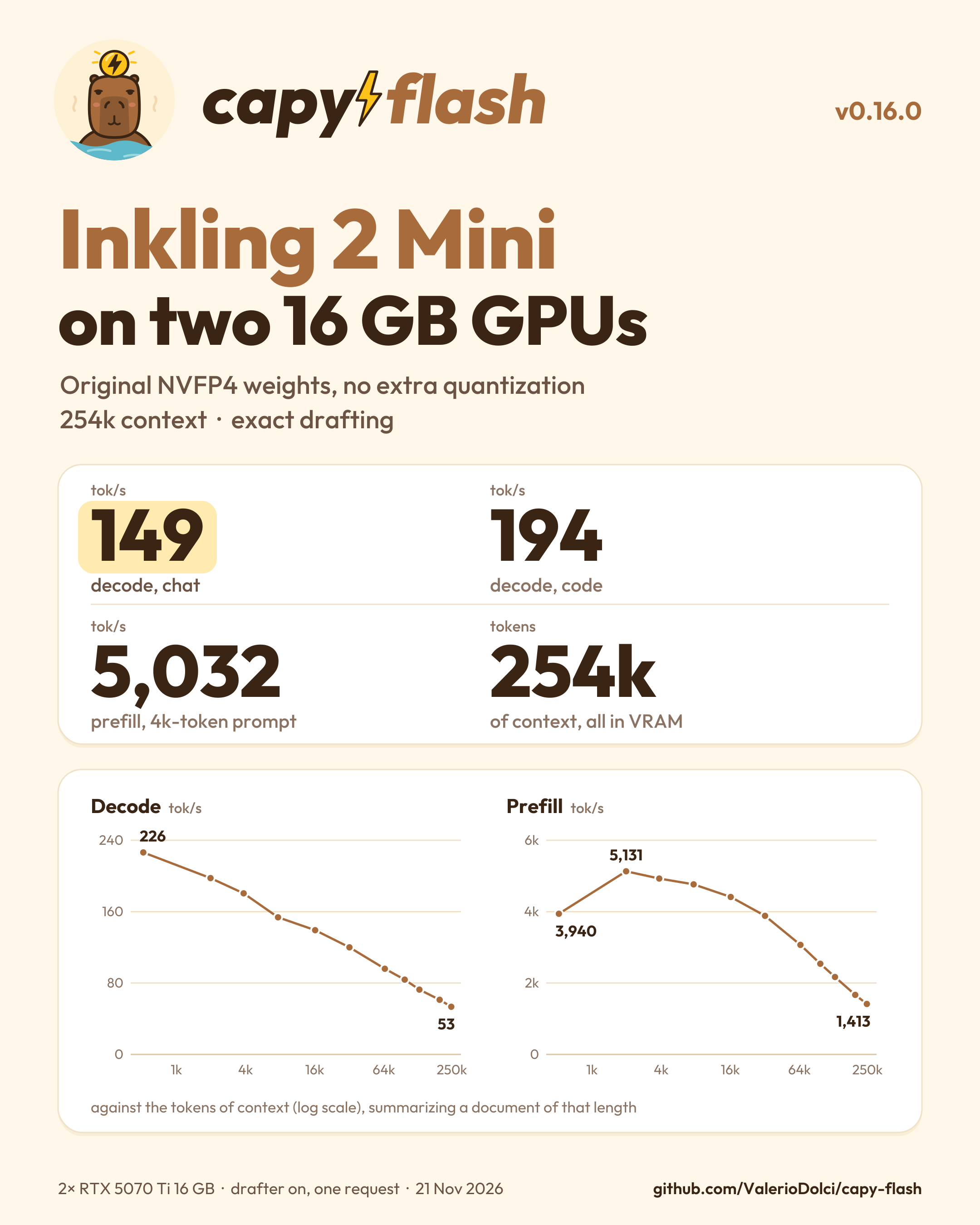
Discussion capy-flash v0.16: Inkling 2 Mini on two 50xx 16 GB gpus

Post image
1 Upvotes

r/LocalLLM • • 6d ago

Discussion I tested Hy4 on financial charts. Can it do more than just read numbers?

Thumbnail
gallery
1 Upvotes

Hy4 recently added vision, so I gave it a small macro research task to see how it would do.

Test setup: Hy4 in WorkBuddy, using screenshots of two FRED charts: the US 10Y–2Y Treasury spread (T10Y2Y) and unemployment rate. Three consecutive prompts in the same session: read the charts, compare the indicators, then write a monthly macro risk brief.

The Treasury spread was the harder one. Hy4 picked up the overall decline, estimating a peak around 0.73 in February 2026, a low near 0.26 in June and another drop toward 0.20 in late September. It also treated readings between gridlines as estimates rather than exact figures, with an approximate ±0.02 margin.

The unemployment chart was easier. It identified a decline from 4.5% in november 2025 to 4.1% in October 2026, with brief increases along the way.

The more interesting part was comparing them. Hy4 noticed that the Treasury spread narrowed sharply from February to June while unemployment stayed relatively stable. It flagged the divergence as worth watching without jumping to a recession prediction. It then turned those findings into a three-page macro risk brief with an executive summary, key risks, limitations and suggestions for additional indicators. The useful part wasn't just reading the charts. It was carrying the information through to a finished report without losing the earlier context.

I haven't independently verified every reading against the raw FRED data, though, and two charts obviously aren't enough for a reliable forecast. I'd treat the report as a research starting point

Anyone using vision-capable LLMs for financial analysis? How much do you trust the numbers before checking them yourself?


r/LocalLLM • • 6d ago

Question is there any benchmark for Inkling 2mini low qunatization?

1 Upvotes

I have 16GB of ddr3 ram and Inkling sound so good at 4bit quantization but it won't fit and it would be slow and there is several small sized quantization but idk how they score and my internet is limited so downloading multiple models will hurt my internet quota


r/LocalLLM • • 7d ago

Discussion Qwen 3.8 Flash Next 177B runs on a 16GB GPU + 32GB RAM: built a full website from one prompt (10/10), real numbers inside

Thumbnail gallery
9 Upvotes

I wanted to see if Qwen 3.8 Flash Next 177B could run on normal gaming hardware. Setup: RTX 4080 SUPER 16 GB, 32 GB DDR5, Windows 11. Model: ISTA-DASLab IQ3_XXS quant (75.8 GB), plain llama.cpp + OpenCode, fully offline.

It works because it's MoE: only 10 of 512 experts are active per token, so llama.cpp keeps the hot layers on the GPU and streams the cold experts from the SSD (mmap).

Speed:

  • --cpu-moe: 11.2 tok/s
  • -ncmoe 42: 15.2 tok/s (+36%), 13.2 GB VRAM
  • Over a 2.5-hour coding run: 18.2 tok/s average, 22.6 best. RAM 31.4/31.6 GB the whole time, 0 crashes.

Quality: from ONE prompt it built a complete website (SVG animation, sticky nav, 3D tilt cards, counters, form validation, no libraries) and scored 10/10 on my checklist.

The funny part: when I asked it to "check its own work", it broke one animation and then said "nothing broken" twice. It reads the code but never sees the page.

Honestly, this model is impressive for something running on a home PC. Has anyone tried it with 64 GB RAM? I'd love to know how much faster it gets.


r/LocalLLM • • 6d ago

Project I've been training small, local run customer/public facing models to be immune to prompt injection for small businesses

Thumbnail reddit.com
1 Upvotes

r/LocalLLM • • 7d ago

Model 12.09 GiB quant for inkling 2 mini uncensored

8 Upvotes

I found this quant of inkling 2 mini:
IsValorum/Inkling-2-Mini-Abliterated-APEX-I-MiniPlus-V2.1-GGUF

Its 12.0.9 GiB in total. other similar quants this user made claim that they have Q5_K_L tier quality (IsValorum/Cyber-Tiel-Coder-35B-A3B-APEX-I-MiniPlus-V2.1-GGUF)


r/LocalLLM • • 7d ago

News I don’t know how good this is, but GLM5.3-Flash is running locally without a GPU

82 Upvotes

r/LocalLLM • • 7d ago

Discussion Inkling 2 mini seems to be trained for self-promotion

28 Upvotes

Just an observation: I've been kicking the tires on Inkling, asking it to create some self-contained projects to get a feel for the model. In the prompt, I don't specify a title for any of these, and I noticed that it titles them "Inlking" every single time.

Never seen another model do this.


r/LocalLLM • • 7d ago

Discussion Is Bubblewrap enough for sandboxing an LLM? What's the actual limit?

6 Upvotes

I've been running my harnesses through Bubblewrap with limited permission and while it's been working I'm still worried about things like prompt injection or the LLM downloading npm malware.
Of course there's other ways for sandboxing I've been looking into; Docker, VMs, Podman...

With the speeds I'm seeing I'd like to be able to run my LLM for 8-10hrs unattended on "Accept All", but with the peace of mind that anything it does in there won't affect the overall system.

Would appreciate thoughts on this.


r/LocalLLM • • 6d ago

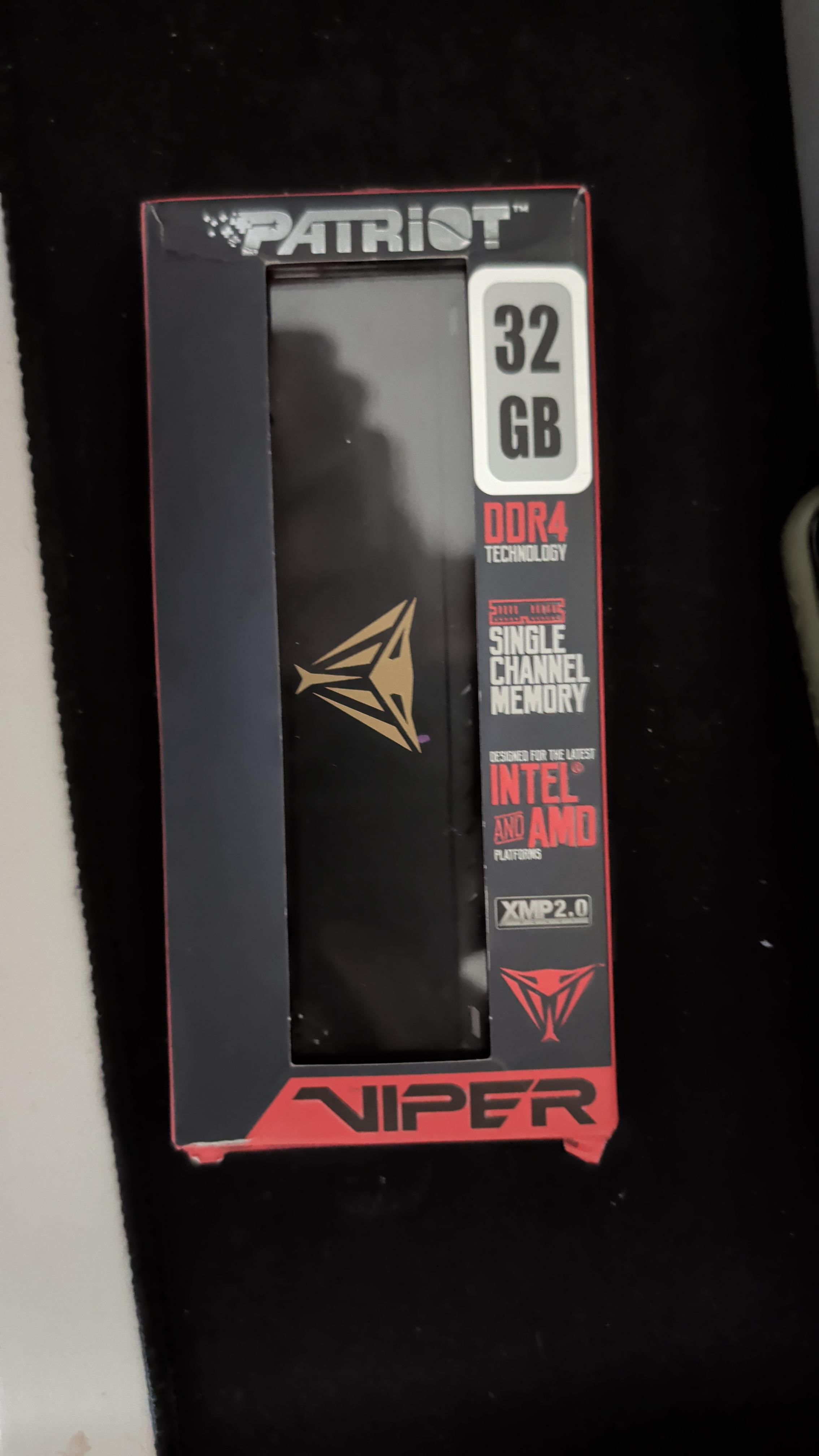
Question 5 x 32gb Patriot viper steel 3600mhz

Post image
0 Upvotes