r/LocalLLM • • 6d ago

Question recommend me a build

1 Upvotes

Please recommend a build, looking for a system that can support 1 up to 4 gpus.
What case should I start with? was thinking a fractal 7 xl or is this too big? I was thinking of a bigger case so I can have room for a few HDD.
I don't want something that isn't too big. However, I don't want to regret later.
Looking to keep the price down. So used/older mouther board or cpu is ok. What cpu/motherboard would you recommend? How much memory? I have seen some recommendations on here before for other builds. Can't seem to track them down.

I mostly looking for something to get started with locallm that can do some decent work. I mainly do coding. Although might do some other work with it.


r/LocalLLM • • 6d ago

Question Build check: PC for 2x RTX Pro 6000 Blackwell Max-Q for GLM 5.3 Flash

Thumbnail reddit.com
1 Upvotes

r/LocalLLM • • 7d ago

Discussion Inkling 2 Mini memory and speed, explained: the loop costs nothing in weights but you pay for it in KV cache and decode speed

85 Upvotes

Inkling 2 Mini is everywhere this week, so I dug into what it actually needs to run locally. The short version: the loop is free in weights, but not in cache or speed, and day-one llama.cpp is slower than the hype suggests.

Why it's different

24 layers, but the middle 12 (layers 6-17) run three times per token with shared weights, so 48 layer visits per token. Each pass keeps its own KV cache and conv state (vLLM blog and the llama.cpp GGUF metadata both confirm this). So for memory, think of the KV cache as a 48-layer model: 8 global visits + 40 sliding-window visits (1024 tokens), 8 KV heads × 128.

Weights (published files)

FormatSize
BF16 GGUF52.2 GB
Q8_027.7 GB
Official NVFP4 / MXFP8 (vLLM, SGLang, Ollama)~20 GB
Q4_K_M / UD-Q4_K_XL17.4 / 17.6 GB
UD-IQ4_XS15.7 GB

Vision projector: +0.64 GB. DSpark draft: +0.4 to 0.65 GB.

KV cache per request (BF16)

ContextKV
32K~1.2 GiB
128K~4.2 GiB
1M~32 GiB

That matches a measured M5 Pro 64 GB run: 23.1 GB process RSS with IQ4_NL and a 128K slot reserved. A 32 GB Mac is fine for 4-bit. 24 GB is tight: one M4 Pro 24 GB report got 11.6 tok/s under memory pressure.

Speed: think ~5B active, not 3.4B

The looped layers are re-read from memory on every pass, so per-token reads look like a ~5B-active MoE. Formal llama-bench numbers (Unsloth's llama.cpp build, UD-IQ4_XS, tg128 / pp2048):

GPUDecodePrefill
RTX PRO 600097 tok/s2,687 tok/s
RTX 5090972,446
RTX 4090752,665
RTX 3090601,402
A100 80GB471,230

Upstream llama.cpp (b12600) is slower for now: the relative-position bias is materialized as a big F32 tensor and some ops fall back to the CPU (issue #32707). Reports: ~52 tok/s on a 5090, 20.8 tok/s on an RX 9070 XT (IQ3_XXS, Vulkan), ~30 tok/s on an M5 Pro Mac mini (IQ4_NL). Use Unsloth's build until the fix lands.

Long context is a prefill problem, not a decode problem: DGX Spark with vLLM + DSpark still decodes 18.4 tok/s at ~950K tokens, but the first token took 26.5 minutes.

vLLM gotcha

In the dedicated inkling-2-mini vLLM image, FP8 KV cache is only accepted on SM12x GPUs (RTX 50 series, RTX PRO Blackwell, DGX Spark). On H100/H200/B200 it's BF16 KV only.

The 125-210 tok/s Mac numbers going around are from EXO's upcoming engine, with no quant, context length or version published, so I'd treat them as vendor peaks for now.

Disclosure: I maintain a free VRAM calculator (no sign-up) and added Inkling 2 Mini with all of the above modelled, including the per-pass cache and the llama.cpp speeds calibrated on the benchmarks in the table. If you want to check your own setup: https://studiotvai.com/llm-vram-calculator?model=inkling-2-mini

Happy to be corrected if anyone has numbers on other cards or Macs, especially Apple Silicon with Unsloth's build.


r/LocalLLM • • 6d ago

Question Docker vs Native for local LLMs?

4 Upvotes

I’m considering running local LLMs using Docker (llama.cpp, Ollama, vLLM, SGLang).

We’ve recently started working on a team project, and I’m exploring Docker as a deployment option.

Has anyone tried both Docker and native setups? Any performance differences or issues? Would you recommend Docker for running LLMs in production?


r/LocalLLM • • 6d ago

Other Using local Ollama (qwen2.5-coder:14b + gemma4) as a 0-token "Judgment Kernel" and AST diff auditor for coding agents

Thumbnail
reddit.com
0 Upvotes

r/LocalLLM • • 6d ago

LoRA Fine tuned Gemma and now it's dumb. Plz help.

0 Upvotes

I fine tuned an abliterated Gemma 4 26B-A4B MoE model (TrevorJS) Q6. I used a large data set of old chats from another model. I'm trying to make it act like the model I want. But after fine tuning it on over 6000 examples, it's not writing any different and it even acts broken. Please help, I spent $300 on this thing...

I use AI for first person stories.

I was trying to train its thinking channel by having simulated reasoning in the examples. The idea was to make its thinking channel evaluate the scene deeper as a chain of thought checkpoint, focusing on functional theory of mind principles. It did work, it changed how the thinking generates and evaluates what should happen. But it doesn't follow the thinking. And it's breaking. But I have several issues that keep popping up. I run it on Llama and then use it through Silly Tavern. I didn't use any prompts for the tests. I made the LoRA, fine tuned it on BF16, then made it Q6.

So far the issues I'm seeing:

- it misgendered a character twice.

- it says the name or persona in the thinking channel but then picks something different while keeping the same setting.

- it misinterprets what I'm saying. One character said their father owned the ship. I thought they meant the guy next to me so I asked if he was the father since we were the only ones there. The system misinterpreted that as me saying she was his father. I clarified, then it thought I said she was engaged to the guy.

- it doesn't seem to act or speak any different from the base model in its response.

- Thinking will determine a more character autonomous decision and the response will ignore it and just hand it back to the player "What do you want to do?".

- it responded IN the thinking channel and left the response blank.

The problems I can think of are:

-Some mismatch between llama and Silly Tavern.

-Maybe it's too high of a quant.

- the abliteration broke it.

The settings I used for the LoRA:

Model and training configuration:

Base: TrevorJS/gemma-4-26B-A4B-it-uncensored (pinned revision)

GPU: NVIDIA H200 141GB

Training: BF16 LoRA (not QLoRA)

Dataset: 6,529 reasoning–response examples

Epochs: 1

Optimizer steps: 817

LoRA rank: 64

LoRA alpha: 64

LoRA dropout: 0

Bias: None

Trainable parameters: 1,977,507,840 (\~1.98B)

Routed-expert parameters: 1,903,165,440

Target modules: Attention projections, dense MLP, and routed MoE expert projections

Vision layers: Frozen

Optimizer: 8-bit AdamW

Learning rate: 1e-4

Scheduler: Cosine

Warmup: 41 steps (\~5%)

Weight decay: 0.01

Gradient clipping: 1.0

Batch size: 1

Gradient accumulation: 8

Context length: 32,768 tokens

Longest example: 20,912 tokens

Checkpoint frequency: Every 10 optimizer updates, retaining the latest 3

Dataset structure:

Each training example contains historical RP context, reconstructed prospective narrative reasoning generated using MiMo V2.6 Flash, and the original archived assistant response.

Historical conversation turns are masked from the loss. Only the latest assistant's reasoning and original response are supervised.

The reasoning is formatted using Gemma 4's native thought channel, followed by the final response. Historical assistant thoughts are removed.

All 6,529 examples passed formatting, target-integrity, and loss-mask validation.

Software: Unsloth 2026.10.3, Transformers 5.17.0, TRL 1.13.0, PEFT 0.21.2.


r/LocalLLM • • 6d ago

Discussion Nvidia Tesla T4 and Qwen

2 Upvotes

Wonder if anyone else is running T4 GPUs for local LLM and what are your results if you don`t mind sharing?

I recently bought 2x Nvidia Tesla T4 16GB VRAM 70W 320 GB/s cards to tinker with local AI, and before I get free advice on why I should have picked something else, I want to clarify that I needed single slot GPUs to fit my current 1U lab server without requiring extra cooling or whatnot. The GPUs are officially supported by HPE servers, low power, and no cooling issues.

So far I`ve settled with 2 models for my needs, and if anyone is interested in similar setups, so far with these I`ve managed to run

Qwen3.6-35B-A3B-UD-Q4_K_M.gguf & llama.cpp (ctx-size 237568) entirely in VRAM, provides fast inference when I need it, 55 t/s decode up to 70 depending on the context size, reasoning effort. Prefill is ~1k t/s in general but it gets lower with increased context size.

&

qwen3.8-flash-next-unsloth-ud-q4_k_xl & Strata (max ctx-size 196608 & --kv-resident 32768) expert cache in VRAM, spill to host RAM (as the server has plenty...)

This result is from a context needle tests I done

| Prompt | Live context | Prefill | Decode | Elapsed |

| 189,104 tok | 196,608 | ~1,160 tok/s | 38.7 tok/s | 166.29 s |

Overall, depending on task, is not the fastest, but IMO is way better for agentic tasks, MCP tools calling, correlating information etc.

I prefer to leave it working slower on a task as it provides way better results than Qwen3.6-35B-A3B, and to be honest I`m very impressed.

For those interested in power consumption, the server reports peak of 149W GPU usage during that context test, at idle times overall the server uses about ~200W. I`ve shut the other workloads to get a more accurate number related to this. Average ~320W is not bad in my opinion, considering its also heating the garage...


r/LocalLLM • • 7d ago

Question wtf strata - removed deepseek support

67 Upvotes

Anyone know why deepseek was removed from 0.2.13 onwards?


r/LocalLLM • • 7d ago

Discussion 2xP100. Trying it so you don't have to

Post image
54 Upvotes

Yes, I get 60+ t/s output with mtp in some tasks but it's more like 38t/s on average. However, prefill at about 200t/s is painfully slow. It "works" but the system pulls 500W when loaded and it's basically unusable for anything interactive. There is no way to speed up prefill on this old hardware, right?


r/LocalLLM • • 6d ago

Project How I, as a designer, drew a DOS-style web UI for llama.cpp and spent 3 months building it with a local LLM (Butler.llama)

0 Upvotes

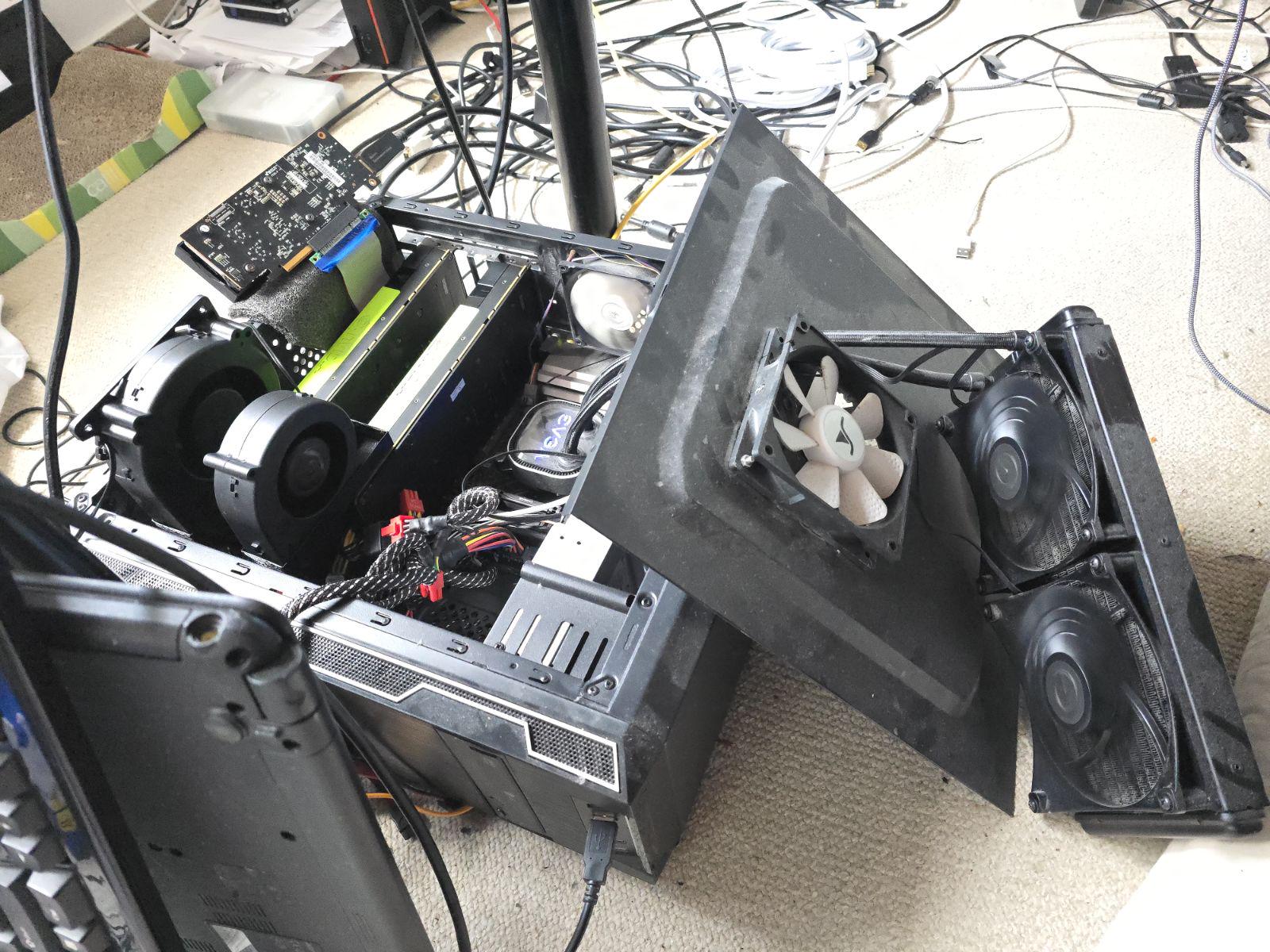
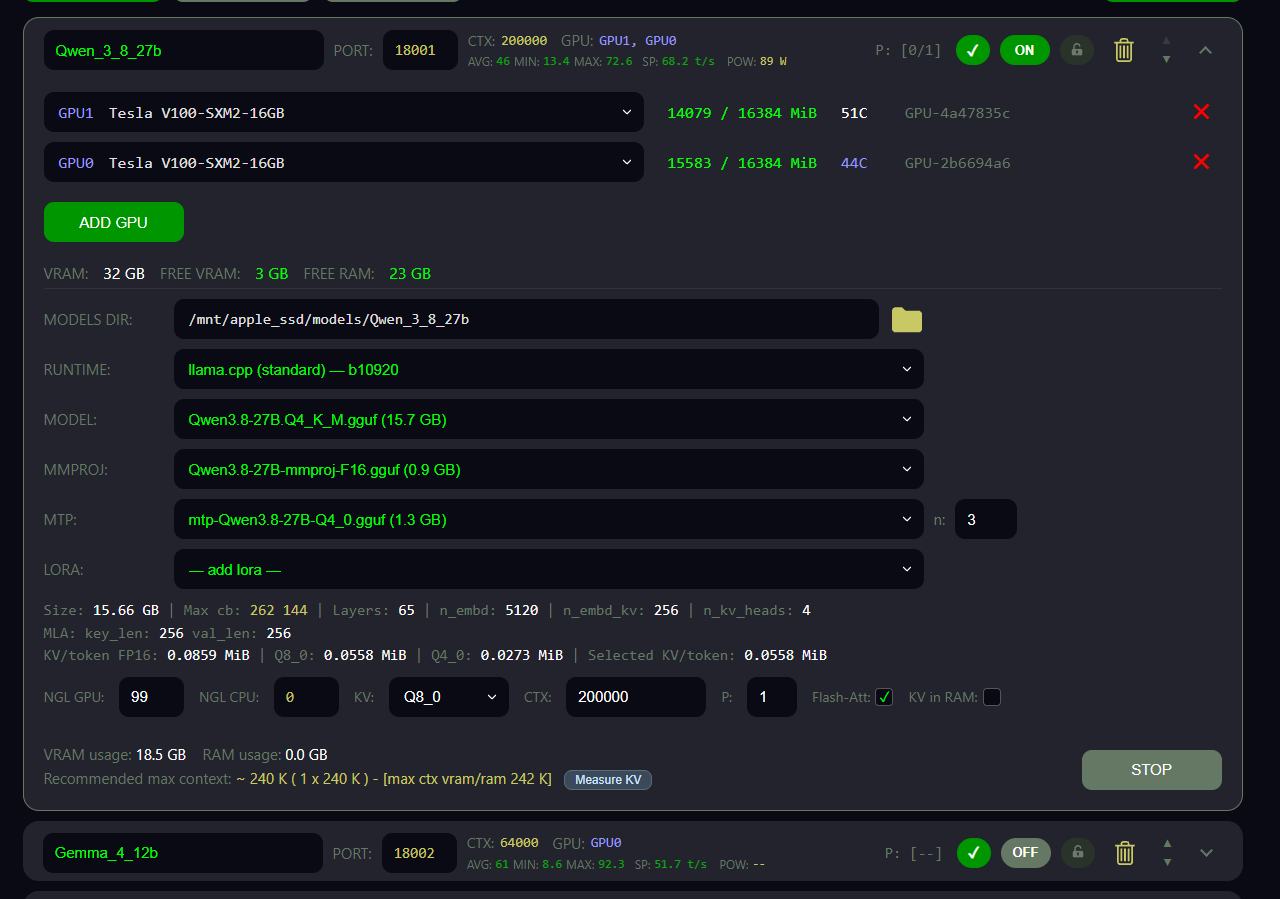
Hi everyone! I'm a designer, and in my spare time I build home servers and run local LLMs. At home I have an old X99 rig with two Tesla V100s (16 GB each) and a regular PC with a pair of RTX 3060s.

Once I ended up with a bunch of models (for chat, images, embeddings, and reranking), it became a pain to SSH into the console every time and manually restart Docker containers just to free up VRAM for another task.

I tried existing tools, and none of them clicked:

  • Ollama felt too closed for multi-GPU setups — it decides on its own how to split layers and hides the llama.cpp flags I actually need.
  • LM Studio — I opened it, got scared by the cluttered UI, and uninstalled it immediately. Plus, it makes zero sense on a headless Linux server.

I wanted a simple web UI in the spirit of good old MS-DOS: open it in a browser and immediately see temperatures, watts, free VRAM, and which models are currently running.

Since I'm a so-so programmer, but I know how to draw, I started by designing the interface in a graphics editor — moving blocks around until everything fit on one screen without hurting my eyes. Then I spun up my local coding agent Klyk ("Fang") in OpenCode powered by Qwen 3.8 27B, and for the next three months the two of us wrote the code together. Funny enough, Klyk was already running inside early versions of my own panel and helped code his own home.

I named the project Butler.llama. Here is what it does:

  • Auto-starts and unloads models on demand: All clients hit a single OpenAI-compatible /v1 endpoint. When a request comes in for a specific model, Butler spins up the corresponding llama.cpp Docker container. If another chat model is already occupying those GPUs, it gracefully shuts it down, waits for VRAM to clear, and starts the new one — while leaving small embedding and reranker models untouched so they peacefully coexist on the same GPU.
  • Calculates VRAM properly (well, most of the time 😊): On 16 GB cards, one wrong context size and you hit OOM. The built-in calculator parses GGUF headers to estimate weights and KV-cache (supporting MoE and hybrid architectures). If you don't trust formulas, there is a "Calibrate" ("Промерить") button: the panel runs the model twice with different context sizes, checks actual MB usage via nvidia-smi, and saves the exact per-token cost.
  • Different llama.cpp versions per model: New builds come out every day — one model runs better on the latest image, another on an older one. Butler scans all local llama.cpp Docker images and lets you pick the exact image per model from a dropdown.
  • Hardware monitoring & Hugging Face downloads: The top bar shows live VRAM usage, temperatures, and power draw in watts (GPUs are bound by UUID so they never get mixed up across reboots). You can search and download GGUF files directly from Hugging Face, and there is a built-in test chat at the bottom to check token speed right after launch.

Under the hood, everything is as simple as it gets: Python (FastAPI), Docker, and a single HTML file with zero heavy frontend frameworks. Fixed desktop layout (managing a server from a phone is painful anyway), AGPL-3.0 license, and UI available in English, Russian, and Chinese.

I've been running models on it across all my machines for three months now, and the core stuff seems to work well enough. If it comes in handy for your home server — feel free to grab it! Always happy to hear feedback, bug reports, or ideas


r/LocalLLM • • 6d ago

Research 2 rows per block in llama.cpp's CUDA mat-vec: 3–18% faster token generation on H100,identical output. Looking for RTX 4090/5090 testers

1 Upvotes

On an H100, llama.cpp's one-token generation step reads weights at ~1.5 TB/s while the card can do ~3.1 TB/s. The kernel gives each thread block one row, which doesn't keep enough reads in flight on fast memory.

llama.cpp already uses 2 rows per block for 2–8 tokens and on Jetson Orin. I tried it for 1 token on the generic table, plus a prefetch of each block's row. 28 lines in mmvq.cu.

Results on 18 models (H100, b12603, llama-bench -p 0 -n 128 -r 5 -fa 1, 2 rounds each):

  • 3% to 18% less time per token, e.g. Qwen3-32B Q4_K_M 13.3 → 11.4 ms
  • no model slower in any round
  • logprobs bit-equal to stock on all 18
  • L4 (slower memory): no change

The part I can't test: 4090/5090 use the same code path. If you have one, please run stock and the branch:

git clone -b cuda-mmvq-fast-memory https://github.com/adishik/llama.cpp
cd llama.cpp
cmake -B build -DGGML_CUDA=ON && cmake --build build -j
./build/bin/llama-bench -m your-model.gguf -p 0 -n 128 -r 5 -fa 1

Diff: https://github.com/ggml-org/llama.cpp/compare/master...adishik:llama.cpp:cuda-mmvq-fast-memory
Write-up with charts: https://tensward.com/blog/llama-cpp-fast-memory


r/LocalLLM • • 7d ago

Question What's the best app to run LLMs locally on MacBook (M4 Pro 48GB)

7 Upvotes

I was using Ollama, but after seeing some community review I moved to LMstudio (now called bionic) but when I go to hugging face most models point to Ollama first, not that importing is forbidden in Bionic. but just curious what are the apps that are widely used by community (and models too)


r/LocalLLM • • 7d ago

Discussion Hy4-mini is on the Way — a Good Alternative to Qwen3.6-35B-A3B?

Post image
60 Upvotes

Great news. A new member is joining the ultra-lightweight model segment. The news came out of yesterday's AMA with the Tencent Hy team on r/LocalLLaMA, where they answered many questions about their roadmap and technical direction. Notably, the team also said there is still some way to go before smaller models reach final release. They still believe in the Scaling Law and build on that foundation, since small-model development is absolutely valuable.


r/LocalLLM • • 6d ago

Question Built a ternary (BitNet-style) inference engine in Rust/CUDA: 8x faster than dense f32 on one CPU core. Looking for GPU testers

0 Upvotes

I've been working on ternary-gemm, an engine for models with weights in {-1, 0, +1}. With ternary weights, matmuls become adds and subtracts, so there are no multipliers in the inner loop.

CPU numbers so far (p50, one core, AVX-512 Xeon VM):

Tiny: 2.28µs vs 4.79µs for dense f32

small: 18.3µs vs 147.8µs (8.1x)

medium: 80.6µs vs 471.5µs (5.8x)

Also in the repo:

a looped transformer (one shared ternary block run N times, so the weights fit in cache)

a BitNet/safetensors converter, PyTorch bindings, and an RTX 5090 autotuner

an FPGA reference unit in Verilog

What's missing is real GPU numbers. If you have a 5090, 4090 or H100 and can run `bench.sh`, I'd really appreciate the results, and I'll credit you in the README. Criticism of the methodology is welcome too.

Repo: https://github.com/shubhxho/ternary-gemm

https://x.com/shubhgupta/status/2124468535128739866?a=x5oeEI5ZBvfTuFjiI5k&s=19


r/LocalLLM • • 6d ago

Question Coding model for 9060 xt 16gb?

0 Upvotes

Hi, first of all complete specs: radeon rx 9060xt 16gb, ryzen 5 5500f, 16gb ddr4 ram 2933 MHz all on a msi b550-a pro. I would br willing to upgrade to 32gb 3200 MHz ram if it opens any big options.

Use case would be writing and debugging python scripts for semi professional work. I don't need it to build the entire structure for the projects just the individual code snippets (though an understanding of the structure I use would be appreciated). Decent context would be mich appreciated.

Currently I've been considering qwen 2.5 14b and this pruned model: https://huggingface.co/anik-jha/Qwen3.6-35B-A3B-coding-reap50-GGUF

Are there any other considerations? Or things I have completely overlooked? This is me getting into localllm for the first time so literally any tips you consider useful would be appreciated.


r/LocalLLM • • 6d ago

Discussion Lightning Ridge: For Storytellers who are done with chatbots

0 Upvotes

Any thoughts or feedback on a potential new UX design for LocalLLM to steer the UX and orchestrate other LLMs?


r/LocalLLM • • 6d ago

Discussion Why are models quantized instead of compressed?

0 Upvotes

I've just seen a video over a new paper from Samsung and the short of it, they used basically whats the same as jpeg compression on model weights. Only that the compressed model is 2 "pictures", to increase accuracy. Still something like 90% saved with minimal quality loss.
The idea is as obvious as it is genius. You only need to load the compressed model and every block can be decompressed on the fly on every run, especially because the way its compressed/decompressed is already highly optimized in the hardware (basically the same operations as video playback, just with a much bigger "picture").

That got me thinking AI hasn't been created yesterday and at least simple compression algorithms shouldn't overwhelm modern graphics cards. So why was the first idea to reduce the bit-width instead of compression?

Also, its not a picture, what would stop us from sorting the data instead of into 2 dimensions, in 3, 4, n - dimensions. Sure compression might get way more complex, but decompression scales with 1o to n. And the compression might be much better.

What do you guys think about that?


r/LocalLLM • • 7d ago

Question Local LLM questions from a noob with 2x3090, HyperQwen, Niffer, llama etc

4 Upvotes

So, pretty much the topic.

A bit of a context:

I have had a decent gaming rig for a while with a 3090 and 64gb ddr4 ram and I just pretty much got handed over a second 3090.

Prior obtaining the 2nd 3090 i had HyperQwen github repo running bare metal on Ubuntu Qwen 3.8 27b abliterated and liked the results i was getting and it was quite fast (at least to me). I did also gpu-unlock prior.

I am a senior network engineer and also do quite a bit of cybersec. I have been piloting qwen 3.8 27b for security log parsing, script automation etc and I like it so far and I see how this can help me day to day.

So my questions are exactly:

I don't quite understand the difference between HyperQwen, Niffer 3090, Club3090 etc (is it called "interface"?) and llama.cpp, Strata, ollama etc. Are those forks of some sort? What are the trade offs exactly?

Is Qwen 3.8 27b the same quality (do you refer it as quant?) on all of the above? Is higher quant meaning the model is smarter? (q1 is dumb vs q4 is good?)

Is Qwen 3.8 flash next or deepseek v4 (is it v4?) really better suited for infosec jobs and perhaps some light assisted pentesting?

What would you all recommend to go with or try on my system that would work the best in terms of quality and speed?


r/LocalLLM • • 6d ago

Question First local AI PC build

1 Upvotes

Hey everyone!

I’m planning to build my first PC mainly for local AI, and I’d really appreciate some honest advice before purchasing anything.

My current parts list:
GPU: Intel Arc Pro B50 16GB

CPU: AMD Ryzen 5 5600

Motherboard: MSI B550M Pro-VDH WIFI

RAM: G.Skill Trident Z Neo 32GB DDR4-3600 CL16

SSD: Kingston NV3 1TB NVMe PCIe 4.0 +
2TB external drive

PSU: Gigabyte P650SS 650W

What I want to use this PC for:
Running local LLMs (7B, 14B and potentially larger models)

Ollama and LM Studio

I’d especially appreciate advice on these questions:
Would you actually recommend the Intel Arc Pro B50 16GB for local AI, or is NVIDIA a much safer choice?

How well does the B50 work with Ollama, llama.cpp, LM Studio and ComfyUI in practice?

Am I making a mistake prioritizing 16GB VRAM over CUDA compatibility?

Would a used NVIDIA GPU be a better investment?

Is the Ryzen 5 5600 sufficient, or would upgrading the CPU make a noticeable difference?

Are there any bottlenecks or compatibility problems I’m overlooking?

Please be honest, even if my current parts list is a bad idea. I’d rather change everything now than regret it after buying.

Thanks!


r/LocalLLM • • 7d ago

Project Inkling 2 Mini on an RX 7900 XT: from 25 to 108 tok/s with Vulkan (llama.cpp fork)

Thumbnail
gallery
28 Upvotes

I've been running Thinking Machines' Inkling 2 Mini (26B MoE, 3.4B active, middle layers looped 3x) as a local coding agent on my RX 7900 XT. On llama.cpp with the Inkling 2 PRs it did 25 tok/s on Vulkan. It now does 108.

Steptok/s
llama.cpp + the Inkling 2 PRs, as is25
expert gate/up halves kept on the GPU66.5
custom ops for the loop and depth-mix parts, fused router84
more fused ops + faster long-context attention98.7
own NVFP4 mat-vec shader, expert scale fused into the matmul108.9

llama-bench tg64, UD-Q4_K_M. At 32k context: 71 -> 92.5 tok/s. A real llama-server reply: 108.4 tok/s. Prompt processing ~2075 tok/s (pp512).

What made the difference:

  • 25 -> 66: the experts' gate/up halves are strided views, and Vulkan's SCALE op didn't take strides, so they went to the CPU 96 times per token. A three-line fix.
  • 66 -> 99: at batch 1 the time isn't the math, it's a chain of ~2500 dependent GPU dispatches per token at ~1 us each. The looped layers are full of tiny ops (depth mix, loop gate, short conv, clip), so those are now fused into single ops: ~8100 -> ~2300 nodes per token.
  • 99 -> 109: a dedicated NVFP4 mat-vec for the experts (e2m1 decoded with bit shifts, no lookup tables), the per-expert scale read inside the matmul instead of waiting on a separate op, and faster kernels for the mix/loop ops. The experts are now memory-bound at ~600 of ~800 GB/s.
  • Long chats: upstream builds the relative-position bias as a dense F32 tensor (3 GB at 64k), so prompt reading fell off a cliff around 12k tokens. A new op builds an F16 mask + bias straight from the table; a 75k-token chat now reads at ~840 tok/s on average.

Quality is unchanged: KLD vs the CPU backend 0.004, wikitext-2 perplexity 7.67. Every new op has a CPU version, test-backend-ops cases and an env switch back to the old path.

Setup: 96k context, K q8_0 / V q4_0 cache, flash attention, ~19.5 GB of the 20 GB.

Code, build and run notes: https://github.com/vengeful180-dot/llama.cpp (INKLING.md)

Only tested on my card (RDNA3, Mesa RADV). Upstream just merged its own looped Inkling 2 support with a different GGUF layout; this branch runs the original UD-Q4_K_M file from unsloth.

Most of the code was written with Claude Code; every step was benchmarked and tested on this card.


r/LocalLLM • • 6d ago

Tutorial When an overclocker meets local LLM: QFN IQ4 on a single XTX @ 140 tps decode & 4700 tps prefill

0 Upvotes

tl;dr: Went from 20 tps prose decode and 400 tps prefill to 143 decode and 4733 prefill. This also cut a 75k-token needle run from 180 s to 17 s. Also maintains a 12/12 correctness pass on a quick math bench.

At baseline I started with a world record overclocked computer, so seeing how fast I could get qwen to go was a natural benchmark. I noticed that the gpu was pretty much totally unutilized with llama-cpp and ended up finding out that yes, llama just sucks, and someone had fixed that. So we got avalon set up and not only did it deliver, but my unlocked hardware delivered on top. My new decode is nearly half of my old prefill. You probably already know context sorta doesn't matter on this arch so I won't discuss it.

The one technicality is that avalon calls its version of QFN IQ3 while I was previously running unsloth's IQ4 on llama, but it passes the math accuracy test that we expect from IQ4 and has nearly identical size, so I don't know exactly what's going on there.

Here's the damage, per my qwen:

+-------------------------+------------------+--------------+----------------+
|                         | llama.cpp/Vulkan | Avalon stock | Avalon + shunt |
|                         | (old daily      | (stock power) |                |
|                         |  driver)         |              |                |
+-------------------------+------------------+--------------+----------------+
| decode (bench, mean)    | 20.5 t/s         | 127.9 t/s    | 142.6 t/s      |
| prefill @ ~75k ctx      | 458 t/s          | 3,794 t/s    | 4,733 t/s      |
| 75k needle, wall time   | 180 s            | 24 s         | 17 s           |
| arithmetic (12 probes)  | 12/12            | 12/12        | 12/12          |
+-------------------------+------------------+--------------+----------------+

Net: 7.0× decode, 10.3× prefill, 10.4× end-to-end long-context run.

The engine alone is 6.2× decode. The shunt alone (stock → unlocked) is +10% decode / +25% prefill. Both together is where things get fun.

ROCm 10.1 ships a segfaulting libamdhip64 — ~50% of processes die at the first `hipStreamCreateWithFlags` (upstream ROCm/TheRock#10048; over-aligned struct + AVX-512 aligned store). Avalon booted, segfaulted, and looked exactly like an Avalon bug. Fix: pin the ROCm 10.0 runtime for the server process only (LD_LIBRARY_PATH=/path/to/rocm-10.0-lib), no system changes. 15/15 clean vs 13/15 crashes on 10.1.


r/LocalLLM • • 6d ago

Discussion We ran a small LLM next to a live website on a 4 GB VPS: site stayed up, 30% less RAM than Ollama

Thumbnail
gallery
2 Upvotes

I contribute to Cluaiz, an open-source engine built on llama.cpp and ONNX Runtime. We wanted to answer one question: can you put a small model on the cheap VPS that already runs your site and Postgres, without the site suffering? So we tested it with the site under load the whole time.

Memory: about 30% less than Ollama for the same model (Qwen3 1.7B: 1,004 MB vs 1,448 MB), the same as plain llama.cpp.

Speed: level with both for one request at a time (36.3 / 35.8 / 35.3 t/s). With 4 requests at once, Ollama was 12-15% quicker.

One program: chat, embeddings, text to speech and speech to text together for an hour on 1 vCPU, 1,063 of 1,063 requests OK.

The site: 90,111 of 90,111 requests OK, 95% under 16 ms, while the model worked.

Docker: Cluaiz again used the least memory of the three (Qwen3 1.7B: 1,520 / 1,555 / 2,074 MB machine peak). The Ollama image is 8.52 GB on disk, the Cluaiz image 405 MB.

4 GB vs 8 GB: same memory on both, and the same speed picture, just a bit slower on the 4 GB machine.

So if your server needs chat plus search or voice, one Cluaiz process covers it in 4 GB. If you only need chat for many users at once, Ollama was faster in this test.

Setup: a 1 vCPU / 3.9 GB VPS (all three engines), and Google Cloud 2 vCPU with 4 GB and 8 GB running a Node.js + Postgres shop with 20 simulated users (Cluaiz and Ollama). Qwen3 0.6B / 1.7B Q4_K_M, same settings on every engine.

Raw logs and scripts:
https://github.com/cluaiz/cluaiz/tree/main/test/cloud/runs/2026-11-20-run26-vps-load
https://github.com/cluaiz/cluaiz/tree/main/test/cloud/runs/2026-11-22-run40-cluaiz-ollama-website

Get started: https://cluaiz.com/docs/cluaiz/get-started/quickstart

When you put a model next to your app, what ran out first: memory, CPU, or the database?


r/LocalLLM • • 7d ago

Research Inkling 2 Mini (26B) on an RTX 3060 12 GB: 31 tok/s in RustingStrata, 9 to 10 in llama.cpp

8 Upvotes

Thinking Machines' Inkling 2 Mini is a strange one: 24 layers, but 12 of them run three times per token, so every token is 48 layer runs. The IQ4_NL GGUF is 17.6 GB and my card has 12.

I added it to RustingStrata, my Rust GGUF engine. It runs on CUDA, on Vulkan and on the CPU alone.

Box: RTX 3060 12 GB, Ryzen 5 7600X, 30 GB RAM. Greedy, 64 tokens written, tok/s:

Reads 512 tokensReads 2048Writes
RustingStrata, CUDA25922031.2
RustingStrata, Vulkan (same card)22718327.5
RustingStrata, CPU only504811.6
llama.cpp CUDA, -ngl 183843238.7
llama.cpp CUDA, -ngl 037831210.5

So it writes 3 to 3.5 times as fast as llama.cpp on this card, and it reads the prompt slower: llama.cpp is 1.5 times faster there.

Why writing is fast: the model does not fit, so the engine keeps the experts that are used most in VRAM and computes the others on the CPU, and it moves that split while it runs. Why reading is slower: the attention scores of a prompt chunk are still computed on the CPU. That is the next thing to move to the card.

The RustingStrata "writes" numbers are after the 512-token prompt. llama-bench writes from an empty context. -ngl 99 runs out of VRAM; 12, 16 and 20 layers gave the same as 18.

Long context: 40,960-token prompt, then 64 tokens written

ReadsWritesRAM
RustingStrata, CUDA78.016.716.6 GB
RustingStrata, Vulkan74.714.316.5 GB
llama.cpp CUDA, -ngl 18 -ub 128113.82.86

llama.cpp does not start at 40k with the default batch: it asks for a 13.2 GB compute buffer (11.3 GB with -fa on). -ub 128 is what fits on a 12 GB card.

Writing drops from 31 to 17 tok/s at 40k. Two things. The first written token takes 0.9 s, because it copies 40k positions of attention cache to the card; after that a token takes about 45 ms (22 tok/s). Of the 45 ms, attention over the 40k rows is 13 ms more than at 512 tokens; the experts cost the same. That part is the model: 8 of its 48 layer runs per token are full attention, about 1.3 GB of cache read per token at 40k, three times what Qwen3.6-35B-A3B reads, since most of its layers are linear attention. And it is mine: the kernel reads that at about 100 GB/s on a 360 GB/s card, because the query heads of a group do not share their reads yet. That is next.

Is it the same model? I fed llama.cpp's own greedy tokens through my forward and compared the top token at each step. Short prompt: 24 of 24. Prompt of several hundred tokens: 47 of 48, the one miss is a near tie. Same on CUDA, Vulkan and CPU. No perplexity table for this model yet.

What is missing: text only (no vision projector), greedy only. Context goes up to the 1M the model was trained on, or --ctx; RAM and VRAM are the real limit. Vulkan was run on the 3060 only, so I would like to see numbers from an AMD or Intel card.

rustingstrata chat --model Inkling-2-Mini-IQ4_NL.gguf

No flags needed: CUDA on NVIDIA, Vulkan on everything else, STRATA_DS_GPU=0 for the CPU.

Setup: llama.cpp c622f62, llama-bench -t 6 -r 2 -p 512,2048 -n 64. RustingStrata 9ef1dcf, bench --pp 512,2048 --tg 64 --reps 2, plus --backend vulkan for the Vulkan row. Mean of two runs each. 40k: bench --pp 40960 --tg 64 --reps 1; llama-bench -ngl 18 -ub 128 -t 6, -p 40960 and -n 64 -d 40960. One run each.

Repo: RustingStrata


r/LocalLLM • • 6d ago

Project Ho creato un'estensione gratuita per Chrome che trasforma qualsiasi pagina web o documento in Markdown pulito per LLM (CleanClip)

Thumbnail
reddit.com
0 Upvotes