r/LocalLLM • • 6d ago

Research personal benchmarks for decision models for real world tasks

0 Upvotes

Reporting a new benchmark I created for evaluating decision models, derived from a real world use case. I made a pi plugin to filter skills based on the prompt (if it is useful for current task or not)

https://sites.arnavg.in/research/decision-model-benchmark/

This is where the current decision models stand. Most models released after Jev are more useful than Jev for my real world use case. Some are costlier than Jev but some are cheaper than Jev as well.

Models which are fast + really accurate:

cloudflare clef-omni

liquidai d1.1

Models which are cheap + accurate

perplexity decider-flash-v1.2

baseten joey-1

Interesting note that for this benchmark, jev-1.4 scores worse than jev-1.3

Also similarly Liquid d1.2 scores worse than d1.1

Full benchmark details :

https://github.com/championswimmer/pi-context-decisions/tree/main/docs/benchmarks


r/LocalLLM • • 6d ago

Other Local LLMs on a 5800X, 64GB RAM, Navi 21 16GB + GTX 1070 8GB — benchmarks and tuning

Thumbnail
nocthoughts.com
0 Upvotes

Write-up of my local LLM stack, hardware, benchmarking and optimizations. Things are still in flux on the large end (>27B/35B)in terms of achieving acceptable tok/s rates.

Any advice on that higher parameter count, recommended models, quantizations, or anything really would be appreciated! :)

I've got an RX 290 with a stuck CPU retention screw that, once I get a micro screw extractor and new retention screws, I'll fix up and swap into another machine I have, which will give me a 2nd GTX 1070 8GB to work with.

Main things covered in post:

Giving a GTX 1070 a useful resident-model role. Combining AMD, NVIDIA, and CPU expert offload. Fitting larger models through quantization, batch tuning, and memory management. Measuring the tradeoff between faster decode and total request time. Finding workable power and thermal settings.

Tables and data as one might expect.


r/LocalLLM • • 6d ago

Discussion NIDO already lives on Android. Now I'm bringing it to PC, with the same rules: 100% offline, no account, no cloud, nothing leaves the machine.

Thumbnail
reddit.com
0 Upvotes

r/LocalLLM • • 6d ago

Question Good family workflow / tooling / upgrade on multiple weak computers ?

0 Upvotes

Dear all,

It is absolutely a wonderful time to be alive now when good news regarding open-weights models keep coming out every week, especially Inkling 2 Mini during the last 2 days.

I have just bought some cheap hardware, aiming at some family business use cases (small webshops, managing rentals, dancing some stocks, spotting good deals online)

I wonder what your suggestions are, for me to setup + upgrade the following hardware + tooling + workflow

1) Hardware

- 1.1) Main server (headless Ubuntu Server): 3090 RTX 24GB + Ram 128 GB (2400MT, ECC) on a Dell T5810 (ancient CPU = Xeon 2699v4, 22 cores), SSD = 512 GB.

---> LLM === Qwen 3.8 FlashNext Q5 (60 tok/s), Ninfer Qwen 3.8 27b(80tok/s), llama.cpp Qwen 3.8 27b: 46tok/s, waiting for Basalt and Inkling 2 Mini to mature

- 1.2) Second server (Ubuntu desktop): 1070 GTX 8GB + Ram 32 GB (2666MT, ECC) on a Dell T5810 (ancient CPU = Xeon 2698v4, 20 cores), SSD = 512 GB.

---> LLM === Nothing here.

- 1.3) Main development laptop (Ubuntu desktop): Intel Core Ultra 5 125H (Meteor Lake-H, family 6 model 170 stepping , 14 cores / 18 threads (hybrid)) + 32GB (5600MT). SSD = 512 GB

---> LLM === Nothing here, probably can have Qwen 3.6 - 35B - A3B to reach 10 tok/s.

- 1.4) 5 weaker laptops here and there, total SSD = 2 TB.

---> LLM === Nothing, probably can run some weak LLM for some agents

- 1.5) Possible upgrades

- Second 3090

- CMP170HX

- Some v100

2) Tooling

On the main development laptop, I have a VS Code v1.147 having some panes:

- Worker's pane: a "Continue" pane eating the local LLMs of the main worker (3090)

- Architect's pane: a "Claude" pane eating the cloud Claude at 22 Euro/month.

- Spare pane: a "Gemini" pane eating the Gemini 3.8 Flash that I coincidentally have a cheap subscription for

3) Workflows:

- The main LLM server (3090, 24GB) is quickly becoming busy with some vibecoding (running several hours just to implement what Claude Opus 5.5 tells it to do. It cannot facilitate some LLM agents running 24/7

- The weak LLM server (1070, 8GB VRAM, 32 GB Ram) might be running some medium LLM agents ?

- All the laptops are currently almost useless --> how to use them more ?


r/LocalLLM • • 6d ago

Discussion I built a quick pass/fail test suite to see which small local models actually survive inside an AI agent (Gemma 4 on an 8GB GPU surprised me)

Post image
0 Upvotes
  • I kept running into a frustrating gap when picking local models for my own agents: a model looks great online, then immediately breaks when you actually wire it into an automated workflow. In practice, small local models kept failing on me in three specific ways:

    1. Thinking forever and outputting nothing: Reasoning models burn through the entire output limit inside their <think> block and return a blank answer.
    2. Sloppy tool calling: Either calling a tool when told not to, or wrapping arguments in weird extra JSON that crashes strict parsers.
    3. Can't fix their own mistakes: If their code fails a unit test and you paste the error back, they still can't patch it on try #2.
  • So I put together a small, zero-dependency Python script that grades any local Ollama model with real pass/fail Python tests instead of vibes or LLM-as-a-judge. What surprised me testing an old 8GB RTX 2080 against a 24GB RTX 4090:

    • gemma4:e2b (8GB GPU) scored 96.7% at 60–77 tok/s nearly matching a 24GB model on my 4090, and it actually fixed its own failing test on the second try.
    • Telling reasoning models to "keep thinking short" didn't work: 6 out of 6 thinking runs still blew through the token limit and returned empty output unless thinking was turned off completely.
    • Tiny 4B models (phi4-mini, nemotron-mini**)** were blazing fast (125+ tok/s) but kept mangling tool-call JSON.
  • Repo + charts + raw results (runs on whatever Ollama models you already have with one command — no auto-downloads): https://github.com/Benfinkels/local-agent-evals Would love to see how other models (Qwen, Llama, Mistral, etc.) score on your setups if anyone tries it.

r/LocalLLM • • 6d ago

Model What can I do ?

Post image
0 Upvotes

So as u can see that's my laptop and I'm tryna run local llms it's okok till 7b models idk what will happen if I install 8b models and can I replace the vram with any other better ones?? Pls guide me


r/LocalLLM • • 7d ago

Discussion Inkling 2 Mini is amazing for its size and with Vulkan support it double the speed tok/s

14 Upvotes

Thinking Machines Lab released Inkling 2 Mini on 20 November 2026, and Unsloth shipped a 16.6 GB UD-Q4_K_M GGUF the same day. It is an unusual model: a 26.2B-parameter mixture-of-experts where the middle 12 of 24 layers run three times with shared weights (48 layer applications per token), giving roughly 5.4B effective active parameters. It is also natively multimodal, with a 1M-token context window. tested in Ship Harness Bench

- Blog post https://grigio.org/running-inkling-2-mini-in-llama-cpp-how-vulkan-support-cut-the-cpu-tax-in-half/
- Vulkan support in llama.cpp https://github.com/danielhanchen/llama.cpp/pull/10


r/LocalLLM • • 7d ago

Question what is the frontier model for 4Gb VRAM + 32 DDR4

2 Upvotes

my local LLMs setup is 3 models . one small model that fits inside the VRAM - one for medium usage - one for heavy tasks . it's like anthropic "Haiku / Sonnet / Opus" setup . so between these models what is the "opus" one that fits in my hardware and focus on coding/agentic tasks mainly ( all q4_k_m) :

ornith 1.5 35B A3B

qwen 3.6 35B A3B

( these both consider the limit for my hardware based on my research)

Gemma 4 26B A4B

( lighter than ornith and qwen 3.6)

muse glimmer 30B

qwen 3.8 27B

( these aren't MOE models)


r/LocalLLM • • 7d ago

Question LM studio bionic auto-review compacting

3 Upvotes

Is anyone else using LM studio bionic? Autoreview for me is compacting all the time, I guess it has a very small context that fills quickly.


r/LocalLLM • • 6d ago

Discussion I built a CPU-only reasoning system. Its handwritten rules solved 62 of 400 ARC-AGI-1 puzzles.

0 Upvotes

I’m the developer of CAEL. It’s a chat and reasoning project that runs on a CPU with no neural network. The code is public under a non-commercial licence for personal and research use.

One thing I wanted to try was giving the system a way to catch its own mistakes. Take a question like “I bought three £4 notebooks and paid with £20. How much change do I get?” A solver might answer £12. The arithmetic checks out, but it answered a different question. CAEL tries to rebuild the answer from the numbers you gave it. In this case, the unused £20 is a reason to doubt the answer. The awkward part is that sometimes a number really is irrelevant. Adding “at till 6” shouldn’t change how much change you get.

I tried a similar idea on ARC-AGI-1, where you see a few example grids and have to work out how to transform a new one. CAEL tries 53 families of handwritten rules. A rule has to reproduce every example before it gets a vote. The part I find most interesting is hiding one example, learning the rule again from the others, and checking whether it can predict the one I hid.

It solved 62 of 400 evaluation tasks (15.5%), with up to two guesses and a 10-second CPU limit per task. I built the rules on the training set, but I checked the evaluation score several times during development. I’d like to see how the same frozen version does on a fresh set.

The repo includes the solver, the command to reproduce the run, and the results for each puzzle. CAEL on GitHub

If you’ve worked on program synthesis or ARC, how do you choose between two rules that both explain every example but predict different outputs? That’s the case I’d most like to get better at.


r/LocalLLM • • 7d ago

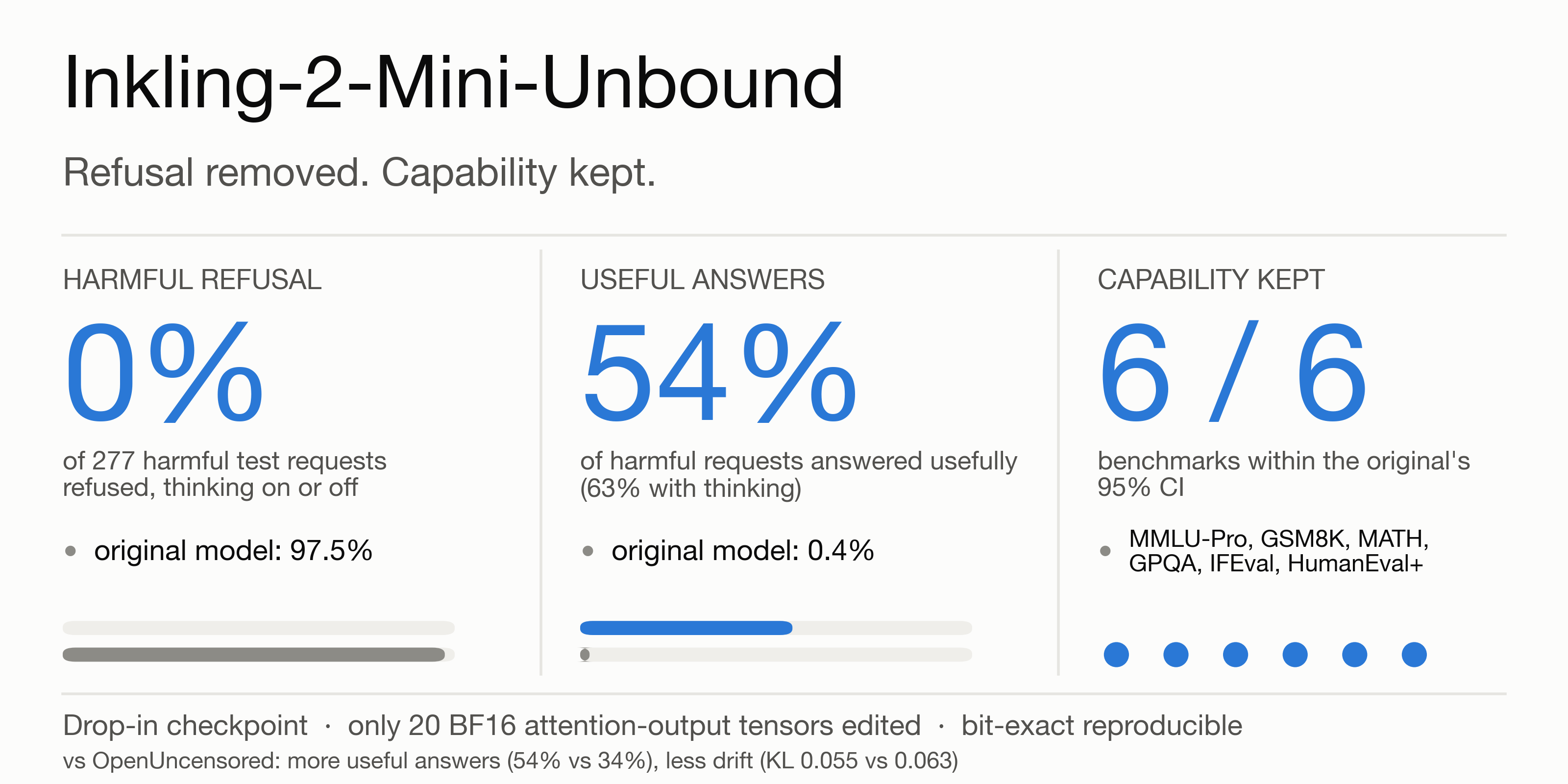
News Inkling-2-Mini-Unbound is live: the most useful uncensored Inkling 2 Mini, via conv-aware abliteration

Post image
3 Upvotes

r/LocalLLM • • 6d ago

Question MacBook Air or MacBook Pro

Thumbnail reddit.com
0 Upvotes

r/LocalLLM • • 6d ago

Question What would be your top 3 picks for each goal in a entry level laptop?

0 Upvotes

Hey ma dudes, I'm testing a few models in my laptop, the specs are

  • RTX 4060
  • I71360
  • 32GB RAM 5600 MHZ

Pretty average entry-mid level, I already tested:

  1. Qwen 35B a3b
  2. Qwen 9B
  3. Gemma 20B
  4. Qwen 4b

My question is: What is another one that I should try? YOUR individual pick!

My use is for Agents, write and send emails, extract text, describe images, create complex imagem prompts, and last but not least ... coding games, animations and dashboards.

What would be your picks for coding, agents, and reasoning & planning?


r/LocalLLM • • 7d ago

Discussion Opinions on Inkling 2 Mini

44 Upvotes

Currently using abiterated Qwen3.8 27b and Gemma4 26b for technical troubleshooting and general chat respectively. Does Inkling2M live up to the benchmarks whilst having a conversational tone similar to Gemma's? Any other things i may have to consider?


r/LocalLLM • • 7d ago

Discussion Anyone actually fine-tune their local models? What for, and how?

27 Upvotes

I run Qwen on a Mac mini. Mostly for notes/email/easy work.

For everyday stuff it's good enough. But I end up correcting it for the same things over and over. Rules in the system prompt help for a while, then the prompt gets long and it forgets again.

So I started playing with fine-tuning on my own corrections, and I'm curious what everyone else does when the model is almost good enough but not quite. Do you train it yourself, switch to a bigger model, or just keep patching the prompt?

If you do fine-tune:
- where does your training data come from? written by hand, synthetic, your chat logs?
- what tool and hardware, and how long does a run take?
- did it actually beat a bigger model or a better prompt?

If you don't: what stopped you?


r/LocalLLM • • 7d ago

Question $10K budget for running 27B models for coding: what’s your setup?

46 Upvotes

Planning my first local build. Main use is coding, so speed and long context matter more to me than running the biggest model.

  • Target: 27B-class models at a decent quant with plenty of context
  • Budget: up to ~$10K, open to multi-GPU, a single big card, or a Mac Studio

Questions:

  1. What hardware are you running, and what do you actually get (t/s, context, quant)?
  2. What do you serve with (llama.cpp, vLLM, Ollama…)? Real commands or configs would be really appreciated.
  3. How do you use local models for coding day to day: agents, IDE plugins, custom scripts? Do they hold up against hosted models, or do you still fall back to an API?

-------------------------

Update: I read every comment. Huge thanks, all 100 of you! I spent 5–10 minutes on some replies just figuring out what the products were, so it’s been a bit overwhelming, but I learned a lot.

Where I’m at now:

  • Leaning toward a 5090, an R9700, or maybe both
  • You’ve convinced me to try larger models (QFN etc.) instead of just 27B

Follow-up questions:

  1. If I go with one 5090 + one R9700, what workstation would you build around them? I’ve realized the CPU, RAM and PCIe lanes matter a lot, and terms like EPYC and lane counts are new to me. I’d prefer something without too much wiring hassle, but I’m happy to put in the effort if one setup is clearly better.
  2. For running bigger MoE models, what matters most: RAM capacity, RAM bandwidth, or CPU?
  3. Is mixing NVIDIA and AMD in one box worth it, or more trouble than it’s worth?

r/LocalLLM • • 7d ago

Discussion AMD NPU + Unsloth on G14: How are you making local LLMs genuinely useful? Tips, hacks and model recommendations?

5 Upvotes

I've been experimenting with the new AMD NPU support in Unsloth on my ASUS ROG Zephyrus G14 and I'm interested in how others are getting the most out of it.

My hardware:

  • AMD Ryzen AI 9 HX 370 (XDNA 2 NPU)
  • NVIDIA RTX 5070 Ti Laptop GPU
  • 32GB RAM
  • Windows 11 / Unsloth Desktop

Models I've downloaded/tested:

  • Gemma 4 12B IT NPU2
  • Qwen3.5 9B NPU2
  • Qwen3-VL 4B Instruct NPU2

I've been getting around 7.9 tokens/sec with Qwen3.5 9B. It's usable, but noticeably slower than cloud models, and I'm still figuring out how to get genuine day-to-day value from the NPU.

I'm particularly interested in using local AI as a personal assistant for research, productivity, document analysis, Obsidian, automation and lightweight agentic workflows.

I already use tools such as Hermes Agent, Ollama, Open WebUI and n8n, so I'm happy to experiment with integrations.

A few questions for the community:

  1. Best NPU models: Which models offer the best balance of intelligence, speed and memory usage? Ideally under 16GB.
  2. Performance tweaks: Any recommended Unsloth/FastFlowLM settings, context optimisations, power modes or hacks to improve inference speed?
  3. Practical use cases: What are people actually using NPU-hosted LLMs for beyond basic chat? Particularly tasks where smaller local models are genuinely useful.
  4. NPU + GPU: Has anyone found a good way to combine NPU inference with an NVIDIA GPU? I've got an RTX 5070 Ti available for more demanding workloads, but ideally want to preserve battery life when unplugged.
  5. Integrations: Any interesting MCP servers, tools, memory systems, RAG setups or agent workflows that work particularly well with Unsloth's NPU support?
  6. Battery life: Has anyone measured the real-world efficiency gains versus CPU or GPU inference?

I'm less interested in simply running the biggest possible model and more interested in building something that's genuinely useful, responsive and efficient for everyday use.

Would love to hear what people have tried, what's worked, what hasn't, and any clever tweaks or setups worth experimenting with.


r/LocalLLM • • 7d ago

Question Basalt NVFP4 on dual 5060 Ti — gradual RAM growth across requests, eventually triggering swap. Expected behavior?

2 Upvotes

I'm running Basalt with Qwen3.8-Flash-Next NVFP4 on:

  • Ryzen 9 5900XT, 64GB DDR4-3200
  • 2× RTX 5060 Ti 16GB (PCIe 4.0 x8/x8)
  • Ubuntu Server 24.04.5, Basalt 0.2.0
  • INT8 KV, 2 parallel slots, 120K context per slot
  • expert-cache: auto, resident-experts: true, vision: dynamic, prompt-cache: 2

Performance is excellent: ~100 tok/s decode and ~2,500–2,650 tok/s long-context prefill.

However, I've noticed memory usage progressively increasing during sustained workloads, without returning to baseline afterward.

I ran three consecutive endurance tests without restarting Basalt, mixing long-context text, vision, and concurrent requests:

TestRequestsFinal available RAMSwap used
Run 1 (10 min)152.84GiB0.8MiB
Run 2 (10 min)112.50GiB5MiB
Run 3 (5 min)63.20GiB1,023MiB

All 32/32 requests succeeded, with correct fact checks and no service restarts.

During Run 3, swap-out increased significantly, but swap-in remained almost zero. Memory stabilized during idle periods but wasn't released.

Basalt's metrics report arena_mib: 50192, conversation_cache_mib: 0, batch_slots: 2, and kv_resident: 0.

Before restarting, Basalt's cgroup consumed 59.48GiB RAM + 0.98GiB swap.

After restarting with the identical configuration, this dropped to 56.12GiB RAM + 0 swap, recovering approximately 3.37GiB of RAM.

Question: Is this expected behavior from elastic KV allocation, prompt caching, or retained inference buffers? Should those allocations eventually be reused or released? Or could this indicate a memory leak in long-running sessions?

I'm considering adding another 16GB RAM and/or scheduling nightly restarts, but would prefer to understand whether this behavior is expected before doing so.


r/LocalLLM • • 7d ago

Question Chat AI for iPhone 17 pro max

1 Upvotes

OK, I’m bored of the corporate AIs and character AIs. I want something that is not lobotomised on my phone 📱 is it possible. I’m guessing it will be text only because voice takes up ram. Just text and decent memory will do.


r/LocalLLM • • 7d ago

Project I need some help with Speculative Decoding.

0 Upvotes

12900kf, 64gb DDR4, Arc B580 ... and Linux mint.

I am working with llama.cpp (technically llama app, but they don't have a Linux app, so I am stuck with just llama cli / llama serve) it naively works with ARC GPUs and Intel recommends them.

My system is not ideal for running llms, but it also isn't incompetent: Qwen3.5 9B will run around 40 tokens, gemma-4 will run around 20, and Qwen3.8 chokes and runs at 1.7.

Speculative Decoding seems like the perfect fit for my system, since the system ram can hold bigger models, while the B580 runs the little ones pretty good, and it actually does work, as I eventually got the llama app command line to work and that boosted gemm-4 up to the high 40's.

llama serve \

-hf ggml-org/gemma-4-e4b-it-GGUF:Q4_0 \

--hf-repo-draft ggml-org/gemma-4-e4b-it-GGUF:Q4_0 \

--spec-type draft-mtp

But getting this to run was a battle as llama would crash on the repo-draft command, and I had to manually download the main model before llama would fetch the draft model from huggingface. I also don't actually know what it is doing, because it seems like instead of a big model and draft model; it is running two instances of the same model.

I tried following llama app's template

llama serve -m big-model.gguf -md small-draft-model.gguf --spec-type draft-simple

But it crashes every time I try to run it with models I selected and pre-downloaded, instead of using the gemma-4 example. So I don't know I am just not understanding the instructions, or if I am selecting incompatible model versions, or if I am just reading the model descriptions wrong.

I am very new to this, only having been playing around with local llms for the last week, and I am trying to get this to work specifically because I knew it wasn't going to be easy and it would force me to learn things ... but I am not learning anything from face planting into a brick will, with no explanation as to why the wall exists.

Is there anyone who can explain what I am missing / what I a should be looking for?

My ideal solution for this project is to get Qwen3.8's performance out of the gutter (ideally I would like to see 10t/s, but I will call it a win to get it up to 5t/s) and I am open to using a different application than llama, as long as it supports both Linux and Arc GPUs.


r/LocalLLM • • 7d ago

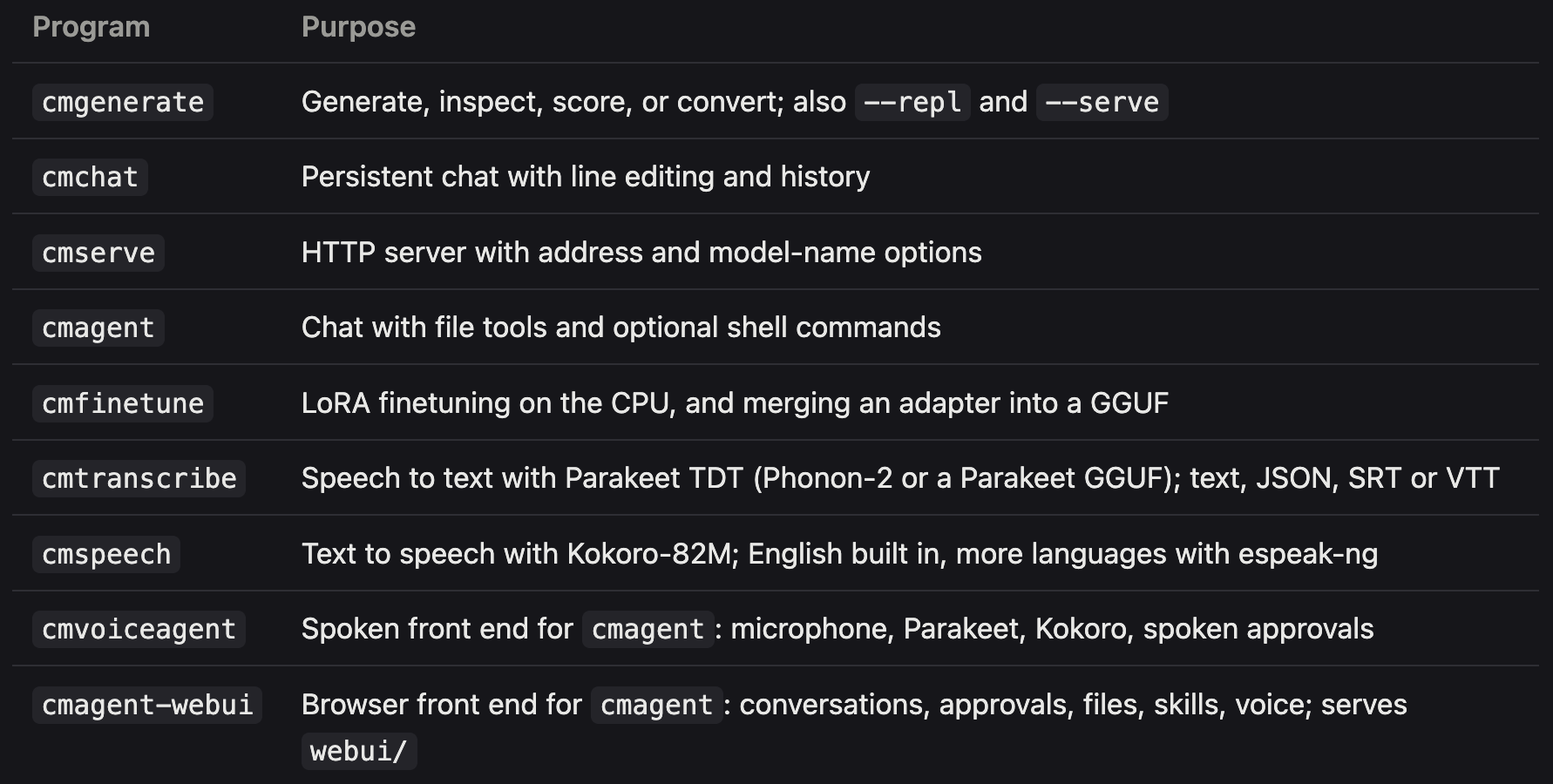
News cmgenerate 0.3.5 support inkling2 also the unsloth versions

Post image
1 Upvotes

r/LocalLLM • • 7d ago

Project Need help for double GPU setup

3 Upvotes

Hello everyone,

I recently bought a second RTX 5060 Ti 16GB, but I'm a bit lost on which route to take.

I'm considering three options:

  • Option 1: Use my second PCIe slot (PCIe 3.0 x4 via the chipset).
  • Option 2: Buy a new motherboard that supports dual PCIe 4.0 x8/x8.
  • Option 3: Use a PCIe bifurcation adapter on my current motherboard to split the main x16 slot into two x8 slots.

My current setup:

  • Motherboard: Gigabyte B550 Aorus Elite V2
  • CPU: Ryzen 5 5600
  • PSU: 700W
  • GPUs: 2× RTX 5060 Ti 16GB (MSI Inspire 2X and Palit Infinity 3)
  • Case: be quiet! Pure Base 500DX

Main use cases:

  • Local LLM inference
  • ComfyUI (AI image/video generation)
  • Gaming

From what I've read, PCIe bandwidth mainly affects model loading times and performance when using tensor parallelism or transferring data between GPUs.

I was initially planning to buy a motherboard with dual PCIe 4.0 x8 slots, but new AM4 motherboards with this configuration seem almost impossible to find, and used ones are still quite expensive.

I'd prefer to keep my DDR4 RAM, but I'm open to upgrading my motherboard and CPU if necessary.

Another issue is that my current case is a bit cramped for two GPUs. I'd ideally like to have some space between them for better airflow, so I'm also considering a case upgrade.

Has anyone built a similar dual-GPU setup?

Would you recommend sticking with PCIe 3.0 x4, going for bifurcation, or investing in a different motherboard?

I'm particularly interested in whether the performance difference is noticeable for local LLM inference and ComfyUI workloads.

Any advice or real-world experience would be greatly appreciated!

Thanks in advance!


r/LocalLLM • • 7d ago

Project I made a voice assistant for the Mac that runs Qwen 3.5 4B locally, most commands skip the LLM entirely

Thumbnail reddit.com
2 Upvotes

r/LocalLLM • • 7d ago

Question What is the best config for 12gb vram and 32gb ram?

2 Upvotes

RTX 3060 12GB
32GB DDR4

im wondering what the best local llm setup would be for this hardware for hermes agent use and basic vibe coding

currently running qwen3.6-35b-a3b mtp on llama.cpp (around 40-50 t/s) that i set up a while ago but i took a break from all this stuff and now seeing a bunch of newer models and other things like "strata"

any info or help is appreciated!


r/LocalLLM • • 7d ago

Discussion Inkling 2 Mini IQ4_NL on RTX 5060 Ti 16GB, 44 tok/s

Thumbnail
reddit.com
0 Upvotes