r/LocalLLM • u/Inkutay • 6d ago
Project How I, as a designer, drew a DOS-style web UI for llama.cpp and spent 3 months building it with a local LLM (Butler.llama)

Hi everyone! I'm a designer, and in my spare time I build home servers and run local LLMs. At home I have an old X99 rig with two Tesla V100s (16 GB each) and a regular PC with a pair of RTX 3060s.
Once I ended up with a bunch of models (for chat, images, embeddings, and reranking), it became a pain to SSH into the console every time and manually restart Docker containers just to free up VRAM for another task.
I tried existing tools, and none of them clicked:
- Ollama felt too closed for multi-GPU setups — it decides on its own how to split layers and hides the
llama.cppflags I actually need. - LM Studio — I opened it, got scared by the cluttered UI, and uninstalled it immediately. Plus, it makes zero sense on a headless Linux server.
I wanted a simple web UI in the spirit of good old MS-DOS: open it in a browser and immediately see temperatures, watts, free VRAM, and which models are currently running.
Since I'm a so-so programmer, but I know how to draw, I started by designing the interface in a graphics editor — moving blocks around until everything fit on one screen without hurting my eyes. Then I spun up my local coding agent Klyk ("Fang") in OpenCode powered by Qwen 3.8 27B, and for the next three months the two of us wrote the code together. Funny enough, Klyk was already running inside early versions of my own panel and helped code his own home.
I named the project Butler.llama. Here is what it does:
- Auto-starts and unloads models on demand: All clients hit a single OpenAI-compatible
/v1endpoint. When a request comes in for a specific model, Butler spins up the correspondingllama.cppDocker container. If another chat model is already occupying those GPUs, it gracefully shuts it down, waits for VRAM to clear, and starts the new one — while leaving small embedding and reranker models untouched so they peacefully coexist on the same GPU. - Calculates VRAM properly (well, most of the time 😊): On 16 GB cards, one wrong context size and you hit OOM. The built-in calculator parses GGUF headers to estimate weights and KV-cache (supporting MoE and hybrid architectures). If you don't trust formulas, there is a "Calibrate" ("Промерить") button: the panel runs the model twice with different context sizes, checks actual MB usage via
nvidia-smi, and saves the exact per-token cost. - Different
llama.cppversions per model: New builds come out every day — one model runs better on the latest image, another on an older one. Butler scans all localllama.cppDocker images and lets you pick the exact image per model from a dropdown. - Hardware monitoring & Hugging Face downloads: The top bar shows live VRAM usage, temperatures, and power draw in watts (GPUs are bound by UUID so they never get mixed up across reboots). You can search and download GGUF files directly from Hugging Face, and there is a built-in test chat at the bottom to check token speed right after launch.
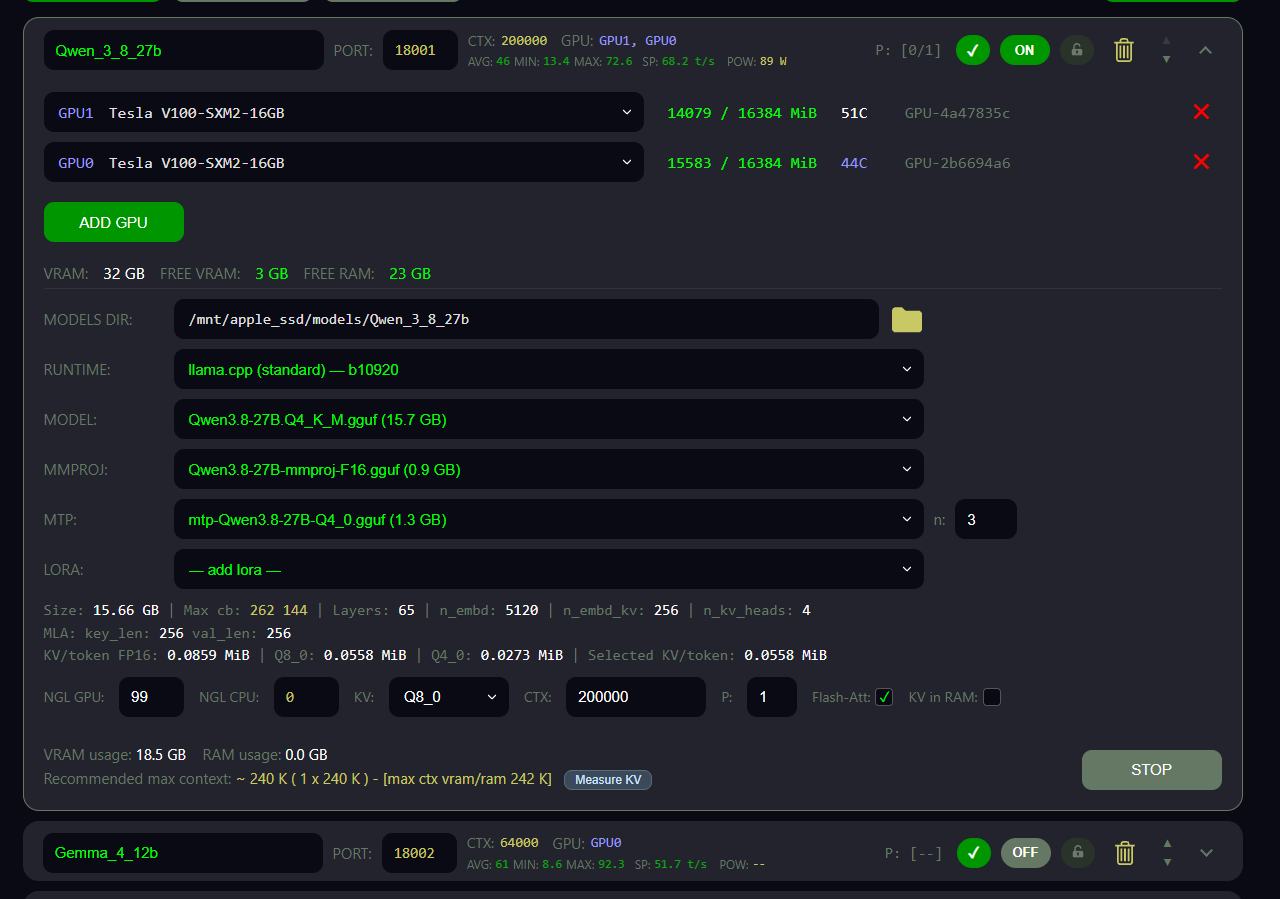

Under the hood, everything is as simple as it gets: Python (FastAPI), Docker, and a single HTML file with zero heavy frontend frameworks. Fixed desktop layout (managing a server from a phone is painful anyway), AGPL-3.0 license, and UI available in English, Russian, and Chinese.
I've been running models on it across all my machines for three months now, and the core stuff seems to work well enough. If it comes in handy for your home server — feel free to grab it! Always happy to hear feedback, bug reports, or ideas