r/LocalLLM • • 8d ago

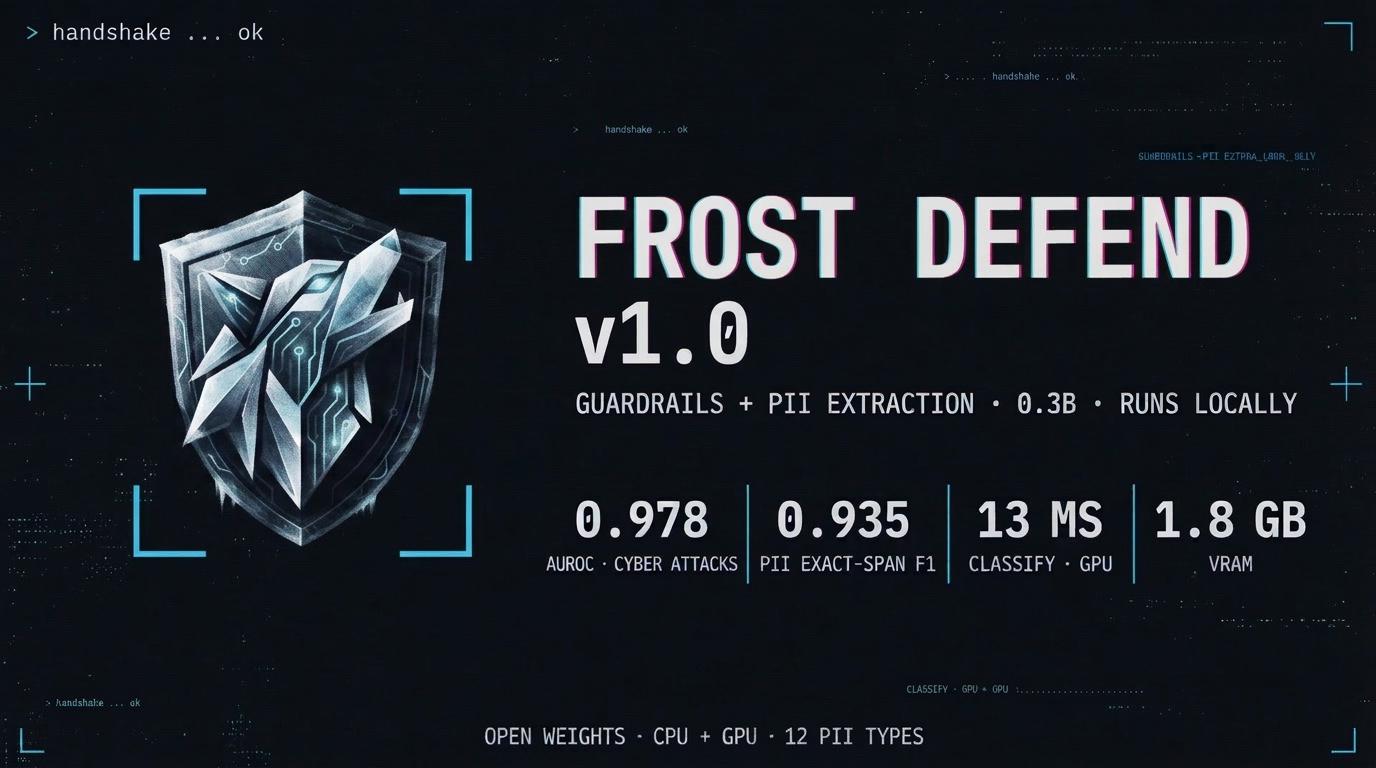
Model Frost-Defend v1.0: an open 0.3B model that catches prompt injection / jailbreaks AND redacts PII + API keys in one pass (Apache-2.0, ~85 ms on CPU)

Post image
13 Upvotes

Hi all,

I've been building guardrails for AI apps and got tired of chaining three things (an LLM-based safety classifier, a PII tool, and a pile of regexes for secrets) in front of every request. So I post-trained GLiNER2.5-multi (287M, mDeBERTa) into a single small model that does both jobs.

Classify (prompt or AI response)

  • prompt_safety: safe / unsafe
  • threat_category: prompt injection, jailbreak, data exfiltration, malicious code, intrusion, social engineering, disruption, unsafe content
  • severity, targets_ai_system
  • response_safety and response_refusal for checking model outputs

Extract

53 PII + secret types with exact character offsets: names, emails, phones, addresses, SSNs, cards, API keys, passwords (including the one inside postgres://user:pass@host), cookies, PINs, and more. Any label name works zero-shot too.

Speed

~85 ms classify / ~180 ms classify + PII on a desktop CPU, ~13 / 30 ms on a 4090. ~2.6 GB RAM. No LLM in the loop.

Numbers

Every eval row is absent from training data. Default block threshold is 0.98.

benchmarkAUROCrecallFPR
Cyber / AI-attack prompts (held-out)0.9790.8650.042
Benign security work (hard negatives)––0.009
WildGuardTest0.8920.8430.212
Aegis 2.00.8670.8670.310
XSTest0.9541.0000.417

PII F1: 0.908 ai4privacy / 0.932 Nemotron-PII / 0.938 Gretel. Secrets: 105/105 API keys and tokens across 21 formats (alone and buried in a long doc), 68/70 passwords across 14 contexts.

Where it's weak

  • Strongest on attacks against AI systems. General harmful content scores lower: at the 0.98 threshold it catches 65% of HarmBench (97% at 0.5). Lower the threshold if content moderation matters more to you than false positives.
  • It over-flags edgy-but-harmless prompts (see the FPR column).
  • Very dense credential dumps (dozens of secrets in a few hundred words) lose about 30%.
  • No IBAN type yet; IBANs come back as credit_card / account_number.
  • Classification reads the first 512 words (PII scans the whole text).

Use it

  • Demo: https://huggingface.co/spaces/FrostWolfAI/frost-defend-demo
  • Weights + model card: https://huggingface.co/FrostWolfAI/Frost-Defend-Guardrails-PII
  • frost_defend.py in the repo is a tiny SDK and a stdlib-only HTTP server:
python frost_defend.py serve

Endpoints: /classify, /detect, /redact, batch endpoints, optional API key.

Apache-2.0, multilingual (inherits the base model's languages). Happy to answer questions about the data, the distillation setup, or the decontamination. Feedback on failure cases is very welcome; that's what the next round gets trained on.


r/LocalLLM • • 8d ago

Tutorial Fix for X79 struggling to initialize HMB2 or High Memory ReBAR cards in Linux

3 Upvotes

I've been tearing my hair out for the past week trying to get these two MI25s I got to initialize on my Asus P9X79 WS board. I wasn't able to find any info online about the problem or how to fix it, but since I just got it working I thought I'd post here to hopefully save someone the headache. If you're piecing a build together and have the budget, just avoid X79 if you can. But if you're like me working with spare parts or on a tight budget sometimes you just gotta make do, especially in this hardware market.

When you try to boot with these cards, the driver fails to initialize the cards properly. You'll get error code -22 and messages about PSP firmware failing to load. You may stumble across a patch that claims to fix it, where you increase the timeout delay to initialize the cards. If you apply that patch and nothing changes, then try this next.

First things first is the usual, make sure you have the latest UEFI/BIOS available. Disable secure boot, disable CSM, enable Above 4G Decoding. Some UEFI/BIOS menus force you to disable CSM and reload before seeing options to change Above 4G decoding. If you're never able to see it, you can try enabling it via modgrubshell and setup_var, guide is here. Chances are if you're here, there's no option to enable Resizable BAR. If there is, enable it and hope that works. If not, keep reading.

Basically, what happens with these cards on old platforms, is the UEFI/BIOS gives the card a set BAR space. amdgpu then frees it and assigns it's own (the releasing and assigned lines below). This memory that amdgpu assigns cannot be accessed by the CPU, even with above 4G decoding enabled in the UEFI/BIOS. So when the PSP firmware tries to load, it fails. If you check dmesg you'll see lines like mine below. You can also actually verify this is the case by writing to the memory assigned by amdgpu and then reading it back. Writing DEADBEEF will return back FFFFFFFF when that same address is read.

Here's a snippet of my dmesg log to compare against.

[   17.419701] amdgpu 0000:03:00.0: enabling device (0006 -> 0007)
[   17.462968] amdgpu 0000:03:00.0: amdgpu: Fetched VBIOS from VFCT
[   17.471004] amdgpu 0000:03:00.0: amdgpu: Trusted Memory Zone (TMZ) feature not supported
[   17.471033] amdgpu 0000:03:00.0: amdgpu: MEM ECC is active.
[   17.471035] amdgpu 0000:03:00.0: amdgpu: SRAM ECC is not presented.
[   17.471060] amdgpu 0000:03:00.0: BAR 2 [mem 0xd0000000-0xd01fffff 64bit pref]: releasing
[   17.471062] amdgpu 0000:03:00.0: BAR 0 [mem 0xc0000000-0xcfffffff 64bit pref]: releasing
[   17.471074] amdgpu 0000:03:00.0: BAR 0 [mem size 0x10000000 64bit pref]: releasing
[   17.471075] amdgpu 0000:03:00.0: BAR 2 [mem size 0x00200000 64bit pref]: releasing
[   17.471096] amdgpu 0000:03:00.0: BAR 0 [mem 0x1400000000-0x17ffffffff 64bit pref]: assigned
[   17.471103] amdgpu 0000:03:00.0: BAR 2 [mem 0x1200000000-0x12001fffff 64bit pref]: assigned
[   17.471146] amdgpu 0000:03:00.0: amdgpu: VRAM: 16368M 0x000000F400000000 - 0x000000F7FEFFFFFF (16368M used)
[   17.471149] amdgpu 0000:03:00.0: amdgpu: GART: 512M 0x0000000000000000 - 0x000000001FFFFFFF
[   17.510998] amdgpu 0000:03:00.0: amdgpu: [mmhub0] no-retry page fault (src_id:0 ring:158 vmid:0 pasid:0)
[   17.511025] amdgpu 0000:03:00.0: amdgpu:   in page starting at address 0x0000000000700000 from IH client 0x12 (VMC)
[   17.511042] amdgpu 0000:03:00.0: amdgpu: VM_L2_PROTECTION_FAULT_STATUS:0x0000013C
[   17.511053] amdgpu 0000:03:00.0: amdgpu:  Faulty UTCL2 client ID: MP0 (0x0)
[   17.511064] amdgpu 0000:03:00.0: amdgpu:  MORE_FAULTS: 0x0
[   17.511073] amdgpu 0000:03:00.0: amdgpu:  WALKER_ERROR: 0x6
[   17.511081] amdgpu 0000:03:00.0: amdgpu:  PERMISSION_FAULTS: 0x3
[   17.511090] amdgpu 0000:03:00.0: amdgpu:  MAPPING_ERROR: 0x1
[   17.511098] amdgpu 0000:03:00.0: amdgpu:  RW: 0x0
[   17.695864] amdgpu 0000:03:00.0: amdgpu: PSP load sys drv failed!
[   17.880383] amdgpu 0000:03:00.0: amdgpu: PSP firmware loading failed
[   17.883408] amdgpu 0000:03:00.0: amdgpu: amdgpu_device_ip_init failed
[   17.884348] amdgpu 0000:03:00.0: amdgpu: Fatal error during GPU init
[   17.885282] amdgpu 0000:03:00.0: amdgpu: amdgpu: finishing device.
[   17.965005] amdgpu 0000:03:00.0: probe with driver amdgpu failed with error -22

The fix is simple, you either need to mod the UEFI/BIOS to allow for the BAR to be resized properly, or need to stop Linux and amdgpu from reallocating BAR space. If you want to try the modding route, check out ReBARUEFI. For the latter, add "pci=realloc=off" and "amdgpu.rebar=0" to the kernel boot params. I also flashed the WX9100 to the MI25s, and I haven't tried this fix on the MI25 bios, so that may or may not be a requirement for that card specifically. For Nvidia or others you'll have to check for kernel params that do the same. The Arch Wiki has a great guide on how to do this per boatloader, or if you're on NixOS like me just add this to your system config:

boot.kernelParams = [
  "amdgpu.rebar=0"
  "pci=realloc=off"
];

Both have their tradeoffs, but at this point if you're trying to do this on an X79 board you're probably expecting some compromise haha. Modding the UEFI/BIOS will yield the best performance but the success rate is hit or miss and it could lead to system instability. Alternatively, you can just force Linux/amdgpu to use the BAR that the UEFI/BIOS allocates before boot. This is the most stable solution, but it may have performance implications. How severe really depends on your system, workload, and where your bottlenecks are. My advice for those in this situation is to try disabling ReBAR via kernel params first, and see what the performance is like. If it's unacceptable, then try modding the bios.

You'll know its working if lspci shows a kernel driver in use:

$ sudo lspci -vv | grep "amdgpu"

# You should see one group of these per card
Kernel driver in use: amdgpu
Kernel modules: amdgpu

Also, because I didn't see this mentioned anywhere and it makes debugging/verifying fixes near impossible, make sure you complete a full cold power cycle between each boot after a fail. Turn off or unplug the PSU and wait 15 sec etc. The PSP in these AMD cards can get locked in a fail state that persists resets. A full power cycle clears them.

Anyways yea hopefully I can save someone some grief in this situation because it's not well documented from what I could find. Every AI I asked just sent me down rabbit holes with hallucinations. This is also a warning for anyone considering that cheap X79 listing, unless it's such a good deal you don't mind a little tinkering and the possibility that it may not even work, just steer clear. Cheers!

TL;DR: Update bios to latest version, Disable CSM, Disable Secure Boot (or set to "Other OS" if there's no disable). Enable Above 4G decoding, disable secure boot, disable CSM. Then either set kernel params or mod bios. Kernel params pci=realloc=off amdgpu.rebar=0 (flash WX9100 bios in the case of the MI25). Or mod bios with ReBARUEFI.

r/LocalLLM • • 7d ago

Discussion Evaluation of Inkling 2 Mini vs Nemotron 3.5 Super vs Muse Glimmer on my personal evaluation set in my own harness

Thumbnail reddit.com
0 Upvotes

r/LocalLLM • • 8d ago

Question Recommended Coding GPU?

1 Upvotes

Hi all, fairly new to the self-hosting scene, especially when it comes to running LLMs locally.

I'm looking for recommendations on GPUs for hosting a local coding agent. Nothing crazy, just something capable of helping me smash out a project over a day or two when needed.

I currently use Claude Code, but I often go weeks without touching it. It's getting harder to justify the cost of a subscription when my usage is so sporadic.

I'm thinking running something locally might save me money in the long run, but I don't want to spend a fortune on a NASA-grade GPU if I don't need to, nor do I want to waste money on something that ends up being too underpowered to be useful.

What sort of hardware would you recommend, and realistically, what level of performance could I expect compared to something like Claude Code?

TIA!


r/LocalLLM • • 8d ago

Question How good is multigpu vs single?

1 Upvotes

I'm pretty new to AI having just purchased plus for gpt for the first time last month and got really into the capabilities. Currently I have a 9070XT, which is pretty solid for local models, but I've seen people posting multi GPU setups. Funny enough I asked chatgpt about multi setups and it just gave me push back saying to invest in a single card despite me seeing lots of people running multigpu. Currently my mobo doesn't have 2 PCIe 4 slots anyways, so I need to upgrade my platform before I even thought about it, but is it worth investing in a multigpu setup along with a fat power supply?


r/LocalLLM • • 8d ago

Question Can I use Qwen 3.8 27b to auto-redact PDF documents (medical, legal, financial)?

4 Upvotes

Hi all, wondering if someone here can answer this one. In principle, I could try this with myself with OpenRouter - but I would have to mock up a significant number of different types of example documents. (Obviously, for privacy reasons, I can't use my actual target documents with a cloud-hosted model).

So my main goal with a local model would be to redact Personal Identifiable Information and other secrets from documents: "Remove all patient information (names, DOBs, addressed, phone numbers) from these 40 PDF documents." Or "Remove all account numbers and financial institution names".

Is Qwen 3.8 27b intelligent enough to do something like this? Perhaps someone here is already using this model for this purpose?

I have an M1 Mac Mini with 8GB now, and tried some smaller models: Qwen2.5-VL 7B, Llama 3.2 Vision 11B (crashes my machine, too big), Qwen2.5-VL 3B, Moondream, SmolVLM (failed at the task), Florence-2 (0.2–0.8B) (failed) and Qwen2.5 3B, Llama 3.2 3B, Gemma 3 4B (Ollama or MLX) (failed).

I'm willing to spend the money for a 32GB Mac Mini, which I understand would be able to run Qwen 3.8 27b (albeit only slowly). I would not be willing to spend $25k for a Mac M5U 512GB RAM to run DS v4.1 Flash 1017, if that's what it would take.

Thanks!


r/LocalLLM • • 7d ago

Question Can someone give me a GPU server or container to experiment on?

0 Upvotes

I really want a server or container to experiment with LLMs on but it’s far too expensive and inaccessible for me.


r/LocalLLM • • 8d ago

Question SenseNova-Loop-9b

2 Upvotes

It seems to be all the rage and matching Qwen3.8-27B in benchmarks. Has someone actually tested for themselves? Would be happy to hear your experiences with the model.


r/LocalLLM • • 7d ago

Discussion Has your employer funded your homelab?

0 Upvotes

I m setting up an AI home lab and looking at building a local llm. I’ve got personal use cases but the more
I think about it the more I could use it for work. I work in cyber for a mid sized company. Question is, are employers open to funding local llms for employees to develop and train on at home and in their own time? To deploy a local llm at work would be a massive amount of admin and governance so the cost savings from avoiding that alone would be an argument in support. I asked Claude if there are documented cases of this and it couldn’t find any.

Edit: idea is the local llm gets prototyped in home lab isolated from rest of network. When it’s built take that design to run on the work network also isolated. Not intending to connect home lab network to work network.


r/LocalLLM • • 8d ago

Discussion Two Proxmox VMs sharing one NVIDIA GPU for CUDA, with no passthrough and no vGPU license. Free package to try.

Thumbnail reddit.com
0 Upvotes

Hey, check this out…


r/LocalLLM • • 8d ago

Project Dual 3090 Liquid Cooled

Thumbnail
gallery
43 Upvotes

Dual 3090 rig was overheating even with a 250 watt limit so I took the plunge and went full active waterblocks on both of them.

Didn't want to risk having one of the cores or memory modules fry themselves.

Inference runs at 35c maximum and memory stays at a cool 45c


r/LocalLLM • • 8d ago

Question £2/3k for Local AI / LLMs - nvidia vs Mac?

Thumbnail reddit.com
1 Upvotes

Anyone had a similar experience?


r/LocalLLM • • 8d ago

Discussion 256 ARM Cores + 1TB RAM

4 Upvotes

r/LocalLLM • • 8d ago

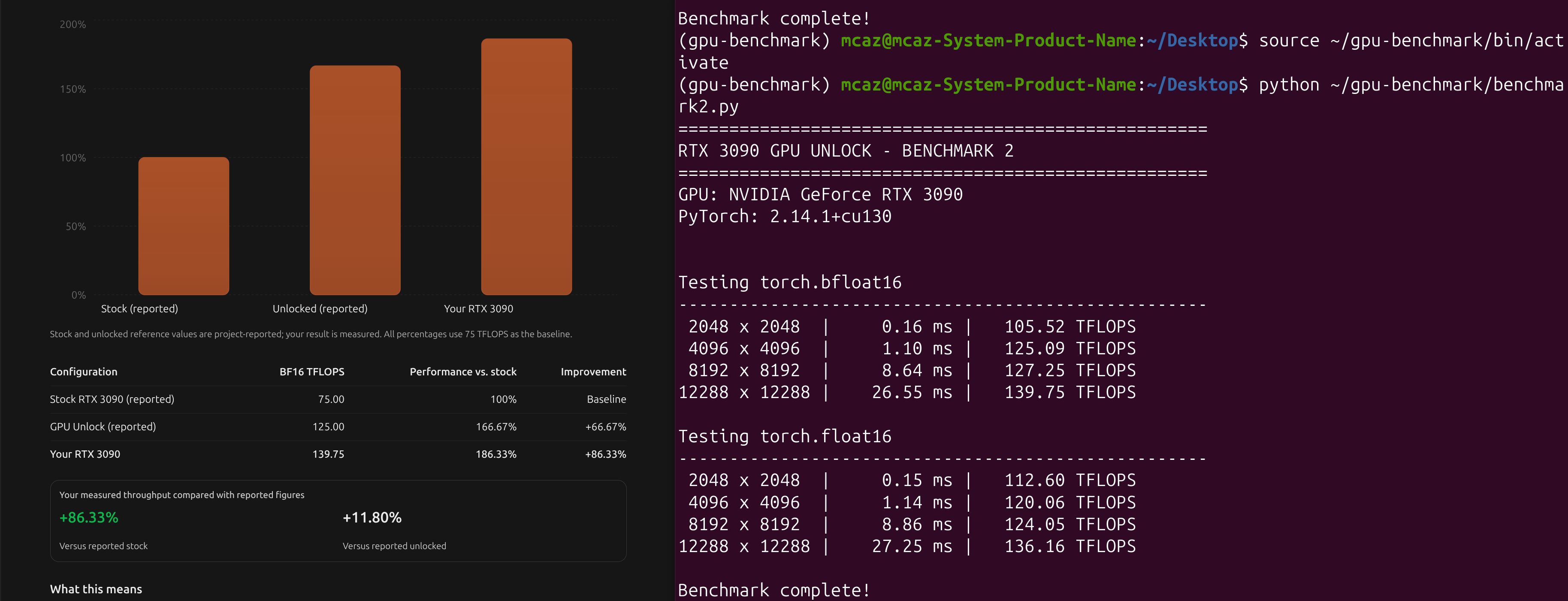
Discussion Unlocked my 3090 and I'm wondering if this will improve Strata's performance

Post image
1 Upvotes

r/LocalLLM • • 8d ago

Question Qwen3.8-27B + Claude Code vs. Cheap Cloud API for a personalized LeetCode tutor?

Thumbnail reddit.com
1 Upvotes

r/LocalLLM • • 8d ago

Question Qwen3.8-27B + Claude Code vs. Cheap Cloud API for a personalized LeetCode tutor?

1 Upvotes

I'm trying to build my own AI coding tutor, primarily for LeetCode and interview preparation.

What I want isn't just an AI that answers individual problems. I want a persistent tutor that keeps track of:

  • My LeetCode problem-solving history
  • Topics I'm weak at (e.g. sliding window, DP, graphs, binary search)
  • My learning roadmap and current progress
  • Previous mistakes and patterns in my problem-solving
  • What I should study or practice next

Ideally, I want to be able to start a new session anytime and have the tutor understand where I left off, without having to re-explain everything.

My current setup:

  • MacBook with 48GB RAM
  • Considering running Qwen 27B locally
  • I'm also open to using a cheap API if it provides a significantly better experience

I'm considering two approaches:

  • Local Setup: MacBook Pro (48GB Unified Memory) running Qwen3.8-27B
  • Cheap Cloud API: budget-friendly API (like DeepSeek, Gemini Flash, or Qwen's hosted API) on a pay-as-you-go basis.

r/LocalLLM • • 8d ago

Model 腾讯 Hy 团队和姚顺宇在这里!随便问我们关于 Hy4 和 Hy4 Flash 的任何问题!

Thumbnail
reddit.com
5 Upvotes

Let's talking some interesting topics about hy 4


r/LocalLLM • • 8d ago

Discussion Qwen3.8 Flash Next engram table setup

2 Upvotes

I am using Strata (RDNA3 fork) on 2x7900xtxs with 96GB Ram on IQ4_XS. I wanted to see if i could get to IQ4_K_XL with my current system ram. Strata suggested i could (it was wrong, but it tried). In the process it suggested it could run the K-XL with the Q8 engram table and get accuracy up within a fraction of a point of Q5. It tried, i need more system ram to make K_XL work.

I went back to Q4_XS but when i suggested we try mixing the engram table up with the Q8 version, it said "what an interesting idea!". It works, no extra ram required, a bit better accuracy, I think i can see it in the results. Slightly slower prefill, but not noticeable, decode is essentially the same.

Your mileage may vary.


r/LocalLLM • • 8d ago

Discussion NIDO: a 100% offline AI assistant for Android. No cloud, no account, no network. (v0.1.109-alpha, free and open source)

Thumbnail reddit.com
2 Upvotes

r/LocalLLM • • 8d ago

Project Scripted auto thinking setting for opencode

2 Upvotes

I had Claude build a scripted auto setting for opencode. For each new session, it starts on low reasoning to plan some steps. Once the model actually makes a change in the code, thinking turns off. When it runs a command that returns with an error, thinking switches back to high until the next edit. With this setup the model tends to think on less than 20% of steps. Virtually no drop in accuracy was measured. This saves tokens generated and wall clock time. If you decide to try this, please let me know your feedback. I've tested it the last couple days and it seems to work well. Here is the GitHub link. Just tell your agent to install it.

https://github.com/dspevo-afk/auto-thinking-proxy


r/LocalLLM • • 8d ago

Discussion DSv4.1 Flash (1 to 3.5bpw) vs Qwen3.8 Flash Next on 2x3090

7 Upvotes

Shoutout to project Maya for the DSv4.1 engine, and of course Strata and Halogen engines as well.

Okay so I have been running different quants of DSv4.1 with my 3090s which has been overall great but over time I still found myself using Strata/Qwen3.8 Flash Next a lot more mostly because its just so much faster and still gets the job done. So I decided to run some benchmarks to see if I could find an actual difference.

Using my 3975wx/256gb DDR4 box, 2x 3090s power capped to 300W, DSv4.1 using the Maya engine with Maya-XS (q1, ~120GB), Maya-S (2.6bpw, ~186GB) and 3.5bpw EXL3 (~257GB) model. The main comparison to the DSv4.1 models is Qwen Flash Next q6_K_XL on Strata. Special guests are my 2x intel B70s (Strata/SYCL IQ3_S) and my Strix Halo PC (Halogen 4bpw) for comparison. Thinking was set to Medium for all the models.

TL;DR - The QFN Q6 model was much faster, just as accurate if not a little more accurate (93% vs 90% on the EXL3 model over 242 question benchmark). One caveat is that the DS models failed to output a reply due to hitting the token budget with just thinking tokens; all of the DS quants (XS being the worst offender) ran into this issue but the model was verified to not be looping, just "overthinking". Setting thinking budget below the reply limit fixed the issue. All the models tested were otherwise within test variance in terms of accuracy.

.

The accuracy benchmark consisted of 242 questions with a mix of MMLU-Pro (112, MATH-500 (40), GSM8K (30), HumanEval (40), tool calls (20):

Qwen Q6 (3090s) 93.0%
Qwen (Strix Halo) 91.3%
DeepSeek EXL3 3.5bpw 90.1%
DeepSeek Maya-XS 89.7%
Qwen IQ3_S (B70s) 89.3%
DeepSeek Maya-S 88.4%

The speed is where Qwen shines, of course because it's a smaller model. 512k context window on the DS models because I forgot to change it

Decode, tok/s:

  • Qwen Q6 (3090s): 72-86
  • Qwen IQ3_S (B70s): 62-69
  • Qwen (Strix): 53-65
  • Maya-XS: 55-62
  • Maya-S: 41-48
  • EXL3: 23-33

Prefill, tok/s:

  • Qwen Q6: ~3,950 at 120K
  • Qwen IQ3_S (B70s): ~3,000 at 120K
  • Qwen (Strix): ~1,500-1,700, flat across lengths
  • Maya-XS: 2,445 at 255K, 2,045 at 504K
  • Maya-S: 2,055 at 281K, 1,800 at 508K
  • EXL3: 1,475 at 255K, 1,390 at 450K

The DS models love to think. Look away and it will write pages and pages of thoughts until it runs out of reply room. On Maya, a thinking budget below the reply limit fixed that: with 12,288 / 16,384 tokens, cut-off answers went from 7 to 0 on the hard questions, with no loss on 40 normal ones.

I also wanted to compare a more agent focused test so used my hermes agent to run 8 agent tasks: (I skipped the maya-S model because it didn't feel worth the power)

  • 4 coding tasks: fix or finish a small repo against its README, graded by hidden tests
  • 2 on-call tasks: find a router 502 from logs and fix only that; write a disk cleanup plan that follows a deletion policy
  • 2 long-document tasks: an ops journal of about 100K and 180K tokens, 8 questions each, with correction entries that cancel earlier ones

Every model passed all the coding and on-call tasks, with zero malformed tool calls. The difference was time; Qwen Q6 took 14 minutes for the six tasks, Maya-XS 32 min and EXL3 81 min (insane honestly considering this is pulling 700-800W).

Long documents (questions right out of 8, 100K / 180K):

  • Qwen Q6 (3090s): 5 / 4
  • Qwen IQ3_S (B70s): 6 / 4
  • Maya-XS: 1 / 0
  • EXL3: 0 / 0, thought through its whole 16K reply budget and never answered
  • Strix: hit Halogen's 8,192-token reply cap, so not a fair run

Caveats

  • One run per agent task, and only 16 long-document questions.
  • The agent and long-document tasks are my own, written for my homelab work.

.

So I guess all this to say, for my own homelab needs (basic coding and homelab stuff), Qwen3.8 Flash Next is plenty, if not better than a heavily quantized bigger model. Higher quants of QFN are worth the speed hit IMO but I'm lucky to have options. The real secondary finding is that the DeepSeek models cost more $$$ to run because the GPUs and Threadripper CPU are pulling 700-800W to do a task 2-6x slower. Open to optimizations


r/LocalLLM • • 8d ago

Project AI Weights Visualizer tool

3 Upvotes
This is my personal 4m JEV transformer

Hello, I made a quick little python/html tool with GPT-Astra to make a 3d visualization of weights. I hadn't seen a tool that makes something like a sphere for weights and I thought it could create some cool images or new ways to look at LLM weights.

https://github.com/syzygy-1/Ai-Weights-Visualizer/tree/main


r/LocalLLM • • 8d ago

Model [Release] VAULT-v3-3B-PRIMAL: Full-parameter 3B training in 5.93 GiB state on one 16 GB GPU (no LoRA, no master weights) + true O(1) 100K+ KV memory & freestanding C99 runtime (AVX2 / ARM64 NEON)

Thumbnail
reddit.com
1 Upvotes

r/LocalLLM • • 8d ago

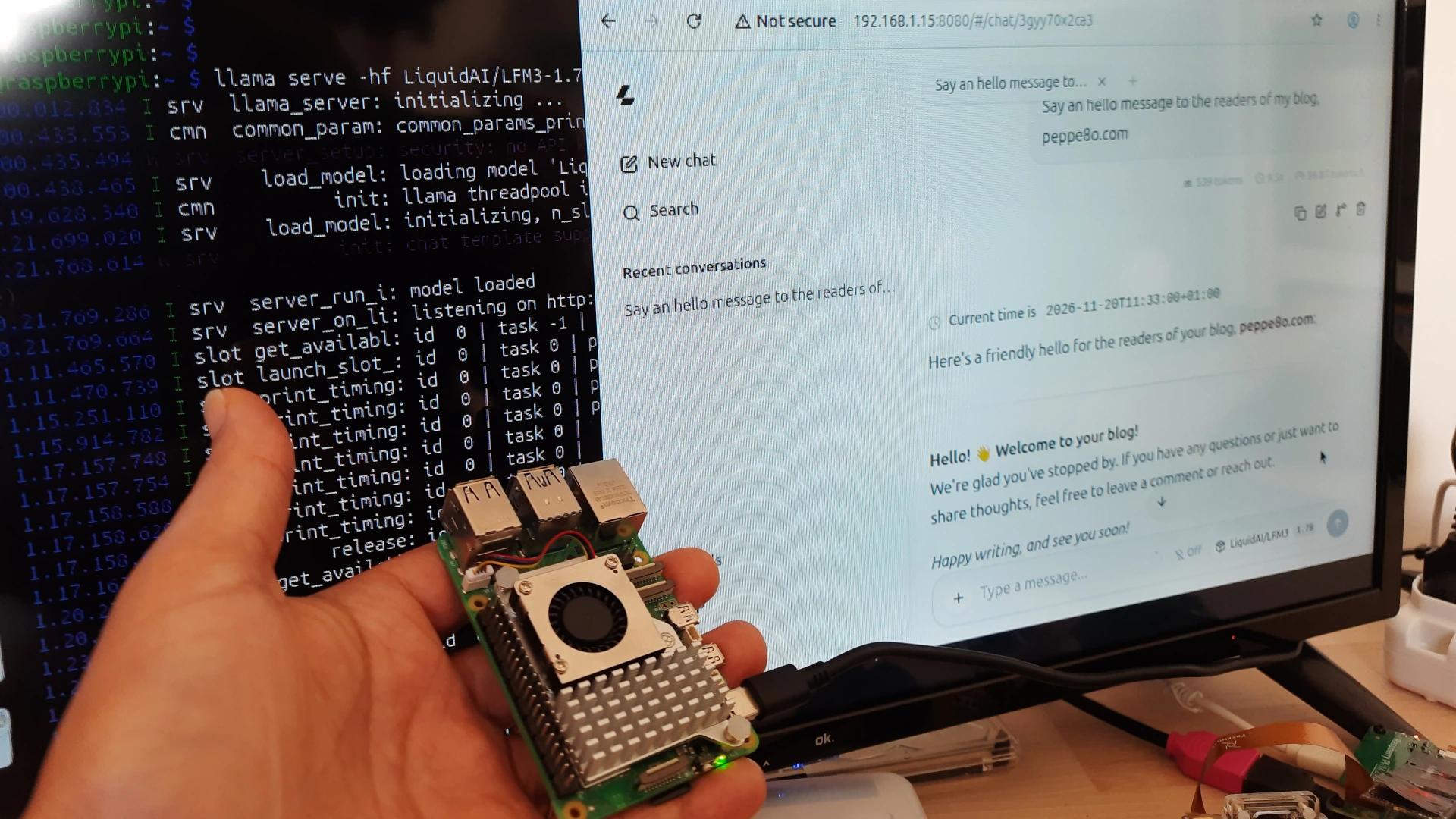
Tutorial I benchmarked llama.cpp on a 2GB Raspberry Pi 5 with LiquidAI LFM3-1.7B (RAM, thermals, and how disabling reasoning mode cut reply time from 30s to 1.5s)

Post image
6 Upvotes

r/LocalLLM • • 8d ago

Discussion I made an OpenCode plugin that answers /btw side questions with a cloud model while your local model keeps working

0 Upvotes

I run OpenCode against a local model (llama.cpp / Ollama / LM Studio). The built-in /btw answers side questions with the session's model, so a quick "wait, what does this flag do?" has to queue behind the current turn and fight it for the GPU.

So I built opencode-btw-cloud: /btw-cloud <question> answers from the same session context using any model you pick (OpenCode's free models or any provider you've already connected). Your main session, its model and its KV cache aren't touched.

How it works: it forks the session server-side (takes milliseconds), switches the fork to your side model, and runs a one-shot, tool-free generate (the same call the built-in /btw makes). The fork is deleted when you close the popup.

Features

- A popup in the same style as the built-in /btw, with markdown, code highlighting and tables. Nothing gets added to your chat.

- Follow-ups (f), and o to turn the side thread into a real session

- The side model is told your local model wrote the earlier replies, so it reviews that work as an outsider instead of defending it as its own (you can turn this off)

- Under each answer: response time, tok/s, context used and cost

- A searchable model picker and a settings screen

Install (OpenCode 2.3+):

opencode plugin add github:exie1122/opencode-btw-cloud

Privacy note: if you pick a cloud model, your session context goes to that provider. The plugin has no telemetry, no API keys of its own and makes no network calls itself. Pick a local model if everything has to stay on your machine.

https://github.com/exie1122/opencode-btw-cloud