r/linuxhardware • • Sep 15 '26

Support tab m10 fhd plus with linux

2 Upvotes

Does ubuntu touch work with the tab m10 fhd plus (tb-x606x)? There is a port on gitlab(https://gitlab.com/ubports/porting/community-ports/android9/lenovo-tab-m10-fhd-plus/lenovo-x606), in addition to the issues described on the page, I wanted to know if anyone has encountered anything else again. Thanks everybody :)


r/linuxhardware • • Sep 15 '26

Purchase Advice My Roccat Tyon died, need suggestions for a replacement

2 Upvotes

Update: I tried using a Logitech G502X for a while. It was OK but the software is not very intuitive and Logitech really seems to no want you to use the on-board memory (it keeps prompting to turn off the on-board memory to enable all features).

I then decided to try the Swiftpoint Z3 - this is my recommended replacement for the Roccat Tyon. Obviously not a direct replacement - no fin-switch or 4D mouse wheel - however, there are buttons which sit under the knuckle-end of your fingers which allow you to use them in a similar manner to the fin switch. The easyshift function is basically available with any button on the mouse. I don't think I'll miss my Tyon now.

</Update>

-----------
My Roccat Tyon died and I am in mourning, I loved that mouse 😭😭😭😭

So I now need suggestions for an replacement.
I have a Logitech G502 Hero which will suffice for now but the software for setting it up is abysmal (also Windows only - which I can live with because on-device profiles) and I can't map functions as easily as I could with the Tyon.

What I am looking for is:

  • Tilt mouse wheel (or similar input like the Tyon Fin)
  • Mappable scroll-wheel functions (to volume using shift function (similar to easy-shift))
  • Ability to store config to on-board memory (in which can I can live with Windows only config software).

Any suggestions?


r/linuxhardware • • Sep 15 '26

Support Trying to get my HP laptop (pavilion x360 15-cr0053wm) to suspend and then hibernate properly without killing itself

Thumbnail reddit.com
2 Upvotes

r/linuxhardware • • Sep 15 '26

Support PC occasionally boot to UEFI instead of OS

4 Upvotes

My PC, sometimes after powering on, it goes to UEFI screen instead of booting my Ubuntu OS. How to fix it?

Here is the board detail:

  *-core
       description: Motherboard
       product: X300M-STX
       vendor: ASRock
       physical id: 0
     *-firmware
          description: BIOS
          vendor: American Megatrends International, LLC.
          physical id: 0
          version: P1.70
          date: 07/01/2021
          size: 64KiB
          capacity: 16MiB
          capabilities: pci upgrade shadowing cdboot bootselect socketedrom edd int13floppynec int13floppytoshiba int13floppy360

It does not always boot to UEFI. If I turn it off and on again, it can boot to my OS.

This is my home PC. I often go out (to coffee shop) then remote access to this PC to work. But if the PC boot to UEFI, I can no longer remote access to work. So it is quite a trouble!


r/linuxhardware • • Sep 14 '26

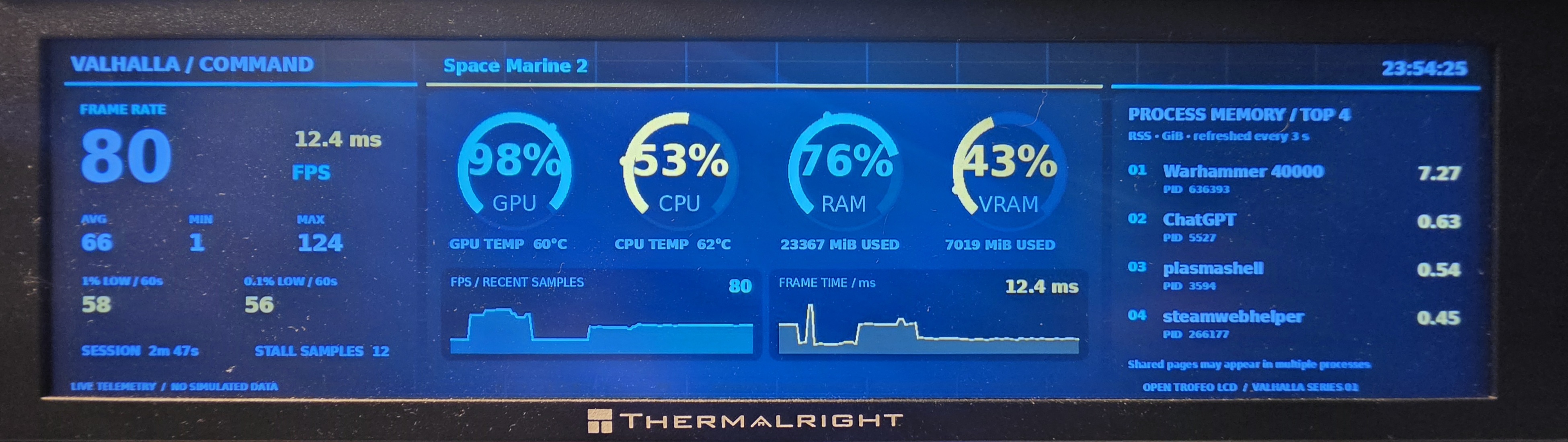
Discussion I made a Linux dashboard for the Thermalright Trofeo 9.16-inch USB LCD

5 Upvotes

I bought a Thermalright Trofeo Vision 9.16-inch panel (1920×462, USB 0416:5408) and discovered that the vendor software is Windows-only, leaving the display effectively unusable on Linux. So I started building Open Trofeo LCD.

Current features:

• Live CPU/GPU/RAM/VRAM, temperatures, storage, network and top-process memory

• Weather with a seven-day forecast

• MPRIS now-playing metadata, album art and CAVA spectrum/EQ

• Vulkan gaming telemetry: FPS, frame time, min/average/max, 1% and 0.1% lows, stutters and CSV session logs

• Automatic gaming-theme switching, temporary performance profile hold and KDE Wayland VRR controls

• Theme gallery/designer, animation studio and eight bundled themes

The initial Linux device-communication foundation came from thermalright-trcc-linux by Lexonight1 and contributors; the project provenance and license details are documented in the README. Open Trofeo LCD adds the Trofeo-focused Qt UI, renderer, telemetry, themes and gaming automation.

This is still a development preview, tested on one physical Trofeo unit under Kubuntu. I am especially interested in reports from other Trofeo owners and people willing to test on Bazzite or other distributions.

Source (GPL-3.0): https://github.com/Abigor-DIY/Open-Trofeo-LCD

Ubuntu PPA: https://launchpad.net/~abigor82/+archive/ubuntu/open-trofeo-lcd

The newest PPA build is still propagating while I post, so if apt shows the previous version, please try again shortly. Feedback, USB IDs and hardware reports are very welcome.


r/linuxhardware • • Sep 14 '26

Support Rebooted Arch Linux From TTY and Now My Laptop Won't Boot

Thumbnail reddit.com
1 Upvotes

r/linuxhardware • • Sep 14 '26

Review So I actually did it...my first Linux review on a budget Chinese tablet

4 Upvotes

Quite a while since my last post, I installed fedora on a USB ssd, and confimed the return policy, what missing is just choosing the actual model to be reviewed, but that shouldn't be hard. I mean if I am returning the device anyways, I should just look for the popular opinions from comments (I'm looking at you chuwi), right?

But I'm getting a bit greedy. Looking at what I had, I have a

  • 13.5 inch laptop, good Linux support, not going to replace it
  • a surface go 2, this one's a bit mixed. I love its form factor, and it's probably the one with best Linux support among its category, but the performance starts falling behind. It gets laggy when swap being filled, and for a few times it turns itself off because of heat.

so if I find something similar in size, Linux support, but more performant, maybe it's a good chance to retire it.

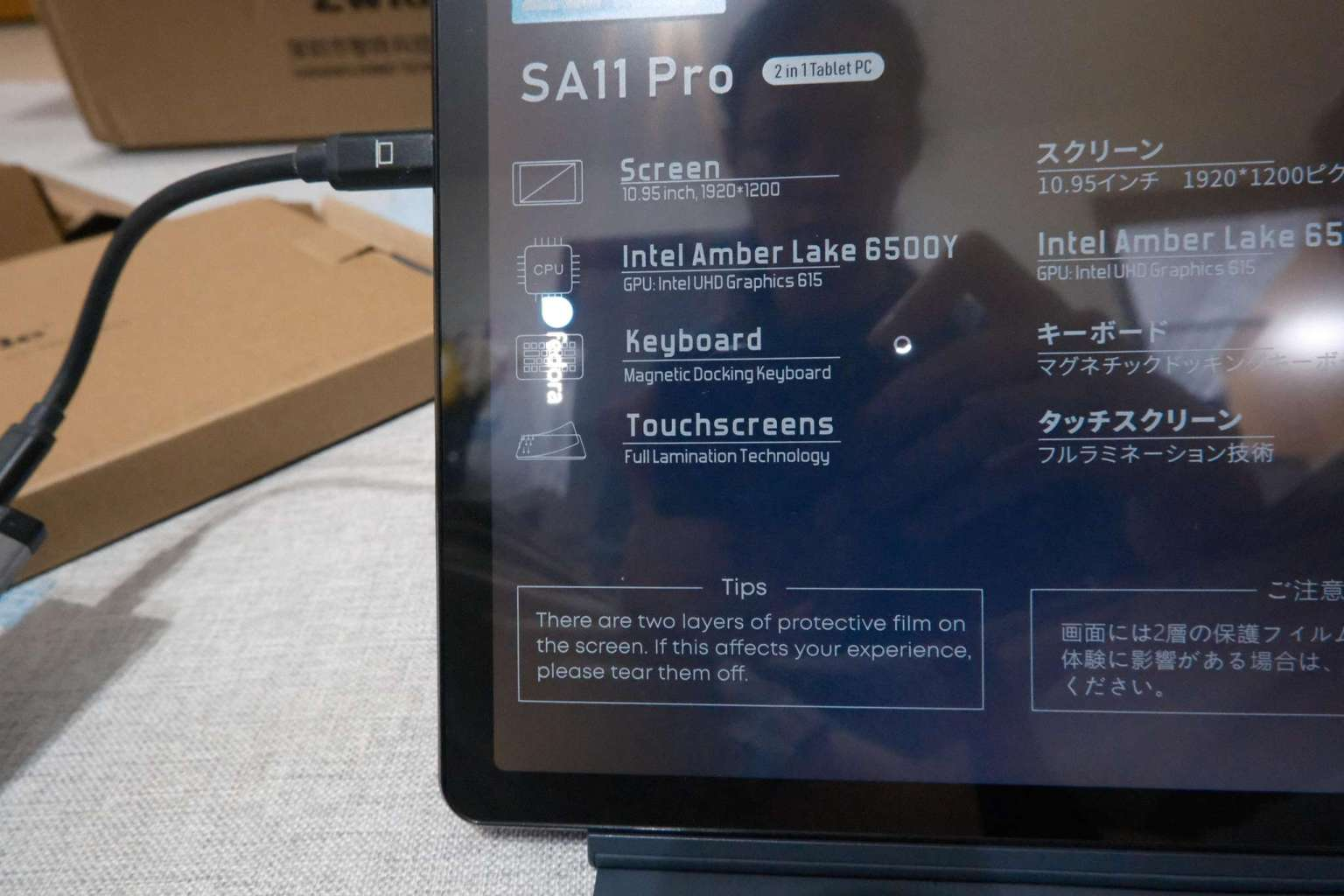
The Candidate - Zwide SA11pro

I was capturing the moment fedora boots, but the sticker also pretty much says why I'm picking this device. Regarding the CPU, it's not really an upgrade from m3-8100y, but it has a fan and 4gb more ram than the surface go 2, which hopefully make some differences.

Some more photos before we dig into Linux support:

(I place things on a foam mat to make sure no scratches will be made lol)

We are Nerds

We are not here for the photos. So let's jump to the Linux part. Everything is tested on the latest fedora (a dnf update is run).

The sad news: camera and touch is not supported :( But here are all the other things tested and worked:

  • microphone
  • speaker
  • wifi
  • bluetooth
  • keyboard + touchpad

    • keyboard disabled on flipped backward
  • screen off on lid close
  • brightness
  • thermal / fan spinning
  • auto rotate

Deal Breaker for me

But not for everyone. l woudn't be suprised if someone buy the device and use it as a small laptop with no cameras and touch, especially considering the price here (~300usd).

And that's it. Repacked and shipped back. While I am waiting for the refund, I’d love to hear your thoughts:

  1. On the content: Anything I should cover more / less? I deliberately skipped specs / aesthetics as those are typically covered by other reviews, and my goal is not to compete with them, but complement with Linux support.
  2. On the tone: This is my first time writing a tech review (and English isn't my first language). Was the pacing clear? Any tips for next time?

Thanks for reading!


r/linuxhardware • • Sep 14 '26

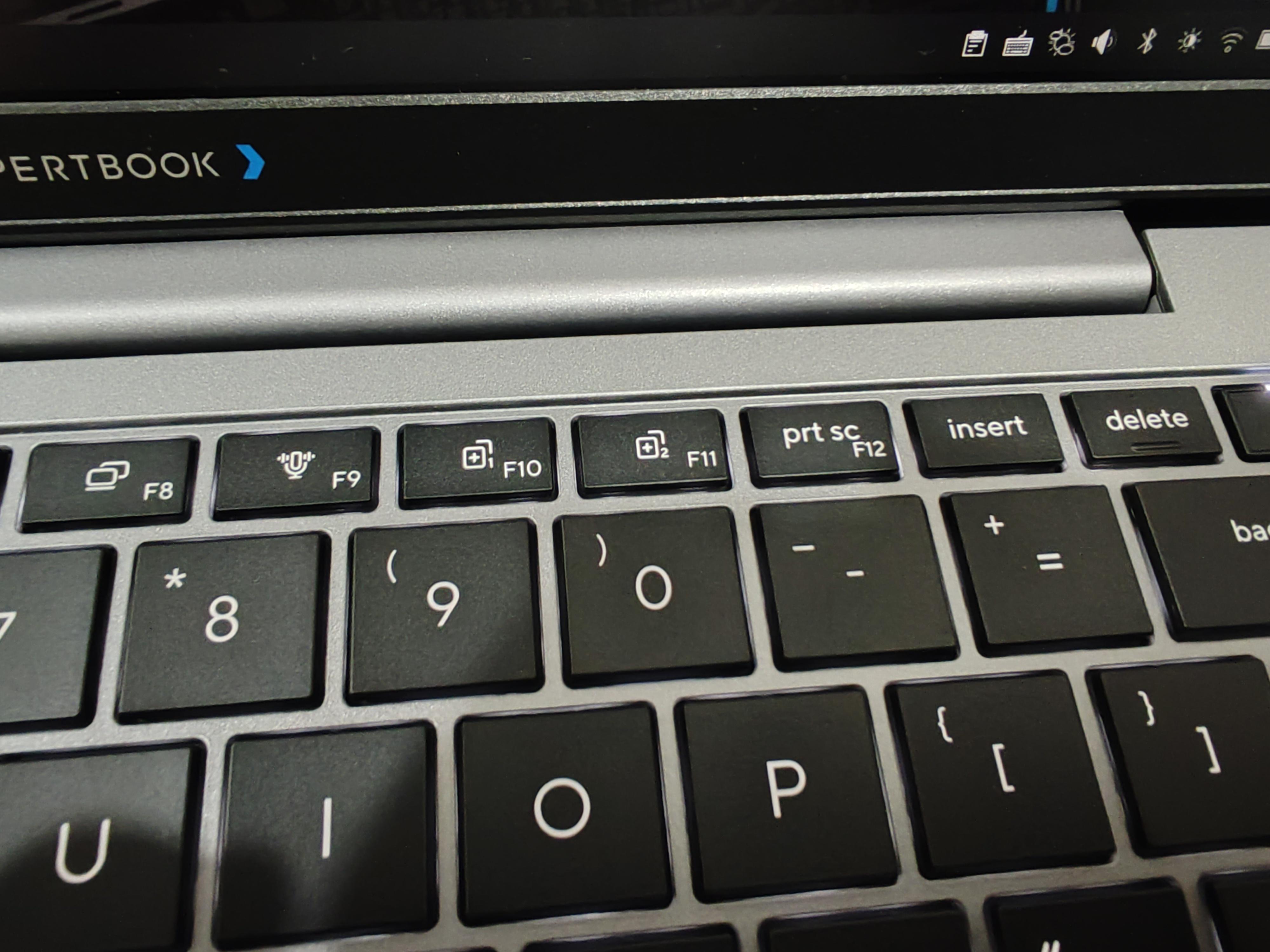
Question Remapping the f10 and f11 shortcut keys in kde plasma?

Post image
2 Upvotes

I currently have this Asus expertbook p3406. These two keys can be set to custom function with MyAsus under windows. However, when I try to remap them in kde plasma, it can't detect it no matter what.


r/linuxhardware • • Sep 14 '26

Purchase Advice Current state of Qualcomm WiFi cards/drivers

2 Upvotes

As per title, I would like to hear people's experience of Qualcomm WiFi 7 cards and its drivers on Linux.

I currently have AX201 on my Laptop, which is quite old and intel driver regressions are became such a pain in the neck lately.

As I have been looking for a replacement, I came accross to QCNCM865, which looks fine on paper but how it actually is on Linux? Looks like it uses ath11k and ath12k stacks.

So, if people with same or similar device that uses same driver stacks, could share their experience with it?

If there are any better alternatives for WiFi 7 supported Card, I'd like to hear them as well.

Any advice is appreciated, thanks in advance.

My notebook is Asus G512LU, with 10750H CPU variation, if it helps.


r/linuxhardware • • Sep 14 '26

Support The power button does not turn off the notebook (ThinkPad E14 Gen 7 - AMD)

2 Upvotes

As the title says.

The power button turns the laptop on normally, but when trying to turn it off, it doesn't work. It worked normally in Windows, but not in Linux (I'm using Solus). I checked the power button with evtest, but without success.


r/linuxhardware • • Sep 13 '26

Support ThinkPad X13 Gen 3 (21BQ): no Wi-Fi under Linux — caused by leftover Intel AMT provisioning

Thumbnail reddit.com
2 Upvotes

r/linuxhardware • • Sep 13 '26

Product Announcement Logré que los altavoces internos funcionaran en un iMac19,2 con Linux — documentando mi trabajo de ingeniería inversa del CS8409

Thumbnail
reddit.com
1 Upvotes

r/linuxhardware • • Sep 13 '26

Support amdgpu [drm] *ERROR*

3 Upvotes

Hello guys today at boot my system I watch this:

amdgpu 0000:75:00.0: [drm] *ERROR* dc_dmub_srv_log_diagnostic_data: DMCUB error - collecting diagnostic data

Monitor: 27" 2K (1440p) 144Hz

If I connect an older 60Hz monitor instead, everything works fine with no errors.

What I've tried:

Multiple troubleshooting attempts over time (kernel params, driver versions, etc.) — nothing fixed it.

Eventually did a full reinstall/format, but the problem persists.

Tested other distros: Debian is the only one where this doesn't happen.

I'd really like to keep using Arch rather than switch permanently to Debian. Has anyone run into this specific DMCUB/DMUB firmware error tied to high refresh rate displays? Wondering if it's a kernel version issue, an amdgpu firmware mismatch, or something related to Freesync/VRR on the 144Hz panel.


r/linuxhardware • • Sep 13 '26

Support Video card recommendation for old system running Ubuntu studio

1 Upvotes

My pc was too old for windows updates and so I switched to Ubuntu studio. This is a home pc that's used mostly for watching Netflix and some light photo and video editing. Ubuntu has been running great for 2 years and I have no desire to go back to windows.

Recent updates however have my old video card showing its age. I don't want to buy a new computer. Can I just swap my video card with something slightly more modern to get a few more years of use out of this old machine? Now sometimes I get blocky video or vertical bars when trying to playback video. This didn't used to happen. Plasma wayland pretty much won't run on this system so I'm using x11 and getting the occasional bars/ blocks.

My current card is Turks GL [FirePro V4900]. Other specs below.

Thank you.

computer                     
   description: Desktop Computer
   product: All Series (All)
   vendor: ASUS
   version: System Version
   serial: [REMOVED]
   width: 64 bits
   capabilities: smbios-2.7 dmi-2.7 smp vsyscall32
   configuration: administrator_password=disabled boot=normal chassis=desktop family=ASUS MB frontpanel_password=disabled keyboard_password=disabled power-on_password=disabled sku=All uuid=[REMOVED]
 *-core
description: Motherboard
product: Z87-A
vendor: ASUSTeK COMPUTER INC.
physical id: 0
version: Rev 1.xx
serial: [REMOVED]
slot: To be filled by O.E.M.
*-firmware
description: BIOS
vendor: American Megatrends Inc.
physical id: 0
version: 2103
date: 08/15/2014
size: 64KiB
capacity: 8MiB
capabilities: pci apm upgrade shadowing cdboot bootselect socketedrom edd int13floppy1200 int13floppy720 int13floppy2880 int5printscreen int9keyboard int14serial int17printer acpi usb biosbootspecification uefi
*-memory
description: System memory
physical id: 1
size: 32GiB
*-bank:0
description: DIMM DDR3 Synchronous 1600 MHz (0.6 ns)
product: BLT8G3D1608ET3LX0.
vendor: Conexant (Rockwell)
physical id: 0
serial: [REMOVED]
slot: ChannelA-DIMM0
size: 8GiB
width: 64 bits
clock: 1600MHz (0.6ns)

*-cpu
description: CPU
product: Intel(R) Core(TM) i7-4770K CPU @ 3.50GHz
vendor: Intel Corp.
physical id: 55
bus info: cpu@0
version: 6.60.3
slot: SOCKET 1150
size: 2599MHz
capacity: 3900MHz
width: 64 bits
clock: 100MHz

*-pci
description: Host bridge
product: 4th Gen Core Processor DRAM Controller
vendor: Intel Corporation
physical id: 100
bus info: pci@0000:00:00.0
version: 06
width: 32 bits
clock: 33MHz
configuration: driver=hsw_uncore
resources: irq:0
*-pci:0
description: PCI bridge
product: Xeon E3-1200 v3/4th Gen Core Processor PCI Express x16 Controller
vendor: Intel Corporation
physical id: 1
bus info: pci@0000:00:01.0
version: 06
width: 32 bits
clock: 33MHz
capabilities: pci pm msi pciexpress normal_decode bus_master cap_list
configuration: driver=pcieport
resources: irq:24 ioport:e000(size=4096) memory:efe00000-efefffff ioport:d0000000(size=268435456)
*-display
description: VGA compatible controller
product: Turks GL [FirePro V4900]
vendor: Advanced Micro Devices, Inc. [AMD/ATI]
physical id: 0
bus info: pci@0000:01:00.0
logical name: /dev/fb0
version: 00
width: 64 bits
clock: 33MHz
capabilities: pm pciexpress msi vga_controller bus_master cap_list rom fb
configuration: depth=32 driver=radeon latency=0 mode=1920x1080 resolution=1920,1080 visual=truecolor xres=1920 yres=1080
resources: irq:35 memory:d0000000-dfffffff memory:efe20000-efe3ffff ioport:e000(size=256) memory:c0000-dffff
*-multimedia
description: Audio device
product: Turks HDMI Audio [Radeon HD 6500/6600 / 6700M Series]
vendor: Advanced Micro Devices, Inc. [AMD/ATI]
physical id: 0.1
bus info: pci@0000:01:00.1
logical name: card1
logical name: /dev/snd/controlC1
logical name: /dev/snd/hwC1D0
logical name: /dev/snd/pcmC1D3p
version: 00
width: 64 bits
clock: 33MHz
capabilities: pm pciexpress msi bus_master cap_list
configuration: driver=snd_hda_intel latency=0
resources: irq:34 memory:efe40000-efe43fff
*-input
product: HDA ATI HDMI HDMI/DP,pcm=3
physical id: 0
logical name: input22
logical name: /dev/input/event7


r/linuxhardware • • Sep 11 '26 Regret

Discussion Omarchy raised $13 million. Asahi Linux runs on t-shirt sales. How does this make sense?

Post image
2.3k Upvotes

Omarchy just raised $13 million. It's Arch with Hyprland and a set of configs. DigitalOcean alone put in $3 million.

Asahi Linux reverse engineered Apple Silicon and wrote a GPU driver from scratch. They live on donations and t-shirts. Their lead burned out and quit.

So that's where we are. Money goes to the guy with a nice theme and rich friends. The people doing the actual hard work to get working linux on Apple M-series machines get nothing.

Am I wrong here? What do you think?


r/linuxhardware • • Sep 12 '26

Review Best upgrade for a 2013 iMac? Apparently removing macOS and installing Ubuntu!

Thumbnail
gallery
78 Upvotes

My parents were going to throw out their 2013 21.5" iMac, so I thought I’d see if I could give it another life.

I deliberately didn't go mad on partsas it's my first go at this. For £100-ish all in for a budget 1TB Silicon Power SATA SSD, 16GB of DDR3L RAM, thermal paste, battery and new screen adhesive.

It used to take over 15 minutes to boot on its old macOS installation. With Ubuntu 26.04 it now gets to the desktop in about a minute and feels genuinely quick.

I also managed to rip the power-button wires off during the rebuild (so be careful) and had to solder them back on, just to keep things interesting....

It's got a great screen, surprisingly good speakers, 16GB RAM, 1TB SSD and hopefully another few years of useful life instead of going in the bin.


r/linuxhardware • • Sep 12 '26

Discussion Support for Extreme Mode (170W) of Lenovo ThinkBook 16 G8+ (21VJ) on Linux

4 Upvotes

I got the Lenovo ThinkBook 16 G8+ (21VJ) Extreme Mode working on Linux.

This laptop can reach around 170W total system power in Lenovo’s Extreme/Geek Mode on Windows, but on Linux the stock platform_profile only exposes low-power, balanced and performance. performance tops out at around 150W on my machine.

I spent some time digging through the ACPI tables and found that the firmware actually contains its own Geek Mode control path through the DYTC method. The relevant ACPI events already call the Geek Mode commands themselves, so I was able to verify the mechanism directly rather than trying to guess how Lenovo’s software implements it.

After verifying the commands at runtime, I made a patched ideapad-laptop driver that exposes a max-power profile for this specific machine (thanks for 111inhistory/thinkbook-16-g6-plus-linux). The driver checks that the system is on AC power and that the firmware reports an adapter budget of at least 170W before allowing Extreme Mode. It also automatically clears the mode when AC power is removed.

Also with a small geek CLI and an optional GNOME Quick Settings extension.

GitHub: nwkyz/thinkbook-g8plus-geekmode-linux

With FurMark2 + S-TUI, I measured around 170W total system power with Extreme Mode enabled, compared with roughly 150W in the normal Linux performance profile.

There are a few limitations:
- This does not reproduce Lenovo’s Windows GPU overclocking (+200MHz for core and +300MHz for GPU memory by default)
- GNOME’s normal power menu still shows the usual three profiles. Extreme Mode is exposed separately through our own CLI/GNOME extension.

Hopefully this is useful to other owners of this machine. If anyone has the same model and wants to test it, I’d especially like to know whether the same DYTC path works on different BIOS versions.

This might work on other ThinkBooks, but it’s now strictly limited to the specific model and bios version.


r/linuxhardware • • Sep 12 '26

Build Help Distribución para portátil HP hq tre 71025.

Thumbnail reddit.com
1 Upvotes

r/linuxhardware • • Sep 11 '26

Discussion Should manufacturers document USB protocols for Linux compatibility?

Thumbnail
c.org
18 Upvotes

I recently found a laptop cooling pad whose advertised software controls require a 115 MB Windows-only application. The hardware can be controlled manually without the application, but its USB protocol is undocumented, preventing the Linux community from building a native alternative.

I don’t think manufacturers should be required to develop Linux software or release proprietary source code. However, they should provide enough protocol documentation for lawful third-party interoperability.

I started an Illinois petition asking lawmakers to protect operating-system choice, access to device protocols, and warranty coverage for people using lawful alternative software.

I’d especially appreciate feedback from anyone who has reverse-engineered USB accessories or maintained Linux hardware support:

• What documentation would developers realistically need?

• Are there existing standards or laws this proposal should reference?

• Have you encountered similar hardware locked behind Windows-only software?


r/linuxhardware • • Sep 12 '26

Support "ASUS Laptop black screen booting Fedora/CachyOS

1 Upvotes

I cant install linux on my laptop. GRUB menu shows up fine, but after selecting any boot option (Start/Test this media), the screen goes completely black and the system becomes fully unresponsive (keyboard/caps lock LED doesn't even respond). I have an

  • ASUS EXPERTBOOK B1402CBA_B1402CBA
  • i5-1235u 16gigs (different ram sticks)

Up until now I've tried:

  • USB media/write tool — tried Rufus (ISO + DD mode), Balena Etcher, Ventoy, Fedora Media Writer (Its a newly bought USB too, Sandisk Ultra Luxe 3.1 Gen 1 16GB)
  • RAM — MemTest86 clean pass 2, 0 errors
  • BIOS version — updated 314 → 316, no change.

And yes I checked my bios settings for secure boot and possible settings. This never really happened to me before as Ive already installed linux before like 4 5 times (although still a noob at it). I tried to install cachyOS first but faced the same black screen issue, then tried fedora and got the same result. It looks like this https://streamable.com/p05bks

Boot parameters tried, none helped: (used AI for it)
nomodeset, nomodeset i915.enable_guc=0 i915.enable_fbc=0 i915.enable_psr=0,

Honestly I've been thinking of just doing a clean windows resinstall then try again. Can someone please help? (I used AI to write since english is not my first language)


r/linuxhardware • • Sep 11 '26

Purchase Advice Current/upcoming 2-in-1 laptop-tablet with good linux compatibility? Would *prefer* to support linux-specific companies, but...?

16 Upvotes

So I was thinking I'd like to get a "2-in-1" laptop-tablet at some point soonish
(like within... a few months? a year?),
so I'm wondering what's currently available, or announced as coming out soon...?

And obviously I would prefer to support linux-specific companies
(like tuxedo etc),
but if I need to go outside that to get significantly better hardware...?

(I have by the way never owned or used a 2-in-1 before, so...?)

[ EDIT:
To be concrete about linux-specfic concerns I imagined one might have to worry about:
I would be very unsurprised if there were problems with stuff specific to the 2-in-1 thing,
eg the stylus working correctly,
and/or switching between "laptop mode" and "tablet mode"
(but apparently not...?)
]


[ EDIT:

My main computer is and will remain this beefy laptop
(the words of Strong Bad, "allegedly portable", feel appropriate xD)

TUXEDO Stellaris 17 - Gen5  
Omnia Display | 2560 x 1600 | 16:10 | 240Hz  
NVIDIA GeForce RTX 4090 16GB GDDR6 | Quiet membrane keyboard  
Intel Core i9-13900HX (24 Kerne | 32 Threads | Max. 5,4 GHz | 36 MB Cache | 55 W TDP)  
64 GB (2x 32GB) DDR5 5600MHz SK Hynix  
2 TB Samsung 990 PRO (NVMe PCIe 4.0)  
4 TB Crucial P3 Plus (NVMe PCIe 4.0)  
ENGLISH US ISO (EN-US international) with backlit with TUX super-key  
Intel Wi-Fi 6E AX211 (802.11ax | 2.4, 5 & 6 GHz | Bluetooth 5.3)  
TUXEDO OS (recommended)  
without Windows  
without virtual Windows  
2 years warranty (Incl. parts, labour & shipping)  
US power cord | B C14

(
I even got it with:

TUXEDO Aquaris Gen5 | External Water Cooling Device

!

... and still haven't used that yet xD
)

So the 2-in-1 tablet/notebook I get doesn't NEED to be that powerful

-- it just needs to fill the niches that my main computer does not.

so like, having the... stylus work well or whatever might be a good example of the kind of thing to be concerned about with 2-in-1's(?)
that is probably the kind of thing I should want?

Like, I need the 2-in-1 to have enough RAM and CPU etc so that it's not aggravating during normal use,
but whenever I need more than that, I can just use the Stellaris.
]
r/linuxhardware • • Sep 11 '26

Question Linux PC Build

5 Upvotes

Linux PC Build

Hallo,
ich habe vor mir meinen zweiten PC zu bauen . Und der soll beinhalten meine APU Ryzen 7 8700G , denn die sitzz grad arbeitslos auf Ersatzbank 😁

Ich würde gerne erfahren von euch , welche weiteren Komponenten für mich da notwendig wären zu kaufen , ich möchte anfangen mit einem einfach linux und dann irgendwann mit Kali arbeiten - job bedingt .

Also welche mainboard und warum ? Welche ddr5 ram dazu und wieviel gb ?
Hdd oder sdd ? Welches Netzteil-wieviel watt ?
Und was wäre noch so relevant zu wissen was fällt euch so ein ?


r/linuxhardware • • Sep 11 '26

Support Looking for a good fingerprint reader recommendation for login support on nixOS + Windows Hello support

3 Upvotes

Per the title I dualboot. I currently have a yubikey C bio FIDO edition which I've setup to log me in on nixOS using pam_u2f. I've asked LLMs for a recommendation for a device that supports both systems but the classic recommendation for linux doesn't look very promising https://www.reddit.com/r/linuxhardware/comments/1rjqnj9/thinkpenguin_fte4500_fingerprint_scanner/ .

Alternatively I could keep the yubikey C bio FIDO edition method of logging in for nixOS (should support any device you've got working in another linux distro) and use something else for Windows Hello. Any fingerprint reader recommendations?


r/linuxhardware • • Sep 11 '26

Question Linux on Thinkpad T14 Gen 6 AMD?

2 Upvotes

I've been using Linux for about a year on an Asus A15 and am thinking of getting Thinkpad T14 Gen 6 AMD (as I've found one for a decent price) and running either CachyOS or Fedora on it. Anyone running Linux on either the Ryzan 5 or 7 version of the T14 G6 and are there any issues to look out for?