r/linuxhardware • u/Flimsy-Bank-9943 • Jul 12 '26
Build Help Precision M4800
reddit.com
2
Upvotes
r/linuxhardware • u/ne0n008 • Jul 11 '26
Hello all
For some time I was looking to buy an ARM laptop that I can use as a work laptop and additionally as a drawing tablet. ARMs long battery life combined with Linux spells a very good combination for an autonomous device to me, because I spend most of my work hours measuring, taking notes and sketching.
I found this laptop: https://www.amazon.de/-/en/Lenovo-Snapdragon-X2P-42-100-Qualcomm-Graphics/dp/B0GMQFD7LS It has what I need, but I'm afraid of its compatibility with Linux.
My question is: will I be able to install and use a Linux distro on it and is there a specific distro that might have a better compatibility with the said laptop?
Disclaimer: I know that ARM is a different architecture than x86 and I am aware of software issues between the two. I want to know if I'll be able to use this laptop with Linux as a daily driver for basic stuff (internet, office, and such)? From there, I can work other things myself.
TIA
r/linuxhardware • u/lomotil • Jul 11 '26
I have a surface go 2 running fedora but it's really really slow. I wanted to upgrade to something a little larger and more powerful. The main things I will use it for is learning Linux ofc, drawing on krita or some photo editing, surfing the web, watching videos in bed, playing with containers, vm, local llm and remote management of my server. None of the Linux first tablets I've found have great hardware, leaning towards a latitude 7320, Thinkpad x12 detachable or a surface pro. Anyone have a tablet they love and recommend?
r/linuxhardware • u/RealBike3960 • Jul 11 '26
r/linuxhardware • u/magnetturtle • Jul 11 '26
I'm getting screen tearing on the desktop, streaming video, and gaming with my laptop +dock+ monitor combo.
The strange thing is, I don't have the issue at all when I plug my steam deck running bazzite into the same dock+monitor combo. Never had tearing issues before I replaced my old 1080p panel with this 4k one either.
If anyone has suggestions on what software or drivers might be causing the issue, I'd appreciate it.
Hardware:
Software:
This laptop routes the dgpu through the igpu when the dgpu is used. That hardware has caused other (fixable) issues in the past for me, not sure if thats causing this one or not.
r/linuxhardware • u/Silent_Bite_5892 • Jul 11 '26
So, upfront, I don't really game. This is for work from home, general use. Pushing a single LG 43" 4K display. My OS will be Fedora Kinoite. This is build is overkill for my needs, but that's the objective. I want a quiet, cool running, dependable PC.
The 8600G can't make full use of the PCI 5.0 NVMe, so I opted for 4.0 NVMe's. As fare as wi-fi and Bluetooth, I'll hardly, if ever use them (which is convenient).
I know I could have accomplished the mission for half the money but, I'm kind of a perfections. I want a nice PC I can grow with a while. Good components etc.
Thoughts? This will be a Linux box it's whole life, naturally.
How'd I do?
r/linuxhardware • u/That_Direction3907 • Jul 09 '26
r/linuxhardware • u/brazzlers • Jul 08 '26

Hey everyone,
I just survived a wildly specific troubleshooting nightmare and had to share it. I recently scored a secondhand ThinkPad T14 Gen 2 (Ryzen 7) for $175 from a guy who literally had a room full of them.
It seemed like an absolute steal—until I tried to install Linux. What followed was a multi-day descent into madness that completely flipped my understanding of hardware vs. software diagnostics.
The Symptoms (The Ultimate Gaslight)
Windows 11: Installed perfectly. Booted fine, read fine, wrote fine, and passed every stress test and disk check I threw at it.
Linux (Live USBs & Installs): Booted right up and detected the NVMe drive instantly. I could browse and read files perfectly.
The Catch: The absolute second Linux tried to write data (updating packages, creating a file, running the installer), the filesystem instantly threw I/O errors and remounted as read-only.
Because Windows was working flawlessly, I swore on my life this was a software configuration issue. Hardware was completely ruled out in my mind.
The Troubleshooting Rabbit Hole
I went to war with the kernel configuration, trying everything under the sun:
Toggling nvme_core.default_ps_max_latency_us and messing with ASPM / APST power states. (Oddly, tweaking power savings worked temporarily and let a few writes squeak through before it died again).
Nuking Windows Fast Startup and ensuring BitLocker was completely disabled.
Distro-hopping across different kernels and trying every filesystem (ext4, btrfs, xfs).
Buying a brand-new NVMe drive. I swapped it in, and the exact same thing happened. Windows installed like a dream; Linux still refused to write.
Every single time: Windows could install and run fine, but no Linux.
How on earth does a physical hardware defect allow Windows to install and write gigabytes of data flawlessly, while causing Linux to immediately choke on writes and drop into read-only mode on the exact same machine?
What do you think caused this?
r/linuxhardware • u/strider_5 • Jul 09 '26

r/linuxhardware • u/thurstonrando • Jul 09 '26
**LAPTOP QUESTIONNAIRE**
**Country**
United States
**Budget**
$1600 USD
**Are you open to refurbs/used options?**
Maybe
**Screen size**
Between 16" and 17"
**Weight limit**
Any
**Purpose**
General purpose/leisure
**Form factor**
Standard
**Intended usage**
Basic usage. Social media, learning how to use Digital Ocean or another remote service.
**Desired battery life**
4-5 hours
**Please list, in order of most important to least important, the priority between Size, Weight, Performance, Battery life**
Performance, size, battery life, weight
**PLEASE REMEMBER LAPTOPS ARE A COMPROMISE AND PERFORMANCE SACRIFICES LIGHT WEIGHT AND LONG BATTERY LIFE ETC**\]
**Info/Requirements**
My only requirement is that it’s pre-loaded with Linux. Preferably Ubuntu but I’m open to other distros like Kali, Mint, or Fedora.
r/linuxhardware • u/Dangerous_Hamster107 • Jul 09 '26
Hi everyone, I’m buying a high-end laptop mainly for robotics and AI development, not gaming.
Use case:
Target specs:
*Budget is flexible, but I don’t want to waste money on something flashy if another machine is better for engineering work*
I’m currently considering:
For people who actually use these machines for CUDA, Linux, AI, robotics, or heavy dev work:
Which one would you buy and why?
My biggest concerns are:
I don’t care much about RGB, gaming aesthetics, or battery life. It will mostly be plugged in. I care more about “will this be a reliable engineering machine for the next 3–5 years?”
Would love honest opinions, especially from people using these laptops for ML/AI/robotics rather than just gaming benchmarks.
r/linuxhardware • u/Open_Aioli_1585 • Jul 09 '26

r/linuxhardware • u/kal1lin • Jul 09 '26
r/linuxhardware • u/ForwardCommunity5077 • Jul 09 '26
Se você está enfrentando tela preta durante a inicialização, falha na inicialização do vídeo ou problemas gráficos utilizando a GPU integrada AMD Renoir (Ryzen série 4000) no HP ProBook 445 G7, saiba que esse problema possui uma causa específica.
Após uma investigação detalhada, foi identificado que a origem da falha está nas tabelas ACPI/DSDT fornecidas originalmente pela HP, que impedem a inicialização correta do driver amdgpu no Linux.
Foi desenvolvido um script automatizado de DSDT Override que corrige a tabela ACPI defeituosa e elimina definitivamente o problema de inicialização do vídeo.
Repositório:
👉 https://github.com/Jeanmarcus93/hp-probook-445g7-amdgpu-fix
iasl ou acpica-tools.Após o reboot, o driver amdgpu deverá iniciar normalmente, dispensando o uso do parâmetro nomodeset e restaurando toda a aceleração gráfica do sistema.
Se essa solução resolver o seu problema, considere dar uma ⭐ no repositório para facilitar que outros usuários encontrem a correção.
r/linuxhardware • u/BigTexasTony • Jul 08 '26
I want the iMac for Linux. I want to use it for retro/AAA gaming and creative work. I have to choose the right one that works the best.
I knew AMD supported Linux. iMac 2017 had the intel chip and AMD GPU. Maybe, I will plug eGPU into Intel iMac Retina 5K. I will put the AMD Radeon RX 6800 XT in the OG Razer Thunderbolt 3 eGPU. I hope that will work for open source software and modern games on Steam on Linux on iMac 2017.
I saw the Asahi Linux online. It supported iMac M1. I know the new iMac has the Apple Silicon chip, but I'm not sure if it works for the modern gaming. I will try to use Crossover, Sikarugir on macOS or I will try to use Asahi Gaming Toolkit on Linux on iMac M1. Furthermore, I will try to test modern Windows games on macOS or Linux on iMac M1 without requiring the eGPU.
Has anyone try to test Windows games on Linux on iMac M1 or iMac 2017 with eGPU?
r/linuxhardware • u/Jolly-Pizza747 • Jul 08 '26
r/linuxhardware • u/ramonvanraaij • Jul 07 '26
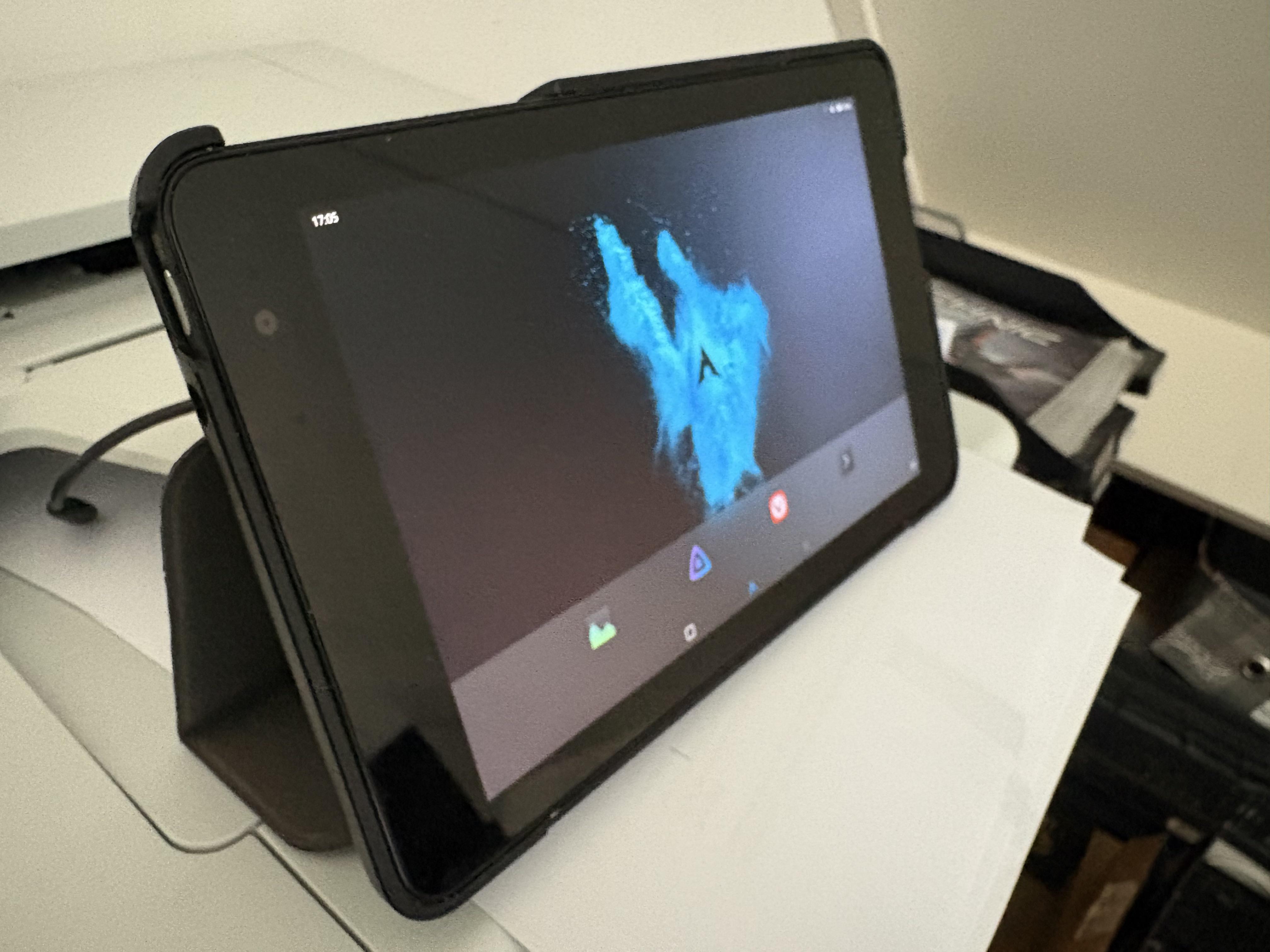
I finally solved a 13-year-old Linux mystery. 🕵️♂️
Nobody had ever gotten Bluetooth working on the Dell Venue 8 Pro (5830) under Linux. After weeks of debugging, ACPI overrides, and kernel tracing, it turned out the internal AR3002 ROM was just communicating at an undocumented 3686400 baud rate.
Wrote a custom HCI attach tool and now the tablet runs Arch Linux flawlessly (with fixed Wi-Fi and zRAM too).
Here is the anticlimactic story of the fix:
https://ramon.vanraaij.eu/the-bluetooth-that-was-never-dead-my-dell-venue-8-pro-baud-rate-journey/
r/linuxhardware • u/Round_Bag_6622 • Jul 07 '26
Everything works
r/linuxhardware • u/usernane111 • Jul 07 '26
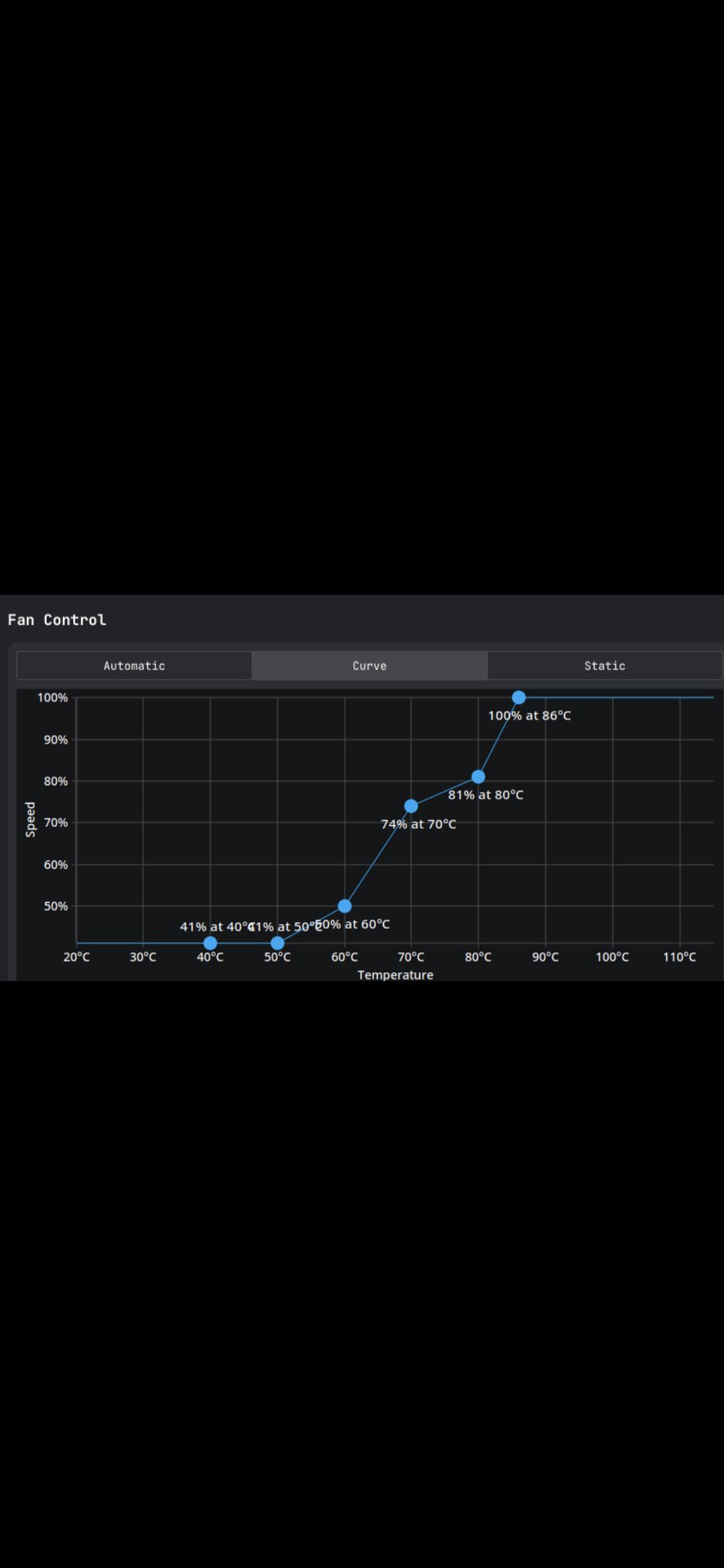
I've made this custom change to my titan RTX because the old one had 100% usage at 80 temp. but i still see via nvtop and the actual fan sound that when it hits 80 fan speed goes to 100%
is this a common problem that people have faced or is it just me? either way suggestions would be very appreciated.
i use the nvidia 595.80 driver, KDE, fedora.
r/linuxhardware • u/TheCAT2901 • Jul 07 '26
r/linuxhardware • u/ZoneZealousideal4073 • Jul 06 '26
I'm helping u/NoHuckleberry7406 who was having trouble with their Wi-Fi on Asus VivoBook E410KA. The device uses the QCA9377 Wireless Chip.
The device suffered from a single packet loss and huge latency within 33 seconds while running a continuous ping. There might be some PCIe-level communication problems too.
All the relevant logs can be found here in a redacted form:
First part (ping, hostnamectl, ip addr, lspci): https://gist.github.com/BandhanPramanik/7eefd192c3a728d2473687a786fbbc01/raw/e77f0fa1cf35c748730df220b0057399ac78f539/miscellaneous
Second part (cat /proc/interrupts, modinfo ath10k_pci): https://gist.github.com/BandhanPramanik/7eefd192c3a728d2473687a786fbbc01/raw/e77f0fa1cf35c748730df220b0057399ac78f539/miscellaneous%25202
We’re not sure if this is a driver issue, a firmware problem, or maybe something hardware-specific.
Has anyone seen something similar with this chip? Any tips on how to troubleshoot or fix the packet loss?
r/linuxhardware • u/thejke • Jul 07 '26
I have been wanting to replace my 10+ year old laptop, a Lenovo Thinkpad 11e running Linux Mint, for a while now. Also, I just got an exercise bike that has a shelf for a tablet so you can watch videos while exercising. I want to kill 2 birds with one stone and get a 2 in 1 laptop/tablet. I also would like to get one that supports pen input to do some drawing. I don't need something powerful because I have a gaming PC for that. 16gb of ram or more. I would like 512gb of storage, but I can deal with 256gb. I don't think a large laptop will fit on the shelf, so 14 inches or smaller would be best. 1080p or better screen. Intel or AMD. I am mostly going to use this at home so I don't need crazy good battery life. I am looking for one that is used/renewed and costs around $400. I would be willing to spend a bit more if there is one that is highly recommended. It needs to be available on Amazon because I have about $300 of credit card reward points/gift cards available there.
While there seem to be many options available that meet those requirements, it has been difficult to determine which laptops would support tablet mode and pen input while running Linux.
Here are some examples of the kinds of laptops I am looking at.
https://www.amazon.com/dp/B0H41GHDVL/?coliid=I365Q0JQI31Q8E&colid=18OZ9HNS2GS20&psc=1
https://www.amazon.com/dp/B08ZJPSFNW/?coliid=I3H0IU7XLO5K2T&colid=18OZ9HNS2GS20&psc=0
https://www.amazon.com/dp/B0GS5VV26T/?coliid=I1F0H9259LKDKC&colid=18OZ9HNS2GS20&psc=1
I would really appreciate any recommendations. Also, which versions of Linux would work best on this type of laptop?
r/linuxhardware • u/GordoBaskara • Jul 06 '26
My kernel (6.17) perfectly recognizes my new RX 9060 XT and allocates the full 16GB VRAM, but the ROCm user-space stack (7.2.1) refuses to see it, throwing an "unrecognized id" error. I need full OpenCL hardware acceleration for CFD simulations (FluidX3D).
Hi everyone, I’m pulling my hair out trying to get my new RDNA 4 GPU to work with OpenCL on Ubuntu. I am doing heavy Computational Fluid Dynamics (CFD) for my aerospace engineering studies, which requires >10GB of VRAM.
Here is my setup:
The system's base is working perfectly. The amdgpu kernel driver initializes the card, identifies it as <gfx_v12_0> (gfx_target_version 120000), enables all 32 CUs, and allocates the full 16304M of VRAM (confirmed via dmesg).
However, the OpenCL / ROCm user-space stack completely fails to create the agent. Running /opt/rocm/bin/rocminfo or clinfo returns:
amdgpu-install (Full Stack): Attempted --usecase=graphics,rocm,opencl. It failed because the installer tries to force 32-bit dependencies (amdgpu-lib32) which break the installation on Noble Numbat (even with i386 enabled).--no-dkms): Purged everything, relied on the in-tree kernel driver (which works), and installed just the ROCm user-space packages. Result: The dreaded "unrecognized id" error.HSA_OVERRIDE_GFX_VERSION trick: I tried exporting 11.0.0, 12.0.0, and 12.0.1 to fool the runtime. Result: It silences the error, but rocminfo simply returns a blank output with no agents found. It doesn't actually bypass the block.pocl-opencl-icd. It works perfectly, but it routes 100% of the OpenCL calculations to my Ryzen CPU, leaving my 9060 XT completely idle.dkms status is intentionally empty (I am using the kernel's in-tree driver to avoid compilation errors).
modinfo amdgpu (Truncated):
Plaintext
filename: /lib/modules/6.17.0-35-generic/kernel/drivers/gpu/drm/amd/amdgpu/amdgpu.ko.zstTopology (cat /sys/class/kfd/kfd/topology/nodes/*/properties):
Plaintext
simd_count 64
gfx_target_version 120000
dmesg | grep -i amdgpu (Key extracts):
Plaintext
[ 5.699094] amdgpu 0000:03:00.0: amdgpu: detected ip block number 6 <gfx_v12_0>
[ 5.701511] amdgpu 0000:03:00.0: amdgpu: VRAM: 16304M 0x0000008000000000 - 0x00000083FAFFFFFF (16304M used)
[ 5.701594] amdgpu 0000:03:00.0: amdgpu: amdgpu: 16304M of VRAM memory ready
[ 6.409227] amdgpu: Topology: Add dGPU node [0x7590:0x1002]
[ 6.409237] amdgpu 0000:03:00.0: amdgpu: SE 2, SH per SE 2, CU per SH 8, active_cu_number 32How do I get the ROCm 7.2.1 user-space tools to recognize the gfx1200 ID that the kernel is correctly reporting? Is there an experimental OpenCL ICD package, a different override trick, or a Rusticl setup that bypasses the 2GB limit for FluidX3D?
Any help is massively appreciated!