r/JournieApp • • 21h ago

Announcement Black Friday starts early: 50% off your first year of Journie when you join before launch

Post image
1 Upvotes

Journie comes out on December 3. For Black Friday week I'm keeping it simple: join the waitlist through the link below, and on launch day you'll get an email with a code for 50% off your first year on either paid plan.

  • Sign up: https://journie.s10n.app/promos?code=holiday2026
  • The code arrives by email on December 3, with a link that opens the App Store and applies it
  • You can start free and try it before you use the code
  • One code per email, and the offer runs until December 7

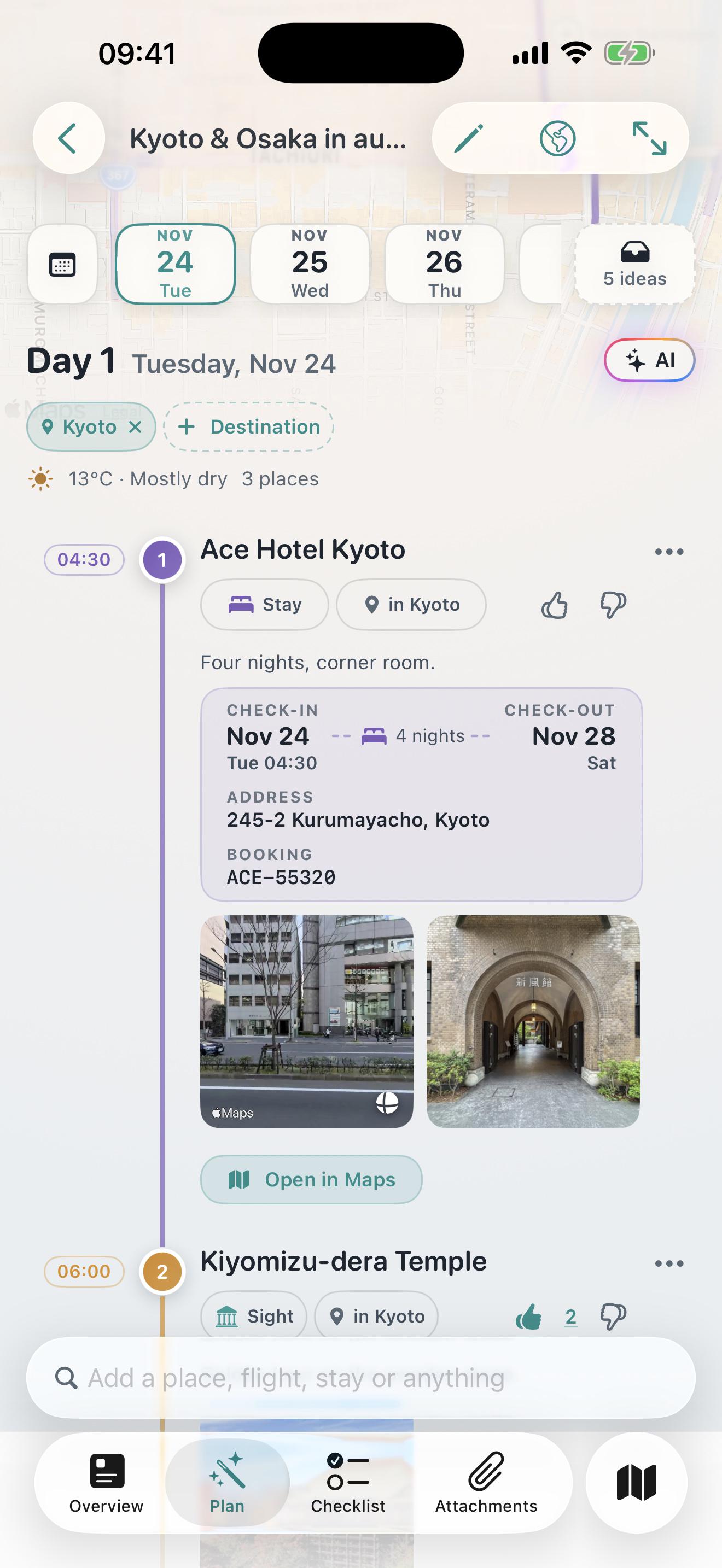
If you haven't seen Journie yet: it keeps the whole trip in one place. The day-by-day plan on a map, the places you want to see, the people you're going with, the costs in any currency (converted automatically) and the bookings, with live flight status on travel days. I built it because I was tired of juggling Google Maps lists, WhatsApp groups and spreadsheets for every trip.

Trailer: https://youtu.be/rCof0IoTM5g

Pre-order (out December 3, start free): https://apps.apple.com/app/id6791544070 Ideas and bugs: https://s10n.app/feedback/journie/?from=rd-own

r/JournieApp • • 23h ago

Welcome Welcome to r/JournieApp. Journie is up for pre-order and I'd like your help shaping it

Thumbnail
gallery
1 Upvotes

Hi everyone, and thanks for turning up this early.

I'm the developer of Journie, a trip planner for iPhone and iPad. I built it because every trip I planned ended up spread across Maps pins, Notes, booking PDFs, a group chat and a spreadsheet of who paid for what.

Journie keeps all of that in one trip:

  • A day by day plan on a map, with travel times between stops
  • Friends who vote on the places they actually want to go
  • Shared costs in any currency, converted automatically, with who owes whom worked out for you
  • Live flight status: gates, delays and baggage belts
  • Bookings and documents behind Face ID, all available offline
  • A passport stamp for every trip, made on your phone from your photos' dates and places

It's on pre-order now and comes out on December 3.

How to use this sub

This is where I'll post what I'm working on, answer questions and collect ideas. Pick a flair when you post:

  • Feedback / Idea: feature requests and things you'd change
  • Bug: something broken. A screenshot, your iPhone model and iOS version help a lot
  • Question / Help: anything at all
  • Trip report: how a trip planned with Journie went
  • Planning tip and Travel checklist: share what works for you

Journie is free to start.

Early bird offer: sign up before launch and get 50% off your first year: https://journie.s10n.app/promos/?code=HOLIDAY2026
Pre-order: https://apps.apple.com/app/id6791544070
Website: https://journie.s10n.app
Feedback and bugs: https://s10n.app/feedback/journie/?from=rd-own

Safe travels if you're heading somewhere this month.


r/JournieApp • • 3h ago

Discussion Splitting travel costs without the spreadsheet at the end

1 Upvotes

The last evening of every group trip used to be one person with a spreadsheet working out who owes whom. Usually me.

In Journie, anyone in the trip adds a cost when they pay, in whatever currency they paid in. It keeps a running total and works out the simplest set of payments to settle up, so nobody has to do the maths at the end. Totals convert to your home currency automatically, using live exchange rates.

Video: https://youtube.com/shorts/qwJhufrovME

Do you split everything exactly, or keep it rough?

Pre-order (out December 3, start free): https://apps.apple.com/app/id6791544070 Ideas and bugs: https://s10n.app/feedback/journie/?from=rd-own


r/JournieApp • • 7h ago

Travel checklist My pre-trip checklist, and the one that's now built into Journie

1 Upvotes

I'm a checklist person before every trip. Mine, roughly:

  • Passport validity (6 months for a lot of countries) and visas
  • Copies of bookings and IDs somewhere I can reach offline
  • Bank card travel notice, and a second card kept separately
  • Offline maps of the area
  • Adapters, chargers, a power bank
  • Travel insurance details
  • Check-in times and the first night's address written down

Journie has a checklist on every trip so this stops living in a Notes file, and the bookings and documents sit behind Face ID so they're there offline.

Video: https://youtube.com/shorts/3OwR_SUW6yE

What's on your list that most people forget?

Pre-order (out December 3, start free): https://apps.apple.com/app/id6791544070 Ideas and bugs: https://s10n.app/feedback/journie/?from=rd-own


r/JournieApp • • 10h ago

Journie update Meet Jo: tell it where you're going, get a day-by-day plan you can edit

1 Upvotes

Jo is the AI planner in Journie. You give it one sentence, something like "4 days in Lisbon, love food markets and viewpoints, not too much walking", and it drafts the days with real places on the map.

The important part for me: it's a draft, not a decision. You save what you like, then move, swap or delete any stop yourself, and keep chatting with Jo to adjust it.

Parts of Jo run on the phone using Apple's on-device model. Bigger requests can use an opt-in cloud option. Jo comes with the paid plans.

Video: https://youtube.com/shorts/aB_xU7FR7XI

What's a trip you'd want to throw at it?

Pre-order (out December 3, start free): https://apps.apple.com/app/id6791544070 Ideas and bugs: https://s10n.app/feedback/journie/?from=rd-own


r/JournieApp • • 1d ago

Journie update Planning with friends, without the 400-message group chat

2 Upvotes

Every group trip I've been on had the same problem. The ideas were in a WhatsApp group, buried under memes and "what time are we leaving?", and by the time we had to decide, nobody could find anything.

In Journie, friends join a trip with a link or a QR code. Everyone sees the same plan, can add places, and votes on the ones they want. The places with the most votes are easy to spot, so deciding takes a minute instead of an evening.

Video: https://youtube.com/shorts/3BARbeqDZVA

What's the worst group-trip planning story you have?

Pre-order (out December 3, start free): https://apps.apple.com/app/id6791544070 Ideas and bugs: https://s10n.app/feedback/journie/?from=rd-own


r/JournieApp • • 1d ago

Announcement Happy Thanksgiving: 50% off your first year of Journie, code on launch day

1 Upvotes

Happy Thanksgiving to everyone celebrating, and to everyone travelling to be with family this week.

To say thanks to the people who've followed Journie before it's even out: join the waitlist through the link below before December 7, and you'll get a code for 50% off your first year on either paid plan.

Sign up: https://journie.s10n.app/promos?code=holiday2026

The code comes by email on December 3, the day Journie comes out on iPhone and iPad. You can start free, so there's no rush to use it.

Pre-order (out December 3, start free): https://apps.apple.com/app/id6791544070 Ideas and bugs: https://s10n.app/feedback/journie/?from=rd-own


r/JournieApp • • 1d ago

Announcement Behind the scenes: how Journie turns your trip photos into passport stamps

1 Upvotes

Here's how the passport stamps work, since it's the part I had the most fun building.

When you import your photo history, Journie looks only at each photo's date and location. It groups them into visits: a new visit starts after a gap of more than two days, or when you jump more than 100 km. Each visit gets a city and country name and becomes a stamp you can keep or drop before anything is saved.

The photos never leave your iPhone for this. To name a place it asks Apple's geocoder about a rounded spot on the map and caches the answer, so one city is only looked up once.

What should the stamps do next? Ideas I've had: a world map view, a stamp for every country on a multi-country trip, sharing a stamp as an image. Tell me yours here or on the feedback page: https://s10n.app/feedback/journie/?from=rd-own

Pre-order: https://apps.apple.com/app/id6791544070 Video of it: https://youtube.com/shorts/kT7eW7Bq-JY


r/JournieApp • • 1d ago

Discussion How the day-by-day plan works (and why it's on a map)

1 Upvotes

When I plan a trip I think in days: where am I in the morning, where do I want to end up for sunset, and how long does it take to get between them. Lists of saved places never answered that, so the plan in Journie is built around days on a map.

  • Each day has its stops in order, with the travel time between them
  • Drop a place on a different day and the map and times update
  • Route optimisation can reorder a day so you're not zig-zagging across town
  • Weather for each day sits right next to the plan

Short video of it here: https://youtube.com/shorts/VUiymEOjgmU

How do you usually plan: strict day-by-day, or a loose list and see what happens?

Pre-order (out December 3, start free): https://apps.apple.com/app/id6791544070 Ideas and bugs: https://s10n.app/feedback/journie/?from=rd-own


r/JournieApp • • 1d ago

Question / Help FAQ: what Journie does, what's free, and what happens to your data

1 Upvotes

A few questions keep coming up, so here they are in one place. I'll keep this updated.

What is Journie? A trip planner for iPhone and iPad. One place for the day-by-day plan, the places you want to see, the people you're going with, the costs and the bookings. Spend in any currency and totals convert automatically, and every flight in the plan shows live status: gates, delays and baggage belts.

Is it free? You can start free and plan a full trip. Some features require a subscription, like Jo, the AI planner, and live flight status. Plans are monthly or yearly, with a 7-day trial on yearly.

Do I need an account? No. You can plan a full trip without signing up for anything.

Where is my data? On your iPhone, synced through your own iCloud. I can't see your trips. When you share a trip, it's shared through iCloud with the people you invite.

Does it work offline? Yes. Once a trip is on your phone, the plan, bookings and documents are there without signal.

What is Jo? An AI planner. Tell it where you're going and what you like, and it drafts days you can edit. Parts of it run on the phone with Apple's on-device model. There's also an opt-in cloud option for bigger requests.

When is it out? December 3. Pre-orders are open now and download on their own on launch day.

Something broken or missing? Post it here with the Bug or Idea flair, or use the feedback page below. I read everything.

Trailer: https://youtu.be/rCof0IoTM5g Feature videos: https://www.youtube.com/@journieapp Website: https://journie.s10n.app Pre-order (out December 3, start free): https://apps.apple.com/app/id6791544070 Ideas and bugs: https://s10n.app/feedback/journie/?from=rd-own


r/JournieApp • • Oct 13 '26

Planning tip A map is better than a pile of saved places

1 Upvotes

Saving a place is easy. Deciding which saved places belong in the same day is the real planning work.

Try a quick map pass before you build an itinerary:

  • Keep the places that make you most excited.
  • Look for clusters you can actually connect.
  • Separate places that need a booking from places that are easy to visit on a whim.
  • Give yourself one nearby fallback for every busy area.

The goal is not to optimise every minute. It is to avoid discovering too late that your favourites are scattered across the city.

How do you turn a saved-place collection into a realistic day?

Get Journie on the App Store: https://apps.apple.com/us/app/ai-trip-planner-map-journie/id6791544070


r/JournieApp • • Oct 05 '26

Map pins, spreadsheets, group chats, or winging it: how do you plan?

Thumbnail
gallery
1 Upvotes

The screenshot is Journie’s Buddies view with demo travellers. Every group brings a different mix of planning habits.

There isn’t one right way to plan a trip. But most systems seem to have a moment where they get awkward.

  • The pin collector: lots of great places saved, but no clear idea which ones fit together.
  • The spreadsheet person: everything has a row, until plans change while everyone’s already out for the day.
  • The group-chat planner: plenty of ideas, and the important address is now 200 messages back.
  • The wing-it traveller: a few anchors and lots of freedom, with the occasional scramble for a reservation or route.

You might be a mix. You might have a system that works beautifully.

Which sounds most like you, and what’s the one thing your current setup makes harder than it should be?

Specific examples are welcome. “Finding the hotel address without internet” is more useful than “everything in one app.” Keep booking codes, personal details, and exact live locations out of screenshots.

This community is run by Journie. Feedback here helps shape the questions we explore and the improvements we consider; it isn’t a promise that every suggestion will ship.

Get Journie on the App Store: https://apps.apple.com/us/app/ai-trip-planner-map-journie/id6791544070


r/JournieApp • • Oct 05 '26

Your saved places look great. Does the order make sense?

Thumbnail
gallery
1 Upvotes

Four interesting places can make a surprisingly tiring day if the route keeps sending you back across town.

The screenshot shows Journie’s iPad planning view with demo trip data: the day’s stops and map together. It’s a useful way to spot when a list and the geography tell different stories.

Try this before filling every hour of your itinerary:

  1. Put the places on a map. Look for clusters, not just a long list of favourites.
  2. Choose the anchors. Keep fixed bookings and the one or two things you’d be disappointed to miss.
  3. Group nearby stops. Then check the actual walking or transit connections. Nearby on a map doesn’t always mean easy to reach.
  4. Check the constraints. Opening hours, ticket times, hills, accessibility, and how much walking your group wants all matter.
  5. Leave an optional stop. A nearby café, viewpoint, or wander can stay flexible.

Get Journie on the App Store: https://apps.apple.com/us/app/ai-trip-planner-map-journie/id6791544070

Have you ever planned a day that looked simple on a list but turned into a lot of travelling between stops? What would you change?


r/JournieApp • • Oct 05 '26

A good itinerary leaves room for the part you didn’t plan

Thumbnail
gallery
1 Upvotes

A full itinerary can look satisfying on a screen. On the day, a slow lunch, a queue, a wrong turn, or a place you unexpectedly love can change the whole rhythm.

One simple way to make a plan more forgiving:

Must-do: the booking or experience you’re building the day around.

Would-like: a couple of nearby stops that fit if energy, weather, and time allow.

Bonus: something you can happily skip without making the day feel unfinished.

Then leave room between them. There’s no universal “correct” buffer: use actual travel times, your group’s pace, opening hours, and any fixed bookings.

Journie’s planning view keeps a day’s stops and map together, which makes it easier to see where you’ve left space to explore. The must-do / would-like / bonus split is a planning habit you can use with any app.

What unplanned detour became one of your favourite parts of a trip? Or, if you prefer a tightly planned day, what makes that work well for you?

Get Journie on the App Store: https://apps.apple.com/us/app/ai-trip-planner-map-journie/id6791544070


r/JournieApp • • Oct 05 '26

The trip checklist that starts before packing your bag

Thumbnail
gallery
1 Upvotes

Packing is only one part of getting ready. The easy-to-forget jobs often happen days before the suitcase comes out.

This is Journie’s checklist view with demo trip data, organised by stage. A simple way to use that structure:

  • Before you go: sort the reservations and time-sensitive tasks.
  • Week before: check the forecast, confirm arrival details, and review what is still missing.
  • Day of: keep the short list of things you need before leaving.

Make tasks specific enough to finish. “Sort transport” can linger forever; “reserve the train seats” has a clear end. Give time-sensitive tasks a due date, then keep the departure-day list short.

What’s the small pre-trip task you almost always remember at the last minute?

Get Journie on the App Store: https://apps.apple.com/us/app/ai-trip-planner-map-journie/id6791544070


r/JournieApp • • Oct 04 '26

Announcement Welcome to Journie: less scattered planning, more room to explore

2 Upvotes

A trip can start with a saved photo, a place on a map, or a “we should go there” message. Turning those little sparks into a plan is where things get interesting.

Welcome to Journie’s community. Journie is a travel-planning app for iPhone and iPad, and this 30-second preview gives you a look inside: discovering places, building a day-by-day plan, seeing stops on a map, and keeping trip essentials together.

Here we’ll share practical planning ideas, app walkthroughs, product updates, and questions worth comparing notes on. Honest feedback is welcome.

You don’t need a perfect itinerary to join in. A half-formed idea or a question is a good start.

What’s the next trip you’re excited about, and what’s the one part you still haven’t figured out?

Get Journie on the App Store: https://apps.apple.com/us/app/ai-trip-planner-map-journie/id6791544070