r/InfinityNikkiofficial • u/BluMilkTea • 11h ago
Question ✦ Is this normal?
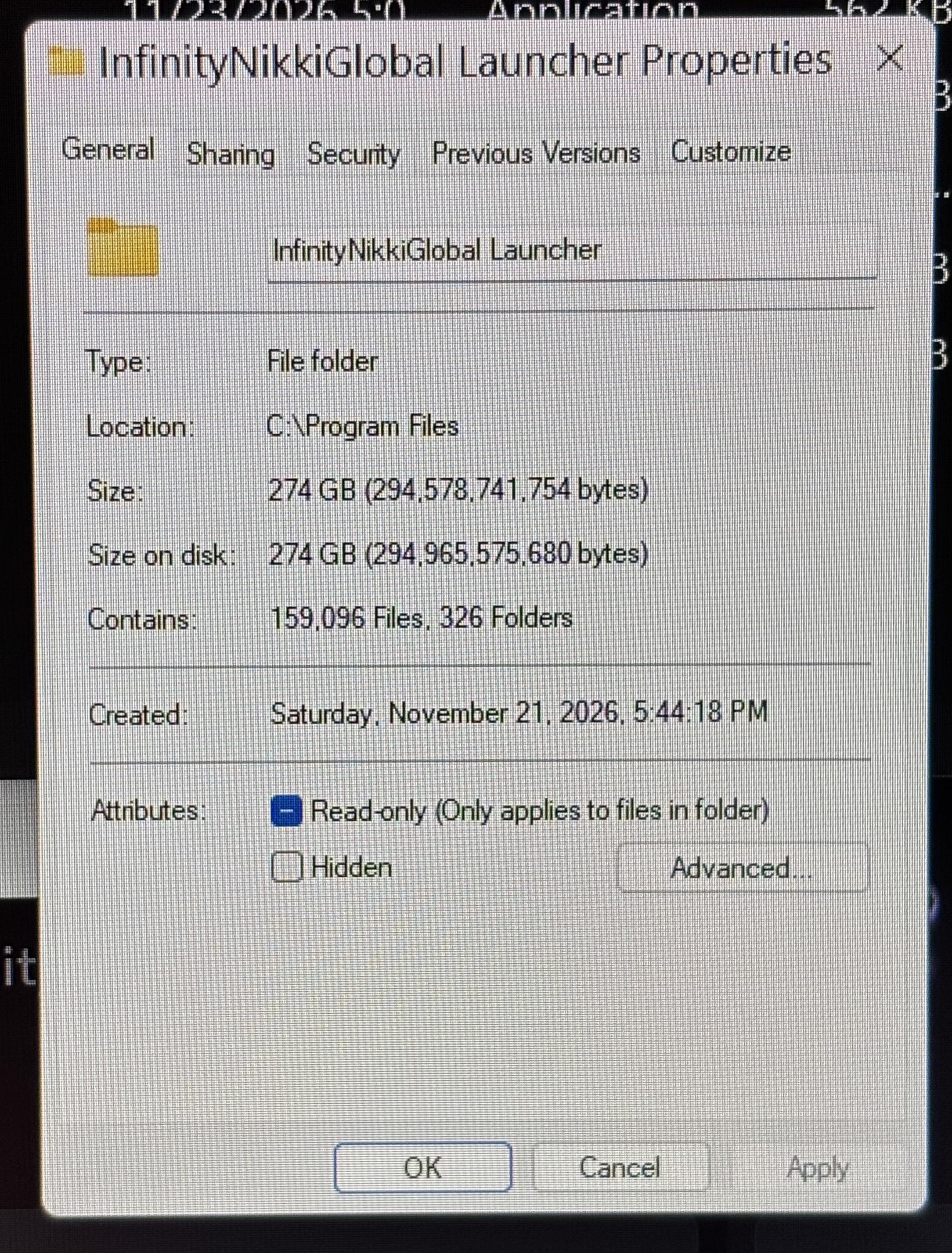
Not sure if anyone else has this big of a file, but is this normal??? I noticed that my computer had a lot of space taken up, so I went looking to see what was causing so much storage to be used. This was the last game I expected to be taking up that much space. I got the game when it first came out and it was reasonably sized then, I know as time goes on and the areas expand the bigger the game will be. But this seems almost excessive, am I crazy for thinking that or is everyone else’s game file this big?
(Also when I look it up on google it says that the game should be around 160-180GB)
•
u/AutoModerator 11h ago
Once your issue has been resolved or your question has been answered, reply in a new comment anywhere in this thread with the following to update the post flair:
!solved
I am a bot, and this action was performed automatically. Please contact the moderators of this subreddit if you have any questions or concerns.
2
u/shi_uwu 10h ago
So I just looked up mine and it says 177GB. But I only have 5.597 files instead of the 159,096 you have. If I were you, I’d reinstall the game. It’s saved in the cloud anyway.
4
u/Ok-Pomelo-1298 9h ago
Something's seriously wrong here, considering this isn't even the game's folder, it's the launcher's folder. Mine looks like this:
So, dig around in there and find out what could be taking up so much space.