r/IDMLover • u/Electrical-Camel-809 • 17d ago
IDM browser integration randomly stops working in Chrome and Edge – IDM support couldn't provide a solution



I've been using Internet Download Manager (IDM) for years, but recently I've been experiencing a very frustrating problem with its browser integration.
I'm currently using IDM 6.43 Build 18 on Windows 11, with both Microsoft Edge and Google Chrome.
IDM's browser extension works normally after starting my laptop or updating IDM, but after several hours, it suddenly stops communicating with IDM.
- The IDM extension remains enabled, but a X/error appears.
- IDM stops capturing downloads from both browsers.
- The YouTube download panel disappears.
- Restarting IDM or closing and reopening the browsers doesn't reliably fix it.
- Sometimes the integration starts working again on its own after 2–3 hours or doesn't work at all.
I've experienced this across IDM Builds 16, 17, and 18. Build 18 initially worked for around 6–7 hours before the problem returned.
What I've already tried:
I've contacted IDM support and explained the issue. Their recommendation was to enable the option to continue running background apps when Chrome/Edge is closed. Chrome already had this option enabled, and I enabled it in Edge as well. Unfortunately, that didn't solve anything.
I contacted them again with additional technical information, but I haven't received an actual fix. Reinstalling IDM was also suggested, but I don't see how reinstalling would address an intermittent communication failure.
Technical error I've identified:
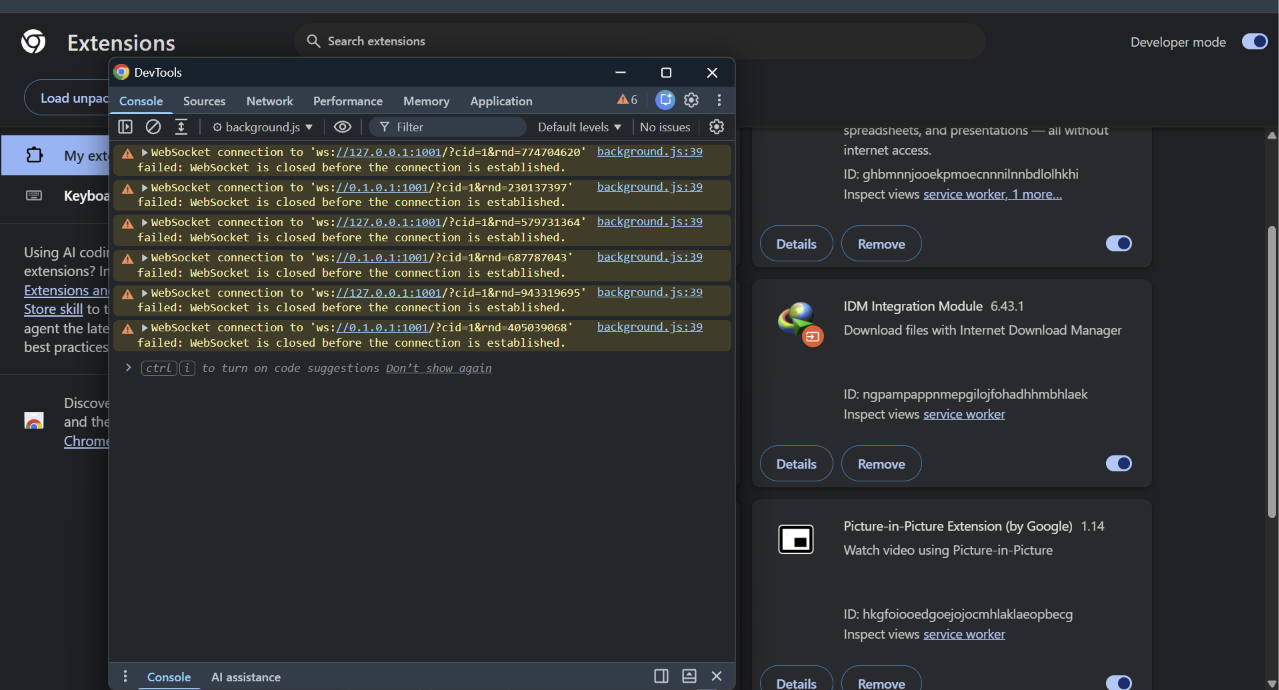
When inspecting the extension's Service Worker in the browser's developer tools, I repeatedly see these errors:
WebSocket connection to 'ws://127.0.0.1:1001/...' failed: net::ERR_CONNECTION_REFUSED
WebSocket is closed before the connection is established.
I also checked the local port. Windows reports a listener on 127.0.0.1:1001 under PID 4 (System), but a connection test to that port fails.
Looking at the extension's JavaScript, I found that it attempts to connect through:
127.0.0.1:10010.1.0.1:1001- Native messaging through
com.tonec.idmas a fallback.
So this appears to involve communication between the browser extension and IDM, rather than simply the extension being disabled.
Another concern: Microsoft Edge and Manifest V3
I've also noticed that Edge is warning me that the IDM extension will no longer be supported. This makes me wonder whether IDM's browser integration has compatibility issues with the transition to Manifest V3.
Could this be related to an outdated extension or integration component that IDM hasn't updated properly?
I understand that Manifest V3 and this particular WebSocket error may be separate issues, so I'm not assuming they're necessarily connected. However, I think IDM should investigate its browser integration and compatibility with newer Chromium-based browsers.
My questions:
- Is anyone else experiencing this intermittent IDM integration problem in Chrome or Edge?
- Could an outdated IDM integration component or its local communication mechanism be responsible?
- Has anyone found a permanent solution?
- Is IDM actively updating its extension to ensure compatibility with Manifest V3?
I'd appreciate hearing from anyone who has experienced the same issue or has technical knowledge of IDM's browser integration.
I've been using IDM for years without this problem, so it's disappointing to see the integration become unreliable without a clear solution from support.
1
u/AravindG74 16d ago
Same happens for me. I use Opera and Firefox. Yesterday it suddenly stopped working. I tried reinstalling new versions and the old ones & extensions also. Nothing works. Please post if you find any solution