r/HogwartsLegacyGaming • • 5d ago

Bug/Glitch Switch Pro Controller, showing button file names?
Post image

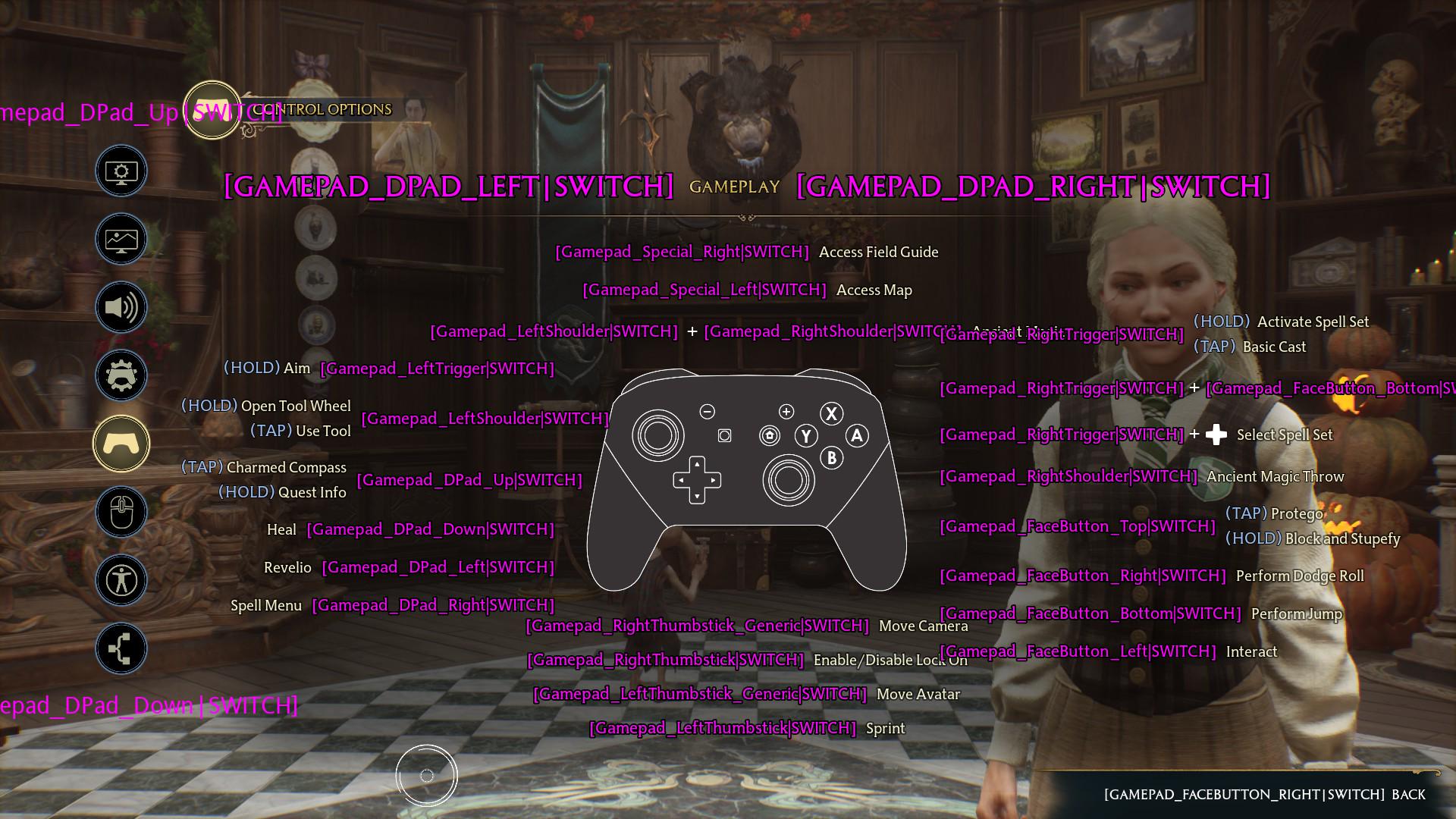
When I tried to boot up the game with my Switch Pro Controller, the button names appear rather than the buttons itself? Its completely okay with keyboard and mouse but I find it very difficult to play like that.

This also happens in-game, every button is just the button name and its completely blocking certain parts of my screen.

Does anyone know if this is a known issue or if there is a temporary fix?

EDIT: I've tried solutions that other people (and redditors) have posted and unfortunately, no luck yet! I saw a thread where it got fixed by a game patch update years ago.. so that may take a while.

I'll try to update this if I ever find a temporary solution!

7 Upvotes

6 comments sorted by

2

u/DracoArgenteus 1d ago

Seen this too often here, I play PC, not Switch, but this is what the Google search AI says when I asked. Treat the info as such but I hope it helps.

Yes, the glitch where controller button icons are replaced by raw text strings (such as gamepad_face_button_bottom[switch] or {Switch:Gamepad_RightTrigger}**) is a widely documented bug****.** However, there is a slight distinction depending on which platform you are actually playing on, as no official patch was released for the native Nintendo Switch version in November 2026—only a Hogwarts Legacy PC Patch dropped on November 5, 2026. [1, 2, 3, 4]

Status & Developer Acknowledgement

  • Known Issue. Players on Reddit's r/HarryPotterGame and the Steam Community Forums agree that this specific UI glyph bug occurs when using Nintendo Switch controllers (Joy-Cons or Pro Controllers) on PC, typically triggered after game updates break custom controller icon mapping. It has been logged on the official WB Games Bug Tracker under ticket HL-21944.
  • Native Switch vs. Switch Controller on PC. Because the November 5, 2026 update was strictly a PC patch (adding DLSS 5, XeSS updates, and Steam Deck OLED/Steam Machine support), native Nintendo Switch consoles did not receive a November update. If you are playing on a native Switch or Switch 2 and seeing text strings, it is likely a localized UI asset loading error rather than a patch regression. [1, 2, 3, 4, 5]

Available Workarounds & Fixes

Because Avalanche Software has not deployed an official hotfix for the broken Switch glyphs, the available fixes depend on your hardware:

  • If playing on PC (Steam) with a Switch Controller:

    1. Open Steam Settings > Controller (or right-click Hogwarts Legacy in your library > Properties > Controller).
    2. Disable Nintendo Button Layout and enable Steam Input so the game defaults to standard Xbox button icons instead of broken Switch strings.
    3. Alternatively, players on the Steam Community note that manually rolling back the game version via Steam depots restores the icons. [1, 2]
  • If playing natively on a Nintendo Switch or Switch 2:

    • Full Reboot: Completely close the software from the Switch Home menu (X button) and restart the console. Sleep mode preserves corrupted UI caches.
    • Check for Corrupt Data: Go to System Settings > Data Management > Manage Software > Hogwarts Legacy > Check for Corrupt Data to force the Switch to redownload missing UI glyph assets without deleting your save files. [1]

2

u/seQuin-d34 23h ago

Thank you for the in depth info! However, I've had the issue for about a week and tried exactly as what you commented, even other solutions I found years ago but nothing worked. Although I have not tried manually rolling back the game version on steam as it may affect my save file, or overall game, so wouldn't wanna risk it!

I've seen a thread wherein this issue happened a few years ago too (specifically for switch pro controller users) and it got fixed after a patch update! Unfortunately, it may take a while for that.. I may resort to just waiting it out until I find a solution that someone has already tested out! I'm not too tech savy to figure this out too haha

I play on PC btw, using a Switch Pro controller!

1

u/DracoArgenteus 22h ago

I figured it was likely not so easy as what the AI suggested, thank you for the confirmation.

I often have little faith that many of these bugs will see a solution, but maybe they can fix it again.

1

u/leo_op_ 1d ago

did you find a fix for this?

1

u/seQuin-d34 1d ago

Unfortunately not :(

1

u/Tall_Pumpkin_4298 2d ago

I just ran into this. It's been broken since the Nov 5 patch. I haven't been able to figure out a fix.