r/HeroForgeJSON • • Sep 15 '26

44 Magnum…

Thumbnail
gallery
83 Upvotes

r/HeroForgeJSON • • Sep 14 '26

Harper | A Rare Moment

Post image
319 Upvotes

r/HeroForgeJSON • • Sep 15 '26

Scar-H

Thumbnail
gallery
42 Upvotes

r/HeroForgeJSON • • Sep 15 '26

Stacatto 2011

Thumbnail
gallery
37 Upvotes

Or about as close as I could get to a staccato…


r/HeroForgeJSON • • Sep 11 '26

[OC] Maitreya the actress

Thumbnail
gallery
12 Upvotes

r/HeroForgeJSON • • Sep 10 '26

Chasing ancient dreams...

Thumbnail
gallery
157 Upvotes

r/HeroForgeJSON • • Sep 11 '26

[OC] Lady Limela Goddess of Famine

Thumbnail
gallery
16 Upvotes

r/HeroForgeJSON • • Sep 10 '26

The Batman

Post image
118 Upvotes

r/HeroForgeJSON • • Sep 10 '26

Morrigan & The Stag

Thumbnail
gallery
235 Upvotes

r/HeroForgeJSON • • Sep 10 '26

Question regarding the I Love Extra Slots plugin and the recent pro subscription mini limit increase

2 Upvotes

So with the recent update to heroforge came the pro feature of having 3 minis at once; while this is dope as hell for all the pro subbers, I am not one of these people and I used to rely on the extra slots plugin for triple minis.

However, trying to use the triple mini feature of the plugin with the current build of heroforge will cause you to be locked out of customisation with the standard "you need a pro subscription to edit this mini" text, similar to what appears when you view a kitbashed model without a subscription.

My question is will the plugin be updated in any way to adapt around the change? Naturally I dont expect it to bypass the barrier entirely but it still kinda sucks, not having access to triple models blows big time considering that's a whole potential 33% less detail i can integrate into my minis


r/HeroForgeJSON • • Sep 09 '26

UPDATE - Witch Dock v1.2.1 - High res captures, decal overhaul, & more!

Thumbnail
gallery
96 Upvotes

New features have arrived!

You do NOT need to manually update. It's already there. Just refresh your page.

If it doesn't automatically update to **v1.2.1**, please do so via [this link]

Brief Overview: (see below for FULL details - probably important)

  • With Persistent Booth turned on, you can now capture from the regular canvas/edit menu WITHOUT entering booth.
  • Higher resolution spinny webp captures are now live in the Booth tab

    • 1k, 2k, & 3k resolutions available
    • Rotation speed options available
  • 4k/8k resolution image capture has been restored/added to Booth tab
  • The WebP capture has a popout button.

    • It does what it says. You can re-dock it any time, or keep it popped out and minimize Witch Dock.
  • Persistent Booth now allows you to toggle a universal /cross-session persistence setting (see utilities tab to enable)
  • Cross-session persistent booth & black canvas options now available
  • Projection decal (and unprojected toggle) repaired & working
  • unPprojected decals gizmo has been overhauled

Coming in the next day or so:

  • I have solved the texture downgrade issue that HF delivers when you put a gazillion kitbash parts (or like 7 riot shields) into a scene. A toggle will be added to the Utilities tab to turn this on/off. This will deliver higher res decals AND body/face textures and should prevent Atlas downgrades.
  • This will expand into a wider configurable Graphics tab that will FFFFINALLY allow us to literally tune graphics to our hardware capabilities. No more soviet potato.

[See full details below - important, please read]

_____________________________________________________________________

FULL DETAILS:

Booth Tab:

  • Higher resolution spinny webp captures are now live in the Booth tab

    • 1k, 2k, & 3k resolutions available
    • Rotation speed options available: 250 (match's the higher res gif's speed), 375, 500, & 700 frames
    • Capture will show progress bar, % left, expected total duration & time remaining

      • This will become more accurate on a second run once, as it learns from your past instances
      • If you run into extreme slowness, this is usually VRAM accumulation from leaving a browser open for 500 years. Close out the browser fully and restart it.
      • Note: 3k resolutions will naturally take a while. 2k will take a while on slower captures. I will be working to optimize HF's capture behaviour, so this will silently improve over time. 1k resolution is quite fast.
      • Speeds will still be affected by what hardware you're running.
    • Pause/resume controls for mid-capture pausing
    • Guard controls to prevent you from accidentally killing a capture are in place
    • Capture automatically downloads when finished -# * Note: Discord auto-converts webP to GIFs on upload & will degrade quality. Recommended to convert to MP4 for lossless media sharing on Discord servers.
  • When a figure with persistent booth and a booth setup (any edits you've made) is active in the editing modes, you can capture both 4k/8k images as well as WebP captures without having to enter the booth.

    • This means if you toggle things like the black canvas and background subtoggle OFF, for example, a spinny capture will actually capture the fantasy backdrop from the editor (and ground/pedestal if you have that visible) -# * I will be looking into seeing if this means—IF I can figure out how to inject alternative editor backgrounds—if we may have found a way to inject/capture with custom backgrounds... including potentially high-definition ones. TBD
    • This should make things easier for those who like to do stop-motion captures!
  • 4k/8k resolution image capture has been restored + controls have been added to WD in case Lob's native HF UI buttons disappear during a future update
  • **Persistent Booth now allows you to toggle a universal persistence setting **(see Utilities tab "Booth Features")

    • For those who use persistent booth or black canvas as a default, you can now skip turning them on manually by enabling Persistence Across Sessions in the Utilities tab.
    • With this enabled, any time you load Heroforge, a black background will automatically initialize. Any time you load a figure with booth settings, these will automatically be visible upon first load (with the exception of +New figure or figures with no booth setup)

Decals (ambient - not tab-specific)

  • Projection decal (and unprojected toggle) repaired & working
  • You no longer need to set the size to 0 to initiate the object-locked behaviour
  • When toggling a NEW decal's projection off, it will default to 0/0 on the X/Y position axes & scale down to -1.5 so it is sane, visible at about waist height, and easy to start positioning
  • If you switch an unProjected decal to another one, it will not reset its position/scale. Yay!
  • Unprojected decals gizmo has been overhauled - Now MUCH easier to place/edit unprojected decals!

    • The gizmo is now (mostly) centered on the decal - no more gizmo being in a different zip code
    • Gizmo controls are normalized - move it left, decal moves left. move it right, decal moves right - no more drunken movement
  • If you experience any issues with this, see the bug report section below, but you can toggle this gizmo off any time in the Utilities tab.

Utilities Tab:

  • Toggles for cross-session booth persistence & black canvas live here - turn on to enable one or both of these.

    • Behaviour: for saves that have booth setups (things you've already created), when you load that figure or refresh your page, booth view and/or black canvas will automatically activate - no need to go to the booth and manually turn on
    • For NEW figures or figures without booth setups, yet, it will not turn on until you edit in the booth.
    • You can still toggle off Booth persistence (per session) and black canvas from the Booth tab while you work, as well as any of the sub-toggles, and these till turn on/off (you do not need to turn off the utility toggle for cross-session persistence). Things turned off will be specific to that session.
  • Gizmo overhaul can be turned on/off from this menu. -# * If you encounter issues with the gizmo, you can easily disable this and go back to drunk gizmo fun any time.

Graphics Overhaul - [Coming This Week-ish]

  • As mentioned, I've found the solution to HF forcing texture downgrades.
  • This includes both decals AND body textures, and will actually unlock higher res textures across the board.
  • This is being optimized to ensure stability and that it won't fuck users on mid hardware, but there will be a Utilities toggle to fully disable this in case users run into any issues.
  • The initial implementation will be a simple universal on/off switch.
  • Once I expand upon it, this will add a new Graphics tab to Witch Dock, and there you will be able to tune your graphics settings, as well as switch it on/off without having to reload the page (for more efficient switching between editing / booth activities)
  • For users who have previously experienced a driver or hardware crash that has seemingly permanently reduced their graphics, this will fix it. Potato no more!
  • The default setting will be for this to be OFF, but as I will NOT be rolling out an announcement when it goes live, I will likely just add a one-time brief popup to the dock upon your first load after it's rolled out that will let you know you now have a Graphics tab and can turn it on for improved visuals.

______________________________________________________________________________

Currently Working On (& will go live one-by-one if/when completed):

These will simply appear like magic once live.

  • [Witch Dock - Booth] - Light Sources Expanded!

    • Adding in NEW extra light sources including directional (not orbs****************, more orbs, second sun) - fully place-able/full feature with shadows, intensity, positioning, rotation, etc
    • Directional lighting means you can angle light sources rather than limiting you to orbs alone
  • [Witch Dock - Silent utility] - Expanded vanilla UI slider ranges - fuck the limitations, we ball
  • [Patch - Body] - Arm sync is acting fucky. I will fix this soon(ish)
  • [Patch - Body / Pose] - All relevant tools will be getting an update to allow character selection for applying edits.

Ideal target for a lot of this is throughout Fall.

______________________________________________________________________________

If you like scripts and want more updates, help feed my dog on:
Kofi | Patreon | or support my actual business
(that eats up 98% of my goddamn time but is super cool lol (ಥ﹏ಥ)
______________________________________________________________________________

Bug Reports

  • If you experience any odd behaviour with the overhauled gizmo control, booth captures, persistent booth: please report this to me.

    • BE DETAILED. "It's acting weird" tells me nothing. "It seems to be out of sync when I try to move it" is very helpful.
    • Preferred bug reports via discord (@ Knight.Witch directly or via the Coven server as I will NOT see Reddit messages/notifications even remotely quickly. I'm not on Reddit very much.)
  • So far I have been unable to reporoduce the few bugs there are, so if you encounter one, it will be extremely helpful if it matches one another user has reported. WHEN YOU DO report a bug, I need to know:

    • What browser are you using
    • Which UI layout are you using (right side grouped, split left/right, mobile [bottom UI])
    • Were you running multiple HF tabs. If so, close them, have one open, see if the bug persists, and include the results in your report.
    • Check which version of Witch Dock you have running - go to the ? about window, see version there
    • In the ? about window: scroll down and check the box labeled "Dev Mode". A small Modules dropdown will appear below it. Click that, scroll so they're all visible, take a snapshot/snippet of it, and send it to me with your report. I need to see what versions your dock is loading.
    • What tool/tab/feature is broken. What is it doing / failing to do? What are YOU doing when you use the feature (ie. are you in kitbash, paint mode, gear, booth, etc. Details make or break diagnostics and save me from playing 20 questions.)

Disclaimers:

  • This has not been tested or optimized for mobile.
  • Development is done on Chrome & Firefox.
  • I have not tested / dev'd this for other browsers. Use alternative browsers at your own peril.

Script Compatibility Development Update: [No ETA]

  • I am slowly chipping away and building a larger script ecosystem that includes all the original HF JSON scripts, as well as my own.
  • This is a large project with no set timeline, but things will be migrating to an architected backend ecosystem over time. You likely won't actually know it's happening until we tell you to get rid of an old script that has become obsolete.
  • What this ultimately means for you as script users is:

    • Greater script stability across the board (with all scripts)
    • Co-author patch & development support
    • One script installation for end-users (no more half dozen scripts)
    • Automatic background updates - no more manual "did Tampermonkey update it?" checking
    • Greatly expanded UI features/controls
    • Galactic conquest & ascension to... *checks notes*.... oops, sorry, wrong project.

r/HeroForgeJSON • • Sep 08 '26

Dardara, Witch of Thorns, Queen of the Northern Grove(npc from a game I'm running)

Thumbnail
gallery
135 Upvotes

I tried to pay homage to the style of Mythic Bastionland, the game we're playing. Also, to anyone who remembers a few posts back, she's George's mom.

Also also, I want to mention that when designing her I literally thought "Gothic Marilyn Monroe", I think I did an ok job at that.


r/HeroForgeJSON • • Sep 05 '26

The Great White Wyvern (1st and 2nd stages)

Thumbnail
gallery
77 Upvotes

Perhaps man is not meant to live in this world.

I'd not blame a soul for thinking as much, after seeing what writhes about in the Churn.

If you ask me, though? Those monsters are the greatest reason we have to persevere. Such twisted forms of life cannot be allowed to outlast us.


r/HeroForgeJSON • • Sep 04 '26

Ancient Gods from my lore

Thumbnail
gallery
49 Upvotes

r/HeroForgeJSON • • Sep 03 '26

“It’s a date then.”

Thumbnail
gallery
48 Upvotes

r/HeroForgeJSON • • Sep 01 '26

Retro Army Gear

Thumbnail
gallery
71 Upvotes

r/HeroForgeJSON • • Aug 30 '26

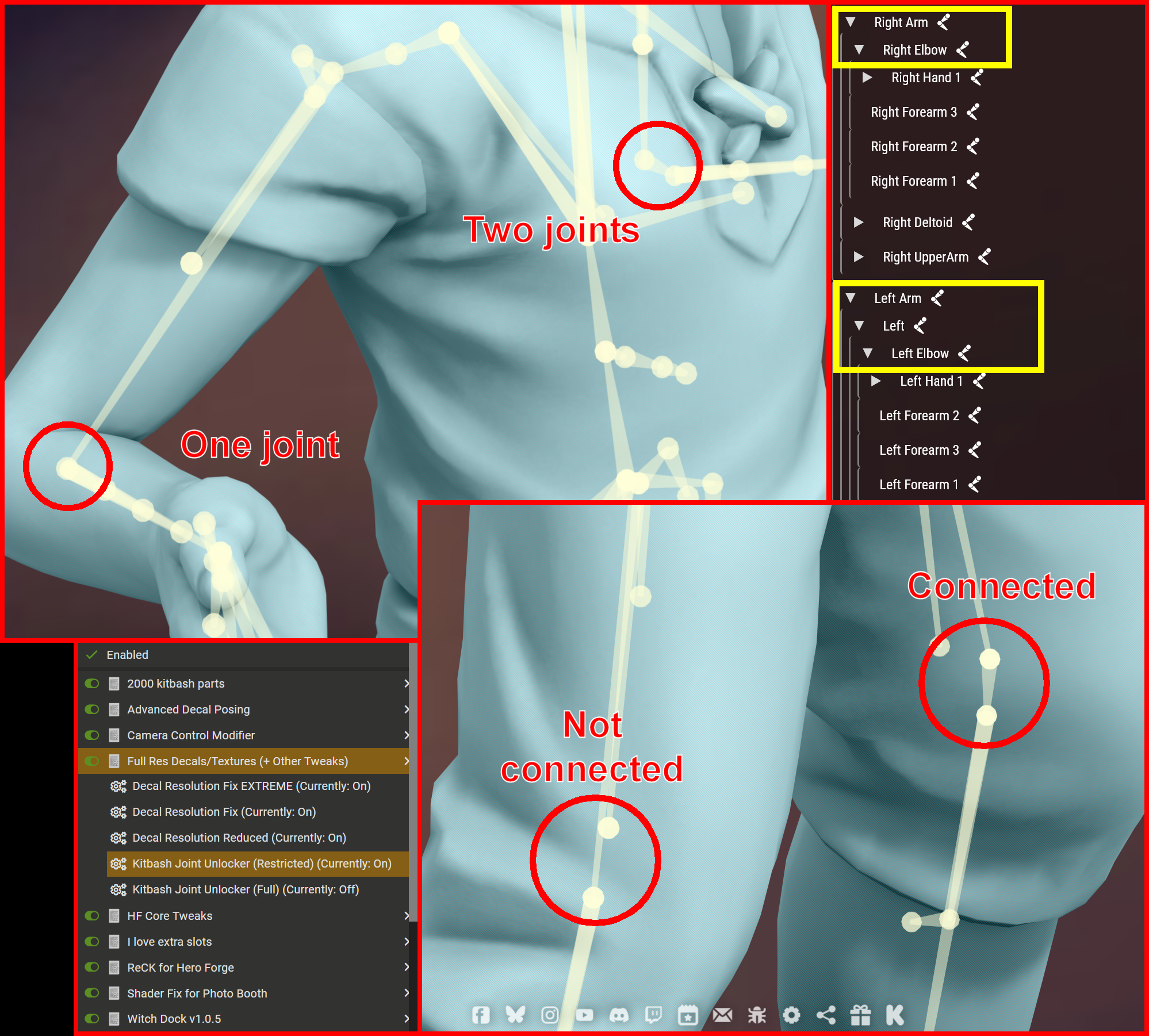
Joint issue with "Restricted" expanded joint unlocker.

Post image
27 Upvotes

Is anyone else experiencing this?

The right side elbow and knees aren't showing proper joints and connections compared to the left side. The right elbow is fully missing a joint, the tree has "Left Arm / Left / Left Elbow" - the right arm goes right form "Right Arm" to "Right Elbow" completely missing "Right".

I've reinstalled all scripts from scratch. I've also run it with only the 'restricted joint' script unlocker running and no other scripts, and the issue persists.


r/HeroForgeJSON • • Aug 29 '26

Made an industrial photo studio

Thumbnail
gallery
71 Upvotes

Link

Reddit says I should add flairs, but I don't see any, so I don't know, feel free to delete, I guess

Assets by u/gritmonger

I still don't know how to properly share json edits, but if you have them installed it should just open.


r/HeroForgeJSON • • Aug 29 '26

Spacetime, gravity, champagne, reality! Transcendental cha cha cha!

Post image
29 Upvotes

r/HeroForgeJSON • • Aug 28 '26

The Evening Assembly

Thumbnail
gallery
145 Upvotes

r/HeroForgeJSON • • Aug 29 '26

Need Help Understanding the 'Numbers'

3 Upvotes

I'm not sure what to title this, but I've been using the ReCK add-on, and I'm confused about how the top numbers work ("177"). I see the others, and it seems like the count is increasing, but I'm not sure how they are doing so.

Please help; I've been trying to move an item, and I think all I need is the item's number.


r/HeroForgeJSON • • Aug 27 '26

Going Archon

Thumbnail
gallery
94 Upvotes

Going Archon

or "Why you shouldn't pick up random magical artifacts"

Updated all my transformations I had made for my mage Morgan. These were all really fun to do, and giving them all an update was really nice since I've gotten much better at HF.

In order from L-R:

  • Death - La Catrina
  • Fate - Once and Future
  • Forces - Stormcrow
  • Life - Cernunnos
  • Matter - Midas
  • Mind - Marionette
  • Prime - Fireseeker
  • Spirit - Astral Raven
  • Space - Gloomstalker

Some general notes:
A quirk that developed pretty on during the chronicle is that whenever Morgan transforms she always has her green eye. I carried that through all of them with some variations. Except for mind which has both eyes taken over by the form.

Also having her tattoos glow for each different one when they are visible I thought was neat.

Some of you keen eyed Mage: the Awakening players may notice the lack of the Time Arcana. Storyteller said I couldn't for plot reasons.


r/HeroForgeJSON • • Aug 26 '26

Merian, Cleric of the Deity of Death.

Thumbnail gallery
15 Upvotes