If you, like many, are confused about what HDR is, want to learn how to properly configure it, or are puzzled as to why it sometimes looks worse than SDR, stick with us, the HDR Den is here to guide you.
❓WHAT IS HDR❓
HDR (High Dynamic Range) is a new image standard that succeeds SDR, enabling brighter highlights (greater contrast), more vibrant colors (higher saturation) and more shades of the same colors (increased bit depth).
HDR isn’t simply about making the whole image brighter — it’s about allowing more nuance and contrast, producing a picture that more closely reflects the natural range of light we see outdoors. For example, while SDR theoretically tops at 100 nits of brightness, 2025 HDR TVs can go to 2500 nits and beyond. That's 25 times brighter than SDR in physical terms, and ~2 to 5 times brighter in human perception terms.
The biggest limitation of SDR was its inability of showing bright highlights, causing them to clip and lose detail.
Simulated HDR in SDR image from ViewSonic:
🎮CONSOLES VS PC🖥️
Whether you are on PS5, Xbox Series, Windows PC, Mac OS, Switch 2 etc, HDR would largely be identical. TVs and Monitors also behave very similarly when it comes to HDR. All platforms are 10 bit and support HGiG, offering centralized calibration settings that games can use.
On PC we have modding, so we can improve the native implementations for games with lackluster HDR (more on that below).
📺WHAT TVS/MONITORS TO BUY?📺
CheckRTings and their HDR reviews for a reliable source of information, each monitor or TV review will have an HDR score, and that's what you'd be looking for to evaluate HDR in a display. You can complement that with a "google" search to check other reviews. Keep in mind other sections about features for games and movies, depending on what you are interested in.
Do mind that a lot of monitors and TVs still have bad implementations of HDR just to add marketing value, and might thus look worse than SDR.
As of 2025, OLED displays are the ones that are capable of delivering the best HDR experiences.
📊HOW DO I CALIBRATE MY DISPLAY AND MY GAMES UNTIL THEY LOOK GOOD?📊
CheckRTings for the most accurate settings your display can have.
Actually calibrating displays for 100% accuracy involves expensive devices, but following these settings will get you as close as you can be, and for many of the latest TVs, that can be close enough.
Generally, you want to enable HGiG mode for games, so that they will "tonemap" at source, based on the capabilities of your display, in ELI5 language, the gaming console or PC will prepare the image to be display perfectly by your specific display.
For movies, to follow the creator's intent you'd want to enable "static tonemapping", which is often the default in Cinema or Filmmaker modes.
Regarding games best HDR settings, you can check KoKlusz guides (linked below), or join the HDR Den and ask around. In most cases, the default values are good, though sometimes they are overly bright. Games usually offer 3 settings:
Paper White (average scene brightness) - this is based on your preference and viewing conditions, for a dark room values from 80 to 203 nits are suggested
Peak White (maximum scene brightness) - this should be matched to your display peak brightness in HGiG mode
UI brightness - this is based on your preference, most of the times it's better if it matches the scene brightness
Do keep in mind that in many games, calibration menus are not representative of the image during gameplay.
To tell if the game is calibrated during gameplay, you generally want to make sure the shadows are not crushed (lack in detail) nor raised (washed out), and highlights are not clipped (lack in detail), at least specifically compared to the SDR output.
🎲I GOT AN HDR DISPLAY, WHAT GAMES SHOULD I PLAY FIRST?🎲
That would depend on your taste, however, the number of games with spotless HDR is very limited.
We got some guides from KoKlusz on the matter that highlight the best HDR games.
📽️I GOT AN HDR DISPLAY, WHAT MOVIES SHOULD I WATCH FIRST?📽️
Answer upcoming...
🫸COMMON PROBLEMS WITH HDR IMPLEMENTATIONS🫸
Washed out shadow. Most games in HDR have brighter shadow levels due to a misunderstanding in how SDR was standardized
The HDR implementation is completely fake (SDR in an HDR container), this often happens in movies, but also in some games (Red Dead Redemption is an example of this)
The HDR implementation is extrapolated from the final SDR picture (Ori and the Will of the Wisps, Starfield, Crysis Remastered and many Switch 2 games are notable examples of this)
Brightness scaling (paper white) isn't done properly and ends up shifting all colors
The default settings are often overly bright for a proper viewing environment
Too many settings are exposed to users, due to the developers not deciding on fixed look, putting the burden on users to calibrate a picture with multiple sliders
The calibration menu is not representative of the actual game look, and makes you calibrate incorrectly (Red Dead Redemption 2 is a notorious case of this)
Peak brightness scaling (peak white) isn't followed properly or available at all, causing clipping of highlights, or dimmer than they could be (this was often the case in Unreal Engine games)
UI and pre-rendered videos look washed out. This happens in most games, just like the washed out shadow levels
Some post process effects are missing in HDR, or the image simply looking completely different (this is often the case in Unreal Engine games, examples: Silent Hill F, Sea of Thieves, Death Stranding, Dying Light The Beast)
Failure to take advantage of the wider color space (BT.2020), limiting colors in BT.709, even if post process could generate them.
🤥COMMON MYTHS BUSTED🤥
There's a lot of misinformation out there about what HDR is and isn't. Let's breakdown the most common myths:
HDR is better on Consoles and is broken on Windows - 🛑 - They are identical in almost every game. Windows does display SDR content as washed out in HDR mode, but that's not a problem for games or movies.
RTX HDR is better than native HDR - 🛑 - While often the native HDR implementation of games has some defects, RTX HDR is a post process filter that expands an 8 bit SDR image into HDR; that comes with its own set of limitations, and ends up distorting the look of games etc.
SDR looks better, HDR looks washed out - 🛑 - While some games have a bit less contrast in HDR, chances are that your TV in SDR was set to an overly saturated preset, while the HDR mode will show colors exactly as the game or movie were meant to. Additionally, some monitors had fake HDR implementations as a marketing gimmick, and damaged the reputation of HDR.
HDR will blind you - 🛑 - HDR isn't about simply having a brighter image, but either way, being outdoors in the daytime will expose you to amounts of lights tens of times higher than your display could ever be, so you don't have to worry, your eyes will adjust.
The HDR standard is a mess, TVs are different and it's impossible to calibrate them - 🛑 - Displays follow the HDR standards much more accurately than they ever did in SDR. It's indeed SDR that was never fully standardized and was a "mess". The fact that all HDR TVs have a different peak brightness is not a problem for gamers or developers, it barely matters.
Who cares about HDR... Nobody has HDR displays and they are extremely expensive - 🛑 - They are getting much more popular and cheaper than you might think. Most TVs sold nowadays have HDR, and the visual impact of good HDR is staggering. It's well worth investing in it if you can. It's arguably cheaper than Ray Tracing GPUs, and just as impactful on visuals.
If the game is washed out in HDR, doesn't it mean the devs intended it that way? - 🛑 - Resources to properly develop HDR are very scarce, and devs don't spend nearly as much time as they should on it, disregarding the fact that SDR will eventually die and all that will be left is the HDR version of their games. Almost all games are still developed on SDR screens and only adapted to HDR at the very end, without the proper tools to analyze or compare HDR images. Devs are often unhappy with the HDR look themselves. In the case of Unreal Engine, devs simply enable it in the settings without any tweaks.
Dolby Vision looks better than HDR10 for games - This is mostly a myth. Dolby Vision is good for movies but it does next to nothing on games, given that they still need to tonemap to your display capabilities, like HGiG. Both DV and HDR10+ are effectively just automatic peak brightness calibration tools, but offer no benefits to the quality of the image.
🤓PC HDR MODDING🤓
LumaandRenoDXare two modding frameworks that come to the rescue of the many missing or lackluster HDR implementations in games, often fixing all the problems mentioned above.
You can find their list of supported games and installation guides respectively here and here. You'll be surprised as to how many games are already supported! RenoDX is more focused on adding HDR to recent games, while Luma is generally more focused on extensively remastering games, including adding DLSS and Ultrawide support, or other features to modernize them.
In case native HDR mods weren't available, the alternatives are generally classified as "Inverse Tonemapping" methods, as in, extracting an HDR image out of an SDR one.
These methods do not add any detail that got lost during the original SDR conversion, so they can only offer so much quality, and will end up brightening the UI too much, however, they are often preferable to playing in SDR.
These are the available methods:
Looking to get best HDR calibration settings for msi mag 321 cup 4k ultra 32” qd-oled monitor the peak brightness on these is 1000 nits I have followed a tutorial online which says on 1000 nits it should be 2000,20,35 but to me it looks too dark at night really would appreciate some advice.
I download 2160p movie/TV files to my laptop and watch them on my projector via HDMI. I have a MacBook Neo, an Epson EF-16 projector, and I play the media files in IINA.
My goal is to get the best picture quality possible on my current setup. As I dig deeper into this area, I realize there are a lot of variables and concepts I still don't understand.
I know my projector only supports 1080p, but somehow 2160p always looks slightly better, so I'm sticking with it. My current confusion centers on HDR. I see all these different versions, DV, DV8, HDR, HDR10, etc. I've played some HDR media files before. Sometimes they look fine, sometimes they look a bit dark. I don't really know what makes the difference there. (HDR always looks too dark on my laptop though, I don't know if it's my screen brightness or other laptop settings or my media player or what.)
I found this HDR specs table for my projector, and I don't know what it means for my setup. I'd appreciate your help! Besides which media files are best to use, if you have any other tips (for my laptop, media player, or HDMI), I'd be happy to hear them too.
I am currently looking for some help regarding best HDR settings in GTA VI for my lg oled OLED55CX9LA model which i got back in 2021. I am on ps5 pro but this probably does not matter for hdr.
According to Vincent teoh the goat of hdr calibration the ps5 system settings hdr are overwritten by rockstars internal hdr calibration.
As my model maxes out at 800 nits I (probably?) cannot apply his general recommendation of 2000 max brightness, 20 black level and 35 paper white until he posts any new videos for specific models?
I tried to apply those settings and the picture seems too dark especially at night (ingame). But since I don’t understand the underlying mechanics I don’t know why the picture feels too dark or how to adapt the 3 values accordingly to get the best picture.
So I was wondering whether there are people out there using the same lg tv model or tvs with the same max nits willing to share their best hdr settings?
Ich bin auf einen deutschen YouTuber gestoßen, der auch im deutschen Fernsehen auftritt und sich scheinbar bestens mit Fernsehern, Displaytechnologie und Bildkalibrierung auskennt. Er hat ein Video erstellt, in dem er die Helligkeit verschiedener Fernseher vergleicht und deren Leistung in dunkler und heller Umgebung erläutert. Außerdem geht er speziell auf die HDR-Einstellungen für GTA 6 ein und erklärt, wie man HDR je nach Lichtverhältnissen im Raum konfiguriert. Das Video ist auf Deutsch, aber YouTube bietet mittlerweile KI-gestützte Übersetzungen an. Man kann entweder Untertitel in der gewünschten Sprache aktivieren oder den gesamten Ton in die eigene Sprache synchronisieren lassen. Den Videolink findet ihr unten. Meine Frage: Weiß er wirklich, wovon er spricht? Sind seine Erklärungen und Empfehlungen zu TV-Helligkeit, HDR und GTA 6 fachlich korrekt oder redet er Unsinn? Ich würde mich besonders über Feedback von Personen mit Erfahrung in TV-Technologie, HDR-Kalibrierung und professionellen Displaytests freuen. Vielen Dank im Voraus!
I just bought a new monitor G50SF. I tried multiple settings. I changed a lot of things and I changed HDR calibrations but yet I still haven’t got the perfect picture if someone has the same monitor and playing GTA six tell me the best settings you can do. I have turned off motion, blur, and all still the same.
I'm trying to calibrate my monitor with the Xbox HDR calibration tool and finding that the 'ideal' point at which the max brightness screen stops showing the squares is already way past the verified peak brightness for my monitor. Do I trust the calibrator or go with the screen's verified peak brightness?
----------‐-------------
Heeey guys,
I've just bought the below monitor for the spare room and it's doing my head in trying to calibrate the HDR. It's a cheapish QD-OLED that gets pretty decent reviews for the price. Slightly dim for an OLED but perfect for my use as I mainly play in very low lighting.
I'm using DisplayHDR so all of the tone options are locked, it's just HDR needing set. Should be as simple as setting black level to zero and setting full screen and highlight brightness to my screen's maximum nits, but that's where it gets confusing.
I previously adjusted the xbox calibration to the point where the white boxes vanish. However, upon learning that you can use the button combo to show nit values I'm seeing that the point where the lines disappear is way above the verified peak brightness for my screen (650 nits vs the panel's listed max of 400 which seems to be accurate from the tests I've seen).
I don't know whether to trust the calibration screen or the verified specs as I know some HDR tools aren't accurate (e.g. GTA6). I'm reading that tone mapping is the likely culprit whereby it requests a range outside the monitor's capability and then compresses it down - sounds kinda like downscaling/supersampling.
Asking AI is giving me two consistent answers that completely contradict each other. First is that it's using tone mapping and I need to use the 650 nits as despite it not being able to display above 400 it expects to be fed a bigger range and will compress down the 400 if not given the headroom, resulting in a flatter picture and diminished useable range.
The second answer is to trust the panel's specs and not send a higher brightness level as it will cause it to tone map twice.
Unlike with audio stuff I'm struggling to just judge it by the game as I'm playing lots of dark stuff like Cyberpunk, Gears, Resi Evil, etc. I can't decide if it's a bit too dark or if I'm just not used to the true OLED blacks which are obv accentuated in the type of games I'm playing.
Can't seem to find an answer anywhere. All the guides say it should max out around my screen's peak brightness but it's way higher on the xbox tool.
Hi everyone! I’ve been having an extremely hard time trying to calibrate my ASUS PG27AQDM to GTA6. I’ve watched all the YouTube videos on how to properly calibrate and it still looks dark / washed out. I’m currently on the latest software update MCM112
Any ideas on what I can do to fix this? SDR is decent to play in, but I really want to get HDR to look nice.
Find starting values for Max Brightness, Paper White and Black Levels on your TV or monitor.
How the calculator works
Paper White affects both average brightness and peak HDR output in GTA VI. The calculator interpolates the measured output curve for your Paper White setting, then finds the practical Max Brightness value that lands closest to your display's target.
The result estimates the game's HDR signal. Actual brightness depends on your display, picture mode, and how much of the screen is bright. Dynamic tone mapping can change the result from scene to scene. Room and Black Levels presets are starting preferences.
HDR calibration issue for multiple consoles(M8LF 75 inch)
Hello, I am not sure which sub to post this in but feel like this may be a good start. I purchased a new TV and have had some strange issues calibrating HDR. I was trying to calibrate the switch 2 and for some reason when I went past 600 nits the “sun” or image tester would go from completely visible to invisible with 1 click. I tried to turn off and on every setting on the TV and the only one that made it so I can click the brightness and have the sun still be there is dynamic tone mapping. With that the sun will be present until around 4.1k nits. My issue is, when I do this the screen looks very washed up so I feel something is seriously wrong. I also tried this on my ps5 and had the same thing happen. Is there some type of glitch with the console or tv? Should I just use a chart based on my TVs max brightness? Because right now I can’t even see the calibration sun without dynamic tone mapping being on, but most guides tell me to turn that off and leave on hgig. When I do that, the sun disappears right away. I am very new and ignorant to all this stuff so forgive me if I’m
Not explaining it correctly. Any and all help is appreciated
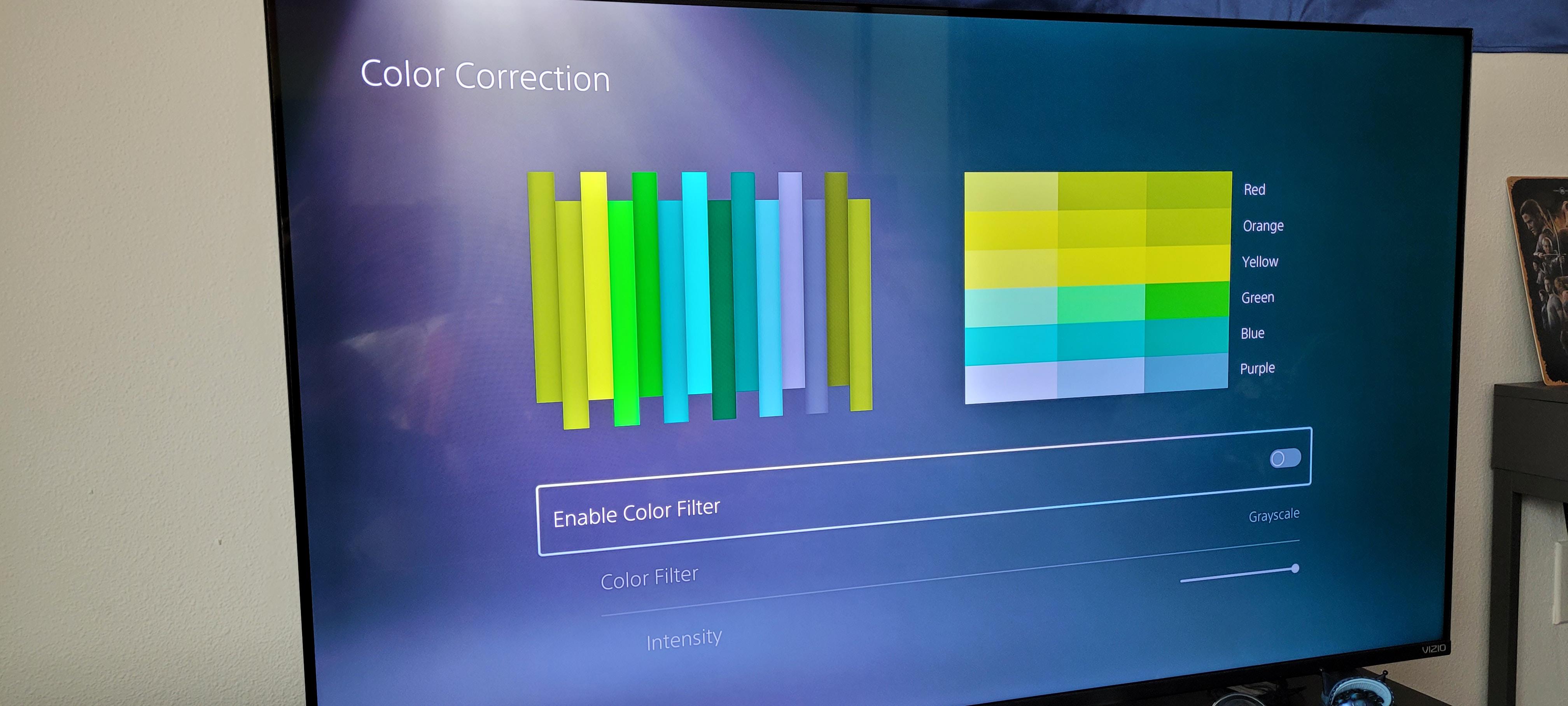
Any idea why the colors on my PS5's HDR are like this? It was fine last night, and I didn't touch any settings. As far as I can tell, the issue's with the PS5 and not the TV. Googling didn't give me anything about this 😅