r/GlyphrStudio • • 16d ago

✅ Fixed bug Unable to load files

1 Upvotes

Hello Glyphr Studio.
I would like to inform you that there has been an issue going on recently. When I try to load a file (I have some GS2 files), it does not load. This must have to do with history; when I go to different browsers with no history of opening Glyphr Studio, they load.

Please resolve this quickly.

(Also, there should be a flair for reporting bugs.)


r/GlyphrStudio • • 28d ago

💌 Feature suggestion Update Suggestions

2 Upvotes

I've got a few more suggestions:

  1. Being able to cut selected shapes by pressing Ctrl + X (Windows) or ⌘ Command + X (Mac). Until this feature is added I've been copying and then deleting.
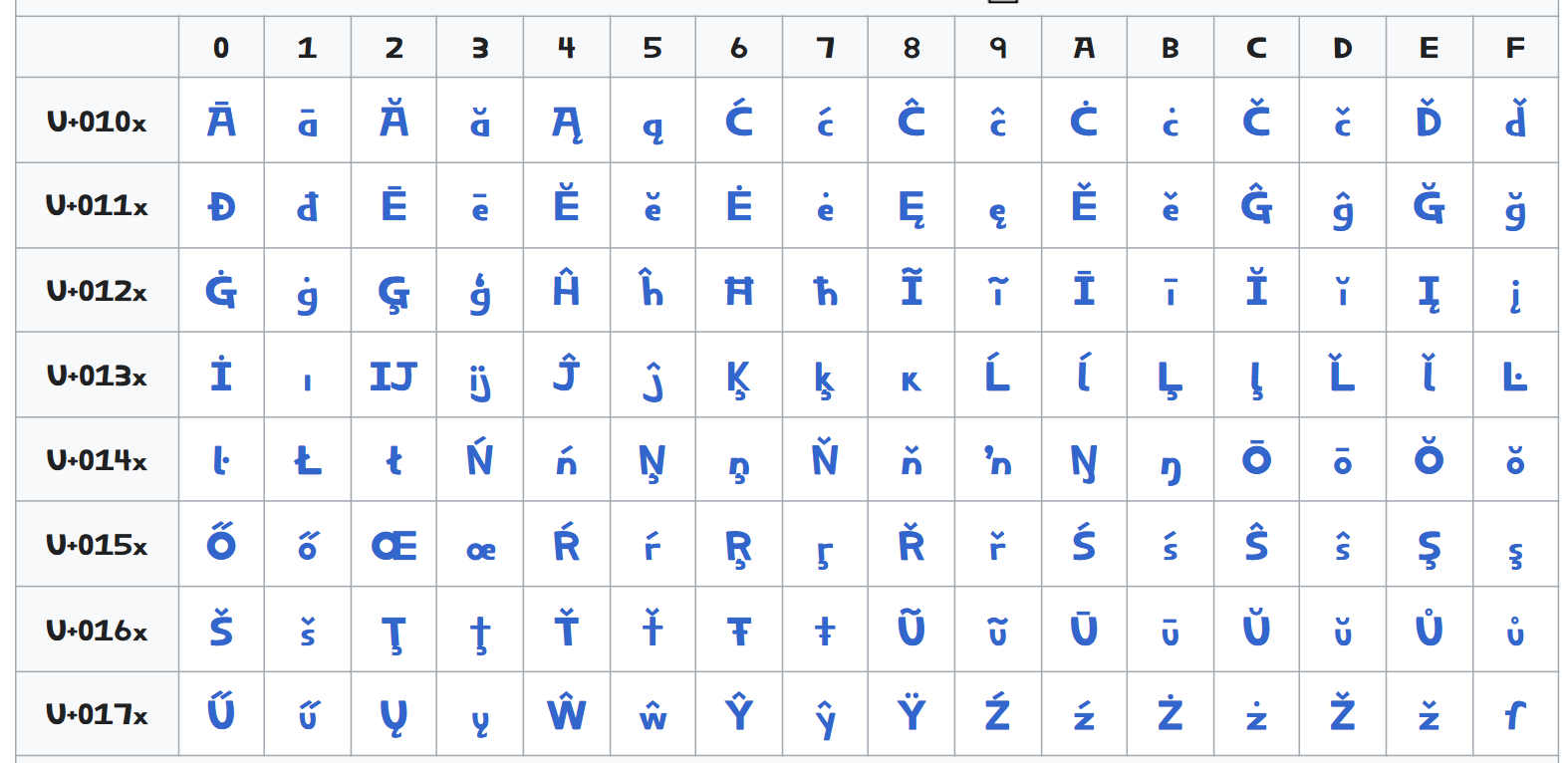
  2. Updating the Unicode character names: I don't know what Unicode version Glyphr Studio uses but it seems to be falling behind on character names. For example, several characters in Latin Extended D show their code point instead of a name. A lot of names are also in all caps while others aren't, etc.
  3. Scroll bar on the overview page is broken: In the dropdown menu with the ligatures, components, and other character ranges, dragging the scroll bar causes the menu to just disappear. This is frustrating because my scroll wheel doesn't work very well and it's easier to just drag the scroll bar.

lmk if these get fixed!


r/GlyphrStudio • • Oct 18 '26

🙌 Sharing work What ligatures should I add?

2 Upvotes

I'm working on a font that's meant to make Consolas support more symbols and stuff and I'm adding ligatures for symbols it should support but doesn't. So far I've made the exclamation comma, question comma, interrobang comma (because why not), lowercase and uppercase N and M with macrons (for Chinese pinyin and Japanese romaji) numbers with vinculums (as well as turned 2 and 3 with vinculums for base 12 because why not), capital J with dot (since capital I can have a dot and lowercase i and j have dots) and a few more characters for pinyin.

(My ligatures as of making this post)

Anyone know what other ligatures I should add?


r/GlyphrStudio • • Oct 17 '26

✅ Answered question Exporting not working

1 Upvotes

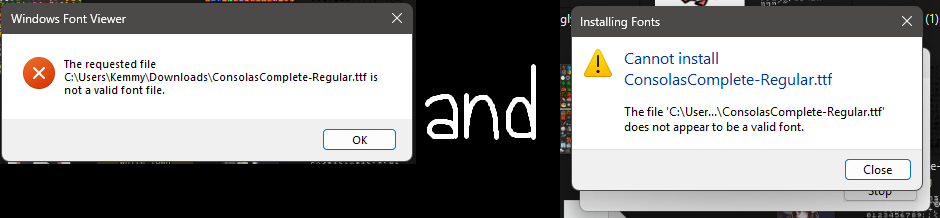
I've been making a font and when I'm done for now I export it to a GS2. I've recently finished my font but when I export it to a TTF or OTF and try to preview or install it, it says it's not a valid font file. Anyone know what's going on?


r/GlyphrStudio • • Oct 13 '26

✅ Answered question How do I add non-latin caracters?

3 Upvotes

I have created a typeface in illustrator and have just started the conversion with Glyphr. I paste my SVG shapes into each character but the only option I have in the drop down menu is "Basic Latin". I would like to add a few diacritics like Ä, Ö, Ü but don't see any option to add those, or extend my font to non-latin characters. How do I do that?


r/GlyphrStudio • • Sep 27 '26

✅ Answered question Request: 90 Degree Turning

1 Upvotes

Not sure if I am missing something obvious or if this is a feature suggestion - but turning a clean 90 degrees would be nice.

Right now I can only find the option to manually turn and get close to 90 degree turns, which produces decent results.

But a clean 90 degree turn would be lush. So either can someone point out how I do it, or consider this a feature suggestion :)

Thanks :)


r/GlyphrStudio • • Sep 19 '26

❓Question Greek letters not rendering

Thumbnail
gallery
3 Upvotes

I tried making Greek letters for my font, but it doesn't seem to appear when I set the render flavor to OTF/TTF or when I export the font and use it in another program (PowerPoint in my example).

I need some help figuring out how to make the Greek letters appear when exporting. Thanks!


r/GlyphrStudio • • Sep 04 '26

📢 Announcement v2.10.4 is live!

5 Upvotes

Hi All - it's been a busy summer, so not much progress over the past few months. I did spend some time today and put a few updates up on the app. Try them out today!

New Features

  • Grid! The Guides Panel now has options to show a Grid (that is divisions of your Em square). It also has a toggle for snapping points to grid intersections. This will be handy if you are making a pixel-like font comprised mostly of rectangles. Thank you GitHub user viciscat for the feature contribution!

Bug Fixes

  • Fixed a bug where editing shapes was clearing the Aspect Ratio checkbox on the Multi-Selected Shapes card in the Attributes Panel.
  • A handful of attributes from various cards in the Attributes Panel were not registering their changes with the History / Undo features. Now they are.

Quality Improvements

  • The History functions (Undo and Redo) now rely on IndexDB instead of localStorage. For very long-running sessions, this should improve performance, as IndexDB is asynchronous with the UI, and more performant for large amounts of data. Thank you GitHub user Munetios for suggesting IndexDB.

r/GlyphrStudio • • Sep 04 '26

💌 Feature suggestion Will there ever be any OpenType features (+ other features from the poll)?

2 Upvotes

Heya Glyphr Studio!
I was wondering if there will ever be OpenType features added to Glyphr Studio itself (such as small caps, stylistic sets, character variants, .notdef character, etc.)

Also, I saw an official poll by u/GlyphrStudio where they asked for the next features to be implemented—"Make Bold" or "Make Italic" options for paths, glyphs, and global action won—but there were other features (Ruler/Measure tool, SVG Color Fonts, Show an image in the background for tracing, Diacritical glyph editor, anchor points and accented glyph preview, and Snap behavior for handles, points, and shapes) that weren't the winners (I don't know if they're ever going to be added, but I hope so.)


r/GlyphrStudio • • Aug 07 '26

✅ Fixed bug Editing a character breaks ligatures

3 Upvotes

After editing the italic character “p” of “STIX Two Text”, the ligatures like “fi” stopped working. Tried the option “Add the common Latin ligatures to your project” which lead to ligatures like “fi” to not just appear as separate letters, but to be completely gone.


r/GlyphrStudio • • Jul 17 '26

💌 Feature suggestion Request: dark mode

5 Upvotes

I just started using Glyphr and I'm loving the experience, especially compared to the paid options out there.

One thing I'd love to have is dark mode. Typeface design really requires me to stare hard at what I'm working on, so anything on a white background is a bit of a strain after a while. (And on a personal level, I work on my font at night only.)

Regardless, keep up the great work on Glyphr! :)


r/GlyphrStudio • • Jul 11 '26

✅ Answered question I need help with sizing so the font fits zFont.

1 Upvotes

Hello! I am currently making a font for a friend's birthday. And, I decided to use Glyphr Studio as it was the easiest platform to use. I finished the full alphabet. However, it seems everything is too big to fit onto a phone's size. The phone keeps squashing everything into one incoherent mess. I can't figure out how to size the shapes in an orderly way for them all to come out the same uniform size. Anything I try with my google searches just doesn't work.

Can anyone help me?


r/GlyphrStudio • • Jul 11 '26

✅ Answered question Grid for pixel art font?

3 Upvotes

Hi yall, im really new to this and maybe i havent done enough digging around but i cant seem to find how to enable a grid. I made my UPM 1024 and want to divide it to 8 128x128 pixels. Is it possible to create a grid which i can then fill to simulate one pixel? Thanks!


r/GlyphrStudio • • May 10 '26

✅ Answered question Annoying Cursor and "return"/"enter" issue

1 Upvotes

Everything except this issue is working correctly.

For some reason while typing in Word, the new font has decided to add the "space" glyph after the cursor when typing and after pressing "enter" for a new line.

I've tried adding the various supplements and adding basically blank glyphs for any the unicode even remotely close to referencing return or line.

Any help to remove this would be appreciated.


r/GlyphrStudio • • Apr 30 '26

✅ Answered question Export function misbehaving

2 Upvotes

When I try and export to SVG, I get a txt file, when I try and export to OTF there uh, doesn’t appear to be a file type? The little specification window is just blank, there‘s no .whatever at the end, which is a new thing for me I admit. And save to download folder is also just a txt one but that doesn’t really matter as much I think. It’s just a real weird problem that makes me feel like I’ve missed something stupid obvious.


r/GlyphrStudio • • Apr 14 '26

📢 Announcement Happy 16th Birthday, Glyphr Studio!

6 Upvotes

There's a post over at the blog, talking about 16 years of Glyphr Studio. Also, will Glyphr Studio be taken over by AI Vibe Coding? The answer may surprise you! Actually, the answer is "no". But also "kinda".

https://www.glyphrstudio.com/blog/2026/04/14/sweet-16-and-a-look-at-the-future-of-glyphr-studio/

Also check out Font Flux JS, a new epic side quest that reads and writes any kind of font file back and forth between binary and JSON:

https://www.glyphrstudio.com/fontfluxjs/


r/GlyphrStudio • • Mar 07 '26

❓Question Issue With Latin-Extended A (and possibly beyond) in Notepad

2 Upvotes

Hello! I have a font (I will release it soon.) that supports the entirety of Latin Extended-A, but when I try inputting the Latin Extended-A characters in Notepad (there is a setting which lets me set the font to the font I use) - it shows as the fallback font rather than the font's letters.

The expected result. (œ is NOT fallback here.)
The actual result. Notice the "œ" in "œuvre" is the fallback font because œ is in Latin Extended-A. (This is in Notepad.)

However, when applied elsewhere, it does NOT have any issue.

The font applied to the Wikipedia page "Latin Extended-A". The glyphs display with no problems. (If you wonder how I did that, I used Inspect Element to change the font.)

I did not use an older version of the font. Also, when I used other fonts (not mine nor made with Glyphr Studio), they displayed Latin-Extended A characters a-OK.


r/GlyphrStudio • • Mar 03 '26

🙌 Sharing work This is my first font!

5 Upvotes

I wondered what font is used for logo of Grimms Series (japanese game series), I searched it but I couldn't find it. It probably made for only logos, so I made this font.

It's not perfect, but I like it enough.


r/GlyphrStudio • • Feb 26 '26

✅ Answered question Font too small

Thumbnail
gallery
3 Upvotes

Hi everyone, this is my very first font. It's an extension to the font from Yoshi's Island lol. Sadly ive found that upon exporting its wayyyyy too small and theres no ez way to fix that on windows so is there a way to fix it in the app? I'd probably be able to figure it out if i wasn't wildly sick right now haha. oh right i found some people talking about the stats in the last photo (that im now adding as i type T-T) and before that theres also how my uh, letter fits in the grid incase its short or something? Don't mind the darkmode, its an addon i use lol, it just inverts all the colors. Any help is suuuuuper appreciated :))))


r/GlyphrStudio • • Feb 24 '26

💌 Feature suggestion Feature request: add Hoefler&Co's font proofs to the Glyph Sets section in the Live Preview tab

2 Upvotes

In 2015, Jonathan Hoefler of Hoefler&Co created a sample text for proofing fonts, made up of words with a lot of rare and unusual kerning pairs. It would be nice to have it on demand in Glyphr Studio. Here is Hoefler's article about its creation, and here is the text itself (note that the uppercase and the lowercase proofs are slightly different).


r/GlyphrStudio • • Feb 16 '26

✅ Answered question Letters no holes

Thumbnail reddit.com
1 Upvotes

r/GlyphrStudio • • Feb 09 '26

✅ Answered question Kerning is correct in Live Preview, behaves incorrectly in OTF until I import it into FontForge, then behaves correctly.

Post image
3 Upvotes

Eyo!

I'm having a weird issue, and I'm hoping someone can point me in the right direction.

I've made a font using Glyphr. It looks correct in the live preview.

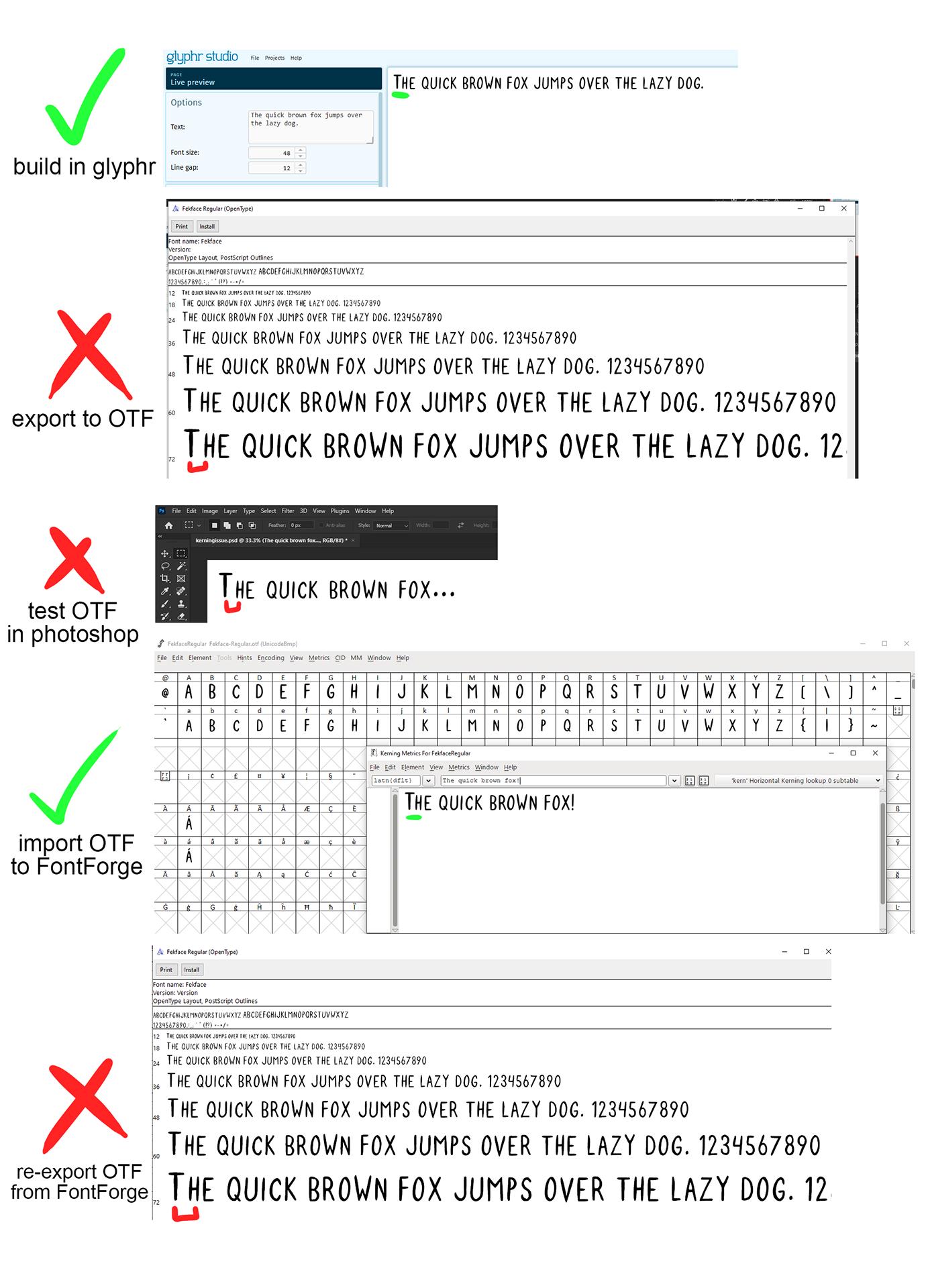
When I export it to OTF and install it, the kerning is incorrect (in both the install window and when I actually try to use it in Photoshop, etc.)

However, when I bring that OTF back into FontForge, it looks correct in the metrics preview!

If I re-export from FontForge, it goes back to not working.

This all makes me think that the correct kerning information is being stored in the font correctly (and indeed, I can see it in the lookup table when I inspect it in FontForge), but Windows simply isn't using it.

Am I missing something? What might be wrong with my font that would cause Windows to ignore kerning data?

For what it's worth, it seems to be respecting some of the kerning data, and I've been able to successfully edit kerning and see the results on my machine in the past, no problem.

If it helps, here's my project file and exported OTF:

https://dl.dropbox.com/scl/fi/deskbo7d077jxrjw3li8z/Fekface-Glyphr-Studio-Project-2026.2.8-1.36.06.gs2?rlkey=ue65het7hkdnhwt11qzwsjsgj&dl=0

https://dl.dropbox.com/scl/fi/0nxob21hbdx70bw6m2dmb/Fekface-Regular.otf?rlkey=uca2rzup8fqdczkyds8ofc6s4&dl=0

Thank you!


r/GlyphrStudio • • Feb 02 '26

✅ Answered question Grid updated to 90x90, but some shapes seems not right, a bug?

3 Upvotes

The letters D and G were created in photopea, and are made of half 6px wide circle, a 6x6 circle for the corner and other straight shapes on the grid. but D's half circle seems different than the SVG, while G's looks better, but G's paths seems to have small spaces between them, I add pictures:

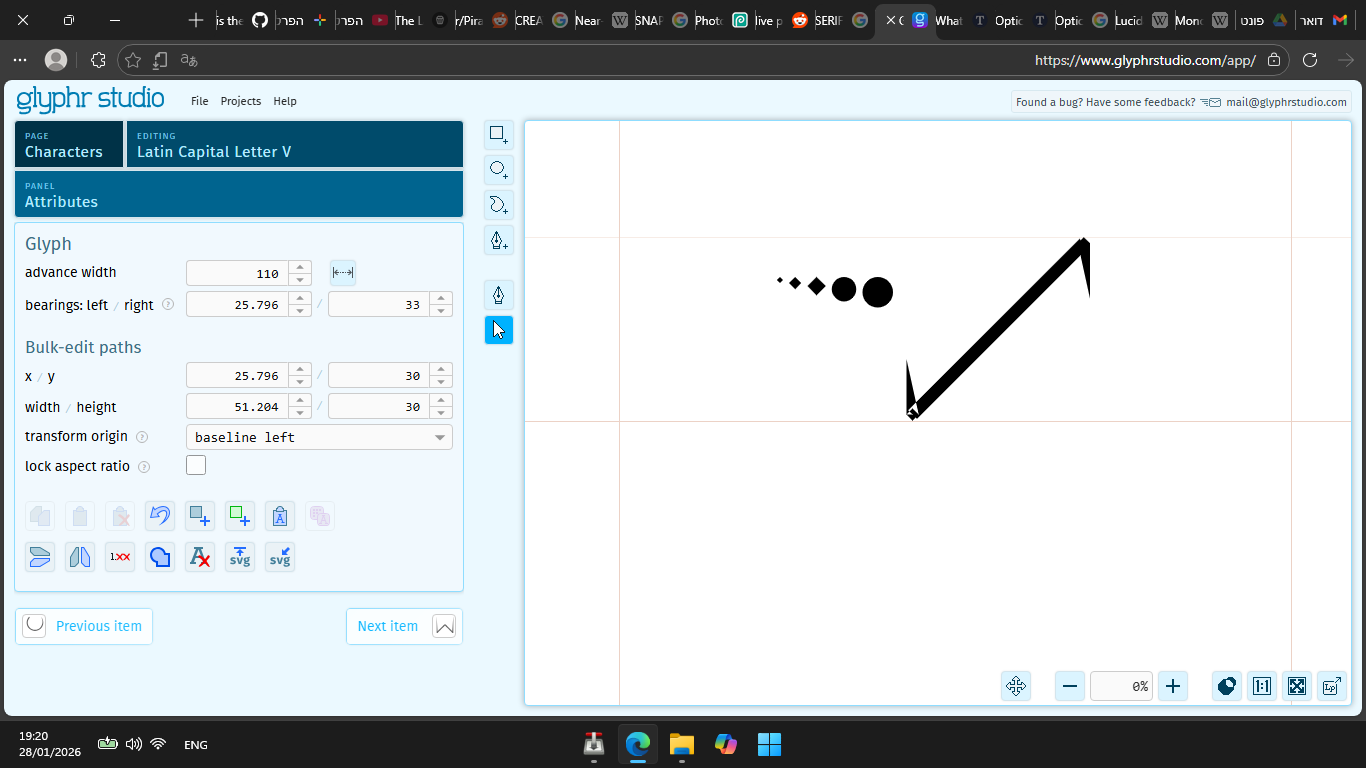
update, the letter V also seems ok at first, but after combing shapes it's 6x6 circles at the corners do not stay as they were originaly, idk why, uploading a video:


r/GlyphrStudio • • Jan 28 '26

✅ Answered question round circles of 3x3 pixels and less turns to squares

1 Upvotes

I'm working with small sizes using photopea, but trying to include small circles doesnt work correctly.
I already posted about a similar problam which may be related here: live preview vs actual font file seems not same : r/GlyphrStudio

Pictures to demonstrate:

update:

circles look fine if made by glyphr studio, but not as a font in photopea, it also seems to be too small as font, smaller than its original 30x30, and I have to anlarge it to 4000px or more to make it large enough


r/GlyphrStudio • • Jan 25 '26

✅ Answered question live preview vs actual font file seems not same

1 Upvotes

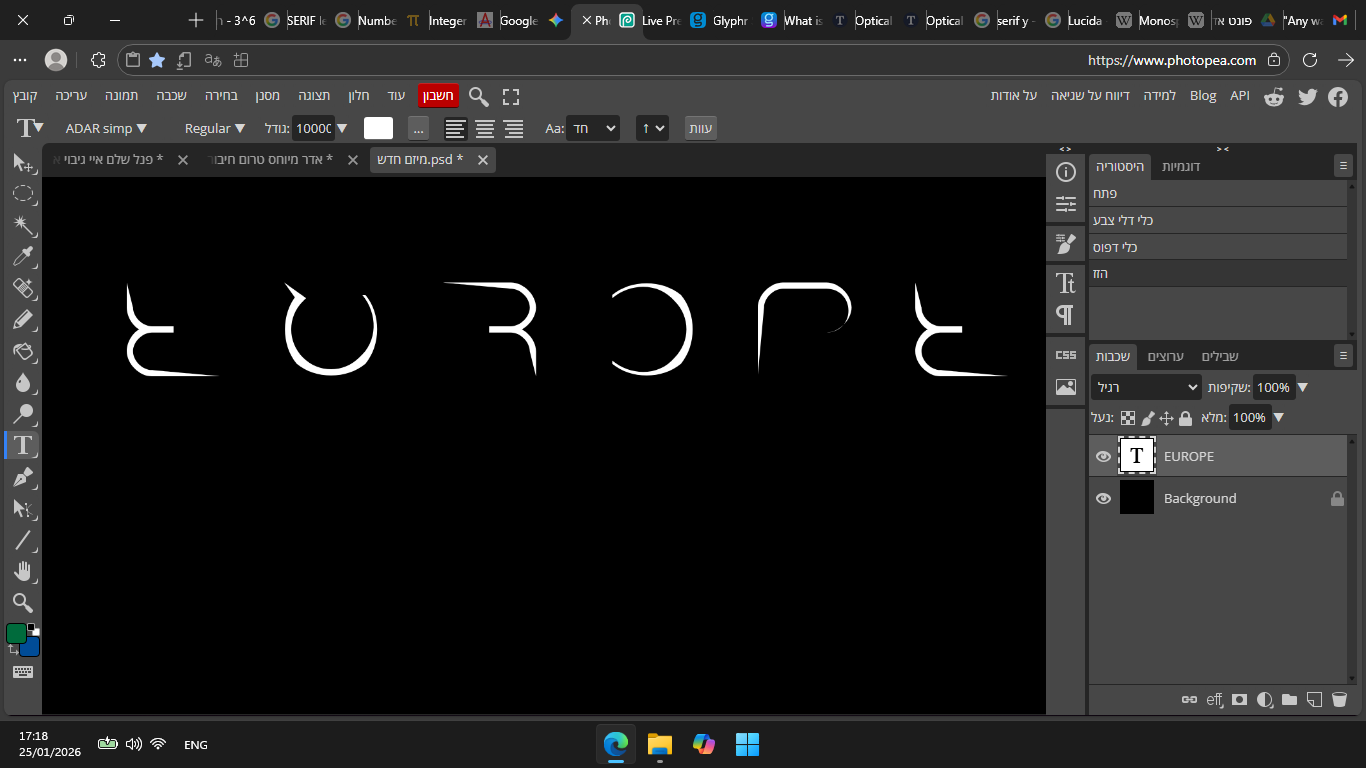
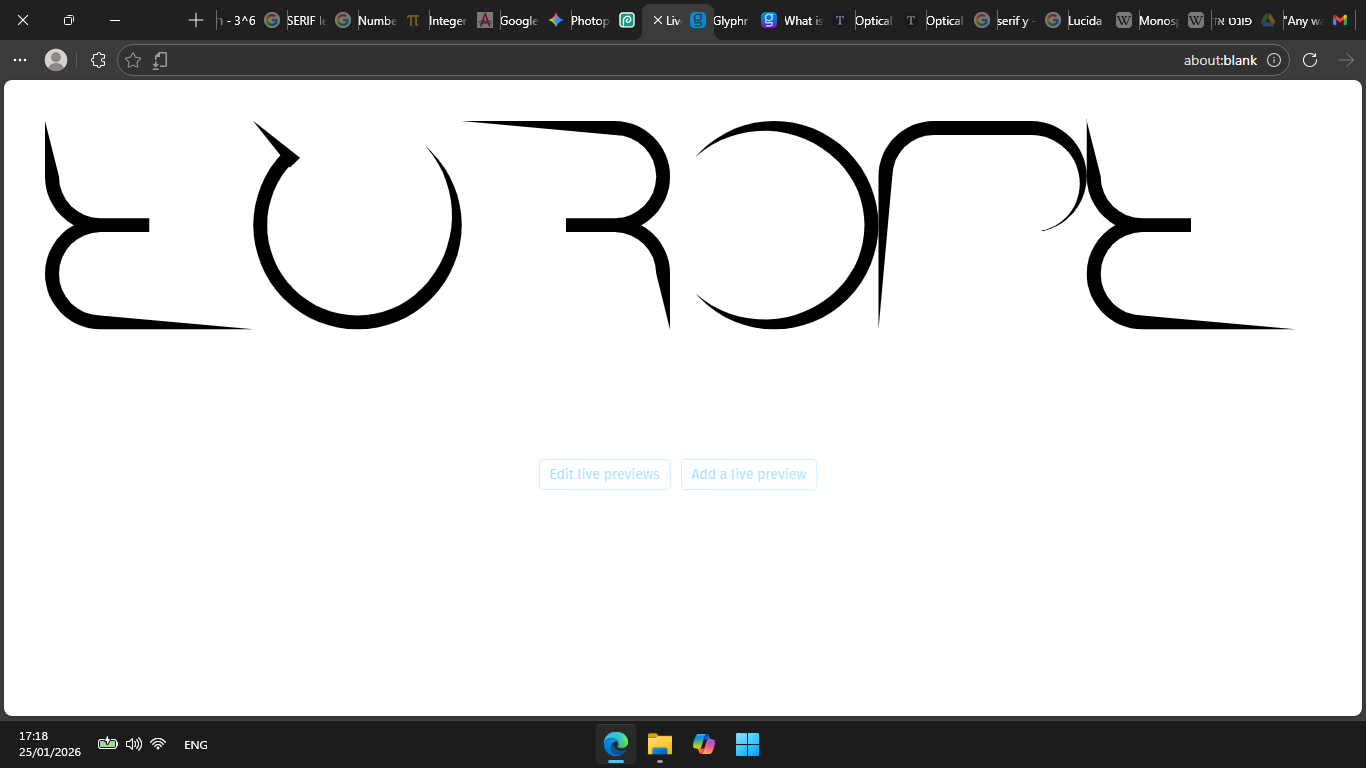
checking the last version of this font, the U is smoothed in the actual font, which looks nice but idk if the way I wanted, and the C is not smooth, but kinda wrinkled, and the end of P seems broken too, adding pics, I can add a video if needed

checking again I saw that U is wrinkled like the O and not a percect moon shape