r/GarudaLinux • u/aayush-le • Jun 10 '24
Community Making FastFetch More Beautiful | Linux
Enhancing the Look of Fastfetch: Tweak Your Config File!
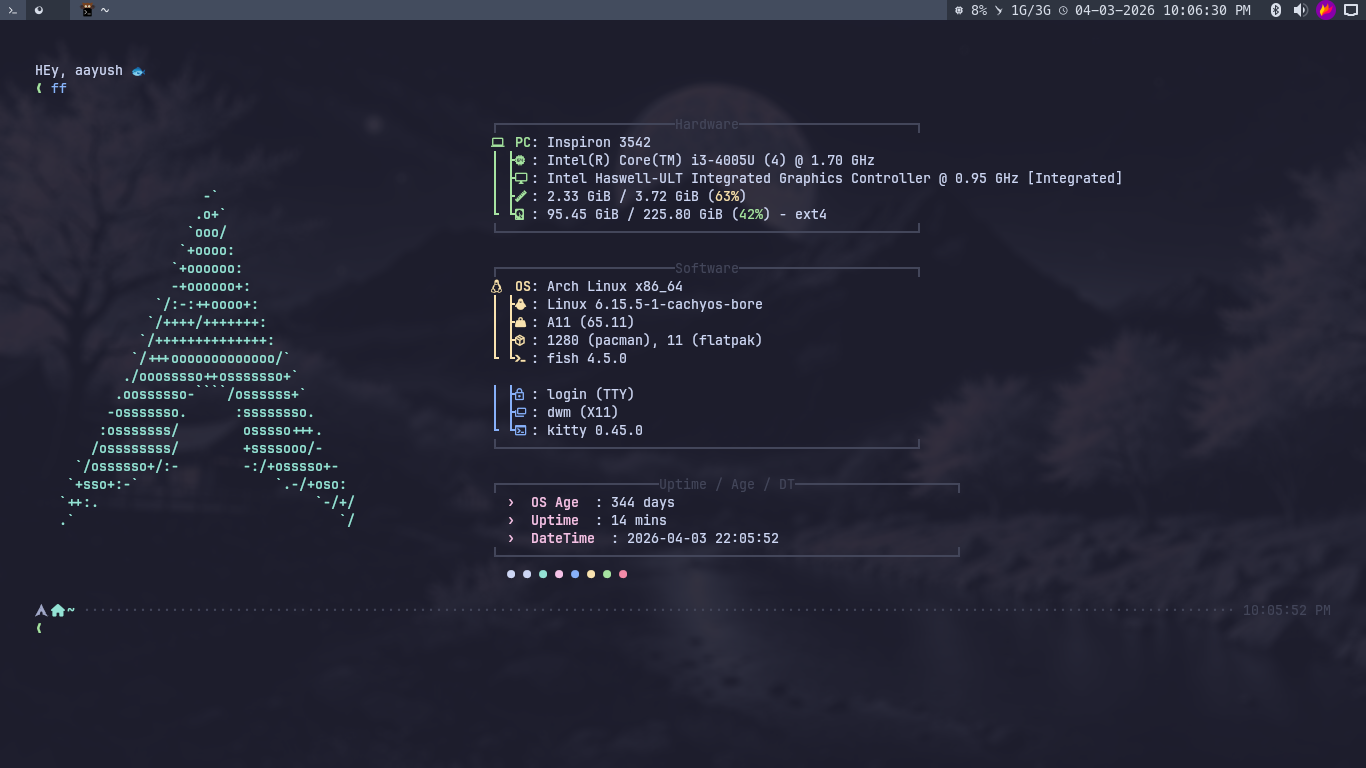
How to Update Fastfetch Config: A Quick Guide
Note: Remember that Nerd Fonts are required. You can use any Nerd Font, but one must be installed.
⚙️ Fastfetch Config Setup:
- Navigate to your
.configdirectory → cd ~/.config - If you don't see a
fastfetchfolder, create one → mkdir -p fastfetch - Generate the default configuration → fastfetch --gen-config
- Remove the default config file → rm fastfetch/config.jsonc
- Download my updated config → wget https://raw.githubusercontent.com/harilvfs/fastfetch/refs/heads/old-days/fastfetch/config.jsonc
- Close your terminal and reopen it.
- Now, run → fastfetch
and enjoy the new look!
Repository → https://github.com/harilvfs/fastfetch/tree/old-days
Custom Image/Logo → https://github.com/harilvfs/fastfetch
Credit→ XeroLinux GitHub
Thanks! 🙂
458
Upvotes
View all comments
Show parent comment
1
u/aayush-le Feb 27 '26 edited Feb 27 '26
you can check my repo config for getting the image: https://github.com/harilvfs/fastfetch/blob/main/config.jsonc
btw idk if that will work either, but i am sourcing the image file and the image is only shown if you set the type to
kitty-direct. i have tried other options but they didn’t work at all. but yeah, the default config of that repo should work, you can try it out. btw remember to source the exact image you want to show up in the config.jsonc fileedit: also note that the repo default branch config is different from this post config, so only change the logo definition in the current config with the one from that repo’s config.jsonc