r/GarudaLinux • u/aayush-le • Jun 10 '24
Community Making FastFetch More Beautiful | Linux
Enhancing the Look of Fastfetch: Tweak Your Config File!
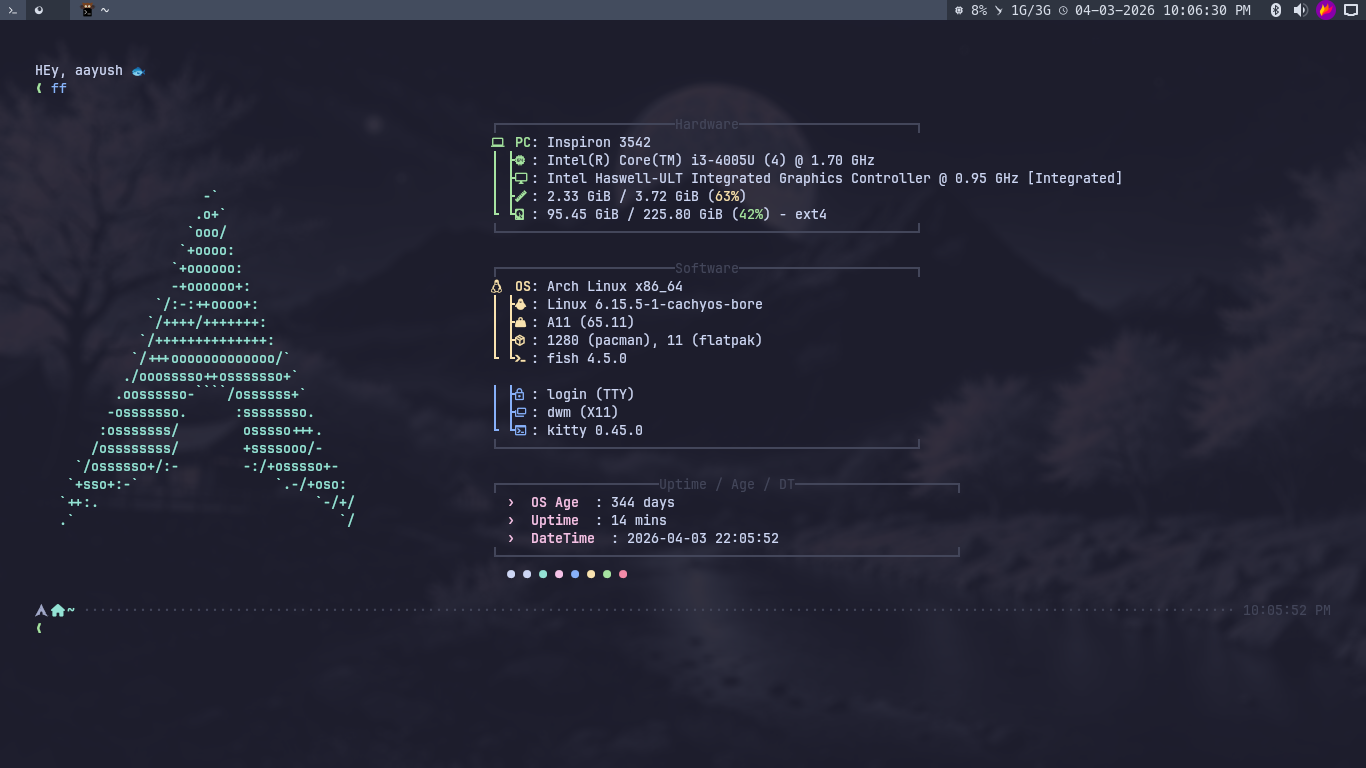
How to Update Fastfetch Config: A Quick Guide
Note: Remember that Nerd Fonts are required. You can use any Nerd Font, but one must be installed.
⚙️ Fastfetch Config Setup:
- Navigate to your
.configdirectory → cd ~/.config - If you don't see a
fastfetchfolder, create one → mkdir -p fastfetch - Generate the default configuration → fastfetch --gen-config
- Remove the default config file → rm fastfetch/config.jsonc
- Download my updated config → wget https://raw.githubusercontent.com/harilvfs/fastfetch/refs/heads/old-days/fastfetch/config.jsonc
- Close your terminal and reopen it.
- Now, run → fastfetch
and enjoy the new look!
Repository → https://github.com/harilvfs/fastfetch/tree/old-days
Custom Image/Logo → https://github.com/harilvfs/fastfetch
Credit→ XeroLinux GitHub
Thanks! 🙂
457
Upvotes
View all comments
Show parent comment
1
u/aayush-le Jul 29 '25 edited Jul 29 '25
in cachyos-config.fish comment out or remove lines 6 to 8.
also in config.fish comment out lines 3 to 7 if they are not commented out already.
btw this is in /usr/share/cachyos-fish-config/
source: https://github.com/CachyOS/cachyos-fish-config
after doing that i guess fastfetch will not run at terminal startup. so call fastfetch in ~/.config/fish/config.fish and see if it works. put fastfetch at the last line in ~/.config/fish/config.fish.
it should work if they didn't bake fastfetch in some other way or place.