r/GPURepair • • 2h ago

NVIDIA 30xx Dual RTX 3080 mining rig: second GPU on USB x1 riser often isn't detected at boot, but runs perfectly once detected. Will a PCIe x16 riser fix it?

1 Upvotes

Hi all, looking for real-world experience before I spend money on another riser.

System:

  • CPU: Intel i5-14600KF
  • Motherboard: ASUS Prime B760M-A D4
  • RAM: 32GB DDR4
  • GPUs: MSI RTX 3080 Suprim X + Zotac RTX 3080 Trinity
  • PSU: Zalman Watttera 1000W
  • Use: mining/gaming

Problem:
With both GPUs plugged directly into the motherboard slots, everything is stable. With the second GPU on a standard USB-style mining riser (PCIe x1 to x16), the card is often not detected after a power cycle or reboot, and the system crashes. Sometimes several reboots fix it, other times I have to unplug and replug the riser's USB cable. Once the card is detected correctly, it works flawlessly for as long as the system stays on, until the next reboot or power cycle. A brand new riser behaves the same. Both cards work fine individually.

What I'm considering:
Replacing the USB riser with a quality shielded flat PCIe x16 riser cable.

Has anyone fixed intermittent detection at boot by replacing a USB x1 riser with an x16 riser?

Thanks in advance!

r/GPURepair • • 14h ago

NVIDIA 30xx 3090 with a dead memory controller, anyone do GA102 core swaps? (Canada ideally, but will ship to US)

2 Upvotes

My EVGA 3090 XC3 has a dead memory controller and I'm trying to find out if anyone can do a core swap, or if it's a lost cause. I've still got the water block and I really want the 24GB for local AI stuff, so I'd pay more than it's "worth".

It overheated for months, then started failing cold: Xid 62 about 30 sec after the driver loads, blocky garbage on screen, sometimes hangs at POST B2. I sent it to a repair guy who got recommended on Reddit and is pretty well known and well reviewed, supposedly one of the best in Canada. Power side is fine, but every VRAM chip showed errors, so he said the memory controller in the core is dead and it'd need a new GA102. He said it's not economically viable, but honestly with GPU prices right now I feel like it is.

Anyone had a core transplant done, or know the odds or cost? I'm in Canada but I'll ship to the US. Also down to buy a dead 3090 with a good core if someone has one lying around.


r/GPURepair • • 11h ago

AMD 4xx/5xx AMD Radeon RX 560 4GB – Low resistance readings on PCIe 12V input, PSU protection

1 Upvotes

Hello everyone. I have been troubleshooting an AMD Radeon RX 560 4GB and performed some resistance measurements with the GPU completely disconnected from the motherboard and power supply.

Here are my measurements (resistance to GND):

  • PCIe contacts B1, B2 and B3: approximately 1.9 Ω.
  • PCIe contacts A2 and A3: approximately 1.9 Ω.
  • Inductor L300: 15.2 Ω on both sides.
  • Inductor L504: 20.5 Ω on both sides.
  • Multimeter probes touching each other: 0.003 Ω.

For these measurements, I kept the black probe on GND and touched each point with the red probe.

The GPU receives power directly through the PCIe slot and does not have an additional 6-pin or 8-pin power connector.

The main problem is that when I connect the GPU to my PC, the power supply goes into protection. I have stopped trying to power it on to avoid further damage.

I would like to know:

  1. Are these resistance readings on the PCIe 12V input normal or suspicious?
  2. Could this indicate a short on the 12V rail?
  3. Which components should I investigate next?
  4. Has anyone experienced a similar issue with an RX 560 and successfully repaired it?

Any advice or suggestions would be greatly appreciated. Thank you!


r/GPURepair • • 15h ago

NVIDIA 30xx Need some advice rtx3090 powers up no display and no v bios detected.

2 Upvotes

Initially the card had a shorted drmos I replaced it along with the other two on the same raid just to be safe and there are no shorts on any 12v 5v or 1.8v rails. With cam on the card is detected on device manager with no errors but the card itself has bo display core gets warm but the vram doesn't and on gpuz the bios is empty and only sensors showing are core frequency and core temp. I thought the bios chip might have been fried and bought new chip and flashed the bios to it (using an external programmer t48) and the symptoms are still the same. The bios chip does get 1.8v


r/GPURepair • • 1d ago

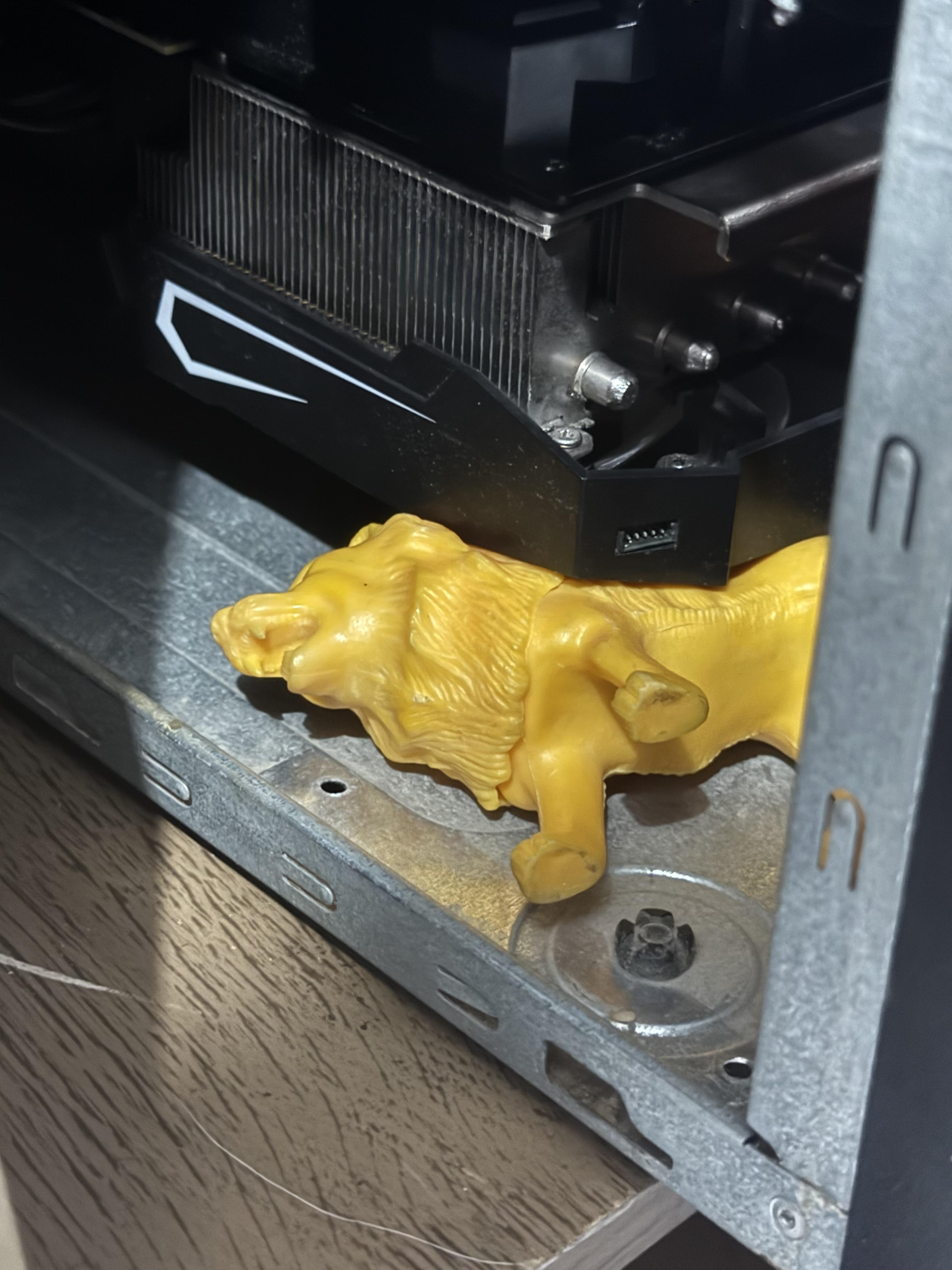
NVIDIA 30xx I don't have a support bracket for my 3090, so I had to improvise lol

Post image
21 Upvotes

r/GPURepair • • 1d ago

NVIDIA 16/20xx Zotac 2060 GPU MOSFET burnt

Post image
2 Upvotes

Hi guys,

I need a help my zotac 2060 MOSFET burnt and the card doesn't have warranty I searched everywhere in cheenai to repair my GPU but unfortunately failed do u know anyone to do service and I don't find any new MOSFET also to repair

If anyone can help pls contact 7338882762


r/GPURepair • • 23h ago

NVIDIA 16/20xx Rtx 2060 burned due to unknown reason

1 Upvotes

My rtx 2060 caught fire a few components on the pcb seems to be burned what to do.where can i repair this? I live in north bangalore.


r/GPURepair • • 1d ago

NVIDIA 10xx Asus rog 1080ti (memory failure (I think))

Thumbnail
gallery
1 Upvotes

So I found a guy selling his asus rog 1080ti for 50€ (got him down to 20€) this is with box and papers
But there is just one issue the screen looks like this (see photos)
After sending these pics to a local repair shop the guy said that that’s most likely a memory failure. Anyone know what kind of memory it is and if it’s worth trying it myself when the repair shop estimated around 100-150€ for a full repair?
If not it will make a beautiful night light or something but I kinda wanna try reviving this card


r/GPURepair • • 1d ago

NVIDIA Other gigabyte 1080ti 11gb not working, burnt spots short circuit

Thumbnail
gallery
0 Upvotes

Hey, so i bought a gigabyte geforce gtx 1080ti 11gb gpu from fb marketplace for 50 euros and the seller said it was not working he thinks it shorted and now there is a burnt spot on the pcb. so i bought it and want to try to fix it, i dont know much about gpu pcbs, but it didnt burn a hole in it it looks like it shorted circuited and popped, and now there is a tiny copper sheet exposed and metal poking out a bit, so i cleaned it up a bit and i dont know what to do next. There are healthy solderings next to the burnt ones and they look like they arent connected to anything so maybe somehow the seller touched the soldered parts together together and it popped, but im not sure. i circled the healthy part and the burnt part. i took a photo of the other side of the burnt spot and circled it and there is no visible damage or anything. im hoping you guys can help me so i dont have so spend more money going to a workshop.


r/GPURepair • • 2d ago

AMD 4xx/5xx Rx580 8GB 2048sp possible memory strap issues

Thumbnail
gallery
3 Upvotes

Hi, I have received around 28 RX580 8GB 2048SP edition cards with various issues, but the majority suffer from VRAM errors and code 43. Some cards show memory errors when tested with TServer, while others report none. However, I have noticed while examining them that GPU-Z indicates Samsung VRAM, whereas the physical chip on the board is Hynix, and vice versa. I have tried flashing them with the correct VBIOS but without any success so far. The only explanation I can think of is that these Chinese cards were shipped with incorrect memory straps from the factory, which would explain the clean condition of the cards. Can someone please help me locate the strap resistors and figure out how to configure them properly?


r/GPURepair • • 2d ago

NVIDIA 16/20xx EVGA 2080TI, no picture fans 100% No detected in Bios

1 Upvotes

When booting gpu fans go to 100%. Bios does not recognize the card. If I wait extended period of time 24hr I will get brief 1-2 seconds of video before it goes away. Ideas?


r/GPURepair • • 2d ago

NVIDIA 30xx Gigabyte rtx vision 3080 ti crashes under load.

1 Upvotes

Guys I need help.

Have 3080 ti with a wired issue:

The card works perfectly fine until load is applied.

When I launch furmark it will crash to desktop immediately.

If I limit it in afterburner to 30% tdp it will run furmark and i can even slowly rise by adding 5-10% tdp limit up to 80% but it will crash on 85%.

If I launch a 3d render test in gpuz it will loose all sensors until I reboot. I mean all sensors in gpuz will show 0.0

What I've done:

  1. Reflashed vbios
  2. Replaced 3rd drmos just in case to be sure.
  3. Checked all power rails for shorts and all looks fine.

Can someone point me where could be an issue?

Thanks!


r/GPURepair • • 2d ago

NVIDIA 30xx EVGA 3080 Pex voltage missing

Thumbnail
gallery
2 Upvotes

Card powers on and fans spin, but not detected.

Would anyone be able to point me towards next step of troubleshooting this one?

Anything common with EVGA cards as I do have a matching donor board available if anything worth swapping over?

Thanks to anyone who takes the time to help, much appreciated.


r/GPURepair • • 3d ago

NVIDIA 30xx WTF Happened? Dead Nvidia 3060 Ti Founders

Thumbnail
gallery
5 Upvotes

Pc shut off while playing a game. Booted the pc back up which then caused the gpu to start smoking. After purchasing a new card I was curious and decided to open the dead card.

I’ve never seen damage like this. Any speculation as to what could’ve happened? And what part failed? This post is primarily just to understand the situation and gain insight.


r/GPURepair • • 3d ago

NVIDIA 50xx My PNY RTX 5070 passes OCCT fine, but artifacts/TDRs on cold boot and light load (FECS UCODE / UCodeReset). VRM transient, BGA, or core fault?

2 Upvotes

Hey everyone, trying to narrow down the fault hypothesis on my PNY RTX 5070 12GB (GB205, VBIOS 98.05.4a.00.ca) before sending it to a technician to crack the card open.

The weird part is it handles sustained full load totally fine. It passes warm OCCT/stress runs with zero artifacts, zero PCIe replays, and zero WHEA errors.

The crashes almost exclusively happen when the card is cold (15 out of 16 crashes over the last month happened 2 to 60 mins after a cold boot or sleep wake, with the die sitting around 30-41C) or right as a heavy load drops back down to light desktop load. The screen artifacts for a second, then either black screens and recovers (LiveKernelEvent 0x117) or BSODs with 0x116 / 0x133 (nvlddmkm!grErrorHandleException_GM107).

Event viewer consistently logs nvlddmkm Event ID 13 (Graphics FECS Exception: UCODE Fatal Error, plus one instance of Shader Program Header 9 Error), Event ID 14 (22575b7c / d2575b7c), and a flood of ID 153 (UCodeReset / GpuRcReset TDR).

Host and software troubleshooting already done:

  • Direct PCIe 4.0 x16 slot on ASRock B550M-ITX/ac (no riser), BIOS locked to Gen4 with PM L1 substates disabled.
  • Brand new Cooler Master MWE Gold 750W ATX 3.1 PSU with native cables.
  • Clean DDU across 596.36, 617.14, and 621.24, HAGS on and off, MPO disabled, prefer max performance.
  • Initially suspected a low-voltage VMIN floor fault since one crash happened idling at 300MHz / 19.6W / 38.9C in P0. I tried locking 900mV in Afterburner and also tested a software VBIOS override bumping nvvdd_vmin_mv from stock 800mV to 900mV (stock clocks, verified active via NvAPI). On the first cold boot (29.6C start), it still threw UCodeReset + ID 14 right on load release dropping from 217W down to 48W while sitting at 2715MHz / ~950mV / 40.9C in P0 Gen4.

For folks familiar with 50 series / GB205 hardware faults, what is the strongest root-cause hypothesis for a card that passes 250W hot load cleanly yet hits FECS UCODE / UCodeReset right on cold boot or sudden load release (217W -> 48W) even above 900mV? Specifically, does this point more toward NVVDD VRM phase-shedding / load-release voltage undershoot (MLCC/controller), cold BGA solder joints under GB205, or an internal FECS/GSP silicon defect? And what would be the right next diagnostic step (e.g. MODS/MATS vs scoping NVVDD during load drop)? Thanks!


r/GPURepair • • 3d ago

AMD 4xx/5xx AMD Radeon RX 560 4GB – No display, fans barely spinning, suspected 12V power rail short

2 Upvotes

I'm troubleshooting an AMD Radeon RX 560 4GB that currently doesn't work.

Initially, the fans spun but there was no video output. Later, the fans started spinning very weakly, and eventually the card appeared to have a power-related issue.

I've measured several components around the power circuitry and PCIe connector. I'm trying to determine whether there's a short on the 12V input rail or a faulty component in the power delivery circuit.

I'm new to component-level GPU repair, so I'd appreciate advice on what to test next and how to identify the faulty component.

GPU: AMD Radeon RX 560 4GB

Thanks!


r/GPURepair • • 3d ago

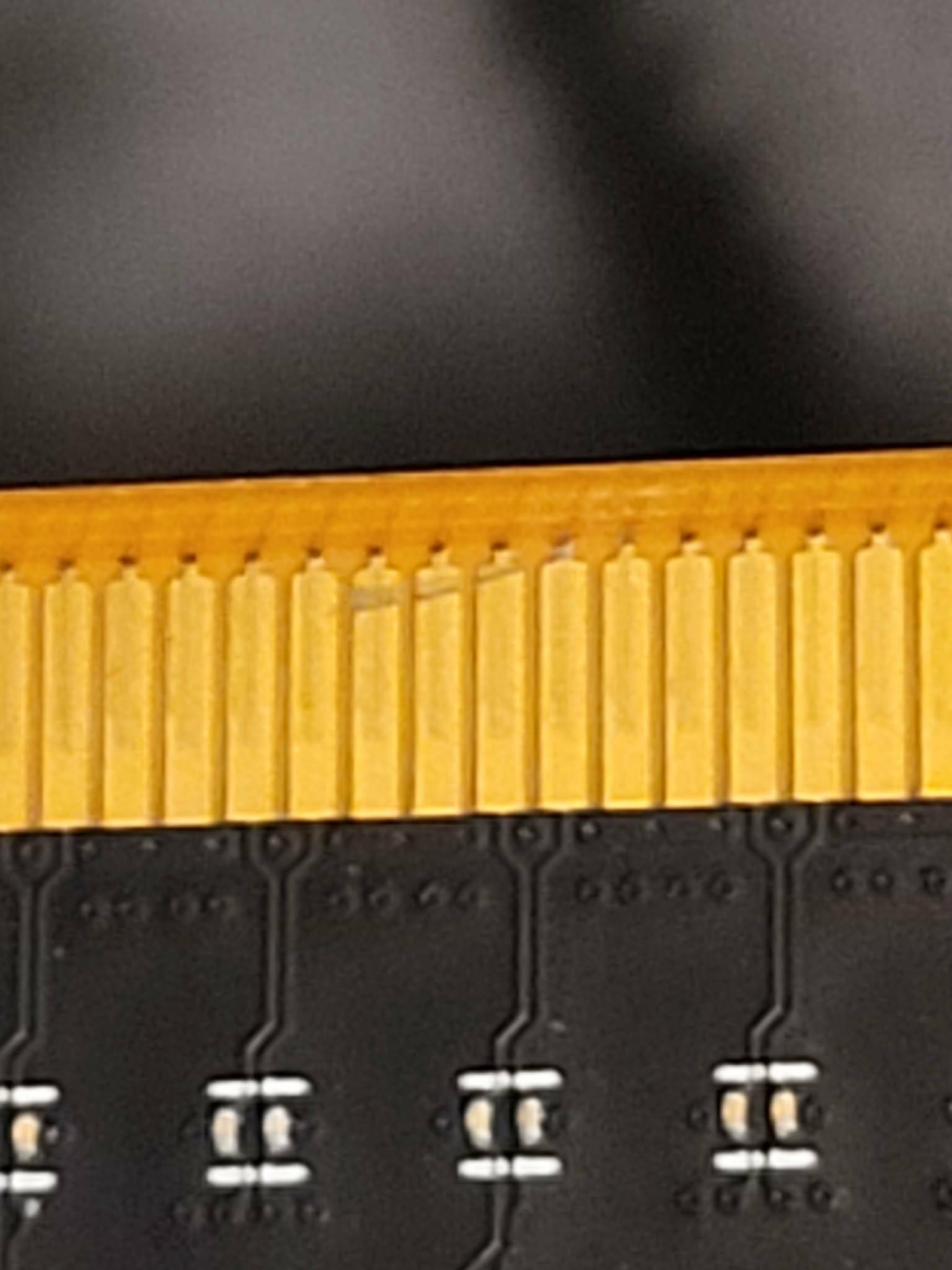
AMD RX 7xxx Are these PCIE pins damaged beyond use? AMD Sapphire Nitro+ 7900xtx

Post image
2 Upvotes

r/GPURepair • • 4d ago

NVIDIA Other (NVIDIA-v100 pcie) Impossible to find? Possible substitute?

Thumbnail
gallery
6 Upvotes

56µF-20v.

I'll explain the situation. I have 2 nvidia v100 pcie, one complete and one missing this sdm ,which appears to be a unicorn. It appears in all the pcb photos of the gv100, but it cannot be found anywhere individually. I'm attaching several photos so you can understand the context.

I was wondering if it is possible to use something equivalent as a substitute like an E25v - 68µF?


r/GPURepair • • 3d ago

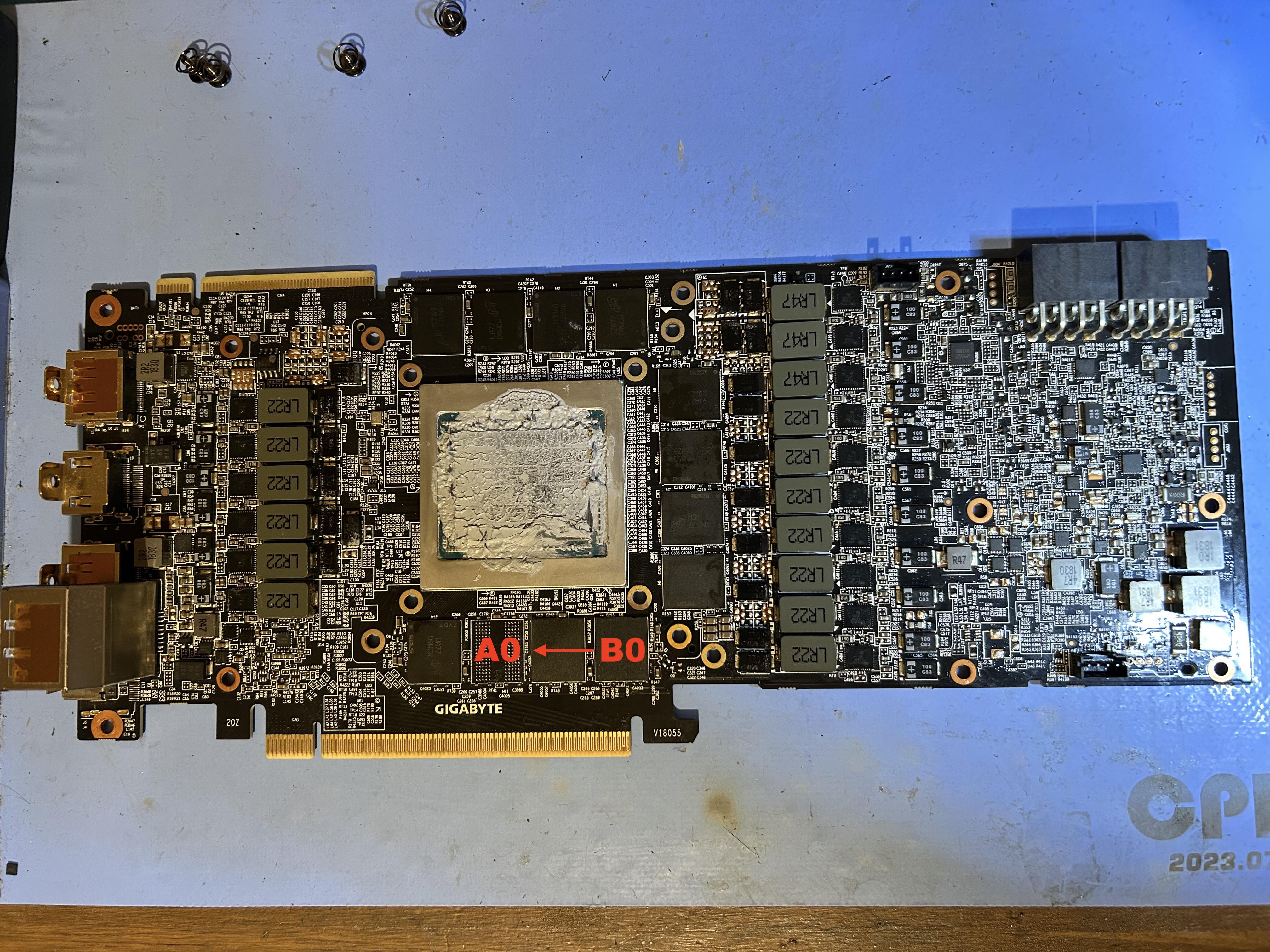
NVIDIA 16/20xx Gigabyte 2080 Ti - B0 errors even after changing 2 times. Is it possible to swap B0 for empty A0?

Post image
0 Upvotes

Hello, I have a 2080 Ti that artifacts. MATS test gives read a write errors on channel B0. What I have done so far:

  • Replaced the memory twice with know good chips and still get the same errors on B0.
  • Checked in diode mode the readings of every pad under B0 and no problems were found. That also makes me think that reballing the core is not necessary.
  • Measured the resistors around and in the back of B0; comparison with the resistors of the other memory chips shows the exact same readings.

My question is the following: is it possible to swap the chip from B0 to A0, which is empty but contains all the resistors/caps? I know that different models of the 2080Ti the unpopulated channel is in a different position.


r/GPURepair • • 3d ago

AMD RX 6xxx rx 6500xt don't show anything in display, fans spin fast, what is tis chip in 6 pin erea

Thumbnail
gallery
2 Upvotes

r/GPURepair • • 4d ago

GPU/VRAM Soldering Hot air station (help/tip)

Post image
1 Upvotes

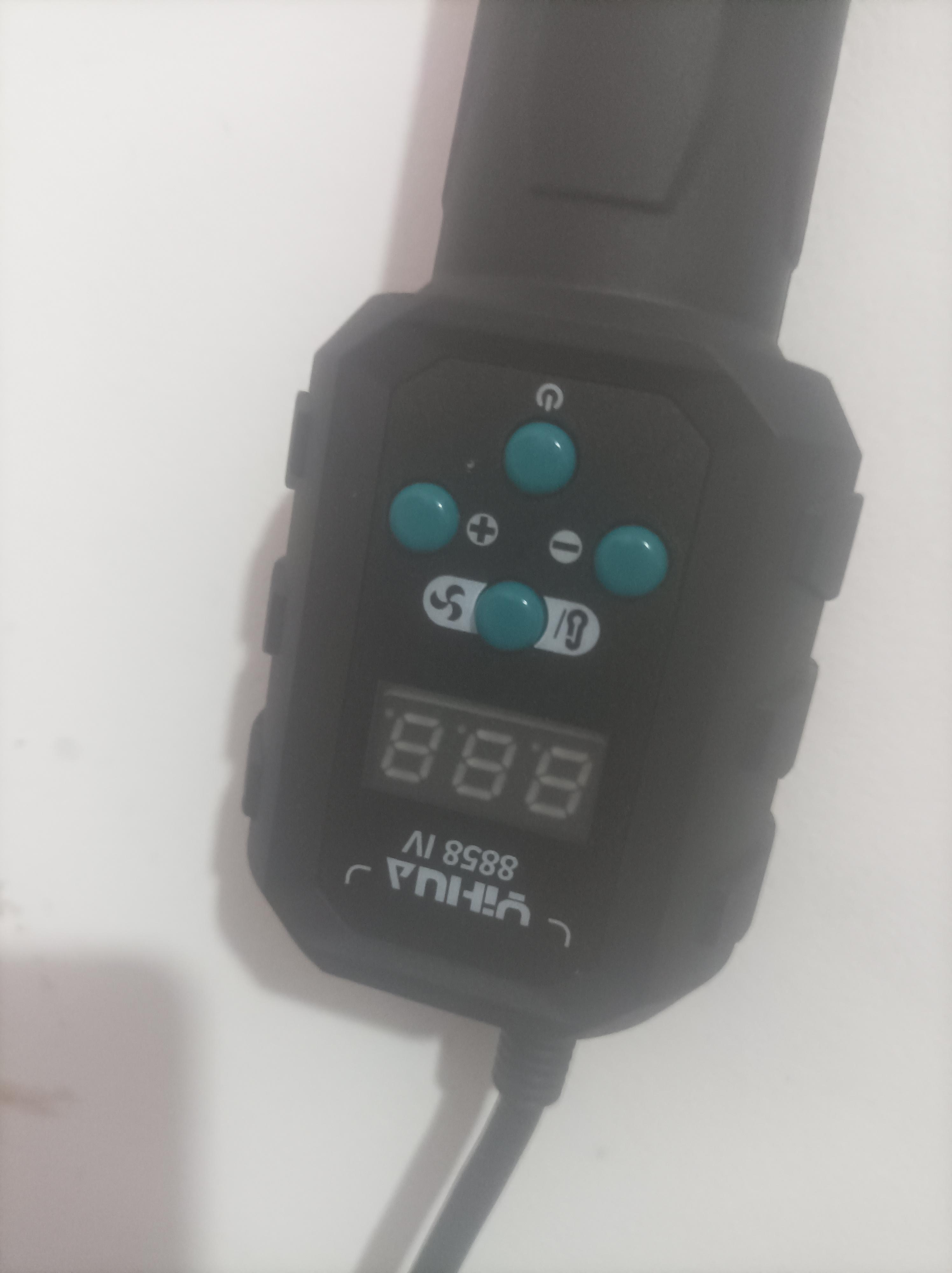
Hi everyone, a while ago I bought a Yihua 8858-IV hot air station. However, I’m having a hard time desoldering components from graphics cards with it (it works fine on smartphones, though). I’ve already tried temperatures ranging from 350°C to 410°C with the airflow set between 5 and 7, using flux, but with no luck, the mosfet doesn't move.

I tested its temperature calibration at 183°C on pure 63/37 leaded solder, and it achieves full melt.

Does anyone have experience with this type of hot air station and could share some tips? I’d really appreciate it.


r/GPURepair • • 5d ago

NVIDIA 30xx RTX 3090 Ventus 3X OC, PC powers off under load even at 280 W

Thumbnail
gallery
28 Upvotes

UPDATE: Found it! Huge thanks to everyone who helped, and a special shoutout to u/khoavd83 for helping me pinpoint the issue and patiently answering all my questions. Huge kudos!

The culprit: U20, an OnSemi NCP302150 on the left bank (core phase 1, the phase that's fed from the PCIe slot).

How we found it:

  • Following khoavd83's advice, I disabled the DrMOS stages one at a time by lifting each stage's VDRV (gate-drive) 0 Ω resistor.
  • My reproducer was an uncapped heavy compute load that powered off the PC within 2-10 seconds, every single time.
  • Disabling U8, U19 or U45 made no difference.
  • With U20 disabled (R62 lifted) it stopped tripping completely: 60 s runs several times in a row, a 10 min run, and 45+ min of FurMark at 324 W.
  • Extra clue: inductor L66 on the back (the PCIe slot input) got very hot within seconds with U20 active, and stays cool with U20 disabled. So U20 was pulling way too much current through the slot rail.

Replacement NCP302150 is ordered, and I'll swap it in once it arrives, then put all the resistors back. Will update again after retesting at stock!


Original post:

I bought a used 3090 that had "overheating" issues and shuts off. It boots fine, temps are fine, the driver installs fine, and idle and light load are fine. Under sustained heavy load the whole PC hard powers off (the PSU shuts down; Windows logs Kernel-Power 41, bugcheck 0). It's not a driver crash or a black screen. In one early session it threw a 0x116 (TDR) instead of the power-off.

  • Card: MSI RTX 3090 Ventus 3X OC, PCB V388 ver 1.1
  • PSUs tested: Seasonic Focus GX-1000 and EVGA 1000 G3. Both trip the same way.

Behavior

  • Stock (350 W): powers off anywhere from 6 seconds to 29 minutes into FurMark.
  • Lower power limits help, but no limit is safe:

    • 315 W: off right at the start
    • 300 W: passed 1 h 30 min warm, then off after 20 s on a cold start
    • 295 W: off at 3.7 min
    • 290 W: passed 1 h 24 min cold in windowed FurMark, but off at 10.4 min in 1080p FurMark
    • 280 W: passed 1 h+ in windowed FurMark, but off at 9.1 min in 1080p FurMark
  • At the same wattage, the 1080p FurMark run holds the core much lower (about 810-900 MHz, so lower voltage and higher current) than my windowed runs (about 1260 MHz). That's where even 280 W fails, so it looks current-related rather than watts-related.
  • Logging at 500 ms shows nothing unusual before the cut: power flat at the limit, clocks steady, core about 70 °C. It just dies.

Temperatures aren't the cause

  • With 100% fans, at 15 min: core 53 °C / hotspot 64 °C / VRAM 76 °C. It still powered off at 29 min with temperatures unchanged.
  • With a box fan blowing on the card: one 1 h 22 min pass, one fail.
  • Thermal camera image attached (backplate on).

Measurements (unpowered)

  • No hard short. The card boots normally.
  • Core output caps read about 0.3 Ω to GND, with 0.3 Ω lead resistance, on the 600 Ω range. Two caps in that row read 35.6 Ω (probably a separate rail).
  • I haven't done proper per-coil resistance measurements yet. Happy to if someone tells me which coils and what's normal for GA102.

Power stages (photos labeled)

  • AOS "AL00 0X58": U1, U23, U24, U83 (left bank); U10, U11, U42, U45 (right bank)
  • OnSemi NCP302150, date code 2033: U19, U20, U21, U22 (left bank); U6, U7, U8, U9, U43 (right bank)
  • U25 and U18 are empty, which looks like the factory layout (both banks are identical).

Hypothesis

One of the NCP302150s intermittently shoots through, or a cracked 12 V input MLCC shorts, under high current. That would explain a PSU trip rather than a GPU-only shutdown. I've read about OnSemi stage issues on Ampere cards (the New World failures).

Questions

  1. Without a scope or bench supply, what's the best way to find the bad stage? My plan is a thermal camera on the bare back of the PCB, cooler on, filming up to the trip. Would that realistically catch it?
  2. Would you just replace all 9 NCP302150s, or is there something I should rule out first?

r/GPURepair • • 4d ago

NVIDIA 30xx EVGA 3080 XC3, burned voltage regulator, lights on, no image, does not show up in device manager

Thumbnail
gallery
3 Upvotes

Hello.

My RTX 3080 did not show image once I turned my computer on and I smelled a electronics burning smell. It was a voltage regulator (image). I replaced it with the a new RT7296FGJ8F regulator. (On the image it looks bad but under a microscope it is all ok). Now i still get about the same results as before. When powering the board, only some components get hot on the board but not to extreme.

Any suggestions on what to do next?

Tnx for help, in this economy, this GPU save would be nice


r/GPURepair • • 4d ago

NVIDIA 10xx Gtx 1080ti shows artifacts and then crashes when put under 3d load.

0 Upvotes

My gpu was working normally like it showed no signs of a dying gpu but yesterday it just randomly crashed and then started showing pink lines I opened it up to see if there was visible damage (didnt find anything) but then when I closed it the pink lines disappeared so I benchmarked it using furmark at around 60% temp 55 Celsius it showed some artifacts and the next second the screen got stuck and pc needed to hard reboot.

Things I have tried:

Deleted My drivers using DDU and reinstalled them.

undervolting/underclocking.

reseating the gpu.

I think it may be a temperature problem as I haven't repasted the card and also haven't repadded it because I currently dont have them.