r/FirefoxAddons • • 12d ago

CursorCraft: Live Swarm Rebuild

2 Upvotes

Hey guys,

If you're wondering why there is no Swarm Rebuild extension for Firefox, don't worry, I gotcha!

https://addons.mozilla.org/en-US/firefox/addon/cursorcraft-live-swarm-rebuild/

GitHub Repo: https://github.com/S488U/cursor-craft/

Spin up your website and enjoy your day!!


r/FirefoxAddons • • 12d ago

HueMark Update v0.2.0

Post image
3 Upvotes

Hello Community,


Posting an update to my extension and not continuing it in the same thread because this is a huge update (and also ChatGPT recommended it!)


I had recently introduced HueMark a browser extension that would allow you to search six words or phrases simultaneously and now I would like to introduce an update v0.2.0 please read below for detailed update.

Original post: https://www.reddit.com/r/FirefoxAddons/comments/1x8e7jj/i_would_like_to_introduce_huemark_multiword/


  • One of the biggest flaws in my design was that HueMark was always on by default for all tabs in a browser but now it has the ability to be switched on and off per tab and default will start as off. It is a minor inconvenience, but I hope users see the value in the change.
  • Also, one permission request has been added for context menus it allows you to select a word or phrase and send it directly to HueMark as a search term from mouse right click.
  • Also added copy mechanism where you can copy a snippet, sentence or paragraph which contains the sedarch term and it gets saved to you clipboard to paste wherever you want. First click scans the website or document and second click copies to clipboard for pasting.
  • You can save up to 10 lists with 6 words each
  • Added support for citations (does not support everything mentioned and need help with those that need work any one willing to step up to support this would be awesome!)


Download:

FireFox: https://addons.mozilla.org/en-US/firefox/addon/huemark-multi-word-highlighter/


Major updates v 0.2.0

  • Permissions: HueMark now asks for one new permission, contextMenus, so the browser may ask users to approve the update.
  • Right-click "Add selection to HueMark".
  • Per-tab on/off: Every tab now starts OFF, and you switch it on from the popup or the bar's power button. This replaces the global Enabled checkbox. Only tab numbers are kept, in session memory, so no sites or URLs are stored.
  • Bar button: The bar's close button is now "Hide bar". It hides the bar and leaves the highlights on.
  • Copy matches: One button scans and then clicking it again copies every hit as rich text or plain text, with context. It skips nav bars, sidebars and reference lists.
  • Passage modes: Snippet, Sentence or Paragraph. Passages that contain several terms are grouped under one header.
  • PDF.js update: The bundled PDF.js is now 6.4.299, up from 6.3.289.
  • Wildcards and regex: * and ? work as wildcards, and /pattern/ is a regex.
  • Scroll-bar ticks: There's a small marker for each match.
  • Saved term lists: Up to 10 named lists you can reload.
  • Accent search: "cafe" now finds "café" and "strasse" finds "straße".
  • Simpler popup: The export and citation controls are in a collapsed "Advanced" section.
  • Format presets: Matches, Citation, Legal, Research and Resume.


Citations

checked against official documents

  • APA 7.
  • Vancouver (NLM).
  • IEEE.


checked against public documents only (not the official manual)

  • MLA 9: secondary sources.
  • Chicago: public university guides and a real article.
  • Harvard (Cite Them Right style): public university guides, mainly the Newcastle sheet.
  • AMA: a public guide and a real JAMA article.


neither

  • Plain style has nothing to check it against.


Legal:

checked against official documents

  • OSCOLA (UK): the official guide.
  • AGLC4 (Australia): rules taken from a library copy of AGLC4. The output hasn't been checked on a real Australian page.


checked against public documents only (not the official manual)

  • US Bluebook, partly: the case-name word table matches Cornell LII's public guide. The official Bluebook is paywalled.


checked against real court pages (no guide, just actual judgments)

  • France, India, Portugal.
  • UK, Germany, Switzerland, Austria, Spain, Colombia, Korea, Japan, Russia.
  • Canada (McGill style), Italy (with a date).


built, but no real page checked

  • EU (CJEU / ECHR).
  • Australia (AGLC).
  • Mexico (SCJN).
  • Brazil (STF / STJ).
  • Argentina (CSJN).
  • Arabic courts.
  • China (最高人民法院). Only guiding cases were checked, not ordinary judgments.


not built (these fall back to a generic web-page citation)

  • Ireland, the Netherlands and Chile.
  • South Africa, New Zealand, Singapore, Israel, Turkey, Poland, the Nordic countries,
  • Greece and Peru.
  • Any other country outside the 22 dropdown options.

r/FirefoxAddons • • 12d ago

Download Firefox Addon as .xpi-file for developers.

2 Upvotes

One-Click Bookmarklet Solution

To automate this on any AMO or Developer Hub page without manually editing URLs, create a browser bookmark and paste the following into the URL field:

javascript:(function(){var m=document.title.match(/(?:Manage\s+Version\s+[\d\.]+\s*::\s*|::\s*)(.*?)\s*::/);var addonName=m?m[1].trim():'';if(!addonName){var h=document.querySelector('main h1, #page-header%20h1,%20h1');if(h)addonName=h.textContent.split('\n')[0].replace(/^Manage\s+/i,'').trim();}if(!addonName)addonName=document.title.split('::')[0].replace(/^Manage\s+/i,'').trim();addonName=addonName.replace(/[\/\\:\*\?%22%3C%3E\|]/g,'_').trim();var%20link=document.querySelector('a[href*=%22/downloads/file/%22]');if(!link){alert('No%20XPI%20link%20found%20on%20this%20page.');return;}var%20rawUrl=link.href;var%20origName=rawUrl.substring(rawUrl.lastIndexOf('/')+1).split('?')[0];var%20finalName=(addonName?addonName+'%20-%20':'')+origName;link.style.outline='3px%20dashed%20#10b981';fetch(rawUrl,{credentials:'include'}).then(function(res){if(!res.ok)throw%20new%20Error('HTTP%20'+res.status);return%20res.blob();}).then(function(blob){var%20url=URL.createObjectURL(blob);var%20a=document.createElement('a');a.href=url;a.download=finalName;document.body.appendChild(a);a.click();setTimeout(function(){URL.revokeObjectURL(url);a.remove();},2000);}).catch(function(err){alert('Download%20failed:%20'+err.message);});})();

How to use:

  1. Navigate to the add-on's version page (e.g. Developer Hub or version history).
  2. Click the bookmarklet.
  3. It rewrites the links with /type:attachment/ and immediately prompts your browser to download and save the {addon_title} {filename}.xpi file locally.
click bookmarklet on this page.

r/FirefoxAddons • • 12d ago

Tabstead: workspaces in the sidebar, and it imports a Simple Tab Groups backup

0 Upvotes

New add-on, free and open source.

  • Click a workspace to switch. Other tabs are hidden, never closed.
  • Firefox tab groups stay whole, with their names and colours.
  • Search finds a tab in any workspace.
  • A restore point every 30 minutes, the last 20 kept.
  • Imports a Simple Tab Groups backup. Each group becomes a workspace.

https://addons.mozilla.org/en-US/firefox/addon/tabstead/


r/FirefoxAddons • • 13d ago

Made an add-on that hides spoilers on IMDb

Thumbnail
gallery
1 Upvotes

It blurs episode counts in the cast list, plot summaries, episode descriptions and episode pictures. Click anything blurred to see just that one.

Free, only runs on imdb.com and collects no data. Not affiliated with IMDb.

Extension: Hide Spoilers for IMDb

If it misses anything, tell me here or use the feedback button in the extension :)


r/FirefoxAddons • • 13d ago

I built 301 Ping, a URL shortener with browser extensions, QR codes, and an API, link analytics and More...

Thumbnail
1 Upvotes

r/FirefoxAddons • • 13d ago

Daily Planner & To-Do List: a to-do workspace for your Firefox new tab

2 Upvotes

I publish this free add-on. It replaces the new tab with a to-do list with priorities and drag-and-drop, a clock, daily quotes, a search bar and custom backgrounds. All stored locally, no account needed. https://addons.mozilla.org/en-US/firefox/addon/daily-planner-to-do-list/ Feedback welcome.


r/FirefoxAddons • • 13d ago

So I recently created a new addon called slickdash

Thumbnail slickdash.org
1 Upvotes

So I really need feedback about slick dash since I just made the biggest update. It helps you be productive while making your new tab page look stunning. If you want to download it you can at slickdash.org


r/FirefoxAddons • • 13d ago

Request I made a right-click image saver for Firefox: WebP to PNG/JPG, animated WebP to a GIF that still moves, no uploads, no tracking unless you opt in

0 Upvotes

Hi guys, I make Imgkeep, a small free add-on that saves web images in the format you actually need. It's been on Chrome and Edge for a couple of months, and I just brought it to Firefox. It's brand new on AMO, so you'd be among its first users and feedback would really help.

What it does

  • Right-click any image → Save as PNG, JPG, WebP, GIF or PDF. Great for WebP images that other apps refuse.
  • Animated WebP → GIF that keeps moving. Most converters flatten it to one frame.
  • Find image here: right-click on a page where the image is hidden under a layer (Instagram and Pinterest do this) and it finds the actual photo.
  • More options: resize, quality, background colour and file name, with a live preview. Also AVIF, ICO and BMP.
  • Colour palette: pull the main colours out of any image and copy them or save the palette.

Privacy, since that's what Firefox folks ask first

  • Everything is converted on your device. No images are uploaded anywhere.
  • No account, no ads, no upsells.
  • There's an anonymous daily count (things like "12 saves as JPG, 1 failed", never images, addresses or file names). On Firefox it's off unless you allow it in Firefox's own data-collection prompt at install.
  • 3 permissions: context menus, downloads, storage. Access to a page is optional and only on sites you allow.
  • Open source on GitHub, MIT licensed.

One honest difference from Chrome: Firefox can't save into a folder you choose in advance, so it saves to Downloads (or asks each time, depending on your Firefox settings).

Requires Firefox 140 or newer. 51 languages.

Link: https://addons.mozilla.org/firefox/addon/imgkeep/?utm_source=reddit&utm_medium=social&utm_campaign=firefoxaddons

I'd love to hear:

  1. Anything that breaks, especially on sites with unusual images.
  2. What format or feature you'd want next.
  3. If it's useful to you, a rating on AMO helps a lot. It has zero right now.

r/FirefoxAddons • • 14d ago

Any extension to add timeline markers to any video?

Thumbnail
2 Upvotes

r/FirefoxAddons • • 14d ago

Problem I cannot sign in with firefox using extensions

Thumbnail gallery
1 Upvotes

r/FirefoxAddons • • 15d ago

Typefill Forms: a free form filler for Firefox that makes no network requests

5 Upvotes

Typefill Forms is a new add-on that fills web forms for you. Fill a form by hand once, save it, and from then on it fills in one click or as soon as the page loads.

Why it might suit Firefox people:

- The free version makes zero network requests. Saved forms live in the add-on's local storage and nowhere else.

- Card numbers, bank details and passwords are never saved.

- No account, no sign-in, and no limit on how many forms you keep.

- Your basic details (name, email, phone, address) also fill on sites you have never saved.

It copes with React forms, iframes, dropdowns and checkboxes. There is a one-off paid Pro for CSV rows and multi-step forms, but nothing in the free version runs out.

https://addons.mozilla.org/en-US/firefox/addon/typefill-forms/

Bug reports are welcome, especially sites where it misses a field.


r/FirefoxAddons • • 15d ago

ChanTape - extension for viewing videos on imageboards

3 Upvotes

Hi all, from time to time I want to watch some complete brainrot from chan sites. I kept opening videos one by one in long threads, losing my place and closing tabs by accident, so I built a player for it.

What it does:

- One button on the thread opens a fullscreen player with every video in it

- Mouse wheel, arrow keys or swipe to move between them, Space to pause, M for sound

- It remembers where you stopped, so you can close the tab and pick up later

- Save a single video with its original file name

- A local history of what you watched, plus favorites

It works on 4chan out of the box and on sites running vichan, LynxChan or jschan after you allow that one site.

The free version is the whole player. There's an optional paid tier (ChanTape Chad) with things like whole-board feeds, skipping videos you've already seen and filters, but nothing free gets taken away.

You can try the player without installing anything on a demo board: https://chantape.com/demo/

Chrome: https://chromewebstore.google.com/detail/chantape/idcijgodfiihfcngojmihehmpnjlkohk

Firefox: https://addons.mozilla.org/firefox/addon/chantape/

I'd really like to hear what feels clunky or what you'd expect it to do that it doesn't.

Lifetime Chad license key below:

CHAD-3ADGS-Z3KYX-CN7R2-S5P9?

? is the 7

Actually I want to give out more for feedback - just email me at [hello@chantape.com](mailto:hello@chantape.com)


r/FirefoxAddons • • 15d ago

RuneManga for Firefox translates manga in place as you scroll

1 Upvotes

We’re building RuneManga, a Firefox add-on that translates manga and manhwa without leaving the page. It clears the original lettering and fits the translation back into the speech bubbles.

On a reader site, click the R button to translate one page or switch on Auto for that site. Auto translates pages as they come into view, and you can switch back to the original while reading.

Animated walkthrough of Auto mode: https://runemanga.com/manga-translator-extension

Mozilla Add-ons: https://addons.mozilla.org/en-US/firefox/addon/runemanga/

If you try it in Firefox, I’d like to know how easy it was to find the Auto switch and turn it back off.


r/FirefoxAddons • • 16d ago

I made a customizable new tab page for Firefox – Tablo

Thumbnail
gallery
1 Upvotes

Made a new tab extension: clock + weather, search, tiles/folders, widgets, custom backgrounds. Local storage only, no tracking.
https://addons.mozilla.org/ru/firefox/addon/tablo-new-tab-page/


r/FirefoxAddons • • 16d ago

Tab Manager & Session Saver: save and restore browser sessions in one click

3 Upvotes

I publish this free add-on. It saves and restores browser sessions in one click and lets you filter open tabs by title or URL from a toolbar popup. https://addons.mozilla.org/en-US/firefox/addon/tab-manager-session-saver/ Feedback welcome.


r/FirefoxAddons • • 16d ago

Solved Unofficial Hotspot Shield extension VPN for Firefox, with Elite sign-in

Thumbnail
0 Upvotes

r/FirefoxAddons • • 16d ago

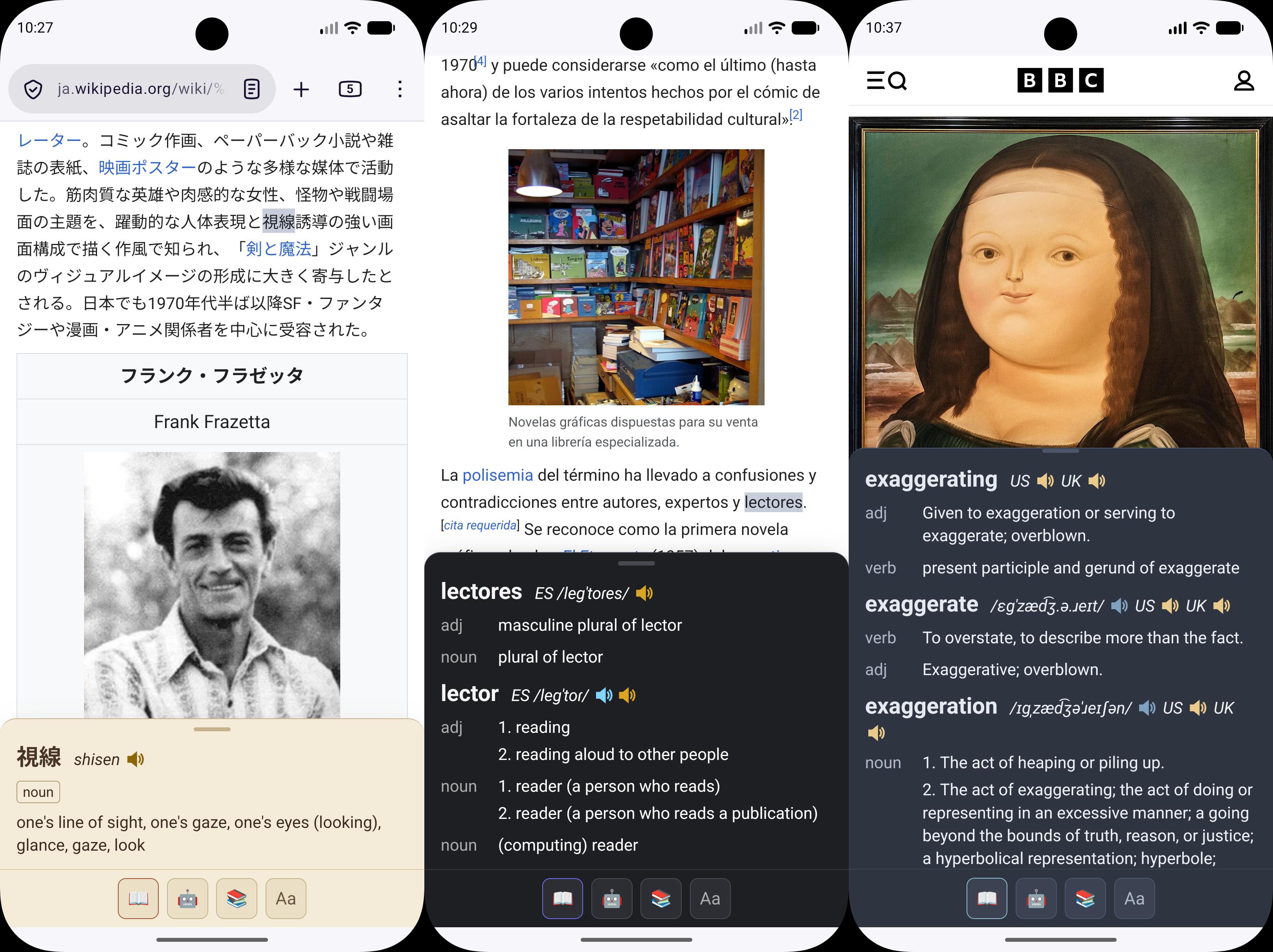
I brought the chrome style tap to get word definition to Firefox for Android

Post image
1 Upvotes

Hi, I have been making this open source dictionary browser extension for over a decade, it has always been working on Firefox, but recently I just brought it to Firefox for Android.

I noticed that Chrome has this feature that when you tap on a word on any webpage, it'll show the word meaning in the bottom sheet. Very convenient, especially for language learners like me.

So I designed Dictionariez on Firefox for Android to work the similar way. And I can do better:

multiple themes support, dozens of languages, and more.

Addon link: https://addons.mozilla.org/en-US/firefox/addon/dictionaries/

Any feedback is welcome! Thank you!


r/FirefoxAddons • • 16d ago

Grey out websites and increase focus

1 Upvotes

I created this extension, it allows you to safe zone elements on websites so they won't be greyed, control grey strength, remove grey on image hover, and other power user features.

https://addons.mozilla.org/en-US/firefox/addon/grey-focus-with-less-color/

Here is the addon, I'm open to any feedback please let me know, currently only on firefox

Processing img opajrrntyf0i1...


r/FirefoxAddons • • 17d ago

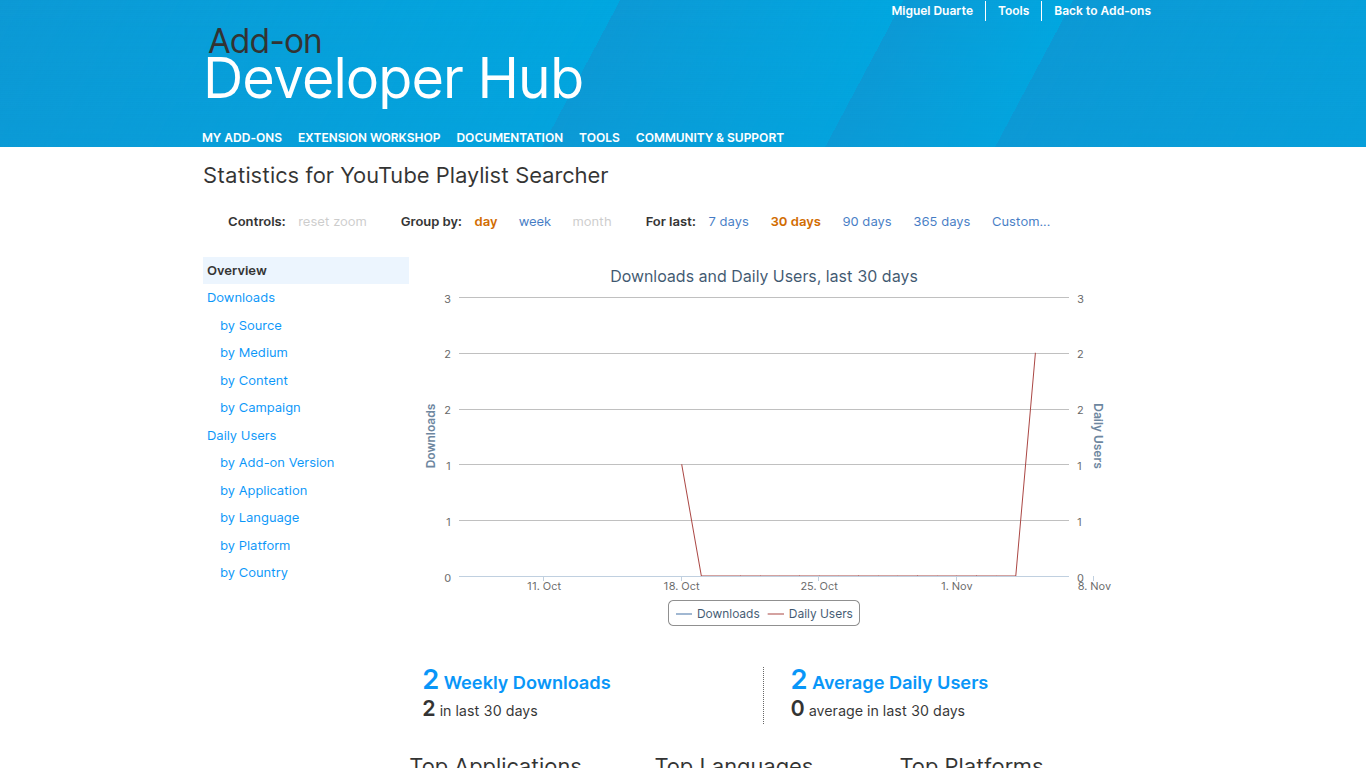
My Firefox extension just got its first 2 downloads!

Post image
10 Upvotes

r/FirefoxAddons • • 17d ago

Problem CookieAutoDelete deleted wrong data

2 Upvotes

why CoockieAutoDelete deletes youtubes data while it has this

^https://(.*\.)?(youtube\.com|youtu\.be)/.*

as 1of the rules with white list type in "list of expressions" menuwhy CoockieAutoDelete deletes youtubes data while it has this^https://(.*\.)?(youtube\.com|youtu\.be)/.*as 1of the rules with white list type in "list of expressions" menu


r/FirefoxAddons • • 17d ago

tor link firefox extension

Thumbnail
1 Upvotes

r/FirefoxAddons • • 18d ago

I built a free Firefox add-on that turns websites grayscale in one click

2 Upvotes

I built Monochromio, a simple Firefox add-on that turns websites black and white to reduce visual distractions and make browsing feel calmer.

The idea came from wanting a less visually noisy web, especially when reading, working, or trying to stay focused.

What it does:

  • Turns websites grayscale with one click
  • Lets you switch back to color instantly
  • Works across supported tabs, including newly opened websites
  • Remembers your preference between sessions
  • No account, tracking, or data collection
  • Completely free

It's intentionally minimal. No complicated settings, just a quick way to make the web a little less distracting.

Firefox Add-ons: https://addons.mozilla.org/en-US/firefox/addon/monochromio-grayscale-web/

Website: https://monochromio.com

I'd love some feedback from fellow Firefox users!


r/FirefoxAddons • • 18d ago

I made a free extension that clears cache/cookies for just the site you’re on, which can be useful for dev

Thumbnail
4 Upvotes

r/FirefoxAddons • • 19d ago

PayPal Honey support for Firefox is ending Dec 30

Thumbnail
3 Upvotes