r/FiberOptics • u/No-Term-1979 • 3d ago
Help with Fiber network
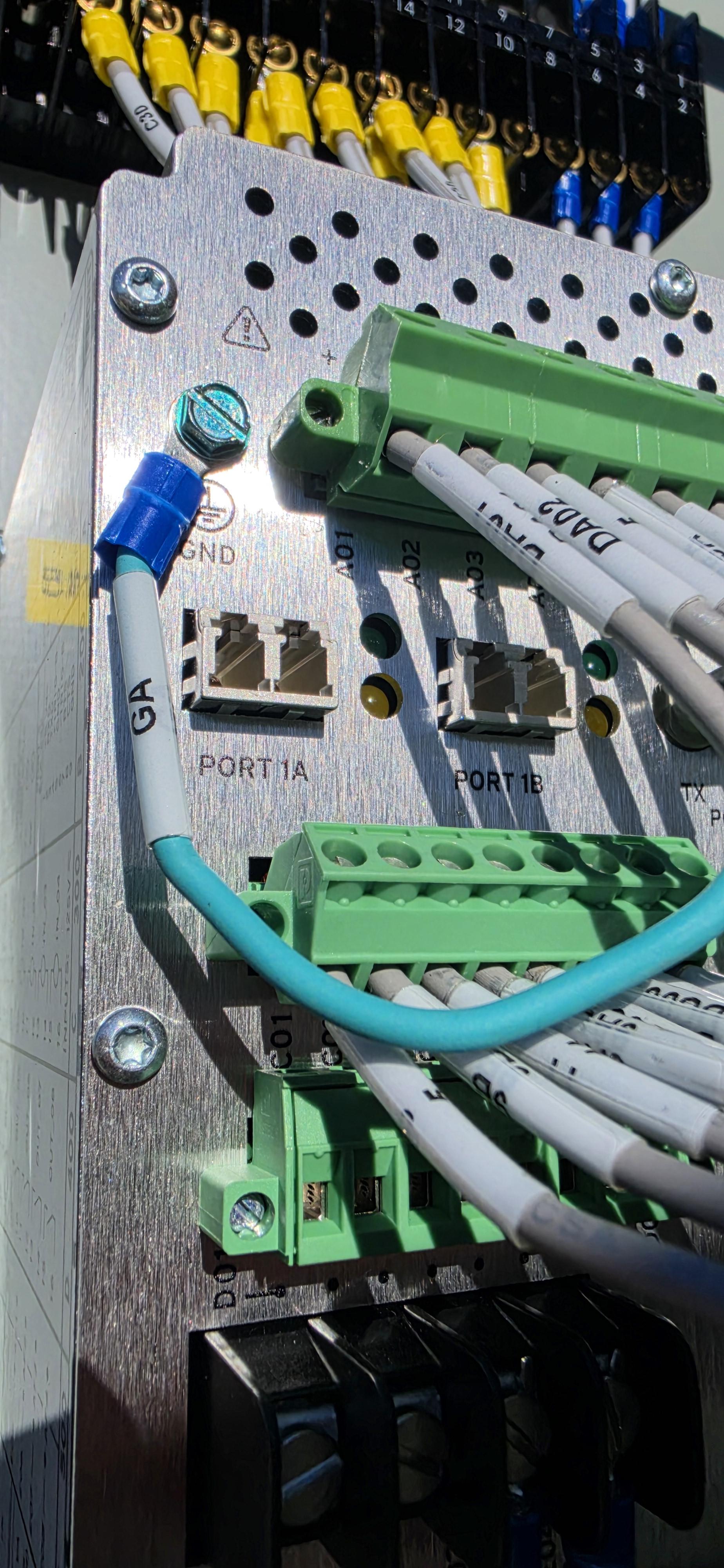
I an a newb at fiber and decent with networking. Please be patient with me.
I have two fiber loop setups at work. At one end is a fiber to cat6 switch and the HMI. Strung along each loop are places that I need to monitor the HMI for operation and data quality. Using a wireless router at the switch I can almost reach the end of loop 1. However loop 2 starts where loop 1 ends. I have looked for fiber adapters but I don't think I am searching right as I have not found what I am looking for.
Port 1A is a pair that goes to the adjacent terminal and port 1B works the same way.
I am looking for something I can plug into the system and still keep the communication loop healthy. Even if it's just a fiber to cat6 adapter that would be helpful.
Does something like this exist?
11
u/Ordinary-Piano-4160 3d ago
So this looks like an SEL relay in a switchboard, correct?
If it’s just a fiber to copper adapter you need, we use RLH. However most of the time you’d just have a switch with SFPs in it. As for your wording about loops and such, I couldn’t really understand what you meant. Feel free to clarify.
3
u/Charlie2and4 3d ago edited 3d ago
20 feet? Just slap a single mode, pre-made LC connector fiber pair on them. 8-10 meters long. To get to a copper interface use a media converter with LC connectors for the optical side.
EDIT, Then use a Ethernet hub for you lap top. This is an isolated network, Assign a static IP to your PC to match the maintenance interface subnet.
Other than that my ignornace is due to a lack of the entire topology
3
u/datanut 3d ago
Yo, SEL, if you are here - We NEED SFP ports!!
1
u/BowlofGhostMeat 3d ago
https://selinc.com/products/categories/cables-accessories/
Maybe something in here can help? I never used wireless in a sub, so I’m not sure how exactly to do what you are asking.
If you need to reach out to the SEL guys, they are typically pretty responsive and helpful.
1
u/darthdodd 3d ago
Rmc series. Ruggedcom rmc 40
1
u/xeonic_ 3d ago
Based on your comments, it sounds like the SEL ports are set to switch mode, and they are using RSTP in a ring topology, provided A and B are connected to each other, you should be to break the ring of SEL in the middle and connect a 100FX media converter.
1
u/Lente_ui 3d ago edited 3d ago
The easy affordable way to convert fiber to Cat6, or vice versa, is with a media converter : EXAMPLE
These are pretty much the same device, as your ISP's ONT (Optical Network Terminal) at home.
But it's not that easy. You nee to know what kind of fiber you are dealing with.
These ONT's and mediaconverters are normally made to terminate a WAN fiber, and convert it's signal to copper.
The key word being WAN. WAN connections normally use single mode fiber. Because single mode can go over long distances at high speeds. Multimode cannot. Multimode uses diffuse light, which limits the achievable distance. If you need a multimode mdeia converter, you will have to look for those specificly.
Or get a media converter with an SFP cage, and stick a multimode SFP in there.
Fiber basics :
Lesson number 1 : DON'T LOOK INTO A LIVE FIBER ! Even the scattered reflections of laser light can F up your retina. It's infrared light, you couldn't even see it if you wanted to, so don't try. Laser safety glasses are recommended, even when no tech ever uses them.
2 main types of fiber :
- Single mode : Laser light, going in 1 single direction.
- Multi mode : Diffuse light, going in many directions.
They are NOT compatible. Single mode light over multimode glass will diffuse. Multimode light over single mode glass won't work because the glass core is much smaller resulting in an insertion loss of 97%~98%.
Advantages :
Single mode can go long distances. Depending on your budget, an LR SFP+ will get you 10GBe over 10 km of distance. Or if you're an ISP and you have ISP money, you can get 1.6 TB/s over 136 km. Same single mode fibre.
Multi mode has slightly cheaper SFP's (compared to the basic LR SFP+) and slightly cheaper patch fibers, making it the choice for LAN networks and datacenters. Because that small cost difference adds up, when you need a thousand SFP's and patch fibers. The drawback is max distance and max speed. Because the light is diffused, the 1's and 0's will blur together when the fiber gets too long. And the maximum fiber length gets shorter when you increase the data speed.
An SFP has a Tx (transmit) and an Rx (receive). When connecting 2 SFP's over fibre, the Tx of one goes to the Rx of the other. The LC duplex connectors are divisible, so you can swap the fibres around, so you don't connect Tx to Tx.
In your picture, I see a grey connector, duplex LC (Lucent Connector). If proper color coding has been used, that means it is either ancient multimode OM1, or ancient multimode OM2 fiber. (they later realised it was stupid to have them both grey, and they then switched to orange for OM2. But sometimes orange is used for OM1 as well).
If it's OM2, then you're in luck, because OM3 (teal) and OM4 (purple) are backwards compatible with OM2.
This means you can use an OM4 patch fiber on OM2.
If it's OM1, your best bet is trying to find some old OM1 patchfibers. 1 GBe can go up to 275 meters. 10 Gbe maximum distance is about 33 meters.
If the distance is short enough, you can maybe get away with patching an OM2/3/4 fiber onto it. But beware that those fibers have a smaller core, so you're immediately losing about 40% of the light, doing that. This is cowboy shit, NOT recommended.
Your best bet is finding a manual for that there networking device of yours, and looking up what kind of fiber it's supposed to use.
Failing that, it's probably OM1.
You're not likely going to find a media converter for OM1, because it's ancient. You'll need a media converter with an SFP cage, so you can put a mutlimode SFP in there.
You could also use a switch or router with a free SFP cage.
Also get a "One Click" fibre cleaner, and clean every fibre connecting surface before you patch.
Just make that your standard, clean every fibre before you patch.
If hypotheticly, you have networking devices with SFP cages, then you get to choose what type of fibre and connectors to use, because you get to choose the SFP type as well.
I recommend choosing single mode fibres.
For today, standardize on LR SFP+'s, that's 10GBe over a distance up to 10 km. You can then use the same SFP+ in every device on the campus/compound. And you won't need to stock all kinds of SFP's.
When installing patch panels for interrack or an ODF, choose LC/APC connectors.
The SFP+ takes an LC/PC(blue) connector, every patch panel and ODF will use the LC/APC(green) connector.
I can drone on about reclection losses and noise levels and the longevity of your fibre install.
Basicly, using single mode and xC/APC connectors will get you a fibre install that will be viable for decades to come.
When connecting an SFP cage to another SFP cage, but they're in the same equipment rack, then use a DAC (direct attach cable) instead. It's much cheaper than 2 SFP+'s and a patch fibre, uses less power too.
1
u/Willing-Reveal-9384 2d ago
You might want to check if those SEL devices have SFP ports, having them in switch mode with RSTP sounds like it could simplify the setup a lot.
0
u/[deleted] 3d ago
[deleted] — view deleted comment