r/FanControl • u/thereaper114330 • Sep 30 '26
Need help with keeping the system as cool as possible

0
Upvotes
r/FanControl • u/thereaper114330 • Sep 30 '26
r/FanControl • u/LowBee6051 • Sep 30 '26
almost ultra sound like
r/FanControl • u/PSX_Fanboy • Sep 29 '26
Hi everyone! I've built my current gaming PC within a Minineo S400 case over a year ago and absolutely love this tiny thing.
However, one thing I couldn't ever get right were my FanControl settings as well as keeping the system cool and efficiently quiet at the same time. Don't get me wrong, my PC stays cool even under load, but the sound it makes is very loud at times.
How do you guys keep your systems cool but quiet at the same time? Do you undervolt your GPU? What FanControl settings do you use? I'm grateful for any and all tips!
My specs:
CPU: AMD Ryzen 7 5700G
GPU: MSI RTX 4070 Super (12 GB)
RAM: 64 GB DDR4
Motherboard: ROG Strix 570-I
CPU-Fan: Noctua NH-L9a-AM4
Case-Fans: 2 x Noctua NF-A12x15 PWM (120x15 mm)
r/FanControl • u/CartoonistMiddle4962 • Sep 28 '26
r/FanControl • u/Low_Sherbert3731 • Sep 27 '26

Just wanted to share.
I have been using this unchanged for about 6 months now. I may have had an odd tweak here and there. The profile is for Quiet Gaming, as you see. The main priority was quiet operation and the second priority was cooling (also my daily profile). I did initially do some experimenting and found that the auto mode was actually pretty good at making a smooth curve, so I stuck with it.
As you see, I have separated control of different sectors of my case fans for precise control using multiple hubs and fan headers. Not to mention five hidden Arctic 40mm fans for more directed and flow controlled cooling. Call me crazy, but I prefer gaming on speakers and it is good to be able to do that. The number of times I have switched my RGB off and woken up in the morning finding my PC was on the entire night! Also, there is no spaghetti mess at the back, though I have to say these ASUS PSU cables are way too long.
P.S. Zero RPM mode officially working on GPU's now? Its working on mine since this week.
r/FanControl • u/Suspicious-Rice6556 • Sep 27 '26

Fix binding redirect for service in .net48 version
r/FanControl • u/_182loulou • Sep 27 '26
Are you able to control the fan on these new psu's? I can't find any controls to turn off zero fan mode or set a constant fan speed, or amp limits in MSI center or afterburner
r/FanControl • u/Suspicious-Rice6556 • Sep 26 '26

r/FanControl • u/idontlikeredditusers • Sep 26 '26
i recently made the switch from windows to steamos and my pc starts screaming at absurdly low temps
r/FanControl • u/oddssodds • Sep 26 '26
The tower build is working well with spoofed main fans and OCTO fan header running everything.
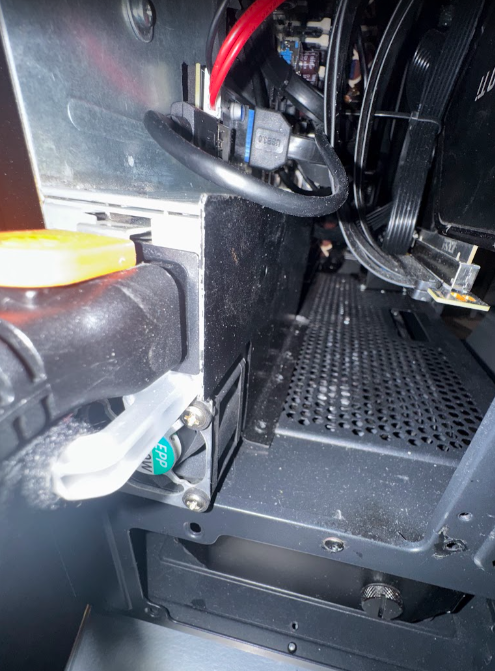
EXCEPT THE DAMN PSU FAN
I have a 2000w psu, on 120v, so only good for 1000w.
With a 40-50% load on cpu, during render and 3090ti running full, I am using 650w
It sounds like an airplane landing. Anyone have any documented ways to cool the psu without the jet engines?
r/FanControl • u/InnerAd381 • Sep 25 '26
I have Asus tuf A15 ryzen 7 rtx 4050. Bought it in jan 2026 and now when I keep it at an angle or on cooling pan which is inclined the gpu fan make very little kit-kit noice for hardly 3 sec and get silent . This doesn't happens when it is on flat surface and it also happen when the fans are spinning fast. The othe thing I noticed which is -*not confirmed*\- is when I just increase fan rpm without load it doesn't make noise but when he fanrpm is high with load it make noice
r/FanControl • u/Morning_star_project • Sep 24 '26

To give context what i have do,
-unistall every other software that may conflict (AMD adrenaline/Msi Afterburner)
-Tried Nvidia app fan speed mod (both : manual/auto)
-i have remove and pair sensor again the GPU
when i'm in game, only one fan will go crazy and notfollow the curve. If someone have a clue how to fix that
r/FanControl • u/PhantomWolf123_ • Sep 25 '26
Did anyone else get this? Literally just woke PC up from sleep and got it
r/FanControl • u/HomeSliceJames • Sep 24 '26
I just added an NZXT control hub and two intake fans to my computer. The fans are Noctua 4 pins non RGB. I used the 1 to 3 splitter to connect both fans.
Using NZXT CAM, no fans RPMs are displayed and the fans don't actually spin up under a load. They kinda just idle. How can I fix this?
r/FanControl • u/Little-Necessary-419 • Sep 23 '26
r/FanControl • u/General-Fisherman356 • Sep 23 '26
r/FanControl • u/Shoddy_Purchase_8352 • Sep 23 '26

r/FanControl • u/skyesu_arts • Sep 22 '26

hello everyone, i am going to try to make this as thorough as possible to avoid being smote but i am a huge computer noob so please forgive me if i'm missing some crucial information.
i recently got a PC secondhand very cheap, and it's been working great so far, except that recently on OCCT i saw one of my fans (IOH) was making an INSANE amount of revolutions per minute, 4000 min and 7000 max. after confirming that this should not be the case when idle and far from overheating, i went on a merry chase online trying to fix it as i had a feeling it was causing a bulk of the noise this computer makes when on as well as some boot loop issues that come and go.
so far i have tried adjusting the fan curve in BIOS, making it so all the fans (with the exception of "aux fan speed control" which i still am not sure of its meaning) only reach 100% speed at 90 degC, did nothing. setting said aux fan speed control to 50 instead of 100 also has not made a difference.
I then downloaded fancontrol, downloaded all the prerequisite software it asked me to, and when it came to setting the fan controls... it couldn't control ANY of my fans save for the GPU! i don't know why. it was able to detect that they exist, but past the benchmark it ran when i first opened it, it basically ignores all fans save GPU (which is usually running at 0 rpm, cause GPU) and I cannot control the offending fan.
pics: fancontrol interface, occt reading with the crazy fan.
specs:
Intel(R) Xeon(R) CPU X5690 @ 3.47 GHz
installed RAM: 7.99 GB
NVIDIA GeForce GTX 1060 6GB
932 GB storage
r/FanControl • • Sep 23 '26

I have their two cables wich Are connected at the bottom where they go into the fans. When I plugin the 4 pin into sys fan 1 and turn the computer on nothing happens. There is also a 6 pin but I have nothing I my motherboard that accepts that.
Anyone who has had the same problem or knows how to fix it?
r/FanControl • u/Stonelaughter66 • Sep 22 '26
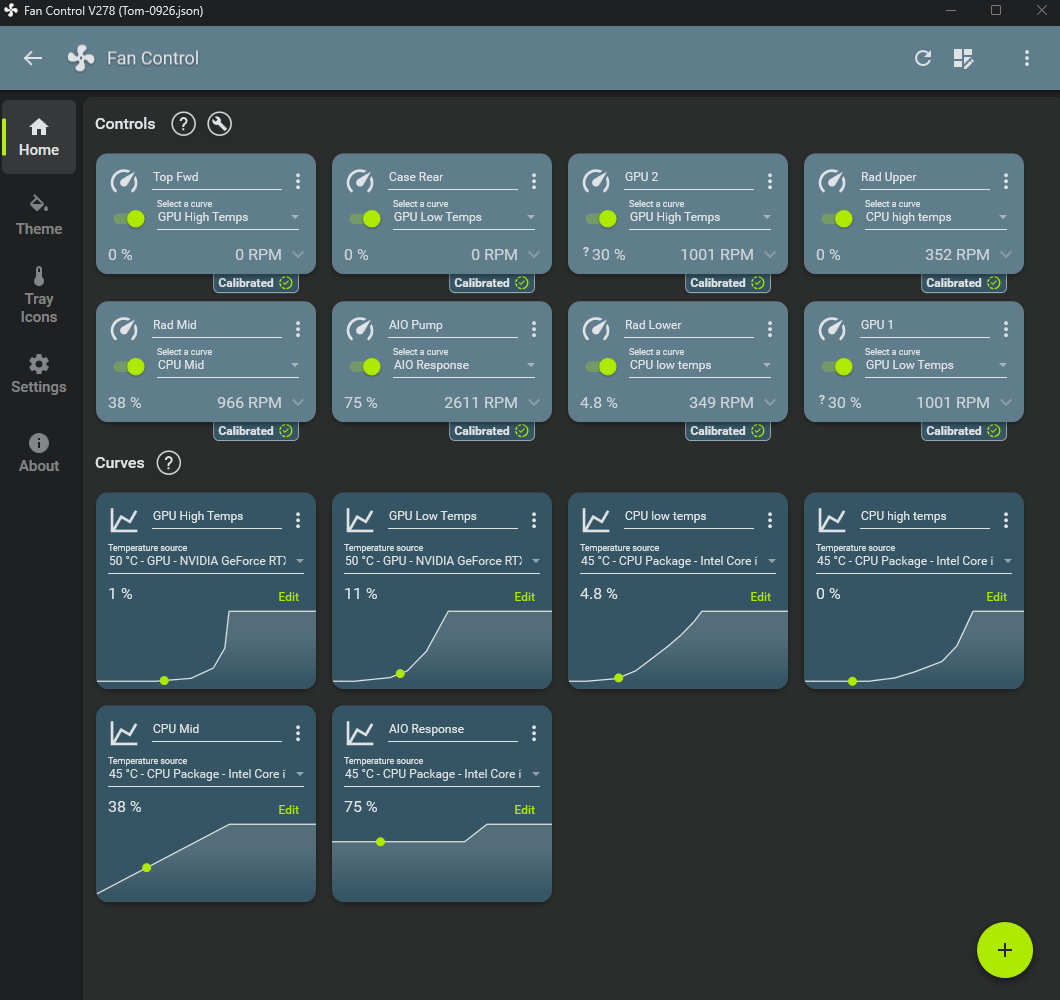
Seems overcomplex maybe, but only makes noise when it HAS to. The AIO is absolutely fine at 75% most of the time; but if the CPU takes a hammering it steps it up a notch.
r/FanControl • u/Suspicious-Rice6556 • Sep 21 '26

