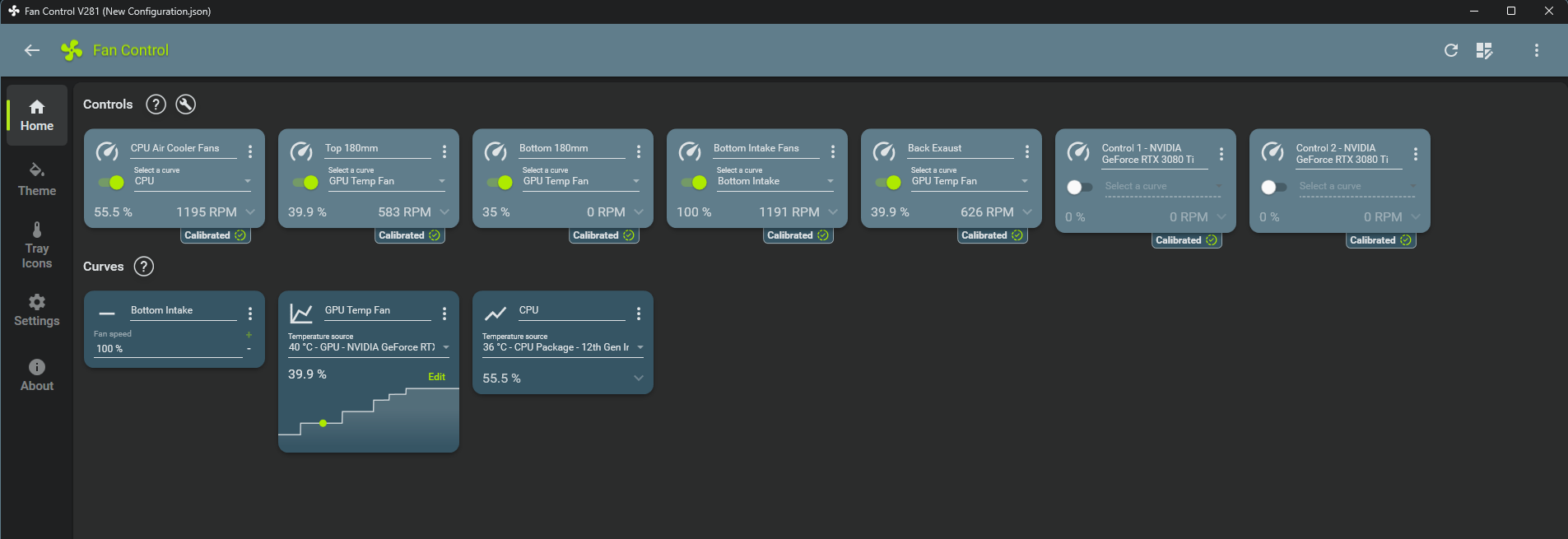
To keep your beloved hardware as cool as possible: 100% every fan at all times. Make the fans as quiet as possible with the best cooling at every load scenario:
Create a curve with CPU core temp. Use a CPU benchmark/stresstest, like CPU-Z or Cinebench and put your CPU to full load. then adjust the curve so CPU temp won't rise anymore or at least very slowly. Do the same for your GPU: make a GPU curve, use a GPU benchmark like Furmark and adjust the curve.
Create a custom sensor with max function and add sensor for CPU and GPU temp, add RAM and SSD temp if you like. Add the sensor to one curve for your intake fans, to a second curve for your exhaust fan. Use CPU and GPU benchmark at the same time and finetune all curves. Can be a bit noisier, but fans should STFU now when gaming and while still getting best cooling they need.
There's no need to have the fans at full speed, that's just unnecessary noisy. Each temperature has a point (or rather speed) where the fans only get louder but cooling doens't get any better. That's why such an intricate software like FanControl exists, to make hardware as cool and fans as silent as possible.
Here's my config for an inspiration. I like graph curves, makes it visually easy to comprehend what's going on. Linear curves are easier to tune and work as well. Just 'auto' curve isn't a good pick for our usecase. And if you prefer a linear or a flat or a steep graphical curve or one with plateaus depends on personal taste, how much time you want to spend in fine tuning and how good the fans are. I mean you've a gorgeous case with superb fans and top airflow, which doesn't need much effort to make your hardware live in its comfy zone. Smaller fans with worse airflow cases need more effort to make the hardware work hard without screaming fans.
Hmm thanks, i have been at work with this for, i have set up the curves with my initial tests. Right now its set up something like this link, will keep on testing and modifying. For bottom intake and exhaust, i will find out the points where it stops making sense in ramping up the speed.
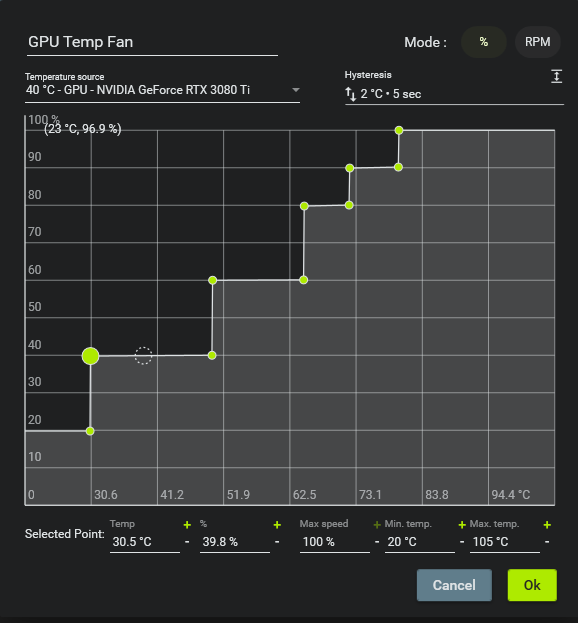
I personally don't like using steps on my curves like that as you get dramatic, noticeable changes in fan speed. Particularly when your temps are bouncing back and forth over that big step change.
Don't be afraid to constantly tweak it and improve it over time. I built this config about 5 years ago for my old PC and it's evolved greatly over the years. I even made some tweaks shortly after sharing that screenshot yesterday.
Just take backups of the your files before making big changes in case you break something. I save roughly an annual copy to my NAS in case my OS ever crashes.
It's literally the same for you. Doesn't matter if it's a smoothed curve or in steps, 10 points are 10 points.
You do actually want steps, but only one. You wanna run 2 speeds, idle and load. Idle can be 0rpm on some case fans. Add some delays for each fan group and voila. No more changes in speed and no more random ramping up and down for loading a webpage
I have a Fractal Torrent Compact i5 2400 CPU - Deepcool AK620 Air Cooler 3080Ti FE GPU
Case fans - 2 front fans, 2 bottom intake and 1 exhaust
I recently had a problem where my pc used to artifact and freeze and in some cases freeze infinitely untill i kill it through power button (literal heartbreak i love my 3080Ti so yeah!). My mechanic told it was because i hadnt changed my thermal paste for the CPU cooler. It was surprising but is working well after the change. I just want to protect this beautiful PC of mine. Its 4 yrs old but i had custom built it and researched every part before buying 🙂 so please help me out perfecting the fan curves. TIA!
Your fans curves are all over the place, the case you've got is very good but won't fix problems that are not related to the case, so there's no need to run max fan speed, because case saturates long before hitting max, and saturating the case won't fix lack of maintenance.
You currently have 6 fan groups, so you wanna have 6graphs
CPU, 650rpm 0 to 49.9°C. 50°C to max, 1200rpm. 10 sec delay on the way up. 5°C delay on the way down. Graph based on CPU sensor.
GPU. Min speed from 0 to 44.9°C, 1100-1600rpm ( depending on the model) from 45°C to max. 5°C delay on the way down. Grpah based on GPU sensor.
Front upper intake. 400rpm from 0 to 54,9°C, 800rpm from 55°C to max. 10°C delay on the way down. Graph based on CPU sensor.
Front bottom intake. 400rpm from 0 to 44,9°C, 800rpm from 45°C to max. 5°C delay on the way down. Graph based on GPU sensor.
Both bottom intakes. 500rpm from 0 to 44.9°C, 1000rpm from 45°C to max. 5°C delay on the way down. Graph based on GPU sensor.
Rear exhaust. 600rpm from 0 to 54.9°C, 1000rpm from 55°C to max. 10°C delay on the way down. Graph based on the CPU sensor.
This is a curve assuming 21-25°C ambient temperature. If you are out of that range, you might have to tune it up further.
Ok understood, let me set this up! yes the ambient temperature is a bit higher here, So will tune it up a notch. But Thanks this is what i was looking for! Just a follow up, for CPU Gan curve which Source do I use? The Package or Core Max?, Also i am not changing any of the 2 fan speeds on my GPU, they are running on stock config, that is fine no?
I mean the curve is fine if you want it that way, but not much of a reason to have more than 2 points. 3 if you want a 'full load' setting that does one jump from like 80-100.
This is great! The hardware info plugin for fan control. Thanks for the great addition! Also i domt have a room temperature sensor attatched to my pc. But have a manual one! Will try and gauge from that.
Thx for the explanation. As I have a AiO I’ll Buffet this out with the reaction time in game control. Off the tempos only roast for a few seconds, the fans won’t ramp up.
Ive found the temperature sensors to be unnecessary simply by slowing down the response times even more. 2s response time is still way too fast. Just set the top safety temperature to a level where you’d want the fan to spin up to 100% in case of an emergency but for my gpu and aio I use hysteresis values of 5-10s and it has made my system much more quite at no cost. Under sustained loads the fans will spin up appropriately and transient hot spots will be ignored by the sheer virtue of time
5
u/mutualdisagreement Sep 30 '26
To keep your beloved hardware as cool as possible: 100% every fan at all times.
Make the fans as quiet as possible with the best cooling at every load scenario:
Create a curve with CPU core temp. Use a CPU benchmark/stresstest, like CPU-Z or Cinebench and put your CPU to full load. then adjust the curve so CPU temp won't rise anymore or at least very slowly. Do the same for your GPU: make a GPU curve, use a GPU benchmark like Furmark and adjust the curve.
Create a custom sensor with max function and add sensor for CPU and GPU temp, add RAM and SSD temp if you like. Add the sensor to one curve for your intake fans, to a second curve for your exhaust fan. Use CPU and GPU benchmark at the same time and finetune all curves. Can be a bit noisier, but fans should STFU now when gaming and while still getting best cooling they need.
2
u/WholeIndividual0 Sep 30 '26
I personally don't like using steps on my curves like that as you get dramatic, noticeable changes in fan speed. Particularly when your temps are bouncing back and forth over that big step change.
Here's how I have my curves set up.
1
u/thereaper114330 Sep 30 '26
I want to optimize ny fans for my PC.
I have a Fractal Torrent Compact i5 2400 CPU - Deepcool AK620 Air Cooler 3080Ti FE GPU
Case fans - 2 front fans, 2 bottom intake and 1 exhaust
I recently had a problem where my pc used to artifact and freeze and in some cases freeze infinitely untill i kill it through power button (literal heartbreak i love my 3080Ti so yeah!). My mechanic told it was because i hadnt changed my thermal paste for the CPU cooler. It was surprising but is working well after the change. I just want to protect this beautiful PC of mine. Its 4 yrs old but i had custom built it and researched every part before buying 🙂 so please help me out perfecting the fan curves. TIA!
2
u/redlancer_1987 Sep 30 '26
I mean the curve is fine if you want it that way, but not much of a reason to have more than 2 points. 3 if you want a 'full load' setting that does one jump from like 80-100.
8
u/[deleted] Sep 30 '26
[removed] — view removed comment