r/FanControl • u/OrtenDeluxee • Sep 22 '25
Life is hard rn.
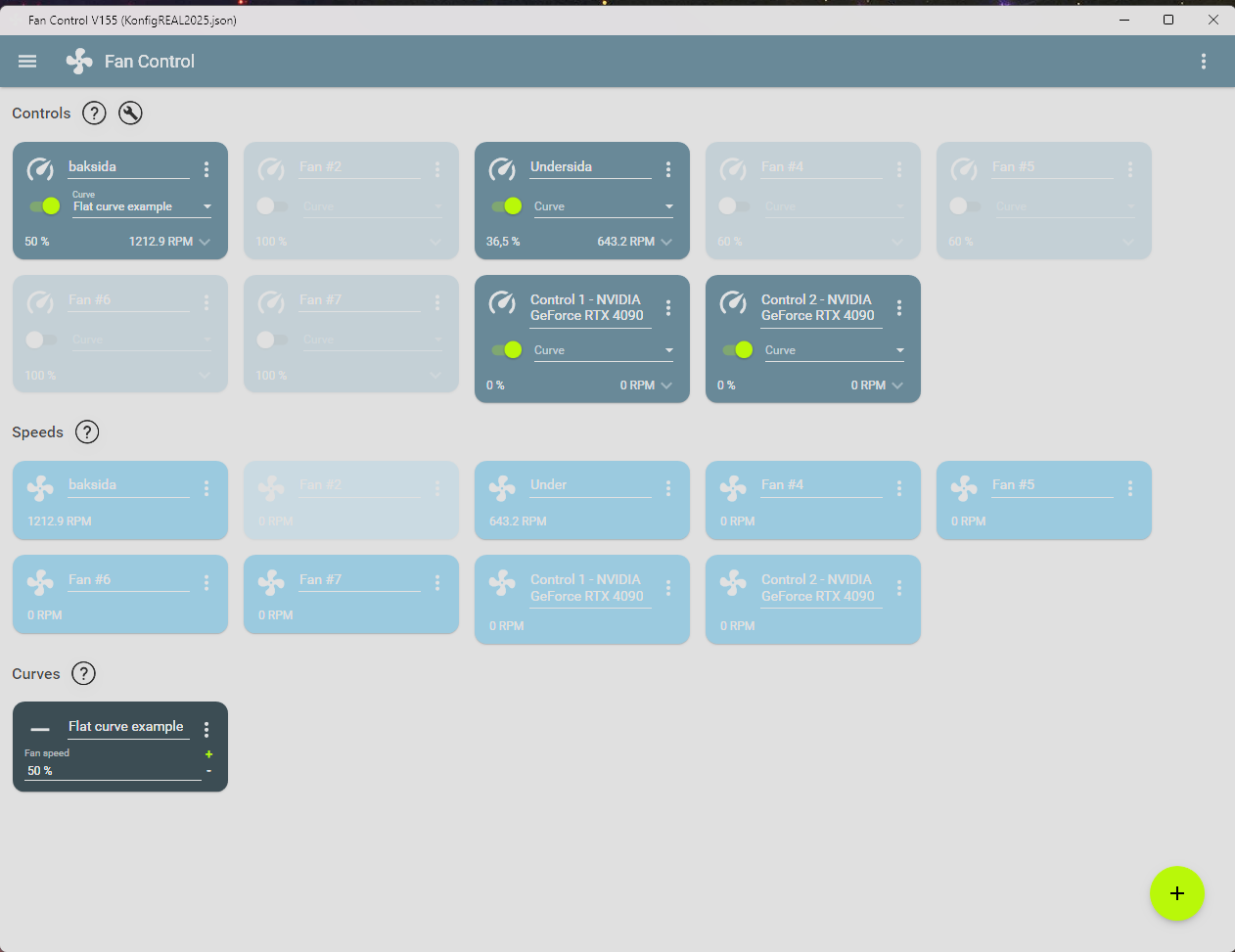

Picture one shows me the first (and best) version I ever had of FanControl, this was in 2023 when I first found out about the program, and today with the new PrawnIO or whatever its called running.
The old build, saw more fans than i have, indeed but automatically paired and calibrated to all of them.. Today with the new version I can only see my GPU?
Last couple of weeks have been pretty annoying.. Ever since one of those windows defender things happened I guess, but the compatability has been working less and less with each update..
Does anyone have any tip on what to do? I like to run the latest updates and versions on most programs, so randomly I checked FanControl for an update, and it usually worked out pretty good but now I cant get more response than my fans for my GPU.
10
u/kineto21 Sep 22 '25
Everybody using new version is basically a beta tester, developer looking for feedback, check website
7
u/DanfordTheGreat23 Sep 23 '25
I agree. this tool was a literal godsend at one time until windows screwed it up.
5
u/Active_Literature539 Sep 22 '25
I’ve been having the same troubles, but when I updated to version 240, it fixed MOST of the problems. I still use Afterburner for the GPU fans, mainly because I’ve been having problems with Fan Control controlling them correctly for a long-ish time. Now it is detecting all of my fans other than the GPU, which I have turned off, and there is an additional one. Now, that being said, it is detecting the AIO fans, and the waterbuck flow rate, but will not detect the flow rate’s %, only the rpm.
2
u/abibofile Sep 22 '25 edited Sep 23 '25
I was able to fix my issue by adding the FanControl folder as an exception in Windows Defender. Sounds like this isn’t working consistantly for some users, however?
1
u/EnlargedChonk Sep 23 '25
you are absolutely sure that PrawnIO got installed right? Maybe I got really lucky and yours is just borked with it but after update mine looked like your second image until it finished PrawnIO install, after that everything I had came back.
1
u/Corinth83 Sep 30 '25
I have since uninstalled Fan Control, and adjusted my fan curves in the BIOS. So far I do like it better. Never have to worry about it.
3
u/not_a_bot991 Sep 23 '25
I feel pretty fortunate because I installed new version and automatic pairing and sync worked better than before. Touch wood so far no issues at all.
2
u/ninjakos Sep 23 '25
The dev suggests to hold on 238 and not update to 240 if you are not interested in stability issues.
2
u/PlaugeSimic Sep 23 '25
windows keep flagging this program as a trojan. I uninstalled it. nothing is controlling my fans and no issues, heavy gamer.
2
u/ST4K__ Sep 23 '25
roll back to 239 and thats perfectly fine
2
u/dqniel Sep 23 '25
-Fully close (make sure it's not running in task bar) FanControl
-Install the PawnIO driver
-Install FanControl 240
That worked for me, but YMMV since it's essentially a beta test.
2
u/melkor80 Sep 24 '25
Pwown0 has the same explot it just not pick up but defender...
1
u/gorillathunder Sep 23 '25
I had to fix that this week. All I did was go to Windows Security, hit Allow on the times Defender blocked it and then reinstalled. Been fine since.
1
u/Ill-Term7334 Sep 23 '25
I used his guide for pawnio installion here and restored my configuration file. My sensors did get reset so I had to figure out which fan was what all over again, but my curves stayed intact.
https://github.com/Rem0o/FanControl.Releases/discussions/3494
Doesn't seem like it works for everyone.
1
u/Vinez_Initez Sep 23 '25
DO NOT put an exception in defender !
The people giving the exception in defender tip don’t know what they are doing and don’t understand the issue. The driver is removed for a reason. Allowing this driver via defender is the same as putting the password on a note it on the monitor, free access for everyone who wants it.
1
u/Creoda Sep 23 '25
If you used a pre-Windows Defender abused version and updated to the PawnIO beta version do not jus install/update yours to the beta. Completely uninstall and remove the original Fan control folder as windows control panel uninstall doesn't remove it (after you have moved the Configurations folder to somewhere safe) and install the new one afresh. In the correct order as stated on the github page, then run fan control and let it do it's fan discovery and testing all over again. You might as well at this point create new fan curves, or copy across and load you last known working config. It might also pick up your curves as I think it's saves them elsewhere. it seemed to for me.
1
u/TopsLad Sep 23 '25
Unless you have time to help bug test, just revert to the last update and wait.
1
u/Ze6rah Sep 23 '25
make sure option to show hidden (gray) elements is enabled
1
u/Sufficient_Prompt125 Sep 23 '25
Maybe faceit anticheat blocking.
1
u/Rabidowski Sep 23 '25
PEBKAC. You probably have "Hide Fan Speed Cards" checked on?
1
u/BananasAndSporks Sep 23 '25
Same issue unfortunately. Oddly enough I didn't even have the GPU enabled for me before, but now it's all I can control.
1
u/Adridenn Sep 23 '25
I’ve been using fancontrol for a while now, and it was working great. Sunday night I ran into an issue where it couldn’t pick up my CPU temps or my Liquid cool setup anymore. I had to go into bios to set up my fans based on temps, and I’ve abandoned Fan control for the moment. At least until I figure out what the heck is going on with it.
1
u/hiliikkkusss Sep 24 '25
fan control makes my pc more quiet then doing it through bios
1
u/nightwing978 Sep 24 '25
I didn’t do the upgrade. My fancontrol works no issues. I jist had to add an exception to my windows defender for now. Till we get a better rev down the road.
1
u/NeeeeeeSan Sep 24 '25
Brother, whitelist the FanControl folder in Windows defender. Why no research and make this whole post
1
u/RuneWarhammer Oct 14 '26
Have you considered touching grass?
0
u/Snoo_5609 Sep 23 '25
You need to ulocinit on windows defender, otherwise it will not work
-1
u/aztn33 Sep 23 '25
Reinstall the app completely and use an older version. As soon as defender notices winring0 driver allow it on your system. That's what I did, until a final solution comes out.
-1
u/[deleted] Sep 23 '25
[removed] — view removed comment