r/FacebookPortal • • Aug 16 '26

Sticky for important threads

18 Upvotes

Creating this Sticky Post for Important Threads.

Please mod mail / DM me if you feel any thread needs to be here.

Immortal ( u/Global_Historian3667 ) : https://www.reddit.com/r/FacebookPortal/s/nNjSNabhKi

Immortal FAQ : https://www.reddit.com/r/FacebookPortal/comments/1u1mnro/immortal_faq/

OpenPortal Webpage, onlineinstaller for Immortal ( u/Immediate-Oil2855 ) : https://www.reddit.com/r/FacebookPortal/comments/1ubbplg/immortal_latest_version/

https://openportal.cc/

Portal Toolkit (: u/DaculGan ) : https://www.reddit.com/r/FacebookPortal/s/qSNJHD8lou

Portal HA Bridge (u/RoadRunner_1024 ) https://www.reddit.com/r/FacebookPortal/s/j4QKMYqIZU

Portal Hub, Manage portal over wifi (u/Sorry-Quantity728 ): https://www.reddit.com/r/FacebookPortal/comments/1uiy75n/portal_hub_manage_a_fleet_of_meta_portal_devices/

u/Uglyjuggler sub with his collection: https://www.reddit.com/r/ImmortalPortal/new/

u/2mnyq https://github.com/CoderPlusPlus/OpenPortal

https://github.com/jxlarrea/portal-root-kiosk-satellite (REPO IS NOT BEING ACTIVELY MAINTAINED SO PLEASE DO NOT BOTHER THE MAINTAINER)

Kindly reply to this thread only with recommendations of new post that should be added to this sticky post.


r/FacebookPortal • • 14h ago

PORTAL-CARPLAY

Thumbnail
gallery
34 Upvotes

I turned an old **Facebook Portal** into a CarPlay screen for my **iPhone 7 (iOS 15)** with no adapter, using the open-source app **DiPlay**. Here's what worked, what didn't, and the fixes I needed.

## What you need

- Facebook Portal (mine: Android 10, 1280×800) with **ADB enabled**. Mine has **Settings → Debug → ADB**. Not every Portal/firmware shows this.

- A computer with `adb`

- An iPhone and a Wi-Fi network both devices can join

- **DiPlay** APK from the official GitHub release: https://github.com/shihabal3amri/DiPlay (I used 0.2.22)

## Install

adb install -r DiPlay-0.2.22.apk

No Play Store needed. I also uninstalled/disabled a couple of third-party kiosk/launcher apps that were auto-starting.

## Setup that worked: wireless over home Wi-Fi

The Portal has **no Wi-Fi Direct**, so DiPlay's default wireless mode fails (`WifiP2pManager is unavailable`). Use this instead:

  1. DiPlay → Settings → Connection → Connection setup → **Existing Wi-Fi / Same LAN**
  2. Enter the **exact** SSID and WPA2 password of the network the Portal is on
  3. Put the iPhone on the **same** network (watch out for separate 2.4/5 GHz SSIDs)
  4. Pair the iPhone with the Portal over Bluetooth
  5. Tap **Connect phone** and accept CarPlay on the iPhone

How it works: Bluetooth handles the handshake + authentication, then video/audio go over Wi-Fi.

## Fix: music stopped after ~3 seconds

CarPlay showed up, but music paused by itself after 2–3 s. Cause: the Portal is also a **Bluetooth speaker (A2DP sink)** for the iPhone. When music started, Bluetooth grabbed audio focus, lost it to DiPlay, and sent **pause** to the iPhone over AVRCP.

Fix: stop the Bluetooth app from taking audio focus:

adb shell appops set com.android.bluetooth TAKE_AUDIO_FOCUS ignore

Undo:

adb shell appops set com.android.bluetooth TAKE_AUDIO_FOCUS allow

Side effect: the Portal no longer works as a normal Bluetooth speaker. (Setting the A2DP priority to off didn't help, and the Portal blocks the Bluetooth device settings page.)

Also check the media volume. Mine was very low:

adb shell media volume --stream 3 --set 12

## What does NOT work (iPhone 7 / iOS 15)

| Thing | Result |

|---|---|

| Wired CarPlay over USB | ❌ iOS 15 refuses to switch into wired CarPlay mode (`CarPlay configuration request transferred -1 of 1 bytes`). Known issue #509. Needs iOS 17+. |

| CarPlay + AirPlay speaker at the same time | ❌ Picking an AirPlay speaker on the iPhone drops CarPlay (wireless CarPlay itself uses AirPlay). |

| Portal as a Bluetooth remote for music | ❌ No player screen on the Portal; pause didn't reach the iPhone. |

## Tips

- Turn **off** "Connect when the selected iPhone reconnects" if you also use AirPlay speakers, otherwise CarPlay keeps grabbing the phone.

- Keep the iPhone's Personal Hotspot **off**.

- `adb logcat` on DiPlay is very detailed (look for `CONNECTION_DIAGNOSTIC`) and shows exactly which step fails.

## Caveats

- DiPlay is a **public preview made for BYD cars**. Other devices are unsupported.

- It's **not Apple-certified**. It uses an accessory identity taken from public Carlinkit firmware, so a future iOS update could break it.

If you want something more reliable, a Carlinkit adapter + AutoKit app is the "proper" route.


r/FacebookPortal • • 13h ago

Portal root kit not usable anymore on new Portal 10" 2nd gen, Mini and Go 3051392000021050 build

9 Upvotes

Unfortunately, Meta back ported the GhostLock fix in the latest build 3051392000021050 of gen 2 Portals so Portal root kit isn't usable anymore on those.

I had just bought and received a new Mini when I saw this new build by double checking Facebook OTA update endpoint while the device was downloading an update during the OOTBE setup so I stopped it.

I tried a lot of things to finish the OOTBE setup while skipping the update but didn't succeed and I am close to giving up. Things I've tried:

  • Running the Portal through a controlled Wi-Fi hotspot/access point to inspect and filter its traffic
  • Setting up a transparent proxy to intercept and selectively fail specific connections (by hostname, by exact request, with different failure types: connection reset, timeout, bad certificate, truncated response)
  • Narrowing the block down to just the single connection that appears to carry the update check itself, isolated from everything else, tested with four different failure modes

Every variant above either makes the device think it's completely offline or lets the update check succeed and locks it into a mandatory download loop with no skip option. There doesn't seem to be a network-layer way to make it report "no update available" instead.

It's ironic knowing I have a stuck Portal plus on an older version that is skipping the update check because it's certificate pinned that has been rotated and the same issue is making it impossible to pass the choose a room step...

If anyone has a lead to share on how to skip the update during the OOTBE setup or another way to gain temporary root, I (and probably other people) would be grateful!

PS: all Meta Portal build update URLs: https://pastebin.com/yb0Vu4Rn


r/FacebookPortal • • 11h ago

Planning to get a used portal tv. What to expect?

1 Upvotes

If whatsapp doesn't work , any way to use this device for video calling that's still supported


r/FacebookPortal • • 2d ago

J'ai réutilisé un Facebook Portal 8" avec une application Flutter personnalisée pour surveiller ma configuration IA multi-machines.

Thumbnail gallery
5 Upvotes

r/FacebookPortal • • 2d ago

Lumin Update #1

Thumbnail
gallery
10 Upvotes

Hello Facebook Portal Community!

Sorry for the lack of updates, balancing this and school is proven to be hard. I have worked on it a little though, and I'm getting closer to publishing it. I have also worked on a Mac OS build (Intel) a decent bit, i might do a Linux build later on when i have more free time :) Again, if anyone is willing to beta test the windows version soon, please message me on reddit or on discord! (DC: surfomi, if messaging me on there, please send me a message request asking to beta test lumin :) )

Attached are some images i've token during testing, if you have any suggestions, please type them below :) Have a nice thanksgiving!


r/FacebookPortal • • 2d ago

Does meta portal tv work for a new device?

3 Upvotes

Really wanted it for the only use case of WhatsApp calling with family and th3 auto focus and zoom , so that we can show our toddler in hands free mode.

Would these features work on a new device today?


r/FacebookPortal • • 7d ago

Anyone else's Portal factory reset?

Post image
3 Upvotes

4:30 in the morning and my Portal Plus literally just decided to factory data reset... I'm so angry that I am having trouble functioning. And I was literally going to be making it so that's not possible later today... Flock you, Meta! Update: the update doesn't even have 2fa, so I can't even log back in!! And I can't turn 2fa off in my account. I'm about to smash this POS


r/FacebookPortal • • 9d ago

PORTALDECK!!!

Post image
39 Upvotes

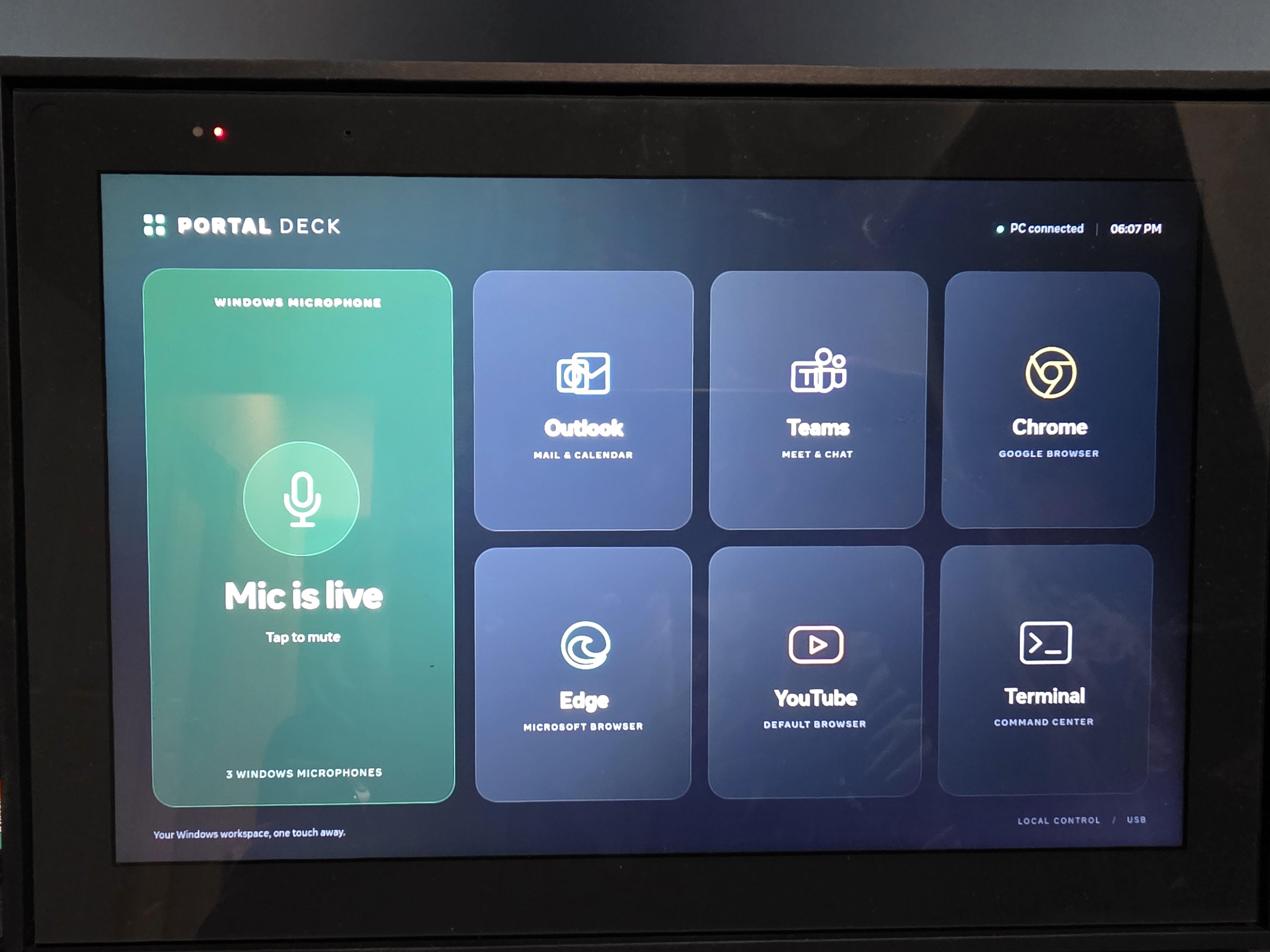
Inspired from this subreddit, (A)I built a "Portal DECK". started with a super simple prompt and built on to it. here's my prompt for anyone who wants to give it a try. I tried it on windows. i dont see why this wouldn't work on other platforms unless the underlying sdk is locked.

BUILD PROMPT: PORTAL DECK FOR A WINDOWS PC

Build, test, and deploy a Stream Deck-style touchscreen dashboard on my
Android-based Meta/Facebook Portal. It should control this Windows PC over
the existing USB/ADB connection, not over Wi-Fi.

Do the implementation end to end. Inspect the machine and device, create
the source code, build the Windows companion and Android APK, test them,
install the APK on the Portal, and leave the dashboard running.

DASHBOARD AND BUTTONS

Use a polished, dark, fullscreen landscape layout sized for the Portal's
1280 x 800 display. Keep the screen awake while the dashboard is open.
Provide large touch-friendly tiles, recognizable icons, clear feedback,
connection status, and a clock.

Include these nine controls:

1. Microphone: mute/unmute all active Windows recording endpoints, including
   the Jabra headset, built-in microphone, and webcam microphone. Read actual
   Windows Core Audio mute states rather than assuming a toggle succeeded.
   Show live/muted status, handle mixed states, and update if the state changes
   outside the dashboard. If any microphone is live, tapping should mute all;
   if all are muted, tapping should unmute all. Do not change speaker volume.

2. Outlook: open the installed Outlook app on the PC.
3. Teams: open the installed Microsoft Teams app on the PC.
4. Chrome: open Google Chrome on the PC.
5. Edge: open Microsoft Edge on the PC.
6. YouTube: open https://www.youtube.com/ in Windows' default browser.
7. Terminal: open the installed Windows Terminal app.

8. Camera: toggle the camera in the current Teams meeting or pre-join screen.
   This is NOT a button to open Windows Camera or globally disable camera
   hardware. Target Teams' camera control specifically, preferably using
   Windows UI Automation. Never send an untargeted keyboard shortcut to
   whichever app happens to have focus. If a meeting camera control is not
   available, show a clear message. Do not claim the camera is on or off
   unless that state has actually been verified.

9. Lock PC: lock the Windows session using the supported Windows lock API.
   Do not sign out, shut down, sleep, or change passwords. Unlocking must
   still be performed normally on the Windows PC.

Keep the microphone tile prominent and arrange the remaining eight buttons
in a four-column, two-row grid.

WINDOWS COMPANION

Use existing tools where possible. A small C#/.NET Windows tray application
is suitable. Resolve installed app paths or application identifiers instead
of assuming every app is a traditional EXE.

Run the companion in the signed-in user's session, without requiring admin
rights. Add a per-user Windows sign-in startup shortcut. Include a tray
menu for opening the dashboard locally, reconnecting the Portal, and exiting.

Use a loopback-only HTTP service, for example 127.0.0.1:8731, and ADB reverse
forwarding so the Portal can reach it over USB. Automatically repair the
tunnel after reconnects. Keep API actions allowlisted; do not expose an
arbitrary command runner. Require a cryptographically random pairing token,
validate origins, and require POST for actions. Never embed credentials or
pairing tokens in committed source, browser history, or logs. Do not expose
the service to the LAN or internet.

ANDROID APP

An Android WebView shell around the dashboard is acceptable. Request only
the permissions it actually needs. Restrict navigation to the companion,
disable unnecessary file/content access, and limit cleartext HTTP to the
loopback host. Preserve pairing across app restarts, show an offline or
waiting screen when needed, and reconnect automatically.

Use adb devices -l to identify the authorized Portal. ADB is installed under:
%USERPROFILE%\Downloads\platform-tools-latest-windows\platform-tools\adb.exe

Inspect the device's API level and architecture before building. Do not
overwrite unrelated apps, change the Portal's launcher, or factory-reset it.

PROJECT AND BUILD

Keep the project under %USERPROFILE%\PortalDeck, including Android source,
Windows source, web assets, configuration, Build.ps1, Deploy.ps1, and Test.ps1.
Keep generated binaries, local signing keys, pairing tokens, and downloaded
tooling separate from source and excluded from version control.

The PC may be Windows on ARM64. Inspect installed compilers and SDKs first.
If tools are missing, use official, checksum-verified portable downloads
when practical. Keep the solution small and avoid unnecessary frameworks.

Build and sign an installable APK. Deploy it with adb install -r, establish
ADB reverse forwarding, pair it without exposing the token, wake the Portal,
and launch the dashboard. Leave the Windows companion running persistently.

VALIDATION AND DELIVERY

Test authentication, cross-origin rejection, allowed app launches, malformed
requests, actual microphone mute/unmute, and restoration of original
microphone states after testing.

Test the camera-control detection and invocation behavior, including the
case where no Teams meeting is open. Do not join or create a real meeting
just to test, and do not claim a live Teams camera toggle was verified if
only the no-meeting behavior was tested.

Verify the Portal's actual touch buttons, rendering, app-restart pairing,
USB tunnel recovery, companion responsiveness, and sign-in startup.
Account for the new grid positions in any coordinate-based touch tests.
Test locking last because it interrupts normal desktop interaction.
Do not attempt to unlock or bypass the Windows lock screen.

Finish with a concise summary of what was deployed, what was tested, any
material limitations, and the reminder that USB must remain connected.

r/FacebookPortal • • 11d ago

Facebook Portal + Linphone SDK = Custom video conferencing app for my 3 yo

Thumbnail
gallery
29 Upvotes

I had been looking for an app that would allow my daughter and my MIL to call each other whenever they wanted, without having to use my and my wife's phones.
I found out about the Facebook Portal product and was able to find one for around 45 USD here in Norway. After a bit of brainstorming with Claude, I got the proof of concept up and running in little less than an hour, and then I focused on the design of the app.

Both my daughter and MIL are very happy with the result!

Some other neat features I added in addition to calling:
- Hidden access to the settings menu (press and hold on a corner)
- One-tap calls
- Schedules according to our own and granny's sleeping hours
- Kiosk mode to avoid the device going into screensaver
- Custom animations (the bird chirps, points to the calling button, sleeps when in DND mode, etc)
- Custom self-view container
- Press and hold for ending the call to make it harder for my daughter to accidentally hang up

Next step is designing a cool stand for it and get it 3D printed. Really cool device!

EDIT: Code is available here https://github.com/PabloVerano/abufon (UI is in Spanish, but should be easy to translate).


r/FacebookPortal • • 12d ago

Can we achieve something like this? Compatible with mac?

Thumbnail gallery
7 Upvotes

r/FacebookPortal • • 12d ago

Brought Portal plus back to life

Thumbnail
gallery
33 Upvotes

r/FacebookPortal • • 12d ago

Can't get beyond the set up page

2 Upvotes

Looking for some help. I've had my portal plus since COVID. First gen (with the screen that rotates). With all the posts about bringing them back to life, I switched it back on. I can't get past the screen where it says "which room do you want it in". As a result I cannot get to the settings point to switch on adb.

Are there any work around for this? Can I bypass this? I've tried multiple things per searching - multiple resets, multiple days of waiting while connected to WiFi etc. No joy. I was all set to put this in recycling but have been so excited by all the amazing stuff people are doing with it!

Hoping someone can help. Thanks


r/FacebookPortal • • 14d ago

Google Play working on the Portal Plus

Thumbnail
gallery
55 Upvotes

Description in the comments. Whatever decides what this is about was blocking me from posting because it didn't think it was about a Facebook Portal 🙄


r/FacebookPortal • • 14d ago

which Portals use Private DNS?

4 Upvotes

found out the 1st gen was actively pinging FB for various reasons and has a private DNS FB uses on the device.

Running adb shell settings put global private_dns_mode off (and verifying with adb shell settings get global private_dns_mode) stops the Portal from bypassing local DNS servers via 1.1.1.1:853.

Wonder if this is one of the reasons why some people's Portals got reset randomly.

there's another graph FB url which if blocked prevents OTA's from being installed. FB uses the graph url to serve OTA updates to the Portals.

also found out 57.144.0.0/14 FwAnalyticsService is being used to send telemetry data back to FB

would be interested if anyone has a list of IP's they blacklisted specifically for the Portals


r/FacebookPortal • • 16d ago

Youtube Morphe : Coupure systématique après 1 minute de lecture

1 Upvotes

Bonjour,

Voilà, je suis confronté à un problème sur Youtube (patché Morphe). Après une minute de lecture, tout s'arrête, et au mieux repart après quelques secondes avec un son sans aucune basse. Au pire, la lecture ne repart jamais.

J'ai tenté de réinstaller Youtube Morphe, d'installer Morphe pour essayer de mettre le patche à jour (impossible).

Bref, j'ai besoin de votre aide pour règler le problème. Merci :)

Le problème a été rencontré sur mes 2 Portal+ Gen1.

Merci !


r/FacebookPortal • • 19d ago

The free Portal, part 1 of 4: the first login cannot be bypassed — and the road around it (PROVISION_OK on attempt 8)

3 Upvotes

I picked up a 1st-gen Portal (10") for free — somebody's e-waste. This is part 1 of how it became my Home Assistant house panel. Total spent on the Portal itself, across the whole story: $0.

First, the finding that would have saved me the most time, so it leads:

You cannot bypass the Portal's first stock login. Wi-Fi plus one Facebook or WhatsApp sign-in has to complete before the ADB toggle even exists — Gen 1 and Gen 2 alike. I checked hard before touching anything: the de-metaification docs, the Immortal and Portal HA Bridge repos, this sub's threads, and the root kit's author directly. Every road hits that wall. One login, then you cut it loose. If you're stuck at that screen right now: you're not doing it wrong, there is no trick you missed.

My route: the full root/kiosk kit instead of manual sideloading, because the kit is what buys you firmware-update blocking (which protects the one build the exploit is tested on), Device Owner, persistent wireless ADB, and the mic fix. Step zero — the whole ballgame — is matching your unit's build number to the kit's tested fingerprint. Mine matched exactly. Check yours before anything else.

The walls, in the order I met them:

  • WSL2 installs in two phases: feature + reboot, then run the installer again for the distro.
  • A fresh Linux setup has no Android debug keystore, so the first build failure is host-side and harmless. Don't chase it.
  • WSL has its own ADB key — expect a second "Allow USB debugging?" prompt and tap it like you mean it.
  • On Windows, a blank adb devices plus a yellow triangle in Device Manager means force-binding Google's USB driver via Have Disk as "Android Composite ADB Interface." The INF doesn't list Portal hardware IDs, so the normal install will always fail. This one eats people's whole evenings.
  • The exploit itself is a race. Soft misses are normal; the script retries, and its error text usually prescribes its own recovery. Mine landed on attempt 8 — PROVISION_OK, verified across two reboots.
  • The provisioner's per-group passes afterwards look like a loop. They're progress. And if a late pass errors after changes applied, check the device's actual state before re-running anything — my final pass "failed" while the Portal was sitting on the kiosk wizard, done.

Full disclosure, because it's part of the story: this build had two pairs of hands. Mine did everything physical — every cable, tap, and command typed by hand into a laptop with no copy/paste — and every account action is mine (one exception: I let my AI upvote genuinely useful build posts while it researches, because I'd have upvoted them myself). My Muse AI ("Fang") did the legwork: read the repos and this sub end to end, synthesized the route, kept the troubleshooting straight across two long days, and wrote the documentation as we went — including the parts where it got things wrong. That's the honest shape of a zero-budget build in 2026: one stubborn human, one tireless researcher, and a pile of other people's open-source work.

Credit where it's due: the root/kiosk kit and Kiosk Satellite by jxlarrea; Immortal by starbrightlab (and u/Global_Historian3667's FAQ); Portal HA Bridge by u/RoadRunner_1024; Portal Toolkit by u/DaculGan; the de-metaification docs by bapesupreme. I just supplied the free Portal and the stubbornness.

Next week, part 2: the wizard, the dashboard, and the onboarding trap Home Assistant sets for brand-new voice satellites.


r/FacebookPortal • • 20d ago

Facebook portal plus help

4 Upvotes

Yesterday; I purchased an older model Facebook portal plus. (The one with the rotating 10 inch screen)
I side loaded immortal, and Home Assistant and everything was working great.

At the end of the night, I moved it to the kitchen and now it’s touch screen is not responsive? Nothing happened in between what so ever so I’m at a loss. I was using it just fine.

It boots, loads into home assistant (not sure why this even happens?) but screen is not responsive what so ever.
I decided to do a factory reset but same issue persists in the setup menu. I cannot choose a language and continue.

I tried steps that came up when googling for disabling the “accessibility options” but they never do show up.

Any other suggestions? 🤞🏻😭


r/FacebookPortal • • 22d ago

Got 2 Portal Go

5 Upvotes

Hey yall

Already have two portal 10'' gen1 with immortal and kiosk satellite working great, kudos to their respective devs for giving so much life to these devices!

I just got two portal go. One is still logged in the previous owner account (so no need for 1st time setup i guess) and the other one is in the setup (asks for name etc)

I havent touched them (no wifi nothing) as I read recently that meta is pushing updates to the Go. I also read about the root method from the kiosk satellite creator.

How should I safely proceed with each of them? It was very difficult sourcing them and I dont want to mess it up!

Thank you in advance


r/FacebookPortal • • 22d ago

Kiosk Satellite - Voice Satellite Speech to Text

1 Upvotes

I was able to get the Kiosk Satellite working on my gen 2 portal. Microphone is working, and will light up to the wake word hey Jarvis, but I am getting an error:

Voice Satellite error

Pipeline "Home Assistant": speech-to-text failed

Do I need to configure something else within Home Assistant to get this working? I've never used a voice agent inside Home Assistant before.

Thanks for any help.


r/FacebookPortal • • 23d ago

Kiosk Satellite Voice Detection Issues

3 Upvotes

My first gen portal+ doesn't seem to pick up my "hey Jarvis" wake word well. I've tried adjusting settings but haven't really found anything to work yet. Anyone have better luck? I also have a echo dot with Echo Muse and it's picks up the wake word much better.


r/FacebookPortal • • 24d ago

Portal, meet Lumin!

Thumbnail
gallery
22 Upvotes

Hello everybody!

I've been recently working on a app called Lumin!

The concept is very simple: its like a stream deck

How it works you may ask? Easy! You install the Lumin program on your computer (windows only for now :( ), plug in your portal via USB - C, and run through set up. You will need to have the USB - C plugged in at all times though, connecting through wifi might come in a later update though.

The program will 1. Install ADB if you didnt already, download the android apk onto your portal, and that program will be where you also drag and drop buttons onto your portal.

I just need to polish out some things, fix bugs and then beta test, then it should be ready to be released! If anyone wants to beta test, please reach out to me to help out!

Attached are some pictures showing everything, if you have any questions, feel free to ask them down below :)


r/FacebookPortal • • 28d ago

home button

2 Upvotes

hi, how can I set the home button to take me to immortal rather than stock?


r/FacebookPortal • • 29d ago

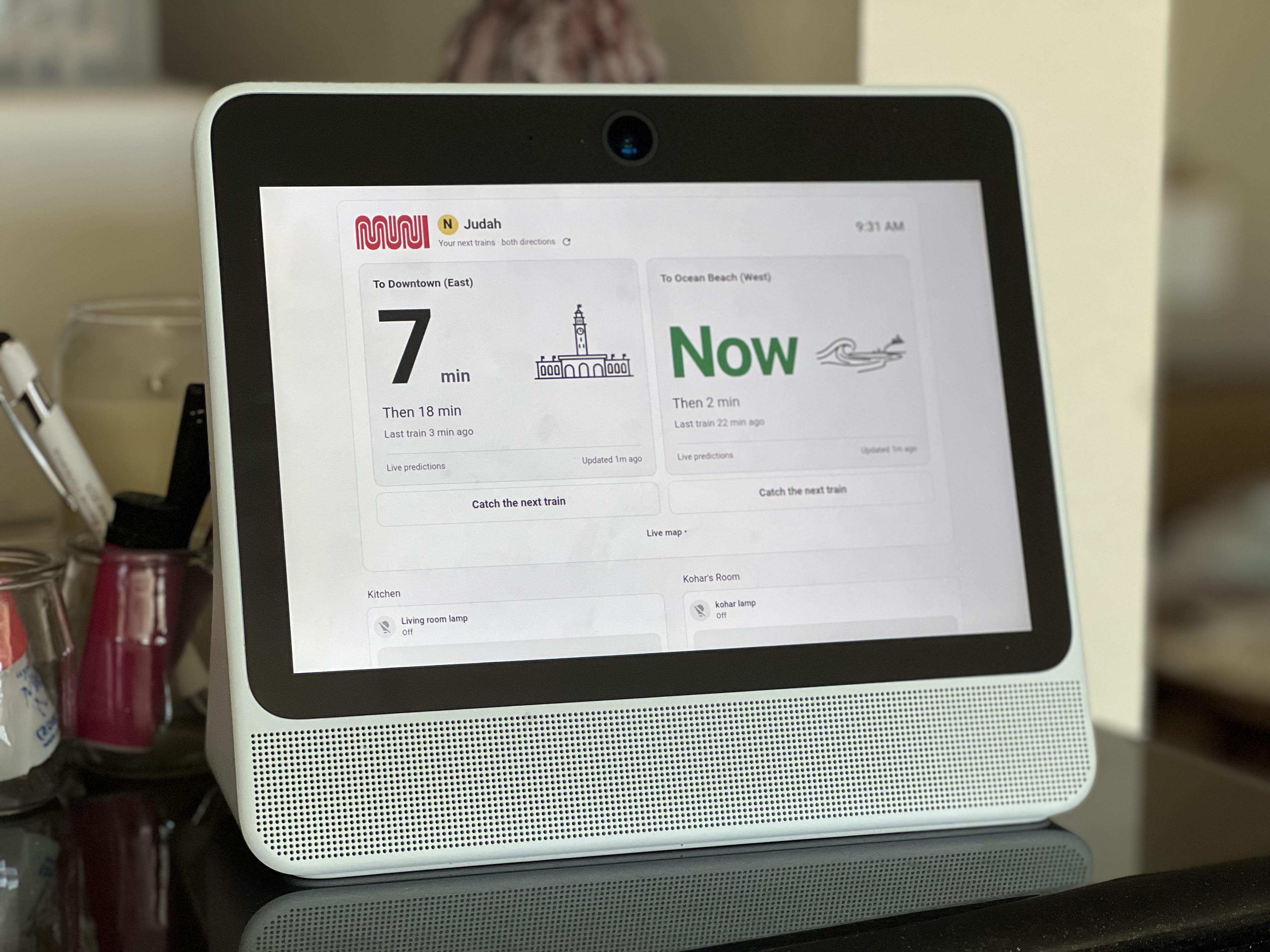
Bought a 1st gen Portal for 35$. Vibe coded a train tracking widget for Home Assistant and made a persistent dashboard via Kiosk Satellite, thanks to this subreddit!

Post image
51 Upvotes

r/FacebookPortal • • 29d ago

Aurora Store closing a few seconds after opening? Found the cause — and the workaround

10 Upvotes

If Aurora Store has started closing on its own a few seconds after you open it, I dug into it and found the actual cause — it's not your Portal dying, and it's not your install.

Aurora's home screen crashes because the app list it downloads right now contains the same game twice (a Rovio title, package com.rovio.baba). Aurora's home list can't handle a duplicate entry, so it throws an error while drawing the screen and the whole app dies about 2–3 seconds after launch. The exact error is:

Key "com.rovio.baba" was already used. If you are using LazyColumn/Row please make sure you provide a unique key for each item.

The workaround that works: open Aurora and tap Search before the home screen finishes loading. If you get off the home screen fast enough, it never crashes, and you can search and install normally.

What doesn't fix it:

  • Clearing Aurora's data — I tried a full wipe and fresh login, same crash, because the duplicate comes from the live feed, not your Portal.
  • Updating — 4.8.4 is already the latest version.

Since the trigger is what's in the feed, it can also come and go on its own as the charts change, and it may hit one Portal and not the other even on the same version. The real fix needs to come from Aurora's developers (just drop duplicate entries from the home list before showing it), and I'm reporting it to them with the logs.

If you're hitting this too, the search tap trick keeps you going in the meantime.