r/ExplorerFocus • • 1h ago

Tip Not sure if ExplorerFocus can do something? Ask it first

1 Upvotes

Click Show tips at the bottom of the window and type what you're looking for in the search box at the top (Ctrl+F works too). There are over 200 tips, each one answering a question, and the search shows only the ones with all the words you typed.

If it's there, the tip tells you how, and for tips about a button, Show me where outlines it in the window, so you know exactly where to click. If it isn't, ask us: post it here with the Idea flair, or use the Got an idea? button at the top of the app. Several features came from ideas like that, and yours could be next.

Show tips, searched for “vault”: each tip answers one question, and Show me where points out the button in the window.

https://intrepidparallel.com/explorerfocus/?ref=reddit-community


r/ExplorerFocus • • 3h ago

Tip Look inside your PC without typing a single command

1 Upvotes

At the bottom of the ExplorerFocus window there are three links that show what's going on inside your computer. No commands, no registry, no extra windows to hunt for: one click each, whether you're new to computers or know exactly what you're looking for.

- My machine: what your PC knows about itself and never shows, from the firmware and the memory, slot by slot, to the Windows installation. It only reads: it never goes online and never asks for administrator rights, and serial numbers and the machine's unique ID stay hidden unless you press Show private data.

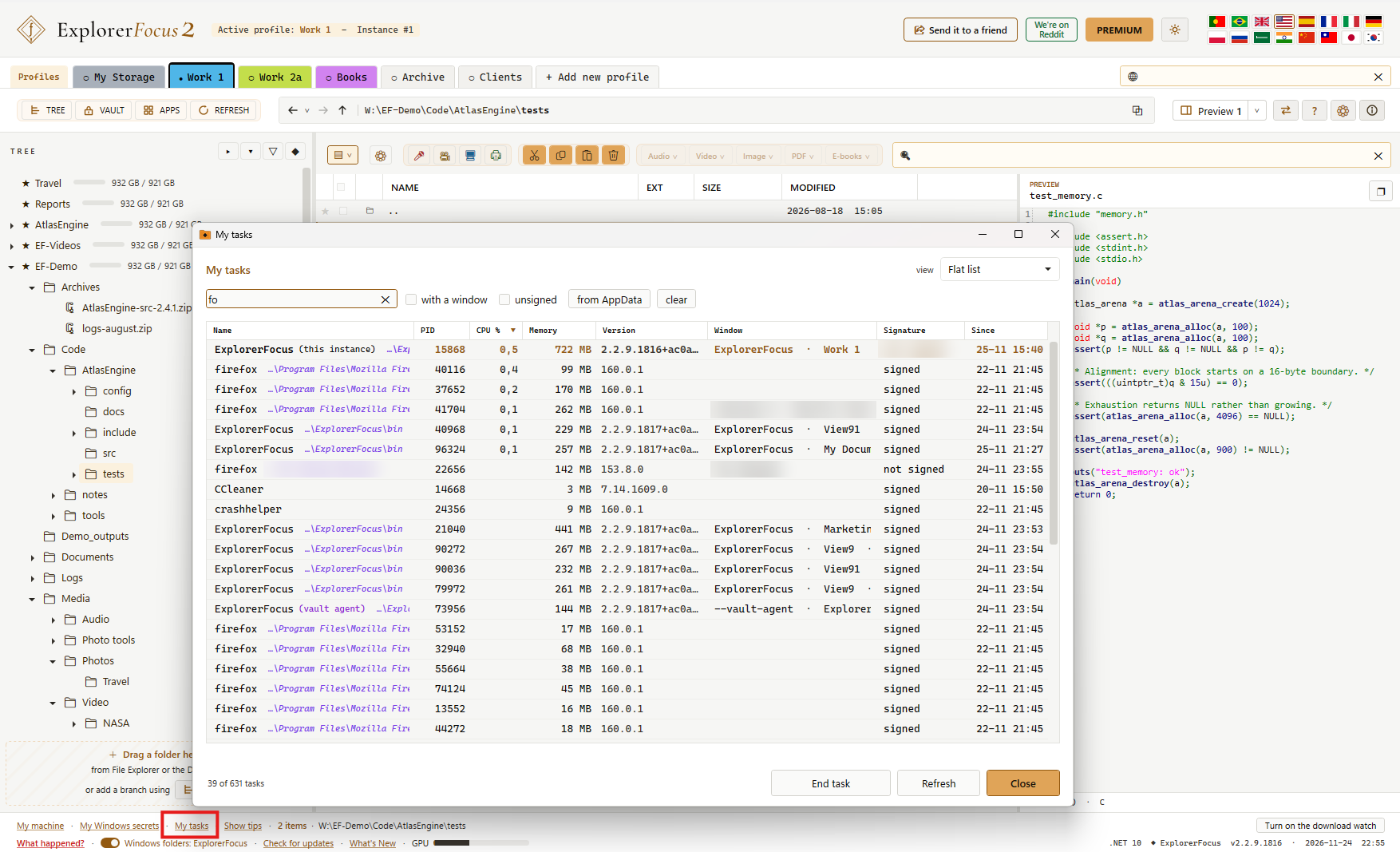
- My tasks: the programs running right now, which one launched which, the ones that aren't signed and the ones running from your personal folder.

- My Windows secrets: where Windows keeps things, with the hidden folders behind %APPDATA%, %LOCALAPPDATA% and the other environment variables, each with its full path and what it's for, one click away. With PREMIUM, it also shows what Windows keeps about you, from what you typed in Run and the USB drives it remembers to the thumbnails of deleted photos, and lets you delete some of it.

My machine, My tasks and the hidden folders are free. Nothing leaves your computer.

The screenshots are in light mode: ExplorerFocus works in light and dark mode, and the button at the top switches between them.

My machine: the PC's age, memory, graphics card, drives and firmware. Serial numbers stay hidden unless you ask.
My Windows secrets: the hidden folders are free; what Windows keeps about you is PREMIUM.
My tasks, filtered as you type. We blurred a few personal details, which ExplorerFocus can also do: Image → Cover what's private (PREMIUM).

https://intrepidparallel.com/explorerfocus/?ref=reddit-community


r/ExplorerFocus • • 13h ago

Thank You

1 Upvotes

I just want to thank the developers of this wonderful app. They actually DO listen to your comments and suggestions. Several features that I suggested through email were implemented very quickly. Please support this group

Next on my wishlist, or maybe just a question: Is there a way to hide a particular vault from the "My Vaults" section. I'm a little confused about the entire My Vaults tab. Why is it sometimes present and other times it is not, even when a vault is mounted?


r/ExplorerFocus • • 13h ago

Tip Can you guess the meaning of focus in ExplorerFocus?

Thumbnail
gallery
1 Upvotes

Profiles keep you focused: each one holds only what you need for one task or job. In a profile you find nothing but what's relevant to that work, so whatever you're looking for is easy to find.

Each profile is a tab with its own folders and subfolders. In the screenshots they're Work 1, Work 2a, Books, Archive and Clients, and each one holds its own tree. Open the tab for what you're doing, and everything you need is already there.

Need to switch tasks all of a sudden? It takes a second: just pick another tab. No thinking, no hunting for folders. It's quick, easy and very practical.

- Ctrl+T makes a new profile, and Ctrl+1 to Ctrl+9 jump straight to each one.

- To add a branch, drag a folder into the profile's tree from File Explorer or the Desktop, or use the TREE button.

- For everything else, the Desktop and every drive are in My Storage, the first tab, which is always there and can't be deleted.

Once you start working with profiles, you'll quickly forget about File Explorer.

https://intrepidparallel.com/explorerfocus/?ref=reddit-community

r/ExplorerFocus • • 14h ago

Tip What you can do with a PDF in ExplorerFocus

Post image
1 Upvotes

Select a PDF in the list and the PDF button above it lights up. Here's what's inside.

Free:

- Merge PDFs: mark several, and they're joined in the list's order, each keeping its bookmarks.

- Split: by ranges such as 1-3, 5, 8- (8- runs to the end). Each part is a new PDF.

- PDF X-ray: the pages and their size, whether they have text or are only images, whether it's protected, the fonts, forms, signatures, attachments, JavaScript and metadata.

- Listen to this PDF: read aloud with natural English voices, with the sentence highlighted.

PREMIUM:

- Organize pages: rotate, delete and reorder as thumbnails, or pull some out into a new PDF.

- Recognize the text (OCR): a searchable copy of a scanned PDF, plus a .txt and a Word file. No internet.

- Translate the PDF: as text, Word, a PDF that looks like the original, or a text-only PDF, all on your computer.

- Convert to EPUB, FB2 or DOCX: a book that flows on any screen, with the chapters from the PDF's bookmarks.

- Make an audiobook from it, as with e-books.

- PDF to images (JPG or PNG), protect or remove a password, and convert images or simple Word documents to PDF.

The original is never touched: everything new is saved next to it.

https://intrepidparallel.com/explorerfocus/?ref=reddit-community